---
title: AI Crawl Control
description: Monitor and control how AI services access your website content.
image: https://developers.cloudflare.com/core-services-preview.png
---
[Skip to content](#%5Ftop)
### Tags
[ AI ](https://developers.cloudflare.com/search/?tags=AI)
Was this helpful?
YesNo
[ Edit page ](https://github.com/cloudflare/cloudflare-docs/edit/production/src/content/docs/ai-crawl-control/index.mdx) [ Report issue ](https://github.com/cloudflare/cloudflare-docs/issues/new/choose)
Copy page
# AI Crawl Control
Available on all plans
Monitor and control how AI services access your website content.
AI companies use web content to train their models and power AI applications. AI Crawl Control (formerly AI Audit) gives you visibility into which AI services are accessing your content, and provides tools to manage access according to your preferences.
With AI Crawl Control, you can:
* **See which AI services access your content** \- Monitor the dashboard to see crawler activity and request patterns
* **Control access with granular policies** \- Set allow or block rules for individual crawlers
* **Monitor robots.txt compliance** \- Track which crawlers follow your directives and create enforcement rules
* **Explore monetization options** \- Set up pay per crawl pricing for content access [(private beta)](https://developers.cloudflare.com/ai-crawl-control/features/pay-per-crawl/what-is-pay-per-crawl/)
* **Deploy with zero configuration** \- Works automatically on all Cloudflare plans
[ Get started ](https://developers.cloudflare.com/ai-crawl-control/get-started/)
---
## Features
### Manage AI crawlers
Control how AI crawlers interact with your domain.
[ Manage AI crawlers ](https://developers.cloudflare.com/ai-crawl-control/features/manage-ai-crawlers/)
### Analyze AI traffic
Gain insight into how AI crawlers are interacting with your pages.
[ Analyze AI traffic ](https://developers.cloudflare.com/ai-crawl-control/features/analyze-ai-traffic/)
### Track robots.txt
Track the health of `robots.txt` files and identify which crawlers are violating your directives.
[ Track robots.txt ](https://developers.cloudflare.com/ai-crawl-control/features/track-robots-txt/)
### Pay Per Crawl
Allow AI crawlers to access content by paying per crawl.
[ Pay per crawl ](https://developers.cloudflare.com/ai-crawl-control/features/pay-per-crawl/what-is-pay-per-crawl/)
---
## Use cases
Publishers and content creators
Publishers and content creators can monitor which AI crawlers are accessing their articles and educational content. Set policies to allow beneficial crawlers while blocking others.
E-commerce and business sites
E-commerce and business sites can identify AI crawler activity on product pages and business information. Control access to sensitive data like pricing and inventory.
Documentation sites
Documentation sites can track how AI crawlers are accessing their technical documentation. Gain insight into how AI crawlers are engaging with your site.
---
## Related Products
**[Bots](https://developers.cloudflare.com/bots/)**
Identify and mitigate automated traffic to protect your domain from bad bots.
**[Web Application Firewall](https://developers.cloudflare.com/waf/)**
Get automatic protection from vulnerabilities and the flexibility to create custom rules.
**[Analytics](https://developers.cloudflare.com/analytics/)**
View and analyze traffic on your domain.
```json
{"@context":"https://schema.org","@type":"BreadcrumbList","itemListElement":[{"@type":"ListItem","position":1,"item":{"@id":"/directory/","name":"Directory"}},{"@type":"ListItem","position":2,"item":{"@id":"/ai-crawl-control/","name":"AI Crawl Control"}}]}
```
---
---
title: Get started
description: Learn how to set up AI Crawl Control.
image: https://developers.cloudflare.com/core-services-preview.png
---
[Skip to content](#%5Ftop)
Was this helpful?
YesNo
[ Edit page ](https://github.com/cloudflare/cloudflare-docs/edit/production/src/content/docs/ai-crawl-control/get-started.mdx) [ Report issue ](https://github.com/cloudflare/cloudflare-docs/issues/new/choose)
Copy page
# Get started
This guide instructs you on how to:
* View AI crawlers that are interacting with pages in your domain (a [Cloudflare zone](https://developers.cloudflare.com/fundamentals/concepts/accounts-and-zones/#zones)).
* Use AI Crawl Control to block individual crawlers from accessing your content.
## Prerequisites
1. Sign up for a [Cloudflare account ↗](https://dash.cloudflare.com/sign-up/).
2. [Connect your domain to Cloudflare](https://developers.cloudflare.com/fundamentals/manage-domains/add-site/).
3. Make sure your domain is [proxying traffic through Cloudflare](https://developers.cloudflare.com/fundamentals/concepts/how-cloudflare-works/#cloudflare-as-a-reverse-proxy).
## 1\. Monitor AI crawler activity at a glance
1. Go to **AI Crawl Control**.
[ Go to **AI Crawl Control** ](https://dash.cloudflare.com/?to=/:account/:zone/ai)
2. Review the snapshot of your AI crawler activity in the **Overview** tab.
3. Use the filters to view activity by specific date ranges, crawlers, operators, hostnames, or paths.
## 2\. Block specific AI crawlers
* [ All plans ](#tab-panel-3033)
* [ Paid plans ](#tab-panel-3034)
To block specific AI crawlers:
1. Go to **AI Crawl Control**.
[ Go to **AI Crawl Control** ](https://dash.cloudflare.com/?to=/:account/:zone/ai)
2. Review which AI crawlers are accessing your domain in the **Crawlers** tab.
3. In the **Action** column, select **Block**.
Quality of AI crawler detection
On the free plan, AI Crawl Control identifies AI crawlers based on their [user agent strings ↗](https://developer.mozilla.org/en-US/docs/Web/HTTP/Reference/Headers/User-Agent). This enables AI Crawl Control to detect well-known, self-identifying AI crawlers.
Upgrade your plan to enable a more thorough detection using Cloudflare's [Bot Management detection ID](https://developers.cloudflare.com/bots/reference/bot-management-variables/#ruleset-engine-fields) field.
To block specific AI crawlers:
1. Go to **AI Crawl Control**.
[ Go to **AI Crawl Control** ](https://dash.cloudflare.com/?to=/:account/:zone/ai)
2. Review which AI crawlers are accessing your domain in the **Crawlers** tab.
3. In the **Action** column, select **Block**.
For more information, refer to [Manage AI crawlers](https://developers.cloudflare.com/ai-crawl-control/features/manage-ai-crawlers/).
You can also create more complex rules when taking action on AI crawlers, using [Cloudflare WAF](https://developers.cloudflare.com/waf/). For more information on creating more specific rules, refer to [Create a custom rule in the dashboard](https://developers.cloudflare.com/waf/custom-rules/create-dashboard/).
## 3\. Explore detailed metrics
* [ All plans ](#tab-panel-3032)
For more detailed analytics, use the **Metrics** tab.
1. Go to **AI Crawl Control**.
[ Go to **AI Crawl Control** ](https://dash.cloudflare.com/?to=/:account/:zone/ai)
2. Review detailed breakdowns by date range, crawler, operator, status code, hostname, or path in the **Metrics** tab.
Note that on free plans, the **Metrics** tab only displays metrics for the past 24 hours.
## Plan comparison
| All plans | Enterprise plans with Bot Management |
| ------------------------------------------------------------------------------------------------------------------------------- | ----------------------------------------------------------------------------------------------------------------------------------------------------------------------------------- |
| AI crawler detection via [user agent strings ↗](https://developer.mozilla.org/en-US/docs/Web/HTTP/Reference/Headers/User-Agent) | Advanced AI crawler detection via [Bot Management detection ID](https://developers.cloudflare.com/bots/reference/bot-management-variables/#ruleset-engine-fields) |
| Maximum 24-hour analytics window | Configurable analytics timeframes |
| Allow/block controls | Allow/block controls, and the ability to charge AI crawlers using [pay per crawl](https://developers.cloudflare.com/ai-crawl-control/features/pay-per-crawl/what-is-pay-per-crawl/) |
## Next steps
* [Manage AI crawlers](https://developers.cloudflare.com/ai-crawl-control/features/manage-ai-crawlers/) with granular allow/block controls.
* [Analyze AI traffic](https://developers.cloudflare.com/ai-crawl-control/features/analyze-ai-traffic/) to understand crawler patterns and content popularity.
* [Explore pay per crawl](https://developers.cloudflare.com/ai-crawl-control/features/pay-per-crawl/what-is-pay-per-crawl/) to test content monetization options (private beta).
## Related resources
Refer to the following related resources:
* Cloudflare blog: [Start auditing and controlling the AI models accessing your content ↗](https://blog.cloudflare.com/nl-nl/cloudflare-ai-audit-control-ai-content-crawlers/)
* Block AI crawlers that do not adhere to recommended guidelines using [Cloudflare AI Labyrinth](https://developers.cloudflare.com/bots/additional-configurations/ai-labyrinth/).
* [Direct AI crawlers with managed robots.txt](https://developers.cloudflare.com/bots/additional-configurations/managed-robots-txt/).
```json
{"@context":"https://schema.org","@type":"BreadcrumbList","itemListElement":[{"@type":"ListItem","position":1,"item":{"@id":"/directory/","name":"Directory"}},{"@type":"ListItem","position":2,"item":{"@id":"/ai-crawl-control/","name":"AI Crawl Control"}},{"@type":"ListItem","position":3,"item":{"@id":"/ai-crawl-control/get-started/","name":"Get started"}}]}
```
---
---
title: Changelog
description: AI Crawl Control now supports extending the underlying WAF rule with custom modifications. Any changes you make directly in the WAF custom rules editor — such as adding path-based exceptions, extra user agents, or additional expression clauses — are preserved when you update crawler actions in AI Crawl Control.
image: https://developers.cloudflare.com/core-services-preview.png
---
[Skip to content](#%5Ftop)
Was this helpful?
YesNo
[ Edit page ](https://github.com/cloudflare/cloudflare-docs/edit/production/src/content/docs/ai-crawl-control/changelog.mdx) [ Report issue ](https://github.com/cloudflare/cloudflare-docs/issues/new/choose)
Copy page
# Changelog
[ Subscribe to RSS ](https://developers.cloudflare.com/changelog/rss/ai-crawl-control.xml)
## 2026-03-24
**Advanced WAF customization for AI Crawl Control blocks**
AI Crawl Control now supports extending the underlying WAF rule with custom modifications. Any changes you make directly in the WAF custom rules editor — such as adding path-based exceptions, extra user agents, or additional expression clauses — are preserved when you update crawler actions in AI Crawl Control.
If the WAF rule expression has been modified in a way AI Crawl Control cannot parse, a warning banner appears on the **Crawlers** page with a link to view the rule directly in WAF.
For more information, refer to [WAF rule management](https://developers.cloudflare.com/ai-crawl-control/features/manage-ai-crawlers/#waf-rule-management).
## 2026-02-09
**Analytics enhancements**
AI Crawl Control metrics have been enhanced with new views, improved filtering, and better data visualization.
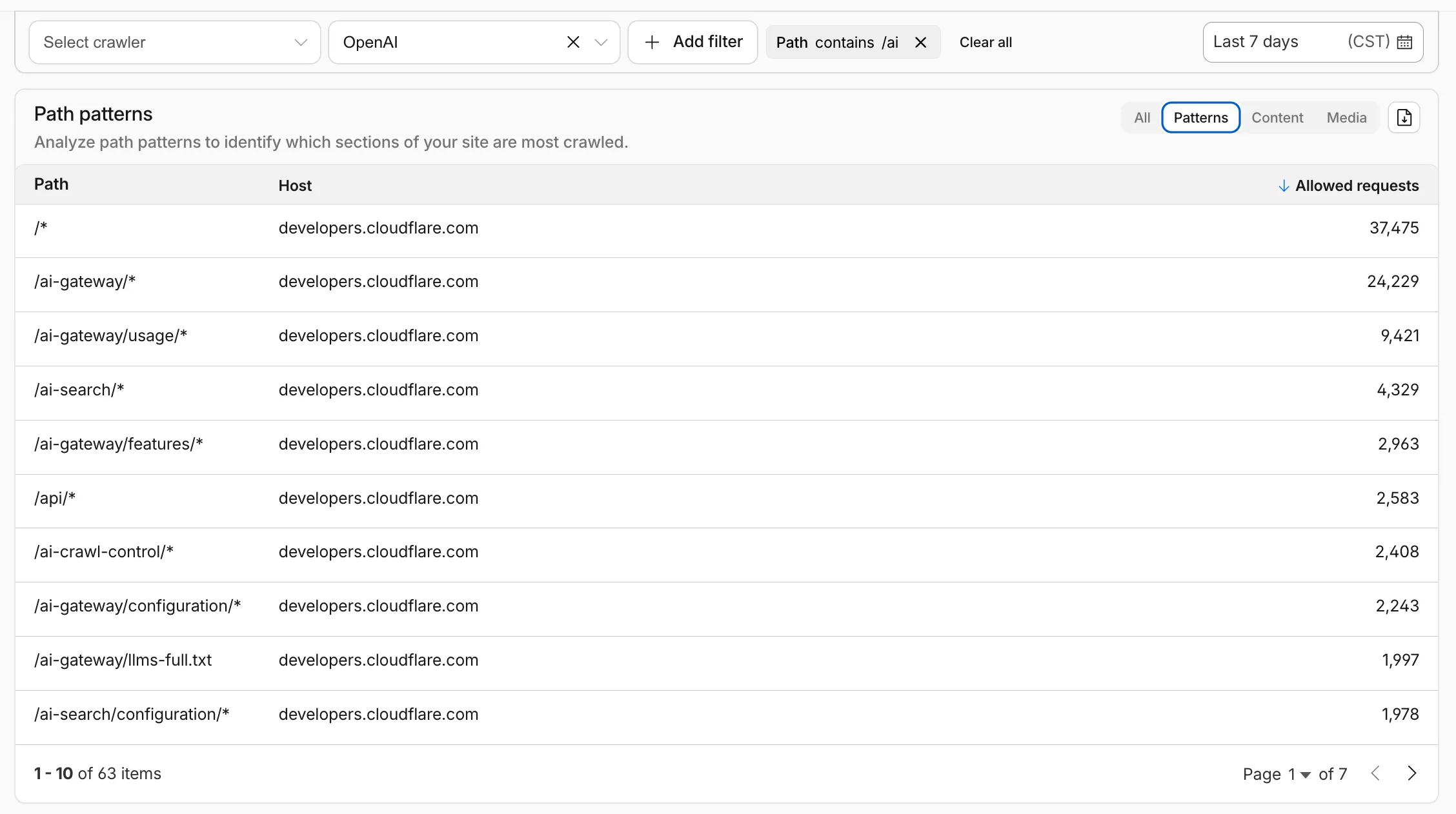
**Path pattern grouping**
* In the **Metrics** tab > **Most popular paths** table, use the new **Patterns** tab that groups requests by URI pattern (`/blog/*`, `/api/v1/*`, `/docs/*`) to identify which site areas crawlers target most. Refer to the screenshot above.
**Enhanced referral analytics**
* Destination patterns show which site areas receive AI-driven referral traffic.
* In the **Metrics** tab, a new **Referrals over time** chart shows trends by operator or source.
**Data transfer metrics**
* In the **Metrics** tab > **Allowed requests over time** chart, toggle **Bytes** to show bandwidth consumption.
* In the **Crawlers** tab, a new **Bytes Transferred** column shows bandwidth per crawler.
**Image exports**
* Export charts and tables as images for reports and presentations.
Learn more about [analyzing AI traffic](https://developers.cloudflare.com/ai-crawl-control/features/analyze-ai-traffic/).
## 2026-02-04
**New reference documentation**
New reference documentation is now available for AI Crawl Control:
* **[GraphQL API reference](https://developers.cloudflare.com/ai-crawl-control/reference/graphql-api/)** — Query examples for crawler requests, top paths, referral traffic, and data transfer. Includes key filters for detection IDs, user agents, and referrer domains.
* **[Bot reference](https://developers.cloudflare.com/ai-crawl-control/reference/bots/)** — Detection IDs and user agents for major AI crawlers from OpenAI, Anthropic, Google, Meta, and others.
* **[Worker templates](https://developers.cloudflare.com/ai-crawl-control/reference/worker-templates/)** — Deploy the x402 Payment-Gated Proxy to monetize crawler access or charge bots while letting humans through free.
## 2026-01-13
**AI Crawl Control Read Only role now available**
Account administrators can now assign the **AI Crawl Control Read Only** role to provide read-only access to AI Crawl Control at the domain level.
Users with this role can view the **Overview**, **Crawlers**, **Metrics**, **Robots.txt**, and **Settings** tabs but cannot modify crawler actions or settings.
This role is specific for AI Crawl Control. You still require correct permissions to access other areas / features of the dashboard.
To assign, go to **Manage Account** \> **Members** and add a policy with the **AI Crawl Control Read Only** role scoped to the desired domain.
## 2025-12-18
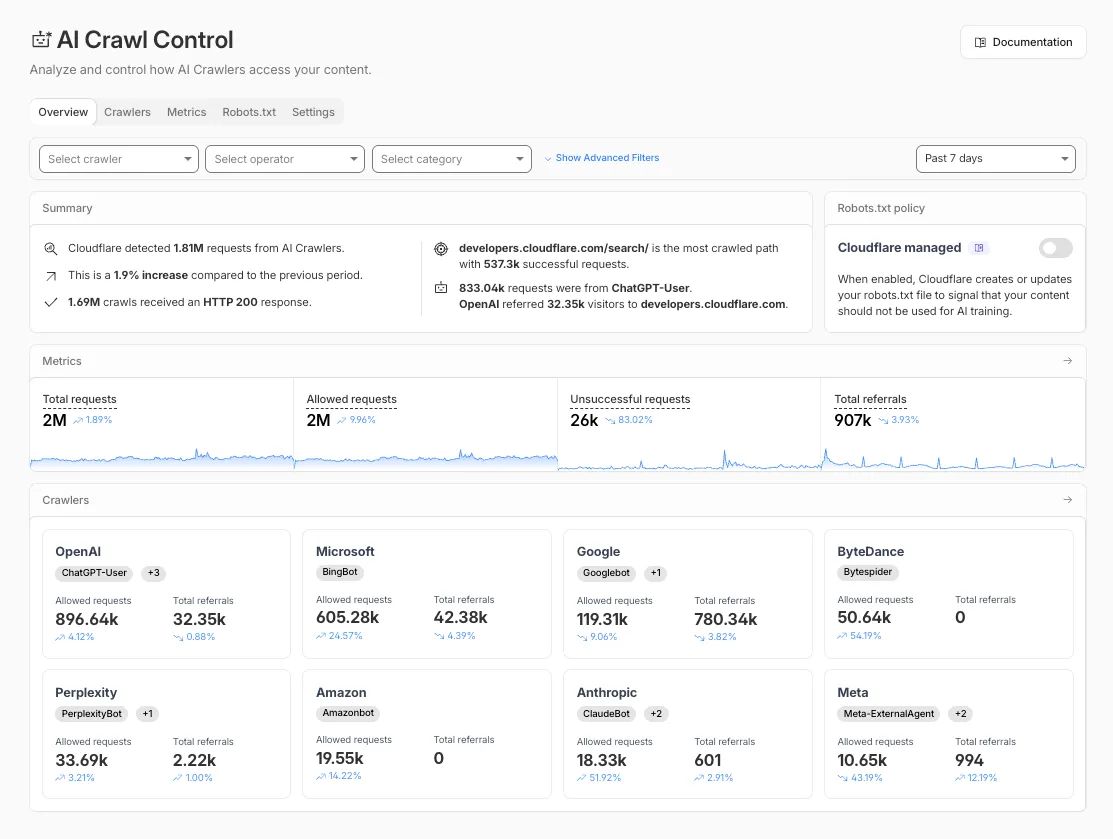
**New AI Crawl Control Overview tab**
The **Overview** tab is now the default view in AI Crawl Control. The previous default view with controls for individual AI crawlers is available in the **Crawlers** tab.
#### What's new
* **Executive summary** — Monitor total requests, volume change, most common status code, most popular path, and high-volume activity
* **Operator grouping** — Track crawlers by their operating companies (OpenAI, Microsoft, Google, ByteDance, Anthropic, Meta)
* **Customizable filters** — Filter your snapshot by date range, crawler, operator, hostname, or path
#### Get started
1. Log in to the Cloudflare dashboard and select your account and domain.
2. Go to **AI Crawl Control**, where the **Overview** tab opens by default with your activity snapshot.
3. Use filters to customize your view by date range, crawler, operator, hostname, or path.
4. Navigate to the **Crawlers** tab to manage controls for individual crawlers.
Learn more about [analyzing AI traffic](https://developers.cloudflare.com/ai-crawl-control/features/analyze-ai-traffic/) and [managing AI crawlers](https://developers.cloudflare.com/ai-crawl-control/features/manage-ai-crawlers/).
## 2025-12-10
**Pay Per Crawl (Private beta) - Discovery API, custom pricing, and advanced configuration**
Pay Per Crawl is introducing enhancements for both AI crawler operators and site owners, focusing on programmatic discovery, flexible pricing models, and granular configuration control.
#### For AI crawler operators
#### Discovery API
A new authenticated API endpoint allows verified crawlers to programmatically discover domains participating in Pay Per Crawl. Crawlers can use this to build optimized crawl queues, cache domain lists, and identify new participating sites. This eliminates the need to discover payable content through trial requests.
The API endpoint is `GET https://crawlers-api.ai-audit.cfdata.org/charged_zones` and requires Web Bot Auth authentication. Refer to [Discover payable content](https://developers.cloudflare.com/ai-crawl-control/features/pay-per-crawl/use-pay-per-crawl-as-ai-owner/discover-payable-content/) for authentication steps, request parameters, and response schema.
#### Payment header signature requirement
Payment headers (`crawler-exact-price` or `crawler-max-price`) must now be included in the Web Bot Auth `signature-input` header components. This security enhancement prevents payment header tampering, ensures authenticated payment intent, validates crawler identity with payment commitment, and protects against replay attacks with modified pricing. Crawlers must add their payment header to the list of signed components when [constructing the signature-input header](https://developers.cloudflare.com/ai-crawl-control/features/pay-per-crawl/use-pay-per-crawl-as-ai-owner/crawl-pages/#22-sign-your-request-with-web-bot-auth).
#### New `crawler-error` header
Pay Per Crawl error responses now include a new `crawler-error` header with 11 specific [error codes](https://developers.cloudflare.com/ai-crawl-control/features/pay-per-crawl/use-pay-per-crawl-as-ai-owner/error-codes/) for programmatic handling. Error response bodies remain unchanged for compatibility. These codes enable robust error handling, automated retry logic, and accurate spending tracking.
#### For site owners
#### Configure free pages
Site owners can now offer free access to specific pages like homepages, navigation, or discovery pages while charging for other content. Create a [Configuration Rule](https://developers.cloudflare.com/ai-crawl-control/features/pay-per-crawl/use-pay-per-crawl-as-site-owner/advanced-configuration/#disable-pay-per-crawl-by-uri-pattern) in **Rules** \> **Configuration Rules**, set your URI pattern using wildcard, exact, or prefix matching on the **URI Full** field, and enable the **Disable Pay Per Crawl** setting. When disabled for a URI pattern, crawler requests pass through without blocking or charging.
Some paths are always free to crawl. These paths are: `/robots.txt`, `/sitemap.xml`, `/security.txt`, `/.well-known/security.txt`, `/crawlers.json`.
#### Get started
**AI crawler operators**: [Discover payable content](https://developers.cloudflare.com/ai-crawl-control/features/pay-per-crawl/use-pay-per-crawl-as-ai-owner/discover-payable-content/) | [Crawl pages](https://developers.cloudflare.com/ai-crawl-control/features/pay-per-crawl/use-pay-per-crawl-as-ai-owner/crawl-pages/)
**Site owners**: [Advanced configuration](https://developers.cloudflare.com/ai-crawl-control/features/pay-per-crawl/use-pay-per-crawl-as-site-owner/advanced-configuration/)
## 2025-11-10
**Crawler drilldowns with extended actions menu**
AI Crawl Control now supports per-crawler drilldowns with an extended actions menu and status code analytics. Drill down into Metrics, Cloudflare Radar, and Security Analytics, or export crawler data for use in [WAF custom rules](https://developers.cloudflare.com/waf/custom-rules/), [Redirect Rules](https://developers.cloudflare.com/rules/url-forwarding/), and robots.txt files.
#### What's new
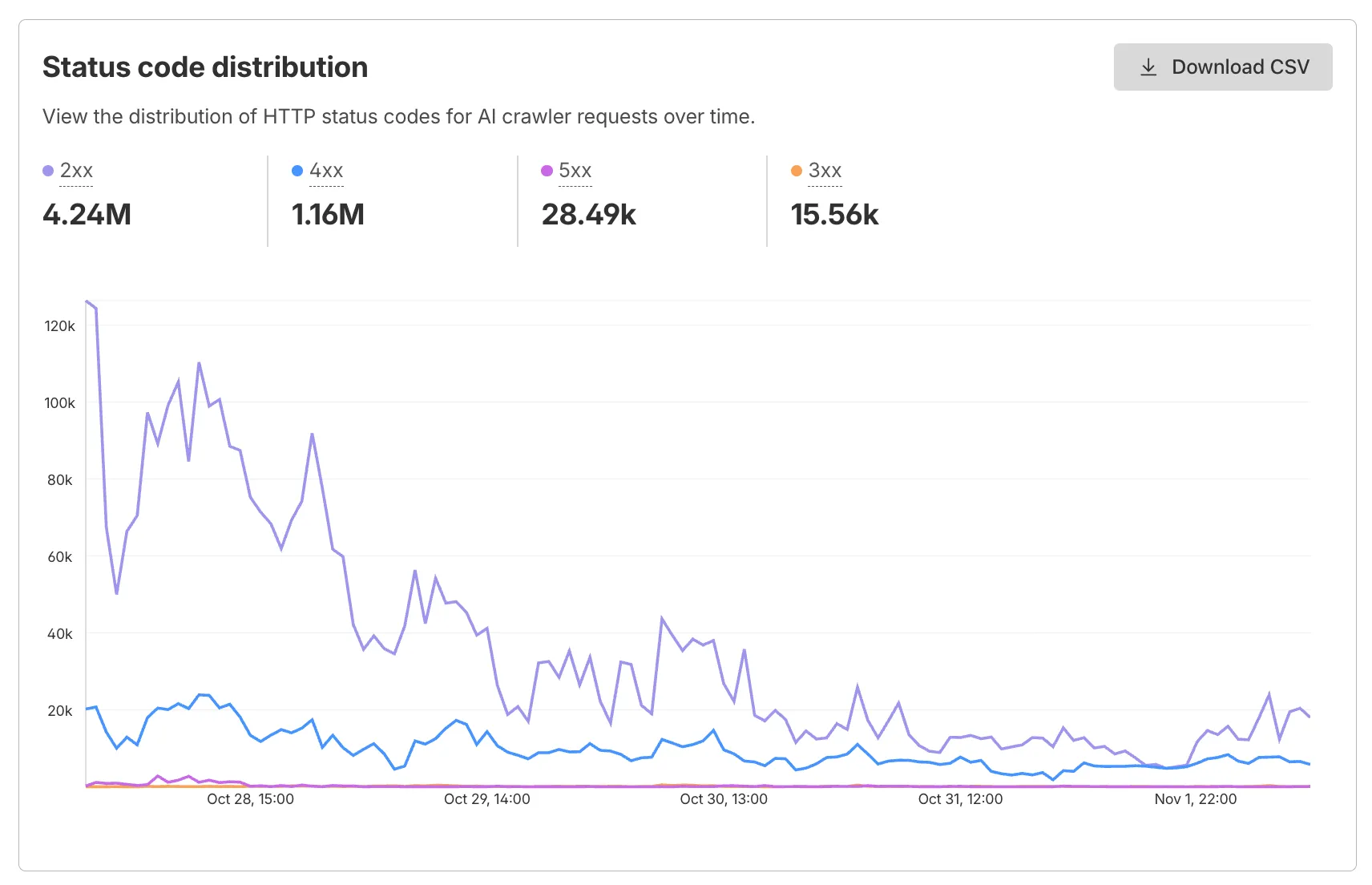
#### Status code distribution chart
The **Metrics** tab includes a status code distribution chart showing HTTP response codes (2xx, 3xx, 4xx, 5xx) over time. Filter by individual crawler, category, operator, or time range to analyze how specific crawlers interact with your site.
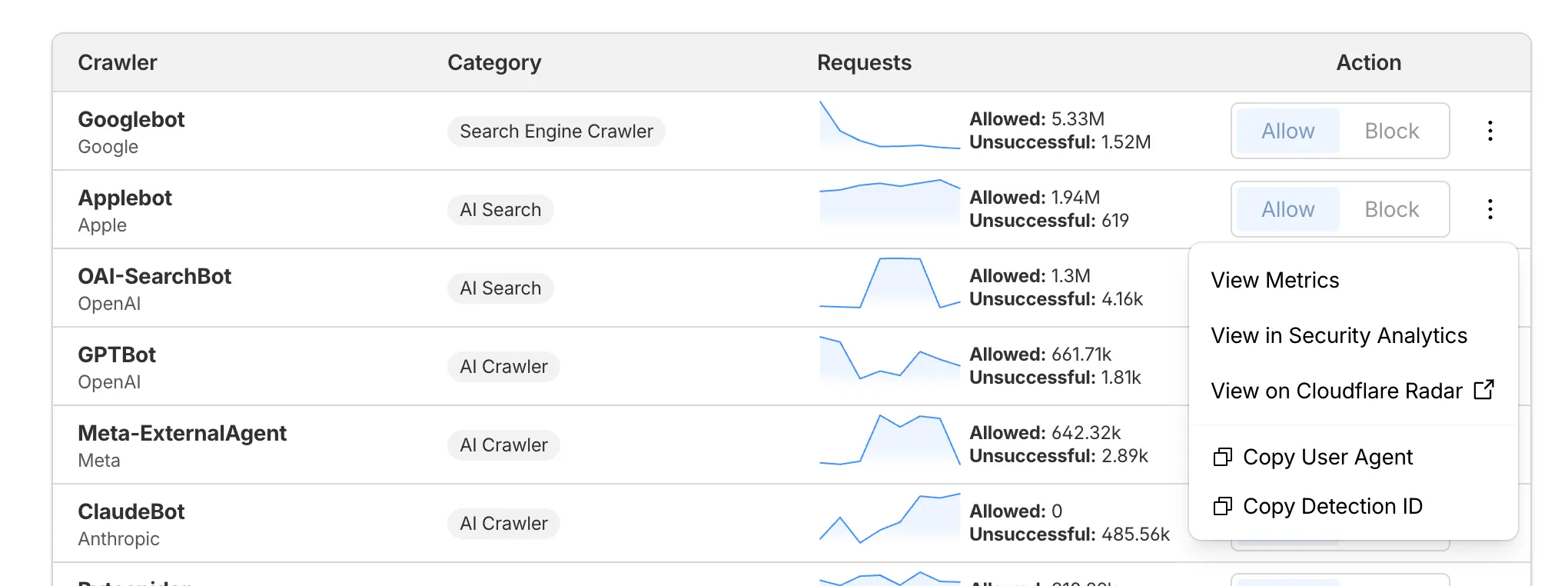
#### Extended actions menu
Each crawler row includes a three-dot menu with per-crawler actions:
* **View Metrics** — Filter the AI Crawl Control Metrics page to the selected crawler.
* **View on Cloudflare Radar** — Access verified crawler details on Cloudflare Radar.
* **Copy User Agent** — Copy user agent strings for use in WAF custom rules, Redirect Rules, or robots.txt files.
* **View in Security Analytics** — Filter Security Analytics by detection IDs (Bot Management customers).
* **Copy Detection ID** — Copy detection IDs for use in WAF custom rules (Bot Management customers).
#### Get started
1. Log in to the Cloudflare dashboard, and select your account and domain.
2. Go to **AI Crawl Control** \> **Metrics** to access the status code distribution chart.
3. Go to **AI Crawl Control** \> **Crawlers** and select the three-dot menu for any crawler to access per-crawler actions.
4. Select multiple crawlers to use bulk copy buttons for user agents or detection IDs.
Learn more about [AI Crawl Control](https://developers.cloudflare.com/ai-crawl-control/).
## 2025-10-21
**New Robots.txt tab for tracking crawler compliance**
AI Crawl Control now includes a **Robots.txt** tab that provides insights into how AI crawlers interact with your `robots.txt` files.
#### What's new
The Robots.txt tab allows you to:
* Monitor the health status of `robots.txt` files across all your hostnames, including HTTP status codes, and identify hostnames that need a `robots.txt` file.
* Track the total number of requests to each `robots.txt` file, with breakdowns of successful versus unsuccessful requests.
* Check whether your `robots.txt` files contain [Content Signals ↗](https://contentsignals.org/) directives for AI training, search, and AI input.
* Identify crawlers that request paths explicitly disallowed by your `robots.txt` directives, including the crawler name, operator, violated path, specific directive, and violation count.
* Filter `robots.txt` request data by crawler, operator, category, and custom time ranges.
#### Take action
When you identify non-compliant crawlers, you can:
* Block the crawler in the [Crawlers tab](https://developers.cloudflare.com/ai-crawl-control/features/manage-ai-crawlers/)
* Create custom [WAF rules](https://developers.cloudflare.com/waf/) for path-specific security
* Use [Redirect Rules](https://developers.cloudflare.com/rules/url-forwarding/) to guide crawlers to appropriate areas of your site
To get started, go to **AI Crawl Control** \> **Robots.txt** in the Cloudflare dashboard. Learn more in the [Track robots.txt documentation](https://developers.cloudflare.com/ai-crawl-control/features/track-robots-txt/).
## 2025-10-14
**Enhanced AI Crawl Control metrics with new drilldowns and filters**
AI Crawl Control now provides enhanced metrics and CSV data exports to help you better understand AI crawler activity across your sites.
#### What's new
#### Track crawler requests over time
Visualize crawler activity patterns over time, and group data by different dimensions:
* **By Crawler** — Track activity from individual AI crawlers (GPTBot, ClaudeBot, Bytespider)
* **By Category** — Analyze crawler purpose or type
* **By Operator** — Discover which companies (OpenAI, Anthropic, ByteDance) are crawling your site
* **By Host** — Break down activity across multiple subdomains
* **By Status Code** — Monitor HTTP response codes to crawlers (200s, 300s, 400s, 500s)
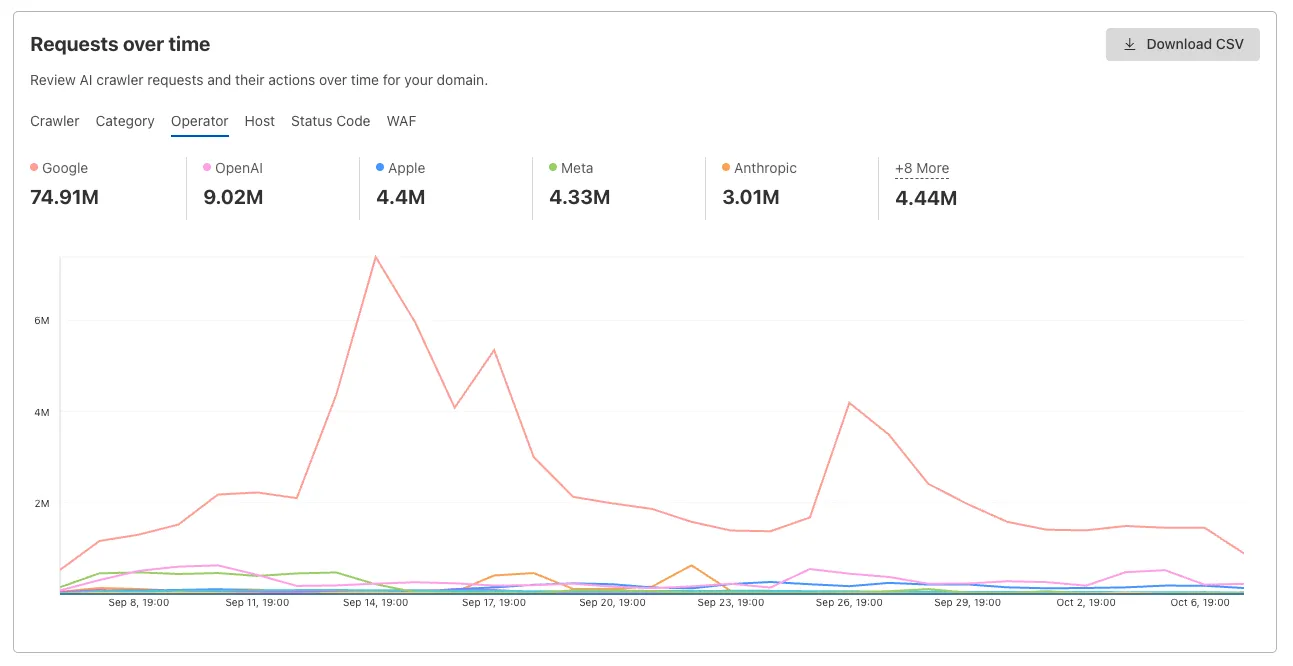
Interactive chart showing crawler requests over time with filterable dimensions
#### Analyze referrer data (Paid plans)
Identify traffic sources with referrer analytics:
* View top referrers driving traffic to your site
* Understand discovery patterns and content popularity from AI operators
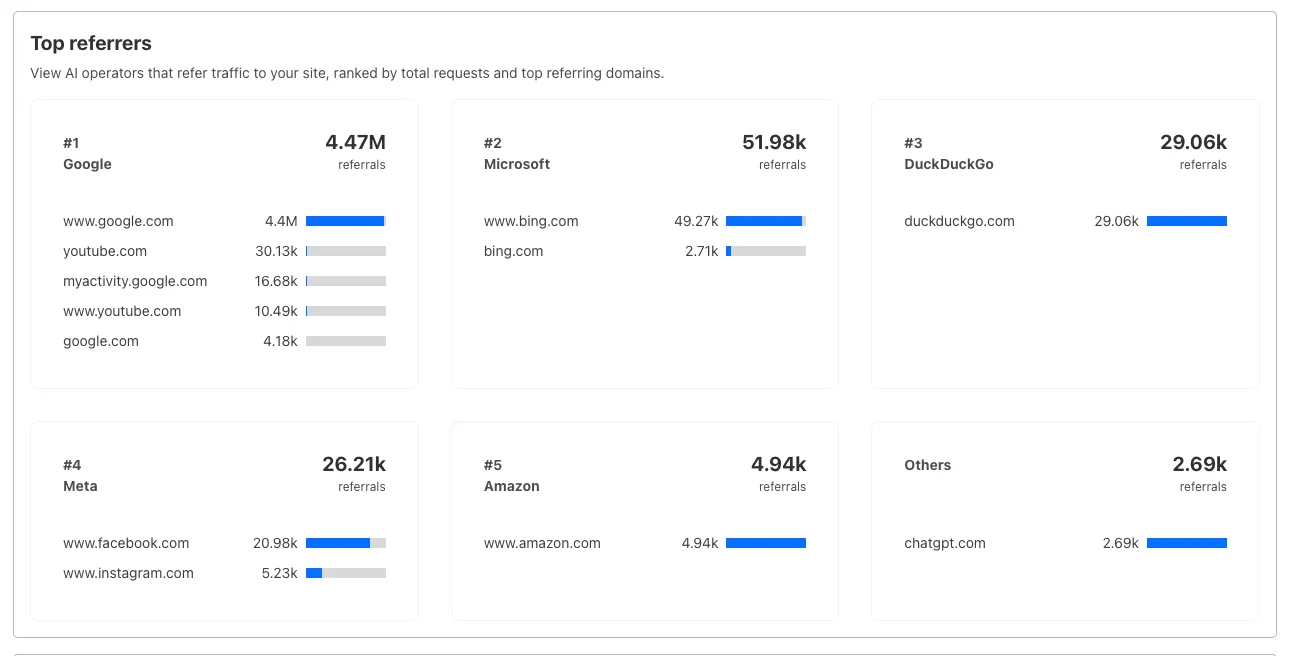
Bar chart showing top referrers and their respective traffic volumes
#### Export data
Download your filtered view as a CSV:
* Includes all applied filters and groupings
* Useful for custom reporting and deeper analysis
#### Get started
1. Log in to the Cloudflare dashboard, and select your account and domain.
2. Go to **AI Crawl Control** \> **Metrics**.
3. Use the grouping tabs to explore different views of your data.
4. Apply filters to focus on specific crawlers, time ranges, or response codes.
5. Select **Download CSV** to export your filtered data for further analysis.
Learn more about [AI Crawl Control](https://developers.cloudflare.com/ai-crawl-control).
## 2025-08-27
**Enhanced crawler insights and custom 402 responses**
We improved AI crawler management with detailed analytics and introduced custom HTTP 402 responses for blocked crawlers. AI Audit has been renamed to AI Crawl Control and is now generally available.
**Enhanced Crawlers tab:**
* View total allowed and blocked requests for each AI crawler
* Trend charts show crawler activity over your selected time range per crawler
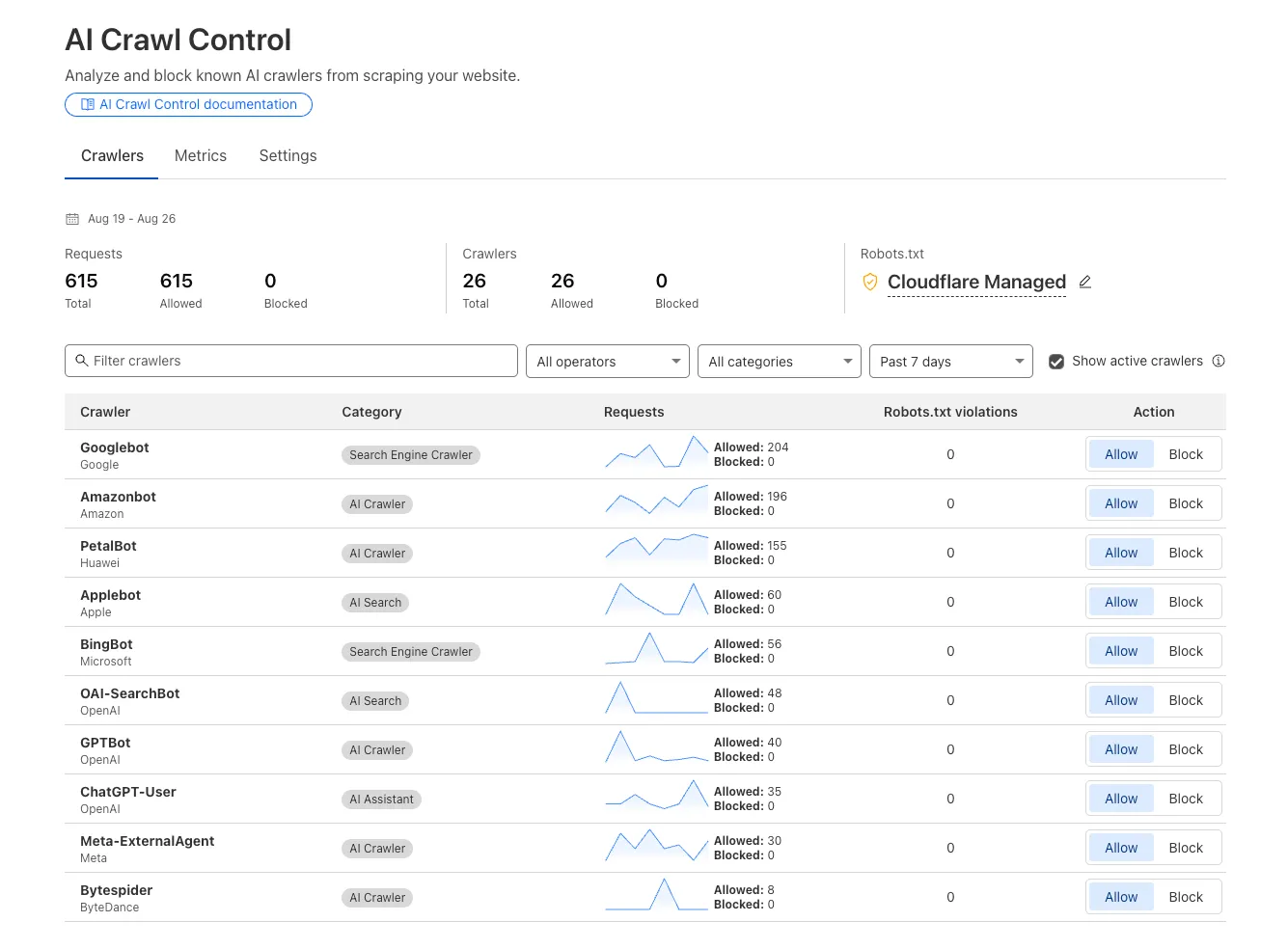
**Custom block responses (paid plans):**You can now return HTTP 402 "Payment Required" responses when blocking AI crawlers, enabling direct communication with crawler operators about licensing terms.
For users on paid plans, when blocking AI crawlers you can configure:
* **Response code:** Choose between 403 Forbidden or 402 Payment Required
* **Response body:** Add a custom message with your licensing contact information
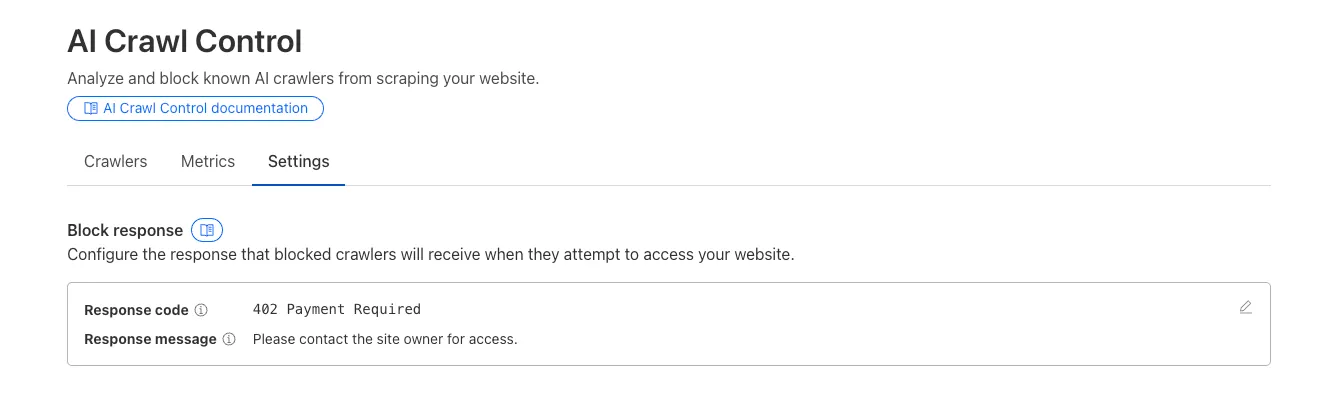
Example 402 response:
```
HTTP 402 Payment Required
Date: Mon, 24 Aug 2025 12:56:49 GMT
Content-type: application/json
Server: cloudflare
Cf-Ray: 967e8da599d0c3fa-EWR
Cf-Team: 2902f6db750000c3fa1e2ef400000001
{
"message": "Please contact the site owner for access."
}
```
## 2025-07-01
**Introducing Pay Per Crawl (private beta)**
We are introducing a new feature of [AI Crawl Control](https://developers.cloudflare.com/ai-crawl-control/) — Pay Per Crawl. [Pay Per Crawl](https://developers.cloudflare.com/ai-crawl-control/features/pay-per-crawl/what-is-pay-per-crawl/) enables site owners to require payment from AI crawlers every time the crawlers access their content, thereby fostering a fairer Internet by enabling site owners to control and monetize how their content gets used by AI.
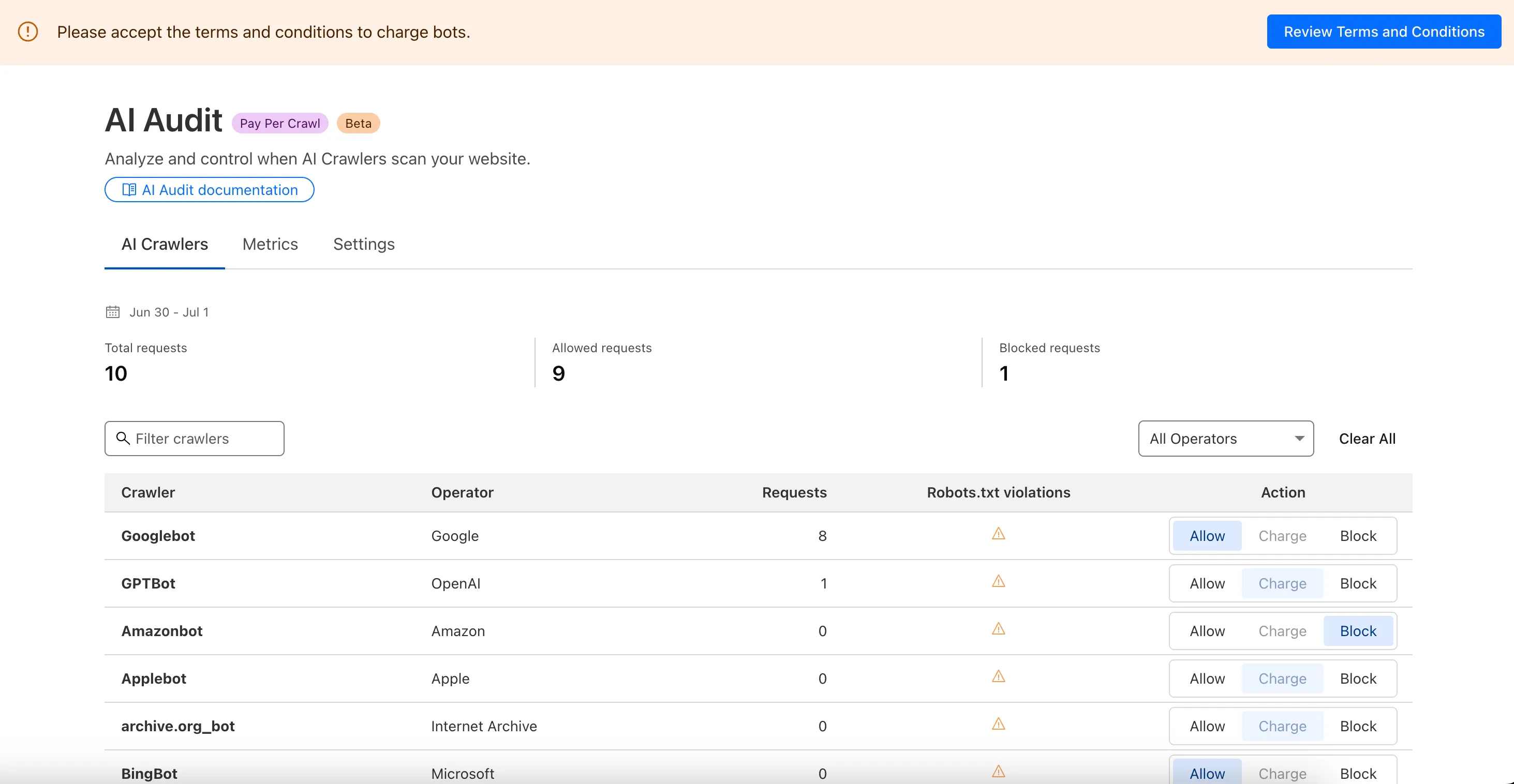
**For Site Owners:**
* Set pricing and select which crawlers to charge for content access
* Manage payments via Stripe
* Monitor analytics on successful content deliveries
**For AI Crawler Owners:**
* Use HTTP headers to request and accept pricing
* Receive clear confirmations on charges for accessed content
Learn more in the [Pay Per Crawl documentation](https://developers.cloudflare.com/ai-crawl-control/features/pay-per-crawl/what-is-pay-per-crawl/).
## 2025-07-01
**AI Crawl Control refresh**
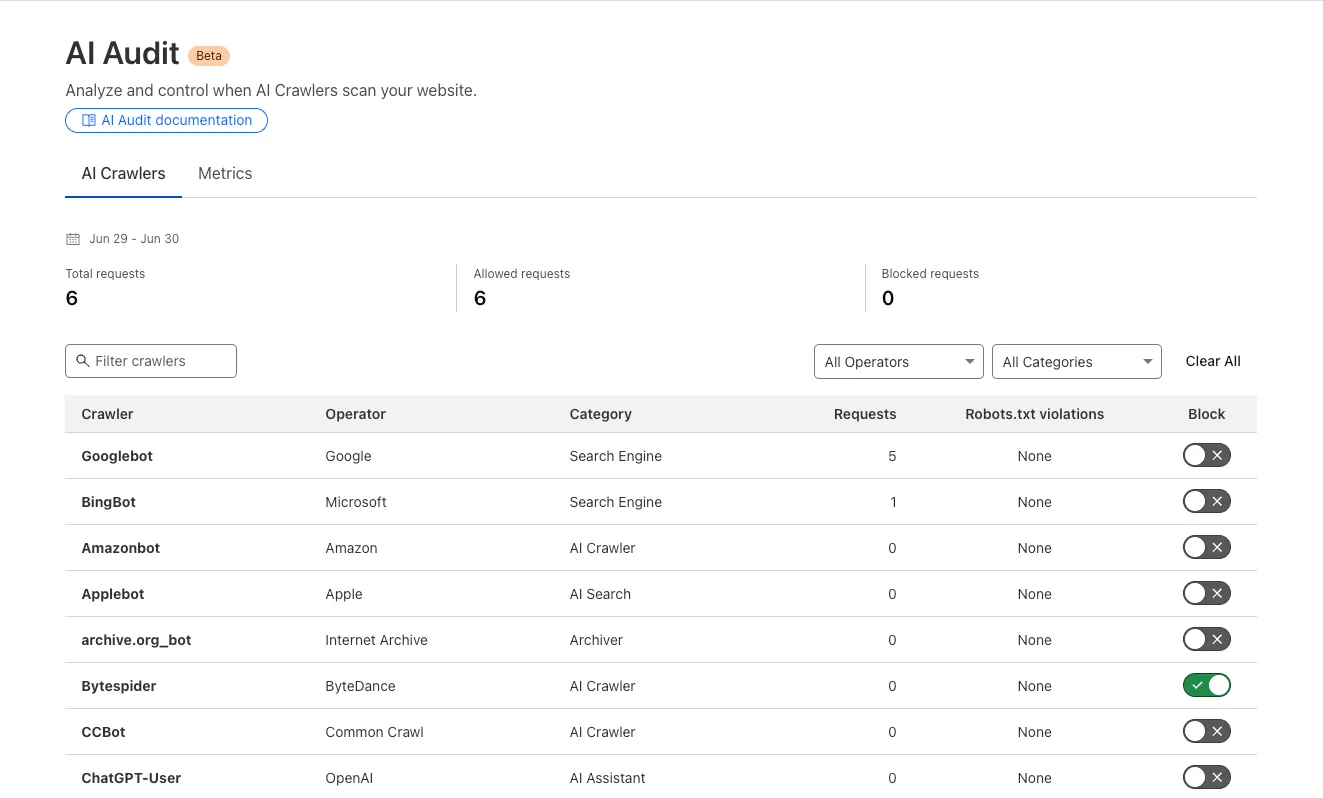
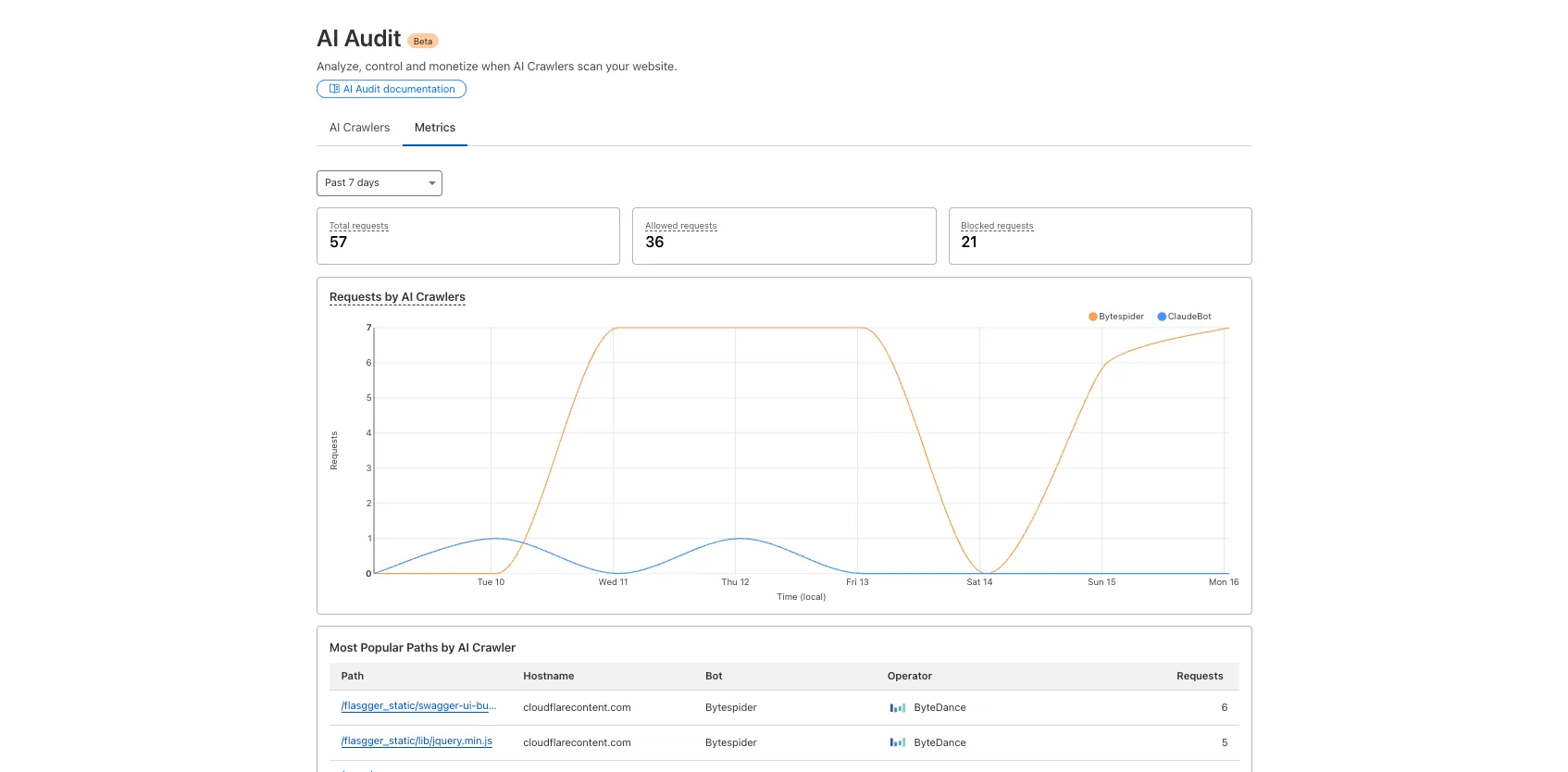
We redesigned the AI Crawl Control dashboard to provide more intuitive and granular control over AI crawlers.
* From the new **AI Crawlers** tab: block specific AI crawlers.
* From the new **Metrics** tab: view AI Crawl Control metrics.
To get started, explore:
* [Manage AI crawlers](https://developers.cloudflare.com/ai-crawl-control/features/manage-ai-crawlers/).
* [Analyze AI traffic](https://developers.cloudflare.com/ai-crawl-control/features/analyze-ai-traffic/).
## 2024-09-23
**AI Crawl Control**
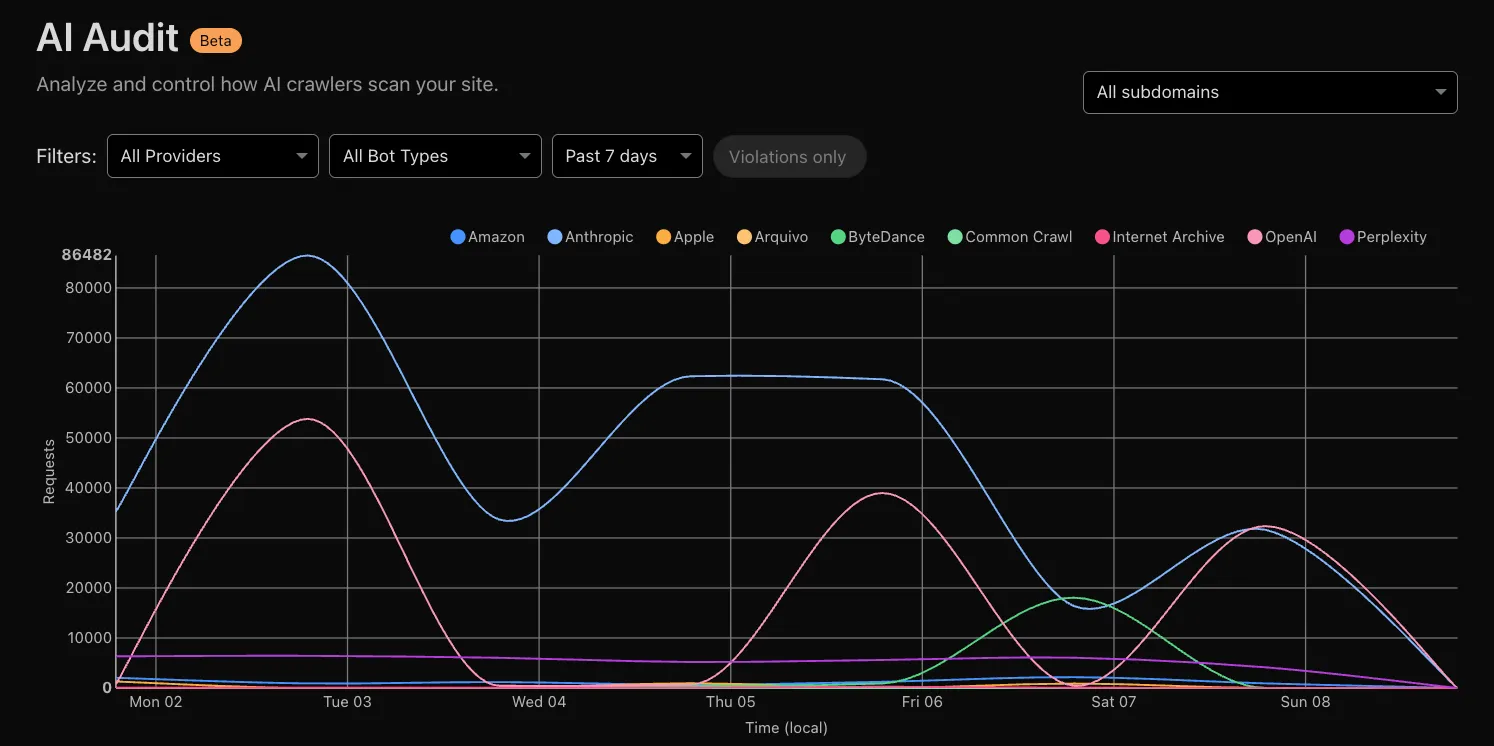
Every site on Cloudflare now has access to [**AI Audit**](https://developers.cloudflare.com/ai-crawl-control/), which summarizes the crawling behavior of popular and known AI services.
You can use this data to:
* Understand how and how often crawlers access your site (and which content is the most popular).
* Block specific AI bots accessing your site.
* Use Cloudflare to enforce your `robots.txt` policy via an automatic WAF rule.
To get started, explore [AI audit](https://developers.cloudflare.com/ai-crawl-control/).
```json
{"@context":"https://schema.org","@type":"BreadcrumbList","itemListElement":[{"@type":"ListItem","position":1,"item":{"@id":"/directory/","name":"Directory"}},{"@type":"ListItem","position":2,"item":{"@id":"/ai-crawl-control/","name":"AI Crawl Control"}},{"@type":"ListItem","position":3,"item":{"@id":"/ai-crawl-control/changelog/","name":"Changelog"}}]}
```
---
---
title: AI Crawl Control with Cloudflare Bots
description: AI Crawl Control works alongside other Cloudflare products, such as Cloudflare bot solutions. Bot solutions identifies traffic matching patterns of known bots, and can challenge or block the bots as you wish.
image: https://developers.cloudflare.com/core-services-preview.png
---
[Skip to content](#%5Ftop)
Was this helpful?
YesNo
[ Edit page ](https://github.com/cloudflare/cloudflare-docs/edit/production/src/content/docs/ai-crawl-control/configuration/ai-crawl-control-with-bots.mdx) [ Report issue ](https://github.com/cloudflare/cloudflare-docs/issues/new/choose)
Copy page
# AI Crawl Control with Cloudflare Bots
AI Crawl Control works alongside other Cloudflare products, such as Cloudflare [bot solutions](https://developers.cloudflare.com/bots/). Bot solutions identifies traffic matching patterns of known bots, and can challenge or block the bots as you wish.
## Order of precedence
* AI Crawl Control's AI crawler blocking uses [WAF custom rules](https://developers.cloudflare.com/waf/custom-rules/), which take place before Cloudflare bot solutions.
* AI Crawl Control's pay per crawl takes place after Cloudflare bot solutions.
graph LR
A[Traffic] --> B[WAF custom rules
AI Crawl Control: Crawler blocks]
B --> C[Cloudflare
Bot Solutions]
C --> D[AI Crawl Control:
Pay Per Crawl]
classDef highlight fill:#F6821F,color:white
For more information on how Cloudflare bot solutions works with WAF custom rules, refer to [How it works](https://developers.cloudflare.com/bots/concepts/bot/#how-it-works).
## Examples
Consider the following examples.
### Bot rule which blocks all AI bots vs pay per crawl
You may have both of the following enabled:
* A selection of AI crawlers to be charged through AI Crawl Control's pay per crawl
* Bot configuration option to [Block AI Bots](https://developers.cloudflare.com/bots/get-started/bot-fight-mode/#block-ai-bots).
Since pay per crawl happens after bot solutions, you need to first turn off **Block AI Bots** to ensure pay per crawl works as intended.
```json
{"@context":"https://schema.org","@type":"BreadcrumbList","itemListElement":[{"@type":"ListItem","position":1,"item":{"@id":"/directory/","name":"Directory"}},{"@type":"ListItem","position":2,"item":{"@id":"/ai-crawl-control/","name":"AI Crawl Control"}},{"@type":"ListItem","position":3,"item":{"@id":"/ai-crawl-control/configuration/","name":"Configuration"}},{"@type":"ListItem","position":4,"item":{"@id":"/ai-crawl-control/configuration/ai-crawl-control-with-bots/","name":"AI Crawl Control with Cloudflare Bots"}}]}
```
---
---
title: AI Crawl Control with Transform Rules
description: Add licensing headers to crawler responses using Transform Rules.
image: https://developers.cloudflare.com/core-services-preview.png
---
[Skip to content](#%5Ftop)
Was this helpful?
YesNo
[ Edit page ](https://github.com/cloudflare/cloudflare-docs/edit/production/src/content/docs/ai-crawl-control/configuration/ai-crawl-control-with-transform-rules.mdx) [ Report issue ](https://github.com/cloudflare/cloudflare-docs/issues/new/choose)
Copy page
# AI Crawl Control with Transform Rules
Use [Response Header Transform Rules](https://developers.cloudflare.com/rules/transform/response-header-modification/) to add `Link` headers to crawler responses — even when those crawlers are blocked. This lets you communicate terms of use or [RSL ↗](https://rslstandard.org/) license information.
## Example: Add licensing terms to blocked responses
**Expression:**
```
(cf.bot_management.verified_bot and http.response.code eq 403)
```
**Header modification:**
* **Operation:** Set static
* **Header name:** `Link`
* **Value:** `; rel="license"; type="text/html"`
For more details, refer to [Response Header Transform Rules](https://developers.cloudflare.com/rules/transform/response-header-modification/).
```json
{"@context":"https://schema.org","@type":"BreadcrumbList","itemListElement":[{"@type":"ListItem","position":1,"item":{"@id":"/directory/","name":"Directory"}},{"@type":"ListItem","position":2,"item":{"@id":"/ai-crawl-control/","name":"AI Crawl Control"}},{"@type":"ListItem","position":3,"item":{"@id":"/ai-crawl-control/configuration/","name":"Configuration"}},{"@type":"ListItem","position":4,"item":{"@id":"/ai-crawl-control/configuration/ai-crawl-control-with-transform-rules/","name":"AI Crawl Control with Transform Rules"}}]}
```
---
---
title: AI Crawl Control with Cloudflare WAF
description: AI Crawl Control works alongside other Cloudflare products, such as Cloudflare Web Application Firewall (WAF). WAF checks incoming web and API requests, and filters undesired traffic based on rules. WAF custom rules allow you to perform certain actions such as enforcing robots.txt.
image: https://developers.cloudflare.com/core-services-preview.png
---
[Skip to content](#%5Ftop)
Was this helpful?
YesNo
[ Edit page ](https://github.com/cloudflare/cloudflare-docs/edit/production/src/content/docs/ai-crawl-control/configuration/ai-crawl-control-with-waf.mdx) [ Report issue ](https://github.com/cloudflare/cloudflare-docs/issues/new/choose)
Copy page
# AI Crawl Control with Cloudflare WAF
AI Crawl Control works alongside other Cloudflare products, such as Cloudflare [Web Application Firewall (WAF)](https://developers.cloudflare.com/waf/). WAF checks incoming web and API requests, and filters undesired traffic based on rules. [WAF custom rules](https://developers.cloudflare.com/waf/custom-rules/) allow you to perform certain actions such as enforcing `robots.txt`.
## Order of precedence
* AI Crawl Control uses WAF custom rules to block the selection of AI crawlers the site owner has decided to block.
* AI Crawl Control's pay per crawl feature takes place after WAF.
graph LR
A[Traffic] --> B[WAF custom rules
AI Crawl Control: Crawler blocks]
B --> C[Cloudflare
Bot Solutions]
C --> D[AI Crawl Control:
Pay Per Crawl]
classDef highlight fill:#F6821F,color:white
For this reason, if you plan on using AI Crawl Control to manage AI crawlers, you may wish to modify your existing WAF custom rules such that it does not affect AI crawlers. This will allow you to manage AI crawlers only from AI Crawl Control, thereby streamlining your workflow.
How AI Crawl Control uses WAF custom rules
When you block AI crawlers via AI Crawl Control (either all or some), you are using **one** WAF custom rule to block those AI crawlers.
If you choose to allow all AI crawlers, AI Crawl Control does not utilize any WAF custom rules.
Depending on the type of account you have, you may have a limited number of WAF custom rules.
## Examples of using WAF vs AI Crawl Control
Consider the following examples.
### Traffic from a restricted country vs pay per crawl
You may have both of the following features enabled:
* [WAF custom rule to block traffic from specific countries](https://developers.cloudflare.com/waf/custom-rules/use-cases/block-traffic-from-specific-countries/)
* AI Crawl Control's [pay per crawl](https://developers.cloudflare.com/ai-crawl-control/features/pay-per-crawl/what-is-pay-per-crawl/) to charge AI crawlers when they request access to your content
Since WAF custom rules are enforced before pay per crawl, traffic (including AI crawlers) from your blocked countries will continue to be blocked, even if they provide the [required headers](https://developers.cloudflare.com/ai-crawl-control/features/pay-per-crawl/use-pay-per-crawl-as-ai-owner/crawl-pages/#1-identify-payment-requirements) for pay per crawl.
### Allowed search engine bots via WAF custom rule vs pay per crawl
You may have both of the following features enabled:
* [WAF custom rule to allow search engine bots](https://developers.cloudflare.com/waf/custom-rules/use-cases/allow-traffic-from-verified-bots/)
* AI Crawl Control's [pay per crawl](https://developers.cloudflare.com/ai-crawl-control/features/pay-per-crawl/what-is-pay-per-crawl/) to charge all AI crawlers when they request access to your content (including search engine bots).
Since custom rules are enforced before pay per crawl:
* Only search engine bots will be able to access your site (enforced by custom rule).
* The search engine bots will then be charged for access to your content (enforced by AI Crawl Control's pay per crawl).
Note
This example only serves to highlight the order of precedence between WAF and AI Crawl Control.
Practically, it may be beneficial to allow well-behaved search engine bots to access your content to ensure your content is indexed.
### Troubleshoot allowed bots
If you have set certain AI crawlers to **Allow** in AI Crawl Control, but they are still being blocked, check for upstream WAF custom rules that may be blocking them. Since the AI Crawl Control rule only includes blocked bots, allowed bots may still be affected by other security rules that execute before the AI Crawl Control rule.
These upstream rules will affect traffic but may not be visible in AI Crawl Control analytics. Review your WAF custom rules to identify and modify any rules that may be blocking AI crawlers you intend to allow.
### Troubleshoot blocked bots
If you have set certain AI crawlers to **Block** in AI Crawl Control, but they are still accessing your content, check for upstream rules that may be bypassing the AI Crawl Control rule. Since the AI Crawl Control rule is added at the end of existing WAF custom rules, the following types of rules may allow bots to bypass the block:
* **Skip rules** that bypass WAF custom rules
* **Redirect rules** that change the request path
* **Transform rules** that modify the request
To ensure blocked bots are properly blocked, move the AI Crawl Control rule to the top of your WAF custom rules, so it executes before other rules.
### Conflict in AI crawler blocking logic
You may have both of the following features enabled:
* A WAF custom rule which blocks all bots.
* AI Crawl Control selection which allows certain AI crawlers.
In this scenario, you have two custom rules, each directing a different logic for handling AI crawlers. To resolve this issue:
* [ New dashboard ](#tab-panel-3028)
* [ Old dashboard ](#tab-panel-3029)
1. In the Cloudflare dashboard, go to the **Security rules** page.
[ Go to **Security rules** ](https://dash.cloudflare.com/?to=/:account/:zone/security/security-rules)
2. Filter by _Custom rules_.
3. Identify your custom rule and the AI Crawl Control rule.
4. Drag the rule you wish to prioritize to the top, or modify your custom rule to ensure it does not conflict with your AI Crawl Control configurations.
1. Log in to the [Cloudflare dashboard ↗](https://dash.cloudflare.com/), and select your account and domain.
2. Go to **Security** \> **WAF** \> **Custom rules** tab.
3. Identify your WAF custom rule and the AI Crawl Control rule.
4. Drag the rule you wish to prioritize to the top, or modify your WAF custom rule to ensure it does not conflict with your AI Crawl Control configurations.
## Extending the AI Crawl Control WAF rule
For most use cases, managing crawlers directly in AI Crawl Control is recommended. However, the underlying WAF rule supports additional customization for scenarios the dashboard does not cover.
The AI Crawl Control rule is named **AI Crawl Control** and can be found under **Security** \> **WAF** \> **Custom rules**.
Common additions include:
* Path-based exceptions, such as allowing a blocked crawler to access specific sections of your site by adding an `AND` clause that excludes certain paths
* Extra user agents or detection IDs for crawlers not listed in AI Crawl Control
* Additional expression clauses to restrict blocking to specific hostnames or other request properties
Any additions you make are preserved when you subsequently update crawler actions in AI Crawl Control. If the expression has been modified in a way AI Crawl Control cannot parse, a warning banner will appear on the **Crawlers** page. Select **View rule in WAF** in the banner to inspect or correct the rule.
Warning
Changes made directly to the WAF rule are not reflected back in the AI Crawl Control dashboard. Use the **Crawlers** tab as your primary interface, and reserve direct WAF edits for cases where the dashboard does not cover your requirements.
```json
{"@context":"https://schema.org","@type":"BreadcrumbList","itemListElement":[{"@type":"ListItem","position":1,"item":{"@id":"/directory/","name":"Directory"}},{"@type":"ListItem","position":2,"item":{"@id":"/ai-crawl-control/","name":"AI Crawl Control"}},{"@type":"ListItem","position":3,"item":{"@id":"/ai-crawl-control/configuration/","name":"Configuration"}},{"@type":"ListItem","position":4,"item":{"@id":"/ai-crawl-control/configuration/ai-crawl-control-with-waf/","name":"AI Crawl Control with Cloudflare WAF"}}]}
```
---
---
title: Analyze AI traffic
description: AI Crawl Control metrics provide you with insight on how AI crawlers are interacting with your website (Cloudflare zone).
image: https://developers.cloudflare.com/core-services-preview.png
---
[Skip to content](#%5Ftop)
### Tags
[ AI ](https://developers.cloudflare.com/search/?tags=AI)
Was this helpful?
YesNo
[ Edit page ](https://github.com/cloudflare/cloudflare-docs/edit/production/src/content/docs/ai-crawl-control/features/analyze-ai-traffic.mdx) [ Report issue ](https://github.com/cloudflare/cloudflare-docs/issues/new/choose)
Copy page
# Analyze AI traffic
AI Crawl Control metrics provide you with insight on how AI crawlers are interacting with your website ([Cloudflare zone](https://developers.cloudflare.com/fundamentals/concepts/accounts-and-zones/#zones)).
To view AI Crawl Control metrics:
1. Log in to the [Cloudflare dashboard ↗](https://dash.cloudflare.com/), and select your account and domain.
2. Go to **AI Crawl Control**.
[ Go to **AI Crawl Control** ](https://dash.cloudflare.com/?to=/:account/:zone/ai)
You can find meaningful information across the **Overview**, **Crawlers**, and **Metrics** tabs.
## View the Overview tab
The **Overview** tab provides a snapshot of AI crawler activity:
| Component | What you can do |
| --------------------------------- | ------------------------------------------------------------------------------------------------------------------------------------------------------------------------------------------------------------------------------------------------------ |
| **Executive summary** | Review total request volume, volume change, most common status code, most popular path, and high-volume crawler activity. |
| **Managed robots.txt status** | Check whether [Cloudflare managed robots.txt](https://developers.cloudflare.com/bots/additional-configurations/managed-robots-txt/) is enabled for your zone. |
| **Metrics with trend charts** | Monitor total requests, allowed requests, unsuccessful requests, and total referrals (paid plans only). |
| **Crawlers grouped by operators** | Explore crawlers organized by company (OpenAI, Microsoft, Google, ByteDance, Anthropic, Meta) with allowed requests, referrals (paid plans only), and activity change percentages. Select a crawler or operator to drill down in the **Crawlers** tab. |
| **Filters** | Customize your view by date range, crawler, operator, hostname, or path. All metrics update dynamically. |
## View the Crawlers tab
The **Crawlers** tab provides detailed information about individual AI crawlers and allows you to set **Block** or **Allow** controls:
| Column | Description |
| ----------------- | -------------------------------------------------------------------------------- |
| **Crawler** | The name of the AI crawler. |
| **Operator** | The company that operates the crawler. |
| **Data transfer** | Total bandwidth consumed by this crawler's requests. Formatted as KB, MB, or GB. |
| **Requests** | Total number of requests from this crawler. |
| **Action** | Current access control setting (Allow or Block). |
For more information on managing crawler access, refer to [Manage AI crawlers](https://developers.cloudflare.com/ai-crawl-control/features/manage-ai-crawlers/).
## View the Metrics tab
The **Metrics** tab provides detailed analytics and charts to help you understand how AI crawlers are interacting with your website.
### Requests over time
Visualize crawler activity patterns over the selected time period. Use the view selector to switch between metrics:
| View | Description |
| -------------------- | --------------------------------------------------------------------------------- |
| **All requests** | Total requests including blocked and error responses. |
| **Allowed requests** | Requests that received a successful response (status 200-299). |
| **Data transfer** | Bandwidth consumption for allowed requests over time, formatted as KB, MB, or GB. |
You can group the data by different dimensions:
| Dimension | Description |
| ------------ | --------------------------------------------------------------------------------------- |
| **Crawler** | Track activity from individual AI crawlers (such as GPTBot, ClaudeBot, Bytespider). |
| **Category** | Analyze crawlers by their purpose or type. |
| **Operator** | Discover which companies (such as OpenAI, Anthropic, ByteDance) are crawling your site. |
| **Host** | Break down activity across multiple subdomains. |
Note
The Data transfer view shows `edgeResponseBytes`. Some crawlers may show higher data transfer per request than others, depending on the content they request.
### Status code distribution
The **Status code distribution** chart shows HTTP response codes for AI crawler requests over time:
* **2xx** — Successful responses
* **3xx** — Redirects
* **4xx** — Client errors (including 403 blocked and 402 payment required)
* **5xx** — Server errors
Use this chart to identify patterns in how your site responds to AI crawlers, including the distribution of error codes and the volume of redirects.
### Top referrers
Note
This feature is available for customers on a paid plan.
Identify traffic sources with referrer analytics to understand discovery patterns and content popularity from AI operators.
| View | Description |
| ------------------------ | ------------------------------------------------------------------------------------------------------------------ |
| **Referral sources** | Top domains sending AI-driven referral traffic to your site (for example, chatgpt.com, perplexity.ai). |
| **Destination patterns** | Which site areas receive the most AI-driven referral traffic, grouped by pattern (for example, /blog/\*, /api/\*). |
Toggle between views using the tabs in the Top referrers section.
### Referrals over time
Track referral traffic trends over your selected time period. Group by:
| Dimension | Description |
| ------------ | -------------------------------------------------------------------------- |
| **Operator** | Stacked area chart showing referrals by company (OpenAI, Anthropic, etc.). |
| **Source** | Top referral URLs driving traffic. |
| **Total** | Aggregate referral volume. |
### Most popular paths
The **Most popular paths** table shows which pages on your site are most frequently requested by AI crawlers.
| Column | Description |
| -------------------- | --------------------------------------------------------- |
| **Path** | The page path that was requested. |
| **Hostname** | The hostname of the requested page. |
| **Referrals** | Number of referral visits to this path from AI platforms. |
| **Allowed requests** | Number of successful requests to this path. |
To see a breakdown by crawler per path, use the top-level filters.
#### Analyze site areas with pattern grouping
Select the **Patterns** tab to see requests grouped by URI pattern (such as `/blog/*`, `/api/v1/*`, or `/docs/*`). This helps you quickly identify which areas of your site AI crawlers target most.
Pattern grouping aggregates individual paths into site areas:
* Patterns include up to 2 levels of depth (for example, `/api/*`, `/api/v1/*`)
* The root pattern `/*` shows total traffic across your site
* Patterns are not aggregated across hostnames
* Single-path patterns display without wildcards (for example, `sitemap.xml` instead of `sitemap.xml/*`)
Additional tabs include:
* **All** — Combined content and media requests (individual paths, not patterns)
* **Content** — HTML, JSON, and text content
* **Media** — Images, videos, and other media files
## Filter and export data
Use the filter bar to narrow your analysis by multiple criteria:
| Filter | Description |
| -------------- | ----------------------------------------- |
| **Date range** | Select the time period to analyze. |
| **Crawler** | Filter to specific AI crawlers. |
| **Operator** | Filter to specific companies. |
| **Hostname** | Filter to specific subdomains. |
| **Path** | Filter to specific URL paths or patterns. |
Combine multiple filters for complex analysis. All metrics and charts update dynamically based on your filter selection.
To export your data, select **Download CSV** or **Download image**. Downloads include all applied filters and groupings.
## Per-crawler drilldowns
The **Crawlers** tab includes an actions menu for each crawler with the following options:
| Action | Description |
| ------------------------------ | ----------------------------------------------------------------------------------------------------------------------------------------------------------------------------------------------------------- |
| **View Metrics** | Filter the **Metrics** tab to the selected crawler. |
| **View on Cloudflare Radar** | Learn more about each verified crawler on Cloudflare Radar. |
| **View in Security Analytics** | Filter Security Analytics by detection IDs ([Bot Management](https://developers.cloudflare.com/bots/get-started/bot-management/) customers). |
| **Copy User Agent** | Copy user agent strings for use in [WAF custom rules](https://developers.cloudflare.com/waf/custom-rules/), [Redirect Rules](https://developers.cloudflare.com/rules/url-forwarding/), or robots.txt files. |
| **Copy Detection ID** | Copy detection IDs for use in [WAF custom rules](https://developers.cloudflare.com/waf/custom-rules/) ([Bot Management](https://developers.cloudflare.com/bots/get-started/bot-management/) customers). |
## Programmatic access
For programmatic access to AI Crawl Control analytics, use the [GraphQL Analytics API](https://developers.cloudflare.com/ai-crawl-control/reference/graphql-api/). The API provides access to the same data available in the dashboard, including detection IDs, referrer data, and data transfer metrics.
## Related resources
* [GraphQL API reference](https://developers.cloudflare.com/ai-crawl-control/reference/graphql-api/)
* [Manage AI crawlers](https://developers.cloudflare.com/ai-crawl-control/features/manage-ai-crawlers/)
* [Track robots.txt](https://developers.cloudflare.com/ai-crawl-control/features/track-robots-txt/)
```json
{"@context":"https://schema.org","@type":"BreadcrumbList","itemListElement":[{"@type":"ListItem","position":1,"item":{"@id":"/directory/","name":"Directory"}},{"@type":"ListItem","position":2,"item":{"@id":"/ai-crawl-control/","name":"AI Crawl Control"}},{"@type":"ListItem","position":3,"item":{"@id":"/ai-crawl-control/features/","name":"Features"}},{"@type":"ListItem","position":4,"item":{"@id":"/ai-crawl-control/features/analyze-ai-traffic/","name":"Analyze AI traffic"}}]}
```
---
---
title: Manage AI crawlers
description: AI Crawl Control enables you to take specific action for each AI crawler.
image: https://developers.cloudflare.com/core-services-preview.png
---
[Skip to content](#%5Ftop)
Was this helpful?
YesNo
[ Edit page ](https://github.com/cloudflare/cloudflare-docs/edit/production/src/content/docs/ai-crawl-control/features/manage-ai-crawlers.mdx) [ Report issue ](https://github.com/cloudflare/cloudflare-docs/issues/new/choose)
Copy page
# Manage AI crawlers
AI Crawl Control enables you to take specific action for each AI crawler.
To manage AI crawlers:
1. Log in to the [Cloudflare dashboard ↗](https://dash.cloudflare.com/), and select your account and domain.
2. Go to **AI Crawl Control**.
[ Go to **AI Crawl Control** ](https://dash.cloudflare.com/?to=/:account/:zone/ai)
3. Go to the **Crawlers** tab.
## Review AI crawler activity
The **Crawlers** tab displays a table of AI crawlers that are requesting access to your content, and how they interact with your pages. The table provides the following information.
| Column | Details |
| --------------------- | ------------------------------------------------------------------------------------------------------------------------------------------------------------------------------------------------------------ |
| Crawler | The name of the AI crawler and the operator that owns it. |
| Category | The category of the AI crawler. Refer to [Verified bot categories](https://developers.cloudflare.com/bots/concepts/bot/verified-bots/#categories). |
| Requests | The total number of allowed and unsuccessful requests, with trend chart. Unsuccessful requests may come from any rule or response error, not just the block action in AI Crawl Control. |
| Robots.txt violations | The number of times the AI crawler has violated your robots.txt file. |
| Action | The action you wish to take for the AI crawler. Refer to [Take action for each AI crawler](https://developers.cloudflare.com/ai-crawl-control/features/manage-ai-crawlers/#take-action-for-each-ai-crawler). |
Quality of AI crawler detection
On the free plan, AI Crawl Control identifies AI crawlers based on their [user agent strings ↗](https://developer.mozilla.org/en-US/docs/Web/HTTP/Reference/Headers/User-Agent). This enables AI Crawl Control to detect well-known, self-identifying AI crawlers.
Upgrade your plan to enable a more thorough detection using Cloudflare's [Bot Management detection ID](https://developers.cloudflare.com/bots/reference/bot-management-variables/#ruleset-engine-fields) field.
### Filter AI crawler data
You can use filters to narrow the scope of your result:
* **Name:** Search the name of the AI crawler.
* **Operator:** Filter by the AI crawler operator.
* **Category:** Filter by the category of the AI crawler (for example, AI crawler, AI assistant, or archiver).
The values of the table will update according to your filter.
## Take action for each AI crawler
* [ Without pay per crawl ](#tab-panel-3030)
* [ With pay per crawl ](#tab-panel-3031)
For each AI crawler, you can choose to allow or block access.
Allow access
* **Summary:** You can allow an AI crawler to scrape your content.
* **When to use:** Allow AI crawlers that offer services which provide value through citations, referrals, or existing agreements.
* **Implementation:** From the **Actions** column, select **Allow**.
Note that you can still choose to [Enforce robots.txt](https://developers.cloudflare.com/ai-crawl-control/features/manage-ai-crawlers/#take-action-for-each-ai-crawler).
Block access
* **Summary:** You can block an AI crawler to completely stop the AI crawler from scraping your webpage.
* **When to use:** Block AI crawlers when their behavior do not align with your content strategy, or violate your policies.
* **Implementation:** From the **Actions** column, select **Block**.
Note that you can configure the response that gets returned when blocking an AI crawler. Refer to [Configure block response](https://developers.cloudflare.com/ai-crawl-control/features/manage-ai-crawlers/#configure-block-response).
Pay per crawl closed beta
Pay per crawl is currently in closed beta.
To find out how to join the beta program, reach out to us at [Pay per crawl signup ↗](http://www.cloudflare.com/paypercrawl-signup/), or contact your account executive if you are an existing Enterprise customer.
To learn more about pay per crawl, refer to Cloudflare blog: [Introducing pay per crawl: enabling content owners to charge AI crawlers for access ↗](https://blog.cloudflare.com/introducing-pay-per-crawl/).
For each AI crawler, you can take one of three actions: allow, charge, or block.
Allow access
* **Summary:** You can allow an AI crawler to scrape your content.
* **When to use:** Allow AI crawlers that offer services which provide value through citations, referrals, or existing agreements.
* **Implementation:** From the **Actions** column, select **Allow**. Note that you can still choose to [Enforce robots.txt](https://developers.cloudflare.com/ai-crawl-control/features/manage-ai-crawlers/#take-action-for-each-ai-crawler).
For more details on how this rule interacts with other Cloudflare settings, refer to [How it works](https://developers.cloudflare.com/bots/concepts/bot/#how-it-works).
Block access
* **Summary:** You can block an AI crawler to completely stop the AI crawler from scraping your webpage.
* **When to use:** Block AI crawlers when their behavior do not align with your content strategy, or violate your policies.
* **Implementation:** From the **Actions** column, select **Block**.
Note that you can configure the response that gets returned when blocking an AI crawler. Refer to [Configure block response](https://developers.cloudflare.com/ai-crawl-control/features/manage-ai-crawlers/#configure-block-response).
Charge for crawl (private beta)
* **Summary:** You can charge the owner of the AI crawler for each successful crawl request.
* **When to use:** Charge AI crawlers when your content has training value, and you want to explore monetization options.
* **Implementation:** From the **Actions** column, select **Charge**.
For more information, refer to [What is Pay Per Crawl?](https://developers.cloudflare.com/ai-crawl-control/features/pay-per-crawl/what-is-pay-per-crawl/).
Need more advanced control?
You can also create more complex rules when taking action on AI crawlers, using [Cloudflare WAF](https://developers.cloudflare.com/waf/). For more information on creating more specific rules, refer to [Create a custom rule in the dashboard](https://developers.cloudflare.com/waf/custom-rules/create-dashboard/).
## WAF rule management
When you block a crawler in AI Crawl Control, the system creates or updates a WAF custom rule on your zone to enforce that block. For advanced scenarios such as adding path-based exceptions or extra user agents, you can extend this rule directly in WAF.
For more information, refer to [AI Crawl Control with Cloudflare WAF](https://developers.cloudflare.com/ai-crawl-control/configuration/ai-crawl-control-with-waf/).
## Configure block response
Available on Paid plans
When blocking an AI crawler, you can configure the details of the response that gets returned to the AI crawler. Specifically, you can configure:
* The response code
* The response body
This provides you with a channel to open dialogue with the AI crawler owner, and to inform the AI crawler how to properly license their content, thereby creating a direct path from crawling attempt to commercial agreement.
To edit these values:
1. Log in to the [Cloudflare dashboard ↗](https://dash.cloudflare.com/), and select your account and domain.
2. Go to **AI Crawl Control**.
[ Go to **AI Crawl Control** ](https://dash.cloudflare.com/?to=/:account/:zone/ai)
3. Go to the **Settings** tab.
4. Under **Block response**, select **Edit**.
5. Once you have edited the values, select **Save**.
Note
You must have opted to block at least one AI crawler to configure a custom block response.
### Edit the response code
You can choose which HTTP response code to return when blocking an AI crawler.
Use the dropdown menu to select the desired response code. You can choose from:
* `403 Forbidden`: Use this option if you wish to indicate that you do not want the AI crawler to access your content.
* `402 Payment Required`: Use this option if you wish to indicate that the AI crawler must pay to access your content.
Note
AI Crawl Control uses [Cloudflare WAF](https://developers.cloudflare.com/waf/) to return custom block responses. If you have manually configured the AI Crawl Control WAF rule to return a response code other than `403` or `402`, AI Crawl Control will not be able to enforce the response code you have selected, and the dropdown will appear blank. Ensure you have selected either `403` or `402`.
Refer to [Configure a custom response for blocked requests](https://developers.cloudflare.com/waf/custom-rules/create-dashboard/#configure-a-custom-response-for-blocked-requests) and [AI Crawl Control with Cloudflare WAF](https://developers.cloudflare.com/ai-crawl-control/configuration/ai-crawl-control-with-waf/) for more information.
### Edit the response body
You can write a custom message (HTTP response body) to return when blocking an AI crawler.
In the **Response body** text field, enter the response you wish to display for the AI crawler in plain text.
## Related resources
* Use [pay per crawl](https://developers.cloudflare.com/ai-crawl-control/features/pay-per-crawl/what-is-pay-per-crawl/) to charge AI crawlers every time they access your content.
* Learn how AI Crawl Control interacts with WAF, including advanced rule customization, in [AI Crawl Control with Cloudflare WAF](https://developers.cloudflare.com/ai-crawl-control/configuration/ai-crawl-control-with-waf/).
```json
{"@context":"https://schema.org","@type":"BreadcrumbList","itemListElement":[{"@type":"ListItem","position":1,"item":{"@id":"/directory/","name":"Directory"}},{"@type":"ListItem","position":2,"item":{"@id":"/ai-crawl-control/","name":"AI Crawl Control"}},{"@type":"ListItem","position":3,"item":{"@id":"/ai-crawl-control/features/","name":"Features"}},{"@type":"ListItem","position":4,"item":{"@id":"/ai-crawl-control/features/manage-ai-crawlers/","name":"Manage AI crawlers"}}]}
```
---
---
title: Pay Per Crawl FAQ
description: No. Pay per crawl allows you to configure different actions (Block, Charge, or Allow) for each crawler, but you can only set a single price that applies to all crawlers configured with the "Charge" option.
image: https://developers.cloudflare.com/core-services-preview.png
---
[Skip to content](#%5Ftop)
Was this helpful?
YesNo
[ Edit page ](https://github.com/cloudflare/cloudflare-docs/edit/production/src/content/docs/ai-crawl-control/features/pay-per-crawl/faq.mdx) [ Report issue ](https://github.com/cloudflare/cloudflare-docs/issues/new/choose)
Copy page
# Pay Per Crawl FAQ
## Frequently asked questions for site owners
### Can I set different prices for different AI crawlers?
No. Pay per crawl allows you to configure different actions (Block, Charge, or Allow) for each crawler, but you can only set a single price that applies to all crawlers configured with the "Charge" option.
## Frequently asked questions for AI bot operators
### Will I be charged for re-crawling the same page?
Yes. Every time your AI crawler accesses content on a website protected with pay per crawl, it will incur the cost set by the site owner. You should implement mechanisms within your crawler to track expenditure and enforce any spending limits you want to set.
Some paths are always free to crawl. These paths are: `/robots.txt`, `/sitemap.xml`, `/security.txt`, `/.well-known/security.txt`, `/crawlers.json`.
### Am I charged for error responses?
No. Charging events are only triggered for successful HTTP response codes. Error responses are not billed, even if you have sent the `crawler-exact-price` or `crawler-max-price` headers.
### What user agent should I use?
Use the standard user agents associated with your AI crawler that you have onboarded to Cloudflare and identified through Web Bot Auth.
```json
{"@context":"https://schema.org","@type":"BreadcrumbList","itemListElement":[{"@type":"ListItem","position":1,"item":{"@id":"/directory/","name":"Directory"}},{"@type":"ListItem","position":2,"item":{"@id":"/ai-crawl-control/","name":"AI Crawl Control"}},{"@type":"ListItem","position":3,"item":{"@id":"/ai-crawl-control/features/","name":"Features"}},{"@type":"ListItem","position":4,"item":{"@id":"/ai-crawl-control/features/pay-per-crawl/","name":"Pay Per Crawl"}},{"@type":"ListItem","position":5,"item":{"@id":"/ai-crawl-control/features/pay-per-crawl/faq/","name":"Pay Per Crawl FAQ"}}]}
```
---
---
title: Connect Stripe
description: Connect your Cloudflare account to Stripe to process payments. Pay per crawl uses Stripe to process payments between AI crawler owners and site owners.
image: https://developers.cloudflare.com/core-services-preview.png
---
[Skip to content](#%5Ftop)
### Tags
[ Stripe ](https://developers.cloudflare.com/search/?tags=Stripe)
Was this helpful?
YesNo
[ Edit page ](https://github.com/cloudflare/cloudflare-docs/edit/production/src/content/docs/ai-crawl-control/features/pay-per-crawl/use-pay-per-crawl-as-ai-owner/connect-to-stripe.mdx) [ Report issue ](https://github.com/cloudflare/cloudflare-docs/issues/new/choose)
Copy page
# Connect Stripe
graph LR
A[Set up your
Cloudflare Account] --> B[Verify your
AI crawler]
B --> C[Discover
payable content]
C --> D[Connect to
Stripe]:::highlight
D --> E[Crawl pages]
classDef highlight fill:#F6821F,color:white
Connect your Cloudflare account to Stripe to process payments. Pay per crawl uses Stripe to process payments between AI crawler owners and site owners.
1. In the Cloudflare dashboard, go to **Manage Account** \> **Settings**.
[ Go to **Configurations** ](https://dash.cloudflare.com/?to=/:account/configurations)
2. Go to the **Pay Per Crawl** tab.
3. From **Connect to Stripe**, select **Connect**.
4. Select **Continue to Stripe**.
5. Follow the on-screen instructions to connect your Cloudflare account to a Stripe account.
Use a non-personal email address
Cloudflare recommends using a dedicated email to manage your pay per crawl account (for example, `aicrawler@company.com`).
When you successfully connect Stripe to your account, you will see a green tick ✅ next to **Stripe connection**.
Spending limits
Cloudflare is not responsible for configuring spending limits. Ensure you have configured a maximum spending limit on your AI crawler.
## Billing
Charges are recorded upon successful delivery of content that is requested with valid [crawler price headers](https://developers.cloudflare.com/ai-crawl-control/features/pay-per-crawl/use-pay-per-crawl-as-ai-owner/crawl-pages/#21-include-payment-headers).
Invoices are created and managed via Stripe. Crawlers are responsible for setting and enforcing their own spending limits.
```json
{"@context":"https://schema.org","@type":"BreadcrumbList","itemListElement":[{"@type":"ListItem","position":1,"item":{"@id":"/directory/","name":"Directory"}},{"@type":"ListItem","position":2,"item":{"@id":"/ai-crawl-control/","name":"AI Crawl Control"}},{"@type":"ListItem","position":3,"item":{"@id":"/ai-crawl-control/features/","name":"Features"}},{"@type":"ListItem","position":4,"item":{"@id":"/ai-crawl-control/features/pay-per-crawl/","name":"Pay Per Crawl"}},{"@type":"ListItem","position":5,"item":{"@id":"/ai-crawl-control/features/pay-per-crawl/use-pay-per-crawl-as-ai-owner/","name":"Use pay per crawl as an AI owner"}},{"@type":"ListItem","position":6,"item":{"@id":"/ai-crawl-control/features/pay-per-crawl/use-pay-per-crawl-as-ai-owner/connect-to-stripe/","name":"Connect Stripe"}}]}
```
---
---
title: Crawl pages
description: Once your AI crawler complies with Web Bot Auth, you can begin to crawl webpages. For more information on how pay per crawl works, refer to What is Pay Per Crawl?
image: https://developers.cloudflare.com/core-services-preview.png
---
[Skip to content](#%5Ftop)
Was this helpful?
YesNo
[ Edit page ](https://github.com/cloudflare/cloudflare-docs/edit/production/src/content/docs/ai-crawl-control/features/pay-per-crawl/use-pay-per-crawl-as-ai-owner/crawl-pages.mdx) [ Report issue ](https://github.com/cloudflare/cloudflare-docs/issues/new/choose)
Copy page
# Crawl pages
graph LR
A[Set up your
Cloudflare Account] --> B[Verify your
AI crawler]
B --> C[Discover
payable content]
C --> D[Connect to
Stripe]
D --> E[Crawl pages]:::highlight
classDef highlight fill:#F6821F,color:white
Once your AI crawler complies with Web Bot Auth, you can begin to crawl webpages. For more information on how pay per crawl works, refer to [What is Pay Per Crawl?](https://developers.cloudflare.com/ai-crawl-control/features/pay-per-crawl/what-is-pay-per-crawl/)
## 1\. Identify payment requirements
When an AI crawler makes a request to a page protected by pay per crawl, the server will respond with `HTTP/2 402 Payment Required`. This response will also include the `crawler-price` header which specifies the cost to access the content. For example, a response may look like the following:
```
HTTP/2 402
date: Fri, 06 Jun 2025 08:42:38 GMT
crawler-price: USD 0.01
```
To access this content, the AI crawler must provide headers for paid access.
## 2\. Access paid content
### 2.1\. Include payment headers
Your AI crawler can specify the price it is willing to pay by providing one of two headers:
* `crawler-exact-price`: This is the exact price the AI crawler is configured to pay for access. This value should exactly match the price set in the response header `crawler-price`. Include this header in your second request if your AI crawler first received a HTTP status code 402, and you wish to access the content by paying the `crawler-price`.
* `crawler-max-price`: This is the maximum price the AI crawler is configured to pay for access on any content. Use this option if you wish to access any pay per crawl content with a crawl price equal or lower than the maximum price. If a page's `crawler-price` is higher than your `crawler-max-price`, your AI crawler will receive a HTTP 402 response.
### 2.2\. Sign your request with Web Bot Auth
Include Web Bot Auth headers by following the steps in [Sign your requests](https://developers.cloudflare.com/bots/reference/bot-verification/web-bot-auth/#4-after-verification-sign-your-requests).
Important
Payment headers (`crawler-exact-price` or `crawler-max-price`) **must be included in the `signature-input` header components**. When [choosing components to sign](https://developers.cloudflare.com/bots/reference/bot-verification/web-bot-auth/#41-choose-a-set-of-components-to-sign), add your payment header to the list of signed components for successful payment processing.
### 2.3\. Review response headers
When you specify a header to indicate payment, you may receive one of two responses:
#### Successful HTTP 200 response
The value of the `crawler-charged` header indicates the exact amount that will be billed to your Cloudflare account for the request.
```
HTTP 200
date: Fri, 06 Jun 2025 08:42:38 GMT
crawler-charged: USD 0.01
```
#### Unsuccessful response
If the request is unsuccessful, you will receive an error response with a `crawler-error` header indicating the specific issue.
```
HTTP/2 402
date: Fri, 06 Jun 2025 08:42:38 GMT
content-type: text/plain; charset=utf-8
crawler-price: USD 0.01
crawler-error: InvalidCrawlerExactPrice
```
Refer to [Pay Per Crawl error codes](https://developers.cloudflare.com/ai-crawl-control/features/pay-per-crawl/use-pay-per-crawl-as-ai-owner/error-codes/) for a complete list of error codes and troubleshooting guidance.
## 3\. Track your spending
When you successfully access pay per crawl content (response with HTTP status code 200), the response will include `crawler-charged`. For example:
```
crawler-charged: USD 0.01
```
Cloudflare strongly recommends tracking and saving these values to keep an accurate record of the bill your AI crawler has accrued.
## Additional resources
You may wish to refer to the following resources.
* [Discover payable content](https://developers.cloudflare.com/ai-crawl-control/features/pay-per-crawl/use-pay-per-crawl-as-ai-owner/discover-payable-content/)
* [Pay Per Crawl error codes](https://developers.cloudflare.com/ai-crawl-control/features/pay-per-crawl/use-pay-per-crawl-as-ai-owner/error-codes/)
* [Pay Per Crawl FAQs](https://developers.cloudflare.com/ai-crawl-control/features/pay-per-crawl/faq/)
```json
{"@context":"https://schema.org","@type":"BreadcrumbList","itemListElement":[{"@type":"ListItem","position":1,"item":{"@id":"/directory/","name":"Directory"}},{"@type":"ListItem","position":2,"item":{"@id":"/ai-crawl-control/","name":"AI Crawl Control"}},{"@type":"ListItem","position":3,"item":{"@id":"/ai-crawl-control/features/","name":"Features"}},{"@type":"ListItem","position":4,"item":{"@id":"/ai-crawl-control/features/pay-per-crawl/","name":"Pay Per Crawl"}},{"@type":"ListItem","position":5,"item":{"@id":"/ai-crawl-control/features/pay-per-crawl/use-pay-per-crawl-as-ai-owner/","name":"Use pay per crawl as an AI owner"}},{"@type":"ListItem","position":6,"item":{"@id":"/ai-crawl-control/features/pay-per-crawl/use-pay-per-crawl-as-ai-owner/crawl-pages/","name":"Crawl pages"}}]}
```
---
---
title: Discover payable content
description: The Pay Per Crawl Discovery API allows verified AI crawlers to discover which domains offer paid content access. This enables your crawler to proactively identify sites participating in Pay Per Crawl before making crawl requests.
image: https://developers.cloudflare.com/core-services-preview.png
---
[Skip to content](#%5Ftop)
Was this helpful?
YesNo
[ Edit page ](https://github.com/cloudflare/cloudflare-docs/edit/production/src/content/docs/ai-crawl-control/features/pay-per-crawl/use-pay-per-crawl-as-ai-owner/discover-payable-content.mdx) [ Report issue ](https://github.com/cloudflare/cloudflare-docs/issues/new/choose)
Copy page
# Discover payable content
graph LR
A[Set up your
Cloudflare Account] --> B[Verify your
AI crawler]
B --> C[Discover
payable content]:::highlight
C --> D[Connect to
Stripe]
D --> E[Crawl pages]
classDef highlight fill:#F6821F,color:white
The Pay Per Crawl Discovery API allows verified AI crawlers to discover which domains offer paid content access. This enables your crawler to proactively identify sites participating in Pay Per Crawl before making crawl requests.
## Prerequisites
Before using the Pay Per Crawl Discovery API, you must:
* [Set up your Cloudflare account](https://developers.cloudflare.com/ai-crawl-control/features/pay-per-crawl/use-pay-per-crawl-as-ai-owner/set-up-cloudflare-account/)
* [Verify your AI crawler](https://developers.cloudflare.com/ai-crawl-control/features/pay-per-crawl/use-pay-per-crawl-as-ai-owner/verify-ai-crawler/)
## Authenticate with Web Bot Auth
All requests to the Discovery API must be authenticated using HTTP message signatures with Web Bot Auth headers. This ensures that only verified crawlers can access the list of participating domains.
1. Generate your Web Bot Auth signature following the steps in [Sign your requests](https://developers.cloudflare.com/bots/reference/bot-verification/web-bot-auth/#4-after-verification-sign-your-requests).
2. Construct the required headers as described in [Construct the required headers](https://developers.cloudflare.com/bots/reference/bot-verification/web-bot-auth/#43-construct-the-required-headers):
* `Signature`: The cryptographic signature of the request
* `Signature-Input`: The signature metadata and parameters
* `Signature-Agent`: Information about the signing agent
## Discover participating domains
### API endpoint
```
GET https://crawlers-api.ai-audit.cfdata.org/charged_zones
```
### Request parameters
* `cursor` (optional): Cursor returned from a previous call for pagination
* `limit` (optional): Number of results to return per request
### Request headers
Include the HTTP message signature headers generated using Web Bot Auth:
```
Signature:
Signature-Input:
Signature-Agent:
```
### Example request
Terminal window
```
curl -X GET "https://crawlers-api.ai-audit.cfdata.org/charged_zones?limit=50" \
-H "Signature: " \
-H "Signature-Input: " \
-H "Signature-Agent: "
```
### Response format
The API returns a list of zones (domains) that have Pay Per Crawl enabled and are accepting payments from your crawler.
```
{
"result": {
"zones": [
{
"domain": "example.com"
},
{
"domain": "news-site.com"
}
]
},
"success": true,
"errors": [],
"messages": []
}
```
### Response fields
* `result.zones`: Array of zone objects containing domains with Pay Per Crawl enabled
* `result.zones[].domain`: The domain name offering Pay Per Crawl content
* `success`: Boolean indicating whether the request was successful
* `errors`: Array of error messages (empty if successful)
* `messages`: Array of informational messages
## Use discovery data
The Discovery API returns domains where site owners have specifically configured your crawler to be charged for content access. If a domain does not appear in the response, the site owner has not enabled Pay Per Crawl charging for your crawler. Site owners may also block or allow your crawler through WAF rules or set directives in their robots.txt file, which you should check and respect.
Cache discovery results locally and refresh periodically to stay up-to-date with domains joining or leaving Pay Per Crawl.
## Additional resources
* [Crawl pages](https://developers.cloudflare.com/ai-crawl-control/features/pay-per-crawl/use-pay-per-crawl-as-ai-owner/crawl-pages/)
```json
{"@context":"https://schema.org","@type":"BreadcrumbList","itemListElement":[{"@type":"ListItem","position":1,"item":{"@id":"/directory/","name":"Directory"}},{"@type":"ListItem","position":2,"item":{"@id":"/ai-crawl-control/","name":"AI Crawl Control"}},{"@type":"ListItem","position":3,"item":{"@id":"/ai-crawl-control/features/","name":"Features"}},{"@type":"ListItem","position":4,"item":{"@id":"/ai-crawl-control/features/pay-per-crawl/","name":"Pay Per Crawl"}},{"@type":"ListItem","position":5,"item":{"@id":"/ai-crawl-control/features/pay-per-crawl/use-pay-per-crawl-as-ai-owner/","name":"Use pay per crawl as an AI owner"}},{"@type":"ListItem","position":6,"item":{"@id":"/ai-crawl-control/features/pay-per-crawl/use-pay-per-crawl-as-ai-owner/discover-payable-content/","name":"Discover payable content"}}]}
```
---
---
title: Error codes
description: Pay per crawl error responses include a crawler-error header with a specific error code. The following table provides a complete reference of all possible error codes:
image: https://developers.cloudflare.com/core-services-preview.png
---
[Skip to content](#%5Ftop)
Was this helpful?
YesNo
[ Edit page ](https://github.com/cloudflare/cloudflare-docs/edit/production/src/content/docs/ai-crawl-control/features/pay-per-crawl/use-pay-per-crawl-as-ai-owner/error-codes.mdx) [ Report issue ](https://github.com/cloudflare/cloudflare-docs/issues/new/choose)
Copy page
# Error codes
Pay per crawl error responses include a `crawler-error` header with a specific error code. The following table provides a complete reference of all possible error codes:
| Error Code | HTTP Status | What to do |
| ------------------------ | ----------- | ------------------------------------------------------------------------------------------------------------------------------------------------------------------------------------------- |
| CrawlerForbidden | 403 | The site owner has blocked your crawler. You cannot access this content. |
| StrongAuthRequired | 400 | Include valid Web Bot Auth headers with strong authentication in your request. |
| InvalidSignature | 400 | Include both signature-input and signature headers in your request. Refer to [Web Bot Auth documentation](https://developers.cloudflare.com/bots/reference/bot-verification/web-bot-auth/). |
| InvalidCrawlerPriceValue | 400 | Check that your crawler-exact-price or crawler-max-price header value is properly formatted (for example, USD 0.01). |
| MissingCrawlerPrice | 402 | Include either crawler-exact-price or crawler-max-price header in your request. |
| PaymentFailed | 403 | Verify your payment processing is configured correctly in Pay Per Crawl settings. Contact Cloudflare support if the issue persists. |
| InvalidCrawlerExactPrice | 402 | Update your crawler-exact-price to match the crawler-price value from the response header. |
| InvalidCrawlerMaxPrice | 402 | Increase your crawler-max-price to meet or exceed the crawler-price value from the response header. |
| ConflictingPriceHeaders | 400 | Use only one price header per request. Remove either crawler-max-price or crawler-exact-price. |
| InvalidContentPrice | 502 | The origin returned an invalid price. This is a site owner configuration issue. Try again later or contact the site owner. |
| InternalError | 500 | A server error occurred. Retry your request with exponential backoff. |
```json
{"@context":"https://schema.org","@type":"BreadcrumbList","itemListElement":[{"@type":"ListItem","position":1,"item":{"@id":"/directory/","name":"Directory"}},{"@type":"ListItem","position":2,"item":{"@id":"/ai-crawl-control/","name":"AI Crawl Control"}},{"@type":"ListItem","position":3,"item":{"@id":"/ai-crawl-control/features/","name":"Features"}},{"@type":"ListItem","position":4,"item":{"@id":"/ai-crawl-control/features/pay-per-crawl/","name":"Pay Per Crawl"}},{"@type":"ListItem","position":5,"item":{"@id":"/ai-crawl-control/features/pay-per-crawl/use-pay-per-crawl-as-ai-owner/","name":"Use pay per crawl as an AI owner"}},{"@type":"ListItem","position":6,"item":{"@id":"/ai-crawl-control/features/pay-per-crawl/use-pay-per-crawl-as-ai-owner/error-codes/","name":"Error codes"}}]}
```
---
---
title: Set up your account
description: To begin using pay per crawl, set up your Cloudflare account.
image: https://developers.cloudflare.com/core-services-preview.png
---
[Skip to content](#%5Ftop)
Was this helpful?
YesNo
[ Edit page ](https://github.com/cloudflare/cloudflare-docs/edit/production/src/content/docs/ai-crawl-control/features/pay-per-crawl/use-pay-per-crawl-as-ai-owner/set-up-cloudflare-account.mdx) [ Report issue ](https://github.com/cloudflare/cloudflare-docs/issues/new/choose)
Copy page
# Set up your account
graph LR
A[Set up your
Cloudflare Account]:::highlight --> B[Verify your
AI crawler]
B --> C[Discover
payable content]
C --> D[Connect to
Stripe]
D --> E[Crawl pages]
classDef highlight fill:#F6821F,color:white
To begin using pay per crawl, set up your Cloudflare account.
Sign up for a [Cloudflare account ↗](https://dash.cloudflare.com/sign-up).
Pay per crawl closed beta
Pay per crawl is currently in closed beta.
To find out how to join the beta program, reach out to us at [Pay per crawl signup ↗](http://www.cloudflare.com/paypercrawl-signup/), or contact your account executive if you are an existing Enterprise customer.
To learn more about pay per crawl, refer to Cloudflare blog: [Introducing pay per crawl: enabling content owners to charge AI crawlers for access ↗](https://blog.cloudflare.com/introducing-pay-per-crawl/).
```json
{"@context":"https://schema.org","@type":"BreadcrumbList","itemListElement":[{"@type":"ListItem","position":1,"item":{"@id":"/directory/","name":"Directory"}},{"@type":"ListItem","position":2,"item":{"@id":"/ai-crawl-control/","name":"AI Crawl Control"}},{"@type":"ListItem","position":3,"item":{"@id":"/ai-crawl-control/features/","name":"Features"}},{"@type":"ListItem","position":4,"item":{"@id":"/ai-crawl-control/features/pay-per-crawl/","name":"Pay Per Crawl"}},{"@type":"ListItem","position":5,"item":{"@id":"/ai-crawl-control/features/pay-per-crawl/use-pay-per-crawl-as-ai-owner/","name":"Use pay per crawl as an AI owner"}},{"@type":"ListItem","position":6,"item":{"@id":"/ai-crawl-control/features/pay-per-crawl/use-pay-per-crawl-as-ai-owner/set-up-cloudflare-account/","name":"Set up your account"}}]}
```
---
---
title: Verify your AI crawler
description: Once you have connected your Stripe account, set up your AI crawler as a verified bot.
image: https://developers.cloudflare.com/core-services-preview.png
---
[Skip to content](#%5Ftop)
Was this helpful?
YesNo
[ Edit page ](https://github.com/cloudflare/cloudflare-docs/edit/production/src/content/docs/ai-crawl-control/features/pay-per-crawl/use-pay-per-crawl-as-ai-owner/verify-ai-crawler.mdx) [ Report issue ](https://github.com/cloudflare/cloudflare-docs/issues/new/choose)
Copy page
# Verify your AI crawler
graph LR
A[Set up your
Cloudflare Account] --> B[Verify your
AI crawler]:::highlight
B --> C[Discover
payable content]
C --> D[Connect to
Stripe]
D --> E[Crawl pages]
classDef highlight fill:#F6821F,color:white
Once you have connected your Stripe account, set up your AI crawler as a [verified bot](https://developers.cloudflare.com/bots/concepts/bot/verified-bots/).
## Content access restriction
When an AI crawler tries to access content protected by pay per crawl, it receives a HTTP status code 402\. This indicates payment is required. The HTTP header of the response includes the cost of the content.
For example, the response header may look like below:
```
HTTP/2 402
date: Fri, 06 Jun 2025 08:42:38 GMT
content-type: text/plain; charset=utf-8
crawler-price: USD 0.01
server: cloudflare
```
To access this content, you must verify your AI crawler.
## 1\. Follow Web Bot Auth protocol
Ensure your AI crawler identifies itself with the required headers for Web Bot Auth.
Follow the steps found in [Web Both Auth](https://developers.cloudflare.com/bots/reference/bot-verification/web-bot-auth/).
## 2\. Follow verified bot policy
Ensure your AI crawler follows Cloudflare's [verified bots policy](https://developers.cloudflare.com/bots/concepts/bot/verified-bots/policy/).
## 3\. Submit verification request
Submit a form to add your AI crawler to Cloudflare's list of verified bots.
1. In the Cloudflare dashboard, go to **Manage Account** \> **Settings**.
[ Go to **Configurations** ](https://dash.cloudflare.com/?to=/:account/configurations)
2. Go to the **Bot Submission Form** tab.
3. Fill out the form with the following required information:
* **Select bot type**: Choose either **Verified Bot** or **Signed Agent**.
* **Verification Method**: Select **Request Signature**.
* **User-Agents header values**: Provide the User-Agent string(s) your bot uses.
* **User-Agents Match Pattern**: Provide substring patterns that match your User-Agent (for example, `GoogleBot | GoogleScraper`).
4. Select **Submit**.
```json
{"@context":"https://schema.org","@type":"BreadcrumbList","itemListElement":[{"@type":"ListItem","position":1,"item":{"@id":"/directory/","name":"Directory"}},{"@type":"ListItem","position":2,"item":{"@id":"/ai-crawl-control/","name":"AI Crawl Control"}},{"@type":"ListItem","position":3,"item":{"@id":"/ai-crawl-control/features/","name":"Features"}},{"@type":"ListItem","position":4,"item":{"@id":"/ai-crawl-control/features/pay-per-crawl/","name":"Pay Per Crawl"}},{"@type":"ListItem","position":5,"item":{"@id":"/ai-crawl-control/features/pay-per-crawl/use-pay-per-crawl-as-ai-owner/","name":"Use pay per crawl as an AI owner"}},{"@type":"ListItem","position":6,"item":{"@id":"/ai-crawl-control/features/pay-per-crawl/use-pay-per-crawl-as-ai-owner/verify-ai-crawler/","name":"Verify your AI crawler"}}]}
```
---
---
title: Advanced configuration
description: You may want to offer free access to certain pages while charging for others:
image: https://developers.cloudflare.com/core-services-preview.png
---
[Skip to content](#%5Ftop)
Was this helpful?
YesNo
[ Edit page ](https://github.com/cloudflare/cloudflare-docs/edit/production/src/content/docs/ai-crawl-control/features/pay-per-crawl/use-pay-per-crawl-as-site-owner/advanced-configuration.mdx) [ Report issue ](https://github.com/cloudflare/cloudflare-docs/issues/new/choose)
Copy page
# Advanced configuration
## Disable Pay Per Crawl by URI pattern
You may want to offer free access to certain pages while charging for others:
* Allow free access to **homepages, category pages, or navigation** to help crawlers discover paid content.
* Exclude functional pages like **login, search, or API endpoints** that don't contain chargeable content.
* Start with Pay Per Crawl on **a small section of your site** before expanding.
* Offer free access to **promotional or archived content** while charging for premium articles.
To get started, use [Configuration Rules](https://developers.cloudflare.com/rules/configuration-rules/) to exclude specific URI patterns from charging.
1. Go to **Rules** \> **Overview** in the Cloudflare dashboard.
[ Go to **Overview** ](https://dash.cloudflare.com/?to=/:account/:zone/rules/overview)
2. Select **Create rule** \> **Configuration Rule**.
3. **When incoming requests match**: Set your URI pattern.
* Field: `URI Full`
* Operator: `wildcard`
* Value: `https://*example.com/public/*`
4. Select **Disable Pay Per Crawl** \> **Add**
5. Select **Deploy**.
**Example patterns:**
* Free homepage: `URI Full` equals `https://example.com/`
* Free directory: `URI Full` wildcard `https://*example.com/public/*`
Note
Some paths are always free to crawl. These paths are: `/robots.txt`, `/sitemap.xml`, `/security.txt`, `/.well-known/security.txt`, `/crawlers.json`
## Additional resources
* [Configuration Rules documentation](https://developers.cloudflare.com/rules/configuration-rules/)
```json
{"@context":"https://schema.org","@type":"BreadcrumbList","itemListElement":[{"@type":"ListItem","position":1,"item":{"@id":"/directory/","name":"Directory"}},{"@type":"ListItem","position":2,"item":{"@id":"/ai-crawl-control/","name":"AI Crawl Control"}},{"@type":"ListItem","position":3,"item":{"@id":"/ai-crawl-control/features/","name":"Features"}},{"@type":"ListItem","position":4,"item":{"@id":"/ai-crawl-control/features/pay-per-crawl/","name":"Pay Per Crawl"}},{"@type":"ListItem","position":5,"item":{"@id":"/ai-crawl-control/features/pay-per-crawl/use-pay-per-crawl-as-site-owner/","name":"Use pay per crawl as a site owner"}},{"@type":"ListItem","position":6,"item":{"@id":"/ai-crawl-control/features/pay-per-crawl/use-pay-per-crawl-as-site-owner/advanced-configuration/","name":"Advanced configuration"}}]}
```
---
---
title: Enable in account settings
description: To configure pay per crawl, you must have the following:
image: https://developers.cloudflare.com/core-services-preview.png
---
[Skip to content](#%5Ftop)
Was this helpful?
YesNo
[ Edit page ](https://github.com/cloudflare/cloudflare-docs/edit/production/src/content/docs/ai-crawl-control/features/pay-per-crawl/use-pay-per-crawl-as-site-owner/enable-in-account-settings.mdx) [ Report issue ](https://github.com/cloudflare/cloudflare-docs/issues/new/choose)
Copy page
# Enable in account settings
graph LR
A[Enable in
account settings]:::highlight --> B[Set a pay per
crawl price ]
B --> C[Select crawlers
to charge]
C --> D[Monitor
activity]
D --> E[Manage
payouts]
classDef highlight fill:#F6821F,color:white
click B "/ai-crawl-control/features/pay-per-crawl/use-pay-per-crawl-as-site-owner/set-a-pay-per-crawl-price/"
click C "/ai-crawl-control/features/pay-per-crawl/use-pay-per-crawl-as-site-owner/select-crawlers-to-charge/"
click D "/ai-crawl-control/features/pay-per-crawl/use-pay-per-crawl-as-site-owner/monitor-activity/"
click E "/ai-crawl-control/features/pay-per-crawl/use-pay-per-crawl-as-site-owner/manage-payouts/"
## Prerequisites
To configure pay per crawl, you must have the following:
* **Cloudflare account**: You need an active Cloudflare account with domains added
* **Domain on Cloudflare**: Your domain must be using Cloudflare's nameservers, or have DNS records managed by Cloudflare
* **Administrator access**: You need Administrator or Super Administrator permissions for account-level configuration
## Configure domain access
An Administrator or Super Administrator with access to all domains must select which domains should show the pay per crawl controls:
1. In the Cloudflare dashboard, go to **Manage Account** \> **Settings**.
[ Go to **Configurations** ](https://dash.cloudflare.com/?to=/:account/configurations)
2. Select **Pay Per Crawl**.
3. In the **Domain Access** table, select which domains will have pay per crawl configurations visible.
4. Set the **Visibility** to **Visible** for each domain you want to configure.
Visibility vs Security
Setting a domain to **Visible** will not affect security rules. This only makes the pay per crawl configuration controls accessible to domain-level administrators.
After completing these steps, domain administrators can set a pay per crawl price and enable pay per crawl for their specific domains.
```json
{"@context":"https://schema.org","@type":"BreadcrumbList","itemListElement":[{"@type":"ListItem","position":1,"item":{"@id":"/directory/","name":"Directory"}},{"@type":"ListItem","position":2,"item":{"@id":"/ai-crawl-control/","name":"AI Crawl Control"}},{"@type":"ListItem","position":3,"item":{"@id":"/ai-crawl-control/features/","name":"Features"}},{"@type":"ListItem","position":4,"item":{"@id":"/ai-crawl-control/features/pay-per-crawl/","name":"Pay Per Crawl"}},{"@type":"ListItem","position":5,"item":{"@id":"/ai-crawl-control/features/pay-per-crawl/use-pay-per-crawl-as-site-owner/","name":"Use pay per crawl as a site owner"}},{"@type":"ListItem","position":6,"item":{"@id":"/ai-crawl-control/features/pay-per-crawl/use-pay-per-crawl-as-site-owner/enable-in-account-settings/","name":"Enable in account settings"}}]}
```
---
---
title: Manage payouts
description: When you're ready to receive payments for your accrued crawler activity, connect your Cloudflare account to Stripe. This step can be completed at any time after enabling pay per crawl.
image: https://developers.cloudflare.com/core-services-preview.png
---
[Skip to content](#%5Ftop)
### Tags
[ Stripe ](https://developers.cloudflare.com/search/?tags=Stripe)
Was this helpful?
YesNo
[ Edit page ](https://github.com/cloudflare/cloudflare-docs/edit/production/src/content/docs/ai-crawl-control/features/pay-per-crawl/use-pay-per-crawl-as-site-owner/manage-payouts.mdx) [ Report issue ](https://github.com/cloudflare/cloudflare-docs/issues/new/choose)
Copy page
# Manage payouts
graph LR
A[Enable in
account settings] --> B[Set a pay per
crawl price ]
B --> C[Select crawlers
to charge]
C --> D[Monitor
activity]
D --> E[Manage
payouts]:::highlight
classDef highlight fill:#F6821F,color:white
click A "/ai-crawl-control/features/pay-per-crawl/use-pay-per-crawl-as-site-owner/enable-in-account-settings/"
click B "/ai-crawl-control/features/pay-per-crawl/use-pay-per-crawl-as-site-owner/set-a-pay-per-crawl-price/"
click C "/ai-crawl-control/features/pay-per-crawl/use-pay-per-crawl-as-site-owner/select-crawlers-to-charge/"
click D "/ai-crawl-control/features/pay-per-crawl/use-pay-per-crawl-as-site-owner/monitor-activity/"
When you're ready to receive payments for your accrued crawler activity, connect your Cloudflare account to Stripe. This step can be completed at any time after enabling pay per crawl.
## Create a new Stripe account
A person with **Administrator** or **Super Administrator** access must set up the Stripe connection:
1. In the Cloudflare dashboard, go to **Manage Account** \> **Settings**.
[ Go to **Configurations** ](https://dash.cloudflare.com/?to=/:account/configurations)
2. Select **Pay Per Crawl**.
3. In the **Stripe account** section, select **Connect**.
4. Select **Continue to Stripe**.
5. Complete Stripe's onboarding process, including:
* Basic business information
* Bank account details for payouts
Pay Per Crawl Stripe account required
You must create a dedicated Cloudflare Stripe Connect account through the dashboard. Pre-existing Stripe accounts are not compatible with this feature.
## Billing lifecycle
Cloudflare manages the complete billing lifecycle:
1. **Charge initiation**: AI crawlers indicate payment intent via request headers
2. **Charge recording**: A charge event is recorded upon successful content delivery (HTTP 200 response)
3. **Aggregation**: Cloudflare aggregates and reconciles all recorded charges
4. **Payout**: Monthly payments to publishers in good standing
### Limitations
* Your accrued balance is not currently visible in the dashboard. You can request balance updates from your Cloudflare team.
* Payouts are subject to settlement periods and minimum payout thresholds.
```json
{"@context":"https://schema.org","@type":"BreadcrumbList","itemListElement":[{"@type":"ListItem","position":1,"item":{"@id":"/directory/","name":"Directory"}},{"@type":"ListItem","position":2,"item":{"@id":"/ai-crawl-control/","name":"AI Crawl Control"}},{"@type":"ListItem","position":3,"item":{"@id":"/ai-crawl-control/features/","name":"Features"}},{"@type":"ListItem","position":4,"item":{"@id":"/ai-crawl-control/features/pay-per-crawl/","name":"Pay Per Crawl"}},{"@type":"ListItem","position":5,"item":{"@id":"/ai-crawl-control/features/pay-per-crawl/use-pay-per-crawl-as-site-owner/","name":"Use pay per crawl as a site owner"}},{"@type":"ListItem","position":6,"item":{"@id":"/ai-crawl-control/features/pay-per-crawl/use-pay-per-crawl-as-site-owner/manage-payouts/","name":"Manage payouts"}}]}
```
---
---
title: Monitor activity
description: After configuring pay per crawl, monitor crawler activity to understand how AI crawlers interact with your content, and track your earnings.
image: https://developers.cloudflare.com/core-services-preview.png
---
[Skip to content](#%5Ftop)
Was this helpful?
YesNo
[ Edit page ](https://github.com/cloudflare/cloudflare-docs/edit/production/src/content/docs/ai-crawl-control/features/pay-per-crawl/use-pay-per-crawl-as-site-owner/monitor-activity.mdx) [ Report issue ](https://github.com/cloudflare/cloudflare-docs/issues/new/choose)
Copy page
# Monitor activity
graph LR
A[Enable in
account settings] --> B[Set a pay per
crawl price ]
B --> C[Select crawlers
to charge]
C --> D[Monitor
activity]:::highlight
D --> E[Manage
payouts]
classDef highlight fill:#F6821F,color:white
click A "/ai-crawl-control/features/pay-per-crawl/use-pay-per-crawl-as-site-owner/enable-in-account-settings/"
click B "/ai-crawl-control/features/pay-per-crawl/use-pay-per-crawl-as-site-owner/set-a-pay-per-crawl-price/"
click C "/ai-crawl-control/features/pay-per-crawl/use-pay-per-crawl-as-site-owner/select-crawlers-to-charge/"
click E "/ai-crawl-control/features/pay-per-crawl/use-pay-per-crawl-as-site-owner/manage-payouts/"
After configuring pay per crawl, monitor crawler activity to understand how AI crawlers interact with your content, and track your earnings.
## View crawler activity
1. Go to **AI Crawl Control**.
[ Go to **AI Crawl Control** ](https://dash.cloudflare.com/?to=/:account/:zone/ai)
2. Go to the **Metrics** tab to view detailed analytics.
The metrics help you understand:
* Which crawlers are accessing your content
* How often they are being charged
* Request patterns and trends
* Robots.txt violations
For detailed information about available metrics, refer to [View AI Crawl Control metrics](https://developers.cloudflare.com/ai-crawl-control/features/analyze-ai-traffic/#view-the-metrics-tab).
Balance visibility
Your accrued earnings balance is not currently visible in the dashboard. You can request balance updates from your Cloudflare team.
## Additional considerations
### Robots.txt management
Consider updating your `robots.txt` file to clearly indicate which pages should remain off-limits, even if AI crawlers are willing to pay for access.
### Ongoing optimization
Do the following to ensure you are using pay per crawl most effectively:
* Review crawler activity regularly to identify patterns
* Adjust pricing based on demand and content value
* Modify crawler actions (charge, allow, block) as needed
* Monitor for any unusual or unwanted crawler behavior
## Additional resources
* [Pay Per Crawl FAQs](https://developers.cloudflare.com/ai-crawl-control/features/pay-per-crawl/faq)
* [Analyze AI traffic](https://developers.cloudflare.com/ai-crawl-control/features/analyze-ai-traffic/)
```json
{"@context":"https://schema.org","@type":"BreadcrumbList","itemListElement":[{"@type":"ListItem","position":1,"item":{"@id":"/directory/","name":"Directory"}},{"@type":"ListItem","position":2,"item":{"@id":"/ai-crawl-control/","name":"AI Crawl Control"}},{"@type":"ListItem","position":3,"item":{"@id":"/ai-crawl-control/features/","name":"Features"}},{"@type":"ListItem","position":4,"item":{"@id":"/ai-crawl-control/features/pay-per-crawl/","name":"Pay Per Crawl"}},{"@type":"ListItem","position":5,"item":{"@id":"/ai-crawl-control/features/pay-per-crawl/use-pay-per-crawl-as-site-owner/","name":"Use pay per crawl as a site owner"}},{"@type":"ListItem","position":6,"item":{"@id":"/ai-crawl-control/features/pay-per-crawl/use-pay-per-crawl-as-site-owner/monitor-activity/","name":"Monitor activity"}}]}
```
---
---
title: Select crawlers to charge
description: Once you have enabled pay per crawl and set a price, you can specify which AI crawlers to charge for accessing your content.
image: https://developers.cloudflare.com/core-services-preview.png
---
[Skip to content](#%5Ftop)
Was this helpful?
YesNo
[ Edit page ](https://github.com/cloudflare/cloudflare-docs/edit/production/src/content/docs/ai-crawl-control/features/pay-per-crawl/use-pay-per-crawl-as-site-owner/select-crawlers-to-charge.mdx) [ Report issue ](https://github.com/cloudflare/cloudflare-docs/issues/new/choose)
Copy page
# Select crawlers to charge
graph LR
A[Enable in
account settings] --> B[Set a pay per
crawl price ]
B --> C[Select crawlers
to charge]:::highlight
C --> D[Monitor
activity]
D --> E[Manage
payouts]
classDef highlight fill:#F6821F,color:white
click A "/ai-crawl-control/features/pay-per-crawl/use-pay-per-crawl-as-site-owner/enable-in-account-settings/"
click B "/ai-crawl-control/features/pay-per-crawl/use-pay-per-crawl-as-site-owner/set-a-pay-per-crawl-price/"
click D "/ai-crawl-control/features/pay-per-crawl/use-pay-per-crawl-as-site-owner/monitor-activity/"
click E "/ai-crawl-control/features/pay-per-crawl/use-pay-per-crawl-as-site-owner/manage-payouts/"
Once you have enabled pay per crawl and set a price, you can specify which AI crawlers to charge for accessing your content.
1. Go to **AI Crawl Control**.
[ Go to **AI Crawl Control** ](https://dash.cloudflare.com/?to=/:account/:zone/ai)
2. Go to the **Crawlers** tab.
3. For each crawler, choose an action from the **Actions** column:
* **Charge**: Charge the set price for successful content access
* **Allow**: Allow free access without charging
* **Block**: Block access completely
Search Engine Crawlers and SEO
Use the **Category** column to identify which bots are **Search Engine Crawlers**. Setting these crawlers to **Block** or **Charge** may negatively impact your site's SEO performance, as search engines may not be able to properly index your content.
## Bulk actions
To configure multiple crawlers at once:
1. Use the filters (Name, Operator, Category) to narrow down the crawler list.
2. Select the crawlers you want to configure by checking their boxes.
3. Bulk action options will appear above the table.
4. Select the desired action and apply the changes.
For more information on managing AI crawlers, refer to [Manage AI crawlers](https://developers.cloudflare.com/ai-crawl-control/features/manage-ai-crawlers/).
```json
{"@context":"https://schema.org","@type":"BreadcrumbList","itemListElement":[{"@type":"ListItem","position":1,"item":{"@id":"/directory/","name":"Directory"}},{"@type":"ListItem","position":2,"item":{"@id":"/ai-crawl-control/","name":"AI Crawl Control"}},{"@type":"ListItem","position":3,"item":{"@id":"/ai-crawl-control/features/","name":"Features"}},{"@type":"ListItem","position":4,"item":{"@id":"/ai-crawl-control/features/pay-per-crawl/","name":"Pay Per Crawl"}},{"@type":"ListItem","position":5,"item":{"@id":"/ai-crawl-control/features/pay-per-crawl/use-pay-per-crawl-as-site-owner/","name":"Use pay per crawl as a site owner"}},{"@type":"ListItem","position":6,"item":{"@id":"/ai-crawl-control/features/pay-per-crawl/use-pay-per-crawl-as-site-owner/select-crawlers-to-charge/","name":"Select crawlers to charge"}}]}
```
---
---
title: Set a pay per crawl price
description: Once your domain's visibility is set to Visible in Account Settings, you can set a pay per crawl price and enable pay per crawl for that domain.
image: https://developers.cloudflare.com/core-services-preview.png
---
[Skip to content](#%5Ftop)
Was this helpful?
YesNo
[ Edit page ](https://github.com/cloudflare/cloudflare-docs/edit/production/src/content/docs/ai-crawl-control/features/pay-per-crawl/use-pay-per-crawl-as-site-owner/set-a-pay-per-crawl-price.mdx) [ Report issue ](https://github.com/cloudflare/cloudflare-docs/issues/new/choose)
Copy page
# Set a pay per crawl price
graph LR
A[Enable in
account settings] --> B[Set a pay per
crawl price ]:::highlight
B --> C[Select crawlers
to charge]
C --> D[Monitor
activity]
D --> E[Manage
payouts]
classDef highlight fill:#F6821F,color:white
click A "/ai-crawl-control/features/pay-per-crawl/use-pay-per-crawl-as-site-owner/enable-in-account-settings/"
click C "/ai-crawl-control/features/pay-per-crawl/use-pay-per-crawl-as-site-owner/select-crawlers-to-charge/"
click D "/ai-crawl-control/features/pay-per-crawl/use-pay-per-crawl-as-site-owner/monitor-activity/"
click E "/ai-crawl-control/features/pay-per-crawl/use-pay-per-crawl-as-site-owner/manage-payouts/"
Once your domain's visibility is set to **Visible** in Account Settings, you can set a pay per crawl price and enable pay per crawl for that domain.
1. Go to **AI Crawl Control**.
[ Go to **AI Crawl Control** ](https://dash.cloudflare.com/?to=/:account/:zone/ai)
2. Go to the **Settings** tab.
3. In the **Pay Per Crawl** card, select **Enable**.
4. Set your default per crawl price. This is the amount charged for each successful content retrieval (HTTP 200 response) by an AI crawler.
* (Optional) To set different prices for different content, select **Enable custom pricing**. Refer to [Advanced configuration](https://developers.cloudflare.com/ai-crawl-control/features/pay-per-crawl/use-pay-per-crawl-as-site-owner/advanced-configuration/) for details.
5. Select **Save**.
After enabling and setting a price, the domain's status in Account Settings will change to **Enabled**.
Pricing considerations
The minimum price is $0.01 USD per crawl. Consider your content value and expected crawler volume when setting your price.
```json
{"@context":"https://schema.org","@type":"BreadcrumbList","itemListElement":[{"@type":"ListItem","position":1,"item":{"@id":"/directory/","name":"Directory"}},{"@type":"ListItem","position":2,"item":{"@id":"/ai-crawl-control/","name":"AI Crawl Control"}},{"@type":"ListItem","position":3,"item":{"@id":"/ai-crawl-control/features/","name":"Features"}},{"@type":"ListItem","position":4,"item":{"@id":"/ai-crawl-control/features/pay-per-crawl/","name":"Pay Per Crawl"}},{"@type":"ListItem","position":5,"item":{"@id":"/ai-crawl-control/features/pay-per-crawl/use-pay-per-crawl-as-site-owner/","name":"Use pay per crawl as a site owner"}},{"@type":"ListItem","position":6,"item":{"@id":"/ai-crawl-control/features/pay-per-crawl/use-pay-per-crawl-as-site-owner/set-a-pay-per-crawl-price/","name":"Set a pay per crawl price"}}]}
```
---
---
title: What is Pay Per Crawl?
description: AI crawlers often consume vast amounts of web content. Some provide mutual benefit to content owners by indexing content for search engines, but others engage in activities such as content scraping without permission.
image: https://developers.cloudflare.com/core-services-preview.png
---
[Skip to content](#%5Ftop)
Was this helpful?
YesNo
[ Edit page ](https://github.com/cloudflare/cloudflare-docs/edit/production/src/content/docs/ai-crawl-control/features/pay-per-crawl/what-is-pay-per-crawl.mdx) [ Report issue ](https://github.com/cloudflare/cloudflare-docs/issues/new/choose)
Copy page
# What is Pay Per Crawl?
Pay per crawl closed beta
Pay per crawl is currently in closed beta.
To find out how to join the beta program, reach out to us at [Pay per crawl signup ↗](http://www.cloudflare.com/paypercrawl-signup/), or contact your account executive if you are an existing Enterprise customer.
To learn more about pay per crawl, refer to Cloudflare blog: [Introducing pay per crawl: enabling content owners to charge AI crawlers for access ↗](https://blog.cloudflare.com/introducing-pay-per-crawl/).
AI crawlers often consume vast amounts of web content. Some provide mutual benefit to content owners by indexing content for search engines, but others engage in activities such as content scraping without permission.
The resulting landscape leaves content owners with limited options for managing AI crawlers or receiving compensation for automated access to their intellectual property.
## What is Pay Per Crawl?
Pay per crawl is a feature of AI Crawl Control that enables site owners to control and monetize AI crawler access to content by setting a price per zone.
Each time an AI crawler requests content, they either present payment intent via request headers for successful `HTTP 200` access, or receive an `HTTP 402 Payment Required` response with pricing. Cloudflare acts as the Merchant of Record for pay per crawl and also provides the underlying technical infrastructure.
Note
If you block an AI crawler from a zone via either of Cloudflare's [WAF](https://developers.cloudflare.com/waf/) or [Bot Management](https://developers.cloudflare.com/bots/get-started/bot-management/) products, those products' rulesets will override pay per crawl's "charge" feature, and the blocked crawler will not have access to the zone.
Ultimately, pay per crawl enables:
* Site owners to take control of their content, and charge a fee every time an AI crawler accesses a page in their [Cloudflare zone](https://developers.cloudflare.com/fundamentals/concepts/accounts-and-zones/#zones). For more details, refer to [use pay per crawl as a site owner](https://developers.cloudflare.com/ai-crawl-control/features/pay-per-crawl/use-pay-per-crawl-as-site-owner/).
* AI crawler owners to pay to access content on sites protected by pay per crawl. For more details, refer to [use pay per crawl as an AI owner](https://developers.cloudflare.com/ai-crawl-control/features/pay-per-crawl/use-pay-per-crawl-as-ai-owner/).
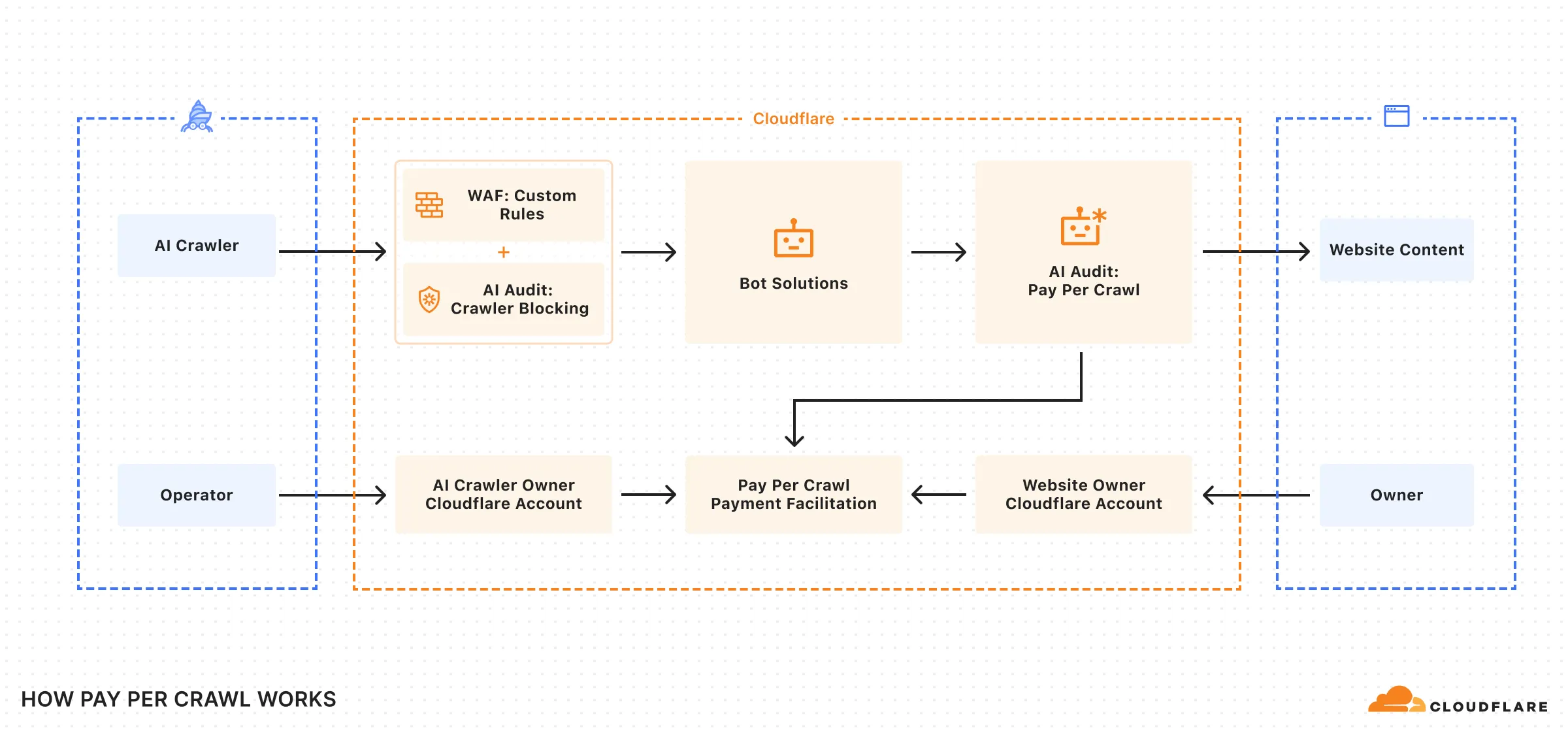
## Additional resources
Refer to the following resources.
* [Use pay per crawl as a site owner](https://developers.cloudflare.com/ai-crawl-control/features/pay-per-crawl/use-pay-per-crawl-as-site-owner/enable-in-account-settings/).
* [Use pay per crawl as an AI owner](https://developers.cloudflare.com/ai-crawl-control/features/pay-per-crawl/use-pay-per-crawl-as-ai-owner/set-up-cloudflare-account/).
* [AI Crawl Control with Cloudflare WAF](https://developers.cloudflare.com/ai-crawl-control/configuration/ai-crawl-control-with-waf/).
* [AI Crawl Control with Cloudflare Bots](https://developers.cloudflare.com/ai-crawl-control/configuration/ai-crawl-control-with-bots/).
```json
{"@context":"https://schema.org","@type":"BreadcrumbList","itemListElement":[{"@type":"ListItem","position":1,"item":{"@id":"/directory/","name":"Directory"}},{"@type":"ListItem","position":2,"item":{"@id":"/ai-crawl-control/","name":"AI Crawl Control"}},{"@type":"ListItem","position":3,"item":{"@id":"/ai-crawl-control/features/","name":"Features"}},{"@type":"ListItem","position":4,"item":{"@id":"/ai-crawl-control/features/pay-per-crawl/","name":"Pay Per Crawl"}},{"@type":"ListItem","position":5,"item":{"@id":"/ai-crawl-control/features/pay-per-crawl/what-is-pay-per-crawl/","name":"What is Pay Per Crawl?"}}]}
```
---
---
title: Track robots.txt
description: The Robots.txt tab in AI Crawl Control provide insights into how AI crawlers interact with your robots.txt files across your hostnames. You can monitor request patterns, verify file availability, and identify crawlers that violate your directives.
image: https://developers.cloudflare.com/core-services-preview.png
---
[Skip to content](#%5Ftop)
Was this helpful?
YesNo
[ Edit page ](https://github.com/cloudflare/cloudflare-docs/edit/production/src/content/docs/ai-crawl-control/features/track-robots-txt.mdx) [ Report issue ](https://github.com/cloudflare/cloudflare-docs/issues/new/choose)
Copy page
# Track robots.txt
The **Robots.txt** tab in AI Crawl Control provide insights into how AI crawlers interact with your `robots.txt` files across your hostnames. You can monitor request patterns, verify file availability, and identify crawlers that violate your directives.
To access robots.txt insights:
1. Log in to the [Cloudflare dashboard ↗](https://dash.cloudflare.com/), and select your account and domain.
2. Go to **AI Crawl Control**.
[ Go to **AI Crawl Control** ](https://dash.cloudflare.com/?to=/:account/:zone/ai)
3. Go to the **Robots.txt** tab.
## Check managed robots.txt status
The status card at the top of the tab shows whether Cloudflare is managing your `robots.txt` file.
When enabled, Cloudflare will include directives to block common AI crawlers used for training and include its [Content Signals Policy](https://developers.cloudflare.com/bots/additional-configurations/managed-robots-txt/#content-signals-policy) in your `robots.txt`. For more details on how Cloudflare manages your `robots.txt` file, refer to [Managed robots.txt](https://developers.cloudflare.com/bots/additional-configurations/managed-robots-txt/).
## Filter robots.txt request data
You can apply filters at the top of the tab to narrow your analysis of robots.txt requests:
* Filter by specific crawler name (for example, Googlebot or specific AI bots).
* Filter by the entity running the crawler to understand direct licensing opportunities or existing agreements.
* Filter by general use cases (for example, AI training, general search, or AI assistant).
* Select a custom time frame for historical analysis.
The values in all tables and metrics will update according to your filters.
## Monitor robots.txt availability
The **Availability** table shows the historical request frequency and health status of `robots.txt` files across your hostnames over the selected time frame.
| Column | Description |
| --------------- | ------------------------------------------------------------------------------------------------------------------------------------------------------------------------------------------------------------------------- |
| Path | The specific hostname's robots.txt file being requested. Paths are listed from the most requested to the least. |
| Requests | The total number of requests made to this path. Requests are broken down into:\- **Successful:** HTTP status codes below 400 (including **200 OK** and redirects).\- **Unsuccessful:** HTTP status codes of 400 or above. |
| Status | The HTTP status code from pinging the robots.txt file. |
| Content Signals | An indicator showing whether the robots.txt file contains [Content Signals ↗](https://contentsignals.org/), directives for usage in AI training, search, or AI input. |
From this table, you can take the following actions:
* Monitor for a high number of unsuccessful requests, which suggests that crawlers are having trouble accessing your `robots.txt` file.
* If the **Status** is `404 Not Found`, create a `robots.txt` file to provide clear directives.
* If the file exists, check for upstream WAF rules or other security settings that may be blocking access.
* If the **Content Signals** column indicates that signals are missing, add them to your `robots.txt` file. You can do this by following the [Content Signals ↗](https://contentsignals.org/) instructions or by enabling [Managed robots.txt](https://developers.cloudflare.com/bots/additional-configurations/managed-robots-txt/) to have Cloudflare manage them for you.
## Track robots.txt violations
The **Violations** table identifies AI crawlers that have requested paths explicitly disallowed by your `robots.txt` file. This helps you identify non-compliant crawlers and take appropriate action.
How violations are calculated
The Violations table identifies mismatches between your **current** `robots.txt` directives and past crawler requests. Because violations are not logged in real-time, recently added or changed rules may cause previously legitimate requests to be flagged as violations.
For example, if you add a new `Disallow` rule, all past requests to that path will appear as violations, even though they were not violations at the time of the request.
| Column | Description |
| ---------- | -------------------------------------------------------------------------------------------------------------------------------------- |
| Crawler | The name of the bot that violated your robots.txt directives. The operator of the crawler is listed directly beneath the crawler name. |
| Path | The specific URL or path the crawler attempted to access that was disallowed by your robots.txt file. |
| Directive | The exact line from your robots.txt file that disallowed access to the path. |
| Violations | The count of HTTP requests made to the disallowed path/directive pair within the selected time frame. |
When you identify crawlers violating your `robots.txt` directives, you have several options:
* Navigate to the [**Crawlers** tab](https://developers.cloudflare.com/ai-crawl-control/features/manage-ai-crawlers/) to permanently block the non-compliant crawler.
* Use [Cloudflare WAF](https://developers.cloudflare.com/waf/) to create a path-specific security rules for the violating crawler.
* Use [Redirect Rules](https://developers.cloudflare.com/rules/url-forwarding/) to guide violating crawlers to an appropriate area of your site.
## Related resources
* [Manage AI crawlers](https://developers.cloudflare.com/ai-crawl-control/features/manage-ai-crawlers/)
* [Analyze AI traffic](https://developers.cloudflare.com/ai-crawl-control/features/analyze-ai-traffic/)
* [Cloudflare WAF](https://developers.cloudflare.com/waf/)
```json
{"@context":"https://schema.org","@type":"BreadcrumbList","itemListElement":[{"@type":"ListItem","position":1,"item":{"@id":"/directory/","name":"Directory"}},{"@type":"ListItem","position":2,"item":{"@id":"/ai-crawl-control/","name":"AI Crawl Control"}},{"@type":"ListItem","position":3,"item":{"@id":"/ai-crawl-control/features/","name":"Features"}},{"@type":"ListItem","position":4,"item":{"@id":"/ai-crawl-control/features/track-robots-txt/","name":"Track robots.txt"}}]}
```
---
---
title: Bot reference
description: Detection IDs and user agents for major AI crawlers.
image: https://developers.cloudflare.com/core-services-preview.png
---
[Skip to content](#%5Ftop)
Was this helpful?
YesNo
[ Edit page ](https://github.com/cloudflare/cloudflare-docs/edit/production/src/content/docs/ai-crawl-control/reference/bots.mdx) [ Report issue ](https://github.com/cloudflare/cloudflare-docs/issues/new/choose)
Copy page
# Bot reference
A selection of crawlers from major AI operators. For an up-to-date list of verified bots, see the [Cloudflare Radar Bots Directory ↗](https://radar.cloudflare.com/bots/directory).
| Crawler | Operator | Category | Detection IDs | User Agent |
| --------------------- | ------------ | ------------- | ------------------- | --------------------- |
| GPTBot | OpenAI | AI Crawler | 123815556, 33563875 | GPTBot |
| ChatGPT-User | OpenAI | AI Assistant | 132995013, 33563857 | ChatGPT-User |
| OAI-SearchBot | OpenAI | AI Search | 126255384, 33563986 | OAI-SearchBot |
| ClaudeBot | Anthropic | AI Crawler | 33563859 | ClaudeBot |
| Claude-SearchBot | Anthropic | AI Search | 33564301 | Claude-SearchBot |
| Claude-User | Anthropic | AI Assistant | 33564303 | Claude-User |
| PerplexityBot | Perplexity | AI Search | 33563889 | PerplexityBot |
| Perplexity-User | Perplexity | AI Assistant | 33564371 | Perplexity-User |
| Googlebot | Google | Search Engine | 120623194, 33554459 | Googlebot |
| Google-CloudVertexBot | Google | AI Crawler | 133730073, 33564321 | Google-CloudVertexBot |
| BingBot | Microsoft | Search Engine | 117479730, 33554461 | bingbot |
| Bytespider | ByteDance | AI Crawler | 33563853 | Bytespider |
| CCBot | Common Crawl | AI Crawler | 133621792, 33563855 | CCBot |
| Meta-ExternalAgent | Meta | AI Crawler | 124581738, 33563982 | meta-externalagent |
| Meta-ExternalFetcher | Meta | AI Assistant | 132272919, 33563980 | meta-externalfetcher |
| FacebookBot | Meta | AI Crawler | 33563972 | FacebookBot |
| Applebot | Apple | AI Search | 120424214, 33563845 | Applebot |
| Amazonbot | Amazon | AI Crawler | 118601807, 33563839 | Amazonbot |
| DuckAssistBot | DuckDuckGo | AI Assistant | 126666910, 33564037 | DuckAssistBot |
| MistralAI-User | Mistral | AI Assistant | 128950951, 33564323 | MistralAI-User |
Note
[Bot Management](https://developers.cloudflare.com/bots/get-started/bot-management/) customers can use `cf.bot_management.detection_ids` in [WAF custom rules](https://developers.cloudflare.com/waf/custom-rules/). All other plans can use user agent matching in robots.txt or WAF rules.
## Referrer domains by operator
When visitors arrive at your site from an AI platform, the referrer indicates which operator's service sent them.
| Operator | Domains |
| ---------- | --------------------------------------------------- |
| OpenAI | openai.com, chatgpt.com |
| Anthropic | anthropic.com, claude.ai |
| Perplexity | perplexity.ai |
| Google | google.com, youtube.com |
| Microsoft | bing.com, msn.com, microsoft.com |
| Meta | facebook.com, instagram.com, whatsapp.com, meta.com |
| DuckDuckGo | duckduckgo.com, duck.com |
| ByteDance | bytedance.com, tiktok.com |
| Apple | apple.com, icloud.com |
| Amazon | amazon.com, alexa.com |
## Related
* [Analyze AI traffic](https://developers.cloudflare.com/ai-crawl-control/features/analyze-ai-traffic/) — View crawler activity in the dashboard
* [GraphQL API reference](https://developers.cloudflare.com/ai-crawl-control/reference/graphql-api/) — Query crawler analytics
* [Cloudflare Radar Bots Directory ↗](https://radar.cloudflare.com/bots/directory) — Up-to-date list of verified bots
```json
{"@context":"https://schema.org","@type":"BreadcrumbList","itemListElement":[{"@type":"ListItem","position":1,"item":{"@id":"/directory/","name":"Directory"}},{"@type":"ListItem","position":2,"item":{"@id":"/ai-crawl-control/","name":"AI Crawl Control"}},{"@type":"ListItem","position":3,"item":{"@id":"/ai-crawl-control/reference/","name":"Reference"}},{"@type":"ListItem","position":4,"item":{"@id":"/ai-crawl-control/reference/bots/","name":"Bot reference"}}]}
```
---
---
title: Glossary
description: Review the definitions for terms used across Cloudflare's AI Crawl Control documentation.
image: https://developers.cloudflare.com/core-services-preview.png
---
[Skip to content](#%5Ftop)
Was this helpful?
YesNo
[ Edit page ](https://github.com/cloudflare/cloudflare-docs/edit/production/src/content/docs/ai-crawl-control/reference/glossary.mdx) [ Report issue ](https://github.com/cloudflare/cloudflare-docs/issues/new/choose)
Copy page
# Glossary
Review the definitions for terms used across Cloudflare's AI Crawl Control documentation.
| Term | Definition |
| ------------------ | ---------------------------------------------------------------------------------------------------------------------------------------------------------------------------------------------------------------- |
| AI crawler | A bot which scrapes content from websites in support of an AI model, including by scraping content for indexing, retrieval augmented generation, or training. |
| category | A classification describing a crawler's stated purpose: "AI Crawler", "AI Search", "AI Assistant", or "Search Engine". One category per crawler. |
| Content Signals | An emerging IETF standard for expressing AI content preferences via HTTP headers or metadata. Aims to replace non-standard vendor signals. Refer to contentsignals.org. |
| crawl | A single HTTP request from a bot to access a page on your site. |
| crawler | A specific bot operated by a company to access web content. One operator (like OpenAI) may run multiple crawlers (GPTBot, ChatGPT-User). |
| In-band pricing | Pricing transmitted in HTTP response headers alongside content. In Pay Per Crawl, the origin sets prices via the crawler-price header. |
| Merchant of Record | The entity who facilitates "buying and selling". For pay per crawl, Cloudflare is the merchant of record. |
| operator | The company or organization that owns and operates an AI crawler. Examples include OpenAI, Microsoft, Google, ByteDance, Anthropic, and Meta. In AI Crawl Control, crawlers are grouped by their operators. |
| Referrer | The site a user was on before visiting your domain, tracked via the HTTP Referer header. In AI Crawl Control, referrer data shows traffic arriving from AI platforms like ChatGPT or Perplexity. |
| robots.txt | A text file at the root of a website that instructs crawlers which pages they should or should not access. Compliance is voluntary. AI Crawl Control helps monitor which crawlers violate your robots.txt rules. |
```json
{"@context":"https://schema.org","@type":"BreadcrumbList","itemListElement":[{"@type":"ListItem","position":1,"item":{"@id":"/directory/","name":"Directory"}},{"@type":"ListItem","position":2,"item":{"@id":"/ai-crawl-control/","name":"AI Crawl Control"}},{"@type":"ListItem","position":3,"item":{"@id":"/ai-crawl-control/reference/","name":"Reference"}},{"@type":"ListItem","position":4,"item":{"@id":"/ai-crawl-control/reference/glossary/","name":"Glossary"}}]}
```
---
---
title: GraphQL API
description: Query AI Crawl Control analytics data using the GraphQL Analytics API.
image: https://developers.cloudflare.com/core-services-preview.png
---
[Skip to content](#%5Ftop)
Was this helpful?
YesNo
[ Edit page ](https://github.com/cloudflare/cloudflare-docs/edit/production/src/content/docs/ai-crawl-control/reference/graphql-api.mdx) [ Report issue ](https://github.com/cloudflare/cloudflare-docs/issues/new/choose)
Copy page
# GraphQL API
AI Crawl Control analytics are available through Cloudflare's [GraphQL Analytics API](https://developers.cloudflare.com/analytics/graphql-api/). You can query the same data shown in the dashboard to build custom reports, integrate with monitoring systems, or export for analysis. Test queries using the [GraphQL API Explorer ↗](https://graphql.cloudflare.com/), or capture the exact queries the dashboard uses via [Chrome DevTools](https://developers.cloudflare.com/analytics/graphql-api/tutorials/capture-graphql-queries-from-dashboard/).
## Key filters
| Filter | Description | Availability |
| -------------------------------- | ------------------------------------------------------------------------------------------------------------------------------- | ------------------------------------------------------------------------------------ |
| requestSource: "eyeball" | Real client requests only. Excludes internal Cloudflare traffic. | All plans |
| userAgent\_like: "%...%" | Filter by [user agent](https://developers.cloudflare.com/ai-crawl-control/reference/bots/). Can be spoofed. | All plans |
| edgeResponseStatus\_geq / \_lt | Filter by HTTP status code range. | All plans |
| clientRequestPath\_like: "%...%" | Filter by URL path pattern. | All plans |
| clientRefererHost\_like: "%...%" | Filter by [referrer domain](https://developers.cloudflare.com/ai-crawl-control/reference/bots/#referrer-domains-by-operator). | Paid plans only |
| botDetectionIds\_hasany: \[...\] | Filter by [detection IDs](https://developers.cloudflare.com/ai-crawl-control/reference/bots/). Reliably verified by Cloudflare. | [Bot Management](https://developers.cloudflare.com/bots/get-started/bot-management/) |
## Query examples
Get AI crawler requests over time using detection IDs
```
{
viewer {
zones(filter: { zoneTag: "" }) {
httpRequestsAdaptiveGroups(
filter: {
datetime_geq: "2027-01-01T00:00:00Z"
datetime_leq: "2027-01-02T00:00:00Z"
requestSource: "eyeball"
# 123815556 = GPTBot, 132995013 = ChatGPT-User, 126255384 = OAI-SearchBot
botDetectionIds_hasany: [123815556, 132995013, 126255384]
}
limit: 5000
) {
count
dimensions {
datetimeHour
botDetectionIds
clientRequestHTTPHost
}
sum {
edgeResponseBytes
}
}
}
}
}
```
Get AI crawler requests over time using user agent
```
{
viewer {
zones(filter: { zoneTag: "" }) {
httpRequestsAdaptiveGroups(
filter: {
datetime_geq: "2027-01-01T00:00:00Z"
datetime_leq: "2027-01-02T00:00:00Z"
requestSource: "eyeball"
userAgent_like: "%GPTBot%"
}
limit: 5000
) {
count
dimensions {
datetimeHour
userAgent
clientRequestHTTPHost
}
sum {
edgeResponseBytes
}
}
}
}
}
```
Get top crawled paths
```
{
viewer {
zones(filter: { zoneTag: "" }) {
httpRequestsAdaptiveGroups(
filter: {
datetime_geq: "2027-01-01T00:00:00Z"
datetime_leq: "2027-01-02T00:00:00Z"
requestSource: "eyeball"
edgeResponseStatus_geq: 200
edgeResponseStatus_lt: 400
userAgent_like: "%GPTBot%"
}
limit: 5000
orderBy: [count_DESC]
) {
count
dimensions {
clientRequestPath
clientRequestHTTPHost
}
}
}
}
}
```
Get AI referral traffic
```
{
viewer {
zones(filter: { zoneTag: "" }) {
httpRequestsAdaptiveGroups(
filter: {
datetime_geq: "2027-01-01T00:00:00Z"
datetime_leq: "2027-01-02T00:00:00Z"
requestSource: "eyeball"
OR: [
{ clientRefererHost_like: "%.chatgpt.com%" }
{ clientRefererHost: "chatgpt.com" }
{ clientRefererHost_like: "%.perplexity.ai%" }
{ clientRefererHost: "perplexity.ai" }
]
}
limit: 5000
orderBy: [count_DESC]
) {
count
dimensions {
datetimeHour
clientRefererHost
}
}
}
}
}
```
Get data transfer by crawler
```
{
viewer {
zones(filter: { zoneTag: "" }) {
httpRequestsAdaptiveGroups(
filter: {
datetime_geq: "2027-01-01T00:00:00Z"
datetime_leq: "2027-01-02T00:00:00Z"
requestSource: "eyeball"
userAgent_like: "%GPTBot%"
}
limit: 5000
orderBy: [sum_edgeResponseBytes_DESC]
) {
count
dimensions {
userAgent
}
sum {
edgeResponseBytes
}
}
}
}
}
```
## Related
* [Bot reference](https://developers.cloudflare.com/ai-crawl-control/reference/bots/) — Detection IDs and user agents
* [GraphQL Analytics API](https://developers.cloudflare.com/analytics/graphql-api/) — Full API documentation
```json
{"@context":"https://schema.org","@type":"BreadcrumbList","itemListElement":[{"@type":"ListItem","position":1,"item":{"@id":"/directory/","name":"Directory"}},{"@type":"ListItem","position":2,"item":{"@id":"/ai-crawl-control/","name":"AI Crawl Control"}},{"@type":"ListItem","position":3,"item":{"@id":"/ai-crawl-control/reference/","name":"Reference"}},{"@type":"ListItem","position":4,"item":{"@id":"/ai-crawl-control/reference/graphql-api/","name":"GraphQL API"}}]}
```
---
---
title: Worker templates
description: Cloudflare Worker templates for AI Crawl Control integrations.
image: https://developers.cloudflare.com/core-services-preview.png
---
[Skip to content](#%5Ftop)
Was this helpful?
YesNo
[ Edit page ](https://github.com/cloudflare/cloudflare-docs/edit/production/src/content/docs/ai-crawl-control/reference/worker-templates.mdx) [ Report issue ](https://github.com/cloudflare/cloudflare-docs/issues/new/choose)
Copy page
# Worker templates
Use [AI Crawl Control analytics](https://developers.cloudflare.com/ai-crawl-control/features/analyze-ai-traffic/) to identify which crawlers are accessing your site, then deploy Worker templates to customize how you handle that traffic.
## x402 Payment-Gated Proxy
The x402-proxy template implements payment-gated access using the [x402 protocol ↗](https://www.x402.org/) — an open payment standard built around HTTP 402 (Payment Required). Use it to monetize crawler access, paywall specific routes, or charge bots while letting humans through free.
For setup instructions and Bot Management integration examples, see the [template on GitHub ↗](https://github.com/cloudflare/templates/tree/main/x402-proxy-template).
[](https://deploy.workers.cloudflare.com/?url=https://github.com/cloudflare/templates/tree/main/x402-proxy-template)
## Related
* [Bot reference](https://developers.cloudflare.com/ai-crawl-control/reference/bots/) — Detection IDs and user agents for common crawlers
* [Cloudflare Workers](https://developers.cloudflare.com/workers/) — Build and deploy serverless applications
* [Workers templates ↗](https://github.com/cloudflare/templates) — More templates on GitHub
* [Pay Per Crawl](https://developers.cloudflare.com/ai-crawl-control/features/pay-per-crawl/what-is-pay-per-crawl/) — Native Cloudflare integration for monetizing crawler access
* [x402 payments](https://developers.cloudflare.com/agents/agentic-payments/x402/) — Gate resources, charge for MCP tools, add payments to coding agents
```json
{"@context":"https://schema.org","@type":"BreadcrumbList","itemListElement":[{"@type":"ListItem","position":1,"item":{"@id":"/directory/","name":"Directory"}},{"@type":"ListItem","position":2,"item":{"@id":"/ai-crawl-control/","name":"AI Crawl Control"}},{"@type":"ListItem","position":3,"item":{"@id":"/ai-crawl-control/reference/","name":"Reference"}},{"@type":"ListItem","position":4,"item":{"@id":"/ai-crawl-control/reference/worker-templates/","name":"Worker templates"}}]}
```