---
title: Cloudflare bot solutions
description: While Cloudflare offers several products that relate to bot traffic, this section reviews our bot-specific products, Bot Fight Mode, Super Bot Fight Mode, and Bot Management for Enterprise.
image: https://developers.cloudflare.com/core-services-preview.png
---

[Skip to content](#%5Ftop) 

Was this helpful?

YesNo

[ Edit page ](https://github.com/cloudflare/cloudflare-docs/edit/production/src/content/docs/bots/index.mdx) [ Report issue ](https://github.com/cloudflare/cloudflare-docs/issues/new/choose) 

Copy page

# Cloudflare bot solutions

Identify and mitigate automated traffic to protect your domain from bad bots.

 Available on all plans 

While Cloudflare offers several products that relate to bot traffic, this section reviews our bot-specific products, Bot Fight Mode, Super Bot Fight Mode, and Bot Management for Enterprise.

Note

Enterprise customers can preview this product as a [non-contract service](https://developers.cloudflare.com/billing/preview-services/), which provides full access, free of metered usage fees, limits, and certain other restrictions.

## Which bot solution do I need?

If you have a smaller domain and have identified a bot problem, we recommend Bot Fight Mode or Super Bot Fight Mode, which are included with your plan subscription. You can enable either from your dashboard, but these solutions offer limited configuration options.

If you have a large domain with a lot of traffic, we recommend Bot Management for Enterprise, especially for customers in ecommerce, banking, and security. To enable Bot Management for Enterprise and write rules to customize your bot protection, contact your account team.

To see the differences in features and functionality, visit [Plans](https://developers.cloudflare.com/bots/plans/).

## Features

### Bot Fight Mode

Detect and mitigate bot traffic on your domain.

[ Use Bot Fight Mode ](https://developers.cloudflare.com/bots/get-started/bot-fight-mode/) 

### Super Bot Fight Mode

Identify traffic matching patterns of known bots, challenge or block bots, protect static resources, and view analytics to help you understand bot traffic using Super Bot Fight Mode.

[ Use Super Bot Fight Mode ](https://developers.cloudflare.com/bots/get-started/super-bot-fight-mode/) 

### Bot Analytics

Use Bot Analytics to dynamically examine bot traffic.

[ Use Bot Analytics ](https://developers.cloudflare.com/bots/bot-analytics/) 

### Firewall variables

Access several new variables within the Firewall expression builder.

[ Use Firewall variables ](https://developers.cloudflare.com/bots/reference/bot-management-variables/) 

## Related products

**[API Shield](https://developers.cloudflare.com/api-shield/)** 

Identify and address API vulnerabilities using API Shield.

**[DDoS Protection](https://developers.cloudflare.com/ddos-protection/)** 

Detect and mitigate Distributed Denial of Service (DDoS) attacks using Cloudflare's Autonomous Edge.

**[Turnstile](https://developers.cloudflare.com/turnstile/)** 

Use Cloudflare's smart CAPTCHA alternative to run less intrusive challenges.

**[WAF](https://developers.cloudflare.com/waf/)** 

Get automatic protection from vulnerabilities and the flexibility to create custom rules.

## More resources

[Plans](https://www.cloudflare.com/plans/#overview) 

Compare available Cloudflare plans

```json
{"@context":"https://schema.org","@type":"BreadcrumbList","itemListElement":[{"@type":"ListItem","position":1,"item":{"@id":"/directory/","name":"Directory"}},{"@type":"ListItem","position":2,"item":{"@id":"/bots/","name":"Bots"}}]}
```

---

---
title: Plans
description: To learn more about features and functionality, select a plan.
image: https://developers.cloudflare.com/core-services-preview.png
---

[Skip to content](#%5Ftop) 

Was this helpful?

YesNo

[ Edit page ](https://github.com/cloudflare/cloudflare-docs/edit/production/src/content/docs/bots/plans/index.mdx) [ Report issue ](https://github.com/cloudflare/cloudflare-docs/issues/new/choose) 

Copy page

# Plans

To learn more about features and functionality, select a plan.

[ Free ](https://developers.cloudflare.com/bots/plans/free/) [ Pro ](https://developers.cloudflare.com/bots/plans/pro/) [ Business ](https://developers.cloudflare.com/bots/plans/biz-and-ent/) [ Bot Management for Enterprise ](https://developers.cloudflare.com/bots/plans/bm-subscription/) 

## How do I get started?

To get started, review our [setup guides](https://developers.cloudflare.com/bots/get-started/). If you have any questions, visit the [community ↗](https://community.cloudflare.com/) to engage with other Cloudflare users.

```json
{"@context":"https://schema.org","@type":"BreadcrumbList","itemListElement":[{"@type":"ListItem","position":1,"item":{"@id":"/directory/","name":"Directory"}},{"@type":"ListItem","position":2,"item":{"@id":"/bots/","name":"Bots"}},{"@type":"ListItem","position":3,"item":{"@id":"/bots/plans/","name":"Plans"}}]}
```

---

---
title: Business
description: To learn more about features and functionality, select a plan.
image: https://developers.cloudflare.com/core-services-preview.png
---

[Skip to content](#%5Ftop) 

Was this helpful?

YesNo

[ Edit page ](https://github.com/cloudflare/cloudflare-docs/edit/production/src/content/docs/bots/plans/biz-and-ent.mdx) [ Report issue ](https://github.com/cloudflare/cloudflare-docs/issues/new/choose) 

Copy page

# Business

To learn more about features and functionality, select a plan.

[ Free ](https://developers.cloudflare.com/bots/plans/free/) [ Pro ](https://developers.cloudflare.com/bots/plans/pro/) [ Business ](https://developers.cloudflare.com/bots/plans/biz-and-ent/) [ Bot Management for Enterprise ](https://developers.cloudflare.com/bots/plans/bm-subscription/) 

| **Plan name**             | Super Bot Fight Mode                                                                                                                                                                                                                                                                                                                                                                                                                                                                                                                                                                                                                                                                                                                                                                                                                                                                            |
| ------------------------- | ----------------------------------------------------------------------------------------------------------------------------------------------------------------------------------------------------------------------------------------------------------------------------------------------------------------------------------------------------------------------------------------------------------------------------------------------------------------------------------------------------------------------------------------------------------------------------------------------------------------------------------------------------------------------------------------------------------------------------------------------------------------------------------------------------------------------------------------------------------------------------------------------- |
| **Availability**          | All Business customers and Enterprise customers without Bot Management[1](#user-content-fn-1)                                                                                                                                                                                                                                                                                                                                                                                                                                                                                                                                                                                                                                                                                                                                                                                                   |
| **Type of bots detected** | Simple bots, headless browsers, and many sophisticated bots                                                                                                                                                                                                                                                                                                                                                                                                                                                                                                                                                                                                                                                                                                                                                                                                                                     |
| **Actions**               | Customer chooses whether to allow, block, or challenge                                                                                                                                                                                                                                                                                                                                                                                                                                                                                                                                                                                                                                                                                                                                                                                                                                          |
| **Analytics**             | Dedicated Bot Analytics tool, available in **Security Analytics**                                                                                                                                                                                                                                                                                                                                                                                                                                                                                                                                                                                                                                                                                                                                                                                                                               |
| **Control**               | Applied to all traffic across a domain                                                                                                                                                                                                                                                                                                                                                                                                                                                                                                                                                                                                                                                                                                                                                                                                                                                          |
| **Additional features**   | [Block AI bots](https://developers.cloudflare.com/bots/additional-configurations/block-ai-bots/), [AI Labyrinth](https://developers.cloudflare.com/bots/additional-configurations/ai-labyrinth/), [Instruct AI bot traffic with robots.txt](https://developers.cloudflare.com/bots/additional-configurations/managed-robots-txt/), [Definitely and Likely automated bots](https://developers.cloudflare.com/bots/concepts/bot-score/#bot-groupings), [Verified bots](https://developers.cloudflare.com/bots/concepts/bot/verified-bots/), [Static resource protection](https://developers.cloudflare.com/bots/additional-configurations/static-resources/), [Optimize for WordPress](https://developers.cloudflare.com/bots/troubleshooting/wordpress-loopback-issue/), [JavaScript Detections](https://developers.cloudflare.com/cloudflare-challenges/challenge-types/javascript-detections/) |

## Bot settings versus custom rules

The following features are handled automatically in **Security Settings** and do not require custom rules:

| Feature                                         | Handled by bot settings | Requires custom rules                                                                     |
| ----------------------------------------------- | ----------------------- | ----------------------------------------------------------------------------------------- |
| Block or challenge definitely automated traffic | Yes                     | Only for path-specific or threshold-tuned rules                                           |
| Block or challenge likely automated traffic     | Not available on Pro    | Yes, with [Bot Management](https://developers.cloudflare.com/bots/plans/bm-subscription/) |
| Allow or block verified bots                    | Yes                     | No                                                                                        |
| Block AI crawlers                               | Yes                     | Only to target individual AI crawlers                                                     |
| Protect static resources                        | Yes                     | No                                                                                        |
| Optimize for WordPress                          | Yes                     | No                                                                                        |

For more details on when custom rules are needed, refer to [custom rules](https://developers.cloudflare.com/bots/additional-configurations/custom-rules/).

## How do I get started?

To get started, review our [setup guides](https://developers.cloudflare.com/bots/get-started/). If you have any questions, visit the [community ↗](https://community.cloudflare.com/) to engage with other Cloudflare users.

## Footnotes

1. When users purchase Bot Management for Enterprise, Cloudflare automatically replaces and disables other bot products to prevent overlap. [↩](#user-content-fnref-1)

```json
{"@context":"https://schema.org","@type":"BreadcrumbList","itemListElement":[{"@type":"ListItem","position":1,"item":{"@id":"/directory/","name":"Directory"}},{"@type":"ListItem","position":2,"item":{"@id":"/bots/","name":"Bots"}},{"@type":"ListItem","position":3,"item":{"@id":"/bots/plans/","name":"Plans"}},{"@type":"ListItem","position":4,"item":{"@id":"/bots/plans/biz-and-ent/","name":"Business"}}]}
```

---

---
title: Enterprise Bot Management
description: To learn more about features and functionality, select a plan.
image: https://developers.cloudflare.com/core-services-preview.png
---

[Skip to content](#%5Ftop) 

Was this helpful?

YesNo

[ Edit page ](https://github.com/cloudflare/cloudflare-docs/edit/production/src/content/docs/bots/plans/bm-subscription.mdx) [ Report issue ](https://github.com/cloudflare/cloudflare-docs/issues/new/choose) 

Copy page

# Enterprise Bot Management

To learn more about features and functionality, select a plan.

[ Free ](https://developers.cloudflare.com/bots/plans/free/) [ Pro ](https://developers.cloudflare.com/bots/plans/pro/) [ Business ](https://developers.cloudflare.com/bots/plans/biz-and-ent/) [ Bot Management for Enterprise ](https://developers.cloudflare.com/bots/plans/bm-subscription/) 

| **Plan name**             | Bot Management for Enterprise                                                                                                                                                                                                                                                                                                                                                                                                                                                                                                                                                                                                                                                                                                                                                                                                                                                                   |
| ------------------------- | ----------------------------------------------------------------------------------------------------------------------------------------------------------------------------------------------------------------------------------------------------------------------------------------------------------------------------------------------------------------------------------------------------------------------------------------------------------------------------------------------------------------------------------------------------------------------------------------------------------------------------------------------------------------------------------------------------------------------------------------------------------------------------------------------------------------------------------------------------------------------------------------------- |
| **Availability**          | Added to Enterprise plans by your account team                                                                                                                                                                                                                                                                                                                                                                                                                                                                                                                                                                                                                                                                                                                                                                                                                                                  |
| **Enablement**            | Quick onboarding with help from our Solutions Engineering team                                                                                                                                                                                                                                                                                                                                                                                                                                                                                                                                                                                                                                                                                                                                                                                                                                  |
| **Type of bots detected** | Simple and sophisticated bots, headless browsers, and domain-specific anomalies                                                                                                                                                                                                                                                                                                                                                                                                                                                                                                                                                                                                                                                                                                                                                                                                                 |
| **Actions**               | Customer chooses from several options, including block and various challenges                                                                                                                                                                                                                                                                                                                                                                                                                                                                                                                                                                                                                                                                                                                                                                                                                   |
| **Analytics**             | Dedicated Bot Analytics tool, available in **Security Analytics**                                                                                                                                                                                                                                                                                                                                                                                                                                                                                                                                                                                                                                                                                                                                                                                                                               |
| **Control**               | Ability to restrict by path, IP address, and more. Access to [bot score](https://developers.cloudflare.com/bots/concepts/bot-score/), [JA3/JA4 fingerprint](https://developers.cloudflare.com/bots/additional-configurations/ja3-ja4-fingerprint/), [bot tags](https://developers.cloudflare.com/bots/concepts/bot-tags/) fields, and [detection IDs](https://developers.cloudflare.com/bots/additional-configurations/detection-ids/).                                                                                                                                                                                                                                                                                                                                                                                                                                                         |
| **Additional features**   | [Block AI bots](https://developers.cloudflare.com/bots/additional-configurations/block-ai-bots/), [AI Labyrinth](https://developers.cloudflare.com/bots/additional-configurations/ai-labyrinth/), [Instruct AI bot traffic with robots.txt](https://developers.cloudflare.com/bots/additional-configurations/managed-robots-txt/), [Definitely and Likely automated bots](https://developers.cloudflare.com/bots/concepts/bot-score/#bot-groupings), [Verified bots](https://developers.cloudflare.com/bots/concepts/bot/verified-bots/), [Static resource protection](https://developers.cloudflare.com/bots/additional-configurations/static-resources/), [Optimize for WordPress](https://developers.cloudflare.com/bots/troubleshooting/wordpress-loopback-issue/), [JavaScript Detections](https://developers.cloudflare.com/cloudflare-challenges/challenge-types/javascript-detections/) |

Note

Zones that have [Enterprise Bot Management](https://developers.cloudflare.com/bots/get-started/bot-management/) enabled will not see Bot Fight Mode or Super Bot Fight Mode under **Security** \> **Bots**.

## Bot settings vs. custom rules

Bot Management customers have both bot settings (configured in **Security Settings**) and the ability to create custom rules using bot score fields. Start with the bot settings for baseline protection, then add custom rules only when you need additional control.

| Feature                                         | Handled by bot settings | When to use custom rules instead                                                                                                           |
| ----------------------------------------------- | ----------------------- | ------------------------------------------------------------------------------------------------------------------------------------------ |
| Block or challenge definitely automated traffic | No                      | Path-specific rules, custom thresholds, or combining with other fields                                                                     |
| Block or challenge likely automated traffic     | No                      | Path-specific rules, custom thresholds, or combining with other fields                                                                     |
| Allow or block verified bots                    | No                      | Granular control by verified bot category                                                                                                  |
| Block AI crawlers                               | Yes                     | Target individual AI crawlers using detection IDs                                                                                          |
| Protect static resources                        | No                      | Exclude static resources from specific rules                                                                                               |
| Optimize for WordPress                          | No                      | No                                                                                                                                         |
| Forward bot data to origin                      | No                      | Use [Transform Rules](https://developers.cloudflare.com/rules/transform/) or [Snippets](https://developers.cloudflare.com/rules/snippets/) |
| Detection ID targeting                          | No                      | Use cf.bot\_management.detection\_ids in [custom rules](https://developers.cloudflare.com/waf/custom-rules/)                               |
| JA3/JA4 fingerprint rules                       | No                      | Use cf.bot\_management.ja3\_hash or cf.bot\_management.ja4 in [custom rules](https://developers.cloudflare.com/waf/custom-rules/)          |

For more details on when custom rules are needed, refer to [custom rules](https://developers.cloudflare.com/bots/additional-configurations/custom-rules/).

## How do I get started?

To get started, review our [setup guides](https://developers.cloudflare.com/bots/get-started/). If you have any questions, visit the [community ↗](https://community.cloudflare.com/) to engage with other Cloudflare users.

```json
{"@context":"https://schema.org","@type":"BreadcrumbList","itemListElement":[{"@type":"ListItem","position":1,"item":{"@id":"/directory/","name":"Directory"}},{"@type":"ListItem","position":2,"item":{"@id":"/bots/","name":"Bots"}},{"@type":"ListItem","position":3,"item":{"@id":"/bots/plans/","name":"Plans"}},{"@type":"ListItem","position":4,"item":{"@id":"/bots/plans/bm-subscription/","name":"Enterprise Bot Management"}}]}
```

---

---
title: Free
description: To learn more about features and functionality, select a plan.
image: https://developers.cloudflare.com/core-services-preview.png
---

[Skip to content](#%5Ftop) 

Was this helpful?

YesNo

[ Edit page ](https://github.com/cloudflare/cloudflare-docs/edit/production/src/content/docs/bots/plans/free.mdx) [ Report issue ](https://github.com/cloudflare/cloudflare-docs/issues/new/choose) 

Copy page

# Free

To learn more about features and functionality, select a plan.

[ Free ](https://developers.cloudflare.com/bots/plans/free/) [ Pro ](https://developers.cloudflare.com/bots/plans/pro/) [ Business ](https://developers.cloudflare.com/bots/plans/biz-and-ent/) [ Bot Management for Enterprise ](https://developers.cloudflare.com/bots/plans/bm-subscription/) 

| **Plan name**             | Bot Fight Mode                                                                                                                                                                                                                                                                                                                    |
| ------------------------- | --------------------------------------------------------------------------------------------------------------------------------------------------------------------------------------------------------------------------------------------------------------------------------------------------------------------------------- |
| **Availability**          | All Free customers                                                                                                                                                                                                                                                                                                                |
| **Type of bots detected** | Simple bots (from cloud ASNs) and headless browsers                                                                                                                                                                                                                                                                               |
| **Actions**               | Cloudflare issues a computationally expensive challenge                                                                                                                                                                                                                                                                           |
| **Control**               | Applied to all traffic across a domain                                                                                                                                                                                                                                                                                            |
| **Additional features**   | [Block AI bots](https://developers.cloudflare.com/bots/additional-configurations/block-ai-bots/), [AI Labyrinth](https://developers.cloudflare.com/bots/additional-configurations/ai-labyrinth/), [Instruct AI bot traffic with robots.txt](https://developers.cloudflare.com/bots/additional-configurations/managed-robots-txt/) |

## How do I get started?

To get started, review our [setup guides](https://developers.cloudflare.com/bots/get-started/). If you have any questions, visit the [community ↗](https://community.cloudflare.com/) to engage with other Cloudflare users.

```json
{"@context":"https://schema.org","@type":"BreadcrumbList","itemListElement":[{"@type":"ListItem","position":1,"item":{"@id":"/directory/","name":"Directory"}},{"@type":"ListItem","position":2,"item":{"@id":"/bots/","name":"Bots"}},{"@type":"ListItem","position":3,"item":{"@id":"/bots/plans/","name":"Plans"}},{"@type":"ListItem","position":4,"item":{"@id":"/bots/plans/free/","name":"Free"}}]}
```

---

---
title: Pro
description: To learn more about features and functionality, select a plan.
image: https://developers.cloudflare.com/core-services-preview.png
---

[Skip to content](#%5Ftop) 

Was this helpful?

YesNo

[ Edit page ](https://github.com/cloudflare/cloudflare-docs/edit/production/src/content/docs/bots/plans/pro.mdx) [ Report issue ](https://github.com/cloudflare/cloudflare-docs/issues/new/choose) 

Copy page

# Pro

To learn more about features and functionality, select a plan.

[ Free ](https://developers.cloudflare.com/bots/plans/free/) [ Pro ](https://developers.cloudflare.com/bots/plans/pro/) [ Business ](https://developers.cloudflare.com/bots/plans/biz-and-ent/) [ Bot Management for Enterprise ](https://developers.cloudflare.com/bots/plans/bm-subscription/) 

| **Plan name**             | Super Bot Fight Mode                                                                                                                                                                                                                                                                                                                                                                                                                                                                                                                                                                                                                                                                                                                                                                                                                                                                 |
| ------------------------- | ------------------------------------------------------------------------------------------------------------------------------------------------------------------------------------------------------------------------------------------------------------------------------------------------------------------------------------------------------------------------------------------------------------------------------------------------------------------------------------------------------------------------------------------------------------------------------------------------------------------------------------------------------------------------------------------------------------------------------------------------------------------------------------------------------------------------------------------------------------------------------------ |
| **Availability**          | All Pro customers                                                                                                                                                                                                                                                                                                                                                                                                                                                                                                                                                                                                                                                                                                                                                                                                                                                                    |
| **Type of bots detected** | Simple bots and headless browsers                                                                                                                                                                                                                                                                                                                                                                                                                                                                                                                                                                                                                                                                                                                                                                                                                                                    |
| **Actions**               | Customer chooses whether to allow, block, or challenge                                                                                                                                                                                                                                                                                                                                                                                                                                                                                                                                                                                                                                                                                                                                                                                                                               |
| **Analytics**             | Limited analytics available in a **Bot Report**                                                                                                                                                                                                                                                                                                                                                                                                                                                                                                                                                                                                                                                                                                                                                                                                                                      |
| **Control**               | Applied to all traffic across a domain                                                                                                                                                                                                                                                                                                                                                                                                                                                                                                                                                                                                                                                                                                                                                                                                                                               |
| **Additional features**   | [Block AI bots](https://developers.cloudflare.com/bots/additional-configurations/block-ai-bots/), [AI Labyrinth](https://developers.cloudflare.com/bots/additional-configurations/ai-labyrinth/), [Instruct AI bot traffic with robots.txt](https://developers.cloudflare.com/bots/additional-configurations/managed-robots-txt/), [Definitely automated bots](https://developers.cloudflare.com/bots/concepts/bot-score/#bot-groupings), [Verified bots](https://developers.cloudflare.com/bots/concepts/bot/verified-bots/), [Static resource protection](https://developers.cloudflare.com/bots/additional-configurations/static-resources/), [Optimize for WordPress](https://developers.cloudflare.com/bots/troubleshooting/wordpress-loopback-issue/), [JavaScript Detections](https://developers.cloudflare.com/cloudflare-challenges/challenge-types/javascript-detections/) |

## Bot settings versus custom rules

The following features are handled automatically in **Security Settings** and do not require custom rules:

| Feature                                         | Handled by bot settings | Requires custom rules                                                                     |
| ----------------------------------------------- | ----------------------- | ----------------------------------------------------------------------------------------- |
| Block or challenge definitely automated traffic | Yes                     | Only for path-specific or threshold-tuned rules                                           |
| Block or challenge likely automated traffic     | Not available on Pro    | Yes, with [Bot Management](https://developers.cloudflare.com/bots/plans/bm-subscription/) |
| Allow or block verified bots                    | Yes                     | No                                                                                        |
| Block AI crawlers                               | Yes                     | Only to target individual AI crawlers                                                     |
| Protect static resources                        | Yes                     | No                                                                                        |
| Optimize for WordPress                          | Yes                     | No                                                                                        |

For more details on when custom rules are needed, refer to [custom rules](https://developers.cloudflare.com/bots/additional-configurations/custom-rules/).

## How do I get started?

To get started, review our [setup guides](https://developers.cloudflare.com/bots/get-started/). If you have any questions, visit the [community ↗](https://community.cloudflare.com/) to engage with other Cloudflare users.

```json
{"@context":"https://schema.org","@type":"BreadcrumbList","itemListElement":[{"@type":"ListItem","position":1,"item":{"@id":"/directory/","name":"Directory"}},{"@type":"ListItem","position":2,"item":{"@id":"/bots/","name":"Bots"}},{"@type":"ListItem","position":3,"item":{"@id":"/bots/plans/","name":"Plans"}},{"@type":"ListItem","position":4,"item":{"@id":"/bots/plans/pro/","name":"Pro"}}]}
```

---

---
title: Bot Analytics
description: Business and Enterprise customers without Bot Management can use Bot Analytics to dynamically examine bot traffic. These dashboards offer less functionality than Bot Management for Enterprise but still help you understand bot traffic on your domain.
image: https://developers.cloudflare.com/core-services-preview.png
---

[Skip to content](#%5Ftop) 

Was this helpful?

YesNo

[ Edit page ](https://github.com/cloudflare/cloudflare-docs/edit/production/src/content/docs/bots/bot-analytics.mdx) [ Report issue ](https://github.com/cloudflare/cloudflare-docs/issues/new/choose) 

Copy page

# Bot Analytics

## Business and Enterprise

Business and Enterprise customers without Bot Management can use **Bot Analytics** to dynamically examine bot traffic. These dashboards offer less functionality than Bot Management for Enterprise but still help you understand bot traffic on your domain.

### Access

You can access Bot Analytics by going to the [Cloudflare dashboard ↗](https://dash.cloudflare.com/login), and selecting your account and domain.

Old dashboard: **Security** \> **Bots**.

New dashboard: **Security** \> **Analytics** \> **Bot analysis**.
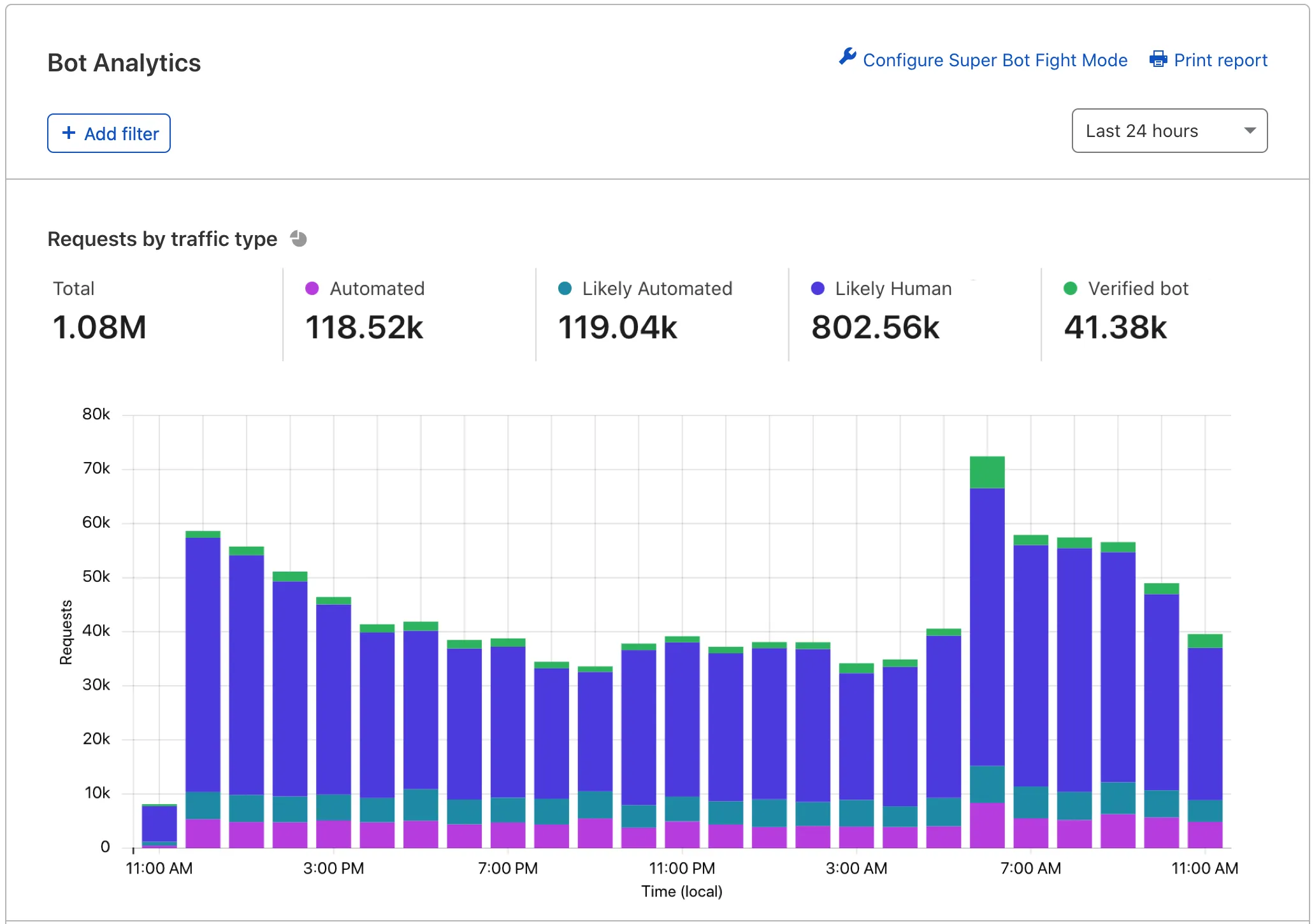
![View Bot Analytics in the Cloudflare dashboard. For more details, keep reading.](https://developers.cloudflare.com/_astro/bot-analytics-dashboard-biz.RDfO3DgS_Z1sosFo.webp) 

### Features

For a full tour of Bot Analytics, see [our blog post ↗](https://blog.cloudflare.com/introducing-bot-analytics/). At a high level, the tool includes:

* **Requests by traffic type**: View your total domain traffic segmented vertically by traffic type. Keep an eye on _automated_ and _likely automated_ traffic.
* **Requests by detection source**: Identify the most common detection engines used to score your traffic. Hover over a tooltip to learn more about each engine.
* **Top requests by attribute**: View more detailed information on specific IP addresses and other characteristics.

Bot Analytics shows up to 72 hours of data at a time and can display data up to 30 days old. Bot Analytics displays data in real time in most cases.

Cloudflare uses adaptive bitrate technology to show sampled data — most customers will see a 1-10% sample depending on how much information they are trying to view. Tooltips on the page will display the current sample rate.

### Common uses

Business and Enterprise customers without Bot Management can use Bot Analytics to:

* Understand bot traffic
* Study recent attacks to find trends and detailed information
* Learn more about Cloudflare’s detection engines with real data

For more details and granular control over bot traffic, consider upgrading to [Bot Management for Enterprise](https://developers.cloudflare.com/bots/bot-analytics/#enterprise-bot-management).

## Enterprise Bot Management

Enterprise customers with Bot Management can use **Bot Analytics** to dynamically examine bot traffic.

### Access

You can access Bot Analytics by going to the [Cloudflare dashboard ↗](https://dash.cloudflare.com/login), and selecting your account and domain.

Old dashboard: **Security** \> **Bots**.

New dashboard: **Security** \> **Analytics** \> **Bot analysis**.
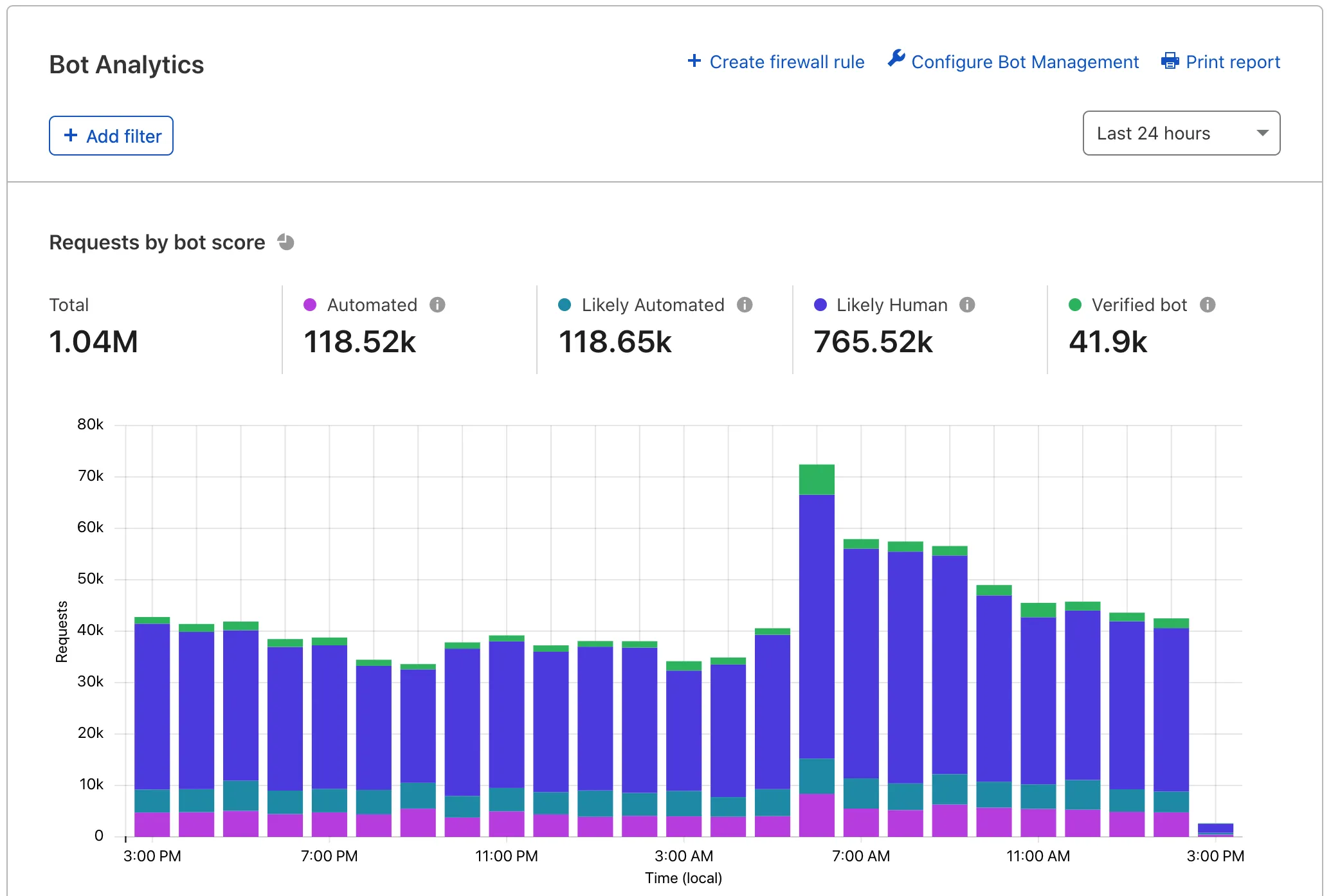
![View Bot Analytics in the Cloudflare dashboard. For more details, keep reading.](https://developers.cloudflare.com/_astro/bot-analytics-dashboard-ent.DA4XLihG_Zb6GXB.webp) 

### Features

For a full tour of Bot Analytics, see [our blog post ↗](https://blog.cloudflare.com/introducing-bot-analytics/). At a high level, the tool includes:

* **Requests by bot score**: View your total domain traffic and segment it vertically by traffic type. Keep an eye on _automated_ and _likely automated_ traffic.
* **Bot score distribution**: View the number of requests assigned a bot score 1 through 99.
* **Bot score source**: Identify the most common detection engines used to score your traffic. Hover over a tooltip to learn more about each engine.
* **Top requests by attribute**: View more detailed information on specific IP addresses and other characteristics.

Bot Analytics shows up to one week of data at a time and can display data up to 30 days old. Bot Analytics displays data in real time in most cases.

Cloudflare uses adaptive bitrate technology to show sampled data — most customers will see a 1-10% sample depending on how much information they are trying to view. Tooltips on the page will display the current sample rate.

### Common uses

Bot Management customers can use Bot Analytics to:

* Understand traffic during [your onboarding phase](https://developers.cloudflare.com/bots/get-started/bot-management/).
* Tune WAF custom rules to be effective but not overly aggressive.
* Study recent attacks to find trends and detailed information.
* Learn more about Cloudflare’s detection engines with real data.

### API

Data from Bot Analytics is also available via the GraphQL API. You can access bot scores, bot sources, [bot tags](https://developers.cloudflare.com/bots/concepts/bot-tags/), and bot _decisions_ (_automated_, _likely automated_, etc.), and more.

Read the [GraphQL Analytics API documentation](https://developers.cloudflare.com/analytics/graphql-api/) for more information about GraphQL and basic querying.

```json
{"@context":"https://schema.org","@type":"BreadcrumbList","itemListElement":[{"@type":"ListItem","position":1,"item":{"@id":"/directory/","name":"Directory"}},{"@type":"ListItem","position":2,"item":{"@id":"/bots/","name":"Bots"}},{"@type":"ListItem","position":3,"item":{"@id":"/bots/bot-analytics/","name":"Bot Analytics"}}]}
```

---

---
title: Account Abuse Protection (Early Access)
description: Fraud detection allows you to detect and mitigate account abuse among your traffic, specifically bulk account creation and account takeover attacks. You can use fraud signals to update or create new rules for suspicious account activity, or pass signals to their origins to integrate into authentication and authorization systems.
image: https://developers.cloudflare.com/core-services-preview.png
---

[Skip to content](#%5Ftop) 

Was this helpful?

YesNo

[ Edit page ](https://github.com/cloudflare/cloudflare-docs/edit/production/src/content/docs/bots/account-abuse-protection.mdx) [ Report issue ](https://github.com/cloudflare/cloudflare-docs/issues/new/choose) 

Copy page

# Account Abuse Protection (Early Access)

Identify and mitigate attacks on your customer and user accounts.

Fraud detection allows you to detect and mitigate account abuse among your traffic, specifically bulk account creation and account takeover attacks. You can use fraud signals to [update or create new rules](https://developers.cloudflare.com/waf/custom-rules/) for suspicious account activity, or pass signals to their origins to integrate into authentication and authorization systems.

## Availability

Account Abuse Protection is available in Early Access for any [Bot Management Enterprise](https://developers.cloudflare.com/bots/get-started/bot-management) customer. You can use these features at no additional cost for a limited period until they are generally available.

Contact your Cloudflare account team to request access.

---

## Concepts

### User ID

User ID is a cryptographically hashed, per-zone identifier that customers can use in [Security Analytics](https://developers.cloudflare.com/waf/analytics/security-analytics/), [Security Rules](https://developers.cloudflare.com/waf/custom-rules/), and [Managed Transforms](https://developers.cloudflare.com/rules/transform/managed-transforms/reference/). With access to hashed User ID, website owners can:

* Review which users have the most activity on your website.
* Find the details on a specific user's characteristics and activity patterns.
* Mitigate traffic based on the user, such as blocking a user with historically suspicious activity.
* Combine fields to see when accounts are being targeted with leaked credentials.
* Manage network patterns or signals associated with specific users.

Data privacy

User profiling was created with privacy in mind. Its design and engineering align with our privacy and compliance programs and contain technical controls that protect the privacy of users. Hashed User IDs are created by encrypting the primary credentials your users use to access your applications.

Other Cloudflare customers cannot access your user profiles. They are unique to your zone.

User ID is enabled by default in the Cloudflare dashboard.

To edit or disable the setting:

1. In the Cloudflare dashboard, go to the **Security Settings** page.  
[ Go to **Settings** ](https://dash.cloudflare.com/?to=/:account/:zone/security/settings)
2. Filter by **Fraud**.
3. Go to **User ID**.
4. Turn **User ID** on or off.

### Ephemeral IDs

Customers using Cloudflare [Turnstile](https://developers.cloudflare.com/turnstile/) can utilize ephemeral IDs for Fraud detection.

Refer to [Fraud detection with ephemeral IDs](https://developers.cloudflare.com/turnstile/tutorials/fraud-detection-with-ephemeral-ids/) for more information.

### Account takeover detections

Cloudflare Bot Management includes dedicated detection IDs for account takeover attacks.

Refer to [Account takeover detections](https://developers.cloudflare.com/bots/additional-configurations/detection-ids/account-takeover-detections/) for more information.

---

## Get started

### Prerequisites

Fraud detection requires the following configurations and settings to be enabled to properly identify suspicious behavior.

#### Security Settings

* User ID: Cloudflare encrypts or hashes your user IDs to better understand typical user traffic patterns across your applications. Enabling Cloudflare to create hashed user ID mappings to your users will allow you to receive account takeover and bulk account creation detections.

#### Eligible traffic

Cloudflare automatically identifies certain login and sign up traffic on your applications and runs these detections without any additional configurations.

* Sign-ups: Cloudflare automatically monitors traffic on endpoints that match common sign up endpoints.
* Login: Cloudflare automatically monitors traffic on endpoints that match common login endpoints.

Verify that your endpoints are properly labeled to ensure Cloudflare can detect and monitor them correctly.

Login or sign up endpoints

Not all login or sign up endpoints are automatically detected.

Cloudflare evaluates and automatically detects your website or application's login or sign up endpoint, but non-traditional login or sign up endpoints may not be recognized.

For example, if you have a non-traditional login endpoint, you should label it with `cf-log-in` using the [endpoint labeling service](https://developers.cloudflare.com/api-shield/management-and-monitoring/endpoint-labels/). Once you have applied the `cf-log-in` label, Cloudflare will use the labeled endpoint for account takeover detection decisions.

Enhanced with leaked credential detections

Cloudflare also recommends enabling [Leaked credentials detection](https://developers.cloudflare.com/waf/detections/leaked-credentials/) to help identify compromised credentials across your users.

---

### Detections

Fraud detections focus on account abuse attacks such as account takeover, bulk account creation, and credential quality. These detections run on all eligible traffic and can be used across [Cloudflare Rules](https://developers.cloudflare.com/rules/) to log, challenge, and/or block requests to your sign up and login endpoints.

#### Account creation

Disposable Email Checks detect when users sign up with throwaway email addresses commonly used for promotion abuse and fake account creation. These disposable email services allow attackers to create thousands of unique accounts without maintaining real infrastructure.

You can use the following binary field as you build rules to enforce security preferences, choosing to block all disposable emails outright, or issue a [challenge](https://developers.cloudflare.com/cloudflare-challenges/challenge-types/) to anyone attempting to create an account with a disposable email.

#### Suspicious emails

Cloudflare analyzes the components of an email used during sign up to help identify suspicious patterns. Refer to [prerequisites](#prerequisites) to ensure your traffic is eligible for detections.

Cloudflare does not store email addresses during this analysis. All detections processed without any storage or caching.

| Detection tag                         | Description                                                                                                                                                                                                     |
| ------------------------------------- | --------------------------------------------------------------------------------------------------------------------------------------------------------------------------------------------------------------- |
| cf.fraud\_detection.disposable\_email | Identifies emails with domains that are commonly found in lists of temporary or disposable email services.                                                                                                      |
| cf.fraud.email\_risk                  | Analyzes the randomness of characters in an email username and top level domain. High risk emails indicate high entropy, while medium and low risk emails indicate less randomness in the string of characters. |

---

### Mitigations

The following Fraud detection fields can be used in Security Rules to help identify and mitigate suspicious traffic.

#### Security Rules

The following fields can be used in new and existing Security Rules.

| Field                                  | Description                                                                                        | Values                                                                                                                                                                                                                                    |
| -------------------------------------- | -------------------------------------------------------------------------------------------------- | ----------------------------------------------------------------------------------------------------------------------------------------------------------------------------------------------------------------------------------------- |
| cf.fraud\_detection.disposable\_domain | Flags whether a domain for a given email is included in a known list of temporary email providers. | True or False                                                                                                                                                                                                                             |
| cf.fraud.email\_risk                   | Measures risk of email based on randomness of characters in the username and domain.               | Low represents low risk due to reduced randomness and simple emails. Medium represents medium risk based on larger strings with slightly more randomness. High represents high risk based on larger and random character strings. Unknown |

#### Other rules

You can use Fraud detection data in Request Header [Transform Rules](https://developers.cloudflare.com/rules/transform/managed-transforms/) to pass information down to the origin.

#### LogPush

You can add Fraud detection fields to existing or new [LogPush](https://developers.cloudflare.com/logs/logpush/) jobs.

---

## Analytics

You can find Fraud data and detections in Security Analytics, where you can see top User IDs.

[ Go to **Analytics** ](https://dash.cloudflare.com/?to=/:account/:zone/security/analytics) 

Fraud fields can be used as filters to identify suspicious patterns in your traffic.

The hashed User ID field within Security Analytics also provides Fraud customers with data that can help review detections and patterns per individual users rather than requests. You can review user level aggregations for IPs and IP counts, event types (login or sign up), locations, devices, and browsers.

A user level profile also provides a quick way to review the latest events associated with a user so that you can identify any anomalies and create a custom rule to log, block, or challenge that user.

```json
{"@context":"https://schema.org","@type":"BreadcrumbList","itemListElement":[{"@type":"ListItem","position":1,"item":{"@id":"/directory/","name":"Directory"}},{"@type":"ListItem","position":2,"item":{"@id":"/bots/","name":"Bots"}},{"@type":"ListItem","position":3,"item":{"@id":"/bots/account-abuse-protection/","name":"Account Abuse Protection (Early Access)"}}]}
```

---

---
title: Glossary
description: Review the definitions for terms used across Cloudflare's Bots documentation.
image: https://developers.cloudflare.com/core-services-preview.png
---

[Skip to content](#%5Ftop) 

Was this helpful?

YesNo

[ Edit page ](https://github.com/cloudflare/cloudflare-docs/edit/production/src/content/docs/bots/glossary.mdx) [ Report issue ](https://github.com/cloudflare/cloudflare-docs/issues/new/choose) 

Copy page

# Glossary

Review the definitions for terms used across Cloudflare's Bots documentation.

| Term                       | Definition                                                                                                                                                                   |
| -------------------------- | ---------------------------------------------------------------------------------------------------------------------------------------------------------------------------- |
| bot                        | A software application programmed to do tasks that can be used for good (chatbots, search engine crawlers) or for evil (inventory hoarding, credential stuffing).            |
| bot score                  | A score from 1 to 99 that indicates how likely that request came from a bot, in which 1 to 29 is likely automated and 30 to 99 is likely human.                              |
| bot tags                   | Additional information about a bot request, such as why Cloudflare has given it a bot score and whether the request came from a verified bot or a category of verified bots. |
| Challenge solve rate (CSR) | The percentage of issued challenges that were solved.                                                                                                                        |
| detection ID               | Static rules that are used to detect predictable bot behavior with no overlap with human traffic.                                                                            |
| JA3 fingerprint            | JA3 and JA4 fingerprints profile specific SSL/TLS clients across different destination IPs, Ports, and X509 certificates.                                                    |
| verified bot               | Bots that are transparent about who they are and what they do.                                                                                                               |

```json
{"@context":"https://schema.org","@type":"BreadcrumbList","itemListElement":[{"@type":"ListItem","position":1,"item":{"@id":"/directory/","name":"Directory"}},{"@type":"ListItem","position":2,"item":{"@id":"/bots/","name":"Bots"}},{"@type":"ListItem","position":3,"item":{"@id":"/bots/glossary/","name":"Glossary"}}]}
```

---

---
title: Changelog
description: Subscribe to RSS
image: https://developers.cloudflare.com/core-services-preview.png
---

[Skip to content](#%5Ftop) 

Was this helpful?

YesNo

[ Edit page ](https://github.com/cloudflare/cloudflare-docs/edit/production/src/content/docs/bots/changelog.mdx) [ Report issue ](https://github.com/cloudflare/cloudflare-docs/issues/new/choose) 

Copy page

# Changelog

[ Subscribe to RSS ](https://developers.cloudflare.com/bots/changelog/index.xml)

## 2025-07-02

**Managed robots.txt will prepend existing files**

Cloudflare will prepend our managed `robots.txt` before your existing `robots.txt`, combining both into a single response.

## 2025-06-26

**Web Bot Auth is now available for bot verification**

Web Bot Auth is an authentication method that leverages cryptographic signatures in HTTP messages to verify that a request comes from an automated bot. This provides a more robust way of verifying bots.

## 2025-05-14

**Anomaly detection events now receive a bot score of 2**

Events detected by the [anomaly detection engine](https://developers.cloudflare.com/bots/concepts/bot-detection-engines/#anomaly-detection-enterprise) are now given a bot score of 2.

## 2025-05-08

**Machine Learning model v9 is now the default model**

[Machine Learning model v9](https://developers.cloudflare.com/bots/reference/machine-learning-models/#model-versions-and-release-notes) is now the default model for all new zones and existing zones set to use the latest machine learning model.

## 2025-04-28

**Managed robots.txt is now available**

Direct AI crawlers on what they can and cannot scrape from your website or application by [implementing a robots.txt file](https://developers.cloudflare.com/bots/additional-configurations/managed-robots-txt/) to your domain.

## 2025-04-24

**Bot Detection Alerts are now available**

You can now create a [Bot Detection Alert](https://developers.cloudflare.com/bots/reference/alerts/) to notify you when Cloudflare detects a spike in Bot traffic on your website.

## 2024-08-19

**AI bots is now a managed rule**

[AI bots protection](https://developers.cloudflare.com/bots/concepts/bot/#ai-bots) has been upgraded from a custom rule to a managed rule.

```json
{"@context":"https://schema.org","@type":"BreadcrumbList","itemListElement":[{"@type":"ListItem","position":1,"item":{"@id":"/directory/","name":"Directory"}},{"@type":"ListItem","position":2,"item":{"@id":"/bots/","name":"Bots"}},{"@type":"ListItem","position":3,"item":{"@id":"/bots/changelog/","name":"Changelog"}}]}
```

---

---
title: AI Labyrinth
description: The AI Labyrinth adds invisible links on your webpage with specific Nofollow tags to block AI crawlers that do not adhere to the recommended guidelines and crawl without permission. AI crawlers that scrape your website content without permission will be stuck in a maze of never-ending links, and their details are recorded and used by all Cloudflare customers who choose to block AI bots.
image: https://developers.cloudflare.com/core-services-preview.png
---

[Skip to content](#%5Ftop) 

### Tags

[ AI ](https://developers.cloudflare.com/search/?tags=AI) 

Was this helpful?

YesNo

[ Edit page ](https://github.com/cloudflare/cloudflare-docs/edit/production/src/content/docs/bots/additional-configurations/ai-labyrinth.mdx) [ Report issue ](https://github.com/cloudflare/cloudflare-docs/issues/new/choose) 

Copy page

# AI Labyrinth

The AI Labyrinth adds invisible links on your webpage with specific `Nofollow` tags to block AI crawlers that do not adhere to the recommended guidelines and crawl without permission. AI crawlers that scrape your website content without permission will be stuck in a maze of never-ending links, and their details are recorded and used by all Cloudflare customers who choose to block [AI bots](https://developers.cloudflare.com/bots/concepts/bot/#ai-bots).

These links do not impact your search engine optimization (SEO) or your website's appearance, and are only seen by bots. AI bots that respect no-crawl instructions will safely ignore this honeypot.

To enable [AI Labyrinth](https://developers.cloudflare.com/bots/additional-configurations/ai-labyrinth):

* [  New dashboard ](#tab-panel-3194)
* [ Old dashboard ](#tab-panel-3195)

1. In the Cloudflare dashboard, go to the **Security Settings** page.  
[ Go to **Settings** ](https://dash.cloudflare.com/?to=/:account/:zone/security/settings)
2. Filter by **Bot traffic**.
3. Go to **AI Labyrinth**.
4. Turn **AI Labyrinth** on.

1. Log in to the [Cloudflare dashboard ↗](https://dash.cloudflare.com/), and select your account and domain.
2. Go to **Security** \> **Bots**.
3. Select **Configure Bot Fight Mode**.
4. Enable **AI Labyrinth**.

```json
{"@context":"https://schema.org","@type":"BreadcrumbList","itemListElement":[{"@type":"ListItem","position":1,"item":{"@id":"/directory/","name":"Directory"}},{"@type":"ListItem","position":2,"item":{"@id":"/bots/","name":"Bots"}},{"@type":"ListItem","position":3,"item":{"@id":"/bots/additional-configurations/","name":"Additional configurations"}},{"@type":"ListItem","position":4,"item":{"@id":"/bots/additional-configurations/ai-labyrinth/","name":"AI Labyrinth"}}]}
```

---

---
title: Block AI Bots
description: You can choose to block AI bots by activating Block AI bots. Activating this setting will block verified bots that are classified as AI crawlers, as well as a number of unverified bots that behave similarly.
image: https://developers.cloudflare.com/core-services-preview.png
---

[Skip to content](#%5Ftop) 

### Tags

[ AI ](https://developers.cloudflare.com/search/?tags=AI) 

Was this helpful?

YesNo

[ Edit page ](https://github.com/cloudflare/cloudflare-docs/edit/production/src/content/docs/bots/additional-configurations/block-ai-bots.mdx) [ Report issue ](https://github.com/cloudflare/cloudflare-docs/issues/new/choose) 

Copy page

# Block AI Bots

Block AI bots availability

The **Block AI bots** feature is only available in the new [application security dashboard](https://developers.cloudflare.com/security/).

You can choose to block AI bots by activating **Block AI bots**. Activating this setting will block [verified bots](https://developers.cloudflare.com/bots/concepts/bot/verified-bots/) that are classified as AI crawlers, as well as a number of unverified bots that behave similarly.

To block [AI bots](https://developers.cloudflare.com/bots/concepts/bot/#ai-bots):

1. In the Cloudflare dashboard, go to the **Security Settings** page.  
[ Go to **Settings** ](https://dash.cloudflare.com/?to=/:account/:zone/security/settings)
2. Filter by **Bot traffic**.
3. Go to **Block AI bots**.
4. Under **Configurations**, select the edit icon. Choose from:  
   * **Only block on hostnames with ads**: Use this option if you wish to block AI bots only on portions of your site that show ads. Cloudflare automatically detects whether ads are present on a subdomain, and only block on hostnames that contain those ad units.  
   * **Block on all pages**: Use this option if you wish to block AI bots on all your pages.  
   * **Do not block (off)**: Use this option if you wish to allow AI bots on all your pages.
5. Select **Save** to save your configuration.

To block individual AI crawlers (rather than blocking all crawlers), use [AI Crawl Control](https://developers.cloudflare.com/ai-crawl-control/).

```json
{"@context":"https://schema.org","@type":"BreadcrumbList","itemListElement":[{"@type":"ListItem","position":1,"item":{"@id":"/directory/","name":"Directory"}},{"@type":"ListItem","position":2,"item":{"@id":"/bots/","name":"Bots"}},{"@type":"ListItem","position":3,"item":{"@id":"/bots/additional-configurations/","name":"Additional configurations"}},{"@type":"ListItem","position":4,"item":{"@id":"/bots/additional-configurations/block-ai-bots/","name":"Block AI Bots"}}]}
```

---

---
title: Custom rules
description: Understand when to use the built-in bot protection settings in Security Settings versus creating WAF custom rules for bot management.
image: https://developers.cloudflare.com/core-services-preview.png
---

[Skip to content](#%5Ftop) 

Was this helpful?

YesNo

[ Edit page ](https://github.com/cloudflare/cloudflare-docs/edit/production/src/content/docs/bots/additional-configurations/custom-rules.mdx) [ Report issue ](https://github.com/cloudflare/cloudflare-docs/issues/new/choose) 

Copy page

# Custom rules

Bot protection on Cloudflare works through two complementary mechanisms: built-in settings configured through toggles in **Security Settings**, and [WAF custom rules](https://developers.cloudflare.com/waf/custom-rules/) that you write using [bot management fields](https://developers.cloudflare.com/bots/reference/bot-management-variables/). Understanding when to use each approach helps you avoid creating duplicate rules and simplifies your security configuration.

The following features are configured through toggles and dropdowns in [Security Settings](https://developers.cloudflare.com/security/settings/). They do not require you to write any rule expressions.

| Feature                                                                                                                 | What it does                                                                                                     | Availability                  |
| ----------------------------------------------------------------------------------------------------------------------- | ---------------------------------------------------------------------------------------------------------------- | ----------------------------- |
| [Block AI bots](https://developers.cloudflare.com/bots/additional-configurations/block-ai-bots/)                        | Blocks AI crawlers (GPTBot, ClaudeBot, Bytespider, and others) using an auto-updating managed rule               | All plans                     |
| [AI Labyrinth](https://developers.cloudflare.com/bots/additional-configurations/ai-labyrinth/)                          | Feeds non-compliant AI crawlers into a maze of generated content                                                 | All plans                     |
| [Managed robots.txt](https://developers.cloudflare.com/bots/additional-configurations/managed-robots-txt/)              | Prepends AI crawler disallow directives to your robots.txt                                                       | All plans                     |
| Super Bot Fight Mode > **Definitely automated**                                                                         | Blocks or challenges traffic with a [bot score](https://developers.cloudflare.com/bots/concepts/bot-score/) of 1 | Pro, Business, Enterprise     |
| Super Bot Fight Mode > **Likely automated**                                                                             | Blocks or challenges traffic with a bot score of 2-29                                                            | Business, Enterprise          |
| [Verified bots](https://developers.cloudflare.com/bots/concepts/bot/verified-bots/)                                     | Managed category of high-trust bots (Googlebot, Bingbot, and others)                                             | Pro, Business, Enterprise     |
| [Static resource protection](https://developers.cloudflare.com/bots/additional-configurations/static-resources/)        | Extends bot actions to cover static file types                                                                   | Pro, Business, Enterprise     |
| [Optimize for WordPress](https://developers.cloudflare.com/bots/troubleshooting/wordpress-loopback-issue/)              | Allows WordPress loopback requests through bot protection                                                        | Pro, Business, Enterprise     |
| [JavaScript detections](https://developers.cloudflare.com/cloudflare-challenges/challenge-types/javascript-detections/) | Injects a lightweight script to identify clients that cannot execute JavaScript                                  | All plans (automatic on Free) |

Bot settings update automatically as Cloudflare identifies new bot signatures and AI crawlers, while custom rules require manual updates. They do not count toward your [custom rule limits](https://developers.cloudflare.com/waf/custom-rules/#availability), and apply uniformly across your domain without the risk of expression errors.

## Custom rules use cases

Custom rules are valuable when you need capabilities that built-in settings do not offer. The following scenarios require [WAF custom rules](https://developers.cloudflare.com/waf/custom-rules/) with [bot management fields](https://developers.cloudflare.com/bots/reference/bot-management-variables/). Bot management fields are available to customers with a [Bot Management](https://developers.cloudflare.com/bots/get-started/bot-management/) subscription.

### Path-specific protection

Since Bot settings apply to all traffic across your domain, you may need an alternative approach to bot handling for different paths using custom rules — for example, stricter protection on `/login/` than on `/public/`.

#### Example

Block likely automated traffic only on your login endpoint:

```

(cf.bot_management.score lt 30 and not cf.bot_management.verified_bot and http.request.uri.path eq "/login")


```

### Custom score thresholds

The **Definitely automated** and **Likely automated** settings in Super Bot Fight Mode use fixed bot score groupings (1 and 2-29). If you need a different threshold, for example, challenging all traffic with a score below 20, you need a custom rule.

### Conditional logic

If you need to combine bot score with other request fields, such as country, ASN, URI path, JA3/JA4 fingerprint, or user agent, you need custom rules. Bot settings do not support compound conditions.

#### Example

Challenge likely automated traffic only from specific ASNs:

```

(cf.bot_management.score lt 30 and not cf.bot_management.verified_bot and ip.src.asnum in {64496 65536})


```

### Custom actions

Bot settings offer **Block**, **Managed Challenge**, and **Allow** as actions.

If you need other actions, such as **Log** (for testing rules before enforcement), **Interactive Challenge**, or **Skip** (to bypass other rules), you need custom rules.

### Detection ID targeting

To act on specific bot heuristic detections, such as [account takeover](https://developers.cloudflare.com/bots/additional-configurations/detection-ids/account-takeover-detections/) or [scraping](https://developers.cloudflare.com/bots/additional-configurations/detection-ids/scraping-detections/) patterns, you need custom rules using the `cf.bot_management.detection_ids` field. Bot settings do not expose individual detection IDs.

### Forwarding bot data to origin

To send bot scores, verified bot status, or JA3/JA4 fingerprints to your origin server, use [Transform Rules](https://developers.cloudflare.com/rules/transform/) (including [Managed Transforms](https://developers.cloudflare.com/rules/transform/managed-transforms/)) or [Snippets](https://developers.cloudflare.com/rules/snippets/). These are not part of the built-in bot settings.

## Execution order

Custom rules execute before Super Bot Fight Mode managed rules. If a custom rule takes a terminating action (such as _Block_ or _Managed Challenge_), the request does not reach bot settings.

Refer to [Security features interoperability](https://developers.cloudflare.com/waf/feature-interoperability/) for more information.

```json
{"@context":"https://schema.org","@type":"BreadcrumbList","itemListElement":[{"@type":"ListItem","position":1,"item":{"@id":"/directory/","name":"Directory"}},{"@type":"ListItem","position":2,"item":{"@id":"/bots/","name":"Bots"}},{"@type":"ListItem","position":3,"item":{"@id":"/bots/additional-configurations/","name":"Additional configurations"}},{"@type":"ListItem","position":4,"item":{"@id":"/bots/additional-configurations/custom-rules/","name":"Custom rules"}}]}
```

---

---
title: Detection IDs
description: Detection IDs are static rules used to detect predictable bot behavior with no overlap with human traffic. Detection IDs refer to the precise detection used to identify a bot, which could be from heuristics, verified bot detections, or anomaly detections. For example, a detection ID can identify if you sent your headers in a different order than what was expected of your browser.
image: https://developers.cloudflare.com/core-services-preview.png
---

[Skip to content](#%5Ftop) 

Was this helpful?

YesNo

[ Edit page ](https://github.com/cloudflare/cloudflare-docs/edit/production/src/content/docs/bots/additional-configurations/detection-ids/index.mdx) [ Report issue ](https://github.com/cloudflare/cloudflare-docs/issues/new/choose) 

Copy page

# Detection IDs

Detection IDs are static rules used to detect predictable bot behavior with no overlap with human traffic. Detection IDs refer to the precise [detection](https://developers.cloudflare.com/bots/concepts/bot-detection-engines/) used to identify a bot, which could be from heuristics, verified bot detections, or anomaly detections. For example, a detection ID can identify if you sent your headers in a different order than what was expected of your browser.

If you are having an issue with one of our heuristics, detection IDs allow you to decide which heuristics to enforce on your zones using customer configurable heuristics. You can choose unique actions for different bots, detected through Cloudflare’s heuristics engine. You can block, allow, or serve alternate content to specific bots to meet the unique needs of your site’s traffic.

Note

A request can trigger multiple detection IDs.

You can use `cf.bot_management.detection_ids` fields in tools such as:

* [Custom rules](https://developers.cloudflare.com/waf/custom-rules/)
* [Advanced Rate Limiting](https://developers.cloudflare.com/waf/rate-limiting-rules/)
* [Transform Rules](https://developers.cloudflare.com/rules/transform/)
* [Workers](https://developers.cloudflare.com/workers/) (as `request.cf.botManagement.detectionIds`)

Bot Detection IDs and tags are also available in [Bot Analytics](https://developers.cloudflare.com/bots/bot-analytics/) and [Security Analytics](https://developers.cloudflare.com/waf/analytics/security-analytics/).

Beta detections

Cloudflare may occasionally try beta detections as we continuously improve our detections.

It is possible, but uncommon, for you to have beta detection IDs on the Cloudflare dashboard that are not actively collecting data on your zone.

---

## Detection tags

Detection tags refer to the category associated with the detection ID at the time that Cloudflare has fingerprinted a bot. For example, if a detection tag is `go`, this means that Cloudflare has observed traffic from that detection ID from a Go programming language bot.

Note

Detection tags are available in Security Analytics, but not in the Security Events.

---

## Create or edit an expression

* [  New dashboard ](#tab-panel-3196)
* [ Old dashboard ](#tab-panel-3197)

1. In the Cloudflare dashboard, go to the **Security Analytics** page.  
[ Go to **Analytics** ](https://dash.cloudflare.com/?to=/:account/:zone/security/analytics)
2. Apply filters and select **Create custom security rule** to create a custom rule based on your filters.  
Alternatively, if you have already created a custom rule, you can go to the existing rule in **Security rules** and edit the expression based on your filters.  
[ Go to **Security rules** ](https://dash.cloudflare.com/?to=/:account/:zone/security/security-rules)
3. Use the `cf.bot_management.detection_ids` field in the rule expression.
4. Select **Deploy**.

1. Log in to the [Cloudflare dashboard ↗](https://dash.cloudflare.com/), and select your account and domain.
2. Go to **Security** \> **Bots**, apply filters and select **Create custom rule** to create a [custom rule](https://developers.cloudflare.com/waf/custom-rules/create-dashboard/) based on those filters. Alternatively, if you already created a custom rule, go to **Security** \> **WAF** \> **Custom rules** and edit the expression of an existing custom rule.
3. Use the `cf.bot_management.detection_ids` field in the rule expression.
4. Select **Save**.

---

## Use cases

### Block requests that match a specific detection ID

JavaScript

```

any(cf.bot_management.detection_ids[*] eq 3355446)

and not cf.bot_management.verified_bot

and http.request.uri.path eq "/login"

and http.request.method eq "POST"


```

### Run Bot Management without specific detection IDs

JavaScript

```

cf.bot_management.score lt 30

and not cf.bot_management.verified_bot

and http.request.uri.path eq "/login"

and http.request.method eq "POST"

and not any(cf.bot_management.detection_ids[*] in {3355446 12577893})


```

---

## Bot Detection IDs via Logpush

You can create or edit existing Logpush jobs to include the new Bot Detection IDs field which will provide an array of IDs for each request that has heuristics match on it. The `BotDetectionIDs` field is available as part of the HTTP Requests dataset and you can add it to new or existing jobs via the Logpush API or on the Cloudflare dashboard. This is the primary method to discover Detection IDs.

* [ Dashboard ](#tab-panel-3198)
* [ API ](#tab-panel-3199)

1. In the Cloudflare dashboard, go to the **Logpush** page.  
[ Go to **Logpush** ](https://dash.cloudflare.com/?to=/:account/logs)
2. Select **Create a Logpush Job**.
3. Select and enter the destination information.
4. Select **HTTP Requests** as the dataset.
5. Select **BotDetectionIDs** under the General data field category.
6. Prove the ownership.
7. Select **Save**.

[Update your logpush job](https://developers.cloudflare.com/logs/logpush/logpush-job/log-output-options/) by adding `BotDetectionIDs` to the `output_options:` parameters.

---

## Availability

Detection IDs are available for Enterprise Bot Management customers.

```json
{"@context":"https://schema.org","@type":"BreadcrumbList","itemListElement":[{"@type":"ListItem","position":1,"item":{"@id":"/directory/","name":"Directory"}},{"@type":"ListItem","position":2,"item":{"@id":"/bots/","name":"Bots"}},{"@type":"ListItem","position":3,"item":{"@id":"/bots/additional-configurations/","name":"Additional configurations"}},{"@type":"ListItem","position":4,"item":{"@id":"/bots/additional-configurations/detection-ids/","name":"Detection IDs"}}]}
```

---

---
title: Account takeover detections
description: Using the detection IDs below, you can detect and mitigate account takeover attacks. You can monitor the number of login requests for a given software and network combination, as well as the percentage of login errors. When it reaches a suspicious level, you can prevent these attacks by using custom rules, rate limiting rules, and Workers.
image: https://developers.cloudflare.com/core-services-preview.png
---

[Skip to content](#%5Ftop) 

Was this helpful?

YesNo

[ Edit page ](https://github.com/cloudflare/cloudflare-docs/edit/production/src/content/docs/bots/additional-configurations/detection-ids/account-takeover-detections.mdx) [ Report issue ](https://github.com/cloudflare/cloudflare-docs/issues/new/choose) 

Copy page

# Account takeover detections

Using the detection IDs below, you can detect and mitigate account takeover attacks. You can monitor the number of login requests for a given software and network combination, as well as the percentage of login errors. When it reaches a suspicious level, you can prevent these attacks by using [custom rules](https://developers.cloudflare.com/waf/custom-rules/), [rate limiting rules](https://developers.cloudflare.com/waf/rate-limiting-rules/), and [Workers](https://developers.cloudflare.com/workers/).

| Detection ID | Description                                                                                                                                                                                                                                                                                                                                                                        |
| ------------ | ---------------------------------------------------------------------------------------------------------------------------------------------------------------------------------------------------------------------------------------------------------------------------------------------------------------------------------------------------------------------------------- |
| 201326592    | Matches traffic that is making a suspicious amount of login failures to the zone.                                                                                                                                                                                                                                                                                                  |
| 201326593    | Matches traffic that is making a suspicious amount of login attempts to the zone.                                                                                                                                                                                                                                                                                                  |
| 201326598    | Sets a dynamic threshold based on the normal traffic that is unique to the zone. When the ID matches a login failure, Bot Management sets the [bot score](https://developers.cloudflare.com/bots/concepts/bot-score/) to 29 and uses [anomaly detection](https://developers.cloudflare.com/bots/concepts/bot-detection-engines/#anomaly-detection-enterprise) as its score source. |

Login endpoints

Not all login endpoints are automatically detected.

Cloudflare evaluates and automatically detects your website or application's login endpoint, but non-traditional login endpoints may not be recognized.

For example, if you have a non-traditional login endpoint, you should label it with `cf-log-in` using the [endpoint labeling service](https://developers.cloudflare.com/api-shield/management-and-monitoring/endpoint-labels/). Once you have applied the `cf-log-in` label, Cloudflare will use the labeled endpoint for account takeover detection decisions.

## Challenges for account takeover detections

Cloudflare's [Managed Challenge](https://developers.cloudflare.com/cloudflare-challenges/challenge-types/challenge-pages/#managed-challenge) can limit brute-force attacks on your login endpoints.

To access account takeover detections:

* [  New dashboard ](#tab-panel-3200)
* [ Old dashboard ](#tab-panel-3201)

1. In the Cloudflare dashboard, go to the **Security rules** page.  
[ Go to **Security rules** ](https://dash.cloudflare.com/?to=/:account/:zone/security/security-rules)
2. Select **Create rule** and choose **Custom rule**.
3. Fill out the form using **Bot Detection IDs** along with other necessary information.
4. Select **Save as draft** to return to the rule later, or **Deploy** to deploy the rule.

1. Log in to the [Cloudflare dashboard ↗](https://dash.cloudflare.com/), and select your account and domain.
2. Go to **Security** \> **WAF**.
3. Under **Custom rules**, select **Create rule**.
4. Fill out the form using **Bot Detection IDs** along with other necessary information.
5. Select **Save as draft** to return to the rule later, or **Deploy** to deploy the rule.

Rule example

```

(any(cf.bot_management.detection_ids[*] eq 201326593))


```

## Limit logins with account takeover detections

Rate limiting rules can limit the number of logins from a particular IP, JA4 fingerprint, or country.

To use rate limiting rules with account takeover detections:

* [  New dashboard ](#tab-panel-3202)
* [ Old dashboard ](#tab-panel-3203)

1. In the Cloudflare dashboard, go to the **Security rules** page.  
[ Go to **Security rules** ](https://dash.cloudflare.com/?to=/:account/:zone/security/security-rules)
2. Select **Create rule** and choose **Rate limiting rule**.
3. Fill out the form using the **Custom expression builder** and `cf.bot_management_detection_ids` along with other necessary information.
4. Select **Save as draft** to return to the rule later, or **Deploy** to deploy the rule.

1. Log in to the [Cloudflare dashboard ↗](https://dash.cloudflare.com/), and select your account and domain.
2. Go to **Security** \> **WAF**.
3. Under **Rate limiting rules**, select **Create rule**.
4. Fill out the form using the **Custom expression builder** and `cf.bot_management_detection_ids` along with other necessary information.
5. Select **Save as draft** to return to the rule later, or **Deploy** to deploy the rule.

Enhanced with leaked credential detections

The rule can be enhanced with Leaked Credential Checks. Refer to the [WAF documentation](https://developers.cloudflare.com/waf/detections/leaked-credentials/) for more information on how to include leaked credentials and account takeover detections in a rate limiting rule.

```json
{"@context":"https://schema.org","@type":"BreadcrumbList","itemListElement":[{"@type":"ListItem","position":1,"item":{"@id":"/directory/","name":"Directory"}},{"@type":"ListItem","position":2,"item":{"@id":"/bots/","name":"Bots"}},{"@type":"ListItem","position":3,"item":{"@id":"/bots/additional-configurations/","name":"Additional configurations"}},{"@type":"ListItem","position":4,"item":{"@id":"/bots/additional-configurations/detection-ids/","name":"Detection IDs"}},{"@type":"ListItem","position":5,"item":{"@id":"/bots/additional-configurations/detection-ids/account-takeover-detections/","name":"Account takeover detections"}}]}
```

---

---
title: Additional detections
description: Cloudflare bot detection includes additional signals to catch different kinds of automated traffic.
image: https://developers.cloudflare.com/core-services-preview.png
---

[Skip to content](#%5Ftop) 

Was this helpful?

YesNo

[ Edit page ](https://github.com/cloudflare/cloudflare-docs/edit/production/src/content/docs/bots/additional-configurations/detection-ids/additional-detections.mdx) [ Report issue ](https://github.com/cloudflare/cloudflare-docs/issues/new/choose) 

Copy page

# Additional detections

Cloudflare bot detection includes additional signals to catch different kinds of automated traffic.

Bot management customers automatically benefit from the residential proxy detection improvement below, which lowers the [bot score](https://developers.cloudflare.com/bots/concepts/bot-score/) for matched requests. Using the detection ID in [custom rules](https://developers.cloudflare.com/waf/custom-rules/) provides even more visibility and control over mitigating residential proxy traffic.

| Detection ID | Description                                                                                                                                                                                                                                                                                                    |
| ------------ | -------------------------------------------------------------------------------------------------------------------------------------------------------------------------------------------------------------------------------------------------------------------------------------------------------------- |
| 50331651     | Observes traffic from residential proxy networks and similar commercial proxies. When the ID matches a request, Bot Management sets the bot score to 29 and uses [anomaly detection](https://developers.cloudflare.com/bots/concepts/bot-detection-engines/#anomaly-detection-enterprise) as its score source. |

```json
{"@context":"https://schema.org","@type":"BreadcrumbList","itemListElement":[{"@type":"ListItem","position":1,"item":{"@id":"/directory/","name":"Directory"}},{"@type":"ListItem","position":2,"item":{"@id":"/bots/","name":"Bots"}},{"@type":"ListItem","position":3,"item":{"@id":"/bots/additional-configurations/","name":"Additional configurations"}},{"@type":"ListItem","position":4,"item":{"@id":"/bots/additional-configurations/detection-ids/","name":"Detection IDs"}},{"@type":"ListItem","position":5,"item":{"@id":"/bots/additional-configurations/detection-ids/additional-detections/","name":"Additional detections"}}]}
```

---

---
title: Scraping detections
description: Scraping behavioral detection IDs allow you to better protect your website from volumetric scraping attacks by identifying anomalous behavior. The detection IDs below are specifically designed to catch suspicious scraping activity at the zone level.
image: https://developers.cloudflare.com/core-services-preview.png
---

[Skip to content](#%5Ftop) 

Was this helpful?

YesNo

[ Edit page ](https://github.com/cloudflare/cloudflare-docs/edit/production/src/content/docs/bots/additional-configurations/detection-ids/scraping-detections.mdx) [ Report issue ](https://github.com/cloudflare/cloudflare-docs/issues/new/choose) 

Copy page

# Scraping detections

Scraping behavioral detection IDs allow you to better protect your website from volumetric scraping attacks by identifying anomalous behavior. The detection IDs below are specifically designed to catch suspicious scraping activity at the zone level.

| Detection ID | Description                                                                                         |
| ------------ | --------------------------------------------------------------------------------------------------- |
| 50331648     | Observes patterns of requests sent to your zone, dynamically analyzing behavior by ASN.             |
| 50331649     | Observes patterns of requests sent to your zone, dynamically analyzing behavior by JA4 fingerprint. |

## Challenges for scraping detections

Cloudflare's [Managed Challenge](https://developers.cloudflare.com/cloudflare-challenges/challenge-types/challenge-pages/#managed-challenge) can limit scraping attacks on your website.

To access scraping detections:

* [  New dashboard ](#tab-panel-3204)
* [ Old dashboard ](#tab-panel-3205)

1. In the Cloudflare dashboard, go to the **Security rules** page.  
[ Go to **Security rules** ](https://dash.cloudflare.com/?to=/:account/:zone/security/security-rules)
2. Select **Create rule** and choose **Custom rule**.
3. Fill out the form using **Bot Detection IDs** along with other necessary information.
4. Select **Save as draft** to return to the rule later, or **Deploy** to deploy the rule.

1. Log in to the [Cloudflare dashboard ↗](https://dash.cloudflare.com/), and select your account and domain.
2. Go to **Security** \> **WAF**.
3. Under **Custom rules**, select **Create rule**.
4. Fill out the form using **Bot Detection IDs** along with other necessary information.
5. Select **Save as draft** to return to the rule later, or **Deploy** to deploy the rule.

Rule example

```

(any(cf.bot_management.detection_ids[*] in {50331648 50331649}) and not cf.bot_management.verified_bot)


```

Best practice

If you are choosing to challenge as your rule action, ensure that you exclude any API calls on which you do not want to issue a challenge. To exclude requests to such paths, edit the [WAF custom rule](https://developers.cloudflare.com/waf/custom-rules/) to exclude the relevant paths.

Note

The matched traffic for detection IDs `50331648` and `50331649` is dynamically re-calculated, meaning a single fingerprint would not be permanently flagged unless it continues to behave suspiciously at all times.

```json
{"@context":"https://schema.org","@type":"BreadcrumbList","itemListElement":[{"@type":"ListItem","position":1,"item":{"@id":"/directory/","name":"Directory"}},{"@type":"ListItem","position":2,"item":{"@id":"/bots/","name":"Bots"}},{"@type":"ListItem","position":3,"item":{"@id":"/bots/additional-configurations/","name":"Additional configurations"}},{"@type":"ListItem","position":4,"item":{"@id":"/bots/additional-configurations/detection-ids/","name":"Detection IDs"}},{"@type":"ListItem","position":5,"item":{"@id":"/bots/additional-configurations/detection-ids/scraping-detections/","name":"Scraping detections"}}]}
```

---

---
title: JA3/JA4 fingerprint
description: JA3 and JA4 fingerprints help you profile specific SSL/TLS clients across different destination IPs, Ports, and X509 certificates.
image: https://developers.cloudflare.com/core-services-preview.png
---

[Skip to content](#%5Ftop) 

Was this helpful?

YesNo

[ Edit page ](https://github.com/cloudflare/cloudflare-docs/edit/production/src/content/docs/bots/additional-configurations/ja3-ja4-fingerprint/index.mdx) [ Report issue ](https://github.com/cloudflare/cloudflare-docs/issues/new/choose) 

Copy page

# JA3/JA4 fingerprint

[**JA3** ↗](https://github.com/salesforce/ja3) and [**JA4** ↗](https://github.com/FoxIO-LLC/ja4) **fingerprints** help you profile specific SSL/TLS clients across different destination IPs, Ports, and X509 certificates.

JA4 fingerprint adds new functionality by sorting ClientHello extensions and reducing the total number of unique fingerprints for modern browsers.

Note

JA3 and JA4 fingerprints are only available to Enterprise customers who have purchased Bot Management.

If you want to use JA4 fingerprints and Signals Intelligence, your Workers script must be able to handle the absence of any field in the array, including:

* The possibility that the JA4 fingerprint could be missing.
* The possibility that the `ja4Signals` array could be missing.
* Results with `NaN` or `Infinity` values will be excluded from the array.

```

{

  "ja4Signals": {

    "h2h3_ratio_1h": 0.98826485872269,

    "heuristic_ratio_1h": 7.288895722013e-05,

    "reqs_quantile_1h": 0.99905741214752,

    "uas_rank_1h": 901,

    "browser_ratio_1h": 0.93640440702438,

    "paths_rank_1h": 655,

    "reqs_rank_1h": 850,

    "cache_ratio_1h": 0.18918327987194,

    "ips_rank_1h": 662,

    "ips_quantile_1h": 0.99926590919495

  },

  "jaSignalsParsed": {

    "ratios": {

      "h2h3_ratio_1h": 0.98826485872269,

      "heuristic_ratio_1h": 7.288895722013e-05,

      "browser_ratio_1h": 0.93640440702438,

      "cache_ratio_1h": 0.18918327987194

    },

    "ranks": {

      "uas_rank_1h": 901,

      "paths_rank_1h": 655,

      "reqs_rank_1h": 850,

      "ips_rank_1h": 662

    },

    "quantiles": {

      "reqs_quantile_1h": 0.99905741214752,

      "ips_quantile_1h": 0.99926590919495

    }

  }

}


```

When JA4 Signals are missing, the output appears as follows:

```

{

  "ja4Signals": {},

  "jaSignalsParsed": {

    "ratios": {},

    "ranks": {},

    "quantiles": {}

  }

}


```

Note

This sample was generated using [Workers' Cloudflare Object script](https://developers.cloudflare.com/workers/examples/accessing-the-cloudflare-object/).

The JA3 or JA4 fingerprint is an SSL/TLS-based identifier and can be null or empty in logs under specific circumstances:

* Since JA3 and JA4 are calculated during the TLS (SSL) handshake, they will not be present for non-encrypted HTTP traffic.
* The field may be empty when a [Worker](https://developers.cloudflare.com/workers/) sends a request to a zone that is either internal to Cloudflare's network (O2O traffic that is not proxied) or to a third-party origin, or when a Worker is routing traffic to the target zone.
* The fingerprints may be absent when Bot Management itself is skipped for a request, as the feature is responsible for calculating and populating these values.

Generally, [O2O traffic](https://developers.cloudflare.com/cloudflare-for-platforms/cloudflare-for-saas/saas-customers/) should include JA3 or JA4 fingerprints unless a Worker is used to route traffic from the eyeball (client-facing) zone to the target zone.

## Analytics

To get more information about potential bot requests, use these JA3 and JA4 fingerprints in:

* [Bot Analytics](https://developers.cloudflare.com/bots/bot-analytics/#enterprise-bot-management)
* [Security Events](https://developers.cloudflare.com/waf/analytics/security-events/) and [Security Analytics](https://developers.cloudflare.com/waf/analytics/security-analytics/)
* [Analytics GraphQL API](https://developers.cloudflare.com/analytics/graphql-api/), specifically the **HTTP Requests** dataset
* [Logs](https://developers.cloudflare.com/logs/logpush/logpush-job/datasets/zone/http%5Frequests/)

## Actions

To adjust how your application responds to specific fingerprints, use them with:

* [WAF custom rules](https://developers.cloudflare.com/waf/custom-rules/)
* [Transform Rules](https://developers.cloudflare.com/rules/transform/)
* [Cloudflare Workers](https://developers.cloudflare.com/workers/runtime-apis/request/#incomingrequestcfproperties)

## Use cases

### Block or allow certain traffic

A group of similar requests may share the same JA3 fingerprint. For this reason, JA3 may be useful in blocking an incoming threat. For example, if you notice that a bot attack is not caught by existing defenses, create a [custom rule](https://developers.cloudflare.com/waf/custom-rules/) that blocks or challenges the JA3 used for the attack.

Alternatively, if existing defenses are blocking traffic that is actually legitimate, create a [custom rule](https://developers.cloudflare.com/waf/custom-rules/) with the _Skip_ action allowing the JA3 seen across good requests.

JA3 may also be useful if you want to immediately remedy false positives or false negatives with Bot Management.

### Allow mobile traffic

Often, mobile application traffic will produce the same JA3 fingerprint across devices and users. This means you can identify your mobile application traffic by its JA3 fingerprint.

Use the JA3 fingerprint to [allow traffic](https://developers.cloudflare.com/waf/custom-rules/use-cases/challenge-bad-bots/#adjust-for-mobile-traffic) from your mobile application, but block or challenge remaining traffic.

```json
{"@context":"https://schema.org","@type":"BreadcrumbList","itemListElement":[{"@type":"ListItem","position":1,"item":{"@id":"/directory/","name":"Directory"}},{"@type":"ListItem","position":2,"item":{"@id":"/bots/","name":"Bots"}},{"@type":"ListItem","position":3,"item":{"@id":"/bots/additional-configurations/","name":"Additional configurations"}},{"@type":"ListItem","position":4,"item":{"@id":"/bots/additional-configurations/ja3-ja4-fingerprint/","name":"JA3/JA4 fingerprint"}}]}
```

---

---
title: Signals Intelligence
description: For every available JA4 fingerprint, Bot Management customers can view how Cloudflare sees it on the Internet and what behavior we view with the fingerprint. This data can help you understand why a request is scored in a particular fashion or allow you to use the aggregate data in your own ML models, run in either Cloudflare Workers or at the origin location.
image: https://developers.cloudflare.com/core-services-preview.png
---

[Skip to content](#%5Ftop) 

Was this helpful?

YesNo

[ Edit page ](https://github.com/cloudflare/cloudflare-docs/edit/production/src/content/docs/bots/additional-configurations/ja3-ja4-fingerprint/signals-intelligence.mdx) [ Report issue ](https://github.com/cloudflare/cloudflare-docs/issues/new/choose) 

Copy page

# Signals Intelligence

For every available [JA4 fingerprint](https://developers.cloudflare.com/bots/additional-configurations/ja3-ja4-fingerprint/), Bot Management customers can view how Cloudflare sees it on the Internet and what behavior we view with the fingerprint. This data can help you understand why a request is scored in a particular fashion or allow you to use the aggregate data in your own ML models, run in either [Cloudflare Workers](https://developers.cloudflare.com/workers/) or at the origin location.

Specifically, for each JA4 fingerprint, you will be able to access the following information:

* The percentage of traffic associated with browsers that Cloudflare sees.
* The percentage of traffic associated with known bots that Cloudflare sees.
* The number of networks Cloudflare sees actively using this fingerprint.
* The number of Cloudflare sites that see traffic from this fingerprint.
* The frequency that fingerprint requests caches content and generates errors.

This data gives you access to insights only available via the Cloudflare network and generated by our unique edge network that sits behind 20% of all Internet traffic. Additionally, you can feed this data into your own [Workers AI](https://developers.cloudflare.com/workers-ai/)\-powered custom machine learning models via the Signals Intelligence fields below.

## Signals Intelligence fields

Signals Intelligence fields show observations about a particular JA4 that Cloudflare has seen globally over the last hour.

| Field name           | Description                                                                                                                                                                                                                                       |
| -------------------- | ------------------------------------------------------------------------------------------------------------------------------------------------------------------------------------------------------------------------------------------------- |
| h2h3\_ratio\_1h      | The ratio of HTTP/2 and HTTP/3 requests combined with the total number of requests for the JA4 fingerprint in the last hour. Higher values indicate a higher proportion of HTTP/2 and HTTP/3 requests compared to other protocol versions.        |
| heuristic\_ratio\_1h | The ratio of requests with a scoreSrc value of "heuristics" for the JA4 fingerprint in the last hour. Higher values suggest a larger proportion of requests being flagged by heuristic-based scoring.                                             |
| reqs\_quantile\_1h   | The quantile position of the JA4 fingerprint based on the number of requests across all fingerprints in the last hour. Higher values indicate a relatively higher number of requests compared to other fingerprints.                              |
| uas\_rank\_1h        | The rank of the JA4 fingerprint based on the number of distinct user agents across all fingerprints in the last hour. Lower values indicate a higher diversity of user agents associated with the fingerprint.                                    |
| browser\_ratio\_1h   | The ratio of requests originating from browser-based user agents for the JA4 fingerprint in the last hour. Higher values suggest a higher proportion of browser-based requests.                                                                   |
| paths\_rank\_1h      | The rank of the JA4 fingerprint based on the number of unique request paths across all fingerprints in the last hour. Lower values indicate a higher diversity of request paths associated with the fingerprint.                                  |
| reqs\_rank\_1h       | The rank of the JA4 fingerprint based on the number of requests across all fingerprints in the last hour. Lower values indicate a higher number of requests associated with the fingerprint.                                                      |
| cache\_ratio\_1h     | The ratio of cacheable responses for the JA4 fingerprint in the last hour. Higher values suggest a higher proportion of responses that can be cached.                                                                                             |
| ips\_rank\_1h        | The rank of the JA4 fingerprint based on the number of unique client IP addresses across all fingerprints in the last hour. Lower values indicate a higher number of distinct client IPs associated with the fingerprint.                         |
| ips\_quantile\_1h    | The quantile position of the JA4 fingerprint based on the number of unique client IP addresses across all fingerprints in the last hour. Higher values indicate a relatively higher number of distinct client IPs compared to other fingerprints. |

If you want to use JA4 fingerprints and Signals Intelligence, your Workers script must be able to handle the absence of any field in the array, including:

* The possibility that the JA4 fingerprint could be missing.
* The possibility that the `ja4Signals` array could be missing.
* Results with `NaN` or `Infinity` values will be excluded from the array.

```json
{"@context":"https://schema.org","@type":"BreadcrumbList","itemListElement":[{"@type":"ListItem","position":1,"item":{"@id":"/directory/","name":"Directory"}},{"@type":"ListItem","position":2,"item":{"@id":"/bots/","name":"Bots"}},{"@type":"ListItem","position":3,"item":{"@id":"/bots/additional-configurations/","name":"Additional configurations"}},{"@type":"ListItem","position":4,"item":{"@id":"/bots/additional-configurations/ja3-ja4-fingerprint/","name":"JA3/JA4 fingerprint"}},{"@type":"ListItem","position":5,"item":{"@id":"/bots/additional-configurations/ja3-ja4-fingerprint/signals-intelligence/","name":"Signals Intelligence"}}]}
```

---

---
title: JavaScript Detections
description: JavaScript Detections is a type of challenge separate from Cloudflare’s Challenge Pages or Turnstile. Javascript Detections helps Cloudflare's bot solutions identify automated requests.
image: https://developers.cloudflare.com/core-services-preview.png
---

[Skip to content](#%5Ftop) 

Was this helpful?

YesNo

[ Edit page ](https://github.com/cloudflare/cloudflare-docs/edit/production/src/content/docs/cloudflare-challenges/challenge-types/javascript-detections.mdx) [ Report issue ](https://github.com/cloudflare/cloudflare-docs/issues/new/choose) 

Copy page

# JavaScript Detections

JavaScript Detections is a type of challenge separate from Cloudflare’s Challenge Pages or Turnstile. Javascript Detections helps Cloudflare's [bot solutions](https://developers.cloudflare.com/bots/) identify automated requests.

While Challenge Pages and Turnstile rely on client-side signals to determine the authenticity of a request, Bot Management’s JavaScript Detections relies on client-side signals and run on every single request made to your website.

## Process

JavaScript Detections is implemented on your website via a lightweight, invisible JavaScript code snippet that follows Cloudflare's [privacy standards ↗](https://www.cloudflare.com/privacypolicy/).

JavaScript is injected only in response to requests for HTML pages or page views, excluding AJAX calls. API and mobile application traffic is unaffected.

JavaScript Detections has a lifespan of 15 minutes. However, the code is injected again before the session expires. After page load, the script is deferred and utilizes a separate thread (where available) to ensure that performance impact is minimal. The snippets of JavaScript will contain a source pointing to the Challenge Platform, with paths that start with `/cdn-cgi/challenge-platform/…`

Once JavaScript Detections is injected on the HTML page, the visitor's browser will run the JavaScript code snippet and a `cf_clearance` cookie is issued to the visitor. The information in JavaScript Detections is stored in the `cf_clearance` cookie and is used to populate `js_detection.passed`.

* If the visitor is verified and a `cf_clearance` cookie is issued, it will contain the outcome: `cf.bot_management.js_detection.passed` \= `true`
* If the verification fails, the cookie will contain the outcome: `cf.bot_management.js_detection.passed` \= `false`

Note

The `cf_clearance` cookie cannot exceed the maximum size of 4096 bytes.

Warning

Enforcement against bots does **not** occur even if the cookie is flagged false.

You must enable JavaScript Detections and then create a custom WAF rule using the `cf.bot_management.js_detection.passed` field to block or challenge a failed request.

When the visitor encounters a WAF custom rule on your website, the rule will check the outcome of the `cf_clearance` cookie. The outcome of the `cf_clearance` cookie determines whether the request passes, or is blocked or challenged.

Refer to the steps below to enable and enforce JavaScript Detections.

## 1\. Enable JavaScript Detections

For Bot Fight Mode customers, [JavaScript Detections](https://developers.cloudflare.com/cloudflare-challenges/challenge-types/javascript-detections/) is automatically enabled and cannot be disabled.

For Super Bot Fight Mode and Bot Management for Enterprise customers, [JavaScript Detections](https://developers.cloudflare.com/cloudflare-challenges/challenge-types/javascript-detections/) is optional.

* [  New dashboard ](#tab-panel-3354)
* [ Old dashboard ](#tab-panel-3355)

1. In the Cloudflare dashboard, go to the **Security Settings** page.  
[ Go to **Settings** ](https://dash.cloudflare.com/?to=/:account/:zone/security/settings)
2. Under your bot traffic plan configurations, select the edit icon for **JS detections** and turn **JavaScript Detections** on.

1. Log in to the [Cloudflare dashboard ↗](https://dash.cloudflare.com/), and select your account and domain.
2. Go to **Security** \> **Bots**.
3. Select **Configure Bot Management**.
4. For **JavaScript Detections**, switch the toggle to **On**.

For more details on how to set up bot protection, refer to the [Bots documentation](https://developers.cloudflare.com/bots/get-started/).

## 2\. Enforce execution of JavaScript Detections

Once you enable JavaScript detections, you must use the `cf.bot_management.js_detection.passed` field to create [WAF custom rules](https://developers.cloudflare.com/waf/custom-rules/) (or the `request.cf.botManagement.jsDetection.passed` variable in [Workers](https://developers.cloudflare.com/workers/)).

When adding this field to WAF custom rules, it is used on endpoints expecting browser traffic (avoiding native mobile applications or websocket endpoints), after a user's first request to your application (Cloudflare needs at least one HTML request before injecting JavaScript detection), and with the Managed Challenge action, because there are legitimate reasons a user might not have passed a JavaScript Detection challenge (network issues, ad blockers, disabled JavaScript in browser, native mobile applications).

### Prerequisites

* You must have an [Enterprise Bot Management](https://developers.cloudflare.com/bots/plans/bm-subscription/) subscription.
* You must have JavaScript Detections enabled on your zone.
* You must have [updated your Content Security Policy headers](https://developers.cloudflare.com/cloudflare-challenges/challenge-types/javascript-detections/#if-you-have-a-content-security-policy-csp) for JavaScript detections.
* You must not run this field on websocket endpoints.
* You must use the field in a custom rules expression that expects only browser traffic.
* The action should always be a managed challenge in case a legitimate user has not received the challenge for network or browser reasons.
* The path specified in the rule builder should never be the first HTML page a user visits when browsing your site.

The `cf.bot_management.js_detection.passed` field should never be used in a WAF custom rule that matches a visitor's first request to a site. It is necessary to have at least one HTML request before Cloudflare can inject JavaScript detection.

* [ WAF rule example ](#tab-panel-3352)
* [ Workers example ](#tab-panel-3353)

```

(http.request.uri.path eq "/api/v4/user/create" and http.request.method eq "POST" and not cf.bot_management.verified_bot)

and (cf.bot_management.score lt 30 or !cf.bot_management.js_detection.passed)


```

JavaScript

```

"botManagement": {

"jsDetection": {

    "passed": false

}

}


```

Refer to the [WAF documentation](https://developers.cloudflare.com/waf/custom-rules/create-dashboard/) for more information on creating a custom rule.

## API

If you enable JavaScript Detections via the dashboard, Cloudflare will insert a script tag in all HTML pages served on your website. If you would prefer to limit where JavaScript Detections is served, you can do so with the JavaScript Detections API script.

The JavaScript Detections API allows you more granular control over when and where JavaScript Detections is injected on your website, as well as an option for callback handling (for logging or other additional actions).

You can explicitly add a script reference to `/cdn-cgi/challenge-platform/scripts/jsd/api.js` and your own code calling `window.cloudflare.jsd.executeOnce` on specific HTML pages of your website.

Warning

It is not recommended to combine both approaches (zone-wide toggle and the manual injection). If you want to selectively deploy JavaScript Detections only on certain pages, disable JavaScript Detections via the Cloudflare dashboard and use the JavaScript Detections API exclusively.

The following script must be added to every page that you wish to have JavaScript Detections enabled:

JavaScript

```

<script>


function jsdOnload(){

  window.cloudflare.jsd.executeOnce(

    {

      callback: function(result){

        console.log('jsd outcome', result);

    }

  );

}

</script>

<script src="/cdn-cgi/challenge-platform/scripts/jsd/api.js?onload=jsdOnload" async>


```

Note

`result` \= `success` or `error` only refers to the execution of JavaScript Detections. It does not indicate whether a visitor is a human or a bot.

## Considerations

JavaScript Detections does not guarantee a specific bot score.

* If the JavaScript Detections injection or execution fails and `cf.bot_management.js_detection.passed` \= `false`, a separate Bot Management heuristic can still yield a `1` or higher bot score, independent of JavaScript Detections.
* If the JavaScript Detections passes, the final bot score may still be `1` due to other detection heuristics (for example, known malicious IP, signature detection, and more), resulting in `js_detection.passed` \= `true`, but `score` \= `1`.

## Limitations

### If you enabled Bot Management before June 2020

Customers who enabled Enterprise Bot Management before June 2020 do not have JavaScript Detections enabled by default (unless specifically requested). These customers can still enable the feature in the Cloudflare dashboard.

### If it is the first request to your website

The first request from a new client to your website or application will generally not have JavaScript Detections data (`cf.bot_management.js_detection.passed` \= `false`). This is because Cloudflare needs at least one HTML request before injecting JavaScript Detection and issuing the `cf_clearance` cookie.

Subsequent requests can include a `cf_clearance` cookie if JavaScript ran successfully.

### If you have a Content Security Policy (CSP)

If you have a Content Security Policy (CSP), you need to take additional steps to implement JavaScript Detections:

* Ensure that anything under `/cdn-cgi/challenge-platform/` is allowed. Your CSP should allow scripts served from your origin domain (`script-src self`).
* For `nonce` script tags:  
   * If your CSP uses a `nonce` for script tags, Cloudflare will add these nonces to the scripts it injects by parsing your CSP response header.  
   * If your CSP does not use `nonce` for script tags and **JavaScript Detections** is enabled, you may see a console error such as `Refused to execute inline script because it violates the following Content Security Policy directive: "script-src 'self'". Either the 'unsafe-inline' keyword, a hash ('sha256-b123b8a70+4jEj+d6gWI9U6IilUJIrlnRJbRR/uQl2Jc='), or a nonce ('nonce-...') is required to enable inline execution.` We highly discourage the use of `unsafe-inline` and instead recommend the use CSP `nonces` in script tags which we parse and support in our CDN.

Warning

JavaScript Detections is not supported with `nonce` set via `<meta>` tags.

### If you have ETags

Enabling JavaScript Detections (JSD) will strip [ETags](https://developers.cloudflare.com/cache/reference/etag-headers/) from HTML responses where JSD is injected.

```json
{"@context":"https://schema.org","@type":"BreadcrumbList","itemListElement":[{"@type":"ListItem","position":1,"item":{"@id":"/directory/","name":"Directory"}},{"@type":"ListItem","position":2,"item":{"@id":"/cloudflare-challenges/","name":"Challenges"}},{"@type":"ListItem","position":3,"item":{"@id":"/cloudflare-challenges/challenge-types/","name":"Available Challenges"}},{"@type":"ListItem","position":4,"item":{"@id":"/cloudflare-challenges/challenge-types/javascript-detections/","name":"JavaScript Detections"}}]}
```

---

---
title: robots.txt setting
description: Protect your website or application from AI crawlers by implementing a robots.txt file on your domain to direct AI bot operators on what content they can and cannot scrape for AI model training.
image: https://developers.cloudflare.com/core-services-preview.png
---

[Skip to content](#%5Ftop) 

Was this helpful?

YesNo

[ Edit page ](https://github.com/cloudflare/cloudflare-docs/edit/production/src/content/docs/bots/additional-configurations/managed-robots-txt.mdx) [ Report issue ](https://github.com/cloudflare/cloudflare-docs/issues/new/choose) 

Copy page

# robots.txt setting

Protect your website or application from AI crawlers by implementing a `robots.txt` file on your domain to direct AI bot operators on what content they can and cannot scrape for AI model training.

AI bots are expected to follow the `robots.txt` directives.

`robots.txt` files express your preferences. They do not prevent crawler operators from crawling your content at a technical level. Some crawler operators may disregard your `robots.txt` preferences and crawl your content regardless of what your `robots.txt` file says.

Note

Respecting `robots.txt` is voluntary. If you want to prevent crawling, use AI Crawl Control's [manage AI crawlers](https://developers.cloudflare.com/ai-crawl-control/features/manage-ai-crawlers/) feature.

## Compatibility with existing `robots.txt` files

Cloudflare will independently check whether your website has an existing `robots.txt` file and update the behavior of this feature based on your website.

### Existing robots.txt file

If your website already has a `robots.txt` file — verified by a HTTP `200` response — Cloudflare will prepend our managed `robots.txt` before your existing `robots.txt`, combining both into a single response.

For example, without this feature enabled, the `robots.txt` content of `crawlstop.com` would be:

Feature not enabled

```

User-agent: *

Disallow: /lp

Disallow: /feedback

Disallow: /langtest


Sitemap: https://www.crawlstop.com/sitemap.xml


```

With the managed `robots.txt` enabled, Cloudflare will prepend our managed content before your original content, resulting in what you can view at [https://www.crawlstop.com/robots.txt ↗](https://www.crawlstop.com/robots.txt).

Feature enabled

```

# As a condition of accessing this website, you agree to abide by the

# following content signals:


# (a)  If a content-signal = yes, you may collect content for the

#      corresponding use.

# (b)  If a content-signal = no, you may not collect content for the

#      corresponding use.

# (c)  If the website operator does not include a content signal for a

#      corresponding use, the website operator neither grants nor restricts

#      permission via content signal with respect to the corresponding use.


# The content signals and their meanings are:


# search: building a search index and providing search results (e.g., returning

#         hyperlinks and short excerpts from your website's contents). Search

#         does not include providing AI-generated search summaries.

# ai-input: inputting content into one or more AI models (e.g., retrieval

#           augmented generation, grounding, or other real-time taking of

#           content for generative AI search answers).

# ai-train: training or fine-tuning AI models.


# ANY RESTRICTIONS EXPRESSED VIA CONTENT SIGNALS ARE EXPRESS RESERVATIONS OF

# RIGHTS UNDER ARTICLE 4 OF THE EUROPEAN UNION DIRECTIVE 2019/790 ON COPYRIGHT

# AND RELATED RIGHTS IN THE DIGITAL SINGLE MARKET.


# BEGIN Cloudflare Managed content


User-Agent: *

Content-signal: search=yes, ai-train=no

Allow: /


User-agent: Amazonbot

Disallow: /


User-agent: Applebot-Extended

Disallow: /


User-agent: Bytespider

Disallow: /


User-agent: CCBot

Disallow: /


User-agent: ClaudeBot

Disallow: /


User-agent: Google-Extended

Disallow: /


User-agent: GPTBot

Disallow: /


User-agent: meta-externalagent

Disallow: /


# END Cloudflare Managed Content

User-agent: *

Disallow: /lp

Disallow: /feedback

Disallow: /langtest


Sitemap: https://www.crawlstop.com/sitemap.xml


```

### No robots.txt file

If your website does not have a `robots.txt` file, Cloudflare creates a new file with our managed block directives and serves it for you.

## Implementation

To implement a `robots.txt` file on your domain:

* [  New dashboard ](#tab-panel-3206)
* [ Old dashboard ](#tab-panel-3207)

1. In the Cloudflare dashboard, go to the **Security Settings** page.  
[ Go to **Settings** ](https://dash.cloudflare.com/?to=/:account/:zone/security/settings)
2. Filter by **Bot traffic**.
3. Go to **Instruct AI bot traffic with robots.txt**.
4. Turn on **Instruct AI bot traffic with robots.txt**.

1. Log in to the [Cloudflare dashboard ↗](https://dash.cloudflare.com/), and select your account and domain.
2. Go to **Security** \> **Bots**.
3. Select **Configure Bot Fight Mode**.
4. Turn on **Instruct bot traffic with robots.txt**.

## Content Signals Policy

Free zones that do not have their own `robots.txt` file and do not use the managed `robots.txt` feature will display the Content Signals Policy when a crawler requests the `robots.txt` file for your zone.

This file only outlines the Content Signals framework. It does not express your preferences or rights associated with your content.

Content Signals Policy

```

# As a condition of accessing this website, you agree to abide by the

# following content signals:


# (a)  If a content-signal = yes, you may collect content for the

#      corresponding use.

# (b)  If a content-signal = no, you may not collect content for the

#      corresponding use.

# (c)  If the website operator does not include a content signal for a

#      corresponding use, the website operator neither grants nor restricts

#      permission via content signal with respect to the corresponding use.


# The content signals and their meanings are:


# search: building a search index and providing search results (e.g., returning

#         hyperlinks and short excerpts from your website's contents). Search

#         does not include providing AI-generated search summaries.

# ai-input: inputting content into one or more AI models (e.g., retrieval

#           augmented generation, grounding, or other real-time taking of

#           content for generative AI search answers).

# ai-train: training or fine-tuning AI models.


# ANY RESTRICTIONS EXPRESSED VIA CONTENT SIGNALS ARE EXPRESS RESERVATIONS OF

# RIGHTS UNDER ARTICLE 4 OF THE EUROPEAN UNION DIRECTIVE 2019/790 ON COPYRIGHT

# AND RELATED RIGHTS IN THE DIGITAL SINGLE MARKET.


```

Cloudflare's Content Signals Policy is included by default in the `robots.txt` file when you turn on **robots.txt setting**.

If you would like to opt out of displaying the policy in your `robots.txt` file, you can uncheck **Display Content Signals Policy** under **Control AI Crawlers** in your zone's overview.

[ Go to **Overview** ](https://dash.cloudflare.com/?to=/:account/:zone/) 

Alternatively, you can use [Security Settings](#implementation).

Warning

Google Search Console may occasionally report `Syntax not understood` for Content Signals and newer directives in the `robots.txt` standard. However, we have observed no impact on crawling rates or SEO as a result of these reports.

## Availability

Managed `robots.txt` for AI crawlers is available on all plans.

```json
{"@context":"https://schema.org","@type":"BreadcrumbList","itemListElement":[{"@type":"ListItem","position":1,"item":{"@id":"/directory/","name":"Directory"}},{"@type":"ListItem","position":2,"item":{"@id":"/bots/","name":"Bots"}},{"@type":"ListItem","position":3,"item":{"@id":"/bots/additional-configurations/","name":"Additional configurations"}},{"@type":"ListItem","position":4,"item":{"@id":"/bots/additional-configurations/managed-robots-txt/","name":"robots.txt setting"}}]}
```

---

---
title: Sequence rules
description: Sequence rules uses cookies to track the order of requests a user has made and the time between requests and makes them available via Cloudflare Rules. This allows you to write rules that match valid or invalid sequences. The specific cookies used to validate sequences are called sequence cookies.
image: https://developers.cloudflare.com/core-services-preview.png
---

[Skip to content](#%5Ftop) 

Was this helpful?

YesNo

[ Edit page ](https://github.com/cloudflare/cloudflare-docs/edit/production/src/content/docs/bots/additional-configurations/sequence-rules.mdx) [ Report issue ](https://github.com/cloudflare/cloudflare-docs/issues/new/choose) 

Copy page

# Sequence rules

[Sequence rules](https://developers.cloudflare.com/bots/additional-configurations/sequence-rules/) uses cookies to track the order of requests a user has made and the time between requests and makes them available via [Cloudflare Rules](https://developers.cloudflare.com/rules/). This allows you to write rules that match valid or invalid sequences. The specific cookies used to validate sequences are called sequence cookies.

`431` error

Too many concurrent requests to your zone may add cookies that create a header that is too large, causing a `431` error.

## Prerequisites

* Your account must have the Fraud Detection subscription.
* Each zone must configure the endpoints to track via Endpoint Management.

You can [build a sequence custom rule via the Cloudflare dashboard](#build-a-sequence-custom-rule-via-the-cloudflare-dashboard) or [using the API](#manage-sequence-rules-via-the-api).

---

## Availability

These sequence fields are available in:

* [Custom rules](https://developers.cloudflare.com/waf/custom-rules/) (`http_request_firewall_custom` phase)
* [Rate limiting rules](https://developers.cloudflare.com/waf/rate-limiting-rules/) (`http_request_ratelimit`)
* [Bulk Redirects](https://developers.cloudflare.com/workers/examples/bulk-redirects/) (`http_request_redirect`)
* [Request Header Transform Rules](https://developers.cloudflare.com/rules/transform/response-header-modification/) (`http_request_late_transform`)

| Field name                             | Description                                                                                                                                                                                                                                                                  | Example value                          |
| -------------------------------------- | ---------------------------------------------------------------------------------------------------------------------------------------------------------------------------------------------------------------------------------------------------------------------------- | -------------------------------------- |
| cf.sequence.current\_opString          | This field contains the ID of the operation that matches the current request. If the current request does not match any operations defined in Endpoint Management, it will be an empty string.                                                                               | c821cc00                               |
| cf.sequence.previous\_opsArray<String> | This field contains an array of the prior operation IDs in the sequence, ordered from most to least recent. It does not include the current request.  If an operation is repeated, it will appear multiple times in the sequence.                                            | \["f54dac32", "c821cc00", "a37dc89b"\] |
| cf.sequence.msec\_since\_opMap<Number> | This field contains a map where the keys are operation IDs and the values are the number of milliseconds since that operation has most recently occurred.  This does not include the current request or operation as it only factors in previous operations in the sequence. | {"f54dac32": 1000, "c821cc00": 2000}   |

---

## Build a sequence custom rule via the Cloudflare dashboard

* [  New dashboard ](#tab-panel-3208)
* [ Old dashboard ](#tab-panel-3209)

1. In the Cloudflare dashboard, go to the **Security rules** page.  
[ Go to **Security rules** ](https://dash.cloudflare.com/?to=/:account/:zone/security/security-rules)
2. To create a new empty rule, select **Create rule** \> **Custom rules**.
3. Enter a descriptive name for the rule in **Rule name**.
4. Under **When incoming requests match**, use the **Field** drop-down list to filter by **Sequences** and select from:  
   * Current Operation  
   * Previous Operations  
   * Elapsed time
5. Under **Value**, select the edit icon to use Builder and build a sequence on the side panel.
6. Under **Select a hostname for this sequence**, choose all or a specific hostname from the dropdown list. Optionally, you can use the search bar to search for a specific hostname.
7. From the **Methods** dropdown list, choose all methods or a specific request method.
8. Select the checkbox for each endpoint in the order that you want them to appear in the sequence.
9. Set the time to complete.
10. Select **Save**.
11. Under **Then take action**, select the rule action in the **Choose action** dropdown. For example, selecting _Block_ tells Cloudflare to refuse requests that match the conditions you specified.
12. (Optional) If you selected the _Block_ action, you can configure a custom response.
13. Under **Place at**, select the order of when the rule will fire.
14. To save and deploy your rule, select **Deploy**. If you are not ready to deploy your rule, select **Save as Draft**.

Note

The fields in the custom rule are populated as a grouped sequence based on the values that you entered on Builder.

1. Log in to the [Cloudflare dashboard ↗](https://dash.cloudflare.com/), and select your account and domain.
2. Go to **Security** \> **WAF** \> **Custom rules**.
3. To create a new empty rule, select **Create rule**.
4. Enter a descriptive name for the rule in **Rule name**.
5. Under **When incoming requests match**, use the **Field** drop-down list and select:  
   * Current Operation  
   * Previous Operations  
   * Elapsed time
6. Under **Value**, build a sequence by selecting a hostname for the sequence.
7. Select the checkbox for each endpoint in the order that you want them to appear in the sequence.
8. Set the time to complete.
9. Select **Save**.
10. Under **Then take action**, select the rule action in the **Choose action** dropdown. For example, selecting _Block_ tells Cloudflare to refuse requests that match the conditions you specified.
11. (Optional) If you selected the _Block_ action, you can configure a custom response.
12. Under **Place at**, select the order of when the rule will fire.
13. To save and deploy your rule, select **Deploy**. If you are not ready to deploy your rule, select **Save as Draft**.

---

## Manage sequence rules via the API

### Enable sequence rules

1. [Create an API token](https://developers.cloudflare.com/fundamentals/api/get-started/create-token/) if you do not already have one. The API token must include the _Zone_ \> _Fraud Detection_ \> _Edit_ permission. 2\. [Get the zone ID](https://developers.cloudflare.com/fundamentals/account/find-account-and-zone-ids/) for the zone(s) where you want to enable sequence rules. 3\. [Add the endpoints](https://developers.cloudflare.com/api-shield/management-and-monitoring/) that you want to track in your sequence rules using API Shield's Endpoint Management and make note of the short ID. 4\. Enable the sequence cookie by adding your API token and zone ID to the following API call.

Note

The short ID will not be visible until your account team has enabled this feature for you.

API call

```

curl --request PUT \

https://api.cloudflare.com/client/v4/zones/{zone_id}/fraud_detection/sequence_cookies \

--header "Authorization: Bearer <API_TOKEN>" \

--header "Content-Type: application/json" \

--data '{"enabled": true}'


```

1. Use the expression editor to write sequence or timing based rules via [custom rules](https://developers.cloudflare.com/waf/custom-rules/), [rate limiting rules](https://developers.cloudflare.com/waf/rate-limiting-rules/), or [transform rules](https://developers.cloudflare.com/rules/transform/). You can put these rules in log only mode to monitor.

Note

When you enable sequence rules, Cloudflare will start setting cookies for all requests that match your endpoints.

Once you have enabled sequence rules, the rules fields will be populated and you can now use the new fields in your rules.

### Disable sequence rules

Disabling sequence rules will stop the rules fields from being populated. If you still have rules deployed which depend on these fields, those rules may not behave as intended. Remove or disable any rules that rely on sequence fields before disabling sequence rules.

To disable sequence rules:

1. [Create an API token](https://developers.cloudflare.com/fundamentals/api/get-started/create-token/) if you do not already have one. The API token must include the _Zone_ \> _Fraud Detection_ \> _Edit_ permission. 2\. [Get the zone ID](https://developers.cloudflare.com/fundamentals/account/find-account-and-zone-ids/) for the zone(s) where you want to enable sequence rules. 3\. [Add the endpoints](https://developers.cloudflare.com/api-shield/management-and-monitoring/) that you want to track in your sequence rules using API Shield's Endpoint Management and make note of the short ID. 4\. Disable the sequence cookie using your API token, zone ID, and by setting `enabled` to `false` on the following API call.

Note

The short ID will not be visible until your account team has enabled this feature for you.

API call

```

curl --request PUT https://api.cloudflare.com/client/v4/zones/{zone_id}/fraud_detection/sequence_cookies \

--header "Authorization: Bearer <API_TOKEN>" \

--data '{"enabled": false}'


```

---

## Rules fields

Sequence rules introduces three new fields to Cloudflare Rules. All of these fields reference operations by their short ID. Accounts that have the Fraud Detection subscription can refer to the short ID by viewing the endpoint details via **API Shield** \> **Endpoint Management** in the Cloudflare dashboard. Accounts without Fraud Detection do not have access to this field.

Cloudflare only stores up to the 10 most recent operations in a sequence for up to one hour. If there are more than 10 operations in the sequence, older operations will be dropped and will not be included in the following fields. Similarly, if an operation happened more than one hour ago, it will also not be included in the following fields.

### Example rules

The customer must request endpoint A before endpoint B.

Valid sequence

```

cf.sequence.current_op eq "bbbbbbbb" and

any(cf.sequence.previous_ops[*] == "aaaaaaaa")


```

Invalid sequence

```

cf.sequence.current_op eq "bbbbbbbb" and

not any(cf.sequence.previous_ops[*] == "aaaaaaaa")


```

Customer must request endpoint A at least one second before endpoint B.

Valid sequence

```

cf.sequence.current_op eq "bbbbbbbb" and

cf.sequence.msec_since_op["aaaaaaaa"] ge 1000


```

Invalid sequence

```

cf.sequence.current_op eq "bbbbbbbb" and

not cf.sequence.msec_since_op["aaaaaaaa"] ge 1000


```

---

## Limitations

Cloudflare only supports HTTPS requests since our cookies set the `Secure` attribute.

---

## Availability

Sequence rules is currently in private beta. If you would like to be included in the beta, contact your account team.

```json
{"@context":"https://schema.org","@type":"BreadcrumbList","itemListElement":[{"@type":"ListItem","position":1,"item":{"@id":"/directory/","name":"Directory"}},{"@type":"ListItem","position":2,"item":{"@id":"/bots/","name":"Bots"}},{"@type":"ListItem","position":3,"item":{"@id":"/bots/additional-configurations/","name":"Additional configurations"}},{"@type":"ListItem","position":4,"item":{"@id":"/bots/additional-configurations/sequence-rules/","name":"Sequence rules"}}]}
```

---

---
title: Static resource protection
description: Pro, Business, and Enterprise customers can use Cloudflare's bot solutions to protect their static resources from bots.
image: https://developers.cloudflare.com/core-services-preview.png
---

[Skip to content](#%5Ftop) 

Was this helpful?

YesNo

[ Edit page ](https://github.com/cloudflare/cloudflare-docs/edit/production/src/content/docs/bots/additional-configurations/static-resources.mdx) [ Report issue ](https://github.com/cloudflare/cloudflare-docs/issues/new/choose) 

Copy page

# Static resource protection

Pro, Business, and Enterprise customers can use Cloudflare's bot solutions to protect their static resources from bots.

Warning

If you enable static resource protection, you may block good bots — like mail clients — that routinely fetch static resources. Make sure you understand your existing infrastructure before enabling this feature.

## Super Bot Fight Mode

To enable this feature as a Pro or Business customer or an Enterprise customer without Bot Management:

* [  New dashboard ](#tab-panel-3210)
* [ Old dashboard ](#tab-panel-3211)

1. In the Cloudflare dashboard, go to the **Security Settings** page.  
[ Go to **Settings** ](https://dash.cloudflare.com/?to=/:account/:zone/security/settings)
2. Filter by **Bot traffic**.
3. Go to **Super Bot Fight Mode**.
4. Under **Configurations**, select the edit icon for **Static resource protection** and turn it on.

1. Log in to the [Cloudflare dashboard ↗](https://dash.cloudflare.com/login), and select your account and domain.
2. Go to **Security** \> **Bots**.
3. Select **Configure Super Bot Fight Mode**.
4. For **Static resource protection**, select **On**.

Warning

The **Static Resource Protection** setting will only activate if at least one of the bot categories (definite, likely, or verified) is _not_ set to `Allow`. If all categories are set to `Allow`, this setting will not have any impact since it works alongside these bot settings as part of the managed rules.

## Bot Management for Enterprise

Static resources are protected by default when you create [custom rules](https://developers.cloudflare.com/waf/custom-rules/) using `cf.bot_management.score`.

To exclude static resources, you would need to include `not (cf.bot_management.static_resource)` as part of your custom rule.

## Which files are protected?

Static resources are files with the following extensions:

`ico|jpg|png|jpeg|gif|css|js|tif|tiff|bmp|pict|webp|svg|svgz|class|jar|txt|csv|doc|docx|xls|xlsx|pdf|ps|pls|ppt|pptx|ttf|otf|woff|woff2|eot|eps|ejs|swf|torrent|midi|mid|m3u8|m4a|mp3|ogg|ts`

Additionally, the `/.well-known/` URL path and all elements in it are considered a static resource, regardless of the file extension.

```json
{"@context":"https://schema.org","@type":"BreadcrumbList","itemListElement":[{"@type":"ListItem","position":1,"item":{"@id":"/directory/","name":"Directory"}},{"@type":"ListItem","position":2,"item":{"@id":"/bots/","name":"Bots"}},{"@type":"ListItem","position":3,"item":{"@id":"/bots/additional-configurations/","name":"Additional configurations"}},{"@type":"ListItem","position":4,"item":{"@id":"/bots/additional-configurations/static-resources/","name":"Static resource protection"}}]}
```

---

---
title: Bots
description: A bot is a software application programmed to do certain tasks.
image: https://developers.cloudflare.com/core-services-preview.png
---

[Skip to content](#%5Ftop) 

Was this helpful?

YesNo

[ Edit page ](https://github.com/cloudflare/cloudflare-docs/edit/production/src/content/docs/bots/concepts/bot/index.mdx) [ Report issue ](https://github.com/cloudflare/cloudflare-docs/issues/new/choose) 

Copy page

# Bots

A **bot** is a software application programmed to do certain tasks.

Bots can be used for good (chatbots, search engine crawlers) or for evil (inventory hoarding, credential stuffing).

More information

For more background, refer to [What is a bot? ↗](https://www.cloudflare.com/learning/bots/what-is-a-bot/).

## Verified bots and signed agents

Cloudflare maintains an internal directory of [verified bot](https://developers.cloudflare.com/bots/concepts/bot/verified-bots/) and [signed agents](https://developers.cloudflare.com/bots/concepts/bot/signed-agents/) that are associated with search engine optimization (SEO), website monitoring, and more.

You can use this directory to prevent any bot protection measures from impacting otherwise helpful bots and agents, such as search crawlers.

For a partial list of verified bots and signed agents, refer to [Cloudflare Radar ↗](https://radar.cloudflare.com/verified-bots).

Note

The method for allowing or blocking verified bots depends on [your plan](https://developers.cloudflare.com/bots/concepts/bot/verified-bots/#availability).

## AI bots

You can opt into a managed rule that will block bots that we categorize as artificial intelligence (AI) crawlers (“AI Bots”) from visiting your website. Customers may choose to do this to prevent AI-related usage of their content, such as training large language models (LLM).

### Which bots are blocked

When you enable this feature, Cloudflare will block the following bots:

* `Amazonbot` (Amazon)
* `Applebot` (Apple)
* `Bytespider` (ByteDance)
* `ClaudeBot` (Anthropic)
* `DuckAssistBot` (DuckDuckGo)
* `Google-CloudVertexBot` (Google)
* `GoogleOther` (Google)
* `GPTBot` (OpenAI)
* `Meta-ExternalAgent` (Meta)
* `PetalBot` (Huawei)
* `TikTokSpider` (ByteDance)
* `CCBot` (Common Crawl)

In addition to this list, [verified bots ↗](https://radar.cloudflare.com/bots#verified-bots) that are classified as AI crawlers, as well as a number of unverified bots that behave similarly, are included in the rule. This rule does not include verified bots that fall into the `Search Engine` categories.

These categories, and the bots classified in these categories, may change from time to time.

If you are a bot operator and feel your bot may have been incorrectly categorized, [add your bot to the list of verified bots ↗](https://dash.cloudflare.com/?to=/:account/configurations/verified-bots).

### How it works

When you enable this feature via a pre-configured managed rule, Cloudflare can detect and block verified AI bots that comply with `robots.txt` and respect crawl rates, and do not hide their behavior from your website. The rule has also been expanded to include more signatures of AI bots that do not follow the rules.

The rule to block AI bots takes precedence over all other Super Bot Fight Mode rules. For example, if you have enabled **Block AI bots** and **Allow verified bots**, verified AI bots will also be blocked even if you allow other verified bots on your website or application.

For Bot Management customers, if you have set a rule to serve managed challenges to definitely automated bots, AI bots will also be challenged because custom rules run in a phase before Super Bot Fight Mode, which is the phase when the rule to block AI bots runs.

This behavior remains the same if the setting for verified, definitely automated, and likely bots is set to `block` or `allow`. If you have an action to `allow` for these rules, the request is not matched to any rule and proceeds to the next ruleset phase. Similarly, if the action is set to `block`, they will be blocked in the earlier phase and do not move on to match the AI rule at all. However, when the action is `challenge`, the request matches a rule and therefore will not be matched to any rules after.

For self-serve non-Bot Management customers, all rules for verified, definitely automated, and likely bots run in the phase following the AI bots rule.

flowchart LR
accTitle: Super Bot Fight Mode and custom rules execution order diagram
accDescr: This diagram details the execution order of custom rules before Super Bot Fight Mode managed rules.
A[Custom rules] --> B[Block AI bots<br>managed rule] --> C[Other SBFM managed rules]

This feature is available on all Cloudflare plans.

Note

The method for blocking AI bots depends on [your plan](https://developers.cloudflare.com/bots/get-started/).

```json
{"@context":"https://schema.org","@type":"BreadcrumbList","itemListElement":[{"@type":"ListItem","position":1,"item":{"@id":"/directory/","name":"Directory"}},{"@type":"ListItem","position":2,"item":{"@id":"/bots/","name":"Bots"}},{"@type":"ListItem","position":3,"item":{"@id":"/bots/concepts/","name":"Concepts"}},{"@type":"ListItem","position":4,"item":{"@id":"/bots/concepts/bot/","name":"Bots"}}]}
```

---

---
title: Bot detection engines
description: The Heuristics engine processes all requests. Cloudflare conducts a number of heuristic checks to identify automated traffic, and requests are matched against a growing database of malicious fingerprints.
image: https://developers.cloudflare.com/core-services-preview.png
---

[Skip to content](#%5Ftop) 

Was this helpful?

YesNo

[ Edit page ](https://github.com/cloudflare/cloudflare-docs/edit/production/src/content/docs/bots/concepts/bot-detection-engines.mdx) [ Report issue ](https://github.com/cloudflare/cloudflare-docs/issues/new/choose) 

Copy page

# Bot detection engines

## Heuristics

The **Heuristics** engine processes all requests. Cloudflare conducts a number of heuristic checks to identify automated traffic, and requests are matched against a growing database of malicious fingerprints.

## JavaScript detections

The [**JavaScript Detections (JSD)**](https://developers.cloudflare.com/bots/additional-configurations/javascript-detections/) engine identifies headless browsers and other malicious fingerprints. This engine performs a lightweight, invisible JavaScript injection on the client side of any request while honoring our [strict privacy standards ↗](https://www.cloudflare.com/privacypolicy/). We do not collect any personally identifiable information during the process. The JSD engine either blocks, challenges, or passes requests to other engines.

JSD is completely optional. To adjust your settings, configure Super Bot Fight Mode from **Security** \> **Bots**.

## Machine Learning (Business and Enterprise)

The **Machine Learning (ML)** engine accounts for the majority of all detections, distinguishing between human and bot traffic. This approach leverages our global network, which proxies billions of requests daily, to identify both automated and human traffic.

The ML system uses a supervised machine learning methodology to determine the final Bot Score (1–99).

The core model relies on the following process:

* Input Variables (X): Various request features (headers, session characteristics, and browser signals) collected from traffic across the Cloudflare network.
* Output Variable (Y): The predicted probability that a client is human (such as the probability of successfully solving a Challenge). This probability is mapped to the final 1–99 Bot Score.

We constantly train the ML engine on a periodic basis using vast, anonymized data to ensure it remains accurate and adapts to new threats. Customers can analyze the request features used by these models via their own logs, such as Cloudflare [Logpull](https://developers.cloudflare.com/logs/logpull/) or [Logpush](https://developers.cloudflare.com/logs/logpush/).

The ML engine identifies _likely automated_ traffic.

## Anomaly detection (Enterprise)

The **Anomaly Detection (AD)** engine is an optional detection engine that uses a form of unsupervised learning. Cloudflare records a baseline of your domain's traffic and uses the baseline to intelligently detect outlier requests. This approach is user agent-agnostic and can be turned on or off by your account team.

Cloudflare does not recommend AD for domains that use [Cloudflare for SaaS](https://developers.cloudflare.com/cloudflare-for-platforms/cloudflare-for-saas/security/certificate-management/) or expect large amounts of API traffic. The AD engine immediately gives automated requests a score of one.

## Notes on detection

Cloudflare uses the `__cf_bm cookie` to smooth out the bot score and reduce false positives for actual user sessions.

The Bot Management cookie measures a single user's request pattern and applies it to the machine learning data to generate a reliable bot score for all of that user's requests.

For more details, refer to [Cloudflare Cookies](https://developers.cloudflare.com/fundamentals/reference/policies-compliances/cloudflare-cookies/).

You can disable the `__cf_bm` cookie using the `bm_cookie_enabled` field [via the API](https://developers.cloudflare.com/api/resources/bot%5Fmanagement/methods/update/).

```json
{"@context":"https://schema.org","@type":"BreadcrumbList","itemListElement":[{"@type":"ListItem","position":1,"item":{"@id":"/directory/","name":"Directory"}},{"@type":"ListItem","position":2,"item":{"@id":"/bots/","name":"Bots"}},{"@type":"ListItem","position":3,"item":{"@id":"/bots/concepts/","name":"Concepts"}},{"@type":"ListItem","position":4,"item":{"@id":"/bots/concepts/bot-detection-engines/","name":"Bot detection engines"}}]}
```

---

---
title: Bot scores
description: A bot score is a score from 1 to 99 that indicates how likely that request came from a bot.
image: https://developers.cloudflare.com/core-services-preview.png
---

[Skip to content](#%5Ftop) 

Was this helpful?

YesNo

[ Edit page ](https://github.com/cloudflare/cloudflare-docs/edit/production/src/content/docs/bots/concepts/bot-score.mdx) [ Report issue ](https://github.com/cloudflare/cloudflare-docs/issues/new/choose) 

Copy page

# Bot scores

A bot score is a score from _1_ to _99_ that indicates how likely that request came from a bot.

For example, a score of 1 means Cloudflare is quite certain the request was automated, while a score of 99 means Cloudflare is quite certain the request came from a human.

Bot scores are available to be used in rule expressions and with Workers to customize application behavior. For more details, refer to [Bot Management variables](https://developers.cloudflare.com/bots/reference/bot-management-variables/).

Note

Granular bot scores are only available to Enterprise customers who have purchased Bot Management. All other customers can only access this information through [bot groupings](#bot-groupings) in Bot Analytics.

## Bot groupings

Customers with a Pro plan or higher can automatically see bot traffic divided into groups by going to **Security** \> **Bots**.

| Category             | Range                                                                                  |
| -------------------- | -------------------------------------------------------------------------------------- |
| **Not computed**     | Bot scores of 0.                                                                       |
| **Automated**        | Bot scores of 1.                                                                       |
| **Likely automated** | Bot scores of 2 through 29.                                                            |
| **Likely human**     | Bot scores of 30 through 99.                                                           |
| **Verified bot**     | Non-malicious automated traffic (used to power search engines and other applications). |

Note

Bot scores are not computed for requests to paths that are handled by Cloudflare and will never be blocked or forwarded to the origin. Note that some features that are enabled before Bot Management, such as Redirect Rules, may result in requests not being scored.

## How Cloudflare generates bot scores

Note

The following detection engines only apply to Enterprise Bot Management. For specific details about the engines included in your plan, refer to [Plans](https://developers.cloudflare.com/bots/plans/).

### Heuristics

The **Heuristics** engine processes all requests. Cloudflare conducts a number of heuristic checks to identify automated traffic, and requests are matched against a growing database of malicious fingerprints.

The Heuristics engine immediately gives automated requests a score of 1.

### Machine learning

The **Machine Learning (ML)** engine accounts for the majority of all detections, distinguishing between human and bot traffic. This approach leverages our global network, which proxies billions of requests daily, to identify both automated and human traffic.

The ML system uses a supervised machine learning methodology to determine the final Bot Score (1–99).

The core model relies on the following process:

* Input Variables (X): Various request features (headers, session characteristics, and browser signals) collected from traffic across the Cloudflare network.
* Output Variable (Y): The predicted probability that a client is human (such as the probability of successfully solving a Challenge). This probability is mapped to the final 1–99 Bot Score.

We constantly train the ML engine on a periodic basis using vast, anonymized data to ensure it remains accurate and adapts to new threats. Customers can analyze the request features used by these models via their own logs, such as Cloudflare [Logpull](https://developers.cloudflare.com/logs/logpull/) or [Logpush](https://developers.cloudflare.com/logs/logpush/).

### Anomaly detection

The **Anomaly Detection (AD)** engine is an optional detection engine that uses a form of unsupervised learning. Cloudflare records a baseline of your domain's traffic and uses the baseline to intelligently detect outlier requests. This approach is user agent-agnostic and can be turned on or off by your account team.

Cloudflare does not recommend AD for domains that use [Cloudflare for SaaS](https://developers.cloudflare.com/cloudflare-for-platforms/cloudflare-for-saas/security/certificate-management/) or expect large amounts of API traffic. The AD engine immediately gives automated requests a score of one.

### JavaScript detections

The [**JavaScript Detections (JSD)**](https://developers.cloudflare.com/bots/additional-configurations/javascript-detections/) engine identifies headless browsers and other malicious fingerprints. This engine performs a lightweight, invisible JavaScript injection on the client side of any request while honoring our [strict privacy standards ↗](https://www.cloudflare.com/privacypolicy/). We do not collect any personally identifiable information during the process. The JSD engine either blocks, challenges, or passes requests to other engines.

JSD is enabled by default but completely optional. To adjust your settings, open the Bot Management Configuration page from **Security** \> **Bots**.

### Cloudflare service

**Cloudflare Service** is a special bot score source for Enterprise Zero Trust to avoid false positives.

### Not computed

A bot score of 0 means Bot Management did not run on the request. Cloudflare does not run Bot Management on internal service requests that Bot Management has no interest in blocking.

### Notes on detection

Cloudflare uses the `__cf_bm cookie` to smooth out the bot score and reduce false positives for actual user sessions.

The Bot Management cookie measures a single user's request pattern and applies it to the machine learning data to generate a reliable bot score for all of that user's requests.

For more details, refer to [Cloudflare Cookies](https://developers.cloudflare.com/fundamentals/reference/policies-compliances/cloudflare-cookies/).

```json
{"@context":"https://schema.org","@type":"BreadcrumbList","itemListElement":[{"@type":"ListItem","position":1,"item":{"@id":"/directory/","name":"Directory"}},{"@type":"ListItem","position":2,"item":{"@id":"/bots/","name":"Bots"}},{"@type":"ListItem","position":3,"item":{"@id":"/bots/concepts/","name":"Concepts"}},{"@type":"ListItem","position":4,"item":{"@id":"/bots/concepts/bot-score/","name":"Bot scores"}}]}
```

---

---
title: Bot tags
description: Bot tags provide more detail about why Cloudflare assigned a bot score to a request.
image: https://developers.cloudflare.com/core-services-preview.png
---

[Skip to content](#%5Ftop) 

Was this helpful?

YesNo

[ Edit page ](https://github.com/cloudflare/cloudflare-docs/edit/production/src/content/docs/bots/concepts/bot-tags.mdx) [ Report issue ](https://github.com/cloudflare/cloudflare-docs/issues/new/choose) 

Copy page

# Bot tags

Bot tags provide more detail about _why_ Cloudflare assigned a [bot score](https://developers.cloudflare.com/bots/concepts/bot-score/) to a request.

Use these tags to learn more about your bot traffic and better inform security settings.

Note

Bot tags are only available to Enterprise customers who have purchased Bot Management.

## Potential values

Once you [enable bot tags](#enable-bot-tags), you can see more information about bot requests, such as whether a request came from a verified bot (like Bing) or a category of verified bot (like SearchEngine).

The following values are **examples** of what may be present in the `BotTags` log field, but not an exhaustive list:

* api
* google
* bing
* googleAds
* googleMedia
* googleImageProxy
* pinterest
* newRelic
* baidu
* apple
* yandex

## Enable bot tags

To enable bot tags, include the `BotTags` log field when using our [Logpush service](https://developers.cloudflare.com/logs/logpush/).

## Limitations

Currently, bot tags are only available in log fields.

Future work will add more values and extend bot tags to other Cloudflare products.

```json
{"@context":"https://schema.org","@type":"BreadcrumbList","itemListElement":[{"@type":"ListItem","position":1,"item":{"@id":"/directory/","name":"Directory"}},{"@type":"ListItem","position":2,"item":{"@id":"/bots/","name":"Bots"}},{"@type":"ListItem","position":3,"item":{"@id":"/bots/concepts/","name":"Concepts"}},{"@type":"ListItem","position":4,"item":{"@id":"/bots/concepts/bot-tags/","name":"Bot tags"}}]}
```

---

---
title: Signed agents
description: A signed agent is controlled by an end user and a verified signature-agent from their Web Bot Auth implementation.
image: https://developers.cloudflare.com/core-services-preview.png
---

[Skip to content](#%5Ftop) 

Was this helpful?

YesNo

[ Edit page ](https://github.com/cloudflare/cloudflare-docs/edit/production/src/content/docs/bots/concepts/bot/signed-agents/index.mdx) [ Report issue ](https://github.com/cloudflare/cloudflare-docs/issues/new/choose) 

Copy page

# Signed agents

A signed agent is controlled by an end user and a verified signature-agent from their Web Bot Auth implementation.

You can request for your agent to be added to Cloudflare's bots and agents directory by filling out an [online application ↗](https://dash.cloudflare.com/?to=/:account/configurations/verified-bots) in the Cloudflare dashboard.

Note

A bot cannot be registered as both a verified bot and a signed agent. Review Cloudflare's [verified bots](https://developers.cloudflare.com/bots/concepts/bot/verified-bots/) to determine how to identify your bot.

## Signed agent requirement

For an agent to be recognized, it must meet the following requirements:

1. The agent must follow the [signed agents policy](https://developers.cloudflare.com/bots/concepts/bot/signed-agents/policy/).
2. The bot must be using [Web Bot Auth](https://developers.cloudflare.com/bots/reference/bot-verification/web-bot-auth/).

Once Cloudflare approves a signed agent, it should appear on [Cloudflare Radar's bots and agents directory ↗](https://radar.cloudflare.com/verified-bots).

---

## Verification method

The bot must be verified using [Web Bot Auth](https://developers.cloudflare.com/bots/reference/bot-verification/web-bot-auth/).

```json
{"@context":"https://schema.org","@type":"BreadcrumbList","itemListElement":[{"@type":"ListItem","position":1,"item":{"@id":"/directory/","name":"Directory"}},{"@type":"ListItem","position":2,"item":{"@id":"/bots/","name":"Bots"}},{"@type":"ListItem","position":3,"item":{"@id":"/bots/concepts/","name":"Concepts"}},{"@type":"ListItem","position":4,"item":{"@id":"/bots/concepts/bot/","name":"Bots"}},{"@type":"ListItem","position":5,"item":{"@id":"/bots/concepts/bot/signed-agents/","name":"Signed agents"}}]}
```

---

---
title: Signed agents policy
description: In order to be listed by Cloudflare as a signed agent, your agent must conform to the below requirements. To provide the best possible protection to our customers, this policy may change in the future as we adapt to new bot behaviors.
image: https://developers.cloudflare.com/core-services-preview.png
---

[Skip to content](#%5Ftop) 

Was this helpful?

YesNo

[ Edit page ](https://github.com/cloudflare/cloudflare-docs/edit/production/src/content/docs/bots/concepts/bot/signed-agents/policy.mdx) [ Report issue ](https://github.com/cloudflare/cloudflare-docs/issues/new/choose) 

Copy page

# Signed agents policy

In order to be listed by Cloudflare as a signed agent, your agent must conform to the below requirements. To provide the best possible protection to our customers, this policy may change in the future as we adapt to new bot behaviors.

## Agent policy

### Minimum zones

Service must be made for a widespread use of zones.

#### Example

A bot crawling one site is not valid.

### Agent identification

The user-agent field is optional as it is not required for Web Bot Authentication.

However, if you choose to provide a user-agent, it and the message signature must meet the following requirements:

* Have at least five characters.
* Must not contain special characters.
* Must not include the same user-agent of another verified service.

#### Example

`cloudflare-browser-rendering` is a valid message signature.

### Service purpose

The purpose of the service should be benign or helpful to both the owner of a zone and the users of the service. The service cannot perform any of the following:

* Bot tooling
* Scalpers
* Credential-stuffing
* Directory-traversal scanning
* Excessive data scraping
* DDoS botnets

#### Example

Price scraping direct e-commerce competitors is not a valid use case.

### Public documentation

The agent must have a publicly documented purpose and expected behavior.

---

## Breach of policy

If any of the requirements to validate are breached, a service will be removed from the signed agent list.

The following are examples of breaches of policy:

* The service has vulnerabilities that have not been patched.
* The disclosed purpose of the service does not reflect on the traffic.

```json
{"@context":"https://schema.org","@type":"BreadcrumbList","itemListElement":[{"@type":"ListItem","position":1,"item":{"@id":"/directory/","name":"Directory"}},{"@type":"ListItem","position":2,"item":{"@id":"/bots/","name":"Bots"}},{"@type":"ListItem","position":3,"item":{"@id":"/bots/concepts/","name":"Concepts"}},{"@type":"ListItem","position":4,"item":{"@id":"/bots/concepts/bot/","name":"Bots"}},{"@type":"ListItem","position":5,"item":{"@id":"/bots/concepts/bot/signed-agents/","name":"Signed agents"}},{"@type":"ListItem","position":6,"item":{"@id":"/bots/concepts/bot/signed-agents/policy/","name":"Signed agents policy"}}]}
```

---

---
title: Verified bots
description: A verified bot is a bot which has been added to Cloudflare's list of verified bots.
image: https://developers.cloudflare.com/core-services-preview.png
---

[Skip to content](#%5Ftop) 

Was this helpful?

YesNo

[ Edit page ](https://github.com/cloudflare/cloudflare-docs/edit/production/src/content/docs/bots/concepts/bot/verified-bots/index.mdx) [ Report issue ](https://github.com/cloudflare/cloudflare-docs/issues/new/choose) 

Copy page

# Verified bots

A verified bot is a bot which has been added to Cloudflare's list of verified bots.

You can request for your bot to be added to Cloudflare's bots and agents directory by filling out an [online application ↗](https://dash.cloudflare.com/?to=/:account/configurations/verified-bots) in the Cloudflare dashboard.

Note

A bot cannot be registered as both a verified bot and a signed agent. Review Cloudflare's [signed agents](https://developers.cloudflare.com/bots/concepts/bot/signed-agents/) to determine how to identify your bot.

## Verified bot requirement

For a bot to be verified, it must meet the following requirements:

1. The bot must follow [verified bots policy](https://developers.cloudflare.com/bots/concepts/bot/verified-bots/policy/).
2. The bot must be verified using one of the following verification methods:  
   * [Web Bot Auth](https://developers.cloudflare.com/bots/reference/bot-verification/web-bot-auth/)  
   * [IP validation](https://developers.cloudflare.com/bots/reference/bot-verification/ip-validation/)

Once Cloudflare approves a verified bot, it should appear on [Cloudflare Radar's bots and agents directory ↗](https://radar.cloudflare.com/verified-bots).

---

## Verification methods

The bot must be verified using one of the following validation methods:

* [Web Bot Auth](https://developers.cloudflare.com/bots/reference/bot-verification/web-bot-auth/)
* [IP validation](https://developers.cloudflare.com/bots/reference/bot-verification/ip-validation/)

---

## Categories

You can segment your verified bot traffic by its type and purpose by adding the Verified Bot Categories field `cf.verified_bot_category` as a filter criteria in [WAF Custom rules](https://developers.cloudflare.com/waf/custom-rules/), [Advanced Rate Limiting](https://developers.cloudflare.com/waf/rate-limiting-rules/), and Late Transform rules.

Warning

The Verified Bot Categories field is not compatible with legacy Firewall rules.

Availability

Verified Bot Categories is available on all plans.

Academic research

**String value**: `Academic Research`

**Definition**: Gathers data for scholarly research or academic purposes.

**Example**: Library of Congress, TurnItInBot, Bibliothèque nationale de France

Accessibility

**String value**: `Accessibility`

**Definition**: Scans websites to identify their accessibility.

**Example**: Accessible Web Bot

Advertising or marketing

**String value**: `Advertising & Marketing`

**Definition**: Automates marketing tasks including, but not limited to, ad placement and performance tracking.

**Example**: Google Adsbot

Aggregators

**String value**: `Aggregator`

**Definition**: Collects content from various online sources and consolidates it in one place.

**Example**: Pinterest, Indeed Jobsbot

AI Assistant

**String value**: `AI Assistant`

**Definition**: Automated AI bot driven by user action.

**Example**: Perplexity-User, DuckAssistBot

AI Crawler

**String value**: `AI Crawler`

**Definition**: Crawls websites for content that is used for training AI models.

**Example**: Google Bard, ChatGPT bot

AI Search

**String value**: `AI Search`

**Definition**: Powers AI-driven search experiences.

**Example**: OAI-SearchBot

Archiver

**String value**: `Archiver`

**Definition**: Saves snapshots of websites to preserve digital content for historical records.

**Example**: Internet Archive, CommonCrawl

Feed fetcher

**String value**: `Feed Fetcher`

**Definition**: Retrieves updates from feeds to power readers or other applications.

**Example**: RSS or Podcast feed updaters

Monitoring or analytics

**String value**: `Monitoring & Analytics`

**Definition**: Tracks a website's uptime, performance, and user traffic to gather key monitoring metrics.

**Example**: Uptime Monitors

Page preview

**String value**: `Page Preview`

**Definition**: Generates previews for links shared on social media or in messaging apps.

**Example**: Facebook, Slack, Twitter, or Discord Link Preview tools

Search engine crawler

**String value**: `Search Engine Crawler`

**Definition**: A bot that discovers and indexes web pages for search results.

**Example**: Googlebot, Bingbot, Yandexbot, Baidubot

Search engine optimization

**String value**: `Search Engine Optimization`

**Definition**: Analyzes websites to improve their standing in search engine results pages.

**Example**: Google Lighthouse, GT Metrix, Pingdom, AddThis

Security

**String value**: `Security`

**Definition**: Scans websites to detect security vulnerabilities and potential threats.

**Example**: Vulnerability Scanners, SSL Domain Control Validation (DCV) Check Tools

Social media marketing

**String value**: `Social Media Marketing`

**Definition**: Manages and automates activities on social platforms.

**Example**: Brandwatch

Webhooks

**String value**: `Webhooks`

**Definition**: An automated messenger that sends data from one application to another for specific events.

**Example**: Payment processors, WordPress Integration tools

Other

**String value**: `Other`

**Definition**: A dedicated category for bots that do not fit into the other classifications.

Cloudflare reserves the right to re-assign verified bot categories if the bot's public documentation and observed behavior differ from the category listed in the bot submission form.

---

## Inactive verified bots

Once Cloudflare lists a bot as a verified bot, this entry is cached and may get delisted if no traffic is seen in the Cloudflare network coming from the bot for a defined period of time.

It takes approximately 24 hours for an inactive IP to be removed as a verified bot.

---

### Known issues

The Yandex bot is classified as a Verified Bot, but traffic may occasionally be blocked by a [WAF Managed Rule](https://developers.cloudflare.com/waf/managed-rules/) (such as the rule with ID `...f6cbb163`).

This typically occurs when Yandex updates its source IP address ranges. The new IPs are temporarily unrecognized by the WAF Managed Rules until the updated Verified Bot IP list is fully synchronized across the Cloudflare network.

To restore Yandex traffic, deploy a [WAF exception](https://developers.cloudflare.com/waf/managed-rules/waf-exceptions/) that temporarily skips the managed rule with ID `<RuleID id="2854e3f18ad946049e6d90ccf6cbb163" />` when a request is coming from the **Yandex IP** and the user-agent contains **Yandex**. This ensures that legitimate Yandex traffic bypasses the blocking rule without disabling security features for other traffic.

You can also create a [WAF Custom Rule](https://developers.cloudflare.com/waf/custom-rules/skip/) with the _Skip_ action targeting the managed ruleset that contains the blocking rule. The rule expression should specifically match the request's Yandex IP and User-Agent.

The issue is transient and will resolve automatically once the new Yandex IP addresses are fully propagated to Cloudflare's systems. This propagation typically takes up to 48 hours. If the bot remains blocked after 48 hours, contact [Cloudflare Support](https://developers.cloudflare.com/support/contacting-cloudflare-support/).

---

## Availability

Verified bots are excluded by default when [Bot Fight Mode](https://developers.cloudflare.com/bots/get-started/bot-fight-mode/) is enabled to block definite bots.

[Super Bot Fight Mode](https://developers.cloudflare.com/bots/get-started/super-bot-fight-mode/) and [Enterprise Bot Management](https://developers.cloudflare.com/bots/get-started/bot-management/) customers have the option to block or allow verified bots.

```json
{"@context":"https://schema.org","@type":"BreadcrumbList","itemListElement":[{"@type":"ListItem","position":1,"item":{"@id":"/directory/","name":"Directory"}},{"@type":"ListItem","position":2,"item":{"@id":"/bots/","name":"Bots"}},{"@type":"ListItem","position":3,"item":{"@id":"/bots/concepts/","name":"Concepts"}},{"@type":"ListItem","position":4,"item":{"@id":"/bots/concepts/bot/","name":"Bots"}},{"@type":"ListItem","position":5,"item":{"@id":"/bots/concepts/bot/verified-bots/","name":"Verified bots"}}]}
```

---

---
title: Verified bots policy
description: In order to be listed by Cloudflare as a verified bot, your bot must conform to the below requirements. To provide the best possible protection to our customers, this policy may change in the future as we adapt to new bot behaviors.
image: https://developers.cloudflare.com/core-services-preview.png
---

[Skip to content](#%5Ftop) 

Was this helpful?

YesNo

[ Edit page ](https://github.com/cloudflare/cloudflare-docs/edit/production/src/content/docs/bots/concepts/bot/verified-bots/policy.mdx) [ Report issue ](https://github.com/cloudflare/cloudflare-docs/issues/new/choose) 

Copy page

# Verified bots policy

In order to be listed by Cloudflare as a [verified bot](https://developers.cloudflare.com/bots/concepts/bot/verified-bots/), your bot must conform to the below requirements. To provide the best possible protection to our customers, this policy may change in the future as we adapt to new bot behaviors.

## Bot policy

### Minimum traffic

A bot or proxy must have a minimum amount of traffic for Cloudflare to be able to find it in the sampled data. The minimum traffic should have more than 1,000 requests per day across multiple domains.

Note

Minimum traffic is not a requirement if you are using [Web Bot Auth](https://developers.cloudflare.com/bots/reference/bot-verification/web-bot-auth/) as an authentication method.

### Minimum zones

Service must be made for a widespread use of zones.

#### Example

A bot crawling one site is not valid.

### Bot identification

The user-agent or message signature with the following requirements:

* Have at least five characters.
* Must not contain special characters.
* Must not include the same user-agent of another verified service.

#### Example

`GoogleBot/1.0` is a valid user-agent.

### Domain owner consent

Domains should only be crawled with the explicit or implicit consent of the zone's owner or terms of use. Search engines crawlers must read the `robots.txt` to exclude paths to crawl from the owner.

#### Example

A tool trying to scalp inventories from different websites might be breaking terms of use while a search engine bot indexing websites but complying with `robots.txt` is a valid service.

### Service purpose

The purpose of the service should be benign or helpful to both the owner of a zone and the users of the service. The service cannot perform any of the following:

* Bot tooling
* Scalpers
* Credential-stuffing
* Directory-traversal scanning
* Excessive data scraping
* DDoS botnets

#### Example

Price scraping direct e-commerce competitors is not a valid use case.

### Crawling etiquette

The crawling etiquette should check `robots.txt` if crawling the whole website, and it should not attempt to crawl sensitive paths.

#### Example

If a search engine crawler skips `robots.txt`, it will be rejected.

### Public documentation

The bot must have publicly documented expected behavior or user-agent format.

---

## Breach of Policy

If any of the requirements to validate are breached, a service will be removed from the global allowlist.

The following are examples of breaches of policy:

* Adding a set of IPs that are not solely used by verified service.
* The service IPs are breached by an attacker.
* The service has vulnerabilities that have not been patched.
* A block of IPs not briefed on onboarding is added to the list.
* The disclosed purpose of the service does not reflect on the traffic.
* An AI Crawler that does not respect the crawl-delay directive in robots.txt.

```json
{"@context":"https://schema.org","@type":"BreadcrumbList","itemListElement":[{"@type":"ListItem","position":1,"item":{"@id":"/directory/","name":"Directory"}},{"@type":"ListItem","position":2,"item":{"@id":"/bots/","name":"Bots"}},{"@type":"ListItem","position":3,"item":{"@id":"/bots/concepts/","name":"Concepts"}},{"@type":"ListItem","position":4,"item":{"@id":"/bots/concepts/bot/","name":"Bots"}},{"@type":"ListItem","position":5,"item":{"@id":"/bots/concepts/bot/verified-bots/","name":"Verified bots"}},{"@type":"ListItem","position":6,"item":{"@id":"/bots/concepts/bot/verified-bots/policy/","name":"Verified bots policy"}}]}
```

---

---
title: Bot Feedback Loop
description: The Bot Feedback Loop is a way for customers to send Cloudflare direct feedback in the case of Bot Management potentially scoring a request incorrectly. When a customer submits a False Negative or a False Positive report, Cloudflare manually analyzes this data and uses it as a training dataset for our next Machine Learning model.
image: https://developers.cloudflare.com/core-services-preview.png
---

[Skip to content](#%5Ftop) 

Was this helpful?

YesNo

[ Edit page ](https://github.com/cloudflare/cloudflare-docs/edit/production/src/content/docs/bots/concepts/feedback-loop.mdx) [ Report issue ](https://github.com/cloudflare/cloudflare-docs/issues/new/choose) 

Copy page

# Bot Feedback Loop

The Bot Feedback Loop is a way for customers to send Cloudflare direct feedback in the case of Bot Management potentially [scoring](https://developers.cloudflare.com/bots/concepts/bot-score/) a request incorrectly. When a customer submits a False Negative or a False Positive report, Cloudflare manually analyzes this data and uses it as a training dataset for our next Machine Learning model.

## Availability

Bot Feedback Loop is available for Enterprise Bot Management customers. Visit [Plans](https://developers.cloudflare.com/bots/plans/) for more information.

## False Positive

A false positive can happen if Cloudflare scores a request from a person using a browser, mobile application or desktop application in the _automated_ or _likely automated_ range.

## False Negative

If Cloudflare is unable to detect a portion of automated traffic on your site, submitting a False Negative report will help us catch it in the future.

### Subtypes

| Subtype                | Definition                                                                                                                                                                                                |
| ---------------------- | --------------------------------------------------------------------------------------------------------------------------------------------------------------------------------------------------------- |
| Account Creation Abuse | The automated creation of many new accounts in order to gain access to site resources.                                                                                                                    |
| Ad Fraud               | Fraudulent increase in the number of times an advertisement is clicked on or displayed.                                                                                                                   |
| Credit Card Abuse      | Attempts to repeatedly validate many credit card numbers or the same credit card number with different validation details.                                                                                |
| Cashing Out            | Abusing the target Internet application to obtain valuable goods.                                                                                                                                         |
| Login Abuse            | Attempts to gain access to a password protected portion of an Internet application using many different combinations of usernames and passwords.                                                          |
| Inventory Abuse        | Automated abuse related to purchasing limited stock inventory or holding inventory to prevent others from making transactions.                                                                            |
| Denial of Service      | Automated requests with the intent of exhausting server resources to prevent the Internet application from functioning.                                                                                   |
| Expediting             | Automating the use of an Internet application to make transactions faster than a human visitor to gain unfair advantage.                                                                                  |
| Fuzzing                | Finding implementation bugs through the use of malformed data injection in an automated fashion.                                                                                                          |
| Scraping               | Automated retrieval of valuable or proprietary information from an Internet application.                                                                                                                  |
| Spamming               | The abuse of content forms to send spam.                                                                                                                                                                  |
| Token Cracking         | Identification of valid token codes providing some form of user benefit within the application.                                                                                                           |
| Vulnerability Scanning | Systematic enumeration and examination of identifiable, guessable and unknown content locations, paths, file names, parameters, to find weaknesses and points where a security vulnerability might exist. |

## Submit a report

* [  New dashboard ](#tab-panel-3212)
* [ Old dashboard ](#tab-panel-3213)

1. In the Cloudflare dashboard, go to the **Security Analytics** page.  
[ Go to **Analytics** ](https://dash.cloudflare.com/?to=/:account/:zone/security/analytics)
2. Apply one or more filters.
3. Under **Request activity**, filter by **Bot analysis**.
4. Select **Report incorrect data** and fill out the form.
5. Select **Submit**.

1. Log in to the [Cloudflare dashboard ↗](https://dash.cloudflare.com/), and select your account and domain.
2. Go to **Security** \> **Bots**.
3. Apply one or more bot score filters.
4. Select **Report incorrect data** and fill out the form.
5. Select **Submit**.

## Via the API

### Create a feedback report

Terminal window

```

curl 'https://api.cloudflare.com/client/v4/zones/{zone_id}/bot_management/feedback' \

--header "X-Auth-Email: <EMAIL>" \

--header "X-Auth-Key: <API_KEY>" \

--header "Content-Type: application/json" \

--data '{

  "type": "false_positive",

  "description": "Legitimate customers having low score",

  "expression": "(cf.bot_management.score le 46 and ip.src.asnum eq 132892 and http.host eq \"api-discovery.theburritobot.com\" and cf.bot_management.ja3_hash eq \"3fed133de60c35724739b913924b6c24\")",

  "first_request_seen_at": "2022-08-01T00:00:00Z",

  "last_request_seen_at": "2022-08-10T00:00:00Z",

  "requests": 100,

  "requests_by_score": {

    "1": 50,

    "10": 50

  },

  "requests_by_score_src": {

    "heuristics": 25,

    "machine_learning": 75

  },

  "requests_by_attribute": {

    "topIPs": [

      {

        "metric": "10.75.34.1",

        "requests": 100

      }

    ],

    "topUserAgents": [

      {

        "metric": "curl/7.68.0",

        "requests": 100

      }

    ]

  }

}'


```

### List feedback reports

Terminal window

```

curl 'https://api.cloudflare.com/client/v4/zones/{zone_id}/bot_management/feedback' \

--header "X-Auth-Email: <EMAIL>" \

--header "X-Auth-Key: <API_KEY>"


```

```

[

  {

    "created_at": "2022-08-19T00:05:24.749712Z",

    "type": "false_positive",

    "description": "Legitimate customers having low score",

    "expression": "(cf.bot_management.score le 46 and ip.src.asnum eq 132892 and http.host eq \"api-discovery.theburritobot.com\" and cf.bot_management.ja3_hash eq \"3fed133de60c35724739b913924b6c24\")",

    "first_request_seen_at": "2022-08-01T00:00:00Z",

    "last_request_seen_at": "2022-08-10T00:00:00Z",

    "requests": 100,

    "requests_by_score": {

      "1": 50,

      "10": 50

    },

    "requests_by_score_src": {

      "heuristics": 25,

      "machine_learning": 75

    },

    "requests_by_attribute": {

      "topIPs": [

        {

          "metric": "10.75.34.1",

          "requests": 100

        }

      ],

      "topUserAgents": [

        {

          "metric": "curl/7.68.0",

          "requests": 100

        }

      ]

    }

  }

]


```

## API Fields

| Field                    | Type    | Description                                                                 | Value Example                                                                                                                                                         |
| ------------------------ | ------- | --------------------------------------------------------------------------- | --------------------------------------------------------------------------------------------------------------------------------------------------------------------- |
| type                     | string  | The feedback report type.                                                   | false\_positive                                                                                                                                                       |
| description              | string  | The feedback report description with more details on the issue.             | Legitimate customers having low scores.                                                                                                                               |
| expression               | string  | The wirefilter expression matching reported requests.                       | (cf.bot\_management.score le 46 and ip.src.asnum eq 132892 and http.host eq "app.example.com" and cf.bot\_management.ja3\_hash eq "3fed133de60c35724739b913924b6c24") |
| first\_request\_seen\_at | string  | The time range start when the first request has been seen, RFC 3339 format. | 2022-08-01T00:00:00Z                                                                                                                                                  |
| last\_request\_seen\_at  | string  | The time range end when the last request has been seen, RFC 3339 format.    | 2022-08-10T00:00:00Z                                                                                                                                                  |
| requests                 | integer | The total number of reported requests.                                      | 100                                                                                                                                                                   |
| requests\_by\_score      | object  | The requests breakdown by score.                                            | See example below.                                                                                                                                                    |
| requests\_by\_score\_src | object  | Requests breakdown by score source.                                         | See example below.                                                                                                                                                    |
| requests\_by\_attribute  | object  | Requests breakdown by attribute (optional).                                 | See example below.                                                                                                                                                    |

`requests_by_score`

```

{

  "1": 50,

  "10": 50

}


```

`requests_by_score_src`

```

{

  "machine_learning": 75,

  "heuristics": 25

}


```

`requests_by_attribute`

```

{

  "topIPs": [

    {

      "metric": "10.75.34.1"

      "requests": 100

    }

  ],

  "topUserAgents": [

    {

      "metric": "curl/7.68.0",

      "requests": 100

    }

  ]

}


```

### Expression fields

| Field                        | Type    | Description                                                                                                                                                                 |
| ---------------------------- | ------- | --------------------------------------------------------------------------------------------------------------------------------------------------------------------------- |
| cf.bot\_management.ja3\_hash | string  | This provides an SSL/TLS fingerprint to help you identify potential bot requests.                                                                                           |
| cf.bot\_management.score     | integer | This represents the likelihood that a request originates from a bot using a score from 1-99.                                                                                |
| http.host                    | string  | This represents the hostname used in the full request URI.                                                                                                                  |
| http.request.uri.path        | string  | This represents the URI path of the request.                                                                                                                                |
| http.user\_agent             | string  | This represents the HTTP user agent which is a request header that contains a characteristic string to allow identification of the client operating system and web browser. |
| ip.src.asnum                 | integer | This represents the 16- or 32-bit integer representing the Autonomous System (AS) number associated with client IP address.                                                 |
| ip.src.country               | string  | This represents the 2-letter country code in ISO 3166-1 Alpha 2 format.                                                                                                     |
| ip.src                       | string  | The source address of the IP.                                                                                                                                               |

## Recommendations when submitting a report

When you submit a report, use the filters available in the Bot Analytics dashboard to ensure that your report includes only the traffic that received an incorrect score. In addition to filtering by a score (required), you may want to filter by user-agent, IP, ASN or JA3 to more precisely highlight the section of traffic that was scored incorrectly.

If you are not certain if some traffic received an incorrect score, keep this traffic in the report.

We appreciate any comments you wish to leave in the description field that might help our team better understand these requests in the context of typical traffic to your domain.

## Recommendations after submitting a false positive

Note

The instructions below apply to Enterprise subscription with Bot Management only.

After submitting a false positive, you can explicitly allow the traffic if you are confident that this traffic source cannot be used for abuse in the future. To allow traffic, you can create a WAF custom rule with a [Skip the remaining custom rules](https://developers.cloudflare.com/waf/custom-rules/skip/options/#skip-the-remaining-custom-rules-current-ruleset) action that matches the characteristics of your false positive report. We recommend any skip rule that you create uses the most narrow possible scope, including restricting the request methods and URIs that the expected traffic has access to, to limit potential abuse.

* Allowing a **[JA3/JA4 fingerprint](https://developers.cloudflare.com/bots/additional-configurations/ja3-ja4-fingerprint/)**: If you want to allow access to a stable software client that does not come from a dedicated IP, you can do so by looking up the JA3 fingerprint(s) used by that client in the Bot Analytics dashboard, and creating a WAF custom rule to allow traffic based on that JA3 fingerprint. JA3 fingerprints will only match a client’s TLS library, so be cautious in looking for both overlap with other clients and with variation based on the operating system.  
    
Cloudflare does not recommend relying on JA3 rules for mobile applications that may be abused. If you have questions about how to securely allow traffic from your mobile application, please contact your account team.

Note

The instructions below apply to Enterprise subscription with Bot Management, Bot Fight Mode and Super Bot Fight Mode.

* Allowing an **IP address**: Only use an IP address to allow traffic if the IP is a dedicated resource that belongs only to the traffic source you wish to allow.  
If the traffic you want to allow shares an IP with other traffic sources, or if the IP changes frequently, consider an alternative to allowing by IP address.

## Recommendations after submitting a false negative

After submitting a false negative report, you can explicitly block or rate-limit the incorrectly scored traffic using a combination of characteristics such as IP address, JA3 fingerprint, ASN, and user-agent. Before blocking or rate-limiting based on JA3 fingerprint, please use Bot Analytics to confirm that fingerprint is not being used by legitimate traffic sources.

```json
{"@context":"https://schema.org","@type":"BreadcrumbList","itemListElement":[{"@type":"ListItem","position":1,"item":{"@id":"/directory/","name":"Directory"}},{"@type":"ListItem","position":2,"item":{"@id":"/bots/","name":"Bots"}},{"@type":"ListItem","position":3,"item":{"@id":"/bots/concepts/","name":"Concepts"}},{"@type":"ListItem","position":4,"item":{"@id":"/bots/concepts/feedback-loop/","name":"Bot Feedback Loop"}}]}
```

---

---
title: Bot Fight Mode
description: Bot Fight Mode is a simple, free product that helps detect and mitigate bot traffic on your domain. When enabled, the product:
image: https://developers.cloudflare.com/core-services-preview.png
---

[Skip to content](#%5Ftop) 

Was this helpful?

YesNo

[ Edit page ](https://github.com/cloudflare/cloudflare-docs/edit/production/src/content/docs/bots/get-started/bot-fight-mode.mdx) [ Report issue ](https://github.com/cloudflare/cloudflare-docs/issues/new/choose) 

Copy page

# Bot Fight Mode

Bot Fight Mode is a simple, free product that helps detect and mitigate bot traffic on your domain. When enabled, the product:

* Identifies traffic matching patterns of known bots
* Issues computationally expensive challenges in response to these bots
* Notifies [Bandwidth Alliance ↗](https://cloudflare.com/bandwidth-alliance/) partners (if applicable) to disable bots

## Considerations

Bot Fight Mode and Super Bot Fight Mode use the same underlying technology that powers our [Bot Management ↗](https://www.cloudflare.com/products/bot-management/) product. Specifically, these products:

* Protect entire domains without endpoint restrictions
* Cannot be customized, adjusted, or reconfigured via WAF custom rules

Although these products are designed to fight malicious actors on the Internet, they may challenge API or mobile app traffic. For more granular control, upgrade to [Bot Management for Enterprise](https://developers.cloudflare.com/bots/plans/bm-subscription/).

## Interaction with other app security features

If you are using several app security features like custom rules, Managed Rules, and Bot Fight Mode, it is important to understand how these features interact and the order in which they execute. Refer to [Security features interoperability](https://developers.cloudflare.com/waf/feature-interoperability/) for more information.

---

## Enable Bot Fight Mode

To start using Bot Fight Mode:

* [  New dashboard ](#tab-panel-3214)
* [ Old dashboard ](#tab-panel-3215)

1. In the Cloudflare dashboard, go to the **Security Settings** page.  
[ Go to **Settings** ](https://dash.cloudflare.com/?to=/:account/:zone/security/settings)
2. Filter by **Bot traffic**.
3. Go to **Bot Fight Mode**.
4. Turn **Bot Fight Mode** on.

1. Log in to the [Cloudflare dashboard ↗](https://dash.cloudflare.com/login), and select your account and domain.
2. Go to **Security** \> **Bots**.
3. For **Bot Fight Mode**, select **On**.

Note

If you are upgrading from Bot Fight Mode to Super Bot Fight Mode, you must disable Bot Fight Mode in your Bot settings.

Old dashboard: **Security** \> **Bots**, and select **Configure Bot Fight Mode**.

New dashboard: **Security** \> **Settings**. Filter by **Bot traffic** and turn **Bot Fight Mode** off.

---

## Disable Bot Fight Mode

If you find that **Bot Fight Mode** is causing problems with your application traffic, you may want to disable it.

To disable Bot Fight Mode:

* [  New dashboard ](#tab-panel-3216)
* [ Old dashboard ](#tab-panel-3217)

1. In the Cloudflare dashboard, go to the **Security Settings** page.  
[ Go to **Settings** ](https://dash.cloudflare.com/?to=/:account/:zone/security/settings)
2. Filter by **Bot traffic**.
3. Go to **Bot Fight Mode**.
4. Turn **Bot Fight Mode** off.

1. Log in to the [Cloudflare dashboard ↗](https://dash.cloudflare.com/login), and select your account and domain.
2. Go to **Security** \> **Bots**.
3. For **Bot Fight Mode**, select **Off**.

---

## Block AI bots

Refer to [Block AI bots](https://developers.cloudflare.com/bots/additional-configurations/block-ai-bots/).

Note

You can view blocked AI bot traffic via [Security Analytics](https://developers.cloudflare.com/waf/analytics/security-analytics/).

---

## Visibility

You can see bot-related actions by going to **Security** \> **Events**. Any requests challenged by this product will be labeled **Bot Fight Mode** in the **Service** field. This allows you to observe, analyze, and follow trends in your bot traffic over time.

---

## Limitations

### Rules

You cannot bypass or skip Bot Fight Mode using the _Skip_ action in WAF custom rules or using Page Rules. _Skip_, _Bypass_, and _Allow_ actions apply to rules or rulesets running on the [Ruleset Engine](https://developers.cloudflare.com/ruleset-engine/). While Super Bot Fight Mode rules are implemented in the Ruleset Engine, Bot Fight Mode checks are not. This is why you can skip Super Bot Fight Mode, but not Bot Fight Mode. If you need to skip Bot Fight Mode, consider using [Super Bot Fight Mode](https://developers.cloudflare.com/bots/get-started/super-bot-fight-mode/).

Bot Fight Mode can still trigger if you have IP Access rules, but it cannot trigger if an IP Access rule matches the request. For example, the IP Access rule matches the connecting IP.

### JavaScript Detections

For Bot Fight Mode customers, [JavaScript Detections](https://developers.cloudflare.com/cloudflare-challenges/challenge-types/javascript-detections/) is automatically enabled and cannot be disabled.

If you have a Content Security Policy (CSP), you need to take additional steps to implement JavaScript Detections:

* Ensure that anything under `/cdn-cgi/challenge-platform/` is allowed. Your CSP should allow scripts served from your origin domain (`script-src self`).
* For `nonce` script tags:  
   * If your CSP uses a `nonce` for script tags, Cloudflare will add these nonces to the scripts it injects by parsing your CSP response header.  
   * If your CSP does not use `nonce` for script tags and **JavaScript Detections** is enabled, you may see a console error such as `Refused to execute inline script because it violates the following Content Security Policy directive: "script-src 'self'". Either the 'unsafe-inline' keyword, a hash ('sha256-b123b8a70+4jEj+d6gWI9U6IilUJIrlnRJbRR/uQl2Jc='), or a nonce ('nonce-...') is required to enable inline execution.` We highly discourage the use of `unsafe-inline` and instead recommend the use CSP `nonces` in script tags which we parse and support in our CDN.

Warning

JavaScript Detections is not supported with `nonce` set via `<meta>` tags.

```json
{"@context":"https://schema.org","@type":"BreadcrumbList","itemListElement":[{"@type":"ListItem","position":1,"item":{"@id":"/directory/","name":"Directory"}},{"@type":"ListItem","position":2,"item":{"@id":"/bots/","name":"Bots"}},{"@type":"ListItem","position":3,"item":{"@id":"/bots/get-started/","name":"Get started with Cloudflare bot solutions"}},{"@type":"ListItem","position":4,"item":{"@id":"/bots/get-started/bot-fight-mode/","name":"Bot Fight Mode"}}]}
```

---

---
title: Bot Management
description: Bot Management for Enterprise is a paid add-on that provides sophisticated bot protection for your domain. Customers can identify automated traffic, take appropriate action, and view detailed analytics within the dashboard.
image: https://developers.cloudflare.com/core-services-preview.png
---

[Skip to content](#%5Ftop) 

Was this helpful?

YesNo

[ Edit page ](https://github.com/cloudflare/cloudflare-docs/edit/production/src/content/docs/bots/get-started/bot-management.mdx) [ Report issue ](https://github.com/cloudflare/cloudflare-docs/issues/new/choose) 

Copy page

# Bot Management

Bot Management for Enterprise is a paid add-on that provides sophisticated bot protection for your domain. Customers can identify automated traffic, take appropriate action, and view detailed analytics within the dashboard.

This Enterprise product provides the most flexibility to customers by:

* Generating a [bot score](https://developers.cloudflare.com/bots/concepts/bot-score/) of 1-99 for every request. Scores below 30 are commonly associated with bot traffic.
* Allowing customers to take action on this score with [WAF custom rules](https://developers.cloudflare.com/waf/custom-rules/) or [Workers](https://developers.cloudflare.com/workers/runtime-apis/request/#incomingrequestcfproperties).
* Allowing customers to view this score in Bot Analytics or Logs.

---

## Enable Bot Management for Enterprise

Bot Management is automatically enabled for Enterprise zones entitled with the add-on.

* [  New dashboard ](#tab-panel-3218)
* [ Old dashboard ](#tab-panel-3219)

1. In the Cloudflare dashboard, go to the **Security Settings** page.  
[ Go to **Settings** ](https://dash.cloudflare.com/?to=/:account/:zone/security/settings)
2. Filter by **Bot traffic**.
3. Go to **Bot management**.
4. Turn **Bot management** on.
5. Choose how your domain should respond to various types of traffic by selecting the associated edit icon.  
   * For more details on verified bots, refer to [Verified Bots](https://developers.cloudflare.com/bots/concepts/bot/verified-bots/).  
   * For more details on supported file types, refer to [Static resource protection](https://developers.cloudflare.com/bots/additional-configurations/static-resources/).  
   * For more details on invisible code injection, refer to [JavaScript detections](https://developers.cloudflare.com/bots/additional-configurations/javascript-detections/).  
   * For more details on WordPress optimization, refer to [Super Bot Fight Mode for WordPress](https://developers.cloudflare.com/bots/troubleshooting/wordpress-loopback-issue/).

To enable a [Bot Management ↗](https://dash.cloudflare.com/?to=/:account/:zone/security/bots) trial on Enterprise zones without the Bot Management add-on entitled:

1. Log in to your [Cloudflare dashboard ↗](https://dash.cloudflare.com/), and select your account and domain.
2. Go to **Security** \> **Bots**.
3. Select **Add Bot Management**.

Note

If you are not seeing Bot Management enabled on your zone or if you still see **Add Bot Management** on the Cloudflare dashboard, contact your account team for the proper entitlements.

---

## Setup

Cloudflare recommends that you deploy the following basic settings and customize them according to the traffic in your zone.

### Enable the latest Machine Learning version

Cloudflare encourages Enterprise customers to enable auto-updates to its Machine Learning models to get the newest bot detection models as they are released.

To enable auto-updates:

* [  New dashboard ](#tab-panel-3220)
* [ Old dashboard ](#tab-panel-3221)

1. In the Cloudflare dashboard, go to the **Security Settings** page.  
[ Go to **Settings** ](https://dash.cloudflare.com/?to=/:account/:zone/security/settings)
2. Filter by **Bot traffic**.
3. Go to **Bot Management**.
4. Under **Configurations**, select the edit icon for **Auto-updates to the Machine Learning Model** and turn it on.

1. Log in to the [Cloudflare dashboard ↗](https://dash.cloudflare.com/), and select your account and domain.
2. Go to **Security** \> **Bots**.
3. Select **Configure Bot Management**.
4. Enable **Auto-updates to the Machine Learning Model**.

### Block AI Bots

Refer to [Block AI bots](https://developers.cloudflare.com/bots/additional-configurations/block-ai-bots/).

Note

You can view blocked AI bot traffic via [Security Analytics](https://developers.cloudflare.com/waf/analytics/security-analytics/).

### Deploy custom rule templates

The **Security Settings** toggles you configured above already provide baseline protection against definitely automated and likely automated traffic.

If you need additional control, such as path-specific protection, custom score thresholds, or combining bot score with other fields, Cloudflare provides [rule templates ↗](https://dash.cloudflare.com/?to=/:account/:zone/security/security-rules?template=bot%5Ftraffic) to get started.

Note

Custom rules created from these templates execute before the managed rules configured in **Security Settings**. For more details on this execution order, refer to [Security features interoperability](https://developers.cloudflare.com/waf/feature-interoperability/).

* [Definite Bots template ↗](https://dash.cloudflare.com/?to=/:account/:zone:/security/security-rules/custom-rules/create?template=Definitely%20Bots): Targets malicious bot traffic while ignoring verified bots and routes delivering static content.  
```  
(cf.bot_management.score eq 1 and not cf.bot_management.verified_bot and not cf.bot_management.static_resource)  
```
* [Likely Bots template ↗](https://dash.cloudflare.com/?to=/:account/:zone/security/security-rules/custom-rules/create?template=Likely%20Bots): Targets traffic likely to be malicious bots while ignoring verified bots and routes with static content. It may contain a small amount of non-bot traffic.  
```  
(cf.bot_management.score ge 2 and cf.bot_management.score le 29 and not cf.bot_management.verified_bot and not cf.bot_management.static_resource)  
```
* (Optional) [JavaScript detections template ↗](https://dash.cloudflare.com/?to=/:account/:zone/security/security-rules/custom-rules/create?template=JavaScript%20Verified%20URLs): You must first enable JavaScript Detections from Security Settings, then set up a [managed challenge](https://developers.cloudflare.com/cloudflare-challenges/challenge-types/challenge-pages/#managed-challenge). Make sure to add a method and URI path. JavaScript detections improves security for URLs that should only expect JavaScript-enabled clients.  
```  
(not cf.bot_management.js_detection.passed and http.request.method eq "" and http.request.uri.path in {""})  
```

```json
{"@context":"https://schema.org","@type":"BreadcrumbList","itemListElement":[{"@type":"ListItem","position":1,"item":{"@id":"/directory/","name":"Directory"}},{"@type":"ListItem","position":2,"item":{"@id":"/bots/","name":"Bots"}},{"@type":"ListItem","position":3,"item":{"@id":"/bots/get-started/","name":"Get started with Cloudflare bot solutions"}},{"@type":"ListItem","position":4,"item":{"@id":"/bots/get-started/bot-management/","name":"Bot Management"}}]}
```

---

---
title: Super Bot Fight Mode
description: Super Bot Fight Mode is included in your Pro, Business, or Enterprise subscription. When enabled, the product:
image: https://developers.cloudflare.com/core-services-preview.png
---

[Skip to content](#%5Ftop) 

Was this helpful?

YesNo

[ Edit page ](https://github.com/cloudflare/cloudflare-docs/edit/production/src/content/docs/bots/get-started/super-bot-fight-mode.mdx) [ Report issue ](https://github.com/cloudflare/cloudflare-docs/issues/new/choose) 

Copy page

# Super Bot Fight Mode

Super Bot Fight Mode is included in your Pro, Business, or Enterprise subscription. When enabled, the product:

* Identifies traffic matching patterns of known bots
* Can challenge or block bots
* Offers protection for static resources
* Provides limited analytics to help you understand bot traffic

Accounts with an Enterprise subscription but not the [Bot Management add-on](https://developers.cloudflare.com/bots/get-started/bot-management/) will have Super Bot Fight Mode for Business.

## Considerations

Bot Fight Mode and Super Bot Fight Mode use the same underlying technology that powers our [Bot Management ↗](https://www.cloudflare.com/products/bot-management/) product. Specifically, these products:

* Protect entire domains without endpoint restrictions
* Cannot be customized, adjusted, or reconfigured via WAF custom rules

Although these products are designed to fight malicious actors on the Internet, they may challenge API or mobile app traffic. For more granular control, upgrade to [Bot Management for Enterprise](https://developers.cloudflare.com/bots/plans/bm-subscription/).

### Interaction with other app security features

If you are using several app security features like custom rules, Managed Rules, and Super Bot Fight Mode, it is important to understand how these features interact and the order in which they execute. Refer to [Security features interoperability](https://developers.cloudflare.com/waf/feature-interoperability/) for more information.

### Configure exceptions to Super Bot Fight Mode

[Custom rules](https://developers.cloudflare.com/waf/custom-rules/) are executed before Super Bot Fight Mode. To configure exceptions to Super Bot Fight Mode, create a custom rule with the [_Skip_ action](https://developers.cloudflare.com/waf/custom-rules/skip/). The _Skip_ action allows the request to bypass the Super Bot Fight Mode phase without terminating the request, enabling it to continue through the rest of the security stack.

## Enable Super Bot Fight Mode

Note

If you are upgrading from Bot Fight Mode to Super Bot Fight Mode, you must disable Bot Fight Mode in your Bot settings.

Old dashboard: **Security** \> **Bots**, and select **Configure Bot Fight Mode**.

New dashboard: **Security** \> **Settings**. Filter by **Bot traffic** and turn **Bot Fight Mode** off.

To start using Super Bot Fight Mode:

* [  New dashboard ](#tab-panel-3222)
* [ Old dashboard ](#tab-panel-3223)

1. In the Cloudflare dashboard, go to the **Security Settings** page.  
[ Go to **Settings** ](https://dash.cloudflare.com/?to=/:account/:zone/security/settings)
2. Filter by **Bot traffic**.
3. Go to **Super Bot Fight Mode**.
4. Turn **Super Bot Fight Mode** on.
5. Choose how your domain should respond to various types of traffic by selecting the associated edit icon:  
   * For more details on verified bots, refer to [Verified Bots](https://developers.cloudflare.com/bots/concepts/bot/verified-bots/).  
   * For more details on supported file types, refer to [Static resource protection](https://developers.cloudflare.com/bots/additional-configurations/static-resources/).  
   * For more details on invisible code injection, refer to [JavaScript detections](https://developers.cloudflare.com/bots/additional-configurations/javascript-detections/).  
   * For more details on WordPress optimization, refer to [Super Bot Fight Mode for WordPress](https://developers.cloudflare.com/bots/troubleshooting/wordpress-loopback-issue/).

1. Log in to the [Cloudflare dashboard ↗](https://dash.cloudflare.com/login), and select your account and domain.
2. Go to **Security** \> **Bots**.
3. Select **Configure Super Bot Fight Mode**.
4. Choose how your domain should respond to various types of traffic:  
   * For more details on verified bots, refer to [Verified Bots](https://developers.cloudflare.com/bots/concepts/bot/verified-bots/).  
   * For more details on supported file types, refer to [Static resource protection](https://developers.cloudflare.com/bots/additional-configurations/static-resources/).  
   * For more details on invisible code injection, refer to [JavaScript detections](https://developers.cloudflare.com/bots/additional-configurations/javascript-detections/).

Warning

If your organization also uses [Cloudflare Tunnel](https://developers.cloudflare.com/cloudflare-one/networks/connectors/cloudflare-tunnel/), keep **Definitely Automated** set to **Allow**. Otherwise, tunnels might fail with a `websocket: bad handshake` error.

In parts of your site where you want bot traffic, you can use the [_Skip_ action](https://developers.cloudflare.com/waf/custom-rules/skip/) in [WAF custom rules](https://developers.cloudflare.com/waf/custom-rules/) to specify where Super Bot Fight Mode should not run.

You can use the [Rules language](https://developers.cloudflare.com/ruleset-engine/rules-language/) and its [operators](https://developers.cloudflare.com/ruleset-engine/rules-language/operators/) and [fields](https://developers.cloudflare.com/ruleset-engine/rules-language/fields/) in custom rules to configure a scoped rule for approved automated traffic in Super Bot Fight Mode.

---

## Disable Super Bot Fight Mode

If you find that **Super Bot Fight Mode** is causing problems with your application traffic, you may want to disable it.

To disable Super Bot Fight Mode:

* [  New dashboard ](#tab-panel-3224)
* [ Old dashboard ](#tab-panel-3225)

1. In the Cloudflare dashboard, go to the **Security Settings** page.  
[ Go to **Settings** ](https://dash.cloudflare.com/?to=/:account/:zone/security/settings)
2. Filter by **Bot traffic**.
3. Go to **Super Bot Fight Mode**.
4. For all bot groupings (**Definitely automated traffic**, **Likely automated traffic**, and **Verified bots**), set the value to **Allow**.
5. For all other options (**Static resource protection**, **JavaScript detections**, and **Optimize for WordPress**), select the edit icon and ensure they are off.

1. Log in to the [Cloudflare dashboard ↗](https://dash.cloudflare.com/login), and select your account and domain.
2. Go to **Security** \> **Bots**.
3. Select **Configure Super Bot Fight Mode**.
4. For all bot groupings (**Definitely automated traffic**, **Likely automated traffic**, and **Verified bots**), set the value to **Allow**.
5. For all other options (**Static resource protection**, **JavaScript detections**, and **Optimize for WordPress**), select the edit icon and ensure they are off.

In parts of your site where you want bot traffic, you can use the [_Skip_ action](https://developers.cloudflare.com/waf/custom-rules/skip/) in [WAF custom rules](https://developers.cloudflare.com/waf/custom-rules/) to specify where Super Bot Fight Mode should not run.

You can use the [Rules language](https://developers.cloudflare.com/ruleset-engine/rules-language/) and its [operators](https://developers.cloudflare.com/ruleset-engine/rules-language/operators/) and [fields](https://developers.cloudflare.com/ruleset-engine/rules-language/fields/) in custom rules to configure a scoped rule for approved automated traffic in Super Bot Fight Mode.

---

## Block AI bots

Refer to [Block AI bots](https://developers.cloudflare.com/bots/additional-configurations/block-ai-bots/).

Note

You can view blocked AI bot traffic via [Security Analytics](https://developers.cloudflare.com/waf/analytics/security-analytics/).

---

## Analytics

### Bot Report

Use the **Bot Report** to monitor bot traffic for the past 24 hours.

To access the **Bot Report**, go to **Security** \> **Bots**. If you see a double-digit percentage of automated traffic, you may want to upgrade to [Bot Management](https://developers.cloudflare.com/bots/plans/bm-subscription/) to save money on origin costs and protect your domain from large-scale attacks.

![Example traffic distribution as part of a bot report](https://developers.cloudflare.com/_astro/bot-report-pro.BU1S3xco_ZvNVOm.webp) 

### Security events

You can see bot-related actions by going to **Security** \> **Events**. Any requests challenged by this product will be labeled **Super Bot Fight Mode** in the **Service** field. This allows you to observe, analyze, and follow trends in your bot traffic over time.

---

## Ruleset Engine

Super Bot Fight Mode runs during the `http_request_sbfm` phase of the [Ruleset Engine](https://developers.cloudflare.com/ruleset-engine/about/phases/).

Change notice for Super Bot Fight Mode rulesets

Updating Super Bot Fight Mode rules via the Rulesets API is no longer supported and may cause unexpected behavior if you do so.

```json
{"@context":"https://schema.org","@type":"BreadcrumbList","itemListElement":[{"@type":"ListItem","position":1,"item":{"@id":"/directory/","name":"Directory"}},{"@type":"ListItem","position":2,"item":{"@id":"/bots/","name":"Bots"}},{"@type":"ListItem","position":3,"item":{"@id":"/bots/get-started/","name":"Get started with Cloudflare bot solutions"}},{"@type":"ListItem","position":4,"item":{"@id":"/bots/get-started/super-bot-fight-mode/","name":"Super Bot Fight Mode"}}]}
```

---

---
title: Bot Detection Alerts
description: Bot alerts inform you when Cloudflare detects spikes in your traffic with any of the following characteristics:
image: https://developers.cloudflare.com/core-services-preview.png
---

[Skip to content](#%5Ftop) 

Was this helpful?

YesNo

[ Edit page ](https://github.com/cloudflare/cloudflare-docs/edit/production/src/content/docs/bots/reference/alerts.mdx) [ Report issue ](https://github.com/cloudflare/cloudflare-docs/issues/new/choose) 

Copy page

# Bot Detection Alerts

Bot alerts inform you when Cloudflare detects spikes in your traffic with any of the following characteristics:

* A global spike in traffic that have a bot score of less than 30.
* An increase in traffic on available dimensions in [Set up a bot detection alert](#set-up-a-bot-detection-alert).
* Filters of your choosing in [Set up a bot detection alert](#set-up-a-bot-detection-alert).

---

## Alert types

Bot Detection Alert

**Who is it for?**

Enterprise customers who want to be notified when Cloudflare detects a spike in bot traffic on their zones.

**Other options / filters**

None.

**Included with**

Accounts with at least one Enterprise zone.

**What should you do if you receive one?**

Select the [Security Analytics](https://developers.cloudflare.com/waf/analytics/security-analytics/) link enclosed in the alert message. Contact support if additional advice is needed on how to investigate the attack further.

**Additional information**

After an alert is created on the dashboard, it may take up to 30 minutes before sufficient data is available to begin detecting traffic anomalies. Verified bot traffic is excluded from bot alerts.

Custom Bot Detection Alert

**Who is it for?**

Enterprise customers who want to be notified when Cloudflare detects a spike in bot traffic on their zones.

**Other options / filters**

Refer to the [alert logic](https://developers.cloudflare.com/bots/reference/alerts/#alert-logic) for more information on additional filters or groupings.

**Included with**

Accounts with at least one Enterprise zone.

**What should you do if you receive one?**

Select the [Security Analytics](https://developers.cloudflare.com/waf/analytics/security-analytics/) link enclosed in the alert message. Contact support if additional advice is needed on how to investigate the attack further.

**Additional information**

After an alert is created on the dashboard, it may take up to 30 minutes before sufficient data is available to begin detecting traffic anomalies. Verified bot traffic is excluded from both basic and advanced bot alerts.

Alerts with grouping could cause potential noise if you set them up for a high-traffic zone. Grouping alerts function as if you set up separate policies with a filter for each value. Alerts may trigger multiple values in the same group as long as the traffic for each value reaches the threshold of 200.

### Set up a bot detection alert

To receive Bot alerts, you must [configure a notification](https://developers.cloudflare.com/notifications/get-started/). Notifications help you stay up to date with your Cloudflare account through email, PagerDuty, or webhooks, depending on your Cloudflare plan.

1. In the Cloudflare dashboard, go to the **Notifications** page.  
[ Go to **Notifications** ](https://dash.cloudflare.com/?to=/:account/notifications)
2. Select **Add**.
3. Select **Bot Management** from the Product list.
4. Choose one of the available bot detection alerts (depending on whether you want to set up custom filters and/or grouping):  
   * Bot Detection Alert  
   * Custom Bot Detection Alert
5. Enter a notification name and (optionally) a description.
6. Select the domain(s) to monitor for this alert.
7. Configure a delivery method for the notification. The available delivery methods depend on your Cloudflare plan. For more information, refer to [Cloudflare Notifications](https://developers.cloudflare.com/notifications/).
8. If you are creating a notification for Custom Bot Detection Alert, define the parameters that will filter the notifications you will receive.
9. Select **Save**.

---

## Alert logic

The Bot Detection Alert notifies users when Cloudflare detects an abnormal spike to their zone where the Z-score > [3.5 ↗](https://blog.cloudflare.com/introducing-thresholds-in-security-event-alerting-a-z-score-love-story/) and bot requests > 200/5 minutes in bot traffic (bot score < 30).

Z-score is calculated with a long window duration of six hours and short window duration of five minutes.

Bot Detection Alerts are delivered with Cloudflare’s Notifications system via email, webhook, or Pager Duty.

You will not receive duplicate alerts within the same one-hour time frame, except in rare cases where different alert values simultaneously trigger alerts.

In addition to the information above, Custom Bot Detection Alerts allow you to include or exclude certain conditions:

* User-agent
* Hostname
* URI Path
* IP Source Address
* AS Num
* JA3 Fingerprint
* JA4 Fingerprint
* Bot Detection IDs

You can also choose to group by the following dimensions so that they can be alerted of volumetric anomalies based on:

* JA4 Fingerprint (removes the filter of bot score < 30)
* AS Num
* Bot Detection IDs

Note

Bot Detection Alerts exclude [verified bots](https://developers.cloudflare.com/bots/concepts/bot/verified-bots/).

```json
{"@context":"https://schema.org","@type":"BreadcrumbList","itemListElement":[{"@type":"ListItem","position":1,"item":{"@id":"/directory/","name":"Directory"}},{"@type":"ListItem","position":2,"item":{"@id":"/bots/","name":"Bots"}},{"@type":"ListItem","position":3,"item":{"@id":"/bots/reference/","name":"Reference"}},{"@type":"ListItem","position":4,"item":{"@id":"/bots/reference/alerts/","name":"Bot Detection Alerts"}}]}
```

---

---
title: Bot Management variables
description: Bot Management provides access to several new variables within the expression builder of Ruleset Engine-based products such as WAF custom rules.
image: https://developers.cloudflare.com/core-services-preview.png
---

[Skip to content](#%5Ftop) 

Was this helpful?

YesNo

[ Edit page ](https://github.com/cloudflare/cloudflare-docs/edit/production/src/content/docs/bots/reference/bot-management-variables.mdx) [ Report issue ](https://github.com/cloudflare/cloudflare-docs/issues/new/choose) 

Copy page

# Bot Management variables

## Ruleset Engine fields

Bot Management provides access to several [new variables](https://developers.cloudflare.com/ruleset-engine/rules-language/fields/reference/?field-category=Bots) within the expression builder of Ruleset Engine-based products such as [WAF custom rules](https://developers.cloudflare.com/waf/custom-rules/).

* **Bot Score** (`cf.bot_management.score`): An integer between 1-99 that indicates [Cloudflare's level of certainty](https://developers.cloudflare.com/bots/concepts/bot-score/) that a request comes from a bot.
* **Verified Bot** (`cf.bot_management.verified_bot`): A boolean value that indicates whether a request originates from a Cloudflare allowed bot.  
Cloudflare maintains a large allowlist of good, automated bots (such as Google Search Engine and Pingdom) that perform beneficial tasks. Cloudflare identifies and verifies these bots primarily through reverse DNS validation, ensuring the source IP matches the requesting service.  
We also use additional validation methods, including checking ASN blocks and public lists. If these methods are unavailable, Cloudflare utilizes internal data and machine learning to identify and verify legitimate IP addresses from good bots. Most customers choose to [allow this traffic](https://developers.cloudflare.com/ruleset-engine/rules-language/fields/reference/cf.bot%5Fmanagement.verified%5Fbot/).
* **Serves Static Resource** (`cf.bot_management.static_resource`): An identifier that matches [file extensions](https://developers.cloudflare.com/bots/additional-configurations/static-resources/) for many types of static resources. Use this variable if you send emails that retrieve static images.
* **ja3Hash** (`cf.bot_management.ja3_hash`) and **ja4** (`cf.bot_management.ja4`): A [**JA3/JA4 fingerprint**](https://developers.cloudflare.com/bots/additional-configurations/ja3-ja4-fingerprint/) helps you profile specific SSL/TLS clients across different destination IPs, Ports, and X509 certificates.
* **Bot Detection IDs** (`cf.bot_management.detection_ids`): List of IDs that correlate to the Bot Management heuristic detections made on a request (you can have multiple heuristic detections on the same request).
* **Verified Bot Categories** (`cf.verified_bot_category`): A string that allows you to segment your verified bot traffic by its [type and purpose](https://developers.cloudflare.com/bots/concepts/bot/verified-bots/#categories).

## Workers variables

These variables are also available as part of the [request.cf](https://developers.cloudflare.com/workers/runtime-apis/request/#incomingrequestcfproperties) object via Cloudflare Workers:

* `request.cf.botManagement.score`
* `request.cf.botManagement.verifiedBot`
* `request.cf.botManagement.staticResource`
* `request.cf.botManagement.ja3Hash`
* `request.cf.botManagement.ja4`
* `request.cf.botManagement.jsDetection.passed`
* `request.cf.botManagement.detectionIds`
* `request.cf.verifiedBotCategory`

## Corporate Proxy

The Bot Management Corporate Proxy field contains identified cloud-based corporate proxies and secure web gateways that are Enterprise-only, and provide outbound security services to their clients.

You can access the Corporate Proxy field in [WAF custom rules](https://developers.cloudflare.com/waf/custom-rules/), [Rate limiting rules](https://developers.cloudflare.com/waf/rate-limiting-rules/), or [Workers](https://developers.cloudflare.com/workers/) to provide different security rules for traffic from these sources. You can also exempt them from rules using Bot Management scores.

Example

```

not cf.bot_management.verified_bot

and not cf.bot_management.static_resource

and not  cf.bot_management.corporate_proxy

and cf.bot_management.score lt 30


```

## Log fields

Once you enable Bot Management, Cloudflare also surfaces bot information in its [HTTP requests log fields](https://developers.cloudflare.com/logs/logpush/logpush-job/datasets/zone/http%5Frequests/):

* BotDetectionIDs
* BotScore
* BotScoreSrc
* BotTags

```json
{"@context":"https://schema.org","@type":"BreadcrumbList","itemListElement":[{"@type":"ListItem","position":1,"item":{"@id":"/directory/","name":"Directory"}},{"@type":"ListItem","position":2,"item":{"@id":"/bots/","name":"Bots"}},{"@type":"ListItem","position":3,"item":{"@id":"/bots/reference/","name":"Reference"}},{"@type":"ListItem","position":4,"item":{"@id":"/bots/reference/bot-management-variables/","name":"Bot Management variables"}}]}
```

---

---
title: IP validation
description: The IP validation method aims to identify all of the IP addresses that a bot may use to send requests. IP validation is only used as a verification method for verified bots.
image: https://developers.cloudflare.com/core-services-preview.png
---

[Skip to content](#%5Ftop) 

Was this helpful?

YesNo

[ Edit page ](https://github.com/cloudflare/cloudflare-docs/edit/production/src/content/docs/bots/reference/bot-verification/ip-validation.mdx) [ Report issue ](https://github.com/cloudflare/cloudflare-docs/issues/new/choose) 

Copy page

# IP validation

The IP validation method aims to identify all of the IP addresses that a bot may use to send requests. IP validation is only used as a verification method for [verified bots](https://developers.cloudflare.com/bots/concepts/bot/verified-bots/).

Cloudflare can achieve this in two ways:

* **Using IP list provided by the bot owner**: The bot owner can host a public list of IP ranges (for example, [Googlebot's list ↗](https://developers.google.com/static/search/apis/ipranges/googlebot.json)). Cloudflare fetches and uses this list directly for validation.
* **Using Domain-based reverse DNS**: The bot owner can provide a domain (or set of domains) that their bot requests originate from. Cloudflare collects the IP addresses observed in the requests with the bot's user agent, and performs reverse DNS lookups. If the reverse DNS of an IP resolves to one of the provided domains, Cloudflare considers it valid and stores it.

## Public IP List

To verify a bot using a public IP list, you need to provide:

* A fixed and limited set of IP addresses, which can be verified via publicly accessible plain-text, `JSON`, or `CSV`.
* IP addresses used solely by the bot owner.
* A user-agent match pattern.

## Reverse DNS

To verify a bot using reverse DNS, you need to provide:

* A list of domain suffixes to validate DNS records.
* IP addresses should have PTR records set correctly.
* A user-agent match pattern.

## Generic user-agents

User-agent patterns that match generic user-agents will be rejected by the Verified Bots API. When you add a user-agent pattern that is considered very common to the Verified Bot form, you may encounter an error message that will prompt you to correct the user-agent before you can submit again.

Generic user-agents include:

* `Dart`
* `Go-http-client`
* `GuzzleHttp`
* `Google Chrome`
* `Mozilla Firefox`
* `Safari`
* `Nessus`
* `Websocket++`
* `cloudflare-go`
* `fasthttp`
* `got`
* `nginx-ssl early hints`
* `node`
* `node-fetch`
* `okhttp`
* `python-requests`
* `uTorrent`

```json
{"@context":"https://schema.org","@type":"BreadcrumbList","itemListElement":[{"@type":"ListItem","position":1,"item":{"@id":"/directory/","name":"Directory"}},{"@type":"ListItem","position":2,"item":{"@id":"/bots/","name":"Bots"}},{"@type":"ListItem","position":3,"item":{"@id":"/bots/reference/","name":"Reference"}},{"@type":"ListItem","position":4,"item":{"@id":"/bots/reference/bot-verification/","name":"Bot verification methods"}},{"@type":"ListItem","position":5,"item":{"@id":"/bots/reference/bot-verification/ip-validation/","name":"IP validation"}}]}
```

---

---
title: Web Bot Auth
description: Web Bot Auth is an authentication method that leverages cryptographic signatures in HTTP messages to verify that a request comes from an automated bot. Web Bot Auth is used as a verification method for verified bots and signed agents.
image: https://developers.cloudflare.com/core-services-preview.png
---

[Skip to content](#%5Ftop) 

Was this helpful?

YesNo

[ Edit page ](https://github.com/cloudflare/cloudflare-docs/edit/production/src/content/docs/bots/reference/bot-verification/web-bot-auth.mdx) [ Report issue ](https://github.com/cloudflare/cloudflare-docs/issues/new/choose) 

Copy page

# Web Bot Auth

Web Bot Auth is an authentication method that leverages cryptographic signatures in HTTP messages to verify that a request comes from an automated bot. Web Bot Auth is used as a verification method for [verified bots](https://developers.cloudflare.com/bots/concepts/bot/verified-bots/) and [signed agents](https://developers.cloudflare.com/bots/concepts/bot/signed-agents/).

It relies on two active IETF drafts: a [directory draft ↗](https://datatracker.ietf.org/doc/html/draft-meunier-http-message-signatures-directory) allowing the crawler to share their public keys, and a [protocol draft ↗](https://datatracker.ietf.org/doc/html/draft-meunier-web-bot-auth-architecture) defining how these keys should be used to attach crawler's identity to HTTP requests.

This documentation goes over specific integration within Cloudflare.

## 1\. Generate a valid signing key

You need to generate a signing key which will be used to authenticate your bot's requests.

1. Generate a unique [Ed25519 ↗](https://ed25519.cr.yp.to/) private key to sign your requests. This example uses the [OpenSSL ↗](https://openssl-library.org/) `genpkey` command:  
Note  
Cloudflare supports Ed25519 key algorithm.  
Terminal window  
```  
openssl genpkey -algorithm ed25519 -out private-key.pem  
```
2. Extract your public key.  
Terminal window  
```  
openssl pkey -in private-key.pem -pubout -out public-key.pem  
```
3. Convert the public key to JSON Web Key (JWK) using a tool of your choice. This example uses [jwker ↗](https://github.com/jphastings/jwker) command line application.  
Terminal window  
```  
go install github.com/jphastings/jwker/cmd/jwker@latest  
jwker public-key.pem public-key.jwk  
```

By following these steps, you have generated a private key and a public key, then converted the public key to a JWK.

Note

You can also [generate a JavaScript key using WebCrypto API ↗](https://developer.mozilla.org/en-US/docs/Web/API/SubtleCrypto/generateKey), which will produce a key in the correct JWK format.

Many existing [JWK libraries ↗](https://jwt.io/libraries) support WebCrypto API for generating JavaScript key.

## 2\. Host a key directory

You need to host a key directory which creates a way for your bot to authenticate its requests to Cloudflare. This directory should follow the definition from the active IETF draft [draft-meunier-http-message-signatures-directory-01 ↗](https://datatracker.ietf.org/doc/html/draft-meunier-http-message-signatures-directory-01).

1. Host a key directory at `/.well-known/http-message-signatures-directory` (note that this is a requirement). This key directory should serve a JSON Web Key Set (JWKS) including the public key derived from your signing key.
2. Serve the web page over HTTPS (not HTTP).
3. [Calculate the base64 URL-encoded JWK thumbprint ↗](https://www.rfc-editor.org/rfc/rfc8037.html#appendix-A.3) associated with your Ed25519 public key.
4. Sign your HTTP response using the HTTP message signature specification by attaching one signature per key in your key directory. This ensures no one else can mirror your directory and attempt to register on your behalf. Your response must include the following headers:  
   * `Content-Type`: This header must have the value `application/http-message-signatures-directory+json`.  
   * `Signature`: Construct a [Signature header ↗](https://www.rfc-editor.org/rfc/rfc9421#name-the-signature-http-field) over your chosen components.  
   * `Signature-Input`: Construct a [Signature-Input header ↗](https://www.rfc-editor.org/rfc/rfc9421#name-the-signature-input-http-fi) over your chosen components. The header must meet the following requirements.  
   | Required component / parameter | Requirement                                                                                                                                                                                       |  
   | ------------------------------ | ------------------------------------------------------------------------------------------------------------------------------------------------------------------------------------------------- |  
   | tag                            | This should be equal to http-message-signatures-directory.                                                                                                                                        |  
   | keyid                          | JWK thumbprint of the corresponding key in your directory.                                                                                                                                        |  
   | created                        | This should be equal to a Unix timestamp associated with when the message was sent by your application.                                                                                           |  
   | expires                        | This should be equal to a Unix timestamp associated with when Cloudflare should no longer attempt to verify the message.                                                                          |  
   | @authority                     | This should be equal to the value of the Host header sent by the request. You should set the [req component parameter ↗](https://datatracker.ietf.org/doc/html/rfc9421#content-request-response). |  
The following example shows the annotated request and response with required headers against `https://example.com`. The value of `Signature` here is purely for illustrative purposes, and not the actual generated signature.  
```  
GET /.well-known/http-message-signatures-directory HTTP/1.1  
Host: example.com  
Accept: application/http-message-signatures-directory+json  
HTTP/1.1 200 OK  
Content-Type: application/http-message-signatures-directory+json  
Signature: sig1=:TD5arhV1ved6xtx63cUIFCMONT248cpDeVUAljLgkdozbjMNpJGr/WAx4PzHj+WeG0xMHQF1BOdFLDsfjdjvBA==:  
Signature-Input: sig1=("@authority";req);alg="ed25519";keyid="poqkLGiymh_W0uP6PZFw-dvez3QJT5SolqXBCW38r0U";nonce="ZO3/XMEZjrvSnLtAP9M7jK0WGQf3J+pbmQRUpKDhF9/jsNCWqUh2sq+TH4WTX3/GpNoSZUa8eNWMKqxWp2/c2g==";tag="http-message-signatures-directory";created=1750105829;expires=1750105839  
Cache-Control: max-age=86400  
{  
  "keys": [{  
    "kty": "OKP",  
    "crv": "Ed25519",  
    "x": "JrQLj5P_89iXES9-vFgrIy29clF9CC_oPPsw3c5D0bs", // Base64 URL-encoded public key, with no padding  
  }]  
}  
```

Note

This URL serves a standard JSON Web Key Set. Besides `x`, `crv`, and `kty`, you can include other standard JSON Web Key parameters, and you may publish non-Ed25519 keys as well. Multiple Ed25519 keys are supported. Only those for which you provide a signature in the above format are going to be used.

Cloudflare will ignore all other key types and key parameters except those containing `kty`, `crv`, and `x` formatted above. Do not include information that would leak your private key, such as the `d` parameter.

You can use the Cloudflare-developed [http-signature-directory CLI tool ↗](https://crates.io/crates/http-signature-directory) to assist you in validating your directory.

## 3\. Register your bot and key directory

You need to register your bot and its key directory to add your bot to the list of verified bots.

1. Log in to the [Cloudflare dashboard ↗](https://dash.cloudflare.com/), and select your account and domain.
2. Go to **Manage Account** \> **Configurations**.
3. Go to the **Bot Submission Form** tab.
4. For **Verification Method**: select **Request Signature**.
5. For **Validation Instructions**: enter the URL of your key directory. You can additionally supply User Agents values (and their match patterns) that will be sent by your bot.
6. Select **Submit**.

Cloudflare accepts all valid Ed25519 keys found in your key directory. In the event a key already exists in Cloudflare's registered database, Cloudflare will work with you to supply a new key, or rotate your existing key.

After successful verification, you will be able to send verified requests.

## 4\. (After verification) Sign your requests

After your bot has been successfully verified, your bot is ready to sign its requests. The signature protocol is defined in [draft-meunier-web-bot-auth-architecture-02 ↗](https://datatracker.ietf.org/doc/html/draft-meunier-web-bot-auth-architecture-02)

### 4.1\. Choose a set of components to sign

Choose a set of components to sign.

A component is either an HTTP header, or any [derived components ↗](https://www.rfc-editor.org/rfc/rfc9421#name-derived-components) in the HTTP Message Signatures specification. Cloudflare recommends the following:

* Choose at least the `@authority` derived component, which represents the domain you are sending requests to. For example, a request to `https://example.com` will be interpreted to have an `@authority` of `example.com`.
* Use components that only contain ASCII values. HTTP Message Signature specification disallows non-ASCII characters, which will result in failure to validate your bot's requests.

Use components with only ASCII values

Cloudflare currently does not support `bs` or `sf` parameter designed to serialize non-ASCII values into ASCII equivalents.

`Content-Digest` header

If you wish to sign your [message content ↗](https://www.rfc-editor.org/rfc/rfc9421#name-message-content) using a `Content-Digest` header, note that you should only do so if there is zero risk of a message being altered on the way to Cloudflare.

For example, if the message is unencrypted and proxied to Cloudflare, you should not use `Content-Digest`.

### 4.2\. Calculate the JWK thumbprint

[Calculate the base64 URL-encoded JWK thumbprint ↗](https://www.rfc-editor.org/rfc/rfc8037.html#appendix-A.3) from the public key you registered with Cloudflare.

### 4.3\. Construct the required headers

Construct the three required headers for Web Bot Auth.

#### `Signature-Input` header

Construct a [Signature-Input header ↗](https://www.rfc-editor.org/rfc/rfc9421#name-the-signature-input-http-fi) over your chosen components. The header must meet the following requirements.

| Required component parameter | Requirement                                                                                                                                                                                                                                           |
| ---------------------------- | ----------------------------------------------------------------------------------------------------------------------------------------------------------------------------------------------------------------------------------------------------- |
| tag                          | This should be equal to web-bot-auth.                                                                                                                                                                                                                 |
| keyid                        | This should be equal to the thumbprint computed in step 2.                                                                                                                                                                                            |
| created                      | This should be equal to a Unix timestamp associated with when the message was sent by your application.                                                                                                                                               |
| expires                      | This should be equal to a Unix timestamp associated with when Cloudflare should no longer attempt to verify the message. A short expires reduces the likelihood of replay attacks, and Cloudflare recommends choosing suitable short-lived intervals. |

`nonce`

The `nonce` parameter allows you to supply a `nonce` to prevent attackers from replaying past messages against a server.

While Cloudflare recommends including it, there is currently no `nonce` validation, nor does Cloudflare guard against replay attacks using a database of seen `nonces`.

Instead, Cloudflare recommends short `expires` as a protection against replay attacks. A minute is often sufficient.

#### `Signature` header

Construct a [Signature header ↗](https://www.rfc-editor.org/rfc/rfc9421#name-the-signature-http-field) over your chosen components.

#### `Signature-Agent` header

Construct a [Signature-Agent header ↗](https://www.ietf.org/archive/id/draft-meunier-http-message-signatures-directory-01.html#name-header-field-definition) that points to your key directory. Note that Cloudflare will fail to verify a message if:

* The message includes a `Signature-Agent` header that is not an `https://`.
* The message includes a valid URI but does not enclose it in double quotes. This is due to Signature-Agent being a structured field.
* The message has a valid `Signature-Agent` header, but does not include it in the component list in `Signature-Input`.

### 4.4\. Add the headers to your bot's requests

Attach these three headers to your bot's requests.

An example request may look like this:

```

Signature-Agent: "https://signature-agent.test"

Signature-Input: sig2=("@authority" "signature-agent")

 ;created=1735689600

 ;keyid="poqkLGiymh_W0uP6PZFw-dvez3QJT5SolqXBCW38r0U"

 ;alg="ed25519"

 ;expires=1735693200

 ;nonce="e8N7S2MFd/qrd6T2R3tdfAuuANngKI7LFtKYI/vowzk4lAZYadIX6wW25MwG7DCT9RUKAJ0qVkU0mEeLElW1qg=="

 ;tag="web-bot-auth"

Signature: sig2=:jdq0SqOwHdyHr9+r5jw3iYZH6aNGKijYp/EstF4RQTQdi5N5YYKrD+mCT1HA1nZDsi6nJKuHxUi/5Syp3rLWBA==:


```

Note

You can test how Cloudflare interprets your signed requests against [https://crawltest.com/cdn-cgi/web-bot-auth ↗](https://crawltest.com/cdn-cgi/web-bot-auth). This endpoint returns an HTTP `401` if your message is formatted correctly but your key is unknown, an HTTP `200` if the key is known and your message is verified, and an HTTP `400` otherwise. You may also see an HTTP `401` if your key is known but the message failed to verify.

---

## Limitations

Cloudflare's implementation of Web Bot Auth does not support every component and parameter defined in IETF RFC 9421\. If you include any of the following in your request's Signature-Input header, verification will fail.

* `@query-params`: Cloudflare recommends signing the whole query using the `@query` component instead of signing an individual parameter.
* `@status`: This is not possible to include in the request path.

The following component parameters defined in IETF RFC 9421 are not supported, and Cloudflare will fail to verify a message if they are included:

* `sf` (for HTTP header fields)
* `bs` (for HTTP header fields)
* `key` (for HTTP header fields)
* `req` (for HTTP header fields or derived components)
* `name` (for `@query-param` support - this requires `@query-param` support)

---

## Troubleshooting

### Failed message validation

If your message is failing validation, the cause(s) may include:

* Ensure you have a [Signature-Agent header](https://developers.cloudflare.com/bots/reference/bot-verification/web-bot-auth/#signature-agent-header), and that its value is in double-quotes.
* Ensure you include `signature-agent` in the component list in your [Signature-Input header](https://developers.cloudflare.com/bots/reference/bot-verification/web-bot-auth/#signature-agent-header).
* Ensure your `expires` timestamp is not too short, such that, by the time it arrives at Cloudflare servers, it has already expired. A minute is often sufficient.
* Ensure you are not signing components containing non-ASCII values, or on the unsupported list.

### Use HTTP message signatures / Web Bot Auth on a zone without Cloudflare's verification

If you wish to use HTTP Message Signatures (Web Bot Auth) for your own origin processing and do not want Cloudflare's verification to intervene or populate the `cf.bot_management.verified_bot` field, you can request that the Cloudflare verification feature be disabled for your zone.

To disable Web Bot Auth verification, contact [Cloudflare Support](https://developers.cloudflare.com/support/contacting-cloudflare-support/).

Disabling this feature means that Cloudflare will not validate incoming signatures. Verified bots will then fall back to other methods (such as reverse DNS validation) to determine if traffic is legitimate.

## Additional resources

You may wish to refer to the following resources.

* Cloudflare blog: [Message Signatures are now part of our Verified Bots Program ↗](https://blog.cloudflare.com/verified-bots-with-cryptography).
* Cloudflare blog: [Forget IPs: using cryptography to verify bot and agent traffic ↗](https://blog.cloudflare.com/web-bot-auth/).
* Cloudflare's [web-bot-auth library in Rust ↗](https://crates.io/crates/web-bot-auth).
* Cloudflare's [web-bot-auth npm package in Typescript ↗](https://www.npmjs.com/package/web-bot-auth).

```json
{"@context":"https://schema.org","@type":"BreadcrumbList","itemListElement":[{"@type":"ListItem","position":1,"item":{"@id":"/directory/","name":"Directory"}},{"@type":"ListItem","position":2,"item":{"@id":"/bots/","name":"Bots"}},{"@type":"ListItem","position":3,"item":{"@id":"/bots/reference/","name":"Reference"}},{"@type":"ListItem","position":4,"item":{"@id":"/bots/reference/bot-verification/","name":"Bot verification methods"}},{"@type":"ListItem","position":5,"item":{"@id":"/bots/reference/bot-verification/web-bot-auth/","name":"Web Bot Auth"}}]}
```

---

---
title: Machine Learning models
description: Cloudflare encourages Enterprise customers to enable auto-updates to its Machine Learning models to get the newest bot detection models as they are released.
image: https://developers.cloudflare.com/core-services-preview.png
---

[Skip to content](#%5Ftop) 

Was this helpful?

YesNo

[ Edit page ](https://github.com/cloudflare/cloudflare-docs/edit/production/src/content/docs/bots/reference/machine-learning-models.mdx) [ Report issue ](https://github.com/cloudflare/cloudflare-docs/issues/new/choose) 

Copy page

# Machine Learning models

## Enable auto-updates to the Machine Learning models

Cloudflare encourages Enterprise customers to enable auto-updates to its Machine Learning models to get the newest bot detection models as they are released.

To enable auto-updates:

* [  New dashboard ](#tab-panel-3226)
* [ Old dashboard ](#tab-panel-3227)

1. In the Cloudflare dashboard, go to the **Security Settings** page.  
[ Go to **Settings** ](https://dash.cloudflare.com/?to=/:account/:zone/security/settings)
2. Filter by **Bot traffic**.
3. Go to **Bot Management**.
4. Under **Configurations**, select the edit icon for **Auto-updates to the Machine Learning Model** and turn it on.

1. Log in to the [Cloudflare dashboard ↗](https://dash.cloudflare.com/), and select your account and domain.
2. Go to **Security** \> **Bots**.
3. Select **Configure Bot Management**.
4. Enable **Auto-updates to the Machine Learning Model**.

### What will change

If you are on an older Machine Learning model, you will see a score change to requests scored by the **Machine Learning** source instantly. If you are already on the latest model, you will see changes only after a new Machine Learning model becomes the global default.

Customers will be notified via email and dashboard prior to a new Machine Learning model becoming the global default.

### Risks of not updating

By not updating to the latest version, you will be using a Machine Learning model no longer maintained or monitored by our engineering team. As Internet traffic changes and new trends evolve, scoring accuracy by older versions may degrade.

### Model versions and release notes

| Version | Release Notes                                                                                                                                                                                                                     | Launch Date |
| ------- | --------------------------------------------------------------------------------------------------------------------------------------------------------------------------------------------------------------------------------- | ----------- |
| v1      | First Machine Learning Model released.                                                                                                                                                                                            | Q1 2019     |
| v2      | Introduced dynamic inter-request features to leverage the Cloudflare network to detect new bots more accurately. Feedback other Bot Management detection mechanisms to the machine learning model to more accurately detect bots. | Q1 2020     |
| v3      | Fixed accuracy issues under some conditions in the previous version.                                                                                                                                                              | Q2 2020     |
| v4      | Improved scoring for iOS devices. Fixed scoring inaccuracy in Firefox builds.                                                                                                                                                     | Q1 2021     |
| v5      | Recalibrated model for the [removal of \_cfduid cookie ↗](https://blog.cloudflare.com/deprecating-cfduid-cookie/).  Introduced new signals to reduce false negatives.                                                             | Q2 2021     |
| v6      | Significantly improved scoring for native Android application traffic. Improved scoring on the newest versions of Chromium browsers.                                                                                              | Q1 2022     |
| v7      | Increased recognition of distributed botnets. Improved HTTP/3 scoring.                                                                                                                                                            | Q1 2024     |
| v8      | Improved detection of residential proxies. Increased weight on network level traffic characteristics.                                                                                                                             | Q2 2024     |
| v9      | Improved model consistency and model efficacy against randomization attack techniques                                                                                                                                             | Q2 2025     |

```json
{"@context":"https://schema.org","@type":"BreadcrumbList","itemListElement":[{"@type":"ListItem","position":1,"item":{"@id":"/directory/","name":"Directory"}},{"@type":"ListItem","position":2,"item":{"@id":"/bots/","name":"Bots"}},{"@type":"ListItem","position":3,"item":{"@id":"/bots/reference/","name":"Reference"}},{"@type":"ListItem","position":4,"item":{"@id":"/bots/reference/machine-learning-models/","name":"Machine Learning models"}}]}
```

---

---
title: Sample terms
description: Cloudflare recommends that customers consider updating their Terms of Service to address bots specifically related to Artificial Intelligence (AI) training and data scraping. The text below provides an informational example of the kind of language that could be added to a website's terms of use.
image: https://developers.cloudflare.com/core-services-preview.png
---

[Skip to content](#%5Ftop) 

Was this helpful?

YesNo

[ Edit page ](https://github.com/cloudflare/cloudflare-docs/edit/production/src/content/docs/bots/reference/sample-terms.mdx) [ Report issue ](https://github.com/cloudflare/cloudflare-docs/issues/new/choose) 

Copy page

# Sample terms

Cloudflare recommends that customers consider updating their Terms of Service to address bots specifically related to Artificial Intelligence (AI) training and data scraping. The text below provides an informational example of the kind of language that could be added to a website's terms of use.

> **Artificial Intelligence Restriction**
> 
> You may not use automated bots to access, scan, scrape, data mine, copy, or use the materials or content on this website for developing, training, fine-tuning, or otherwise contributing to or improving a machine learning model or artificial intelligence (AI) system or the operation thereof, unless your bot's user agent is (I) explicitly permitted ("allowed") to do so in this website's `robots.txt` file and (II) solely used to identify bots used for AI purposes (i.e., this provision does not apply to user agents that are used for multiple purposes, such as search engine indexing and AI purposes).

Disclaimer

This language is provided for informational purposes only. It does not constitute legal advice, nor does it guarantee any specific outcome.

This is an illustrative example of language that can be included in a website's terms to put AI providers on notice that they are not authorized to use automated means to scrape content from your website for purposes of training or otherwise contributing to their AI models or systems, unless you have expressly permitted them to do so in your `robots.txt` file.

```json
{"@context":"https://schema.org","@type":"BreadcrumbList","itemListElement":[{"@type":"ListItem","position":1,"item":{"@id":"/directory/","name":"Directory"}},{"@type":"ListItem","position":2,"item":{"@id":"/bots/","name":"Bots"}},{"@type":"ListItem","position":3,"item":{"@id":"/bots/reference/","name":"Reference"}},{"@type":"ListItem","position":4,"item":{"@id":"/bots/reference/sample-terms/","name":"Sample terms"}}]}
```

---

---
title: Bot Management skips
description: There are instances in which Bot Management does not run and certain fields, such as the JA3/JA4 field, are not populated because it has been determined that running Bot Management would not be necessary.
image: https://developers.cloudflare.com/core-services-preview.png
---

[Skip to content](#%5Ftop) 

Was this helpful?

YesNo

[ Edit page ](https://github.com/cloudflare/cloudflare-docs/edit/production/src/content/docs/bots/troubleshooting/bot-management-skips.mdx) [ Report issue ](https://github.com/cloudflare/cloudflare-docs/issues/new/choose) 

Copy page

# Bot Management skips

There are instances in which Bot Management does not run and certain fields, such as the [JA3/JA4 field](https://developers.cloudflare.com/bots/additional-configurations/ja3-ja4-fingerprint/), are not populated because it has been determined that running Bot Management would not be necessary.

Refer to [bot scores](https://developers.cloudflare.com/bots/concepts/bot-score/#not-computed) for more information about why a request is not scored.

## Common reasons for Bot Management to not score a request

### Requests to internal endpoints

Requests such as `/cdn-cgi/` are handled individually and will never receive a Bot Management score. Email Obfuscation, Web Analytics, Trace Requests, Challenge Pages, and JavaScript Detections do not receive bot scores. Refer to the table below for some examples of internal endpoints.

| Route                                                           |
| --------------------------------------------------------------- |
| /cdn-cgi/rum                                                    |
| /cdn-cgi/script\_monitor/report                                 |
| /cdn-cgi/trace                                                  |
| /cdn-cgi/challenge-platform/…                                   |
| /cdn-cgi/scripts/5c5dd728/cloudflare-static/email-decode.min.js |

### Purge requests

All HTTP purge requests will not receive a bot score.

### Early hints cache requests

Early hints cache requests will not receive a bot score.

```json
{"@context":"https://schema.org","@type":"BreadcrumbList","itemListElement":[{"@type":"ListItem","position":1,"item":{"@id":"/directory/","name":"Directory"}},{"@type":"ListItem","position":2,"item":{"@id":"/bots/","name":"Bots"}},{"@type":"ListItem","position":3,"item":{"@id":"/bots/troubleshooting/","name":"Troubleshooting"}},{"@type":"ListItem","position":4,"item":{"@id":"/bots/troubleshooting/bot-management-skips/","name":"Bot Management skips"}}]}
```

---

---
title: Handle False Positives from Bot Fight Mode or Super Bot Fight Mode
description: Bot Fight Mode (BFM) and Super Bot Fight Mode (SBFM) are designed to stop active attacks quickly. Due to their aggressive nature, false positives can occur where legitimate human or automated traffic is incorrectly challenged or blocked.
image: https://developers.cloudflare.com/core-services-preview.png
---

[Skip to content](#%5Ftop) 

Was this helpful?

YesNo

[ Edit page ](https://github.com/cloudflare/cloudflare-docs/edit/production/src/content/docs/bots/troubleshooting/false-positives.mdx) [ Report issue ](https://github.com/cloudflare/cloudflare-docs/issues/new/choose) 

Copy page

# Handle False Positives from Bot Fight Mode or Super Bot Fight Mode

[Bot Fight Mode (BFM)](https://developers.cloudflare.com/bots/get-started/bot-fight-mode/) and [Super Bot Fight Mode (SBFM)](https://developers.cloudflare.com/bots/get-started/bot-fight-mode/) are designed to stop active attacks quickly. Due to their aggressive nature, false positives can occur where legitimate human or automated traffic is incorrectly challenged or blocked.

When dealing with false positives, consider the following key differences and solutions:

* Bot Fight Mode has limited control. You cannot bypass or skip Bot Fight Mode using the _Skip_ action in WAF custom rules or using Page Rules. Bot Fight Mode will be disabled if there are any IP Access rules present. If you turned on BFM during an attack, and the attack has subsided, we recommend either disabling the feature using IP Access rules to bypass BFM, or looking at [Bot Management for Enterprise](https://developers.cloudflare.com/bots/plans/bm-subscription/), which gives you the ability to precisely customize your security threshold and create exception rules as needed.
* Super Bot Fight Mode can be bypassed with IP Access _Allow_ action rules. You can use the _Skip_ action in [WAF custom rules](https://developers.cloudflare.com/waf/custom-rules/skip/) to specify where Super Bot Fight Mode should not run.

In parts of your site where you want bot traffic, you can use the [_Skip_ action](https://developers.cloudflare.com/waf/custom-rules/skip/) in [WAF custom rules](https://developers.cloudflare.com/waf/custom-rules/) to specify where Super Bot Fight Mode should not run.

You can use the [Rules language](https://developers.cloudflare.com/ruleset-engine/rules-language/) and its [operators](https://developers.cloudflare.com/ruleset-engine/rules-language/operators/) and [fields](https://developers.cloudflare.com/ruleset-engine/rules-language/fields/) in custom rules to configure a scoped rule for approved automated traffic in Super Bot Fight Mode.

You cannot bypass or skip Bot Fight Mode using the _Skip_ action in WAF custom rules or using Page Rules. _Skip_, _Bypass_, and _Allow_ actions apply to rules or rulesets running on the [Ruleset Engine](https://developers.cloudflare.com/ruleset-engine/). While Super Bot Fight Mode rules are implemented in the Ruleset Engine, Bot Fight Mode checks are not. This is why you can skip Super Bot Fight Mode, but not Bot Fight Mode. If you need to skip Bot Fight Mode, consider using [Super Bot Fight Mode](https://developers.cloudflare.com/bots/get-started/super-bot-fight-mode/).

Bot Fight Mode can still trigger if you have IP Access rules, but it cannot trigger if an IP Access rule matches the request. For example, the IP Access rule matches the connecting IP.

If you encounter persistent false positives, you can [disable the feature in the Cloudflare dashboard](https://developers.cloudflare.com/bots/get-started/bot-fight-mode/#disable-bot-fight-mode).

```json
{"@context":"https://schema.org","@type":"BreadcrumbList","itemListElement":[{"@type":"ListItem","position":1,"item":{"@id":"/directory/","name":"Directory"}},{"@type":"ListItem","position":2,"item":{"@id":"/bots/","name":"Bots"}},{"@type":"ListItem","position":3,"item":{"@id":"/bots/troubleshooting/","name":"Troubleshooting"}},{"@type":"ListItem","position":4,"item":{"@id":"/bots/troubleshooting/false-positives/","name":"Handle False Positives from Bot Fight Mode or Super Bot Fight Mode"}}]}
```

---

---
title: Super Bot Fight Mode for WordPress
description: When users attempt to run diagnostics in the Site Status page for WordPress installations, loopback issues arise when our bot detection services block them.
image: https://developers.cloudflare.com/core-services-preview.png
---

[Skip to content](#%5Ftop) 

Was this helpful?

YesNo

[ Edit page ](https://github.com/cloudflare/cloudflare-docs/edit/production/src/content/docs/bots/troubleshooting/wordpress-loopback-issue.mdx) [ Report issue ](https://github.com/cloudflare/cloudflare-docs/issues/new/choose) 

Copy page

# Super Bot Fight Mode for WordPress

When users attempt to run diagnostics in the Site Status page for WordPress installations, loopback issues arise when our bot detection services block them.

WordPress relies on making loopback requests to monitor and occasionally administer its websites. Customers can opt-in to optimize Super Bot Fight Mode for WordPress. If this feature is enabled, automated loopback requests made by your WordPress site will be authorized even when Super Bot Fight Mode blocks other bots.

Note

Loopback requests may also be blocked by [I’m Under Attack mode](https://developers.cloudflare.com/fundamentals/reference/under-attack-mode/) or certain [WAF custom rules](https://developers.cloudflare.com/waf/custom-rules/).

## Enable Optimize for WordPress

* [  New dashboard ](#tab-panel-3228)
* [ Old dashboard ](#tab-panel-3229)

1. In the Cloudflare dashboard, go to the **Security Settings** page.  
[ Go to **Settings** ](https://dash.cloudflare.com/?to=/:account/:zone/security/settings)
2. Filter by **Bot traffic**.
3. Go to **Super Bot Fight Mode**.
4. Under **Configurations**, select the edit icon for **Optimize for WordPress** and turn it on.

1. Log in to the [Cloudflare dashboard ↗](http://dash.cloudflare.com), and select your account and domain.
2. Go to **Security** \> **Bots**.
3. Select **Configure Bot Management**.
4. Enable **Optimize for WordPress**.

## Availability

This feature is available for all Super Bot Fight Mode customers.

```json
{"@context":"https://schema.org","@type":"BreadcrumbList","itemListElement":[{"@type":"ListItem","position":1,"item":{"@id":"/directory/","name":"Directory"}},{"@type":"ListItem","position":2,"item":{"@id":"/bots/","name":"Bots"}},{"@type":"ListItem","position":3,"item":{"@id":"/bots/troubleshooting/","name":"Troubleshooting"}},{"@type":"ListItem","position":4,"item":{"@id":"/bots/troubleshooting/wordpress-loopback-issue/","name":"Super Bot Fight Mode for WordPress"}}]}
```

---

---
title: Delay action
description: Customers with a Bot Management and a Workers subscription can use the template below to introduce a delay to requests that are likely from bots.
image: https://developers.cloudflare.com/core-services-preview.png
---

[Skip to content](#%5Ftop) 

Was this helpful?

YesNo

[ Edit page ](https://github.com/cloudflare/cloudflare-docs/edit/production/src/content/docs/bots/workers-templates/delay-action.mdx) [ Report issue ](https://github.com/cloudflare/cloudflare-docs/issues/new/choose) 

Copy page

# Delay action

Customers with a Bot Management and a [Workers](https://developers.cloudflare.com/workers/) subscription can use the template below to introduce a delay to requests that are likely from bots.

The template sets a minimum and maximum delay, and delays requests where the bot score is less than 30 and the URI path starts with `/exampleURI`.

* [  JavaScript ](#tab-panel-3230)
* [  TypeScript ](#tab-panel-3231)

JavaScript

```

// Configurable Variables

const PATH_START = "/exampleURI";

const DELAY_FROM = 5; // in seconds

const DELAY_TO = 10; // in seconds


export default {

  async fetch(request, env, ctx) {

    const url = new URL(request.url);

    const botScore = request.cf.botManagement.score;


    if (url.pathname.startsWith(PATH_START) && botScore < 30) {

      // Random delay between DELAY_FROM and DELAY_TO seconds

      const delay =

        Math.floor(Math.random() * (DELAY_TO - DELAY_FROM + 1)) + DELAY_FROM;

      await new Promise((resolve) => setTimeout(resolve, delay * 1000));


      // Fetch the original request

      return fetch(request);

    }


    // Fetch the original request without delay

    return fetch(request);

  },

};


```

TypeScript

```

// Configurable Variables

const PATH_START = '/exampleURI';

const DELAY_FROM = 5; // in seconds

const DELAY_TO = 10; // in seconds


export default {

  async fetch(request, env, ctx): Promise<Response> {

    const url = new URL(request.url);

    const botScore = request.cf.botManagement.score


    if (url.pathname.startsWith(PATH_START) && botScore < 30) {

      // Random delay between DELAY_FROM and DELAY_TO seconds

      const delay = Math.floor(Math.random() * (DELAY_TO - DELAY_FROM + 1)) + DELAY_FROM;

      await new Promise(resolve => setTimeout(resolve, delay * 1000));


      // Fetch the original request

      return fetch(request);

    }


    // Fetch the original request without delay

    return fetch(request);

  },

} satisfies ExportedHandler<Env>;


```

```json
{"@context":"https://schema.org","@type":"BreadcrumbList","itemListElement":[{"@type":"ListItem","position":1,"item":{"@id":"/directory/","name":"Directory"}},{"@type":"ListItem","position":2,"item":{"@id":"/bots/","name":"Bots"}},{"@type":"ListItem","position":3,"item":{"@id":"/bots/workers-templates/","name":"Workers templates"}},{"@type":"ListItem","position":4,"item":{"@id":"/bots/workers-templates/delay-action/","name":"Delay action"}}]}
```
