
Before

We have updated the terminology “Reclassify” and “Reclassifications” to “Submit” and “Submissions” respectively. This update more accurately reflects the outcome of providing these items to Cloudflare.
Submissions are leveraged to tune future variants of campaigns. To respect data sanctity, providing a submission does not change the original disposition of the emails submitted.
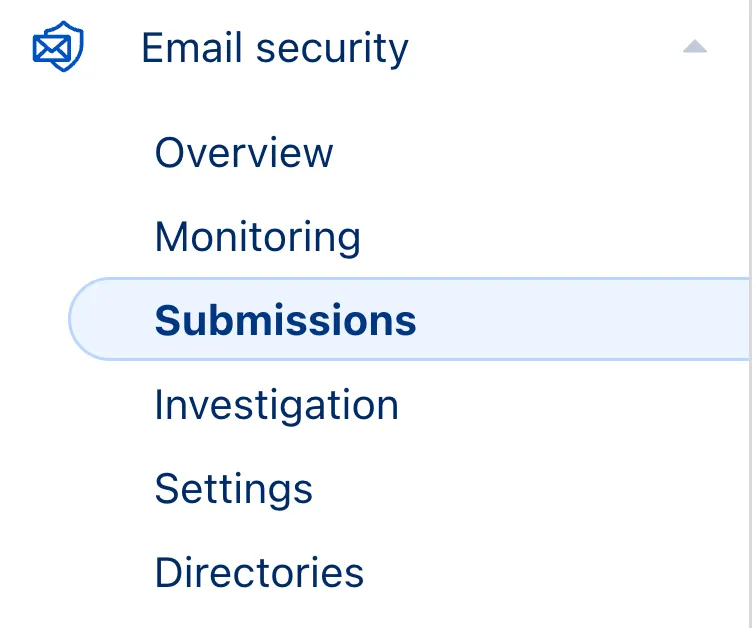
This applies to all Email Security packages:
The WAF rule deployed yesterday to block unsafe deserialization-based RCE has been updated. The rule description now reads “React – RCE – CVE-2025-55182”, explicitly mapping to the recently disclosed React Server Components vulnerability. Detection logic remains unchanged.
Key Findings
Rule description updated to reference React – RCE – CVE-2025-55182 while retaining existing unsafe-deserialization detection.
Impact
Improved classification and traceability with no change to coverage against remote code execution attempts.
| Ruleset | Rule ID | Legacy Rule ID | Description | Previous Action | New Action | Comments |
|---|---|---|---|---|---|---|
| Cloudflare Managed Ruleset | N/A | React - RCE - CVE:CVE-2025-55182 | N/A | Block | Rule metadata description changed. Detection unchanged. | |
| Cloudflare Free Ruleset | N/A | React - RCE - CVE:CVE-2025-55182 | N/A | Block | Rule metadata description changed. Detection unchanged. |
This week's emergency release introduces a new rule to block a critical RCE vulnerability in widely-used web frameworks through unsafe deserialization patterns.
Key Findings
New WAF rule deployed for RCE Generic Framework to block malicious POST requests containing unsafe deserialization patterns. If successfully exploited, this vulnerability allows attackers with network access via HTTP to execute arbitrary code remotely.
Impact
| Ruleset | Rule ID | Legacy Rule ID | Description | Previous Action | New Action | Comments |
|---|---|---|---|---|---|---|
| Cloudflare Managed Ruleset | N/A | RCE Generic - Framework | N/A | Block | This is a new detection. | |
| Cloudflare Free Ruleset | N/A | RCE Generic - Framework | N/A | Block | This is a new detection. |
This week’s release introduces new detections for remote code execution attempts targeting Monsta FTP (CVE-2025-34299), alongside improvements to an existing XSS detection to enhance coverage.
Key Findings
Impact
If exploited, the vulnerability enables full remote command execution on the underlying server, allowing takeover of the hosting environment, unauthorized file access, and potential lateral movement. As the flaw can be triggered without authentication on exposed Monsta FTP instances, it represents a severe risk for publicly reachable deployments.
| Ruleset | Rule ID | Legacy Rule ID | Description | Previous Action | New Action | Comments |
|---|---|---|---|---|---|---|
| Cloudflare Managed Ruleset | N/A | Monsta FTP - Remote Code Execution - CVE:CVE-2025-34299 | Log | Block | This is a new detection | |
| Cloudflare Managed Ruleset | N/A | XSS - JS Context Escape - Beta | Log | Block | This rule is merged into the original rule "XSS - JS Context Escape" (ID: |
The latest release of @cloudflare/agents ↗ brings resumable streaming, significant MCP client improvements, and critical fixes for schedules and Durable Object lifecycle management.
AIChatAgent now supports resumable streaming, allowing clients to reconnect and continue receiving streamed responses without losing data. This is useful for:
Streams are maintained across page refreshes, broken connections, and syncing across open tabs and devices.
The MCPClientManager API has been redesigned for better clarity and control:
registerServer() method: Register MCP servers without immediately connectingconnectToServer() method: Establish connections to registered serversrestoreConnectionsFromStorage() now properly handles failed connections// Register a server to Agentconst { id } = await this.mcp.registerServer({ name: "my-server", url: "https://my-mcp-server.example.com",});
// Connect when readyawait this.mcp.connectToServer(id);
// Discover tools, prompts and resourcesawait this.mcp.discoverIfConnected(id);The SDK now includes a formalized MCPConnectionState enum with states: idle, connecting, authenticating, connected, discovering, and ready.
MCP discovery fetches the available tools, prompts, and resources from an MCP server so your agent knows what capabilities are available. The MCPClientConnection class now includes a dedicated discover() method with improved reliability:
this.schedule(new Date(), ...) would not fireTo update to the latest version:
npm i agents@latestYou can now review detailed audit logs for cache purge events, giving you visibility into what purge requests were sent, what they contained, and by whom. Audit your purge requests via the Dashboard or API for all purge methods:
The detailed audit payload is visible within the Cloudflare Dashboard (under Manage Account > Audit Logs) and via the API. Below is an example of the Audit Logs v2 payload structure:
{ "action": { "result": "success", "type": "create" }, "actor": { "id": "1234567890abcdef", "email": "user@example.com", "type": "user" }, "resource": { "product": "purge_cache", "request": { "files": [ "https://example.com/images/logo.png", "https://example.com/css/styles.css" ] } }, "zone": { "id": "023e105f4ecef8ad9ca31a8372d0c353", "name": "example.com" }}To get started, refer to the Audit Logs documentation.
We've partnered with Black Forest Labs (BFL) to bring their latest FLUX.2 [dev] model to Workers AI! This model excels in generating high-fidelity images with physical world grounding, multi-language support, and digital asset creation. You can also create specific super images with granular controls like JSON prompting.
Read the BFL blog ↗ to learn more about the model itself. Read our Cloudflare blog ↗ to see the model in action, or try it out yourself on our multi modal playground ↗.
Pricing documentation is available on the model page or pricing page. Note, we expect to drop pricing in the next few days after iterating on the model performance.
The model hosted on Workers AI is able to support up to 4 image inputs (512x512 per input image). Note, this image model is one of the most powerful in the catalog and is expected to be slower than the other image models we currently support. One catch to look out for is that this model takes multipart form data inputs, even if you just have a prompt.
With the REST API, the multipart form data input looks like this:
curl --request POST \ --url 'https://api.cloudflare.com/client/v4/accounts/{ACCOUNT}/ai/run/@cf/black-forest-labs/flux-2-dev' \ --header 'Authorization: Bearer {TOKEN}' \ --header 'Content-Type: multipart/form-data' \ --form 'prompt=a sunset at the alps' \ --form steps=25 --form width=1024 --form height=1024With the Workers AI binding, you can use it as such:
const form = new FormData();form.append('prompt', 'a sunset with a dog');form.append('width', '1024');form.append('height', '1024');
//this dummy request is temporary hack//we're pushing a change to address this soonconst formRequest = new Request('http://dummy', {  method: 'POST',  body: form});const formStream = formRequest.body;const formContentType = formRequest.headers.get('content-type') || 'multipart/form-data';
const resp = await env.AI.run("@cf/black-forest-labs/flux-2-dev", {  multipart: {    body: formStream,    contentType: formContentType  }});
The parameters you can send to the model are detailed here:
prompt (string) - Text description of the image to generateOptional Parameters
input_image_0 (string) - Binary imageinput_image_1 (string) - Binary imageinput_image_2 (string) - Binary imageinput_image_3 (string) - Binary imagesteps (integer) - Number of inference steps. Higher values may improve quality but increase generation timeguidance (float) - Guidance scale for generation. Higher values follow the prompt more closelywidth (integer) - Width of the image, default 1024 Range: 256-1920height (integer) - Height of the image, default 768 Range: 256-1920seed (integer) - Seed for reproducibility## Multi-Reference Images
The FLUX.2 model is great at generating images based on reference images. You can use this feature to apply the style of one image to another, add a new character to an image, or iterate on past generate images. You would use it with the same multipart form data structure, with the input images in binary.
For the prompt, you can reference the images based on the index, like `take the subject of image 1 and style it like image 0` or even use natural language like `place the dog beside the woman`.
Note: you have to name the input parameter as `input_image_0`, `input_image_1`, `input_image_2` for it to work correctly. All input images must be smaller than 512x512.
```bashcurl --request POST \ --url 'https://api.cloudflare.com/client/v4/accounts/{ACCOUNT}/ai/run/@cf/black-forest-labs/flux-2-dev' \ --header 'Authorization: Bearer {TOKEN}' \ --header 'Content-Type: multipart/form-data' \ --form 'prompt=take the subject of image 1 and style it like image 0' \ --form input_image_0=@/Users/johndoe/Desktop/icedoutkeanu.png \ --form input_image_1=@/Users/johndoe/Desktop/me.png \ --form steps=25 --form width=1024 --form height=1024Through Workers AI Binding:
//helper function to convert ReadableStream to Blobasync function streamToBlob(stream: ReadableStream, contentType: string): Promise<Blob> {  const reader = stream.getReader();  const chunks = [];
  while (true) {    const { done, value } = await reader.read();    if (done) break;    chunks.push(value);  }
  return new Blob(chunks, { type: contentType });}
const image0 = await fetch("http://image-url");const image1 = await fetch("http://image-url");const form = new FormData();
const image_blob0 = await streamToBlob(image0.body, "image/png");const image_blob1 = await streamToBlob(image1.body, "image/png");form.append('input_image_0', image_blob0)form.append('input_image_1', image_blob1)form.append('prompt', 'take the subject of image 1and style it like image 0')
//this dummy request is temporary hack//we're pushing a change to address this soonconst formRequest = new Request('http://dummy', {  method: 'POST',  body: form});const formStream = formRequest.body;const formContentType = formRequest.headers.get('content-type') || 'multipart/form-data';
const resp = await env.AI.run("@cf/black-forest-labs/flux-2-dev", { multipart: { body: form, contentType: "multipart/form-data" }})The model supports prompting in JSON to get more granular control over images. You would pass the JSON as the value of the 'prompt' field in the multipart form data. See the JSON schema below on the base parameters you can pass to the model.
{ "type": "object", "properties": { "scene": { "type": "string", "description": "Overall scene setting or location" }, "subjects": { "type": "array", "items": { "type": "object", "properties": { "type": { "type": "string", "description": "Type of subject (e.g., desert nomad, blacksmith, DJ, falcon)" }, "description": { "type": "string", "description": "Physical attributes, clothing, accessories" }, "pose": { "type": "string", "description": "Action or stance" }, "position": { "type": "string", "enum": ["foreground", "midground", "background"], "description": "Depth placement in scene" } }, "required": ["type", "description", "pose", "position"] } }, "style": { "type": "string", "description": "Artistic rendering style (e.g., digital painting, photorealistic, pixel art, noir sci-fi, lifestyle photo, wabi-sabi photo)" }, "color_palette": { "type": "array", "items": { "type": "string" }, "minItems": 3, "maxItems": 3, "description": "Exactly 3 main colors for the scene (e.g., ['navy', 'neon yellow', 'magenta'])" }, "lighting": { "type": "string", "description": "Lighting condition and direction (e.g., fog-filtered sun, moonlight with star glints, dappled sunlight)" }, "mood": { "type": "string", "description": "Emotional atmosphere (e.g., harsh and determined, playful and modern, peaceful and dreamy)" }, "background": { "type": "string", "description": "Background environment details" }, "composition": { "type": "string", "enum": [ "rule of thirds", "circular arrangement", "framed by foreground", "minimalist negative space", "S-curve", "vanishing point center", "dynamic off-center", "leading leads", "golden spiral", "diagonal energy", "strong verticals", "triangular arrangement" ], "description": "Compositional technique" }, "camera": { "type": "object", "properties": { "angle": { "type": "string", "enum": ["eye level", "low angle", "slightly low", "bird's-eye", "worm's-eye", "over-the-shoulder", "isometric"], "description": "Camera perspective" }, "distance": { "type": "string", "enum": ["close-up", "medium close-up", "medium shot", "medium wide", "wide shot", "extreme wide"], "description": "Framing distance" }, "focus": { "type": "string", "enum": ["deep focus", "macro focus", "selective focus", "sharp on subject", "soft background"], "description": "Focus type" }, "lens": { "type": "string", "enum": ["14mm", "24mm", "35mm", "50mm", "70mm", "85mm"], "description": "Focal length (wide to telephoto)" }, "f-number": { "type": "string", "description": "Aperture (e.g., f/2.8, the smaller the number the more blurry the background)" }, "ISO": { "type": "number", "description": "Light sensitivity value (comfortable range between 100 & 6400, lower = less sensitivity)" } } }, "effects": { "type": "array", "items": { "type": "string" }, "description": "Post-processing effects (e.g., 'lens flare small', 'subtle film grain', 'soft bloom', 'god rays', 'chromatic aberration mild')" } }, "required": ["scene", "subjects"]}#2ECC71Radar introduces HTTP Origins insights, providing visibility into the status of traffic between Cloudflare's global network and cloud-based origin infrastructure.
The new Origins API provides provides the following endpoints:
/origins - Lists all origins (cloud providers and associated regions)./origins/{origin} - Retrieves information about a specific origin (cloud provider)./origins/timeseries - Retrieves normalized time series data for a specific origin, including the following metrics:
REQUESTS: Number of requestsCONNECTION_FAILURES: Number of connection failuresRESPONSE_HEADER_RECEIVE_DURATION: Duration of the response header receiveTCP_HANDSHAKE_DURATION: Duration of the TCP handshakeTCP_RTT: TCP round trip timeTLS_HANDSHAKE_DURATION: Duration of the TLS handshake/origins/summary - Retrieves HTTP requests to origins summarized by a dimension./origins/timeseries_groups - Retrieves timeseries data for HTTP requests to origins grouped by a dimension.The following dimensions are available for the summary and timeseries_groups endpoints:
region: Origin regionsuccess_rate: Success rate of requests (2XX versus 5XX response codes)percentile: Percentiles of metrics listed aboveAdditionally, the Annotations and Traffic Anomalies APIs have been extended to support origin outages and anomalies, enabling automated detection and alerting for origin infrastructure issues.
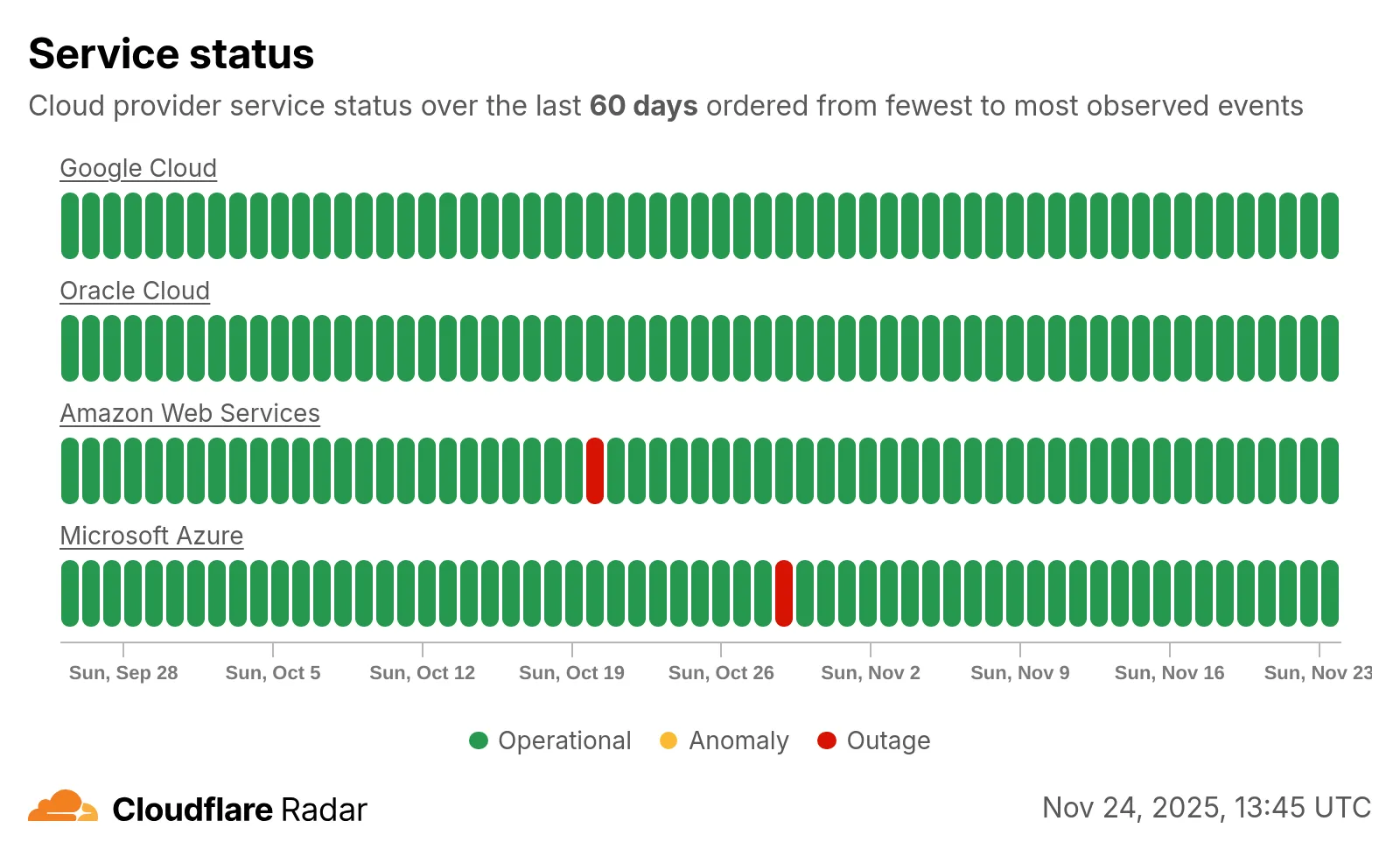
Check out the new Radar page ↗.
This week highlights enhancements to detection signatures improving coverage for vulnerabilities in FortiWeb, linked to CVE-2025-64446, alongside new detection logic expanding protection against PHP Wrapper Injection techniques.
Key Findings
This vulnerability enables an unauthenticated attacker to bypass access controls by abusing the CGIINFO header. The latest update strengthens detection logic to ensure a reliable identification of crafted requests attempting to exploit this flaw.
Impact
CGIINFO header to FortiWeb’s backend CGI handler. Successful exploitation grants unintended access to restricted administrative functionality, potentially enabling configuration tampering or system-level actions.| Ruleset | Rule ID | Legacy Rule ID | Description | Previous Action | New Action | Comments |
|---|---|---|---|---|---|---|
| Cloudflare Managed Ruleset | N/A | FortiWeb - Authentication Bypass via CGIINFO Header - CVE:CVE-2025-64446 | Log | Block | This is a new detection | |
| Cloudflare Managed Ruleset | N/A | PHP Wrapper Injection - Body - Beta | Log | Disabled | This rule has been merged into the original rule "PHP Wrapper Injection - Body" (ID: | |
| Cloudflare Managed Ruleset | N/A | PHP Wrapper Injection - URI - Beta | Log | Disabled | This rule has been merged into the original rule "PHP Wrapper Injection - URI" (ID: |
Containers now support mounting R2 buckets as FUSE (Filesystem in Userspace) volumes, allowing applications to interact with R2 using standard filesystem operations.
Common use cases include:
FUSE adapters like tigrisfs ↗, s3fs ↗, and gcsfuse ↗ can be installed in your container image and configured to mount buckets at startup.
FROM alpine:3.20
# Install FUSE and dependenciesRUN apk update && \    apk add --no-cache ca-certificates fuse curl bash
# Install tigrisfsRUN ARCH=$(uname -m) && \    if [ "$ARCH" = "x86_64" ]; then ARCH="amd64"; fi && \    if [ "$ARCH" = "aarch64" ]; then ARCH="arm64"; fi && \    VERSION=$(curl -s https://api.github.com/repos/tigrisdata/tigrisfs/releases/latest | grep -o '"tag_name": "[^"]*' | cut -d'"' -f4) && \    curl -L "https://github.com/tigrisdata/tigrisfs/releases/download/${VERSION}/tigrisfs_${VERSION#v}_linux_${ARCH}.tar.gz" -o /tmp/tigrisfs.tar.gz && \    tar -xzf /tmp/tigrisfs.tar.gz -C /usr/local/bin/ && \    rm /tmp/tigrisfs.tar.gz && \    chmod +x /usr/local/bin/tigrisfs
# Create startup script that mounts bucketRUN printf '#!/bin/sh\n\    set -e\n\    mkdir -p /mnt/r2\n\    R2_ENDPOINT="https://${R2_ACCOUNT_ID}.r2.cloudflarestorage.com"\n\    /usr/local/bin/tigrisfs --endpoint "${R2_ENDPOINT}" -f "${BUCKET_NAME}" /mnt/r2 &\n\    sleep 3\n\    ls -lah /mnt/r2\n\    ' > /startup.sh && chmod +x /startup.sh
CMD ["/startup.sh"]
See the Mount R2 buckets with FUSE example for a complete guide on mounting R2 buckets and/or other S3-compatible storage buckets within your containers.
Containers and Sandboxes pricing for CPU time is now based on active usage only, instead of provisioned resources.
This means that you now pay less for Containers and Sandboxes.
Imagine running the standard-2 instance type for one hour, which can use up to 1 vCPU,
but on average you use only 20% of your CPU capacity.
CPU-time is priced at $0.00002 per vCPU-second.
Previously, you would be charged for the CPU allocated to the instance multiplied by the time it was active, in this case 1 hour.
CPU cost would have been: $0.072 — 1 vCPU * 3600 seconds * $0.00002
Now, since you are only using 20% of your CPU capacity, your CPU cost is cut to 20% of the previous amount.
CPU cost is now: $0.0144 — 1 vCPU * 3600 seconds * $0.00002 * 20% utilization
This can significantly reduce costs for Containers and Sandboxes.
See the documentation to learn more about Containers, Sandboxes, and associated pricing.
The threat events platform now has threat insights available for some relevant parent events. Threat intelligence analyst users can access these insights for their threat hunting activity.
Insights are also highlighted in the Cloudflare dashboard by a small lightning icon and the insights can refer to multiple, connected events, potentially part of the same attack or campaign and associated with the same threat actor.
For more information, refer to Analyze threat events.
This week’s release introduces a critical detection for CVE-2025-61757, a vulnerability in the Oracle Identity Manager REST WebServices component.
Key Findings
This flaw allows unauthenticated attackers with network access over HTTP to fully compromise the Identity Manager, potentially leading to a complete takeover.
Impact
Oracle Identity Manager (CVE-2025-61757): Exploitation could allow an unauthenticated remote attacker to bypass security checks by sending specially crafted requests to the application's message processor. This enables the creation of arbitrary employee accounts, which can be leveraged to modify system configurations and achieve full system compromise.
| Ruleset | Rule ID | Legacy Rule ID | Description | Previous Action | New Action | Comments |
|---|---|---|---|---|---|---|
| Cloudflare Managed Ruleset | N/A | Oracle Identity Manager - Pre-Auth RCE - CVE:CVE-2025-61757 | N/A | Block | This is a new detection. |
Workers Builds now supports up to 64 environment variables, and each environment variable can be up to 5 KB in size. The previous limit was 5 KB total across all environment variables.
This change enables better support for complex build configurations, larger application settings, and more flexible CI/CD workflows.
For more details, refer to the build limits documentation.
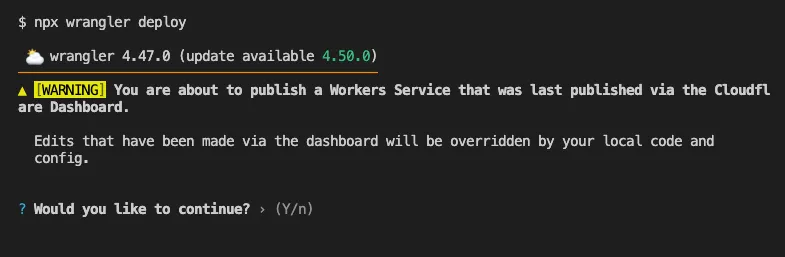
Until now, if a Worker had been previously deployed via the Cloudflare Dashboard ↗, a subsequent deployment done via the Cloudflare Workers CLI, Wrangler
(through the deploy command), would allow the user to override the Worker's dashboard settings without providing details on
what dashboard settings would be lost.
Now instead, wrangler deploy presents a helpful representation of the differences between the local configuration
and the remote dashboard settings, and offers to update your local configuration file for you.
See example below showing a before and after for wrangler deploy when a local configuration is expected to override a Worker's dashboard settings:
Before
After
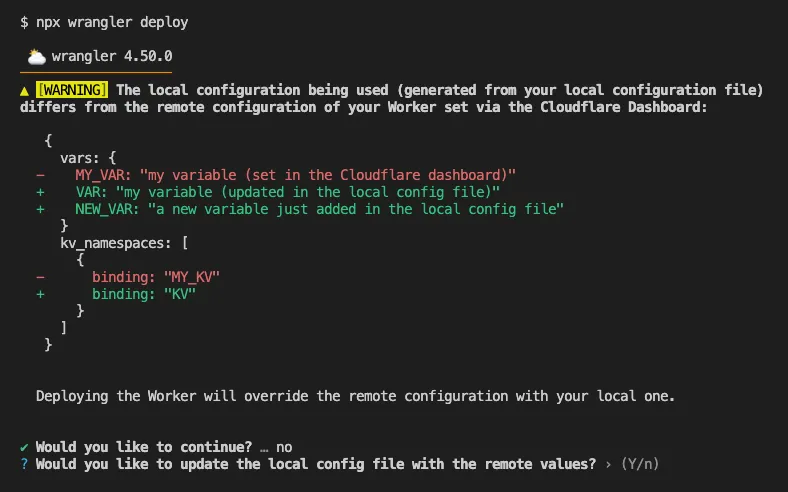
Also, if instead Wrangler detects that a deployment would override remote dashboard settings but in an additive way, without modifying or removing any of them, it will simply proceed with the deployment without requesting any user interaction.
Update to Wrangler v4.50.0 or greater to take advantage of this improved deploy flow.
Earlier this year, we announced the launch of the new Terraform v5 Provider. We are aware of the high number of issues reported by the Cloudflare community related to the v5 release. We have committed to releasing improvements on a 2-3 week cadence ↗ to ensure its stability and reliability, including the v5.13 release. We have also pivoted from an issue-to-issue approach to a resource-per-resource approach ↗ - we will be focusing on specific resources to not only stabilize the resource but also ensure it is migration-friendly for those migrating from v4 to v5.
Thank you for continuing to raise issues. They make our provider stronger and help us build products that reflect your needs.
This release includes new features, new resources and data sources, bug fixes, updates to our Developer Documentation, and more.
Please be aware that there are breaking changes for the cloudflare_api_token and cloudflare_account_token resources. These changes eliminate configuration drift caused by policy ordering differences in the Cloudflare API.
For more specific information about the changes or the actions required, please see the detailed Repository changelog ↗.
We suggest holding off on migration to v5 while we work on stabilization. This help will you avoid any blocking issues while the Terraform resources are actively being stabilized. We will be releasing a new migration tool in March 2026 to help support v4 to v5 transitions for our most popular resources.
AI Search now supports custom HTTP headers for website crawling, solving a common problem where valuable content behind authentication or access controls could not be indexed.
Previously, AI Search could only crawl publicly accessible pages, leaving knowledge bases, documentation, and other protected content out of your search results. With custom headers support, you can now include authentication credentials that allow the crawler to access this protected content.
This is particularly useful for indexing content like:
To add custom headers when creating an AI Search instance, select Parse options. In the Extra headers section, you can add up to five custom headers per Website data source.
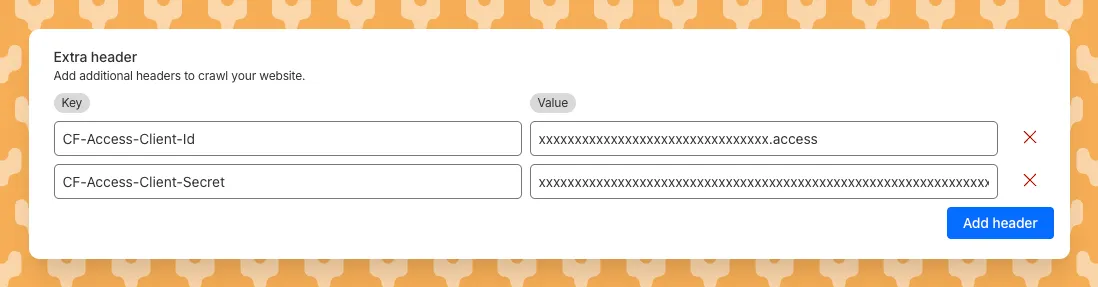
For example, to crawl a site protected by Cloudflare Access, you can add service token credentials as custom headers:
CF-Access-Client-Id: your-token-id.accessCF-Access-Client-Secret: your-token-secretThe crawler will automatically include these headers in all requests, allowing it to access protected pages that would otherwise be blocked.
Learn more about configuring custom headers for website crawling in AI Search.
We will listen carefully to your feedback and continue to find comprehensive ways to communicate updates on your submissions. Your submissions will continue to be addressed at an even greater rate than before, fuelling faster and more accurate email security improvement.
The Zero Trust dashboard and navigation is receiving significant and exciting updates. The dashboard is being restructured to better support common tasks and workflows, and various pages have been moved and consolidated.
There is a new guided experience on login detailing the changes, and you can use the Zero Trust dashboard search to find product pages by both their new and old names, as well as your created resources. To replay the guided experience, you can find it in Overview > Get Started.
Notable changes
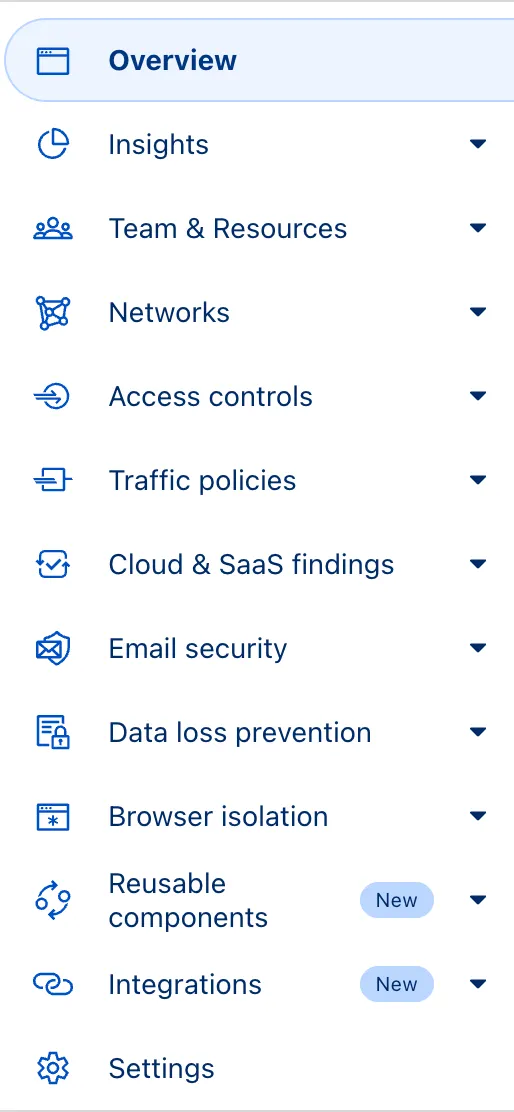
No changes to our API endpoint structure or to any backend services have been made as part of this effort.
This week highlights enhancements to detection signatures improving coverage for vulnerabilities in DELMIA Apriso, linked to CVE-2025-6205.
Key Findings
This vulnerability allows unauthenticated attackers to gain privileged access to the application. The latest update provides enhanced detection logic for resilient protection against exploitation attempts.
Impact
| Ruleset | Rule ID | Legacy Rule ID | Description | Previous Action | New Action | Comments |
|---|---|---|---|---|---|---|
| Cloudflare Managed Ruleset | N/A | DELMIA Apriso - Auth Bypass - CVE:CVE-2025-6205 | Log | Block | This is a new detection. | |
| Cloudflare Managed Ruleset | N/A | PHP Wrapper Injection - Body | N/A | Disabled | Rule metadata description refined. Detection unchanged. | |
| Cloudflare Managed Ruleset | N/A | PHP Wrapper Injection - URI | N/A | Disabled | Rule metadata description refined. Detection unchanged. |
SSH with Cloudflare Access for Infrastructure allows you to use short-lived SSH certificates to eliminate SSH key management and reduce security risks associated with lost or stolen keys.
Previously, users had to generate this certificate by using the Cloudflare API ↗ directly. With this update, you can now create and manage this certificate in the Cloudflare One dashboard ↗ from the Access controls > Service credentials page.
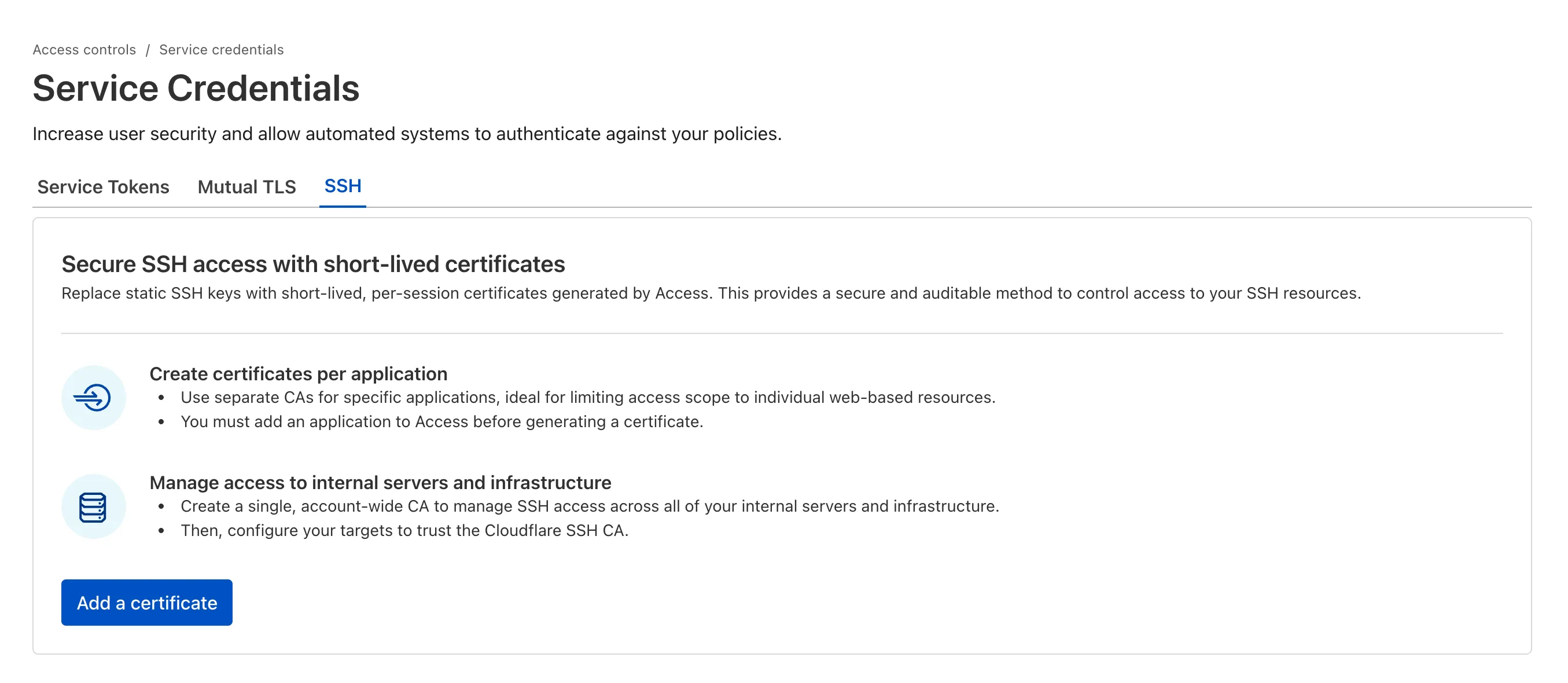
For more details, refer to Generate a Cloudflare SSH CA.
You can now stay on top of your SaaS security posture with the new CASB Weekly Digest notification. This opt-in email digest is delivered to your inbox every Monday morning and provides a high-level summary of your organization's Cloudflare API CASB findings from the previous week.
This allows security teams and IT administrators to get proactive, at-a-glance visibility into new risks and integration health without having to log in to the dashboard.
To opt in, navigate to Manage Account > Notifications in the Cloudflare dashboard to configure the CASB Weekly Digest alert type.
The CASB Weekly Digest notification is available to all Cloudflare users today.
We've resolved a bug in Log Explorer that caused inconsistencies between the custom SQL date field filters and the date picker dropdown. Previously, users attempting to filter logs based on a custom date field via a SQL query sometimes encountered unexpected results or mismatching dates when using the interactive date picker.
This fix ensures that the custom SQL date field filters now align correctly with the selection made in the date picker dropdown, providing a reliable and predictable filtering experience for your log data. This is particularly important for users creating custom log views based on time-sensitive fields.
We've significantly enhanced Log Explorer by adding support for 14 additional Cloudflare product datasets.
This expansion enables Operations and Security Engineers to gain deeper visibility and telemetry across a wider range of Cloudflare services. By integrating these new datasets, users can now access full context to efficiently investigate security incidents, troubleshoot application performance issues, and correlate logged events across different layers (like application and network) within a single interface. This capability is crucial for a complete and cohesive understanding of event flows across your Cloudflare environment.
The newly supported datasets include:
Dns_logsNel_reportsPage_shield_eventsSpectrum_eventsZaraz_eventsAudit LogsAudit_logs_v2Biso_user_actionsDNS firewall logsEmail_security_alertsMagic Firewall IDSNetwork AnalyticsSinkhole HTTPipsec_logsYou can now use Log Explorer to query and filter with each of these datasets. For example, you can identify an IP address exhibiting suspicious behavior in the FW_event logs, and then instantly pivot to the Network Analytics logs or Access logs to see its network-level traffic profile or if it bypassed a corporate policy.
To learn more and get started, refer to the Log Explorer documentation and the Cloudflare Logs documentation.
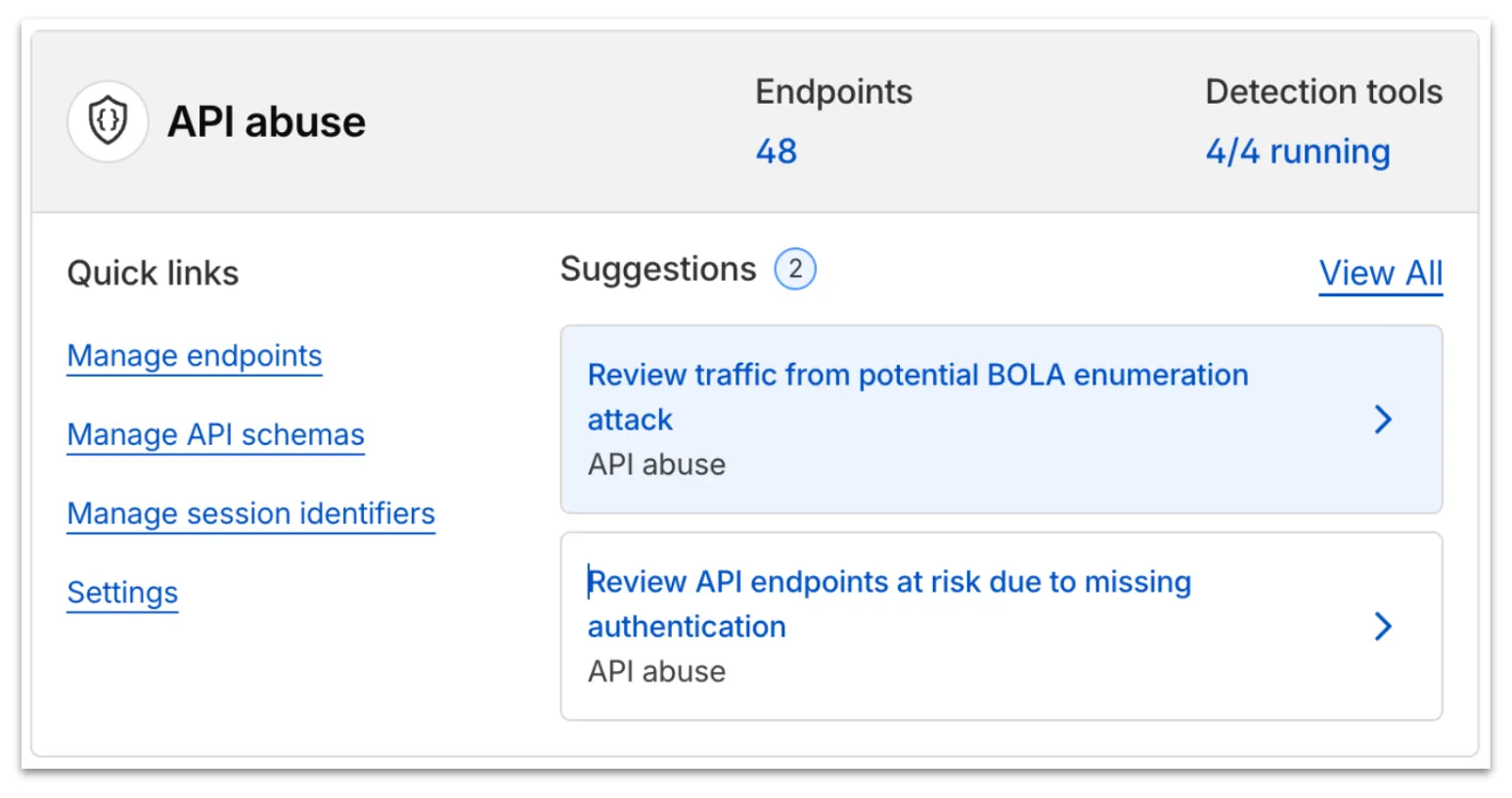
Now, API Shield automatically searches for and highlights Broken Object Level Authorization (BOLA) attacks on managed API endpoints. API Shield will highlight both BOLA enumeration attacks and BOLA pollution attacks, telling you what was attacked, by who, and for how long.
You can find these attacks three different ways: Security Overview, Endpoint details, or Security Analytics. If these attacks are not found on your managed API endpoints, there will not be an overview card or security analytics suspicious activity card.
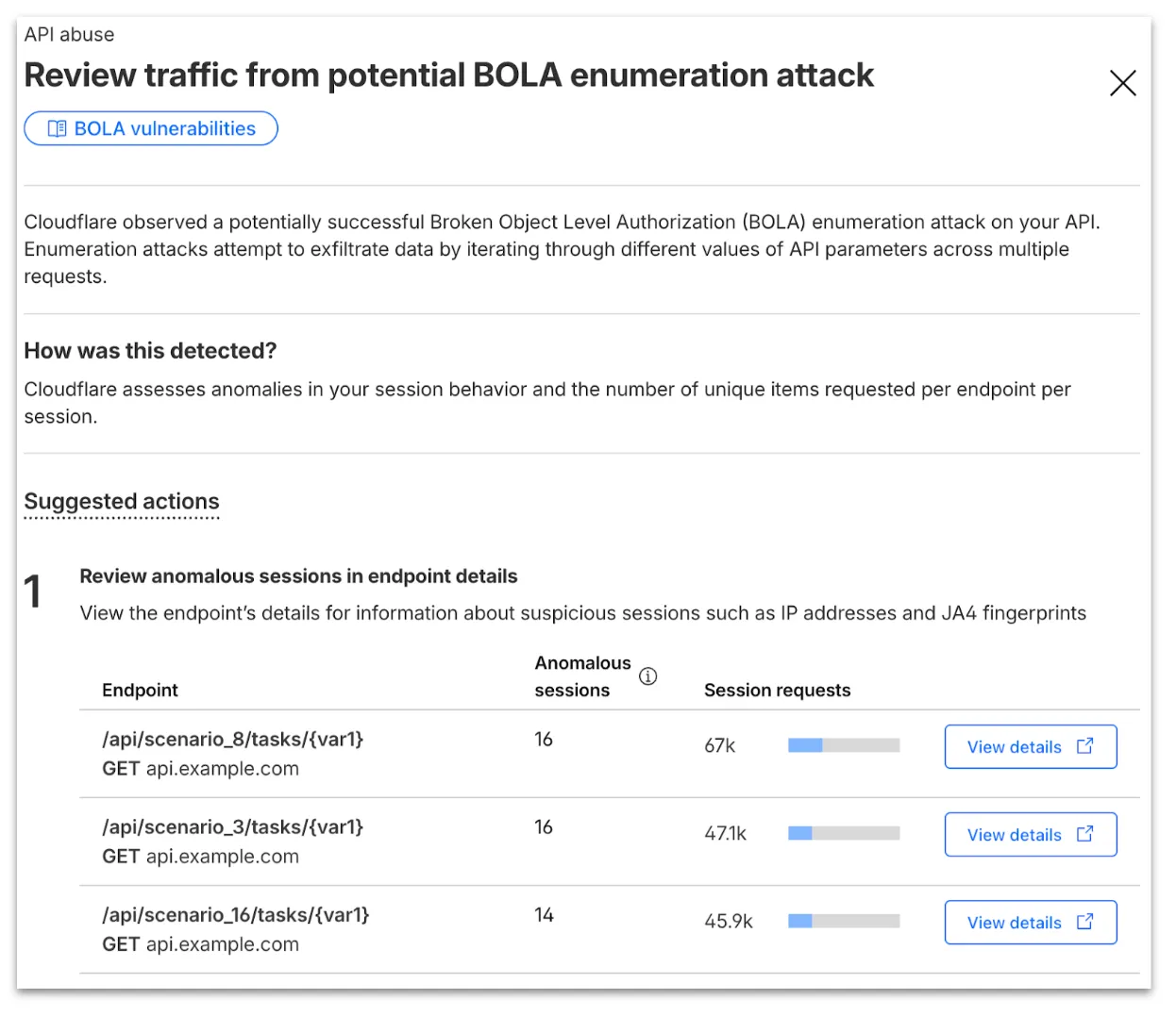
From the endpoint details, you can select View attack to find details about the BOLA attacker’s sessions.
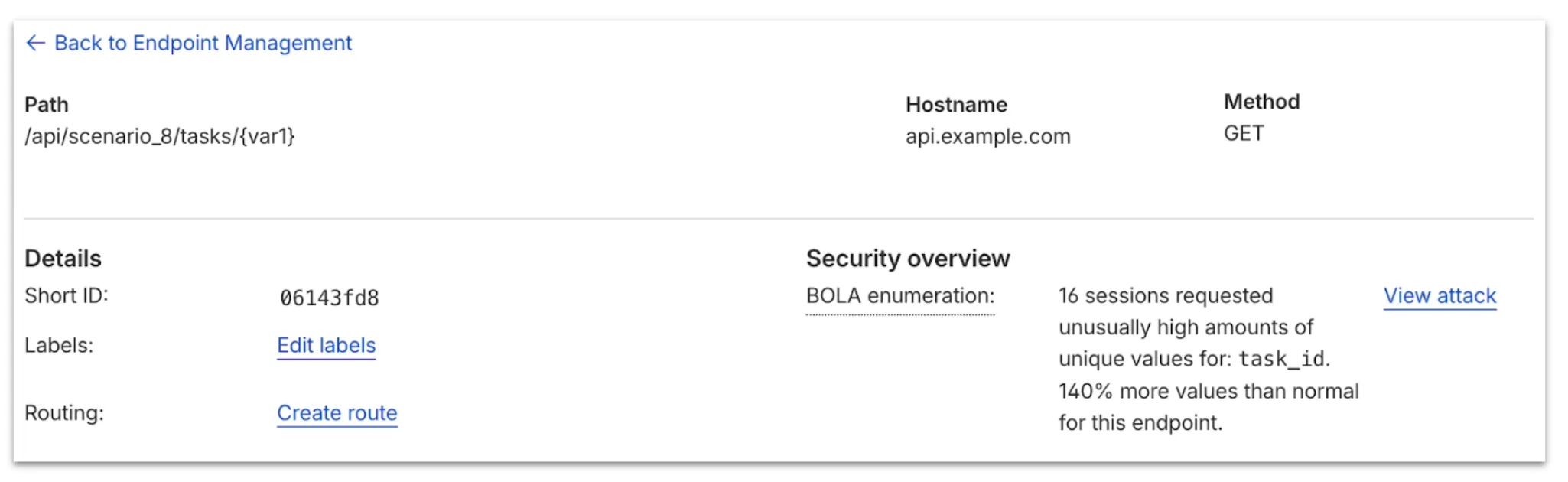
From here, select View in Analytics to observe attacker traffic over time for the last seven days.
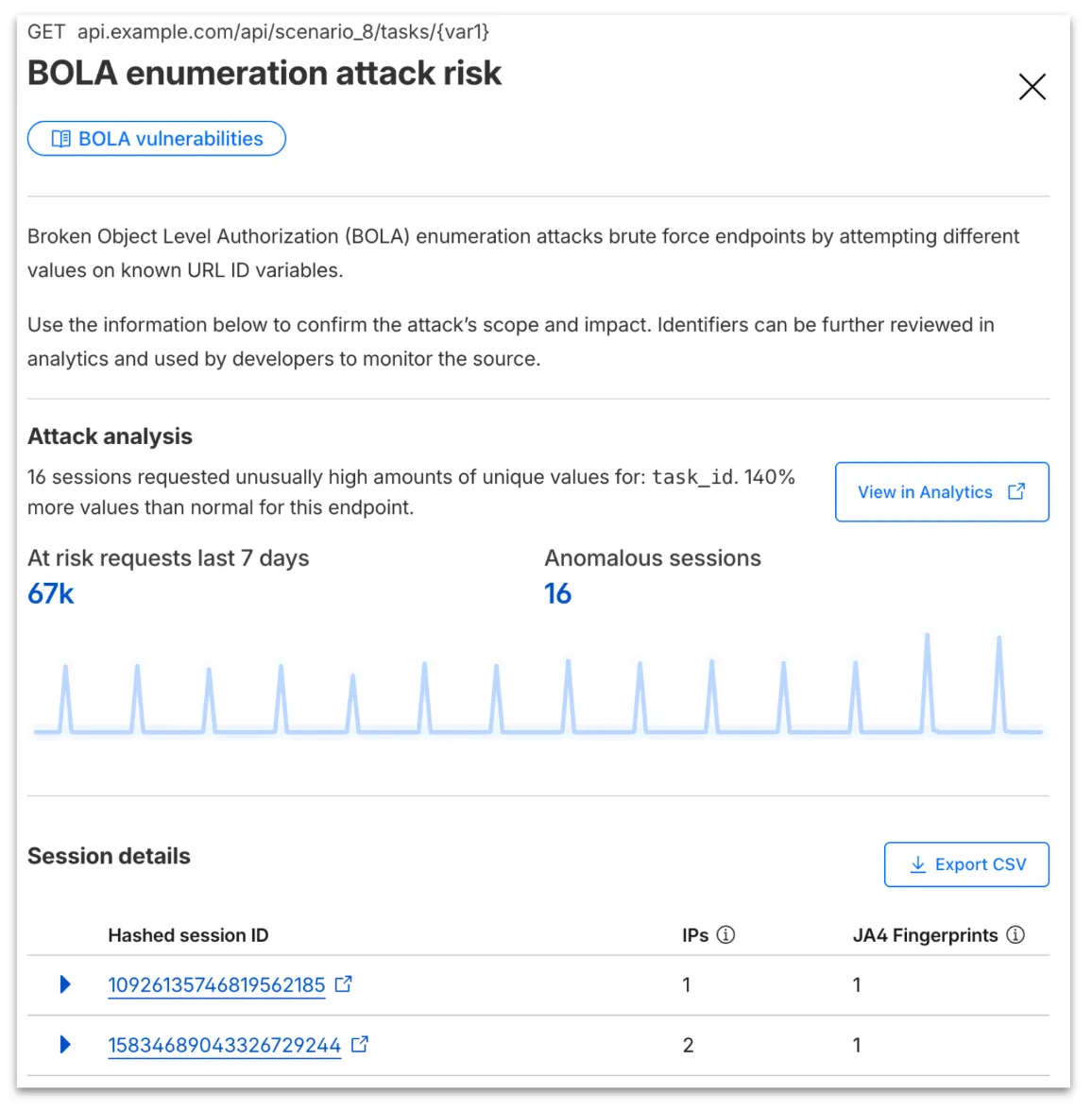
Your search will filter to traffic on that endpoint in the last seven days, along with the malicious session IDs found in the attack. Session IDs are hashed for privacy and will not be found in your origin logs. Refer to IP and JA4 fingerprint to cross-reference behavior at the origin.
At any time, you can also start your investigation into attack traffic from Security Analytics by selecting the suspicious activity card.
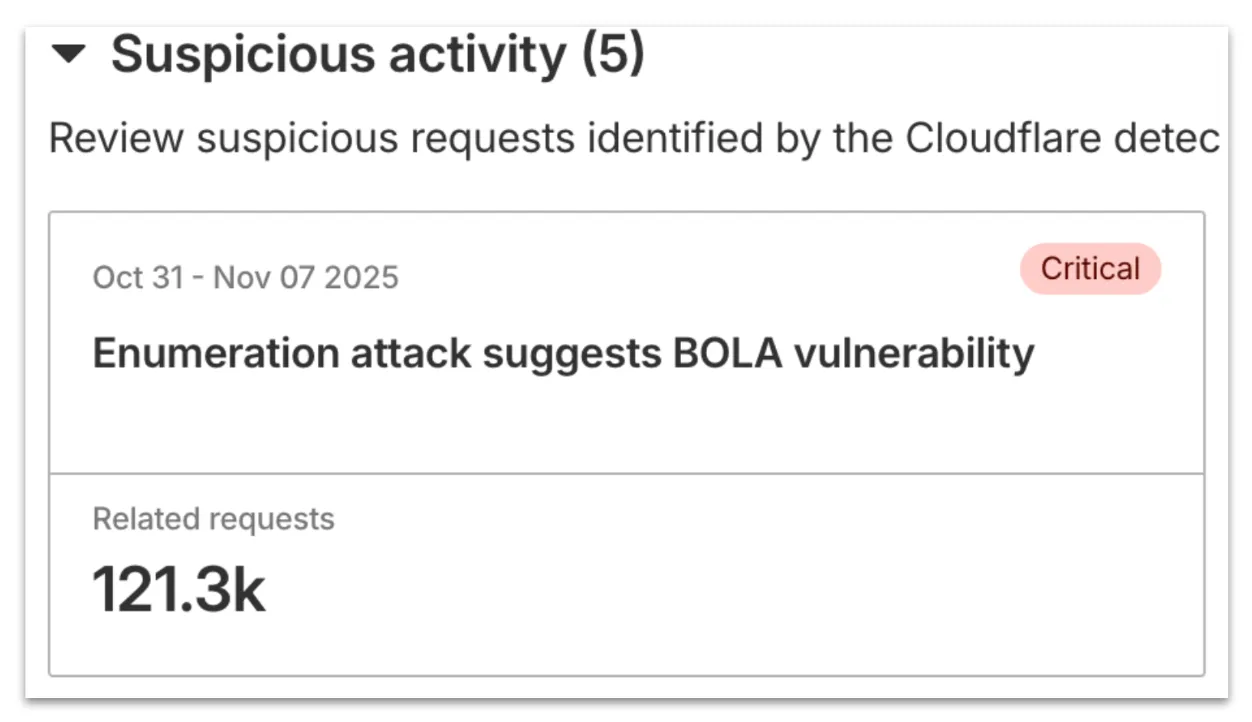
We urge you to take all of this client information to your developer team to research the attacker behavior and ensure any broken authorization policies in your API are fixed at the source in your application, preventing further abuse.
In addition, this release marks the end of the beta period for these scans. All Enterprise customers with API Shield subscriptions will see these new attacks if found on their zone.