

You can now enable Cloudflare Access for your
workers.devand Preview URLs in a single click.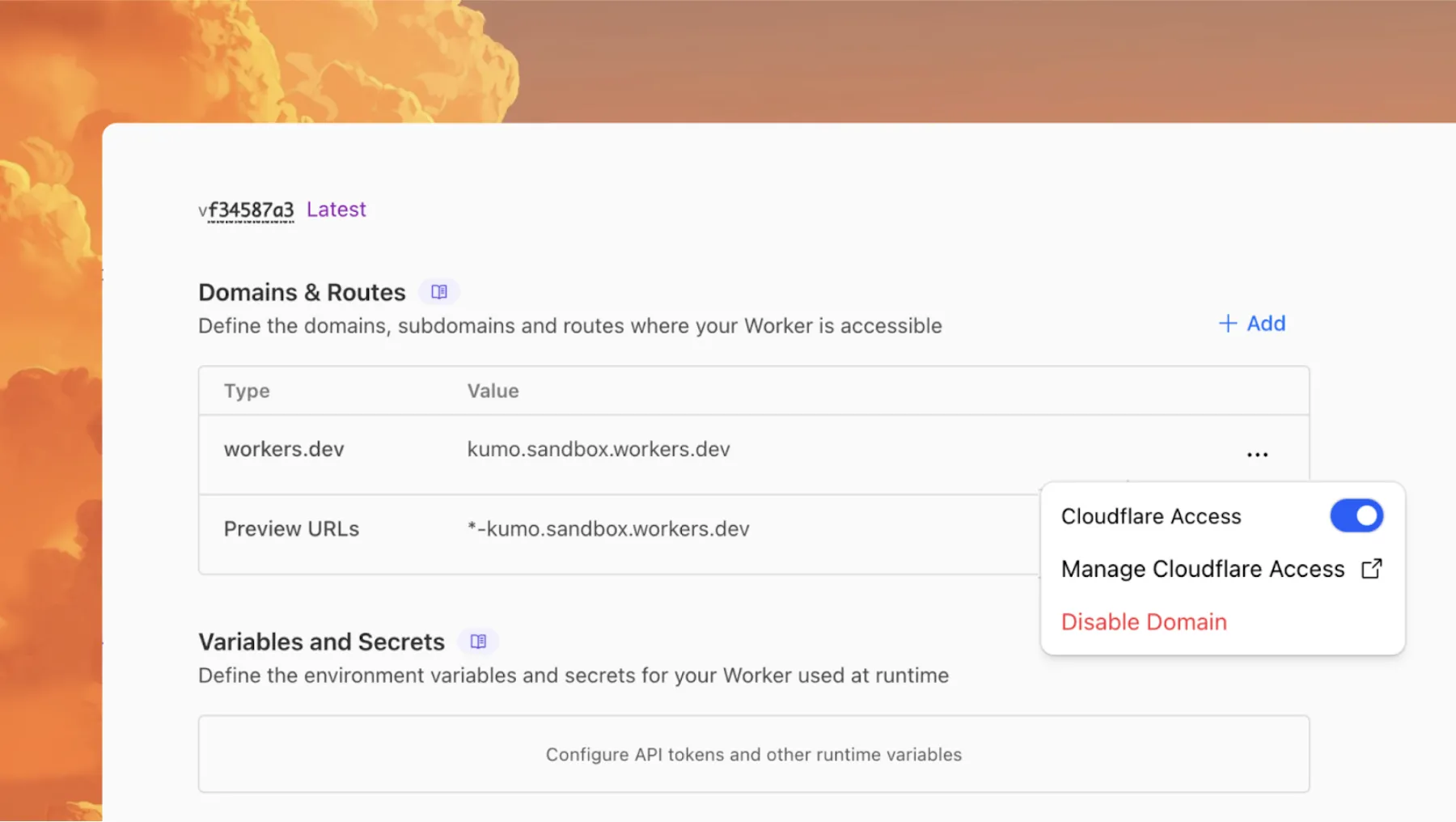
Access allows you to limit access to your Workers to specific users or groups. You can limit access to yourself, your teammates, your organization, or anyone else you specify in your Access policy.
To enable Cloudflare Access:
-
In the Cloudflare dashboard, go to the Workers & Pages page.
Go to Workers & Pages -
In Overview, select your Worker.
-
Go to Settings > Domains & Routes.
-
For
workers.devor Preview URLs, click Enable Cloudflare Access. -
Optionally, to configure the Access application, click Manage Cloudflare Access. There, you can change the email addresses you want to authorize. View Access policies to learn about configuring alternate rules.
To fully secure your application, it is important that you validate the JWT that Cloudflare Access adds to the
Cf-Access-Jwt-Assertionheader on the incoming request.The following code will validate the JWT using the jose NPM package ↗:
JavaScript import { jwtVerify, createRemoteJWKSet } from "jose";export default {async fetch(request, env, ctx) {// Verify the POLICY_AUD environment variable is setif (!env.POLICY_AUD) {return new Response("Missing required audience", {status: 403,headers: { "Content-Type": "text/plain" },});}// Get the JWT from the request headersconst token = request.headers.get("cf-access-jwt-assertion");// Check if token existsif (!token) {return new Response("Missing required CF Access JWT", {status: 403,headers: { "Content-Type": "text/plain" },});}try {// Create JWKS from your team domainconst JWKS = createRemoteJWKSet(new URL(`${env.TEAM_DOMAIN}/cdn-cgi/access/certs`),);// Verify the JWTconst { payload } = await jwtVerify(token, JWKS, {issuer: env.TEAM_DOMAIN,audience: env.POLICY_AUD,});// Token is valid, proceed with your application logicreturn new Response(`Hello ${payload.email || "authenticated user"}!`, {headers: { "Content-Type": "text/plain" },});} catch (error) {// Token verification failedreturn new Response(`Invalid token: ${error.message}`, {status: 403,headers: { "Content-Type": "text/plain" },});}},};Add these environment variables to your Worker:
POLICY_AUD: Your application's AUD tagTEAM_DOMAIN:https://<your-team-name>.cloudflareaccess.com
Both of these appear in the modal that appears when you enable Cloudflare Access.
You can set these variables by adding them to your Worker's Wrangler configuration file, or via the Cloudflare dashboard under Workers & Pages > your-worker > Settings > Environment Variables.
-
Fine-grained permissions for Access Applications, Identity Providers (IdPs), and Targets is now available in Public Beta. This expands our RBAC model beyond account & zone-scoped roles, enabling administrators to grant permissions scoped to individual resources.
- Access Applications ↗: Grant admin permissions to specific Access Applications.
- Identity Providers ↗: Grant admin permissions to individual Identity Providers.
- Targets ↗: Grant admin rights to specific Targets
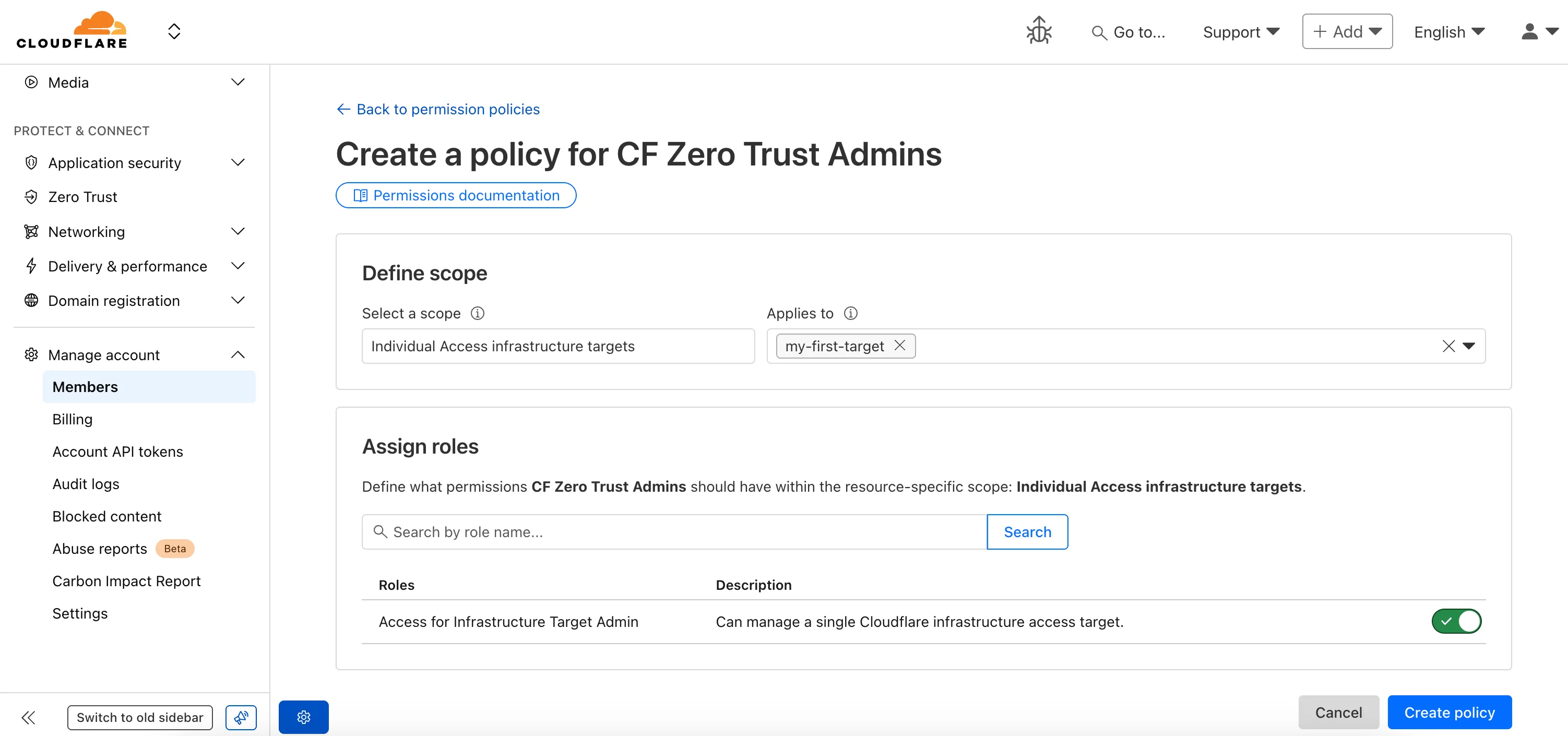
For more info:
Deepgram's newest Flux model
@cf/deepgram/fluxis now available on Workers AI, hosted directly on Cloudflare's infrastructure. We're excited to be a launch partner with Deepgram and offer their new Speech Recognition model built specifically for enabling voice agents. Check out Deepgram's blog ↗ for more details on the release.The Flux model can be used in conjunction with Deepgram's speech-to-text model
@cf/deepgram/nova-3and text-to-speech model@cf/deepgram/aura-1to build end-to-end voice agents. Having Deepgram on Workers AI takes advantage of our edge GPU infrastructure, for ultra low latency voice AI applications.For the month of October 2025, Deepgram's Flux model will be free to use on Workers AI. Official pricing will be announced soon and charged after the promotional pricing period ends on October 31, 2025. Check out the model page for pricing details in the future.
The new Flux model is WebSocket only as it requires live bi-directional streaming in order to recognize speech activity.
- Create a worker that establishes a websocket connection with
@cf/deepgram/flux
JavaScript export default {async fetch(request, env, ctx): Promise<Response> {const resp = await env.AI.run("@cf/deepgram/flux", {encoding: "linear16",sample_rate: "16000"}, {websocket: true});return resp;},} satisfies ExportedHandler<Env>;- Deploy your worker
Terminal window npx wrangler deploy- Write a client script to connect to your worker and start sending random audio bytes to it
JavaScript const ws = new WebSocket('wss://<your-worker-url.com>');ws.onopen = () => {console.log('Connected to WebSocket');// Generate and send random audio bytes// You can replace this part with a function// that reads from your mic or other audio sourceconst audioData = generateRandomAudio();ws.send(audioData);console.log('Audio data sent');};ws.onmessage = (event) => {// Transcription will be received here// Add your custom logic to parse the dataconsole.log('Received:', event.data);};ws.onerror = (error) => {console.error('WebSocket error:', error);};ws.onclose = () => {console.log('WebSocket closed');};// Generate random audio data (1 second of noise at 44.1kHz, mono)function generateRandomAudio() {const sampleRate = 44100;const duration = 1;const numSamples = sampleRate * duration;const buffer = new ArrayBuffer(numSamples * 2);const view = new Int16Array(buffer);for (let i = 0; i < numSamples; i++) {view[i] = Math.floor(Math.random() * 65536 - 32768);}return buffer;}- Create a worker that establishes a websocket connection with
You can now perform more powerful queries directly in Workers Analytics Engine ↗ with a major expansion of our SQL function library.
Workers Analytics Engine allows you to ingest and store high-cardinality data at scale (such as custom analytics) and query your data through a simple SQL API.
Today, we've expanded Workers Analytics Engine's SQL capabilities with several new functions:
argMin()- Returns the value associated with the minimum in a groupargMax()- Returns the value associated with the maximum in a grouptopK()- Returns an array of the most frequent values in a grouptopKWeighted()- Returns an array of the most frequent values in a group using weightsfirst_value()- Returns the first value in an ordered set of values within a partitionlast_value()- Returns the last value in an ordered set of values within a partition
bitAnd()- Returns the bitwise AND of two expressionsbitCount()- Returns the number of bits set to one in the binary representation of a numberbitHammingDistance()- Returns the number of bits that differ between two numbersbitNot()- Returns a number with all bits flippedbitOr()- Returns the inclusive bitwise OR of two expressionsbitRotateLeft()- Rotates all bits in a number left by specified positionsbitRotateRight()- Rotates all bits in a number right by specified positionsbitShiftLeft()- Shifts all bits in a number left by specified positionsbitShiftRight()- Shifts all bits in a number right by specified positionsbitTest()- Returns the value of a specific bit in a numberbitXor()- Returns the bitwise exclusive-or of two expressions
abs()- Returns the absolute value of a numberlog()- Computes the natural logarithm of a numberround()- Rounds a number to a specified number of decimal placesceil()- Rounds a number up to the nearest integerfloor()- Rounds a number down to the nearest integerpow()- Returns a number raised to the power of another number
lowerUTF8()- Converts a string to lowercase using UTF-8 encodingupperUTF8()- Converts a string to uppercase using UTF-8 encoding
hex()- Converts a number to its hexadecimal representationbin()- Converts a string to its binary representation
New type conversion functions: ↗
toUInt8()- Converts any numeric expression, or expression resulting in a string representation of a decimal, into an unsigned 8 bit integer
Whether you're building usage-based billing systems, customer analytics dashboards, or other custom analytics, these functions let you get the most out of your data. Get started with Workers Analytics Engine and explore all available functions in our SQL reference documentation.
The GraphQL Analytics API now supports confidence intervals for
sumandcountfields on adaptive (sampled) datasets. Confidence intervals provide a statistical range around sampled results, helping verify accuracy and quantify uncertainty.- Supported datasets: Adaptive (sampled) datasets only.
- Supported fields: All
sumandcountfields. - Usage: The confidence
levelmust be provided as a decimal between 0 and 1 (e.g.0.90,0.95,0.99). - Default: If no confidence level is specified, no intervals are returned.
For examples and more details, see the GraphQL Analytics API documentation.
New instance types provide up to 4 vCPU, 12 GiB of memory, and 20 GB of disk per container instance.
Instance Type vCPU Memory Disk lite 1/16 256 MiB 2 GB basic 1/4 1 GiB 4 GB standard-1 1/2 4 GiB 8 GB standard-2 1 6 GiB 12 GB standard-3 2 8 GiB 16 GB standard-4 4 12 GiB 20 GB The
devandstandardinstance types are preserved for backward compatibility and are aliases forliteandstandard-1, respectively. Thestandard-1instance type now provides up to 8 GB of disk instead of only 4 GB.See the getting started guide to deploy your first Container, and the limits documentation for more details on the available instance types and limits.
You can now enhance your security posture by blocking additional application installer and disk image file types with Cloudflare Gateway. Preventing the download of unauthorized software packages is a critical step in securing endpoints from malware and unwanted applications.
We have expanded Gateway's file type controls to include:
- Apple Disk Image (dmg)
- Microsoft Software Installer (msix, appx)
- Apple Software Package (pkg)
You can find these new options within the Upload File Types and Download File Types selectors when creating or editing an HTTP policy. The file types are categorized as follows:
- System: Apple Disk Image (dmg)
- Executable: Microsoft Software Installer (msix), Microsoft Software Installer (appx), Apple Software Package (pkg)
To ensure these file types are blocked effectively, please note the following behaviors:
- DMG: Due to their file structure, DMG files are blocked at the very end of the transfer. A user's download may appear to progress but will fail at the last moment, preventing the browser from saving the file.
- MSIX: To comprehensively block Microsoft Software Installers, you should also include the file type Unscannable. MSIX files larger than 100 MB are identified as Unscannable ZIP files during inspection.
To get started, go to your HTTP policies in Zero Trust. For a full list of file types, refer to supported file types.
Users can now specify that they want to retrieve Cloudflare documentation as markdown rather than the previous HTML default. This can significantly reduce token consumption when used alongside Large Language Model (LLM) tools.
Terminal window curl https://developers.cloudflare.com/workers/ -H 'Accept: text/markdown' -vIf you maintain your own site and want to adopt this practice using Cloudflare Workers for your own users you can follow the example here ↗.
A new GA release for the Windows WARP client is now available on the stable releases downloads page.
This release contains minor fixes and improvements.
Changes and improvements
- MASQUE is now the default tunnel protocol for all new WARP device profiles.
- Improvement to limit idle connections in Gateway with DoH mode to avoid unnecessary resource usage that can lead to DoH requests not resolving.
- Improvement to maintain TCP connections to reduce interruptions in long-lived connections such as RDP or SSH.
- Improvements to maintain Global WARP override settings when switching between organizations.
- Improvements to maintain client connectivity during network changes.
Known issues
For Windows 11 24H2 users, Microsoft has confirmed a regression that may lead to performance issues like mouse lag, audio cracking, or other slowdowns. Cloudflare recommends users experiencing these issues upgrade to a minimum Windows 11 24H2 KB5062553 or higher for resolution.
Devices using WARP client 2025.4.929.0 and up may experience Local Domain Fallback failures if a fallback server has not been configured. To configure a fallback server, refer to Route traffic to fallback server.
Devices with KB5055523 installed may receive a warning about
Win32/ClickFix.ABAbeing present in the installer. To resolve this false positive, update Microsoft Security Intelligence to version 1.429.19.0 or later.DNS resolution may be broken when the following conditions are all true:
- WARP is in Secure Web Gateway without DNS filtering (tunnel-only) mode.
- A custom DNS server address is configured on the primary network adapter.
- The custom DNS server address on the primary network adapter is changed while WARP is connected.
To work around this issue, reconnect the WARP client by toggling off and back on.
A new GA release for the macOS WARP client is now available on the stable releases downloads page.
This release contains minor fixes and improvements.
Changes and improvements
- Fixed a bug preventing the
warp-diag captive-portalcommand from running successfully due to the client not parsing SSID on macOS. - Improvements to maintain Global WARP override settings when switching between organizations.
- MASQUE is now the default tunnel protocol for all new WARP device profiles.
- Improvement to limit idle connections in Gateway with DoH mode to avoid unnecessary resource usage that can lead to DoH requests not resolving.
- Improvements to maintain client connectivity during network changes.
- The WARP client now supports macOS Tahoe (version 26.0).
Known issues
macOS Sequoia: Due to changes Apple introduced in macOS 15.0.x, the WARP client may not behave as expected. Cloudflare recommends the use of macOS 15.4 or later.
Devices using WARP client 2025.4.929.0 and up may experience Local Domain Fallback failures if a fallback server has not been configured. To configure a fallback server, refer to Route traffic to fallback server.
- Fixed a bug preventing the
A new GA release for the Linux WARP client is now available on the stable releases downloads page.
This release contains minor fixes and improvements including an updated public key for Linux packages. The public key must be updated if it was installed before September 12, 2025 to ensure the repository remains functional after December 4, 2025. Instructions to make this update are available at pkg.cloudflareclient.com.
Changes and improvements
- MASQUE is now the default tunnel protocol for all new WARP device profiles.
- Improvement to limit idle connections in Gateway with DoH mode to avoid unnecessary resource usage that can lead to DoH requests not resolving.
- Improvements to maintain Global WARP override settings when switching between organizations.
- Improvements to maintain client connectivity during network changes.
Known issues
- Devices using WARP client 2025.4.929.0 and up may experience Local Domain Fallback failures if a fallback server has not been configured. To configure a fallback server, refer to Route traffic to fallback server.
Gateway users can now apply granular controls to their file sharing and AI chat applications through HTTP policies.
The new feature offers two methods of controlling SaaS applications:
- Application Controls are curated groupings of Operations which provide an easy way for users to achieve a specific outcome. Application Controls may include Upload, Download, Prompt, Voice, and Share depending on the application.
- Operations are controls aligned to the most granular action a user can take. This provides a fine-grained approach to enforcing policy and generally aligns to the SaaS providers API specifications in naming and function.
Get started using Application Granular Controls and refer to the list of supported applications.
Radar now introduces Regional Data, providing traffic insights that bring a more localized perspective to the traffic trends shown on Radar.
The following API endpoints are now available:
Get Geolocation- Retrieves geolocation bygeoId.List Geolocations- Lists geolocations.NetFlows Summary By Dimension- Retrieves NetFlows summary by dimension.
All
summaryandtimeseries_groupsendpoints inHTTPandNetFlowsnow include anadm1dimension for grouping data by first level administrative division (for example, state, province, etc.)A new filter
geoIdwas also added to all endpoints inHTTPandNetFlows, allowing filtering by a specific administrative division.Check out the new Regional traffic insights on a country specific traffic page new Radar page ↗.
This week highlights four important vendor- and component-specific issues: an authentication bypass in SimpleHelp (CVE-2024-57727), an information-disclosure flaw in Flowise Cloud (CVE-2025-58434), an SSRF in the WordPress plugin Ditty (CVE-2025-8085), and a directory-traversal bug in Vite (CVE-2025-30208). These are paired with improvements to our generic detection coverage (SQLi, SSRF) to raise the baseline and reduce noisy gaps.
Key Findings
-
SimpleHelp (CVE-2024-57727): Authentication bypass in SimpleHelp that can allow unauthorized access to management interfaces or sessions.
-
Flowise Cloud (CVE-2025-58434): Information-disclosure vulnerability in Flowise Cloud that may expose sensitive configuration or user data to unauthenticated or low-privileged actors.
-
WordPress:Plugin: Ditty (CVE-2025-8085): SSRF in the Ditty WordPress plugin enabling server-side requests that could reach internal services or cloud metadata endpoints.
-
Vite (CVE-2025-30208): Directory-traversal vulnerability in Vite allowing access to filesystem paths outside the intended web root.
Impact
These vulnerabilities allow attackers to gain access, escalate privileges, or execute actions that were previously unavailable:
-
SimpleHelp (CVE-2024-57727): An authentication bypass that can let unauthenticated attackers access management interfaces or hijack sessions — enabling lateral movement, credential theft, or privilege escalation within affected environments.
-
Flowise Cloud (CVE-2025-58434): Information-disclosure flaw that can expose sensitive configuration, tokens, or user data; leaked secrets may be chained into account takeover or privileged access to backend services.
-
WordPress:Plugin: Ditty (CVE-2025-8085): SSRF that enables server-side requests to internal services or cloud metadata endpoints, potentially allowing attackers to retrieve credentials or reach otherwise inaccessible infrastructure, leading to privilege escalation or cloud resource compromise.
-
Vite (CVE-2025-30208): Directory-traversal vulnerability that can expose filesystem contents outside the web root (configuration files, keys, source code), which attackers can use to escalate privileges or further compromise systems.
Ruleset Rule ID Legacy Rule ID Description Previous Action New Action Comments Cloudflare Managed Ruleset 100717 SimpleHelp - Auth Bypass - CVE:CVE-2024-57727 Log Block This rule is merged to 100717 in legacy WAF and Cloudflare Managed Ruleset 100775 Flowise Cloud - Information Disclosure - CVE:CVE-2025-58434 Log Block This is a New Detection Cloudflare Managed Ruleset 100881 WordPress:Plugin:Ditty - SSRF - CVE:CVE-2025-8085 Log Block This is a New Detection Cloudflare Managed Ruleset 100887 Vite - Directory Traversal - CVE:CVE-2025-30208 Log Block This is a New Detection -
This week highlights multiple critical Cisco vulnerabilities (CVE-2025-20363, CVE-2025-20333, CVE-2025-20362). This flaw stems from improper input validation in HTTP(S) requests. An authenticated VPN user could send crafted requests to execute code as root, potentially compromising the device.
Key Findings
- Cisco (CVE-2025-20333, CVE-2025-20362, CVE-2025-20363): Multiple vulnerabilities that could allow attackers to exploit unsafe deserialization and input validation flaws. Successful exploitation may result in arbitrary code execution, privilege escalation, or command injection on affected systems.
Impact
Cisco (CVE-2025-20333, CVE-2025-20362, CVE-2025-20363): Exploitation enables attackers to escalate privileges or achieve remote code execution via command injection.
Ruleset Rule ID Legacy Rule ID Description Previous Action New Action Comments Cloudflare Managed Ruleset 100788 Cisco Secure Firewall Adaptive Security Appliance - Remote Code Execution - CVE:CVE-2025-20333, CVE:CVE-2025-20362, CVE:CVE-2025-20363 N/A Disabled This is a New Detection Cloudflare Managed Ruleset 100788A Cisco Secure Firewall Adaptive Security Appliance - Remote Code Execution - CVE:CVE-2025-20333, CVE:CVE-2025-20362, CVE:CVE-2025-20363 N/A Disabled This is a New Detection
Managed Ruleset Updated
This update introduces 11 new detections in the Cloudflare Managed Ruleset (all currently set to Disabled mode to preserve remediation logic and allow quick activation if needed). The rules cover a broad spectrum of threats - SQL injection techniques, command and code injection, information disclosure of common files, URL anomalies, and cross-site scripting.
Ruleset Rule ID Legacy Rule ID Description Previous Action New Action Comments Cloudflare Managed Ruleset 100859A SQLi - UNION - 3 N/A Disabled This is a New Detection Cloudflare Managed Ruleset 100889 Command Injection - Generic 9 N/A Disabled This is a New Detection Cloudflare Managed Ruleset 100890 Information Disclosure - Common Files - 2 N/A Disabled This is a New Detection Cloudflare Managed Ruleset 100891 Anomaly:URL - Relative Paths N/A Disabled This is a New Detection Cloudflare Managed Ruleset 100894 XSS - Inline Function N/A Disabled This is a New Detection Cloudflare Managed Ruleset 100895 XSS - DOM N/A Disabled This is a New Detection Cloudflare Managed Ruleset 100896 SQLi - MSSQL Length Enumeration N/A Disabled This is a New Detection Cloudflare Managed Ruleset 100897 Generic Rules - Code Injection - 3 N/A Disabled This is a New Detection Cloudflare Managed Ruleset 100898 SQLi - Evasion N/A Disabled This is a New Detection Cloudflare Managed Ruleset 100899 SQLi - Probing 2 N/A Disabled This is a New Detection Cloudflare Managed Ruleset 100900 SQLi - Probing N/A Disabled This is a New Detection
The
ctx.exportsAPI contains automatically-configured bindings corresponding to your Worker's top-level exports. For each top-level export extendingWorkerEntrypoint,ctx.exportswill contain a Service Binding by the same name, and for each export extendingDurableObject(and for which storage has been configured via a migration),ctx.exportswill contain a Durable Object namespace binding. This means you no longer have to configure these bindings explicitly inwrangler.jsonc/wrangler.toml.Example:
JavaScript import { WorkerEntrypoint } from "cloudflare:workers";export class Greeter extends WorkerEntrypoint {greet(name) {return `Hello, ${name}!`;}}export default {async fetch(request, env, ctx) {let greeting = await ctx.exports.Greeter.greet("World")return new Response(greeting);}}At present, you must use the
enable_ctx_exportscompatibility flag to enable this API, though it will be on by default in the future.
Today, we're launching the new Cloudflare Pipelines: a streaming data platform that ingests events, transforms them with SQL, and writes to R2 as Apache Iceberg ↗ tables or Parquet files.
Pipelines can receive events via HTTP endpoints or Worker bindings, transform them with SQL, and deliver to R2 with exactly-once guarantees. This makes it easy to build analytics-ready warehouses for server logs, mobile application events, IoT telemetry, or clickstream data without managing streaming infrastructure.
For example, here's a pipeline that ingests clickstream events and filters out bot traffic while extracting domain information:
INSERT into events_tableSELECTuser_id,lower(event) AS event_type,to_timestamp_micros(ts_us) AS event_time,regexp_match(url, '^https?://([^/]+)')[1] AS domain,url,referrer,user_agentFROM events_jsonWHERE event = 'page_view'AND NOT regexp_like(user_agent, '(?i)bot|spider');Get started by creating a pipeline in the dashboard or running a single command in Wrangler:
Terminal window npx wrangler pipelines setupCheck out our getting started guide to learn how to create a pipeline that delivers events to an Iceberg table you can query with R2 SQL. Read more about today's announcement in our blog post ↗.
Today, we're launching the open beta for R2 SQL: A serverless, distributed query engine that can efficiently analyze petabytes of data in Apache Iceberg ↗ tables managed by R2 Data Catalog.
R2 SQL is ideal for exploring analytical and time-series data stored in R2, such as logs, events from Pipelines, or clickstream and user behavior data.
If you already have a table in R2 Data Catalog, running queries is as simple as:
Terminal window npx wrangler r2 sql query YOUR_WAREHOUSE "SELECTuser_id,event_type,valueFROM events.user_eventsWHERE event_type = 'CHANGELOG' or event_type = 'BLOG'AND __ingest_ts > '2025-09-24T00:00:00Z'ORDER BY __ingest_ts DESCLIMIT 100"To get started with R2 SQL, check out our getting started guide or learn more about supported features in the SQL reference. For a technical deep dive into how we built R2 SQL, read our blog post ↗.
We’re shipping three updates to Browser Rendering:
- Playwright support is now Generally Available and synced with Playwright v1.55 ↗, giving you a stable foundation for critical automation and AI-agent workflows.
- We’re also adding Stagehand support (Beta) so you can combine code with natural language instructions to build more resilient automations.
- Finally, we’ve tripled limits for paid plans across both the REST API and Workers Bindings to help you scale.
To get started with Stagehand, refer to the Stagehand example that uses Stagehand and Workers AI to search for a movie on this example movie directory ↗, extract its details using natural language (title, year, rating, duration, and genre), and return the information along with a screenshot of the webpage.
Stagehand example const stagehand = new Stagehand({env: "LOCAL",localBrowserLaunchOptions: { cdpUrl: endpointURLString(env.BROWSER) },llmClient: new WorkersAIClient(env.AI),verbose: 1,});await stagehand.init();const page = stagehand.page;await page.goto('https://demo.playwright.dev/movies');// if search is a multi-step action, stagehand will return an array of actions it needs to act onconst actions = await page.observe('Search for "Furiosa"');for (const action of actions)await page.act(action);await page.act('Click the search result');// normal playwright functions work as expectedawait page.waitForSelector('.info-wrapper .cast');let movieInfo = await page.extract({instruction: 'Extract movie information',schema: z.object({title: z.string(),year: z.number(),rating: z.number(),genres: z.array(z.string()),duration: z.number().describe("Duration in minutes"),}),});await stagehand.close();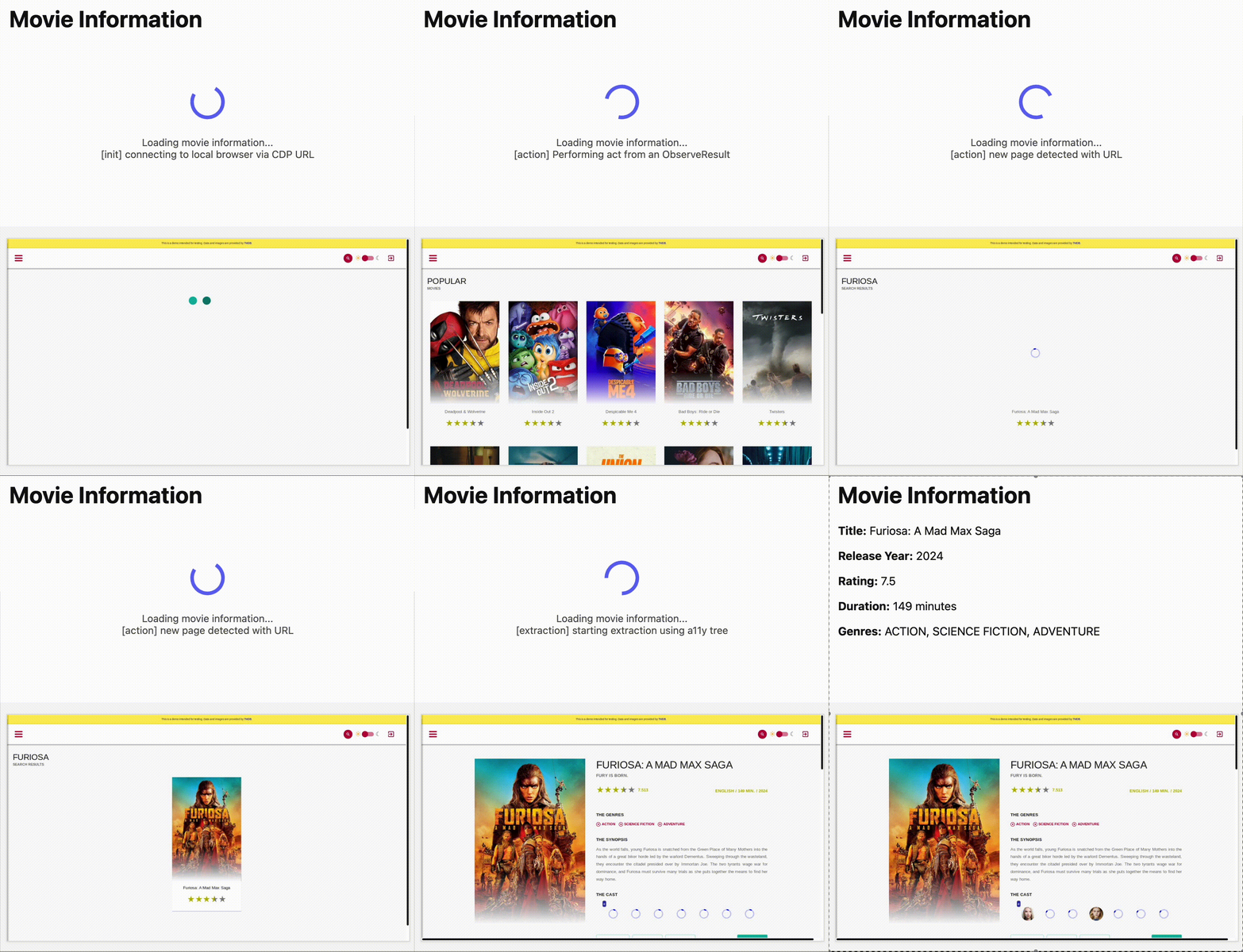
AutoRAG is now AI Search! The new name marks a new and bigger mission: to make world-class search infrastructure available to every developer and business.
With AI Search you can now use models from different providers like OpenAI and Anthropic. By attaching your provider keys to the AI Gateway linked to your AI Search instance, you can use many more models for both embedding and inference.
To use AI Search with other model providers:
- Add provider keys to AI Gateway
- Go to AI > AI Gateway in the dashboard.
- Select or create an AI gateway.
- In Provider Keys, choose your provider, click Add, and enter the key.
- Connect a gateway to AI Search: When creating a new AI Search, select the AI Gateway with your provider keys. For an existing AI Search, go to Settings and switch to a gateway that has your keys under Resources.
- Select models: Embedding models are only available to be changed when creating a new AI Search. Generation model can be selected when creating a new AI Search and can be changed at any time in Settings.
Once configured, your AI Search instance will be able to reference models available through your AI Gateway when making a
/ai-searchrequest:JavaScript export default {async fetch(request, env) {// Query your AI Search instance with a natural language question to an OpenAI modelconst result = await env.AI.autorag("my-ai-search").aiSearch({query: "What's new for Cloudflare Birthday Week?",model: "openai/gpt-5"});// Return only the generated answer as plain textreturn new Response(result.response, {headers: { "Content-Type": "text/plain" },});},};In the coming weeks we will also roll out updates to align the APIs with the new name. The existing APIs will continue to be supported for the time being. Stay tuned to the AI Search Changelog and Discord ↗ for more updates!
- Add provider keys to AI Gateway
You can now run more Containers concurrently with higher limits on CPU, memory, and disk.
Limit New Limit Previous Limit Memory for concurrent live Container instances 400GiB 40GiB vCPU for concurrent live Container instances 100 20 Disk for concurrent live Container instances 2TB 100GB You can now run 1000 instances of the
devinstance type, 400 instances ofbasic, or 100 instances ofstandardconcurrently.This opens up new possibilities for running larger-scale workloads on Containers.
See the getting started guide to deploy your first Container, and the limits documentation for more details on the available instance types and limits.
You can now more precisely control your HTTP DLP policies by specifying whether to scan the request or response body, helping to reduce false positives and target specific data flows.
In the Gateway HTTP policy builder, you will find a new selector called Body Phase. This allows you to define the direction of traffic the DLP engine will inspect:
- Request Body: Scans data sent from a user's machine to an upstream service. This is ideal for monitoring data uploads, form submissions, or other user-initiated data exfiltration attempts.
- Response Body: Scans data sent to a user's machine from an upstream service. Use this to inspect file downloads and website content for sensitive data.
For example, consider a policy that blocks Social Security Numbers (SSNs). Previously, this policy might trigger when a user visits a website that contains example SSNs in its content (the response body). Now, by setting the Body Phase to Request Body, the policy will only trigger if the user attempts to upload or submit an SSN, ignoring the content of the web page itself.
All policies without this selector will continue to scan both request and response bodies to ensure continued protection.
For more information, refer to Gateway HTTP policy selectors.
Cloudflare has launched sign in with GitHub as a log in option. This feature is available to all users with a verified email address who are not using SSO. To use it, simply click on the
Sign in with GitHubbutton on the dashboard login page. You will be logged in with your primary GitHub email address.
Single sign-on (SSO) streamlines the process of logging into Cloudflare for Enterprise customers who manage a custom email domain and manage their own identity provider. Instead of managing a password and two-factor authentication credentials directly for Cloudflare, SSO lets you reuse your existing login infrastructure to seamlessly log in. SSO also provides additional security opportunities such as device health checks which are not available natively within Cloudflare.
Historically, SSO was only available for Enterprise accounts. Today, we are announcing that we are making SSO available to all users for free. We have also added the ability to directly manage SSO configurations using the API. This removes the previous requirement to contact support to configure SSO.