
Use our brand new onboarding experience for Cloudflare Zero Trust. New and returning users can now engage with a Get Started tab with walkthroughs for setting up common use cases end-to-end.
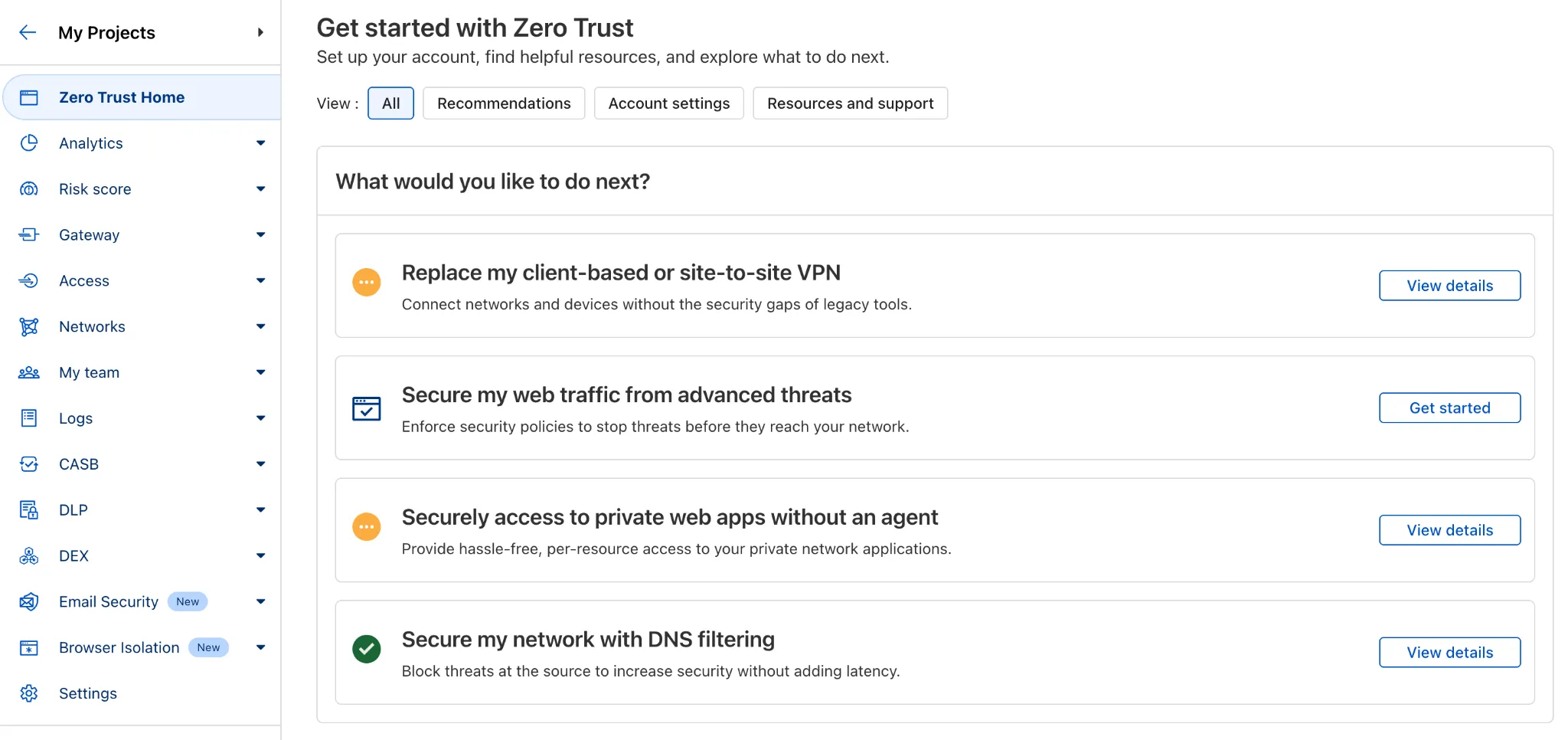
There are eight brand new onboarding guides in total:
- Securely access a private network (sets up device client and Tunnel)
- Device-to-device / mesh networking (sets up and connects multiple device clients)
- Network to network connectivity (sets up and connects multiple WARP Connectors, makes reference to Magic WAN availability for Enterprise)
- Secure web traffic (sets up device client, Gateway, pre-reqs, and initial policies)
- Secure DNS for networks (sets up a new DNS location and Gateway policies)
- Clientless web access (sets up Access to a web app, Tunnel, and public hostname)
- Clientless SSH access (all the same + the web SSH experience)
- Clientless RDP access (all the same + RDP-in-browser)
Each flow walks the user through the steps to configure the essential elements, and provides a “more details” panel with additional contextual information about what the user will accomplish at the end, along with why the steps they take are important.
Try them out now in the Zero Trust dashboard ↗!
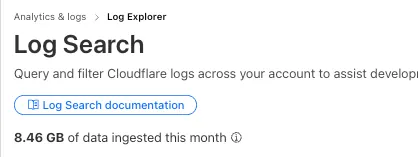
Log Explorer customers can now monitor their data ingestion volume to keep track of their billing. Monthly usage is displayed at the top of the Log Search and Manage Datasets screens in Log Explorer.
You can now expect 3-5× faster indexing in AutoRAG, and with it, a brand new Jobs view to help you monitor indexing progress.
With each AutoRAG, indexing jobs are automatically triggered to sync your data source (i.e. R2 bucket) with your Vectorize index, ensuring new or updated files are reflected in your query results. You can also trigger jobs manually via the Sync API or by clicking “Sync index” in the dashboard.
With the new jobs observability, you can now:
- View the status, job ID, source, start time, duration and last sync time for each indexing job
- Inspect real-time logs of job events (e.g.
Starting indexing data source...) - See a history of past indexing jobs under the Jobs tab of your AutoRAG
This makes it easier to understand what’s happening behind the scenes.
Coming soon: We’re adding APIs to programmatically check indexing status, making it even easier to integrate AutoRAG into your workflows.
Try it out today on the Cloudflare dashboard ↗.
You can use Images to ingest HEIC images and serve them in supported output formats like AVIF, WebP, JPEG, and PNG.
When inputting a HEIC image, dimension and sizing limits may still apply. Refer to our documentation to see limits for uploading to Images or transforming a remote image.
Cloudy, Cloudflare's AI Agent, will now automatically summarize your Access and Gateway block logs.
In the log itself, Cloudy will summarize what occurred and why. This will be helpful for quick troubleshooting and issue correlation.
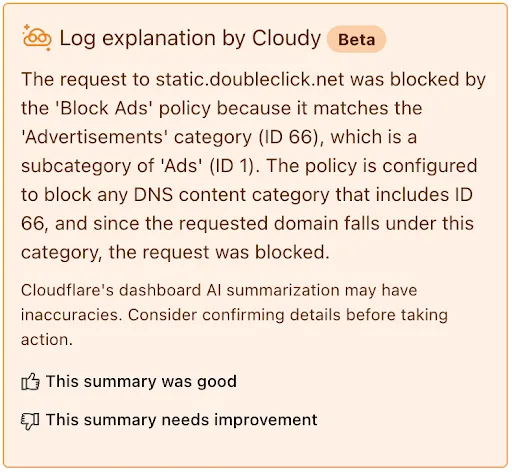
If you have feedback about the Cloudy summary - good or bad - you can provide that right from the summary itself.
Cloudflare Zero Trust customers can use the App Library to get full visibility over the SaaS applications that they use in their Gateway policies, CASB integrations, and Access for SaaS applications.
App Library, found under My Team, makes information available about all Applications that can be used across the Zero Trust product suite.
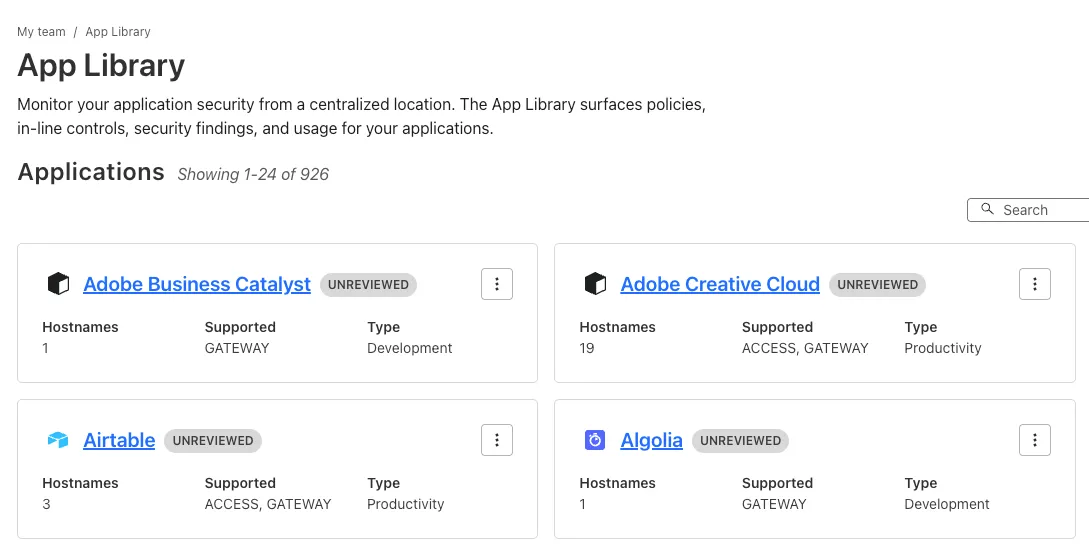
You can use the App Library to see:
- How Applications are defined
- Where they are referenced in policies
- Whether they have Access for SaaS configured
- Review their CASB findings and integration status.
Within individual Applications, you can also track their usage across your organization, and better understand user behavior.
We have significantly increased the limits for IP Lists on Enterprise plans to provide greater flexibility and control:
- Total number of lists: Increased from 10 to 1,000.
- Total number of list items: Increased from 10,000 to 500,000.
Limits for other list types and plans remain unchanged. For more details, refer to the lists availability.
This week’s roundup uncovers critical vulnerabilities affecting enterprise VoIP systems, webmail platforms, and a popular JavaScript framework. The risks range from authentication bypass to remote code execution (RCE) and buffer handling flaws, each offering attackers a path to elevate access or fully compromise systems.
Key Findings
- Next.js - Auth Bypass: A newly detected authentication bypass flaw in the Next.js framework allows attackers to access protected routes or APIs without proper authorization, undermining application access controls.
- Fortinet FortiVoice (CVE-2025-32756): A buffer error vulnerability in FortiVoice systems that could lead to memory corruption and potential code execution or service disruption in enterprise telephony environments.
- Roundcube (CVE-2025-49113): A critical RCE flaw allowing unauthenticated attackers to execute arbitrary PHP code via crafted requests, leading to full compromise of mail servers and user inboxes.
Impact
These vulnerabilities affect core business infrastructure, from web interfaces to voice communications and email platforms. The Roundcube RCE and FortiVoice buffer flaw offer potential for deep system access, while the Next.js auth bypass undermines trust boundaries in modern web apps.
Ruleset Rule ID Legacy Rule ID Description Previous Action New Action Comments Cloudflare Managed Ruleset 100795 Next.js - Auth Bypass Log Disabled This is a New Detection Cloudflare Managed Ruleset 100796 Fortinet FortiVoice - Buffer Error - CVE:CVE-2025-32756 Log Disabled This is a New Detection Cloudflare Managed Ruleset 100797 Roundcube - Remote Code Execution - CVE:CVE-2025-49113 Log Disabled This is a New Detection
Workers now support breakpoint debugging using VSCode's built-in JavaScript Debug Terminals ↗. All you have to do is open a JS debug terminal (
Cmd + Shift + Pand then typejavascript debug) and runwrangler dev(orvite dev) from within the debug terminal. VSCode will automatically connect to your running Worker (even if you're running multiple Workers at once!) and start a debugging session.In 2023 we announced breakpoint debugging support ↗ for Workers, which meant that you could easily debug your Worker code in Wrangler's built-in devtools (accessible via the
[d]hotkey) as well as multiple other devtools clients, including VSCode ↗. For most developers, breakpoint debugging via VSCode is the most natural flow, but until now it's required manually configuring alaunch.jsonfile ↗, runningwrangler dev, and connecting via VSCode's built-in debugger. Now it's much more seamless!
You can now specify the number of connections your Hyperdrive configuration uses to connect to your origin database.
All configurations have a minimum of 5 connections. The maximum connection count for a Hyperdrive configuration depends on the Hyperdrive limits of your Workers plan.
This feature allows you to right-size your connection pool based on your database capacity and application requirements. You can configure connection counts through the Cloudflare dashboard or API.
Refer to the Hyperdrive configuration documentation for more information.
Browser-based RDP with Cloudflare Access is now available in open beta for all Cloudflare customers. It enables secure, remote Windows server access without VPNs or RDP clients.
With browser-based RDP, you can:
- Control how users authenticate to internal RDP resources with single sign-on (SSO), multi-factor authentication (MFA), and granular access policies.
- Record who is accessing which servers and when to support regulatory compliance requirements and to gain greater visibility in the event of a security event.
- Eliminate the need to install and manage software on user devices. You will only need a web browser.
- Reduce your attack surface by keeping your RDP servers off the public Internet and protecting them from common threats like credential stuffing or brute-force attacks.
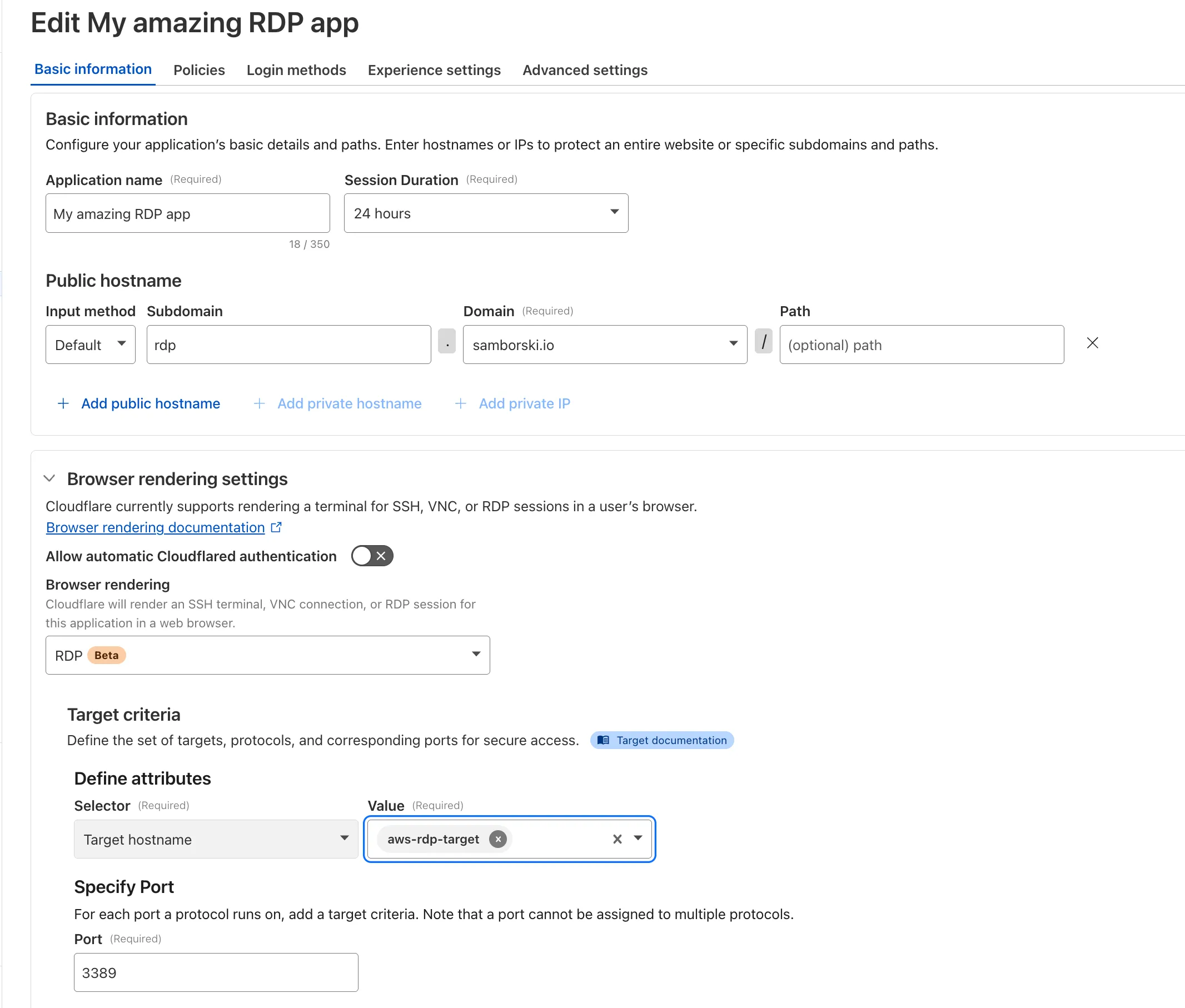
To get started, see Connect to RDP in a browser.
We are introducing a new feature of AI Crawl Control — Pay Per Crawl. Pay Per Crawl enables site owners to require payment from AI crawlers every time the crawlers access their content, thereby fostering a fairer Internet by enabling site owners to control and monetize how their content gets used by AI.
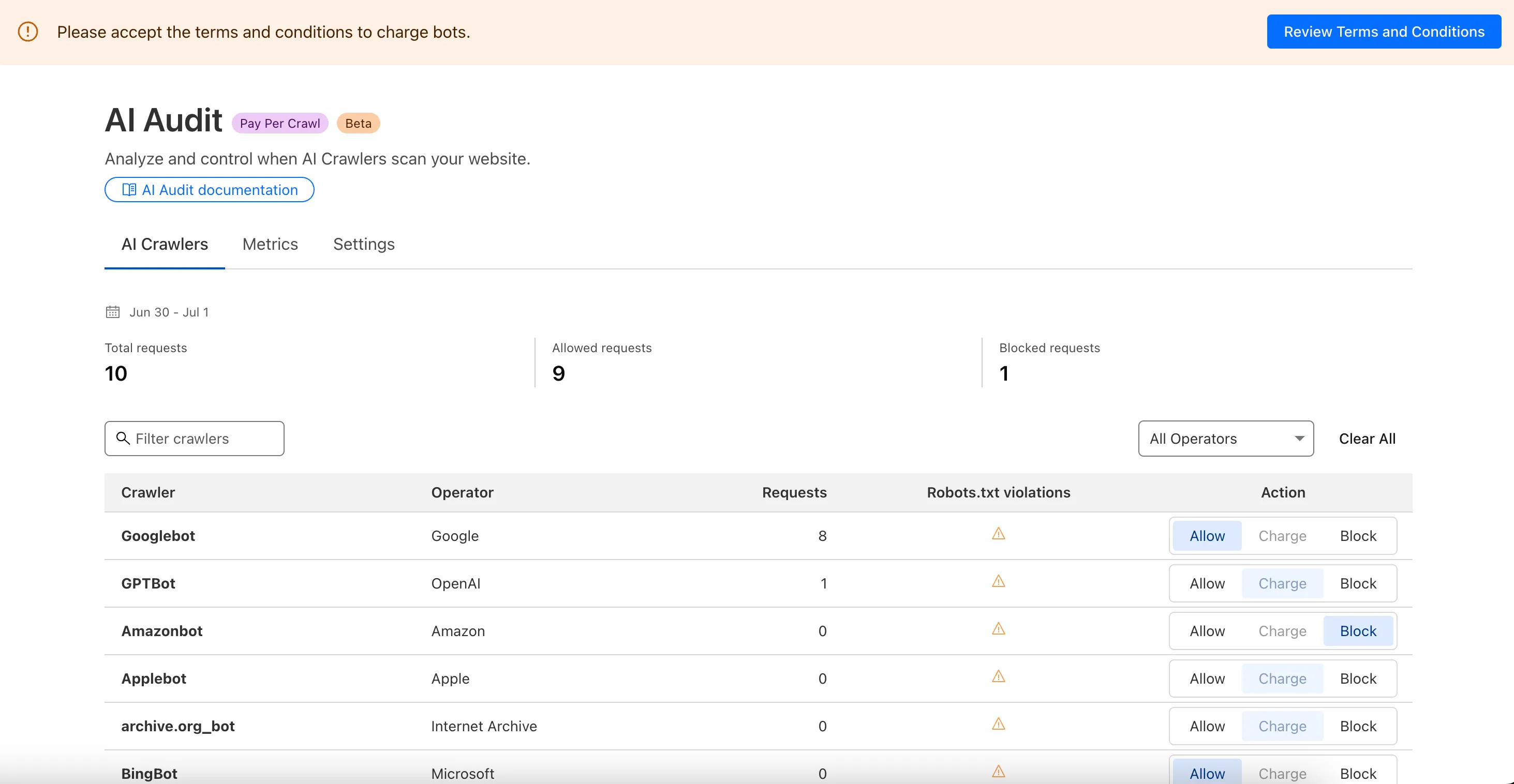
For Site Owners:
- Set pricing and select which crawlers to charge for content access
- Manage payments via Stripe
- Monitor analytics on successful content deliveries
For AI Crawler Owners:
- Use HTTP headers to request and accept pricing
- Receive clear confirmations on charges for accessed content
Learn more in the Pay Per Crawl documentation.
We redesigned the AI Crawl Control dashboard to provide more intuitive and granular control over AI crawlers.
- From the new AI Crawlers tab: block specific AI crawlers.
- From the new Metrics tab: view AI Crawl Control metrics.
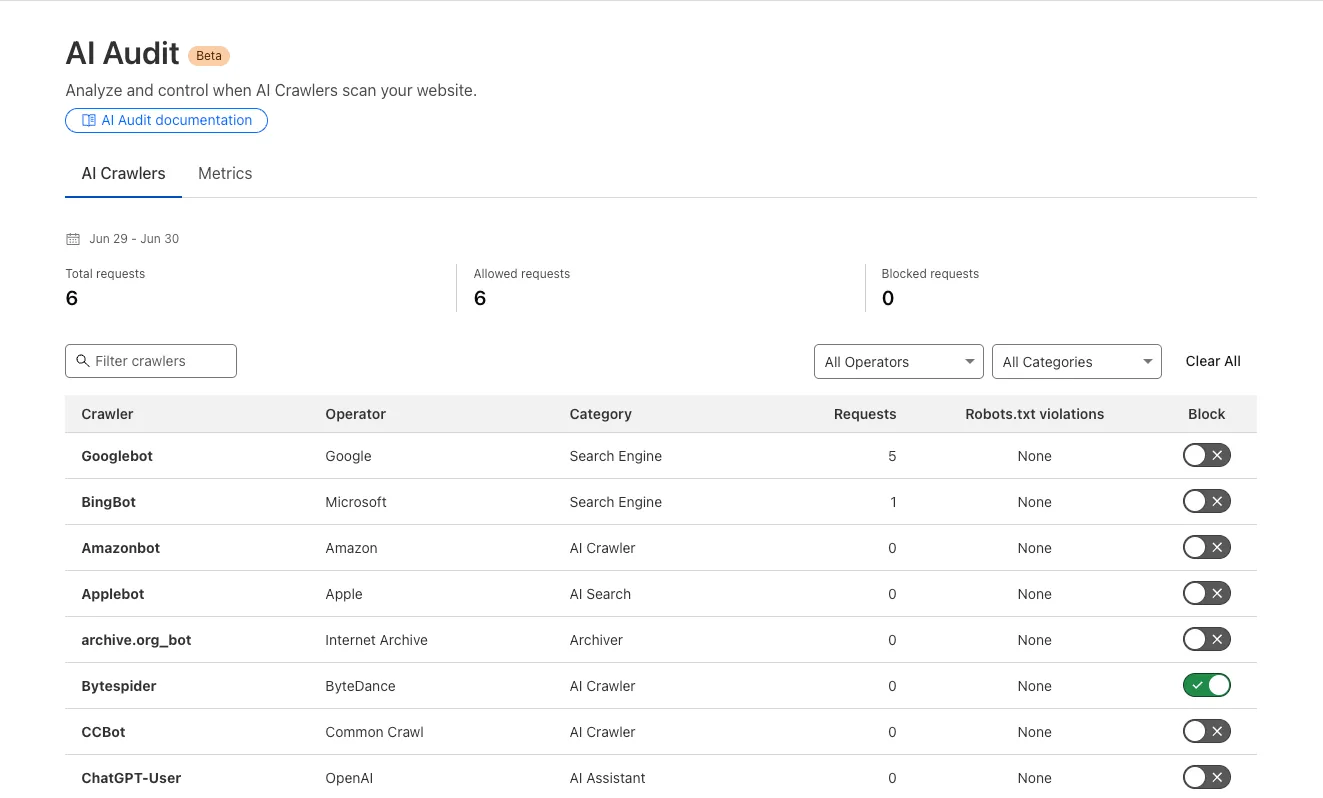
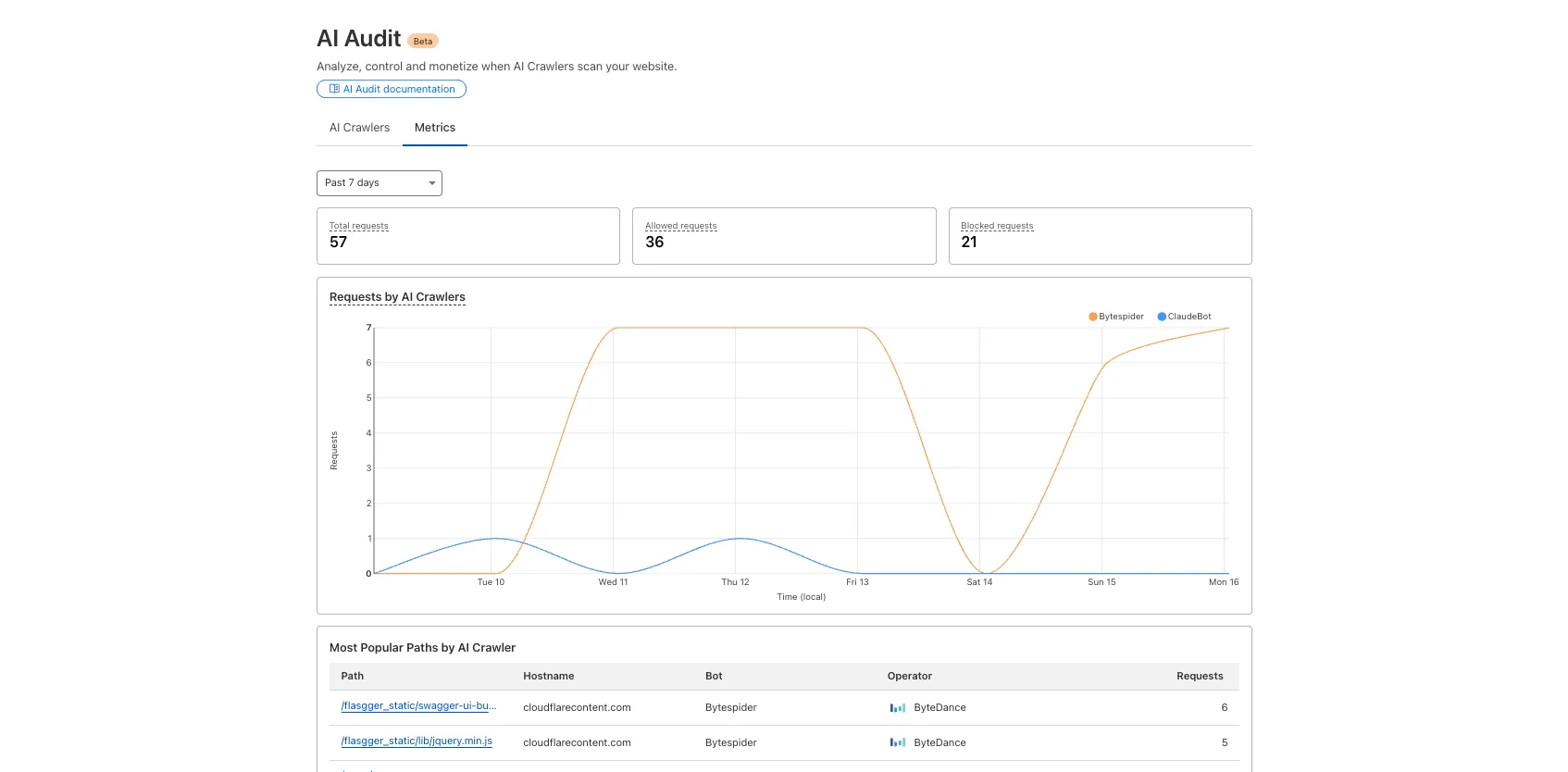
To get started, explore:
-
Radar now offers expanded insights into web crawlers, giving you greater visibility into aggregated trends in crawl and refer activity.
We have introduced the following endpoints:
/bots/crawlers/summary/{dimension}: Returns an overview of crawler HTTP request distributions across key dimensions./bots/crawlers/timeseries_groups/{dimension}: Provides time-series data on crawler request distributions across the same dimensions.
These endpoints allow analysis across the following dimensions:
user_agent: Parsed data from theUser-Agentheader.referer: Parsed data from theRefererheader.crawl_refer_ratio: Ratio of HTML page crawl requests to HTML page referrals by platform.
In addition to crawler-specific insights, Radar now provides a broader set of bot endpoints:
/bots/: Lists all bots./bots/{bot_slug}: Returns detailed metadata for a specific bot./bots/timeseries: Time-series data for bot activity./bots/summary/{dimension}: Returns an overview of bot HTTP request distributions across key dimensions./bots/timeseries_groups/{dimension}: Provides time-series data on bot request distributions across the same dimensions.
These endpoints support filtering and breakdowns by:
bot: Bot name.bot_operator: The organization or entity operating the bot.bot_category: Classification of bot type.
The previously available
verified_botsendpoints have now been deprecated in favor of this set of bot insights APIs. While current data still focuses on verified bots, we plan to expand support for unverified bot traffic in the future.Learn more about the new Radar bot and crawler insights in our blog post ↗.
You can now use any of Vite's static asset handling ↗ features in your Worker as well as in your frontend. These include importing assets as URLs, importing as strings and importing from the
publicdirectory as well as inlining assets.Additionally, assets imported as URLs in your Worker are now automatically moved to the client build output.
Here is an example that fetches an imported asset using the assets binding and modifies the response.
TypeScript // Import the asset URL// This returns the resolved path in development and productionimport myImage from "./my-image.png";export default {async fetch(request, env) {// Fetch the asset using the bindingconst response = await env.ASSETS.fetch(new URL(myImage, request.url));// Create a new `Response` object that can be modifiedconst modifiedResponse = new Response(response.body, response);// Add an additional headermodifiedResponse.headers.append("my-header", "imported-asset");// Return the modfied responsereturn modifiedResponse;},};Refer to Static Assets in the Cloudflare Vite plugin docs for more info.
A new GA release for the Windows WARP client is now available on the stable releases downloads page.
This release contains improvements and new exciting features, including SCCM VPN boundary support and post-quantum cryptography. By tunneling your corporate network traffic over Cloudflare, you can now gain the immediate protection of post-quantum cryptography without needing to upgrade any of your individual corporate applications or systems.
Changes and improvements
- Fixed a device registration issue that caused WARP connection failures when changing networks.
- Captive portal improvements and fixes:
- Captive portal sign in notifications will now be sent through operating system notification services.
- Fix for firewall configuration issue affecting clients in DoH only mode.
- Improved the connectivity status message in the client GUI.
- Fixed a bug affecting clients in Gateway with DoH mode where the original DNS servers were not restored after disabling WARP.
- The WARP client now applies post-quantum cryptography end-to-end on enabled devices accessing resources behind a Cloudflare Tunnel. This feature can be enabled by MDM.
- Improvement to handle client configuration changes made by an MDM while WARP is not running.
- Improvements for multi-user experience to better handle fast user switching and transitions from a pre-login to a logged-in state.
- Added a WARP client device posture check for SAN attributes to the client certificate check.
- Fixed an issue affecting Split Tunnel Include mode, where traffic outside the tunnel was blocked when switching between Wi-Fi and Ethernet networks.
- Added SCCM VPN boundary support to device profile settings. With SCCM VPN boundary support enabled, operating systems will register WARP's local interface IP with the on-premise DNS server when reachable.
- Fix for an issue causing WARP connectivity to fail without full system reboot.
Known issues
For Windows 11 24H2 users, Microsoft has confirmed a regression that may lead to performance issues like mouse lag, audio cracking, or other slowdowns. Cloudflare recommends users experiencing these issues upgrade to a minimum Windows 11 24H2 version KB5060829 or higher for resolution.
Devices with
KB5055523installed may receive a warning aboutWin32/ClickFix.ABAbeing present in the installer. To resolve this false positive, update Microsoft Security Intelligence to version 1.429.19.0 or later.DNS resolution may be broken when the following conditions are all true:
- WARP is in Secure Web Gateway without DNS filtering (tunnel-only) mode.
- A custom DNS server address is configured on the primary network adapter.
- The custom DNS server address on the primary network adapter is changed while WARP is connected.
To work around this issue, reconnect the WARP client by toggling off and back on.
A new GA release for the macOS WARP client is now available on the stable releases downloads page.
This release contains improvements and new exciting features, including post-quantum cryptography. By tunneling your corporate network traffic over Cloudflare, you can now gain the immediate protection of post-quantum cryptography without needing to upgrade any of your individual corporate applications or systems.
Changes and improvements
- Fixed an issue where WARP sometimes failed to automatically relaunch after updating.
- Fixed a device registration issue causing WARP connection failures when changing networks.
- Captive portal improvements and fixes:
- Captive portal sign in notifications will now be sent through operating system notification services.
- Fix for firewall configuration issue affecting clients in DoH only mode.
- Improved the connectivity status message in the client GUI.
- The WARP client now applies post-quantum cryptography end-to-end on enabled devices accessing resources behind a Cloudflare Tunnel. This feature can be enabled by MDM.
- Improvement to handle client configuration changes made by an MDM while WARP is not running.
- Fixed an issue affecting Split Tunnel Include mode, where traffic outside the tunnel was blocked when switching between Wi-Fi and Ethernet networks.
- Improvement for WARP connectivity issues on macOS due to the operating system not accepting DNS server configurations.
- Added a WARP client device posture check for SAN attributes to the client certificate check.
Known issues
- macOS Sequoia: Due to changes Apple introduced in macOS 15.0.x, the WARP client may not behave as expected. Cloudflare recommends the use of macOS 15.4 or later.
A new GA release for the Linux WARP client is now available on the stable releases downloads page.
This release contains improvements and new exciting features, including post-quantum cryptography. By tunneling your corporate network traffic over Cloudflare, you can now gain the immediate protection of post-quantum cryptography without needing to upgrade any of your individual corporate applications or systems.
Changes and improvements
- Fixed a device registration issue causing WARP connection failures when changing networks.
- Captive portal improvements and fixes:
- Captive portal sign in notifications will now be sent through operating system notification services.
- Fix for firewall configuration issue affecting clients in DoH only mode.
- Improved the connectivity status message in the client GUI.
- The WARP client now applies post-quantum cryptography end-to-end on enabled devices accessing resources behind a Cloudflare Tunnel. This feature can be enabled by MDM.
- Improvement to handle client configuration changes made by MDM while WARP is not running.
- Fixed an issue affecting Split Tunnel Include mode, where traffic outside the tunnel was blocked when switching between Wi-Fi and Ethernet networks.
- Added a WARP client device posture check for SAN attributes to the client certificate check.
Known issues
- Devices using WARP client 2025.4.929.0 and up may experience Local Domain Fallback failures if a fallback server has not been configured. To configure a fallback server, refer to Route traffic to fallback server.
A new GA release for the Android Cloudflare One Agent is now available in the Google Play Store ↗. This release contains improvements and new exciting features, including post-quantum cryptography. By tunneling your corporate network traffic over Cloudflare, you can now gain the immediate protection of post-quantum cryptography ↗ without needing to upgrade any of your individual corporate applications or systems.
Changes and improvements
- QLogs are now disabled by default and can be enabled in the app by turning on Enable qlogs under Settings > Advanced > Diagnostics > Debug Logs. The QLog setting from previous releases will no longer be respected.
- DNS over HTTPS traffic is now included in the WARP tunnel by default.
- The WARP client now applies post-quantum cryptography ↗ end-to-end on enabled devices accessing resources behind a Cloudflare Tunnel. This feature can be enabled by MDM.
- Fixed an issue that caused WARP connection failures on ChromeOS devices.
A new GA release for the iOS Cloudflare One Agent is now available in the iOS App Store ↗. This release contains improvements and new exciting features, including post-quantum cryptography. By tunneling your corporate network traffic over Cloudflare, you can now gain the immediate protection of post-quantum cryptography ↗ without needing to upgrade any of your individual corporate applications or systems.
Changes and improvements
- QLogs are now disabled by default and can be enabled in the app by turning on Enable qlogs under Settings > Advanced > Diagnostics > Debug Logs. The QLog setting from previous releases will no longer be respected.
- DNS over HTTPS traffic is now included in the WARP tunnel by default.
- The WARP client now applies post-quantum cryptography ↗ end-to-end on enabled devices accessing resources behind a Cloudflare Tunnel. This feature can be enabled by MDM.
The Email Routing platform supports SPF ↗ records and DKIM (DomainKeys Identified Mail) ↗ signatures and honors these protocols when the sending domain has them configured. However, if the sending domain doesn't implement them, we still forward the emails to upstream mailbox providers.
Starting on July 3, 2025, we will require all emails to be authenticated using at least one of the protocols, SPF or DKIM, to forward them. We also strongly recommend that all senders implement the DMARC protocol.
If you are using a Worker with an Email trigger to receive email messages and forward them upstream, you will need to handle the case where the forward action may fail due to missing authentication on the incoming email.
SPAM has been a long-standing issue with email. By enforcing mail authentication, we will increase the efficiency of identifying abusive senders and blocking bad emails. If you're an email server delivering emails to large mailbox providers, it's likely you already use these protocols; otherwise, please ensure you have them properly configured.
Magic Transit customers can now configure AS prepending on their BYOIP prefixes advertised at the Cloudflare edge. This allows for smoother traffic migration and minimizes packet loss when changing providers.
AS prepending makes the Cloudflare route less preferred by increasing the AS path length. You can use this to gradually shift traffic away from Cloudflare before withdrawing a prefix, avoiding abrupt routing changes.
Prepending can be configured via the API or through BGP community values when peering with the Magic Transit routing table. For more information, refer to Advertise prefixes.
We recently announced ↗ our public beta for remote bindings, which allow you to connect to deployed resources running on your Cloudflare account (like R2 buckets or D1 databases) while running a local development session.
Now, you can use remote bindings with your Next.js applications through the
@opennextjs/cloudflareadaptor ↗ by enabling the experimental feature in yournext.config.ts:initOpenNextCloudflareForDev();initOpenNextCloudflareForDev({experimental: { remoteBindings: true }});Then, all you have to do is specify which bindings you want connected to the deployed resource on your Cloudflare account via the
experimental_remoteflag in your binding definition:JSONC {"r2_buckets": [{"bucket_name": "testing-bucket","binding": "MY_BUCKET","experimental_remote": true,},],}TOML [[r2_buckets]]bucket_name = "testing-bucket"binding = "MY_BUCKET"experimental_remote = trueYou can then run
next devto start a local development session (or start a preview withopennextjs-cloudflare preview), and all requests toenv.MY_BUCKETwill be proxied to the remotetesting-bucket— rather than the default local binding simulations.Remote bindings are also used during the build process, which comes with significant benefits for pages using Incremental Static Regeneration (ISR) ↗. During the build step for an ISR page, your server executes the page's code just as it would for normal user requests. If a page needs data to display (like fetching user info from KV), those requests are actually made. The server then uses this fetched data to render the final HTML.
Data fetching is a critical part of this process, as the finished HTML is only as good as the data it was built with. If the build process can't fetch real data, you end up with a pre-rendered page that's empty or incomplete.
With remote bindings support in OpenNext, your pre-rendered pages are built with real data from the start. The build process uses any configured remote bindings, and any data fetching occurs against the deployed resources on your Cloudflare account.
Want to learn more? Get started with remote bindings and OpenNext ↗.
Have feedback? Join the discussion in our beta announcement ↗ to share feedback or report any issues.
Workers can now talk to each other across separate dev commands using service bindings and tail consumers, whether started with
vite devorwrangler dev.Simply start each Worker in its own terminal:
Terminal window # Terminal 1vite dev# Terminal 2wrangler devThis is useful when different teams maintain different Workers, or when each Worker has its own build setup or tooling.
Check out the Developing with multiple Workers guide to learn more about the different approaches and when to use each one.
AI is supercharging app development for everyone, but we need a safe way to run untrusted, LLM-written code. We’re introducing Sandboxes ↗, which let your Worker run actual processes in a secure, container-based environment.
TypeScript import { getSandbox } from "@cloudflare/sandbox";export { Sandbox } from "@cloudflare/sandbox";export default {async fetch(request: Request, env: Env) {const sandbox = getSandbox(env.Sandbox, "my-sandbox");return sandbox.exec("ls", ["-la"]);},};exec(command: string, args: string[], options?: { stream?: boolean }):Execute a command in the sandbox.gitCheckout(repoUrl: string, options: { branch?: string; targetDir?: string; stream?: boolean }): Checkout a git repository in the sandbox.mkdir(path: string, options: { recursive?: boolean; stream?: boolean }): Create a directory in the sandbox.writeFile(path: string, content: string, options: { encoding?: string; stream?: boolean }): Write content to a file in the sandbox.readFile(path: string, options: { encoding?: string; stream?: boolean }): Read content from a file in the sandbox.deleteFile(path: string, options?: { stream?: boolean }): Delete a file from the sandbox.renameFile(oldPath: string, newPath: string, options?: { stream?: boolean }): Rename a file in the sandbox.moveFile(sourcePath: string, destinationPath: string, options?: { stream?: boolean }): Move a file from one location to another in the sandbox.ping(): Ping the sandbox.
Sandboxes are still experimental. We're using them to explore how isolated, container-like workloads might scale on Cloudflare — and to help define the developer experience around them.
You can try it today from your Worker, with just a few lines of code. Let us know what you build.