---
title: Data Localization Suite
description: The Data Localization Suite (DLS) is a collection of tools that enable customers to choose the location where Cloudflare inspects and stores data, while maintaining the security and performance benefits of our global network.
image: https://developers.cloudflare.com/zt-preview.png
---
[Skip to content](#%5Ftop)
Was this helpful?
YesNo
[ Edit page ](https://github.com/cloudflare/cloudflare-docs/edit/production/src/content/docs/data-localization/index.mdx) [ Report issue ](https://github.com/cloudflare/cloudflare-docs/issues/new/choose)
Copy page
# Data Localization Suite
Enterprise-only paid add-on
The Data Localization Suite (DLS) is a collection of tools that enable customers to choose the location where Cloudflare inspects and stores data, while maintaining the security and performance benefits of our global network.
---
## Features
### Geo Key Manager
Keep your keys within a specified region, ensuring compliance and data sovereignty.
[ Use Geo Key Manager ](https://developers.cloudflare.com/data-localization/geo-key-manager/)
### Customer Metadata Boundary
Ensure that any traffic metadata that can identify your end user stays in the region you selected.
[ Use Customer Metadata Boundary ](https://developers.cloudflare.com/data-localization/metadata-boundary/)
### Regional Services
Comply with regional restrictions by choosing which subset of data centers decrypts and services your HTTPS traffic.
[ Use Regional Services ](https://developers.cloudflare.com/data-localization/regional-services/)
---
## Related products
**[SSL/TLS](https://developers.cloudflare.com/ssl/)**
Cloudflare SSL/TLS encrypts your web traffic to prevent data theft and other tampering.
**[DNS](https://developers.cloudflare.com/dns/)**
Cloudflare's global DNS platform provides speed and resilience. DNS customers also benefit from free DNSSEC, and protection against route leaks and hijacking.
---
## More resources
[Resource hub](https://www.cloudflare.com/resource-hub/?topic=Privacy)
Refer to our latest resources to learn more about privacy.
[Cloudflare blog](https://blog.cloudflare.com/tag/data-localization-suite)
Read articles about the latest updates to the Data Localization Suite.
```json
{"@context":"https://schema.org","@type":"BreadcrumbList","itemListElement":[{"@type":"ListItem","position":1,"item":{"@id":"/directory/","name":"Directory"}},{"@type":"ListItem","position":2,"item":{"@id":"/data-localization/","name":"Data Localization Suite"}}]}
```
---
---
title: Region support
description: Support by product and region is summarized in the following table:
image: https://developers.cloudflare.com/zt-preview.png
---
[Skip to content](#%5Ftop)
Was this helpful?
YesNo
[ Edit page ](https://github.com/cloudflare/cloudflare-docs/edit/production/src/content/docs/data-localization/region-support.mdx) [ Report issue ](https://github.com/cloudflare/cloudflare-docs/issues/new/choose)
Copy page
# Region support
Support by product and region is summarized in the following table:
| Region | Geo Key Manager | Regional Services | Customer Metadata Boundary |
| ---------------------------------------------------------------------------------------- | ------------------------- | ----------------- | ----------------------------- |
| Australia | ✅ [1](#user-content-fn-1) | ✅ | ✘ |
| Austria | ✘ | ✅ | Can use EU metadata boundary. |
| Brazil | ✘ | ✅ | ✘ |
| Canada | ✅ [1](#user-content-fn-1) | ✅ | ✘ |
| Cloudflare Green Energy | ✘ | ✅ | ✘ |
| European Union | ✅ | ✅ | ✅ |
| Exclusive of Hong Kong and Macau | ✘ | ✅ | ✘ |
| Exclusive of Russia and Belarus | ✘ | ✅ | ✘ |
| FedRAMP Moderate Compliant (Domestic) | ✅ [1](#user-content-fn-1) | ✅ | ✅ |
| FedRAMP Moderate Compliant (International) | ✘ | ✅ | ✅ |
| France | ✘ | ✅ | Can use EU metadata boundary. |
| Germany | ✅ [1](#user-content-fn-1) | ✅ | Can use EU metadata boundary. |
| Hong Kong | ✘ | ✅ | ✘ |
| India | ✅ [1](#user-content-fn-1) | ✅ | ✘ |
| [IRAP ↗](https://www.cloudflare.com/cloudflare-for-government/australia/irap/) Protected | ✘ | ✅ | ✘ |
| ISO 27001 Certified European Union | ✘ | ✅ | Can use EU metadata boundary. |
| Italy | ✘ | ✅ | Can use EU metadata boundary. |
| Japan | ✅ [1](#user-content-fn-1) | ✅ | ✘ |
| NATO | ✘ | ✅ | ✘ |
| Netherlands | ✘ | ✅ | Can use EU metadata boundary. |
| Russia | ✘ | ✅ | ✘ |
| Saudi Arabia | ✘ | ✅ | ✘ |
| Singapore | ✅ [1](#user-content-fn-1) | ✅ | ✘ |
| South Africa | ✘ | ✅ | ✘ |
| South Korea | ✅ [1](#user-content-fn-1) | ✅ | ✘ |
| Spain | ✘ | ✅ | Can use EU metadata boundary. |
| Switzerland | ✘ | ✅ | ✘ |
| Taiwan | ✘ | ✅ | ✘ |
| Turkey | ✘ | ✅ | ✘ |
| United Arab Emirates | ✘ | ✅ | ✘ |
| United Kingdom | ✅ [1](#user-content-fn-1) | ✅ | Can use EU metadata boundary. |
| United States of America | ✅ | ✅ | ✅ |
| US State of California | ✘ | ✅ | ✘ |
| US State of Florida | ✘ | ✅ | ✘ |
| US State of Texas | ✘ | ✅ | ✘ |
Refer to the table below for the complete list of available regions and their definitions.
| Region | Definition |
| ------------------------------------------ | ------------------------------------------------------------------------------------------------------------------------------------------------------------------------------------------------------------------------------------------------------ |
| Australia | Cloudflare will only use data centers that are physically located within Australia to decrypt and service HTTPS traffic. |
| Austria | Cloudflare will only use data centers that are physically located within Austria to decrypt and service HTTPS traffic. |
| Brazil | Cloudflare will only use data centers that are physically located within Brazil to decrypt and service HTTPS traffic. |
| Canada | Cloudflare will only use data centers that are physically located within Canada to decrypt and service HTTPS traffic. |
| Cloudflare Green Energy | Cloudflare will only use data centers that are committed to powering their operations with [renewable energy ↗](https://www.cloudflare.com/impact/). |
| European Union | Cloudflare will only use data centers that are physically located within the European Union. For more details, refer to the [list of European Union countries ↗](https://european-union.europa.eu/principles-countries-history/country-profiles%5Fen). |
| Exclusive of Hong Kong and Macau | Cloudflare will only use data centers that are NOT physically located within Hong Kong and Macau to decrypt and service HTTPS traffic. |
| Exclusive of Russia and Belarus | Cloudflare will only use data centers that are NOT physically located within Russia and Belarus to decrypt and service HTTPS traffic. |
| FedRAMP Moderate Compliant (Domestic) | Cloudflare will only use data centers that are FedRAMP Moderate certified and located within the United States. |
| FedRAMP Moderate Compliant (International) | Cloudflare will only use data centers that are FedRAMP Moderate certified, including certified locations outside the United States. |
| France | Cloudflare will only use data centers that are physically located within Metropolitan France (the European territory of France) to decrypt and service HTTPS traffic. |
| Germany | Cloudflare will only use data centers that are physically located within Germany to decrypt and service HTTPS traffic. |
| Hong Kong | Cloudflare will only use data centers that are physically located within Hong Kong to decrypt and service HTTPS traffic. |
| India | Cloudflare will only use data centers that are physically located within India to decrypt and service HTTPS traffic. |
| ISO 27001 Certified European Union | Cloudflare will only use data centers that are physically located within the [European Union ↗](https://european-union.europa.eu/principles-countries-history/country-profiles%5Fen) and that adhere to the ISO 27001 certification. |
| IRAP Protected | Cloudflare will only use data centers that are IRAP protected, including certified locations outside Australia. |
| Italy | Cloudflare will only use data centers that are physically located within Italy to decrypt and service HTTPS traffic. |
| Japan | Cloudflare will only use data centers that are physically located within Japan to decrypt and service HTTPS traffic. |
| NATO | Cloudflare will only use data centers that are physically located within North Atlantic Treaty Organization (NATO) countries. For more details, refer to the [list of NATO countries ↗](https://www.nato.int/nato-welcome/). |
| Netherlands | Cloudflare will only use data centers that are physically located within the Netherlands to decrypt and service HTTPS traffic. |
| Russia | Cloudflare will only use data centers that are physically located within Russia to decrypt and service HTTPS traffic. |
| Saudi Arabia | Cloudflare will only use data centers that are physically located within Saudi Arabia to decrypt and service HTTPS traffic. |
| Singapore | Cloudflare will only use data centers that are physically located within Singapore to decrypt and service HTTPS traffic. |
| South Africa | Cloudflare will only use data centers that are physically located within South Africa to decrypt and service HTTPS traffic. |
| South Korea | Cloudflare will only use data centers that are physically located within South Korea to decrypt and service HTTPS traffic. |
| Spain | Cloudflare will only use data centers that are physically located within Spain to decrypt and service HTTPS traffic. |
| Switzerland | Cloudflare will only use data centers that are physically located within Switzerland to decrypt and service HTTPS traffic. |
| Taiwan | Cloudflare will only use data centers that are physically located within Taiwan to decrypt and service HTTPS traffic. |
| Turkey | Cloudflare will only use data centers that are physically located within Turkey to decrypt and service HTTPS traffic. |
| United Arab Emirates | Cloudflare will only use data centers that are physically located within United Arab Emirates to decrypt and service HTTPS traffic. |
| United Kingdom | Cloudflare will only use data centers that are physically located within the United Kingdom to decrypt and service HTTPS traffic. |
| United States of America | Cloudflare will only use data centers that are physically located within the United States of America to decrypt and service HTTPS traffic. |
| US State of California | Cloudflare will only use data centers that are physically located within the US State of California to decrypt and service HTTPS traffic. |
| US State of Florida | Cloudflare will only use data centers that are physically located within the US State of Florida to decrypt and service HTTPS traffic. |
| US State of Texas | Cloudflare will only use data centers that are physically located within the US State of Texas to decrypt and service HTTPS traffic. |
## Footnotes
1. Only supported in [Geo Key Manager v2](https://developers.cloudflare.com/ssl/edge-certificates/geokey-manager/). [↩](#user-content-fnref-1) [↩2](#user-content-fnref-1-2) [↩3](#user-content-fnref-1-3) [↩4](#user-content-fnref-1-4) [↩5](#user-content-fnref-1-5) [↩6](#user-content-fnref-1-6) [↩7](#user-content-fnref-1-7) [↩8](#user-content-fnref-1-8) [↩9](#user-content-fnref-1-9)
```json
{"@context":"https://schema.org","@type":"BreadcrumbList","itemListElement":[{"@type":"ListItem","position":1,"item":{"@id":"/directory/","name":"Directory"}},{"@type":"ListItem","position":2,"item":{"@id":"/data-localization/","name":"Data Localization Suite"}},{"@type":"ListItem","position":3,"item":{"@id":"/data-localization/region-support/","name":"Region support"}}]}
```
---
---
title: Product compatibility
description: The table below provides a summary of the Data Localization Suite product's behavior with Cloudflare products. Refer to the table legend for guidance on interpreting the table.
image: https://developers.cloudflare.com/zt-preview.png
---
[Skip to content](#%5Ftop)
Was this helpful?
YesNo
[ Edit page ](https://github.com/cloudflare/cloudflare-docs/edit/production/src/content/docs/data-localization/compatibility.mdx) [ Report issue ](https://github.com/cloudflare/cloudflare-docs/issues/new/choose)
Copy page
# Product compatibility
The table below provides a summary of the Data Localization Suite product's behavior with Cloudflare products. Refer to the table legend for guidance on interpreting the table.
✅ Product works with no caveats
🚧 Product can be used with some caveats
✘ Product cannot be used
⚫️ Not applicable
## Application Performance
| Product | Geo Key Manager | Regional Services | Customer Metadata Boundary |
| ------------------------------------------ | --------------- | --------------------------- | --------------------------- |
| Caching/CDN | ✅ | ✅ | ✅ |
| Cache Reserve | ⚫️ | 🚧 | ✅ [1](#user-content-fn-29) |
| DNS | ⚫️ | 🚧 [2](#user-content-fn-33) | ✅ |
| HTTP/3 (with QUIC) | ⚫️ | ✘ | ⚫️ |
| Image Resizing | ✅ | ✅ [3](#user-content-fn-6) | 🚧 [4](#user-content-fn-1) |
| Load Balancing | ✅ | ✅ | 🚧 [4](#user-content-fn-1) |
| Network Error Logging (NEL) | ⚫️ | ⚫️ | ✘ |
| Onion Routing | ✘ | ✘ | ✘ |
| O2O | ✘ | ✘ | ✘ |
| Stream Delivery | ✅ | ✅ | ✅ |
| Tiered Caching | ✅ | 🚧 [5](#user-content-fn-2) | 🚧 [6](#user-content-fn-30) |
| Trace | ✘ | ✘ | ✘ |
| Waiting Room | ⚫️ | ✅ | ✅ |
| Web Analytics / Real User Monitoring (RUM) | ⚫️ | ⚫️ | ✘ [7](#user-content-fn-43) |
| Zaraz | ✅ | ✅ | ✅ |
---
## Application Security
| Product | Geo Key Manager | Regional Services | Customer Metadata Boundary |
| ------------------------------------------- | --------------- | ----------------- | --------------------------- |
| Advanced Certificate Manager | ⚫️ | ⚫️ | ⚫️ |
| Advanced DDoS Protection | ✅ | ✅ | 🚧 [8](#user-content-fn-3) |
| API Shield | ✅ | ✅ | 🚧 [9](#user-content-fn-4) |
| Bot Management | ✅ | ✅ | ✅ |
| Client-side security (formerly Page Shield) | ✅ | ✅ | ✅ |
| DNS Firewall | ⚫️ | ⚫️ | ✅ |
| Rate Limiting | ✅ | ✅ | ✅ [10](#user-content-fn-37) |
| SSL | ✅ | ✅ | ✅ |
| Cloudflare for SaaS | ✘ | ✅ | ✅ |
| Turnstile | ⚫️ | ✘ | ✅ [11](#user-content-fn-38) |
| WAF/L7 Firewall | ✅ | ✅ | ✅ |
| DMARC Management | ⚫️ | ⚫️ | ✅ |
---
## Developer Platform
| Product | Geo Key Manager | Regional Services | Customer Metadata Boundary |
| ------------------------------ | --------------------------- | --------------------------- | ---------------------------- |
| Cloudflare Images | ⚫️ | ✅ [12](#user-content-fn-36) | 🚧 [13](#user-content-fn-35) |
| AI Gateway | ✘ | ✘ | 🚧 [14](#user-content-fn-39) |
| AI Search | ✘ [15](#user-content-fn-46) | ✘ [16](#user-content-fn-47) | 🚧 [17](#user-content-fn-48) |
| AI Security for Apps | ✘ | ✘ | ✘ |
| Cloudflare Pages | ✅ [18](#user-content-fn-11) | ✅ [18](#user-content-fn-11) | 🚧 [4](#user-content-fn-1) |
| Cloudflare D1 | ⚫️ | ⚫️ | 🚧 [19](#user-content-fn-40) |
| Durable Objects | ⚫️ | ✅ [20](#user-content-fn-7) | 🚧 [4](#user-content-fn-1) |
| Email Routing | ⚫️ | ⚫️ | ✅ |
| Remote MCP Server | ✅ [21](#user-content-fn-44) | ✅ [22](#user-content-fn-45) | 🚧 [4](#user-content-fn-1) |
| R2 | ✅ [23](#user-content-fn-27) | ✅ [24](#user-content-fn-8) | ✅ [25](#user-content-fn-28) |
| Smart Placement | ⚫️ | ✘ | ✘ |
| Stream | ⚫️ | ✘ | 🚧 [4](#user-content-fn-1) |
| Vectorize | ⚫️ | ✘ | ✘ |
| Workers (deployed on a Zone) | ✅ | ✅ | 🚧 [26](#user-content-fn-41) |
| Workers AI | ⚫️ | ✘ | ✅ |
| Workers KV | ⚫️ | ✘ | ✅ [27](#user-content-fn-34) |
| Workers.dev | ✘ | ✘ | ✘ |
| Workers Analytics Engine (WAE) | ⚫️ | ⚫️ | 🚧 [4](#user-content-fn-1) |
---
## Network Services
| Product | Geo Key Manager | Regional Services | Customer Metadata Boundary |
| --------------------------- | --------------- | --------------------------- | --------------------------- |
| Argo Smart Routing | ✅ | ✘ [28](#user-content-fn-9) | ✘ [29](#user-content-fn-10) |
| Static IP/BYOIP | ⚫️ | ✅ [30](#user-content-fn-26) | ⚫️ |
| Cloudflare Network Firewall | ⚫️ | ⚫️ | ✅ |
| Network Flow | ⚫️ | ⚫️ | 🚧 [4](#user-content-fn-1) |
| Magic Transit | ⚫️ | ⚫️ | ✅ |
| Cloudflare WAN | ⚫️ | ⚫️ | ✅ |
| Spectrum | ✅ | ✅ [31](#user-content-fn-42) | ✅ |
---
## Platform
| Product | Geo Key Manager | Regional Services | Customer Metadata Boundary |
| ------------ | --------------- | ----------------- | ---------------------------- |
| Logpull | ⚫️ | ⚫️ | 🚧 [32](#user-content-fn-12) |
| Logpush | ⚫️ | ✅ | 🚧 [33](#user-content-fn-13) |
| Log Explorer | ⚫️ | ⚫️ | ✘ [34](#user-content-fn-23) |
---
## Zero Trust
| Product | Geo Key Manager | Regional Services | Customer Metadata Boundary |
| --------------------- | ---------------------------- | ---------------------------- | ---------------------------- |
| Access | 🚧 [35](#user-content-fn-14) | 🚧 [36](#user-content-fn-15) | ✅ [37](#user-content-fn-16) |
| Browser Isolation | ⚫️ | 🚧 [38](#user-content-fn-17) | ✅ |
| CASB | ⚫️ | ⚫️ | ✘ |
| Cloudflare Tunnel | ⚫️ | 🚧 [39](#user-content-fn-18) | ⚫️ |
| Digital Experience | ⚫️ | ⚫️ | 🚧 [40](#user-content-fn-49) |
| DLP | ⚫️ [41](#user-content-fn-19) | ⚫️ [41](#user-content-fn-19) | 🚧 [42](#user-content-fn-31) |
| Gateway | 🚧 [43](#user-content-fn-20) | 🚧 [44](#user-content-fn-21) | 🚧 [45](#user-content-fn-22) |
| Cloudflare One Client | ⚫️ | ⚫️ | 🚧 [4](#user-content-fn-1) |
## Footnotes
1. You cannot yet specify region location for object storage itself. [↩](#user-content-fnref-29)
2. [Outgoing zone transfers](https://developers.cloudflare.com/dns/zone-setups/zone-transfers/cloudflare-as-primary/) will carry Earth region proxy IPs, thus making regional service dysfunctional when non-Cloudflare nameservers respond to the DNS queries. [↩](#user-content-fnref-33)
3. Only when using a Custom Domain set to a region, either through Workers or [Transform Rules](https://developers.cloudflare.com/images/transform-images/serve-images-custom-paths/) within the same zone. [↩](#user-content-fnref-6)
4. Logs / Analytics not available outside US region when using Customer Metadata Boundary. [↩](#user-content-fnref-1) [↩2](#user-content-fnref-1-2) [↩3](#user-content-fnref-1-3) [↩4](#user-content-fnref-1-4) [↩5](#user-content-fnref-1-5) [↩6](#user-content-fnref-1-6) [↩7](#user-content-fnref-1-7) [↩8](#user-content-fnref-1-8) [↩9](#user-content-fnref-1-9)
5. Regular and Custom Tiered Cache works; Smart Tiered Caching not available with Regional Services. [↩](#user-content-fnref-2)
6. Regular/Generic and Custom Tiered Cache works; Smart Tiered Caching does not work with Customer Metadata Boundary (CMB).
With CMB set to EU, the Zone Dashboard **Caching** \> **Tiered Cache** \> **Smart Tiered Caching** option will not populate the Dashboard Analytics. [↩](#user-content-fnref-30)
7. Web Analytics collects the [minimum amount of information](https://developers.cloudflare.com/web-analytics/data-metrics/data-origin-and-collection/). Alternatively, you can [exclude EU Visitors from RUM](https://developers.cloudflare.com/speed/observatory/rum-beacon/#rum-excluding-eeaeu). [↩](#user-content-fnref-43)
8. [Adaptive DDoS Protection](https://developers.cloudflare.com/ddos-protection/managed-rulesets/adaptive-protection/) is only supported for CMB = US. All other features are available to all CMB regions. [↩](#user-content-fnref-3)
9. API Discovery, Volumetric Abuse Detection and [Sequence Analytics and Mitigation](https://developers.cloudflare.com/api-shield/security/sequence-analytics/) will not work with CMB = EU. All other features are available to all CMB regions. [↩](#user-content-fnref-4)
10. Legacy Zone Analytics & Logs section not available outside US region when using CMB. Use [Security Analytics](https://developers.cloudflare.com/waf/analytics/security-analytics/) instead. [↩](#user-content-fnref-37)
11. [Turnstile Analytics](https://developers.cloudflare.com/turnstile/turnstile-analytics/) are available. However, there are no regionalization guarantees for the Siteverify API yet. [↩](#user-content-fnref-38)
12. Only when using a [Custom Domain](https://developers.cloudflare.com/images/manage-images/serve-images/serve-from-custom-domains/) set to a region. [↩](#user-content-fnref-36)
13. Logs / Analytics not supported for CMB = EU. Jurisdictional Restrictions ([storage](https://developers.cloudflare.com/images/upload-images/)) options are not supported today. All other features are available to all CMB regions. Note that beta or future features may not be in scope and could be subject to change. [↩](#user-content-fnref-35)
14. Jurisdictional Restrictions (storage) options for [Logs](https://developers.cloudflare.com/ai-gateway/observability/logging/) are not supported today. All other features are available to all CMB regions. [↩](#user-content-fnref-39)
15. Only R2 Custom Domains and Custom Certificate are supported. [↩](#user-content-fnref-46)
16. Only R2 Custom Domains are supported. [↩](#user-content-fnref-47)
17. The following are exceptions and are supported: AI Gateway Analytics (GraphQL Analytics datasets) and Logs (Logpush), R2 Dashboard Metrics & Analytics, Workers AI GraphQL Analytics datasets like aiInferenceAdaptive. [↩](#user-content-fnref-48)
18. Only when using [Custom Domain](https://developers.cloudflare.com/pages/configuration/custom-domains/) set to a region. [↩](#user-content-fnref-11) [↩2](#user-content-fnref-11-2)
19. Jurisdictional Restrictions ([data location](https://developers.cloudflare.com/d1/configuration/data-location/) / storage) options are not supported today. All other features are available to all CMB regions. Note that beta or future features may not be in scope and could be subject to change. [↩](#user-content-fnref-40)
20. [Jurisdiction restrictions for Durable Objects](https://developers.cloudflare.com/durable-objects/reference/data-location/#restrict-durable-objects-to-a-jurisdiction). [↩](#user-content-fnref-7)
21. Only when using Workers Routes & Domains and Custom Certificate. [↩](#user-content-fnref-44)
22. Only when using Workers Routes & Domains. [↩](#user-content-fnref-45)
23. Only when using a Custom Domain and a [Custom Certificate](https://developers.cloudflare.com/r2/reference/data-security/#encryption-in-transit) or [Keyless SSL](https://developers.cloudflare.com/ssl/keyless-ssl/). [↩](#user-content-fnref-27)
24. Only when using a [Custom Domain](https://developers.cloudflare.com/r2/buckets/public-buckets/#connect-a-bucket-to-a-custom-domain) set to a region and using [jurisdictions with the S3 API](https://developers.cloudflare.com/r2/reference/data-location/#using-jurisdictions-with-the-s3-api). [↩](#user-content-fnref-8)
25. R2 Dashboard [Metrics and Analytics](https://developers.cloudflare.com/r2/platform/metrics-analytics/) are populated. [Jurisdictional Restrictions](https://developers.cloudflare.com/r2/reference/data-location/#jurisdictional-restrictions) guarantee objects in a bucket are stored within a specific jurisdiction. [↩](#user-content-fnref-28)
26. Logs / Analytics not available outside US region when using Customer Metadata Boundary. Use Logpush instead. [↩](#user-content-fnref-41)
27. Jurisdictional Restrictions (storage) for Workers KV pairs is not supported today. [↩](#user-content-fnref-34)
28. Argo cannot be used with Regional Services. [↩](#user-content-fnref-9)
29. Argo cannot be used with Customer Metadata Boundary. [↩](#user-content-fnref-10)
30. Static IP/BYOIP can be used with the legacy Spectrum setup. [↩](#user-content-fnref-26)
31. Only applies to HTTP/S Spectrum applications. [↩](#user-content-fnref-42)
32. Logpull available when using CMB = US only. Logpull is a legacy feature, consider using [Logpush](https://developers.cloudflare.com/data-localization/metadata-boundary/logpush-datasets/) or [Log Explorer](https://developers.cloudflare.com/log-explorer/) instead. [↩](#user-content-fnref-12)
33. Logpush available with Customer Metadata Boundary for [these datasets](https://developers.cloudflare.com/data-localization/metadata-boundary/logpush-datasets/). Contact your account team if you need another dataset. [↩](#user-content-fnref-13)
34. Currently, customers do not have the ability to choose the location of the Cloudflare-managed R2 bucket for Log Explorer. [↩](#user-content-fnref-23)
35. Access App SSL keys can use Geo Key Manager. [Access JWT](https://developers.cloudflare.com/cloudflare-one/access-controls/applications/http-apps/authorization-cookie/validating-json/) is not yet localized. [↩](#user-content-fnref-14)
36. Can be localized to US FedRAMP Moderate Domestic region only. [↩](#user-content-fnref-15)
37. Customer Metadata Boundary can be used to limit data transfer outside region, but Access User Logs will not be available outside US region. EU customers must use Logpush to retain logs. [↩](#user-content-fnref-16)
38. Currently may only be used with US FedRAMP region. [↩](#user-content-fnref-17)
39. When Cloudflare Tunnel connects to Cloudflare, the connectivity options available are the Global Region (default) and [US FedRAMP Moderate Domestic region](https://developers.cloudflare.com/cloudflare-one/networks/connectors/cloudflare-tunnel/configure-tunnels/run-parameters/#region). For incoming requests to the Cloudflare Edge, Regional Services only applies when using [published applications](https://developers.cloudflare.com/cloudflare-one/networks/connectors/cloudflare-tunnel/routing-to-tunnel/). In this case, the region associated with the DNS record will apply. [↩](#user-content-fnref-18)
40. Dashboard Analytics are empty when using CMB outside the US region. Use [Logpush](https://developers.cloudflare.com/logs/logpush/) instead. [↩](#user-content-fnref-49)
41. Uses Gateway HTTP and CASB. [↩](#user-content-fnref-19) [↩2](#user-content-fnref-19-2)
42. DLP is part of Gateway HTTP, however, [DLP detection entries](https://developers.cloudflare.com/cloudflare-one/data-loss-prevention/detection-entries/) are not available outside US region when using Customer Metadata Boundary. [↩](#user-content-fnref-31)
43. You can [bring your own certificate ↗](https://blog.cloudflare.com/bring-your-certificates-cloudflare-gateway/) to Gateway but these cannot yet be restricted to a specific region. [↩](#user-content-fnref-20)
44. Gateway HTTP supports Regional Services. Gateway DNS does not yet support regionalization.
ICMP proxy and Peer-to-peer proxy are not available to Regional Services users. [File Sandboxing](https://developers.cloudflare.com/cloudflare-one/traffic-policies/http-policies/file-sandboxing/) (add-on) is incompatible with DLS. [↩](#user-content-fnref-21)
45. Dashboard Analytics and Logs are empty when using CMB outside the US region. Use Logpush instead. [↩](#user-content-fnref-22)
```json
{"@context":"https://schema.org","@type":"BreadcrumbList","itemListElement":[{"@type":"ListItem","position":1,"item":{"@id":"/directory/","name":"Directory"}},{"@type":"ListItem","position":2,"item":{"@id":"/data-localization/","name":"Data Localization Suite"}},{"@type":"ListItem","position":3,"item":{"@id":"/data-localization/compatibility/","name":"Product compatibility"}}]}
```
---
---
title: Geo Key Manager
description: Geo Key Manager offers enhanced control over the storage location of private SSL/TLS keys, ensuring compliance with regional data regulations and security requirements.
image: https://developers.cloudflare.com/zt-preview.png
---
[Skip to content](#%5Ftop)
Was this helpful?
YesNo
[ Edit page ](https://github.com/cloudflare/cloudflare-docs/edit/production/src/content/docs/data-localization/geo-key-manager.mdx) [ Report issue ](https://github.com/cloudflare/cloudflare-docs/issues/new/choose)
Copy page
# Geo Key Manager
Geo Key Manager offers enhanced control over the storage location of private SSL/TLS keys, ensuring compliance with regional data regulations and security requirements.
## Customize key storage
By default, private keys will be encrypted and securely distributed to each data center, where they can be utilized for local SSL/TLS termination. Geo Key Manager allows you to choose where you want to store your private keys.
Geo Key Manager was restricted to the US, EU, and high-security data centers, but with the new version of Geo Key Manager, available in [Closed Beta ↗](https://blog.cloudflare.com/configurable-and-scalable-geo-key-manager-closed-beta/), you can now create `allowlists` and `blocklists` of countries in which your private keys will be stored. That means that you will be able define specific geographic locations where to store keys, for instance you can store your private keys exclusively in Australia or limit private keys storage to the EU and the UK.
## Cloudflare data center flow example
The following diagram is a high-level example of the flow of the Cloudflare data centers without private TLS key. In this process, data centers have to request and create temporary Session Keys to perform TLS termination by reaching out to Cloudflare data centers which hold the private TLS keys:
sequenceDiagram
participant User as End user
participant CloudflarePoP as Closest data center without TLS Key
participant CloudflarePoPwTLS as Data center with TLS Key
User->>CloudflarePoP: Initial request
Note right of CloudflarePoP: Closest data center cannot decrypt
CloudflarePoP-->>CloudflarePoPwTLS: Requests TLS Signature
CloudflarePoPwTLS-->>CloudflarePoP: Sends TLS Signature in order to establish Session Key
Note right of CloudflarePoP: Decrypts and performs business logic (for example, WAF, Configuration Rules, Load Balancing)
CloudflarePoP-->>User: Subsequent requests use the Session Key
User-->>CloudflarePoP: Subsequent requests use the Session Key
For detailed information on setup and supported options, refer to [Geo Key Manager documentation](https://developers.cloudflare.com/ssl/edge-certificates/geokey-manager/).
```json
{"@context":"https://schema.org","@type":"BreadcrumbList","itemListElement":[{"@type":"ListItem","position":1,"item":{"@id":"/directory/","name":"Directory"}},{"@type":"ListItem","position":2,"item":{"@id":"/data-localization/","name":"Data Localization Suite"}},{"@type":"ListItem","position":3,"item":{"@id":"/data-localization/geo-key-manager/","name":"Geo Key Manager"}}]}
```
---
---
title: Customer Metadata Boundary
description: As part of the Data Localization Suite, the Customer Metadata Boundary (CMB) ensures that Customer Logs — any traffic metadata that can identify a customer’s end user (that is, contains the customer's Account ID) — will stay in the EU (European Union) or in the US (United States), depending on the region the customer selects. For example, if a customer selects the EU Customer Metadata Boundary, metadata will only be sent to our core data center located in the European Union.
image: https://developers.cloudflare.com/zt-preview.png
---
[Skip to content](#%5Ftop)
Was this helpful?
YesNo
[ Edit page ](https://github.com/cloudflare/cloudflare-docs/edit/production/src/content/docs/data-localization/metadata-boundary/index.mdx) [ Report issue ](https://github.com/cloudflare/cloudflare-docs/issues/new/choose)
Copy page
# Customer Metadata Boundary
As part of the Data Localization Suite, the Customer Metadata Boundary (CMB) ensures that Customer Logs — any traffic metadata that can identify a customer’s end user (that is, contains the customer's [Account ID](https://developers.cloudflare.com/fundamentals/account/find-account-and-zone-ids/)) — will stay in the `EU` (European Union) or in the `US` (United States), depending on the region the customer selects. For example, if a customer selects the `EU` Customer Metadata Boundary, metadata will **only** be sent to our core data center located in the European Union.
An exception is made if "Allow out-of-region access" is enabled. When enabled, Customer Logs will still be stored in the configured regions but will be accessible to authorized end users, regardless of physical location. Refer to [Out of region access](https://developers.cloudflare.com/data-localization/metadata-boundary/out-of-region-access/) for more details.
## Customer traffic metadata flow
The following diagram is a high-level example of the flow of how metadata about a customer's traffic is generated on a Cloudflare data center. Logs are exclusively sent to the EU core data center for Cloudflare customers and their authorized users to access and view.
sequenceDiagram
participant UserEU as End user
participant CloudflarePoP as Closest data center
participant EUCoreDC as Core data center in EU
participant CloudflareSuperAdmin as Admin
UserEU->>CloudflarePoP: Connects
Note right of CloudflarePoP: Customer Logs generated
(for example, HTTP requests and Firewall events)
CloudflarePoP-->>EUCoreDC: Forwards encrypted Customer Logs
Note right of EUCoreDC: Authorized users can view Logs & Analytics
on the UI or via API
CloudflareSuperAdmin->>EUCoreDC: Authenticated access
EUCoreDC->>CloudflareSuperAdmin: Logs & Analytics
CloudflarePoP->>UserEU: Response
## Log management
Additionally, customers have the option to configure [Logpush](https://developers.cloudflare.com/logs/logpush/) to push their Customer Logs to various storage services, SIEMs, and log management providers.
## Product specific-behavior
For detailed information about product-specific behavior regarding Metadata Boundary, refer to the [Cloudflare product compatibility](https://developers.cloudflare.com/data-localization/compatibility/) page.
```json
{"@context":"https://schema.org","@type":"BreadcrumbList","itemListElement":[{"@type":"ListItem","position":1,"item":{"@id":"/directory/","name":"Directory"}},{"@type":"ListItem","position":2,"item":{"@id":"/data-localization/","name":"Data Localization Suite"}},{"@type":"ListItem","position":3,"item":{"@id":"/data-localization/metadata-boundary/","name":"Customer Metadata Boundary"}}]}
```
---
---
title: FAQs
description: Commonly asked questions about Cloudflare's Customer Metadata Boundary.
image: https://developers.cloudflare.com/zt-preview.png
---
[Skip to content](#%5Ftop)
Was this helpful?
YesNo
[ Edit page ](https://github.com/cloudflare/cloudflare-docs/edit/production/src/content/docs/data-localization/metadata-boundary/faq.mdx) [ Report issue ](https://github.com/cloudflare/cloudflare-docs/issues/new/choose)
Copy page
# FAQs
## What data is covered by the Customer Metadata Boundary?
Nearly all end user metadata is covered by the Customer Metadata Boundary. This includes all of the end user data for which Cloudflare is a processor, as defined in the [Cloudflare Privacy Policy ↗](https://www.cloudflare.com/privacypolicy/). Cloudflare is a data processor of Customer Logs, which are defined as end user logs that we make available to our customers via the dashboard or other online interfaces. End users are those who access or use our customers' domains, networks, websites, application programming interfaces, and applications.
Specific examples of this data include all of the analytics in our dashboard and APIs on requests, responses, and security products associated and all of the logs received through Logpush.
## What data is not covered by the Customer Metadata Boundary?
Some of the data for which Cloudflare is a controller, as defined in the [Cloudflare Privacy Policy ↗](https://www.cloudflare.com/privacypolicy/).
Some examples:
* Customer account data (for example, name and billing information).
* Customer configuration data (for example, the content of WAF custom rules).
* Metadata that is “operational” in nature — data needed for Cloudflare to properly operate our network. This includes metadata such as:
* System data generated for debugging (for example, application logs from internal systems, core dumps).
* Networking flow data (for example, sFlow from our routers), including data on DDoS attacks.
## Who can use the Customer Metadata Boundary?
Currently, this is available for Enterprise customers as part of the Data Localization Suite.
The Customer Metadata Boundary is for customers who want to limit personal data transfer outside the EU or the US (depending on the customer's selected region). These customers should already be using Regional Services, which ensures that traffic content is only ever decrypted within the geographic region specified by the customer.
## What are the analytics products available for Metadata Boundary?
HTTP and Firewall analytics are available.
At the moment, there are no analytics available for Workers, DNS, and Load Balancing. Additionally, there are no dashboard logs or analytics for [Gateway](https://developers.cloudflare.com/cloudflare-one/insights/logs/dashboard-logs/gateway-logs/#limitations). Enterprise users can still export Gateway logs via [Logpush](https://developers.cloudflare.com/cloudflare-one/insights/logs/logpush/).
```json
{"@context":"https://schema.org","@type":"BreadcrumbList","itemListElement":[{"@type":"ListItem","position":1,"item":{"@id":"/directory/","name":"Directory"}},{"@type":"ListItem","position":2,"item":{"@id":"/data-localization/","name":"Data Localization Suite"}},{"@type":"ListItem","position":3,"item":{"@id":"/data-localization/metadata-boundary/","name":"Customer Metadata Boundary"}},{"@type":"ListItem","position":4,"item":{"@id":"/data-localization/metadata-boundary/faq/","name":"FAQs"}}]}
```
---
---
title: Get started
description: You can configure the Metadata Boundary to select the region where your logs and analytics are stored via API or dashboard.
image: https://developers.cloudflare.com/zt-preview.png
---
[Skip to content](#%5Ftop)
Was this helpful?
YesNo
[ Edit page ](https://github.com/cloudflare/cloudflare-docs/edit/production/src/content/docs/data-localization/metadata-boundary/get-started.mdx) [ Report issue ](https://github.com/cloudflare/cloudflare-docs/issues/new/choose)
Copy page
# Get started
You can configure the Metadata Boundary to select the region where your logs and analytics are stored via API or dashboard.
Currently, this can only be applied at the account-level. If you only want the Metadata Boundary to be applied on a portion of zones beneath the same account, you will have to [move the rest of zones to a new account](https://developers.cloudflare.com/fundamentals/manage-domains/move-domain/).
## Configure Customer Metadata Boundary in the dashboard
To configure Customer Metadata Boundary in the dashboard:
1. In the Cloudflare dashboard, go to the **Settings** page.
[ Go to **Configurations** ](https://dash.cloudflare.com/?to=/:account/configurations)
2. In **Customer Metadata Boundary**, select the region you want to use. You have the option to select `EU` or `US`. If you want to select both regions, select `Global` instead.
## Configure Customer Metadata Boundary via API
You can also configure Customer Metadata Boundary via API.
Currently, only SuperAdmins and Admin roles can edit DLS configurations. Use the **Account-level Logs:Read/Write** API permissions for the `/logs/control/cmb` endpoint to read/write Customer Metadata Boundary configurations.
These are some examples of API requests.
Get current regions
Here is an example request using cURL to get current regions (if any):
Required API token permissions
At least one of the following [token permissions](https://developers.cloudflare.com/fundamentals/api/reference/permissions/)is required:
* `Logs Write`
* `Logs Read`
Get CMB config
```
curl "https://api.cloudflare.com/client/v4/accounts/$ACCOUNT_ID/logs/control/cmb/config" \
--request GET \
--header "Authorization: Bearer $CLOUDFLARE_API_TOKEN"
```
Setting regions
Here is an example request using cURL to set regions:
Required API token permissions
At least one of the following [token permissions](https://developers.cloudflare.com/fundamentals/api/reference/permissions/)is required:
* `Logs Write`
Update CMB config
```
curl "https://api.cloudflare.com/client/v4/accounts/$ACCOUNT_ID/logs/control/cmb/config" \
--request POST \
--header "Authorization: Bearer $CLOUDFLARE_API_TOKEN" \
--json '{
"regions": "eu",
"allow_out_of_region_access": false
}'
```
This will overwrite any previous regions. Change will be in effect after several minutes.
Delete regions
Here is an example request using cURL to delete regions:
Required API token permissions
At least one of the following [token permissions](https://developers.cloudflare.com/fundamentals/api/reference/permissions/)is required:
* `Logs Write`
Delete CMB config
```
curl "https://api.cloudflare.com/client/v4/accounts/$ACCOUNT_ID/logs/control/cmb/config" \
--request DELETE \
--header "Authorization: Bearer $CLOUDFLARE_API_TOKEN"
```
## View or change settings
To view or change your Customer Metadata Boundary setting:
1. In the Cloudflare dashboard, go to the **Settings** page.
[ Go to **Configurations** ](https://dash.cloudflare.com/?to=/:account/configurations)
2. Go to **Preferences**.
3. Locate the **Customer Metadata Boundary** section.
```json
{"@context":"https://schema.org","@type":"BreadcrumbList","itemListElement":[{"@type":"ListItem","position":1,"item":{"@id":"/directory/","name":"Directory"}},{"@type":"ListItem","position":2,"item":{"@id":"/data-localization/","name":"Data Localization Suite"}},{"@type":"ListItem","position":3,"item":{"@id":"/data-localization/metadata-boundary/","name":"Customer Metadata Boundary"}},{"@type":"ListItem","position":4,"item":{"@id":"/data-localization/metadata-boundary/get-started/","name":"Get started"}}]}
```
---
---
title: GraphQL datasets
description: The table below shows a non-exhaustive list of GraphQL Analytics API fields that respect CMB configuration and are available in both the US and the EU or only in the US.
image: https://developers.cloudflare.com/zt-preview.png
---
[Skip to content](#%5Ftop)
Was this helpful?
YesNo
[ Edit page ](https://github.com/cloudflare/cloudflare-docs/edit/production/src/content/docs/data-localization/metadata-boundary/graphql-datasets.mdx) [ Report issue ](https://github.com/cloudflare/cloudflare-docs/issues/new/choose)
Copy page
# GraphQL datasets
The table below shows a non-exhaustive list of GraphQL Analytics API fields that respect CMB configuration and are available in both the US and the EU or only in the US.
| Suite/Category | Product | GraphQL Analytics API Field(s) supported in |
| ------------------------------------------- | -------------------------------------------------------------------------------------------------------------------------------------------------------------------------------------------------------------------------------------------------------------------------------------------------------------------------------------------------------------------------------------------------------------------------------------------------------------------------------------------------------------------------------------------------------------------------------------------------------------------------------------------------------------------------- | ----------------------------------------------------------------------------------------------------------------------------------------------------------- |
| Application Performance | Caching/CDN | US and EU httpRequestsAdaptive httpRequestsAdaptiveGroups httpRequestsOverviewAdaptiveGroups httpRequests1mGroups httpRequests1hGroups httpRequests1dGroups |
| Cache Reserve | US and EU cacheReserveOperationsAdaptiveGroups cacheReserveRequestsAdaptiveGroups cacheReserveStorageAdaptiveGroups | |
| DNS | US and EU dnsAnalyticsAdaptive dnsAnalyticsAdaptiveGroups | |
| Image Resizing | US only imageResizingRequests1mGroups imagesRequestsAdaptiveGroups imagesUniqueTransformations | |
| Load Balancing | US only [loadBalancingRequestsAdaptive](https://developers.cloudflare.com/load-balancing/reference/load-balancing-analytics/#graphql-analytics) [loadBalancingRequestsAdaptiveGroups](https://developers.cloudflare.com/load-balancing/reference/load-balancing-analytics/#graphql-analytics) healthCheckEventsAdaptive healthCheckEventsAdaptiveGroups | |
| Stream Delivery | Same as Caching/CDN | |
| Tiered Caching | US and EU Only the field upperTierColoName part of httpRequestsAdaptive and httpRequestsAdaptiveGroups | |
| Secondary DNS | Same as DNS | |
| Waiting Room | US and EU [waitingRoomAnalyticsAdaptive](https://developers.cloudflare.com/waiting-room/waiting-room-analytics/#graphql-analytics) [waitingRoomAnalyticsAdaptiveGroups](https://developers.cloudflare.com/waiting-room/waiting-room-analytics/#graphql-analytics) | |
| Web Analytics / Real User Monitoring (RUM) | US only rumWebVitalsEventsAdaptive rumWebVitalsEventsAdaptiveGroups rumPerformanceEventsAdaptiveGroups rumPageloadEventsAdaptiveGroups | |
| Zaraz | US and EU zarazActionsAdaptiveGroups zarazTrackAdaptiveGroups zarazTriggersAdaptiveGroups | |
| Application Security | Advanced Certificate Manager | US and EU Only the fields clientSSLProtocol and ja3Hash part of httpRequestsAdaptive and httpRequestsAdaptiveGroups |
| Advanced DDoS Protection | US and EU [dosdAttackAnalyticsGroups](https://developers.cloudflare.com/analytics/graphql-api/migration-guides/network-analytics-v2/node-reference/) [dosdNetworkAnalyticsAdaptiveGroups](https://developers.cloudflare.com/analytics/graphql-api/migration-guides/network-analytics-v2/node-reference/) [flowtrackdNetworkAnalyticsAdaptiveGroups](https://developers.cloudflare.com/analytics/graphql-api/migration-guides/network-analytics-v2/node-reference/) advancedTcpProtectionNetworkAnalyticsAdaptiveGroups advancedDnsProtectionNetworkAnalyticsAdaptiveGroups programmableFlowProtectionNetworkAnalyticsAdaptiveGroups | |
| API Shield | US and EU [apiGatewayGraphqlQueryAnalyticsGroups](https://developers.cloudflare.com/api-shield/security/graphql-protection/api/#gather-graphql-statistics) apiGatewayMatchedSessionIDsAdaptiveGroups US only apiRequestSequencesGroups | |
| Bot Management | US and EU httpRequestsAdaptive [httpRequestsAdaptiveGroups](https://developers.cloudflare.com/analytics/graphql-api/migration-guides/graphql-api-analytics/) [firewallEventsAdaptive](https://developers.cloudflare.com/analytics/graphql-api/tutorials/querying-firewall-events/) [firewallEventsAdaptiveGroups ↗](https://blog.cloudflare.com/how-we-used-our-new-graphql-api-to-build-firewall-analytics/) | |
| DNS Firewall | Same as DNS | |
| DMARC Management | US and EU dmarcReportsAdaptive dmarcReportsSourcesAdaptiveGroups | |
| Client-side security (formerly Page Shield) | US and EU [pageShieldReportsAdaptiveGroups](https://developers.cloudflare.com/client-side-security/rules/violations/#get-rule-violations-via-graphql-api) | |
| SSL | US and EU Only the fields clientSSLProtocol and ja3Hash part of httpRequestsAdaptive and httpRequestsAdaptiveGroups | |
| SSL 4 SaaS | US and EU [clientRequestHTTPHost](https://developers.cloudflare.com/cloudflare-for-platforms/cloudflare-for-saas/hostname-analytics/#explore-customer-usage) Refer to [GraphQL Tutorial on querying HTTP events by hostname](https://developers.cloudflare.com/analytics/graphql-api/tutorials/end-customer-analytics/) | |
| Turnstile | US and EU [turnstileAdaptiveGroups](https://developers.cloudflare.com/turnstile/turnstile-analytics/) | |
| WAF/L7 Firewall | US and EU [firewallEventsAdaptive](https://developers.cloudflare.com/analytics/graphql-api/tutorials/querying-firewall-events/) [firewallEventsAdaptiveGroups ↗](https://blog.cloudflare.com/how-we-used-our-new-graphql-api-to-build-firewall-analytics/) firewallEventsAdaptiveByTimeGroups | |
| Developer Platform | Cloudflare Images | US only imagesRequestsAdaptiveGroups |
| Cloudflare Pages | US only pagesFunctionsInvocationsAdaptiveGroups | |
| Durable Objects | US only [durableObjectsInvocationsAdaptiveGroups](https://developers.cloudflare.com/durable-objects/observability/metrics-and-analytics/) [durableObjectsPeriodicGroups](https://developers.cloudflare.com/durable-objects/observability/metrics-and-analytics/) [durableObjectsStorageGroups](https://developers.cloudflare.com/durable-objects/observability/metrics-and-analytics/) [durableObjectsSubrequestsAdaptiveGroups](https://developers.cloudflare.com/durable-objects/observability/metrics-and-analytics/) | |
| Email Routing | US and EU emailRoutingAdaptive emailRoutingAdaptiveGroups | |
| R2 | US and EU r2OperationsAdaptiveGroups r2StorageAdaptiveGroups | |
| Stream | US only [streamMinutesViewedAdaptiveGroups](https://developers.cloudflare.com/stream/getting-analytics/fetching-bulk-analytics/) [videoPlaybackEventsAdaptiveGroups](https://developers.cloudflare.com/stream/getting-analytics/fetching-bulk-analytics/) [videoBufferEventsAdaptiveGroups](https://developers.cloudflare.com/stream/getting-analytics/fetching-bulk-analytics/) [videoQualityEventsAdaptiveGroups](https://developers.cloudflare.com/stream/getting-analytics/fetching-bulk-analytics/) | |
| Workers (deployed on a Zone) | US and EU workerPlacementAdaptiveGroups workersAnalyticsEngineAdaptiveGroups US only workersZoneInvocationsAdaptiveGroups workersZoneSubrequestsAdaptiveGroups workersOverviewRequestsAdaptiveGroups workersOverviewDataAdaptiveGroups [workersInvocationsAdaptive](https://developers.cloudflare.com/analytics/graphql-api/tutorials/querying-workers-metrics/) workersInvocationsScheduled workersSubrequestsAdaptiveGroups | |
| Network Services | Network Error Logging (NEL) / Edge Reachability / Last Mile Insights | US only nelReportsAdaptiveGroups |
| Cloudflare Network Firewall | US and EU [magicFirewallSamplesAdaptiveGroups](https://developers.cloudflare.com/cloudflare-network-firewall/tutorials/graphql-analytics/) [magicFirewallNetworkAnalyticsAdaptiveGroups](https://developers.cloudflare.com/cloudflare-network-firewall/tutorials/graphql-analytics/#example-queries-for-cloudflare-network-firewall) | |
| Network Flow | US only [mnmFlowDataAdaptiveGroups](https://developers.cloudflare.com/network-flow/tutorials/graphql-analytics/) | |
| Magic Transit | US and EU [magicTransitNetworkAnalyticsAdaptiveGroups](https://developers.cloudflare.com/analytics/graphql-api/migration-guides/network-analytics-v2/node-reference/) [flowtrackdNetworkAnalyticsAdaptiveGroups](https://developers.cloudflare.com/analytics/graphql-api/migration-guides/network-analytics-v2/node-reference/) magicTransitTunnelHealthCheckSLOsAdaptiveGroups [magicTransitTunnelHealthChecksAdaptiveGroups](https://developers.cloudflare.com/analytics/graphql-api/tutorials/querying-magic-transit-tunnel-healthcheck-results/) [magicTransitTunnelTrafficAdaptiveGroups](https://developers.cloudflare.com/magic-transit/analytics/query-bandwidth/) | |
| Cloudflare WAN | US and EU MagicWANConnectorMetricsAdaptiveGroups | |
| Spectrum | US and EU [spectrumNetworkAnalyticsAdaptiveGroups](https://developers.cloudflare.com/analytics/graphql-api/migration-guides/network-analytics-v2/node-reference/) | |
| Platform | GraphQL Analytics API | US and EU [All GraphQL Analytics API datasets](https://developers.cloudflare.com/analytics/graphql-api/features/discovery/introspection/) |
| Logpush | US and EU [logpushHealthAdaptiveGroups](https://developers.cloudflare.com/logs/logpush/alerts-and-analytics/#enable-logpush-health-analytics) | |
| Zero Trust | Access | US and EU [accessLoginRequestsAdaptiveGroups](https://developers.cloudflare.com/analytics/graphql-api/tutorials/querying-access-login-events/) |
| Browser Isolation | US and EU Only the field isIsolated part of gatewayL7RequestsAdaptiveGroups | |
| DLP | Part of Gateway HTTP / Gateway L7 | |
| Gateway | US and EU gatewayL7RequestsAdaptiveGroups gatewayL4SessionsAdaptiveGroups gatewayResolverQueriesAdaptiveGroups gatewayResolverByCategoryAdaptiveGroups gatewayResolverByRuleExecutionPerformanceAdaptiveGroups US only gatewayL4DownstreamSessionsAdaptiveGroups gatewayL4UpstreamSessionsAdaptiveGroups | |
| WARP | US and EU warpDeviceAdaptiveGroups | |
```json
{"@context":"https://schema.org","@type":"BreadcrumbList","itemListElement":[{"@type":"ListItem","position":1,"item":{"@id":"/directory/","name":"Directory"}},{"@type":"ListItem","position":2,"item":{"@id":"/data-localization/","name":"Data Localization Suite"}},{"@type":"ListItem","position":3,"item":{"@id":"/data-localization/metadata-boundary/","name":"Customer Metadata Boundary"}},{"@type":"ListItem","position":4,"item":{"@id":"/data-localization/metadata-boundary/graphql-datasets/","name":"GraphQL datasets"}}]}
```
---
---
title: Logpush datasets
description: The table below lists the Logpush datasets that support zones or accounts with Customer Metadata Boundary (CMB) enabled. The column Respects CMB indicates whether enabling CMB impacts the dataset (yes/no). The last two columns inform you if CMB is available with US and EU.
image: https://developers.cloudflare.com/zt-preview.png
---
[Skip to content](#%5Ftop)
Was this helpful?
YesNo
[ Edit page ](https://github.com/cloudflare/cloudflare-docs/edit/production/src/content/docs/data-localization/metadata-boundary/logpush-datasets.mdx) [ Report issue ](https://github.com/cloudflare/cloudflare-docs/issues/new/choose)
Copy page
# Logpush datasets
The table below lists the [Logpush datasets](https://developers.cloudflare.com/logs/logpush/logpush-job/datasets/) that support zones or accounts with Customer Metadata Boundary (CMB) enabled. The column **Respects CMB** indicates whether enabling CMB impacts the dataset (yes/no). The last two columns inform you if CMB is available with US and EU.
Be aware that if you enable CMB for a dataset that does not support your region, no data will be pushed to your destination.
| Dataset name | Level | Respects CMB | Available with US CMB region | Available with EU CMB region |
| ------------------------------------------- | ------- | -------------------------- | ---------------------------- | ---------------------------- |
| Access Requests | Account | ✅ | ✅ | ✅ |
| AI Gateway Events | Account | ✅ | ✅ | ✅ |
| Audit Logs | Account | ✘ | ✅ | ✘ |
| Browser Isolation User Actions | Account | ✅ | ✅ | ✅ |
| CASB Findings | Account | ✘ | ✅ | ✘ |
| Client-side security (formerly Page Shield) | Zone | ✅ | ✅ | ✅ |
| DEX Application Tests | Account | ✅ | ✘ | ✅ |
| DEX Device State Events | Account | ✅ | ✘ | ✅ |
| Device Posture Results | Account | ✘ | ✅ | ✘ |
| DLP Forensic Copies | Account | N/A[1](#user-content-fn-1) | ✘ | ✘ |
| DNS Firewall logs | Account | ✅ | ✅ | ✅ |
| DNS logs | Zone | ✅ | ✅ | ✅ |
| Email security Alerts | Account | ✅ | ✅ | ✅ |
| Firewall events | Zone | ✅ | ✅ | ✅ |
| Gateway DNS | Account | ✅ | ✅ | ✅ |
| Gateway HTTP | Account | ✅ | ✅ | ✅ |
| Gateway Network | Account | ✅ | ✅ | ✅ |
| HTTP requests | Zone | ✅ | ✅ | ✅ |
| IPSec Logs | Account | ✅ | ✅ | ✅ |
| Magic IDS Detections | Account | ✅ | ✅ | ✅ |
| NEL reports | Zone | ✘ | ✅ | ✘ |
| Network Analytics Logs | Account | ✅ | ✅ | ✅ |
| Sinkhole Events | Account | ✅ | ✅ | ✅ |
| Spectrum events | Zone | ✅ | ✅ | ✅ |
| WARP Config Changes | Account | ✅ | ✘ | ✅ |
| WARP Toggle Changes | Account | ✅ | ✘ | ✅ |
| Workers Trace Events | Account | ✅ | ✅ | ✅ |
| Zaraz Events | Zone | ✅ | ✅ | ✅ |
| Zero Trust Sessions | Account | ✅ | ✅ | ✅ |
## Footnotes
1. Customer Metadata Boundary does not apply in this case, as these logs are sent directly from the processing location to your configured destination. [↩](#user-content-fnref-1)
```json
{"@context":"https://schema.org","@type":"BreadcrumbList","itemListElement":[{"@type":"ListItem","position":1,"item":{"@id":"/directory/","name":"Directory"}},{"@type":"ListItem","position":2,"item":{"@id":"/data-localization/","name":"Data Localization Suite"}},{"@type":"ListItem","position":3,"item":{"@id":"/data-localization/metadata-boundary/","name":"Customer Metadata Boundary"}},{"@type":"ListItem","position":4,"item":{"@id":"/data-localization/metadata-boundary/logpush-datasets/","name":"Logpush datasets"}}]}
```
---
---
title: Out of region access
description: With the default configuration for Customer Metadata Boundary, users outside the configured region will not have access to view analytics on the dashboard or the default API endpoint. When Allow out-of-region access is enabled, Customer Logs will still be stored exclusively within the configured region but will be made available to users outside the region as well.
image: https://developers.cloudflare.com/zt-preview.png
---
[Skip to content](#%5Ftop)
Was this helpful?
YesNo
[ Edit page ](https://github.com/cloudflare/cloudflare-docs/edit/production/src/content/docs/data-localization/metadata-boundary/out-of-region-access.mdx) [ Report issue ](https://github.com/cloudflare/cloudflare-docs/issues/new/choose)
Copy page
# Out of region access
With the default configuration for Customer Metadata Boundary, users outside the configured region will not have access to view analytics on the dashboard or the default API endpoint. When **Allow out-of-region access** is enabled, Customer Logs will still be stored exclusively within the configured region but will be made available to users outside the region as well.
For example, when **Allow out-of-region access** is **disabled** on an account configured for Customer Metadata Boundary in the US, users in Europe will not be able to see any analytics or Customer Logs on the dashboard.
When **Allow out-of-region access** is enabled on an account configured for Customer Metadata Boundary in the US, users in both Europe and the US will be able to see analytics on the dashboard even though the Customer Logs are stored exclusively in the US.
```json
{"@context":"https://schema.org","@type":"BreadcrumbList","itemListElement":[{"@type":"ListItem","position":1,"item":{"@id":"/directory/","name":"Directory"}},{"@type":"ListItem","position":2,"item":{"@id":"/data-localization/","name":"Data Localization Suite"}},{"@type":"ListItem","position":3,"item":{"@id":"/data-localization/metadata-boundary/","name":"Customer Metadata Boundary"}},{"@type":"ListItem","position":4,"item":{"@id":"/data-localization/metadata-boundary/out-of-region-access/","name":"Out of region access"}}]}
```
---
---
title: Regional Services
description: Regional Services gives you the ability to accommodate regional restrictions by choosing which subset of data centers decrypt and service HTTPS traffic.
image: https://developers.cloudflare.com/zt-preview.png
---
[Skip to content](#%5Ftop)
Was this helpful?
YesNo
[ Edit page ](https://github.com/cloudflare/cloudflare-docs/edit/production/src/content/docs/data-localization/regional-services/index.mdx) [ Report issue ](https://github.com/cloudflare/cloudflare-docs/issues/new/choose)
Copy page
# Regional Services
Regional Services gives you the ability to accommodate regional restrictions by choosing which subset of data centers decrypt and service HTTPS traffic.
Regional Services proceeds and processes traffic within certain regions for customers who have to meet regional compliance or have preferences for maintaining regional control over their data. Examples of use cases could be a customer that needs to accommodate regional restrictions like [GDPR ↗](https://www.cloudflare.com/trust-hub/gdpr/) (General Data Protection Regulation), or customers that are bound by agreement with their own customers that include geographic restrictions on data flows or data processing.
With Regional Services, TLS is only terminated inside the configured region. For example, if a hostname is configured to regionalize to the European Union (EU), any HTTPS request from the United States (US) will route to the EU.
## Global traffic management
Regional Services globally ingests traffic, implementing [L3/L4 DDoS mitigations](https://developers.cloudflare.com/ddos-protection/about/attack-coverage/). Meanwhile, security, performance, and reliability functions are serviced at only in-region Cloudflare locations.
Regional Services ensures that all edge application services operate within the selected region. This includes (the following list is not exhaustive):
* Storing and retrieving content from Cache.
* Blocking malicious HTTP payloads with the Web Application Firewall (WAF).
* Detecting and blocking suspicious activity with Bot Management.
* Running Cloudflare Workers scripts.
* Load Balancing traffic to the best origin servers (or other endpoints).
## Request flow example
The following diagram is a high-level example of the flow of a request coming from an end user located within the US connecting to a website using Cloudflare Regional Services set to EU.
sequenceDiagram
participant User in US as End user in US
participant CloudflarePoPNYC as Closest data center
in US
participant CloudflarePoPDUB as Data center in EU
participant EUOriginServer as Origin Server
User in US->>CloudflarePoPNYC: TCP connection
Note right of User in US: TLS encryption
Note left of CloudflarePoPNYC: TCP connection
(no TLS unwrapping)
Note right of CloudflarePoPNYC: L3 DDoS protection
CloudflarePoPNYC-->>CloudflarePoPDUB: Forwards
encrypted request
Note right of CloudflarePoPDUB: TLS termination (decryption)
Note right of CloudflarePoPDUB: Applies security
and performance features
(for example, WAF, Configuration Rules,
Load Balancing)
Note right of CloudflarePoPDUB: TLS encryption
CloudflarePoPDUB-->>EUOriginServer: Requests content
EUOriginServer-->>CloudflarePoPDUB: Response content
Note right of CloudflarePoPDUB: TLS termination (decryption)
Note right of CloudflarePoPDUB: Caches eligible static content
(on encrypted disks)
Note right of CloudflarePoPDUB: TLS encryption
CloudflarePoPDUB->>User in US: Forwards response with content
## Additional information
For more details about the products that are compatible with Regional Services, refer to the [Cloudflare product compatibility](https://developers.cloudflare.com/data-localization/compatibility/) page. If you have purchased these products as part of your Enterprise subscription plan, Cloudflare will only terminate TLS connections for these products in the geographic region you have configured for Regional Services.
```json
{"@context":"https://schema.org","@type":"BreadcrumbList","itemListElement":[{"@type":"ListItem","position":1,"item":{"@id":"/directory/","name":"Directory"}},{"@type":"ListItem","position":2,"item":{"@id":"/data-localization/","name":"Data Localization Suite"}},{"@type":"ListItem","position":3,"item":{"@id":"/data-localization/regional-services/","name":"Regional Services"}}]}
```
---
---
title: Get started
description: You can use Regional Services through the dashboard or via API.
image: https://developers.cloudflare.com/zt-preview.png
---
[Skip to content](#%5Ftop)
Was this helpful?
YesNo
[ Edit page ](https://github.com/cloudflare/cloudflare-docs/edit/production/src/content/docs/data-localization/regional-services/get-started.mdx) [ Report issue ](https://github.com/cloudflare/cloudflare-docs/issues/new/choose)
Copy page
# Get started
Note
Interested customers need to contact their account team to enable DNS Regionalisation.
You can use Regional Services through the dashboard or via API.
## Configure Regional Services in the dashboard
To use Regional Services, you need to first create a DNS record in the dashboard:
1. In the Cloudflare dashboard, go to the **Records** page.
[ Go to **Records** ](https://dash.cloudflare.com/?to=/:account/:zone/dns/records)
2. Follow these steps to [create a DNS record](https://developers.cloudflare.com/dns/manage-dns-records/how-to/create-dns-records/).
3. From the **Region** dropdown, select the region you would like to use on your domain. This value will be applied to all DNS records on the same hostname. This means that if you have two DNS records of the same hostname and change the region for one of them, both records will have the same region.
Note
Some regions may not appear on the dropdown because newly announced regions mentioned in the [blog post ↗](https://blog.cloudflare.com/expanding-regional-services-configuration-flexibility-for-customers) are subject to approval by Cloudflare's internal team. For more information and entitlement reach out to your account team.
Refer to the table on [Available regions and product support](https://developers.cloudflare.com/data-localization/region-support/) for the complete list of available regions, their definitions and product support
## Configure Regional Services via API
You can also use Regional Services via API.
Currently, only SuperAdmins and Admin roles can edit DLS configurations. Use the Zone-level **DNS: Read/Write** API permission for the `/addressing/` endpoint to read or write Regional Services configurations.
These are some examples of API requests.
List all the available regions
Required API token permissions
At least one of the following [token permissions](https://developers.cloudflare.com/fundamentals/api/reference/permissions/)is required:
* `DNS Read`
* `DNS Write`
List Regions
```
curl "https://api.cloudflare.com/client/v4/accounts/$ACCOUNT_ID/addressing/regional_hostnames/regions" \
--request GET \
--header "Authorization: Bearer $CLOUDFLARE_API_TOKEN"
```
Response
```
{
"success": true,
"errors": [],
"result": [
{
"key": "ca",
"label": "Canada"
},
{
"key": "eu",
"label": "Europe"
}
],
"messages": []
}
```
Create a new regional hostname entry
Required API token permissions
At least one of the following [token permissions](https://developers.cloudflare.com/fundamentals/api/reference/permissions/)is required:
* `DNS Write`
Create Regional Hostname
```
curl "https://api.cloudflare.com/client/v4/zones/$ZONE_ID/addressing/regional_hostnames" \
--request POST \
--header "Authorization: Bearer $CLOUDFLARE_API_TOKEN" \
--json '{
"hostname": "ca.regional.ipam.rocks",
"region_key": "ca"
}'
```
Response
```
{
"success": true,
"errors": [],
"result": {
"hostname": "ca.regional.ipam.rocks",
"region_key": "ca",
"created_on": "2023-01-13T23:59:45.276558Z"
},
"messages": []
}
```
List all regional hostnames for a zone or get a specific one
Required API token permissions
At least one of the following [token permissions](https://developers.cloudflare.com/fundamentals/api/reference/permissions/)is required:
* `DNS Read`
* `DNS Write`
List Regional Hostnames
```
curl "https://api.cloudflare.com/client/v4/zones/$ZONE_ID/addressing/regional_hostnames" \
--request GET \
--header "Authorization: Bearer $CLOUDFLARE_API_TOKEN"
```
Response
```
{
"success": true,
"errors": [],
"result": [
{
"hostname": "ca.regional.ipam.rocks",
"region_key": "ca",
"created_on": "2023-01-14T00:47:57.060267Z"
}
],
"messages": []
}
```
List all regional hostnames for a specific zone
Required API token permissions
At least one of the following [token permissions](https://developers.cloudflare.com/fundamentals/api/reference/permissions/)is required:
* `DNS Read`
* `DNS Write`
Fetch Regional Hostname
```
curl "https://api.cloudflare.com/client/v4/zones/$ZONE_ID/addressing/regional_hostnames/$HOSTNAME" \
--request GET \
--header "Authorization: Bearer $CLOUDFLARE_API_TOKEN"
```
Response
```
{
"success": true,
"errors": [],
"result": {
"hostname": "ca.regional.ipam.rocks",
"region_key": "ca",
"created_on": "2023-01-13T23:59:45.276558Z"
},
"messages": []
}
```
Patch the region for a specific hostname
Required API token permissions
At least one of the following [token permissions](https://developers.cloudflare.com/fundamentals/api/reference/permissions/)is required:
* `DNS Write`
Update Regional Hostname
```
curl "https://api.cloudflare.com/client/v4/zones/$ZONE_ID/addressing/regional_hostnames/$HOSTNAME" \
--request PATCH \
--header "Authorization: Bearer $CLOUDFLARE_API_TOKEN" \
--json '{
"region_key": "eu"
}'
```
Response
```
{
"success": true,
"errors": [],
"result": {
"hostname": "ca.regional.ipam.rocks",
"region_key": "eu",
"created_on": "2023-01-13T23:59:45.276558Z"
},
"messages": []
}
```
Delete the region configuration
Required API token permissions
At least one of the following [token permissions](https://developers.cloudflare.com/fundamentals/api/reference/permissions/)is required:
* `DNS Write`
Delete Regional Hostname
```
curl "https://api.cloudflare.com/client/v4/zones/$ZONE_ID/addressing/regional_hostnames/$HOSTNAME" \
--request DELETE \
--header "Authorization: Bearer $CLOUDFLARE_API_TOKEN"
```
Response
```
{
"success": true,
"errors": [],
"result": null,
"messages": []
}
```
## Verify regional map for Zero Trust
To verify that your regional map is being applied correctly, check the `IngressColoName` field in your [Zero Trust Network Session logs](https://developers.cloudflare.com/logs/logpush/logpush-job/datasets/account/zero%5Ftrust%5Fnetwork%5Fsessions/#ingresscoloname). This field shows the name of the Cloudflare data center where traffic ingressed. Since regionalization is applied upstream from Gateway, the ingress data center will be located within your configured regional map, confirming that traffic is being processed in the correct region.
## Terraform support
You can also configure Regional Services using Terraform. For more details, refer to the [cloudflare\_regional\_hostname resource ↗](https://registry.terraform.io/providers/cloudflare/cloudflare/latest/docs/resources/regional%5Fhostname) in the Terraform documentation.
```json
{"@context":"https://schema.org","@type":"BreadcrumbList","itemListElement":[{"@type":"ListItem","position":1,"item":{"@id":"/directory/","name":"Directory"}},{"@type":"ListItem","position":2,"item":{"@id":"/data-localization/","name":"Data Localization Suite"}},{"@type":"ListItem","position":3,"item":{"@id":"/data-localization/regional-services/","name":"Regional Services"}},{"@type":"ListItem","position":4,"item":{"@id":"/data-localization/regional-services/get-started/","name":"Get started"}}]}
```
---
---
title: Default HTTP Privacy
description: Cloudflare runs one of the largest global anycast networks in the world, with all current data center locations accessible on the network map.
image: https://developers.cloudflare.com/zt-preview.png
---
[Skip to content](#%5Ftop)
Was this helpful?
YesNo
[ Edit page ](https://github.com/cloudflare/cloudflare-docs/edit/production/src/content/docs/data-localization/regional-services/http-requests.mdx) [ Report issue ](https://github.com/cloudflare/cloudflare-docs/issues/new/choose)
Copy page
# Default HTTP Privacy
Cloudflare runs one of the largest global anycast networks in the world, with all current data center locations accessible on the [network map ↗](https://www.cloudflare.com/network/).
Within the Cloudflare data centers, and between the Cloudflare network and a customer's origin, traffic is encrypted during transit. Customers have the flexibility to select which [encryption mode](https://developers.cloudflare.com/ssl/origin-configuration/ssl-modes/) and which [Cipher Suites](https://developers.cloudflare.com/ssl/edge-certificates/additional-options/cipher-suites/) they want to use.
Additionally, all request and response processing within a Cloudflare data center occurs in memory, with machine inspection used to prevent human access. Nothing is written to disk except for eligible content for caching or Cache Rules configured by the customer. Moreover, all cache disks are encrypted at rest.
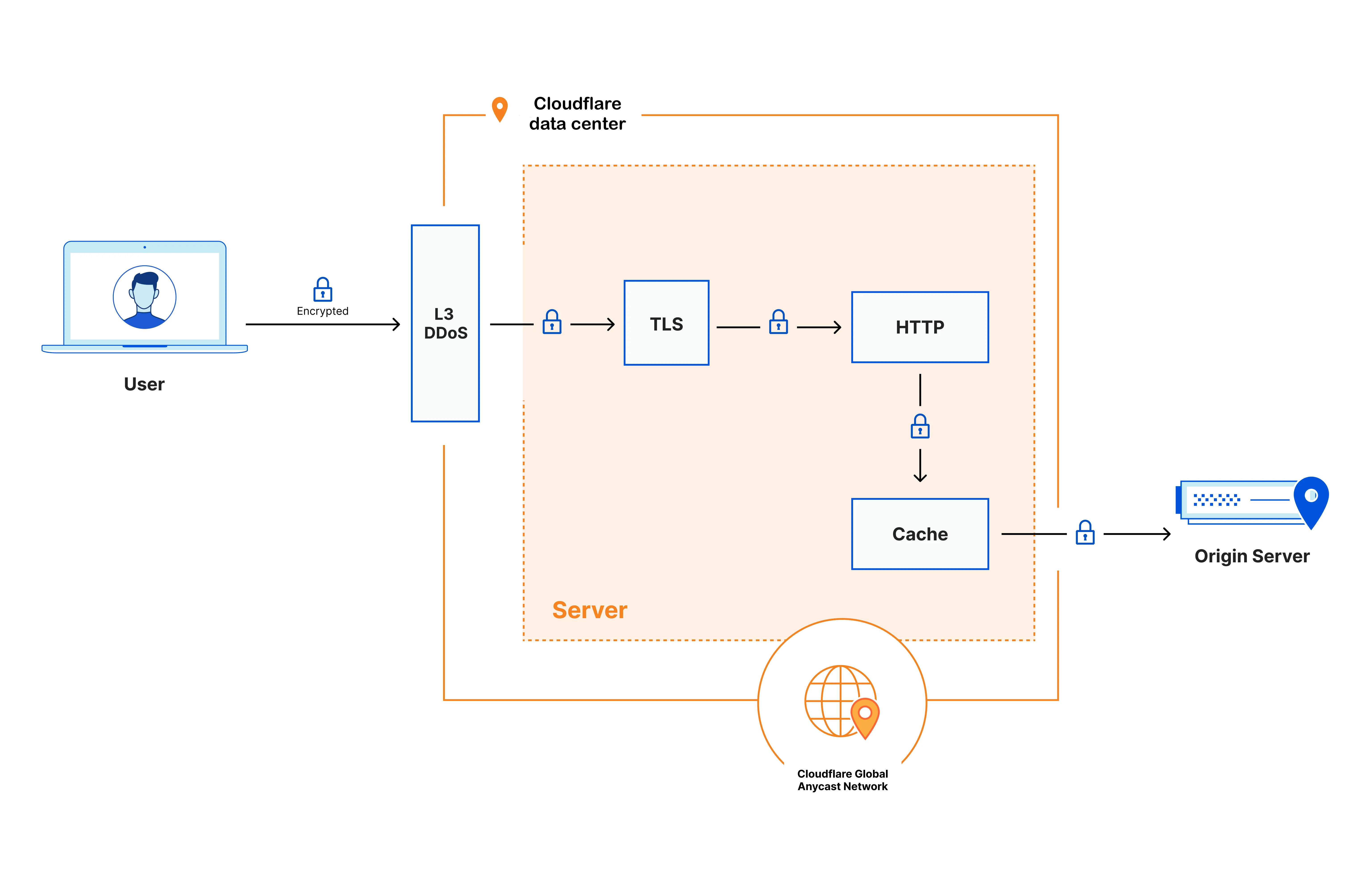
At a high level, when an end user's device connects to any Cloudflare data center, the request is processed in the following way:
1. Certain types of requests that can be used for cyber attacks are immediately dropped based on the addressing information (layer 3 / network layer).
2. Next, the encrypted request is decrypted and inspected using the customer's chosen business logic, for example, the products Configuration Rules, WAF Custom Rules, Rate Limiting Rules, following the [traffic sequence ↗](https://blog.cloudflare.com/traffic-sequence-which-product-runs-first/) and phases. This process enables the detection and prevention of a variety of different types of cyber attacks and malicious traffic, including layer 7 / application layer DDoS attacks, automated bot traffic, credential stuffing, and SQL injection, among others.
3. The inspected request is then passed to the cache module. If the cache can fulfill the request with a cached copy of the content, it does so; if not, it forwards the request to the customer's origin server. Traffic between the Cloudflare data center and the origin server is encrypted, unless the customer decides to use a different encryption mode.
4. When the response comes from the customer's origin server, any static and eligible content is cached onto encrypted disks. The response then goes back through the business logic to the user across the Internet.
By default, Cloudflare performs TLS termination globally in every data center, where the Internet end user connects to a website or application behind Cloudflare. However, customers can configure Regional Services to specify in which regions the processing and TLS termination occurs.
```json
{"@context":"https://schema.org","@type":"BreadcrumbList","itemListElement":[{"@type":"ListItem","position":1,"item":{"@id":"/directory/","name":"Directory"}},{"@type":"ListItem","position":2,"item":{"@id":"/data-localization/","name":"Data Localization Suite"}},{"@type":"ListItem","position":3,"item":{"@id":"/data-localization/regional-services/","name":"Regional Services"}},{"@type":"ListItem","position":4,"item":{"@id":"/data-localization/regional-services/http-requests/","name":"Default HTTP Privacy"}}]}
```
---
---
title: Configuration guides
description: Learn how to use Cloudflare products with the Data Localization Suite.
image: https://developers.cloudflare.com/zt-preview.png
---
[Skip to content](#%5Ftop)
Was this helpful?
YesNo
[ Edit page ](https://github.com/cloudflare/cloudflare-docs/edit/production/src/content/docs/data-localization/how-to/index.mdx) [ Report issue ](https://github.com/cloudflare/cloudflare-docs/issues/new/choose)
Copy page
# Configuration guides
Learn how to use Cloudflare products with the Data Localization Suite.
* [ Zero Trust ](https://developers.cloudflare.com/data-localization/how-to/zero-trust/)
* [ Pages ](https://developers.cloudflare.com/data-localization/how-to/pages/)
* [ Cache ](https://developers.cloudflare.com/data-localization/how-to/cache/)
* [ Load Balancing ](https://developers.cloudflare.com/data-localization/how-to/load-balancing/)
* [ Cloudflare for SaaS ](https://developers.cloudflare.com/data-localization/how-to/cloudflare-for-saas/)
* [ R2 Object Storage ](https://developers.cloudflare.com/data-localization/how-to/r2/)
* [ Durable Objects ](https://developers.cloudflare.com/data-localization/how-to/durable-objects/)
* [ Workers ](https://developers.cloudflare.com/data-localization/how-to/workers/)
## Verify Regional Services behavior
In order to verify that Regional Services is working, customers can confirm the behavior by executing one of the following `curl` commands on a regionalized hostname:
Terminal window
```
curl -X GET -I https:/// 2>&1 | grep cf-ray
```
Terminal window
```
curl -s https:///cdn-cgi/trace | grep "colo="
```
The first command will return a three-letter IATA code in the [Cf-Ray](https://developers.cloudflare.com/fundamentals/reference/http-headers/#cf-ray) header, indicating the Cloudflare data center location of processing and/or TLS termination. The second command will directly return the three-letter IATA code.
For example, when a hostname is configured to use the region European Union (EU), the three-letter IATA code will always return a data center inside of the EU.
```json
{"@context":"https://schema.org","@type":"BreadcrumbList","itemListElement":[{"@type":"ListItem","position":1,"item":{"@id":"/directory/","name":"Directory"}},{"@type":"ListItem","position":2,"item":{"@id":"/data-localization/","name":"Data Localization Suite"}},{"@type":"ListItem","position":3,"item":{"@id":"/data-localization/how-to/","name":"Configuration guides"}}]}
```
---
---
title: Cache
description: In the following sections, we will give you some details about how to configure Cache with Regional Services and Customer Metadata Boundary.
image: https://developers.cloudflare.com/zt-preview.png
---
[Skip to content](#%5Ftop)
Was this helpful?
YesNo
[ Edit page ](https://github.com/cloudflare/cloudflare-docs/edit/production/src/content/docs/data-localization/how-to/cache.mdx) [ Report issue ](https://github.com/cloudflare/cloudflare-docs/issues/new/choose)
Copy page
# Cache
In the following sections, we will give you some details about how to configure Cache with Regional Services and Customer Metadata Boundary.
## Regional Services
To configure Regional Services for hostnames [proxied](https://developers.cloudflare.com/dns/proxy-status/) through Cloudflare and ensure that [eligible assets](https://developers.cloudflare.com/cache/concepts/default-cache-behavior/) are cached only in-region, follow these steps for the dashboard or API configuration:
* [ Dashboard ](#tab-panel-4212)
* [ API ](#tab-panel-4213)
1. In the Cloudflare dashboard, go to the **Records** page.
[ Go to **Records** ](https://dash.cloudflare.com/?to=/:account/:zone/dns/records)
2. Follow these steps to [create a DNS record](https://developers.cloudflare.com/dns/manage-dns-records/how-to/create-dns-records/).
3. From the **Region** dropdown, select the region you would like to use on your domain.
4. Select **Save**.
1. To create records with the API, use the [API POST](https://developers.cloudflare.com/api/resources/dns/subresources/records/methods/create/) command.
2. Run the [API POST](https://developers.cloudflare.com/data-localization/regional-services/get-started/#configure-regional-services-via-api) command on the hostname to create a `regional_hostnames` with a specific region.
Note
Take into consideration that only [Generic Global Tiered Cache](https://developers.cloudflare.com/cache/how-to/tiered-cache/#generic-global-tiered-cache) and [Custom Tiered Cache](https://developers.cloudflare.com/cache/how-to/tiered-cache/#custom-tiered-cache) respect Regional Services. [Smart Tiered Cache](https://developers.cloudflare.com/cache/how-to/tiered-cache/#smart-tiered-cache) is incompatible with Regional Services.
## Customer Metadata Boundary
[Cache Analytics](https://developers.cloudflare.com/cache/performance-review/cache-analytics/), Generic Global Tiered Cache and Custom Tiered Cache are compatible with Customer Metadata Boundary. With Customer Metadata Boundary set to EU, the **Caching** \> **Tiered Cache** tab in the zone dashboard will not be populated.
For more information on CDN and caching, refer to the [Cache documentation](https://developers.cloudflare.com/cache/).
```json
{"@context":"https://schema.org","@type":"BreadcrumbList","itemListElement":[{"@type":"ListItem","position":1,"item":{"@id":"/directory/","name":"Directory"}},{"@type":"ListItem","position":2,"item":{"@id":"/data-localization/","name":"Data Localization Suite"}},{"@type":"ListItem","position":3,"item":{"@id":"/data-localization/how-to/","name":"Configuration guides"}},{"@type":"ListItem","position":4,"item":{"@id":"/data-localization/how-to/cache/","name":"Cache"}}]}
```
---
---
title: Cloudflare for SaaS
description: In the following sections, we will give you some details about how to configure Cloudflare for SaaS with Regional Services and Customer Metadata Boundary.
image: https://developers.cloudflare.com/zt-preview.png
---
[Skip to content](#%5Ftop)
Was this helpful?
YesNo
[ Edit page ](https://github.com/cloudflare/cloudflare-docs/edit/production/src/content/docs/data-localization/how-to/cloudflare-for-saas.mdx) [ Report issue ](https://github.com/cloudflare/cloudflare-docs/issues/new/choose)
Copy page
# Cloudflare for SaaS
In the following sections, we will give you some details about how to configure Cloudflare for SaaS with Regional Services and Customer Metadata Boundary.
## Regional Services
To configure Regional Services for both hostnames [proxied](https://developers.cloudflare.com/dns/proxy-status/) through Cloudflare and the fallback origin, follow these steps for the dashboard or API configuration:
* [ Dashboard ](#tab-panel-4214)
* [ API ](#tab-panel-4215)
1. In the Cloudflare dashboard, go to the **Custom Hostnames** page.
[ Go to **Custom Hostnames** ](https://dash.cloudflare.com/?to=/:account/:zone/ssl-tls/custom-hostnames)
2. Follow these steps to [configure Cloudflare for SaaS](https://developers.cloudflare.com/cloudflare-for-platforms/cloudflare-for-saas/start/getting-started/).
1. Set the [fallback record](https://developers.cloudflare.com/api/resources/custom%5Fhostnames/subresources/fallback%5Forigin/methods/update/).
2. Create a [Custom Hostname](https://developers.cloudflare.com/api/resources/custom%5Fhostnames/methods/create/).
3. Run the [API POST](https://developers.cloudflare.com/data-localization/regional-services/get-started/#configure-regional-services-via-api) command on the Custom Hostname to create a `regional_hostnames` with a specific region.
The Regional Services functionality can be extended to Custom Hostnames and this is dependent on the target of the alias.
Consider the following example.
Note
As a SaaS provider, I might want all of my customers to connect to the nearest data center to them and for all the processing and Cloudflare features to be applied there; however, I might have a few exceptions where I want the processing to only be done in the US.
In this case, I can just keep my fallback record with `Earth` as the processing region and have all my Custom Hostnames create a CNAME record and use the fallback record as the CNAME target. For any Custom Hostnames that need to be processed in the US, I will create a DNS record for example, `us.saasprovider.com` and set the processing region to `United States of America`. In order for the US processing region to be applied, my customers must create a CNAME record and use the `us.saasprovider.com` as the CNAME target. The origin associated with the Custom Hostname is not used to set the processing region, but instead to route the traffic to the right server.
Below you can find a breakdown of the different ways that you might configure Cloudflare for SaaS and the corresponding processing regions:
* No processing region: `fallback.saasprovider.com`
* Processing region is the `US`: `us.saasprovider.com`
* User location: `UK` (closest datacenter: `LHR`)
| Test | Custom Hostname | Target | Origin | Location |
| ---- | -------------------------------------- | ------------------------- | ---------------------------- | -------- |
| 1 | regionalservices-default.example.com | fallback.saasprovider.com | default (fallback) | LHR |
| 2 | regionalservices-default2.example.com | us.saasprovider.com | default (fallback) | EWR |
| 3 | regionalservices-custom.example.com | fallback.saasprovider.com | us.saasprovider.com (custom) | LHR |
| 4 | regionalservices-custom2.example.com | us.saasprovider.com | us.saasprovider.com (custom) | EWR |
* In order to set a processing region for the fallback record to any of the available regions for Regional Services, create a new regional hostname entry for the fallback via a [POST](https://developers.cloudflare.com/data-localization/regional-services/get-started/#configure-regional-services-via-api) request.
* To update the existing region (for example, from `EU` to `US`), make a [PATCH](https://developers.cloudflare.com/data-localization/regional-services/get-started/#configure-regional-services-via-api) request for the fallback to update the processing region accordingly.
* To remove the regional services processing region and set it back to `Earth`, make a [DELETE](https://developers.cloudflare.com/data-localization/regional-services/get-started/#configure-regional-services-via-api) request to delete the region configuration.
## Customer Metadata Boundary
Cloudflare for SaaS [Analytics](https://developers.cloudflare.com/cloudflare-for-platforms/cloudflare-for-saas/hostname-analytics/) based on [HTTP requests](https://developers.cloudflare.com/logs/logpush/logpush-job/datasets/zone/http%5Frequests/) are fully supported by Customer Metadata Boundary.
Refer to [Cloudflare for SaaS documentation](https://developers.cloudflare.com/cloudflare-for-platforms/cloudflare-for-saas/) for more information.
```json
{"@context":"https://schema.org","@type":"BreadcrumbList","itemListElement":[{"@type":"ListItem","position":1,"item":{"@id":"/directory/","name":"Directory"}},{"@type":"ListItem","position":2,"item":{"@id":"/data-localization/","name":"Data Localization Suite"}},{"@type":"ListItem","position":3,"item":{"@id":"/data-localization/how-to/","name":"Configuration guides"}},{"@type":"ListItem","position":4,"item":{"@id":"/data-localization/how-to/cloudflare-for-saas/","name":"Cloudflare for SaaS"}}]}
```
---
---
title: Durable Objects
description: In the following sections, we will give you some details about how to configure Durable Objects with Regional Services and Customer Metadata Boundary.
image: https://developers.cloudflare.com/zt-preview.png
---
[Skip to content](#%5Ftop)
Was this helpful?
YesNo
[ Edit page ](https://github.com/cloudflare/cloudflare-docs/edit/production/src/content/docs/data-localization/how-to/durable-objects.mdx) [ Report issue ](https://github.com/cloudflare/cloudflare-docs/issues/new/choose)
Copy page
# Durable Objects
In the following sections, we will give you some details about how to configure Durable Objects with Regional Services and Customer Metadata Boundary.
## Regional Services
To configure Regional Services for hostnames [proxied](https://developers.cloudflare.com/dns/proxy-status/) through Cloudflare and ensure that processing of a Durable Object (DO) occurs only in-region, follow these steps:
1. Follow the steps in the Durable Objects [Get Started](https://developers.cloudflare.com/durable-objects/get-started/) guide.
2. [Restrict Durable Objects to a jurisdiction](https://developers.cloudflare.com/durable-objects/reference/data-location/#restrict-durable-objects-to-a-jurisdiction), in order to control where the DO itself runs and persists data, by creating a jurisidictional subnamespace in your Worker’s code.
3. Follow the [Workers guide](https://developers.cloudflare.com/data-localization/how-to/workers/#regional-services) to configure a custom domain with Regional Services, in order to control the regions from which Cloudflare responds to requests.
## Customer Metadata Boundary
DO Logs and Analytics are not available outside the US region when using Customer Metadata Boundary. With Customer Metadata Boundary set to `EU`, **Workers & Pages** \> **Workers** \> **Metrics** tab related to DO in the zone dashboard will not be populated.
Refer to the [Durable Objects documentation](https://developers.cloudflare.com/durable-objects/) for more information.
```json
{"@context":"https://schema.org","@type":"BreadcrumbList","itemListElement":[{"@type":"ListItem","position":1,"item":{"@id":"/directory/","name":"Directory"}},{"@type":"ListItem","position":2,"item":{"@id":"/data-localization/","name":"Data Localization Suite"}},{"@type":"ListItem","position":3,"item":{"@id":"/data-localization/how-to/","name":"Configuration guides"}},{"@type":"ListItem","position":4,"item":{"@id":"/data-localization/how-to/durable-objects/","name":"Durable Objects"}}]}
```
---
---
title: Load Balancing
description: In the following sections, we will give you some details about how to configure Load Balancing with Regional Services and Customer Metadata Boundary.
image: https://developers.cloudflare.com/zt-preview.png
---
[Skip to content](#%5Ftop)
Was this helpful?
YesNo
[ Edit page ](https://github.com/cloudflare/cloudflare-docs/edit/production/src/content/docs/data-localization/how-to/load-balancing.mdx) [ Report issue ](https://github.com/cloudflare/cloudflare-docs/issues/new/choose)
Copy page
# Load Balancing
In the following sections, we will give you some details about how to configure Load Balancing with Regional Services and Customer Metadata Boundary.
## Regional Services
You can load balance traffic at different levels of the networking stack depending on the [proxy mode](https://developers.cloudflare.com/load-balancing/understand-basics/proxy-modes/): Layer 7 (`HTTP/S`) and Layer 4 (`TCP`) are supported; however, `DNS-only` is not supported, as it is not [proxied](https://developers.cloudflare.com/dns/proxy-status/).
To configure Regional Services for hostnames [proxied](https://developers.cloudflare.com/dns/proxy-status/) through Cloudflare and ensure that the Load Balancer is available only in-region, follow these steps for the dashboard or API configuration:
* [ Dashboard ](#tab-panel-4216)
* [ API ](#tab-panel-4217)
1. In the Cloudflare dashboard, go to the **Load balancing** page.
[ Go to **Load Balancing** ](https://dash.cloudflare.com/?to=/:account/:zone/traffic/load-balancing)
2. Follow the steps to [create a load balancer](https://developers.cloudflare.com/load-balancing/load-balancers/create-load-balancer/#create-a-load-balancer).
3. From the **Data Localization** dropdown, select the region you would like to use on your domain.
4. Select **Next** and continue with the regular setup.
5. Select **Save**.
1. Follow the instructions outlined to [create a load balancer](https://developers.cloudflare.com/load-balancing/load-balancers/create-load-balancer/#create-a-load-balancer) via API.
2. Run the [API POST](https://developers.cloudflare.com/data-localization/regional-services/get-started/#configure-regional-services-via-api) command on the Load Balancer hostname to create a `regional_hostnames` with a specific region.
## Customer Metadata Boundary
[Load Balancing Analytics](https://developers.cloudflare.com/load-balancing/reference/load-balancing-analytics/) are not available outside the US region when using Customer Metadata Boundary.
With Customer Metadata Boundary set to `EU`, **Traffic** \> **Load Balancing Analytics** \> **Overview and Latency** tab in the zone dashboard will not be populated.
Refer to the [Load Balancing documentation](https://developers.cloudflare.com/load-balancing/) for more information.
```json
{"@context":"https://schema.org","@type":"BreadcrumbList","itemListElement":[{"@type":"ListItem","position":1,"item":{"@id":"/directory/","name":"Directory"}},{"@type":"ListItem","position":2,"item":{"@id":"/data-localization/","name":"Data Localization Suite"}},{"@type":"ListItem","position":3,"item":{"@id":"/data-localization/how-to/","name":"Configuration guides"}},{"@type":"ListItem","position":4,"item":{"@id":"/data-localization/how-to/load-balancing/","name":"Load Balancing"}}]}
```
---
---
title: Pages
description: In the following sections, we will give you some details about how to configure Pages with Regional Services and Customer Metadata Boundary.
image: https://developers.cloudflare.com/zt-preview.png
---
[Skip to content](#%5Ftop)
Was this helpful?
YesNo
[ Edit page ](https://github.com/cloudflare/cloudflare-docs/edit/production/src/content/docs/data-localization/how-to/pages.mdx) [ Report issue ](https://github.com/cloudflare/cloudflare-docs/issues/new/choose)
Copy page
# Pages
In the following sections, we will give you some details about how to configure Pages with Regional Services and Customer Metadata Boundary.
## Regional Services
To configure Regional Services for hostnames [proxied](https://developers.cloudflare.com/dns/proxy-status/) through Cloudflare and ensure that processing of a Pages project occurs only in-region, follow these steps for the dashboard or API configuration:
* [ Dashboard ](#tab-panel-4218)
* [ API ](#tab-panel-4219)
1. In the Cloudflare dashboard, go to the **Workers & Pages** page.
[ Go to **Workers & Pages** ](https://dash.cloudflare.com/?to=/:account/workers-and-pages)
2. Select your Pages project.
3. Follow these steps to [create a Custom Domain](https://developers.cloudflare.com/pages/configuration/custom-domains/).
4. Go to the **DNS** of the zone you configured the Custom Domain for.
5. From the **Region** dropdown, select the region you would like to use on your domain.
6. Select **Save**.
1. Use the [API POST](https://developers.cloudflare.com/api/resources/pages/subresources/projects/subresources/domains/methods/create/) command to add a Custom Domain to a Pages project.
2. Run the [API POST](https://developers.cloudflare.com/data-localization/regional-services/get-started/#configure-regional-services-via-api) command on the Pages Custom Domain to create a `regional_hostnames` with a specific Region.
Note
Regional Services only applies to the Custom Domain configured for a Pages project.
## Customer Metadata Boundary
Customer Metadata Boundary applies to the Custom Domain configured, as well as the [\*.pages.dev](https://developers.cloudflare.com/pages/configuration/preview-deployments/) subdomain. You also have the option to disable access to the [.dev domain](https://developers.cloudflare.com/pages/configuration/custom-domains/#disable-access-to-pagesdev-subdomain).
For information on available Analytics and Metrics, review the [Cloudflare product compatibility](https://developers.cloudflare.com/data-localization/compatibility/) page.
It is recommended not to store any Personally Identifiable Information (PII) in the Pages project's static assets.
Note
Page [Functions](https://developers.cloudflare.com/pages/functions/) are implemented as Cloudflare Workers. Refer to the Workers section for more information.
Refer to the [Pages documentation](https://developers.cloudflare.com/pages) for more information.
```json
{"@context":"https://schema.org","@type":"BreadcrumbList","itemListElement":[{"@type":"ListItem","position":1,"item":{"@id":"/directory/","name":"Directory"}},{"@type":"ListItem","position":2,"item":{"@id":"/data-localization/","name":"Data Localization Suite"}},{"@type":"ListItem","position":3,"item":{"@id":"/data-localization/how-to/","name":"Configuration guides"}},{"@type":"ListItem","position":4,"item":{"@id":"/data-localization/how-to/pages/","name":"Pages"}}]}
```
---
---
title: R2 Object Storage
description: In the following sections, we will give you some details about how to configure R2 with Regional Services and Customer Metadata Boundary.
image: https://developers.cloudflare.com/zt-preview.png
---
[Skip to content](#%5Ftop)
Was this helpful?
YesNo
[ Edit page ](https://github.com/cloudflare/cloudflare-docs/edit/production/src/content/docs/data-localization/how-to/r2.mdx) [ Report issue ](https://github.com/cloudflare/cloudflare-docs/issues/new/choose)
Copy page
# R2 Object Storage
In the following sections, we will give you some details about how to configure R2 with Regional Services and Customer Metadata Boundary.
## Regional Services
To configure Regional Services for hostnames [proxied](https://developers.cloudflare.com/dns/proxy-status/) through Cloudflare and ensure that processing of requesting objects from a [R2 Bucket](https://developers.cloudflare.com/r2/buckets/) occurs only in-region, follow these steps:
1. In the Cloudflare dashboard, go to the **R2** page.
[ Go to **Overview** ](https://dash.cloudflare.com/?to=/:account/r2/overview)
2. Follow the steps to [create a Bucket](https://developers.cloudflare.com/r2/buckets/create-buckets/).
3. [Connect a bucket to a custom domain](https://developers.cloudflare.com/r2/buckets/public-buckets/#connect-a-bucket-to-a-custom-domain).
4. Run the [API POST](https://developers.cloudflare.com/data-localization/regional-services/get-started/#configure-regional-services-via-api) command on the configured bucket custom domain to create a `regional_hostnames` with a specific region.
Regional Services only applies to the custom domain configured for an R2 Bucket.
### Send logs to R2 via S3-Compatible endpoint
The following instructions will show you how to set up a Logpush job using an S3-compatible endpoint to store logs in an R2 bucket in the jurisdiction of your choice.
1. Create an [R2 bucket](https://developers.cloudflare.com/r2/get-started/) in your Cloudflare account and select the [jurisdiction](https://developers.cloudflare.com/r2/reference/data-location/#set-jurisdiction-via-the-cloudflare-dashboard) you would like to use.
2. Generate an API token for your R2 bucket. You have the following two options:
Generate a token for a specific bucket (recommended)
Go to the R2 section of your Cloudflare dashboard and select **Manage R2 API Tokens** to generate a token directly tied to your specific bucket. You can follow the instructions in the [Authentication](https://developers.cloudflare.com/r2/api/tokens/) section.
Generate a token for all buckets
You can generate a API token in **Manage Account** \> **Account API Tokens** or you can create a user-specific token:
1. Go to **My Profile** \> **API Tokens**
2. Select **Create Token** \> **Create Custom Token**
3. Choose **Account** \> **Workers R2 Storage** \> **Edit** to set permissions.
4. To test your token, copy the `curl` command and paste it into a terminal.
Terminal window
```
curl "https://api.cloudflare.com/client/v4/user/tokens/verify" \
--header "Authorization: Bearer "
```
The result:
```
{
"result": {
"id": "325xxxxcd",
"status": "active"
},
"success": true,
"errors": [],
"messages": [
{
"code": 10000,
"message": "This API Token is valid and active",
"type": null
}
]
}
```
1. Generate a SHA-256 hash of the token:
Terminal window
```
echo -n "" | shasum -a 256
```
This command will output a hash similar to `dxxxx391b`.
1. Set up a Logpush destination using [S3-compatible endpoint](https://developers.cloudflare.com/logs/logpush/logpush-job/enable-destinations/s3-compatible-endpoints/) and fill in the following fields:
* **Bucket**: Enter the name of the R2 bucket you created with the jurisdiction you would like to use.
* **Path** (optional): If you want, you can specify a folder path to organize your logs.
* **Endpoint URL**: Provide the S3 API endpoint for your bucket in the format `.eu.r2.cloudflarestorage.com`. Do not include the bucket name, as it was set in the first field.
* **Bucket Region**: For instance, use `WEUR` to specify the EU region.
* **Access Key ID**: Enter the Token ID created previously (`325xxxxcd`).
* **Secret Access Key**: Use the SHA-256 hash of the token (`dxxxx391b`).
Complete the configuration by selecting the fields you want to push to your R2 bucket.
## Customer Metadata Boundary
With Customer Metadata Boundary set to `EU`, **R2** \> **Bucket** \> [**Metrics**](https://developers.cloudflare.com/r2/platform/metrics-analytics/) tab in the account dashboard will be populated.
Note
Additionally, customers can create R2 buckets with [jurisdictional restrictions set to EU](https://developers.cloudflare.com/r2/reference/data-location/#jurisdictional-restrictions). In this case, we recommend [using jurisdictions with the S3 API](https://developers.cloudflare.com/r2/reference/data-location/#using-jurisdictions-with-the-s3-api).
Refer to the [R2 documentation](https://developers.cloudflare.com/r2/) for more information.
```json
{"@context":"https://schema.org","@type":"BreadcrumbList","itemListElement":[{"@type":"ListItem","position":1,"item":{"@id":"/directory/","name":"Directory"}},{"@type":"ListItem","position":2,"item":{"@id":"/data-localization/","name":"Data Localization Suite"}},{"@type":"ListItem","position":3,"item":{"@id":"/data-localization/how-to/","name":"Configuration guides"}},{"@type":"ListItem","position":4,"item":{"@id":"/data-localization/how-to/r2/","name":"R2 Object Storage"}}]}
```
---
---
title: Workers
description: In the following sections, we will give you some details about how to configure Workers with Regional Services and Customer Metadata Boundary.
image: https://developers.cloudflare.com/zt-preview.png
---
[Skip to content](#%5Ftop)
Was this helpful?
YesNo
[ Edit page ](https://github.com/cloudflare/cloudflare-docs/edit/production/src/content/docs/data-localization/how-to/workers.mdx) [ Report issue ](https://github.com/cloudflare/cloudflare-docs/issues/new/choose)
Copy page
# Workers
In the following sections, we will give you some details about how to configure Workers with Regional Services and Customer Metadata Boundary.
## Regional Services
To configure Regional Services for hostnames [proxied](https://developers.cloudflare.com/dns/proxy-status/) through Cloudflare and ensure that processing of a Workers project occurs only in-region, follow these steps:
1. In the Cloudflare dashboard, go to the **Workers & Pages** page.
[ Go to **Workers & Pages** ](https://dash.cloudflare.com/?to=/:account/workers-and-pages)
2. Select your Workers project.
3. Follow the steps to [create a custom domain](https://developers.cloudflare.com/workers/configuration/routing/custom-domains/).
4. Run the [API POST](https://developers.cloudflare.com/data-localization/regional-services/get-started/#configure-regional-services-via-api) command on the configured Workers Custom Domain to create a `regional_hostnames` with a specific region.
### Caveats
Regional Services only applies to the custom domain configured for a Workers project. Therefore, it will run only in-region Cloudflare locations.
Regional Services does not apply to [subrequests](https://developers.cloudflare.com/workers/platform/limits/#subrequests).
Regional Services does not apply to other Worker triggers, like [Queues](https://developers.cloudflare.com/queues/) or [Cron Triggers](https://developers.cloudflare.com/workers/configuration/cron-triggers/).
## Customer Metadata Boundary
Customer Metadata Boundary applies to the custom domain configured, as well as the [\*.workers.dev](https://developers.cloudflare.com/workers/configuration/routing/workers-dev/) subdomain.
Workers [Metrics and Analytics](https://developers.cloudflare.com/workers/observability/metrics-and-analytics/) are not available outside the US region when using Customer Metadata Boundary.
With Customer Metadata Boundary set to `EU`, **Workers & Pages** \> **Workers** \> **Metrics** tab the zone dashboard will not be populated.
Note
It is recommended to not store any Personally Identifiable Information (PII) in the Workers code. If sensitive information needs to be used, it is recommended to use [Secrets](https://developers.cloudflare.com/workers/configuration/secrets/).
Refer to the [Workers documentation](https://developers.cloudflare.com/workers/) for more information.
```json
{"@context":"https://schema.org","@type":"BreadcrumbList","itemListElement":[{"@type":"ListItem","position":1,"item":{"@id":"/directory/","name":"Directory"}},{"@type":"ListItem","position":2,"item":{"@id":"/data-localization/","name":"Data Localization Suite"}},{"@type":"ListItem","position":3,"item":{"@id":"/data-localization/how-to/","name":"Configuration guides"}},{"@type":"ListItem","position":4,"item":{"@id":"/data-localization/how-to/workers/","name":"Workers"}}]}
```
---
---
title: Zero Trust
description: In the following sections, we will give you some details about how different Zero Trust products can be used with the Data Localization Suite.
image: https://developers.cloudflare.com/zt-preview.png
---
[Skip to content](#%5Ftop)
Was this helpful?
YesNo
[ Edit page ](https://github.com/cloudflare/cloudflare-docs/edit/production/src/content/docs/data-localization/how-to/zero-trust.mdx) [ Report issue ](https://github.com/cloudflare/cloudflare-docs/issues/new/choose)
Copy page
# Zero Trust
In the following sections, we will give you some details about how different Zero Trust products can be used with the Data Localization Suite.
## Gateway
Regional Services can be used with Gateway in all [supported regions](https://developers.cloudflare.com/data-localization/region-support/). Be aware that Regional Services only apply when using the Cloudflare One Client in Traffic and DNS mode.
### Egress policies
Enterprise customers can purchase a [dedicated egress IP](https://developers.cloudflare.com/cloudflare-one/traffic-policies/egress-policies/dedicated-egress-ips/) (IPv4 and IPv6) or range of IPs geolocated to one or more Cloudflare network locations. This allows your egress traffic to geolocate to the city selected in your [egress policies](https://developers.cloudflare.com/cloudflare-one/traffic-policies/egress-policies/).
### HTTP policies
As part of Regional Services, Cloudflare Gateway will only perform [TLS decryption](https://developers.cloudflare.com/cloudflare-one/traffic-policies/http-policies/tls-decryption/) when using the [Cloudflare One Client](https://developers.cloudflare.com/cloudflare-one/team-and-resources/devices/cloudflare-one-client/) (in default [Traffic and DNS mode](https://developers.cloudflare.com/cloudflare-one/team-and-resources/devices/cloudflare-one-client/configure/modes/)).
#### Data Loss Prevention (DLP)
You are able to [log the payload of matched DLP rules](https://developers.cloudflare.com/cloudflare-one/data-loss-prevention/dlp-policies/logging-options/#log-the-payload-of-matched-rules) and encrypt them with your public key so that only you can examine them later.
[Cloudflare cannot decrypt encrypted payloads](https://developers.cloudflare.com/cloudflare-one/data-loss-prevention/dlp-policies/logging-options/#data-privacy).
### Network policies
You are able to [configure SSH proxy and command logs](https://developers.cloudflare.com/cloudflare-one/traffic-policies/network-policies/ssh-logging/). Generate a Hybrid Public Key Encryption (HPKE) key pair and upload the public key `sshkey.pub` to your dashboard. All proxied SSH commands are immediately encrypted using this public key. The matching private key – which is in your possession – is required to view logs.
### DNS policies
Regional Services controls where Cloudflare decrypts traffic; because most DNS traffic is not encrypted, Gateway DNS cannot be regionalized using Regional Services.
Refer to the [Cloudflare One Client settings](https://developers.cloudflare.com/data-localization/how-to/zero-trust/#cloudflare-one-client-settings) section below for more information.
### Custom certificates
You can [bring your own certificate](https://developers.cloudflare.com/cloudflare-one/team-and-resources/devices/user-side-certificates/custom-certificate/) to Gateway but these cannot yet be restricted to a specific region.
### Logs and Analytics
By default, Cloudflare will store and deliver logs from data centers across our global network. To maintain regional control over your data, you can use [Customer Metadata Boundary](https://developers.cloudflare.com/data-localization/metadata-boundary/) and restrict data storage to a specific geographic region. For more information refer to the section about [Logpush datasets supported](https://developers.cloudflare.com/data-localization/metadata-boundary/logpush-datasets/).
Customers also have the option to reduce the logs that Cloudflare stores:
* You can [exclude PII from logs](https://developers.cloudflare.com/cloudflare-one/insights/logs/dashboard-logs/gateway-logs/manage-pii/)
* You can [disable logging, or only log blocked requests](https://developers.cloudflare.com/cloudflare-one/insights/logs/dashboard-logs/gateway-logs/#selective-logging).
#### Verify regional map application
To verify that your regional map is being applied correctly, check the `IngressColoName` field in your [Zero Trust Network Session logs](https://developers.cloudflare.com/logs/logpush/logpush-job/datasets/account/zero%5Ftrust%5Fnetwork%5Fsessions/#ingresscoloname). This field shows the name of the Cloudflare data center where traffic ingressed. Since regionalization is applied upstream from Gateway, the ingress data center will be located within your configured regional map, confirming that traffic is being processed in the correct region.
## Access
To ensure that all reverse proxy requests for applications protected by Cloudflare Access will only occur in FedRAMP-compliant data centers, you should use [Regional Services](https://developers.cloudflare.com/data-localization/regional-services/get-started/) with the region set to FedRAMP.
## Cloudflare Tunnel
You can [configure Cloudflare Tunnel](https://developers.cloudflare.com/cloudflare-one/networks/connectors/cloudflare-tunnel/configure-tunnels/run-parameters/#region) to only connect to data centers within the United States, regardless of where the software was deployed.
## Cloudflare One Client settings
### Local Domain Fallback
You can use the WARP setting [Local Domain Fallback](https://developers.cloudflare.com/cloudflare-one/team-and-resources/devices/cloudflare-one-client/configure/route-traffic/local-domains/) in order to use a private DNS resolver, which you can manage yourself.
### Split Tunnels
[Split Tunnels](https://developers.cloudflare.com/cloudflare-one/team-and-resources/devices/cloudflare-one-client/configure/route-traffic/split-tunnels/) allow you to decide which IP addresses/ranges and/or domains are routed through or excluded from Cloudflare.
Warning
Gateway policies will not apply for excluded traffic.
```json
{"@context":"https://schema.org","@type":"BreadcrumbList","itemListElement":[{"@type":"ListItem","position":1,"item":{"@id":"/directory/","name":"Directory"}},{"@type":"ListItem","position":2,"item":{"@id":"/data-localization/","name":"Data Localization Suite"}},{"@type":"ListItem","position":3,"item":{"@id":"/data-localization/how-to/","name":"Configuration guides"}},{"@type":"ListItem","position":4,"item":{"@id":"/data-localization/how-to/zero-trust/","name":"Zero Trust"}}]}
```
---
---
title: Limitations
description: There are some caveats and limitations when deploying Data Localization Suite features.
image: https://developers.cloudflare.com/zt-preview.png
---
[Skip to content](#%5Ftop)
Was this helpful?
YesNo
[ Edit page ](https://github.com/cloudflare/cloudflare-docs/edit/production/src/content/docs/data-localization/limitations.mdx) [ Report issue ](https://github.com/cloudflare/cloudflare-docs/issues/new/choose)
Copy page
# Limitations
There are some caveats and limitations when deploying Data Localization Suite features.
Cloudflare is working hard to improve this offering and fill the gaps. If you have a specific feature request, please contact your [Account Team](https://developers.cloudflare.com/support/contacting-cloudflare-support/).
## Key Management
When using Geo Key Manager or Keyless SSL, some caveats may apply.
The remote procedure call from the server to the key server can add latency to the handshake, slowing down connection establishment. The additional latency cost corresponds to the round-trip time from the server to the key server, which can be as much as a second if the key server is on the other side of the world. Luckily, this latency cost only applies to the first time you connect to a server. Once the handshake is complete, the key server is not involved. Furthermore, if you reconnect to a site you do not have to pay the latency cost either because resuming a connection with TLS Session Resumption does not require the private key. Hence, latency is only added for the initial connection.
Learn more about how it works in our [blog post ↗](https://blog.cloudflare.com/geo-key-manager-how-it-works/).
## Regional Services
When using Regional Services, some caveats and limitations may apply.
For product-specific caveats, refer to [Cloudflare product compatibility](https://developers.cloudflare.com/data-localization/compatibility/) page.
The following features and protocols are not supported by Regional Services and might not work on regionalized hostnames:
* [ICMP ↗](https://www.cloudflare.com/learning/ddos/glossary/internet-control-message-protocol-icmp/)
* [Encrypted Client Hello (ECH)](https://developers.cloudflare.com/ssl/edge-certificates/ech/)
* [O2O](https://developers.cloudflare.com/cloudflare-for-platforms/cloudflare-for-saas/saas-customers/how-it-works/)
* [Onion Routing (Tor)](https://developers.cloudflare.com/network/onion-routing/)
Since Regional Services leverages Spectrum in the background, [Spectrum limitations](https://developers.cloudflare.com/spectrum/reference/limitations/) apply.
Regional Services does not apply to [Subrequests](https://developers.cloudflare.com/workers/platform/limits/#subrequests). Regional Services operates on your hostname's IPs. We recommend using [DNSSEC](https://developers.cloudflare.com/learning-paths/application-security/default-traffic-security/dnssec/) and/or [DNS over HTTPS](https://developers.cloudflare.com/1.1.1.1/encryption/dns-over-https/) to ensure that DNS responses are secure and correct.
## Customer Metadata Boundary
There are certain limitations and caveats when using Customer Metadata Boundary.
Specifically most of the Zone Analytics & Logs UI Tabs will be showing up as empty, when configuring Customer Metadata Boundary to EU only. It is recommended to use the UI [Security Analytics](https://developers.cloudflare.com/waf/analytics/security-analytics/) instead, or the [HTTP request](https://developers.cloudflare.com/logs/logpush/logpush-job/datasets/zone/http%5Frequests/) logs via [Logpush](https://developers.cloudflare.com/logs/logpush/).
To configure Customer Metadata Boundary to EU only, you must disable Log Retention for all zones within your account. Log Retention is a legacy feature of [Logpull](https://developers.cloudflare.com/logs/logpull/).
For product-specific caveats, refer to [Cloudflare product compatibility](https://developers.cloudflare.com/data-localization/compatibility/) page.
### Data unavailability
If you encounter a message on the dashboard indicating that your data is unavailable due to your account's Metadata Boundary configuration, this is because you are trying to access data that is not stored in your region (that is, you are in the US and trying to access data that is only stored in the EU, or vice versa). If you receive this error message while being in the region where your data is stored, there are two potential reasons why you might get this message:
* Your account has Customer Metadata Boundary (CMB) enabled, and your request is being directed to an incorrect region. For example, if you are in the EU and CMB is configured to store your data in the US.
* If you are trying to access your data from the correct region, such as being in the EU with CMB configured to save your data in the EU, the issue may be caused by network congestion. Typically, this problem resolves within a few minutes.
### Dashboard UI Analytics
In some cases, when using Customer Metadata Boundary set to the EU, some Dashboard UI Analytics might show up empty.
```json
{"@context":"https://schema.org","@type":"BreadcrumbList","itemListElement":[{"@type":"ListItem","position":1,"item":{"@id":"/directory/","name":"Directory"}},{"@type":"ListItem","position":2,"item":{"@id":"/data-localization/","name":"Data Localization Suite"}},{"@type":"ListItem","position":3,"item":{"@id":"/data-localization/limitations/","name":"Limitations"}}]}
```
---
---
title: FAQs
description: No, they are not. DLP stands for Data Loss Prevention, and it is part of Cloudflare’s Zero Trust offering (requiring Gateway). It allows customers to scan web traffic and SaaS apps for sensitive data like secret keys, financial information (credit card numbers), and other keywords.
image: https://developers.cloudflare.com/zt-preview.png
---
[Skip to content](#%5Ftop)
Was this helpful?
YesNo
[ Edit page ](https://github.com/cloudflare/cloudflare-docs/edit/production/src/content/docs/data-localization/faq.mdx) [ Report issue ](https://github.com/cloudflare/cloudflare-docs/issues/new/choose)
Copy page
# FAQs
## Are DLP and DLS the same?
No, they are not. DLP stands for [Data Loss Prevention](https://developers.cloudflare.com/cloudflare-one/data-loss-prevention/), and it is part of Cloudflare’s Zero Trust offering (requiring Gateway). It allows customers to scan web traffic and SaaS apps for sensitive data like secret keys, financial information (credit card numbers), and other keywords.
[Data Localization Suite](https://developers.cloudflare.com/data-localization/) (DLS) is a suite of features that can provide localization and data residency features.
## Are Cloudflare’s services GDPR compliant?
Yes, even without DLS, Cloudflare services are designed to satisfy the GDPR’s requirements. Cloudflare services are also verified compliant with the EU Cloud CoC, Verification-ID: 2023LVL02SCOPE4316\. For further information, visit EU Cloud CoC [public register ↗](https://eucoc.cloud/en/public-register).
## How can I use DLS?
Once you have purchased DLS, the post-sales team will entitle DLS for you, and you will be able to configure all features by yourself via dashboard or API. You can find more specific information under the [Configuration guides](https://developers.cloudflare.com/data-localization/how-to/) section.
## Does Regional Services work with HTTP/3 / QUIC?
Not yet.
## Are there other options if I prefer not to have Cloudflare handle TLS termination (decryption)?
Yes, you have these options available:
* [Spectrum TCP/UDP Apps](https://developers.cloudflare.com/spectrum/) (without TLS Termination)
* [Magic Transit](https://developers.cloudflare.com/magic-transit/)
* [Privacy Gateway](https://developers.cloudflare.com/privacy-gateway/)
These options only offer L3/L4 DDoS protection and using them imply that no application / L7 security or performance services can be applied.
## I have configured [Customer Metadata Boundary](https://developers.cloudflare.com/data-localization/metadata-boundary/) for EU region, I'm accessing the Cloudflare Dashboard from Europe, why am I getting an error `Data not available due to your account's Customer Metadata Boundary configuration`?
Based on Internet conditions that vary over time, users may be dynamically steered to a data center that is physically further away. This can be based on a variety of factors, including latency and network congestion. [Out of region access](https://developers.cloudflare.com/data-localization/metadata-boundary/out-of-region-access/) allows requests arriving in the United States to pull Customer Logs from the European Union and vice-versa. The analytics are still exclusively stored in the CMB configured region.
```json
{"@context":"https://schema.org","@type":"BreadcrumbList","itemListElement":[{"@type":"ListItem","position":1,"item":{"@id":"/directory/","name":"Directory"}},{"@type":"ListItem","position":2,"item":{"@id":"/data-localization/","name":"Data Localization Suite"}},{"@type":"ListItem","position":3,"item":{"@id":"/data-localization/faq/","name":"FAQs"}}]}
```
---
---
title: Changelog
description: Subscribe to RSS
image: https://developers.cloudflare.com/zt-preview.png
---
[Skip to content](#%5Ftop)
Was this helpful?
YesNo
[ Edit page ](https://github.com/cloudflare/cloudflare-docs/edit/production/src/content/docs/data-localization/changelog.mdx) [ Report issue ](https://github.com/cloudflare/cloudflare-docs/issues/new/choose)
Copy page
# Changelog
[ Subscribe to RSS ](https://developers.cloudflare.com/data-localization/changelog/index.xml)
## 2024-05-22
**Expanded Regional Services for more precise data localization.**
* Added Austria, Brazil, France, Hong Kong, Italy, NATO, the Netherlands, Russia, Saudi Arabia, South Africa, Spain, Switzerland, and Taiwan. Some regions may not appear in the dropdown as they require Cloudflare approval. Contact your account team for more information.
* Introduced Exclusive of Hong Kong and Macau, and Exclusive of Russia and Belarus options.
* Launched the Cloudflare Green Energy region, using renewable-powered data centers.
```json
{"@context":"https://schema.org","@type":"BreadcrumbList","itemListElement":[{"@type":"ListItem","position":1,"item":{"@id":"/directory/","name":"Directory"}},{"@type":"ListItem","position":2,"item":{"@id":"/data-localization/","name":"Data Localization Suite"}},{"@type":"ListItem","position":3,"item":{"@id":"/data-localization/changelog/","name":"Changelog"}}]}
```