---
title: Cloudflare Smart Shield
description: Use Smart Shield to protect your origin server, improve content availability, and reduce network latency.
image: https://developers.cloudflare.com/core-services-preview.png
---
[Skip to content](#%5Ftop)
Was this helpful?
YesNo
[ Edit page ](https://github.com/cloudflare/cloudflare-docs/edit/production/src/content/docs/smart-shield/index.mdx) [ Report issue ](https://github.com/cloudflare/cloudflare-docs/issues/new/choose)
Copy page
# Cloudflare Smart Shield
Safeguard your origin with just a few clicks.
Smart Shield acts as an intermediate caching layer between Cloudflare's content delivery network and your origin server, consolidating multiple requests from various locations into a single request. Combined with [connection reuse](https://developers.cloudflare.com/smart-shield/concepts/connection-reuse/), this approach significantly reduces origin load while improving website and application performance.
Learn how to [get started](https://developers.cloudflare.com/smart-shield/get-started/).
---
## Related products
**[Cache](https://developers.cloudflare.com/cache/)**
Cache stores copies of frequently accessed content (such as images, videos, or webpages) in geographically distributed data centers that are located closer to end users than origin servers, improving website performance.
**[Observatory](https://developers.cloudflare.com/speed/observatory/)**
Observatory uses synthetic tests and real user data to assess the performance of your website, producing different metrics and insights. Cloudflare then uses this analysis to recommend optimizations that best address your performance issues.
```json
{"@context":"https://schema.org","@type":"BreadcrumbList","itemListElement":[{"@type":"ListItem","position":1,"item":{"@id":"/directory/","name":"Directory"}},{"@type":"ListItem","position":2,"item":{"@id":"/smart-shield/","name":"Smart Shield"}}]}
```
---
---
title: Get started
description: Smart Shield is available to all customers as an opt-in configuration.
image: https://developers.cloudflare.com/core-services-preview.png
---
[Skip to content](#%5Ftop)
Was this helpful?
YesNo
[ Edit page ](https://github.com/cloudflare/cloudflare-docs/edit/production/src/content/docs/smart-shield/get-started.mdx) [ Report issue ](https://github.com/cloudflare/cloudflare-docs/issues/new/choose)
Copy page
# Get started
Smart Shield is available to all customers as an opt-in configuration.
## Before you begin
* You should have a Cloudflare account and [onboard your domain](https://developers.cloudflare.com/fundamentals/manage-domains/add-site/).
* Also make sure the relevant DNS records are set to [proxied](https://developers.cloudflare.com/dns/proxy-status/).
## Steps
1. Log in to the [Cloudflare dashboard ↗](https://dash.cloudflare.com/), and select your account and domain.
2. Go to **Speed** \> **Smart Shield**.
3. (Optional) Explore the different [available packages](#packages-and-availability).
4. Select **Get started for free** or choose a different package and select **Continue** to proceed to the guided onboarding flow.
Access analytics and get insights through the [Observatory](https://developers.cloudflare.com/speed/observatory/) dashboard.
## Packages and availability
### Smart Shield
* Includes [Smart Tiered Cache](https://developers.cloudflare.com/smart-shield/configuration/smart-tiered-cache/) and [Connection Reuse](https://developers.cloudflare.com/smart-shield/concepts/connection-reuse/).
* Pro, Business, and Enterprise customers also have access to [Health Checks](https://developers.cloudflare.com/smart-shield/configuration/health-checks/).
### Smart Shield + Argo
* Includes [Smart Tiered Cache](https://developers.cloudflare.com/smart-shield/configuration/smart-tiered-cache/), [Connection Reuse](https://developers.cloudflare.com/smart-shield/concepts/connection-reuse/), and [Argo Smart Routing](https://developers.cloudflare.com/smart-shield/configuration/argo/).
* Pro, Business, and Enterprise customers also have access to [Health Checks](https://developers.cloudflare.com/smart-shield/configuration/health-checks/).
### Smart Shield Advanced
* Includes [Smart Tiered Cache](https://developers.cloudflare.com/smart-shield/configuration/smart-tiered-cache/), [Connection Reuse](https://developers.cloudflare.com/smart-shield/concepts/connection-reuse/), [Argo Smart Routing](https://developers.cloudflare.com/smart-shield/configuration/argo/), and additional caching customization with [Regional Tiered Cache](https://developers.cloudflare.com/smart-shield/configuration/regional-tiered-cache/) and [Cache Reserve](https://developers.cloudflare.com/smart-shield/configuration/cache-reserve/).
* Pro, Business, and Enterprise customers also have access to [Health Checks](https://developers.cloudflare.com/smart-shield/configuration/health-checks/).
Dedicated CDN Egress IPs
Enterprise customers also have the option to configure [Dedicated CDN Egress IPs](https://developers.cloudflare.com/smart-shield/configuration/dedicated-egress-ips/), allowing you to increase origin security by only allowing traffic from a small list of IP addresses. If you are interested, reach out to your account team.
Dedicated CDN Egress IPs will be available for other plans in the future.
## Further reading
* [ Network diagram ](https://developers.cloudflare.com/smart-shield/concepts/network-diagram/)
* [ Connection reuse ](https://developers.cloudflare.com/smart-shield/concepts/connection-reuse/)
```json
{"@context":"https://schema.org","@type":"BreadcrumbList","itemListElement":[{"@type":"ListItem","position":1,"item":{"@id":"/directory/","name":"Directory"}},{"@type":"ListItem","position":2,"item":{"@id":"/smart-shield/","name":"Smart Shield"}},{"@type":"ListItem","position":3,"item":{"@id":"/smart-shield/get-started/","name":"Get started"}}]}
```
---
---
title: Connection reuse
description: Smart Shield leverages Cloudflare's optimized infrastructure to package multiple requests from an upper-tier into a single connection to your origin. This means overall connections to your origin are lowered by 30% on average. Refer to the blog post for details.
image: https://developers.cloudflare.com/core-services-preview.png
---
[Skip to content](#%5Ftop)
Was this helpful?
YesNo
[ Edit page ](https://github.com/cloudflare/cloudflare-docs/edit/production/src/content/docs/smart-shield/concepts/connection-reuse.mdx) [ Report issue ](https://github.com/cloudflare/cloudflare-docs/issues/new/choose)
Copy page
# Connection reuse
Smart Shield leverages Cloudflare's optimized infrastructure to package multiple requests from an [upper-tier](https://developers.cloudflare.com/smart-shield/configuration/smart-tiered-cache/) into a single connection to your origin. This means overall connections to your origin are lowered by 30% on average. Refer to the [blog post ↗](https://blog.cloudflare.com/introducing-observatory-and-smart-shield/#protecting-and-accelerating-origins-with-smart-connection-reuse) for details.
## About connection reuse
Implemented by HTTP/1.1, connection reuse describes multiple requests passing through one same connection (between one source IP:port and one destination IP:port). It is commonly the case even for simple websites nowadays.
For example, when a connection is initiated for `shop.example.com`, several embedded subresources may be requested - CSS, image files, advertisement, etc. This can mean hundreds of requests just for the website to load. Instead of having a one to one ratio of request per connection, a single connection is used for multiple requests.
With HTTP/2, requests can use the same connection even if they are for different domains (also known as connection coalescing).
For example, a connection initiated for `shop.example.com` can be used for requests for `blog.example.com` as well - as long as the requests have the same destination IP:port and the server TLS certificate is authoritative for both hostnames.
## Egress IPs allocation
Connection reuse and connection coalescing are also considered when allocating your [Dedicated CDN Egress IPs](https://developers.cloudflare.com/smart-shield/configuration/dedicated-egress-ips/).
```json
{"@context":"https://schema.org","@type":"BreadcrumbList","itemListElement":[{"@type":"ListItem","position":1,"item":{"@id":"/directory/","name":"Directory"}},{"@type":"ListItem","position":2,"item":{"@id":"/smart-shield/","name":"Smart Shield"}},{"@type":"ListItem","position":3,"item":{"@id":"/smart-shield/concepts/","name":"Concepts"}},{"@type":"ListItem","position":4,"item":{"@id":"/smart-shield/concepts/connection-reuse/","name":"Connection reuse"}}]}
```
---
---
title: Network diagram
description: The diagram below illustrates the different configurations available for Smart Shield and the role each of them plays in protecting your origin while also improving your website or application performance.
image: https://developers.cloudflare.com/core-services-preview.png
---
[Skip to content](#%5Ftop)
Was this helpful?
YesNo
[ Edit page ](https://github.com/cloudflare/cloudflare-docs/edit/production/src/content/docs/smart-shield/concepts/network-diagram.mdx) [ Report issue ](https://github.com/cloudflare/cloudflare-docs/issues/new/choose)
Copy page
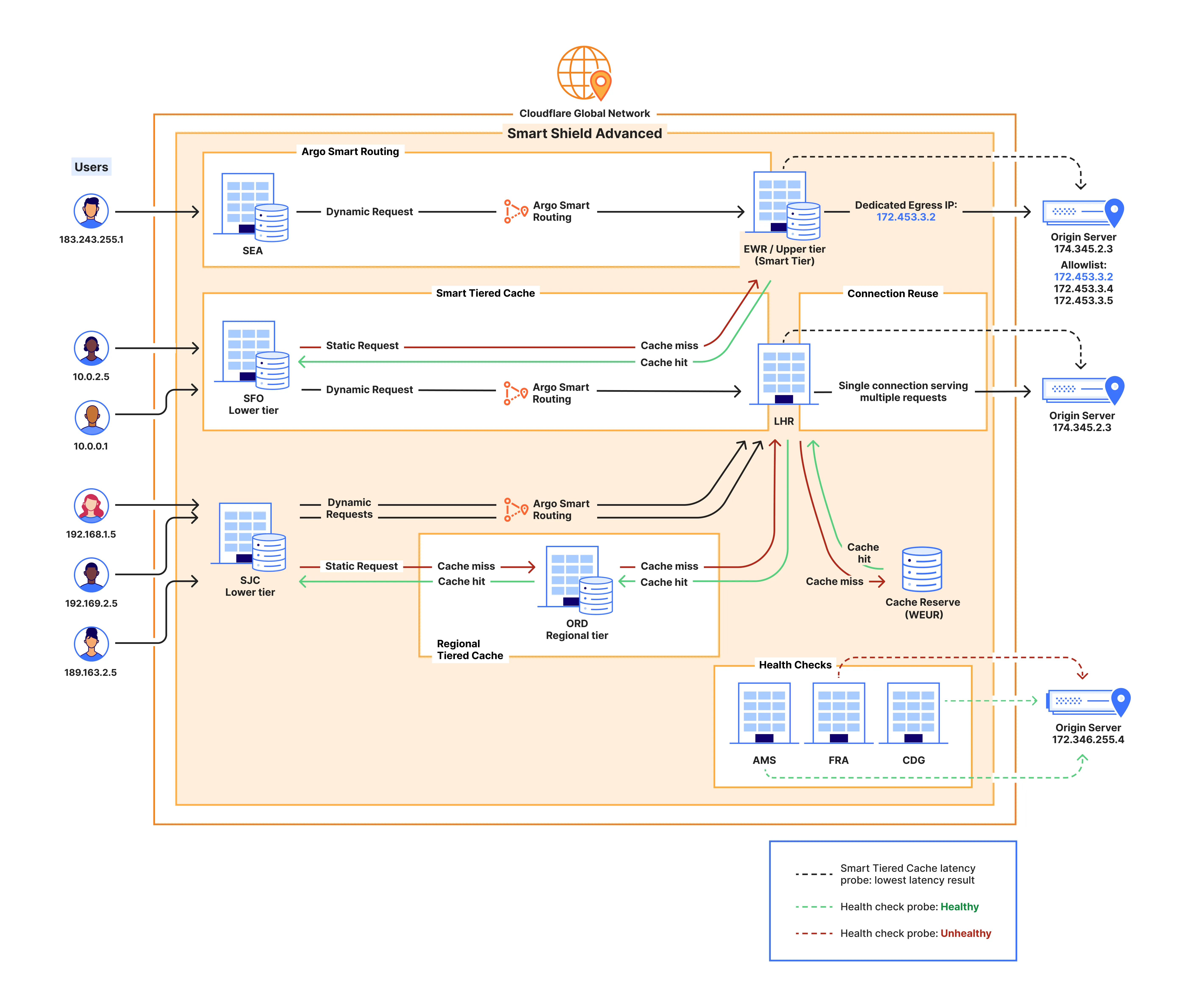
# Network diagram
The diagram below illustrates the different configurations available for Smart Shield and the role each of them plays in protecting your origin while also improving your website or application performance.
```json
{"@context":"https://schema.org","@type":"BreadcrumbList","itemListElement":[{"@type":"ListItem","position":1,"item":{"@id":"/directory/","name":"Directory"}},{"@type":"ListItem","position":2,"item":{"@id":"/smart-shield/","name":"Smart Shield"}},{"@type":"ListItem","position":3,"item":{"@id":"/smart-shield/concepts/","name":"Concepts"}},{"@type":"ListItem","position":4,"item":{"@id":"/smart-shield/concepts/network-diagram/","name":"Network diagram"}}]}
```
---
---
title: Argo Smart Routing
description: Argo Smart Routing detects real-time network issues and routes your web traffic across the most efficient network path, avoiding congestion.
image: https://developers.cloudflare.com/core-services-preview.png
---
[Skip to content](#%5Ftop)
Was this helpful?
YesNo
[ Edit page ](https://github.com/cloudflare/cloudflare-docs/edit/production/src/content/docs/smart-shield/configuration/argo.mdx) [ Report issue ](https://github.com/cloudflare/cloudflare-docs/issues/new/choose)
Copy page
# Argo Smart Routing
Availability
Available with Smart Shield + Argo and Smart Shield Advanced.
Argo Smart Routing detects real-time network issues and routes your web traffic across the most efficient network path, avoiding congestion.
Cloudflare provides analytics to show the performance benefits of Argo Smart Routing.
Analytics collects data based on the time-to-first-byte (TTFB) from your origin to the Cloudflare network. TTFB is the delay between when Cloudflare sends a request to your server and when it receives the first byte in response. Argo Smart Routing optimizes your server's network transit time to minimize this delay.
```json
{"@context":"https://schema.org","@type":"BreadcrumbList","itemListElement":[{"@type":"ListItem","position":1,"item":{"@id":"/directory/","name":"Directory"}},{"@type":"ListItem","position":2,"item":{"@id":"/smart-shield/","name":"Smart Shield"}},{"@type":"ListItem","position":3,"item":{"@id":"/smart-shield/configuration/","name":"Configuration"}},{"@type":"ListItem","position":4,"item":{"@id":"/smart-shield/configuration/argo/","name":"Argo Smart Routing"}}]}
```
---
---
title: Cache Reserve
description: Cache Reserve is a large, persistent data store implemented on top of R2. By pushing a single button in the dashboard, your website's cacheable content will be written to Cache Reserve.
image: https://developers.cloudflare.com/core-services-preview.png
---
[Skip to content](#%5Ftop)
Was this helpful?
YesNo
[ Edit page ](https://github.com/cloudflare/cloudflare-docs/edit/production/src/content/docs/smart-shield/configuration/cache-reserve/index.mdx) [ Report issue ](https://github.com/cloudflare/cloudflare-docs/issues/new/choose)
Copy page
# Cache Reserve
Availability
Available with Smart Shield Advanced.
Cache Reserve is a large, persistent data store [implemented on top of R2](https://developers.cloudflare.com/r2/). By pushing a single button in the dashboard, your website's cacheable content will be written to Cache Reserve.
In the same way that Tiered Cache builds a hierarchy of caches between your visitors and your origin, Cache Reserve serves as the ultimate upper-tier cache, that will reserve storage space for your assets for as long as you want. This ensures that your content is served from cache longer, shielding your origin from unneeded egress fees.
Smart Shield Advanced includes 2 TB of storage for Cache Reserve.
## Asset eligibility
Not all assets are eligible for Cache Reserve. To be admitted into Cache Reserve, assets must:
* Be cacheable, according to Cloudflare's standard [cacheability factors](https://developers.cloudflare.com/cache/).
* Have a freshness time-to-live (TTL) of at least 10 hours (set by any means such as Cache-Control / [CDN-Cache-Control](https://developers.cloudflare.com/cache/concepts/cache-control/) origin response headers, [Edge Cache TTL](https://developers.cloudflare.com/cache/how-to/edge-browser-cache-ttl/#edge-cache-ttl), [Cache TTL By Status](https://developers.cloudflare.com/cache/how-to/configure-cache-status-code/), or [Cache Rules](https://developers.cloudflare.com/cache/how-to/cache-rules/)),
* Have a Content-Length response header.
* When using [Image transformations](https://developers.cloudflare.com/images/manage-images/create-variants/), original files are eligible for Cache Reserve, but resized file variants are not eligible because transformations happen after Cache Reserve in the response flow.
## Limits
* Cache Reserve file limits are the same as [R2 limits](https://developers.cloudflare.com/r2/platform/limits/). Note that [CDN cache limits](https://developers.cloudflare.com/cache/concepts/default-cache-behavior/#customization-options-and-limits) still apply. Assets larger than standard limits will not be stored in the standard CDN cache, so these assets will incur Cache Reserve operations costs far more frequently.
* Origin Range requests are not supported at this time from Cache Reserve.
* [Vary for images](https://developers.cloudflare.com/cache/advanced-configuration/vary-for-images/) is currently not compatible with Cache Reserve.
* Requests to [R2 public buckets linked to a zone's domain](https://developers.cloudflare.com/r2/buckets/public-buckets/) will not use Cache Reserve. Enabling Cache Reserve for the connected zone will use Cache Reserve only for requests not destined for the R2 bucket.
* Cache Reserve makes requests for uncompressed content directly from the origin. Unlike the standard Cloudflare CDN, Cache Reserve does not include the `Accept-Encoding: gzip` header when sending requests to the origin.
* Cache Reserve is bypassed when using the Cloudflare [O2O](https://developers.cloudflare.com/cloudflare-for-platforms/cloudflare-for-saas/saas-customers/how-it-works/) setup.
## Delete data
You can remove all data stored in Cache Reserve. In most cases, deletion takes around 24 hours to be completed.
1. Select the three dots next to Cache Reserve in your Smart Shield configurations.
2. Choose **View details** to open the Cache Reserve sidebar.
3. Make sure to pause Cache Reserve.
4. Select **Delete data** and then **Save**.
5. Select **Delete** again in the dialog to confirm.
Note
If you want to purge your cache instead, refer to [cache configurations](https://developers.cloudflare.com/cache/how-to/purge-cache/).
```json
{"@context":"https://schema.org","@type":"BreadcrumbList","itemListElement":[{"@type":"ListItem","position":1,"item":{"@id":"/directory/","name":"Directory"}},{"@type":"ListItem","position":2,"item":{"@id":"/smart-shield/","name":"Smart Shield"}},{"@type":"ListItem","position":3,"item":{"@id":"/smart-shield/configuration/","name":"Configuration"}},{"@type":"ListItem","position":4,"item":{"@id":"/smart-shield/configuration/cache-reserve/","name":"Cache Reserve"}}]}
```
---
---
title: Cache Reserve analytics
description: Cache Reserve Analytics provides insights regarding your Cache Reserve usage. It allows you to check what content is stored in Cache Reserve, how often it is being accessed, how long it has been there and how much egress from your origin it is saving you.
image: https://developers.cloudflare.com/core-services-preview.png
---
[Skip to content](#%5Ftop)
Was this helpful?
YesNo
[ Edit page ](https://github.com/cloudflare/cloudflare-docs/edit/production/src/content/docs/smart-shield/configuration/cache-reserve/analytics.mdx) [ Report issue ](https://github.com/cloudflare/cloudflare-docs/issues/new/choose)
Copy page
# Cache Reserve analytics
Cache Reserve Analytics provides insights regarding your Cache Reserve usage. It allows you to check what content is stored in Cache Reserve, how often it is being accessed, how long it has been there and how much egress from your origin it is saving you.
You have access to the following metrics:
* **Egress savings (bandwidth)** \- is an estimation based on response bytes served from Cache Reserve that did not need to be served from your origin server. These are represented as cache hits.
* **Requests served by Cache Reserve** \- is the number of requests served by Cache Reserve (total).
* **Data storage summary** \- is based on a representative sample of requests. Refer to [Sampling](https://developers.cloudflare.com/analytics/graphql-api/sampling/) for more details about how Cloudflare samples data.
* **Current data stored** \- is the data stored (currently) over time.
* **Aggregate storage usage** \- is the total of storage used for the selected timestamp.
* **Operations** \- Class A (writes) and Class B (reads) operations over time.
```json
{"@context":"https://schema.org","@type":"BreadcrumbList","itemListElement":[{"@type":"ListItem","position":1,"item":{"@id":"/directory/","name":"Directory"}},{"@type":"ListItem","position":2,"item":{"@id":"/smart-shield/","name":"Smart Shield"}},{"@type":"ListItem","position":3,"item":{"@id":"/smart-shield/configuration/","name":"Configuration"}},{"@type":"ListItem","position":4,"item":{"@id":"/smart-shield/configuration/cache-reserve/","name":"Cache Reserve"}},{"@type":"ListItem","position":5,"item":{"@id":"/smart-shield/configuration/cache-reserve/analytics/","name":"Cache Reserve analytics"}}]}
```
---
---
title: Cache Reserve operations
description: Operations are performed by Cache Reserve on behalf of the user to write data from the origin to Cache Reserve and to pass that data downstream to other parts of Cloudflare’s network. These operations are managed internally by Cloudflare.
image: https://developers.cloudflare.com/core-services-preview.png
---
[Skip to content](#%5Ftop)
Was this helpful?
YesNo
[ Edit page ](https://github.com/cloudflare/cloudflare-docs/edit/production/src/content/docs/smart-shield/configuration/cache-reserve/operations.mdx) [ Report issue ](https://github.com/cloudflare/cloudflare-docs/issues/new/choose)
Copy page
# Cache Reserve operations
Operations are performed by Cache Reserve on behalf of the user to write data from the origin to Cache Reserve and to pass that data downstream to other parts of Cloudflare’s network. These operations are managed internally by Cloudflare.
#### Class A operations (writes)
Class A operations are performed based on cache misses from Cloudflare’s CDN. When a request cannot be served from cache, it will be fetched from the origin and written to cache reserve as well as our edge caches on the way back to the visitor.
#### Class B operations (reads)
Class B operations are performed when data needs to be fetched from Cache Reserve to respond to a miss in the edge cache.
#### Purge
Asset purges are free operations.
Cache Reserve will be instantly purged along with edge cache when you send a purge by URL request. Refer to [cache configurations](https://developers.cloudflare.com/cache/how-to/purge-cache/) for details.
Other purge methods, such as purge by tag, host, prefix, or purge everything will force an attempt to [revalidate](https://developers.cloudflare.com/cache/concepts/cache-responses/#revalidated) on the subsequent request for the Cache Reserve asset. Note that assets purged this way will still incur storage costs until their retention TTL expires.
Note
Note this differs from the standard CDN's purge by tag, host, or prefix features which force a cache miss, requiring the origin to deliver the asset in full.
```json
{"@context":"https://schema.org","@type":"BreadcrumbList","itemListElement":[{"@type":"ListItem","position":1,"item":{"@id":"/directory/","name":"Directory"}},{"@type":"ListItem","position":2,"item":{"@id":"/smart-shield/","name":"Smart Shield"}},{"@type":"ListItem","position":3,"item":{"@id":"/smart-shield/configuration/","name":"Configuration"}},{"@type":"ListItem","position":4,"item":{"@id":"/smart-shield/configuration/cache-reserve/","name":"Cache Reserve"}},{"@type":"ListItem","position":5,"item":{"@id":"/smart-shield/configuration/cache-reserve/operations/","name":"Cache Reserve operations"}}]}
```
---
---
title: Dedicated CDN Egress IPs
description: Enterprise customers can leverage dedicated egress1 IPs for layer 7 WAF and CDN services, as well as Spectrum. The egress IPs are reserved exclusively for your account so that you can increase your origin security by only allowing traffic from a small list of IP addresses.
image: https://developers.cloudflare.com/core-services-preview.png
---
[Skip to content](#%5Ftop)
Was this helpful?
YesNo
[ Edit page ](https://github.com/cloudflare/cloudflare-docs/edit/production/src/content/docs/smart-shield/configuration/dedicated-egress-ips/index.mdx) [ Report issue ](https://github.com/cloudflare/cloudflare-docs/issues/new/choose)
Copy page
# Dedicated CDN Egress IPs
Enterprise customers can leverage dedicated egress[1](#user-content-fn-1) IPs for layer 7 [WAF](https://developers.cloudflare.com/waf/) and CDN services, as well as [Spectrum](https://developers.cloudflare.com/spectrum/). The egress IPs are reserved exclusively for your account so that you can increase your origin security by only allowing traffic from a small list of IP addresses.
Note
If you are interested in using Smart Shield Advanced with Dedicated CDN Egress IPs, reach out to your account team.
Dedicated CDN Egress IPs was formerly known as Cloudflare Aegis ([release blog post ↗](https://blog.cloudflare.com/cloudflare-aegis/)).
## Benefits
With Dedicated CDN Egress IPs, you can:
* Lock down your network firewall to only allow traffic from your dedicated IPs.
* Use [Cloudflare Access and CNI](https://developers.cloudflare.com/smart-shield/configuration/dedicated-egress-ips/other-products/#access-and-cni) to secure your applications without installing software or customizing code on your server.
* Ensure only authorized [Workers](https://developers.cloudflare.com/smart-shield/configuration/dedicated-egress-ips/other-products/#workers) can access your origin services.
## Scope
You can assign Dedicated CDN Egress IPs to single or multiple Cloudflare zones, and across different Cloudflare accounts.
Dedicated CDN Egress IPs are included within [BGP advertisement over CNI](https://developers.cloudflare.com/network-interconnect/).
Each dedicated egress pool can consist of either IPs from a [BYOIP prefix](https://developers.cloudflare.com/byoip/) or Cloudflare-leased IPs. A single dedicated egress pool cannot contain both BYOIPs and leased IPs. Also, a single BYOIP prefix can be used for either CDN ingress or CDN egress, but not both.
## Resources
* [ How it works ](https://developers.cloudflare.com/smart-shield/configuration/dedicated-egress-ips/how-it-works/)
* [ Setup ](https://developers.cloudflare.com/smart-shield/configuration/dedicated-egress-ips/setup/)
* [ IPs utilization ](https://developers.cloudflare.com/smart-shield/configuration/dedicated-egress-ips/ips-utilization/)
* [ Use with other Cloudflare products ](https://developers.cloudflare.com/smart-shield/configuration/dedicated-egress-ips/other-products/)
## Footnotes
1. From Cloudflare to your origin. Refer to [how it works](https://developers.cloudflare.com/smart-shield/configuration/dedicated-egress-ips/how-it-works/egress-ips/) for details. [↩](#user-content-fnref-1)
```json
{"@context":"https://schema.org","@type":"BreadcrumbList","itemListElement":[{"@type":"ListItem","position":1,"item":{"@id":"/directory/","name":"Directory"}},{"@type":"ListItem","position":2,"item":{"@id":"/smart-shield/","name":"Smart Shield"}},{"@type":"ListItem","position":3,"item":{"@id":"/smart-shield/configuration/","name":"Configuration"}},{"@type":"ListItem","position":4,"item":{"@id":"/smart-shield/configuration/dedicated-egress-ips/","name":"Dedicated CDN Egress IPs"}}]}
```
---
---
title: Connection forwarding
description: Since IPv6 address ranges are deployed globally, no forwarding is needed.
image: https://developers.cloudflare.com/core-services-preview.png
---
[Skip to content](#%5Ftop)
Was this helpful?
YesNo
[ Edit page ](https://github.com/cloudflare/cloudflare-docs/edit/production/src/content/docs/smart-shield/configuration/dedicated-egress-ips/how-it-works/connection-forwarding.mdx) [ Report issue ](https://github.com/cloudflare/cloudflare-docs/issues/new/choose)
Copy page
# Connection forwarding
Since IPv6 address ranges are deployed globally, no forwarding is needed.
For IPv4 traffic, based on [IPs allocation](https://developers.cloudflare.com/smart-shield/configuration/dedicated-egress-ips/how-it-works/egress-ips/#ips-allocation), not all egress data centers will have access to an applicable dedicated CDN egress IP.
Dedicated CDN egress IPs do not forward to another location in response to traffic spikes. Instead, each IPv4 can be split across up to four locations, where some of these locations may have multiple data centers. IP capacity in each data center can also be adjusted in accordance with the amount of traffic that reaches each location.
After a request reaches Cloudflare on an ingress data center, and the cache service sends a request for the egress router to connect to your origin, the following scenarios are possible.
### Traffic can egress from the same server
If the server running the egress router has access to an applicable dedicated CDN egress IP, traffic egresses from that server.
flowchart LR
accTitle: Dedicated CDN Egress IPs and connection forwarding
accDescr: Diagram showing IPv4 connection forwarding for Dedicated CDN Egress IPs - Same data center.
A[Client]
subgraph Data center A
X[(Cache service)] --> B[(Egress router
*has applicable IP)]
end
C[(Origin server)]
A --ingress--> X
B --egress--> C
### Connection forwarding is needed
If the server does not have access to an applicable IP, the following options are checked and the first that is possible will take place:
* Another server in the same data center has access to an applicable IP and the connection is forwarded to that server.
flowchart LR
accTitle: Dedicated CDN Egress IPs and connection forwarding
accDescr: Diagram showing IPv4 connection forwarding for Dedicated CDN Egress IPs - Same data center.
A[Client]
subgraph Data center A
X[(Cache service)] --> B[(Egress router
*no applicable IP)]
B --> Y[(Egress server
*has applicable IP)]
end
C[(Origin server)]
A --ingress--> X
Y --egress--> C
* Another data center in the same location has access to an applicable IP and the connection is forwarded to that data center.
flowchart LR
accTitle: Dedicated CDN Egress IPs and connection forwarding
accDescr: Diagram showing IPv4 connection forwarding for Dedicated CDN Egress IPs - Different data center.
A[Client]
subgraph Location 1
subgraph Data center A
X[(Cache service)] --> B[(Egress router
*no applicable IP)]
end
subgraph Data center B
B --> Y[(Egress server
*has applicable IP)]
end
end
C[(Origin server)]
A --ingress--> X
Y --egress--> C
* Another data center in a different location has access to an applicable IP. The closest location is selected and connection is forwarded to that location.
flowchart LR
accTitle: Dedicated CDN Egress IPs and connection forwarding
accDescr: Diagram showing IPv4 connection forwarding for Dedicated CDN Egress IPs - Different location.
A[Client]
subgraph Location 1
subgraph Data center A
X[(Cache service)] --> B[(Egress router
*no applicable IP)]
end
end
subgraph Location 2
subgraph Data center C
B --> Y[(Egress server
*has applicable IP)]
end
end
C[(Origin server)]
A --ingress--> X
Y --egress--> C
```json
{"@context":"https://schema.org","@type":"BreadcrumbList","itemListElement":[{"@type":"ListItem","position":1,"item":{"@id":"/directory/","name":"Directory"}},{"@type":"ListItem","position":2,"item":{"@id":"/smart-shield/","name":"Smart Shield"}},{"@type":"ListItem","position":3,"item":{"@id":"/smart-shield/configuration/","name":"Configuration"}},{"@type":"ListItem","position":4,"item":{"@id":"/smart-shield/configuration/dedicated-egress-ips/","name":"Dedicated CDN Egress IPs"}},{"@type":"ListItem","position":5,"item":{"@id":"/smart-shield/configuration/dedicated-egress-ips/how-it-works/","name":"How it works"}},{"@type":"ListItem","position":6,"item":{"@id":"/smart-shield/configuration/dedicated-egress-ips/how-it-works/connection-forwarding/","name":"Connection forwarding"}}]}
```
---
---
title: Egress IPs
description: When you use Cloudflare as a reverse proxy, Cloudflare's global network sits between client requests and your origin servers.
image: https://developers.cloudflare.com/core-services-preview.png
---
[Skip to content](#%5Ftop)
Was this helpful?
YesNo
[ Edit page ](https://github.com/cloudflare/cloudflare-docs/edit/production/src/content/docs/smart-shield/configuration/dedicated-egress-ips/how-it-works/egress-ips.mdx) [ Report issue ](https://github.com/cloudflare/cloudflare-docs/issues/new/choose)
Copy page
# Egress IPs
When you use Cloudflare [as a reverse proxy](https://developers.cloudflare.com/fundamentals/concepts/how-cloudflare-works/#cloudflare-as-a-reverse-proxy), [Cloudflare's global network ↗](https://www.cloudflare.com/network/) sits between client requests and your origin servers.
flowchart LR
accTitle: Cloudflare as a reverse proxy
accDescr: Diagram showing Cloudflare's network between clients and the origin server.
A[Client] <--> B((Cloudflare))<--> C[(Origin server)]
Zooming into what happens as a request routes through Cloudflare, you can consider two parts of the process: ingress and egress.
flowchart LR
accTitle: Cloudflare as a reverse proxy
accDescr: Diagram showing Cloudflare's network between clients and the origin server.
A[Client] --ingress--> B((Cloudflare))--egress--> C[(Origin server)]
Ingress refers to the data center where the client request lands on, based on Internet routing. From there on, the request will be processed according to your Cloudflare configurations and, if needed, a connection to the origin will be initiated via an egress data center.
Traditionally, Cloudflare maintains a very large pool of egress IPs that are used by all Cloudflare customers and are [publicly documented ↗](https://www.cloudflare.com/ips/). With Dedicated CDN Egress IPs, Cloudflare connects to your origin using IPs that are reserved for you.
## BYOIP or Cloudflare-leased
Each dedicated CDN egress IP pool can consist of either IPs from a [BYOIP prefix](https://developers.cloudflare.com/byoip/) or Cloudflare-leased IPs. A single dedicated CDN egress IP pool cannot contain both BYOIPs and leased IPs.
You can find your leased dedicated IPs for CDN egress on the dashboard under [**Address space** \> **Leased IPs** ↗](https://dash.cloudflare.com/?to=/:account/ip-addresses/address-space).
If you are using BYOIP, refer to **BYOIP prefixes** instead.
## IPs allocation
Dedicated CDN Egress IPs support both IPv4 and IPv6 addresses.
IPv6 address ranges are deployed globally, meaning your dedicated IPv6 addresses can be used for connections from Cloudflare to your origin servers across all Cloudflare data centers.
China exception
Dedicated CDN Egress IPs are currently **not** available in the [Cloudflare China Network](https://developers.cloudflare.com/china-network/).
For IPv4 addresses, you should work with your account team to choose the locations where each IP should be deployed. Ideally, your dedicated IPv4 addresses should be placed near your origin servers and adjusted to the amount of traffic expected for each region.
Refer to [connection forwarding](https://developers.cloudflare.com/smart-shield/configuration/dedicated-egress-ips/how-it-works/connection-forwarding/) to understand how requests are processed when reaching different Cloudflare data centers.
### Connections to your origin
Each Dedicated CDN Egress IP can support 40,000 concurrent connections per origin IP port. For example, if you have one dedicated IP and two origins (A and B), this single IP can support 40,000 concurrent connections to origin A, while simultaneously supporting 40,000 concurrent connections to origin B.
Dedicated CDN Egress IPs also benefit from [connection reuse and coalescing](https://developers.cloudflare.com/smart-shield/concepts/connection-reuse/).
GraphQL Analytics API allows you to get visibility over [IPs utilization](https://developers.cloudflare.com/smart-shield/configuration/dedicated-egress-ips/ips-utilization/).
### Regional Services
If you are using [Regional Services](https://developers.cloudflare.com/data-localization/regional-services/), you should take this into consideration when allocating dedicated IPv4 addresses. Traffic will egress from the specified locations as long as you have Dedicated CDN Egress IPs provisioned in those locations.
```json
{"@context":"https://schema.org","@type":"BreadcrumbList","itemListElement":[{"@type":"ListItem","position":1,"item":{"@id":"/directory/","name":"Directory"}},{"@type":"ListItem","position":2,"item":{"@id":"/smart-shield/","name":"Smart Shield"}},{"@type":"ListItem","position":3,"item":{"@id":"/smart-shield/configuration/","name":"Configuration"}},{"@type":"ListItem","position":4,"item":{"@id":"/smart-shield/configuration/dedicated-egress-ips/","name":"Dedicated CDN Egress IPs"}},{"@type":"ListItem","position":5,"item":{"@id":"/smart-shield/configuration/dedicated-egress-ips/how-it-works/","name":"How it works"}},{"@type":"ListItem","position":6,"item":{"@id":"/smart-shield/configuration/dedicated-egress-ips/how-it-works/egress-ips/","name":"Egress IPs"}}]}
```
---
---
title: IPs utilization
description: Use the GraphQL API to get aggregate data and monitor your dedicated IPs capacity (formerly known as Aegis).
image: https://developers.cloudflare.com/core-services-preview.png
---
[Skip to content](#%5Ftop)
Was this helpful?
YesNo
[ Edit page ](https://github.com/cloudflare/cloudflare-docs/edit/production/src/content/docs/smart-shield/configuration/dedicated-egress-ips/ips-utilization.mdx) [ Report issue ](https://github.com/cloudflare/cloudflare-docs/issues/new/choose)
Copy page
# IPs utilization
Use the [GraphQL API](https://developers.cloudflare.com/analytics/graphql-api/) to get aggregate data and monitor your dedicated IPs capacity (formerly known as Aegis).
Each Dedicated CDN Egress IP can support 40,000 concurrent connections per origin IP port. For example, if you have one dedicated IP and two origins (A and B), this single IP can support 40,000 concurrent connections to origin A, while simultaneously supporting 40,000 concurrent connections to origin B.
Refer to the [GraphQL Analytics API documentation](https://developers.cloudflare.com/analytics/graphql-api/getting-started/) for further guidance, or consider the [example](#example) below for a quickstart.
## GraphQL schema
The specific schema to get Dedicated CDN Egress IPs data is called `aegisIpUtilizationAdaptiveGroups`.
You can get average (`avg`) or maximum (`max`) utilization values (in percentage), and use the following dimensions:
* `datetimeFiveMinutes` ` time `
* Timestamp truncated to five minutes. For example, `2025-01-10T00:05:00Z`.
* `popName` ` string `
* The Cloudflare point of presence (PoP). For example, `sjc`.
* `egressIp` ` string `
* Your assigned Dedicated CDN Egress IP. For example, `192.0.2.1`.
* `origin` ` string `
* Origin IP and port. For example, `203.0.113.150:443`.
* `popUtilizationKey` ` string `
* The Cloudflare point of presence (PoP), the Dedicated CDN Egress IP, and the origin IP and port. For example, `sjc 192.0.2.1 203.0.113.150:443`.
## Example
Refer to the query below to learn how to get average utilization and maximum utilization by point of presence, and filter the results.
You can also select the button at the bottom to use this query for your account via the [Cloudflare GraphQL API Explorer ↗](https://graphql.cloudflare.com/explorer). Make sure to provide your account ID and timestamps, and replace the placeholders for `popName`, `egressIp`, and `origin` as needed.
```
query AegisIpUtilizationQuery(
$accountTag: string
$datetimeStart: string
$datetimeEnd: string
) {
viewer {
utilization: accounts(filter: { accountTag: $accountTag }) {
avgByPopUtilization: aegisIpUtilizationAdaptiveGroups(
limit: 100
filter: {
datetimeFiveMinutes_geq: $datetimeStart
datetimeFiveMinutes_leq: $datetimeEnd
}
orderBy: [datetimeFiveMinutes_ASC]
) {
avg {
utilization
}
dimensions {
datetimeFiveMinutes
popUtilizationKey
}
}
maxByPopUtilization: aegisIpUtilizationAdaptiveGroups(
limit: 100
filter: {
datetimeFiveMinutes_geq: $datetimeStart
datetimeFiveMinutes_leq: $datetimeEnd
}
orderBy: [datetimeFiveMinutes_ASC]
) {
max {
utilization
}
dimensions {
datetimeFiveMinutes
popUtilizationKey
}
}
filterPopUtilization: aegisIpUtilizationAdaptiveGroups(
limit: 100
filter: {
datetimeFiveMinutes_geq: $datetimeStart
datetimeFiveMinutes_leq: $datetimeEnd
popName: ""
}
orderBy: [datetimeFiveMinutes_ASC]
) {
max {
utilization
}
dimensions {
datetimeFiveMinutes
popUtilizationKey
}
}
filterIPUtilization: aegisIpUtilizationAdaptiveGroups(
limit: 100
filter: {
datetimeFiveMinutes_geq: $datetimeStart
datetimeFiveMinutes_leq: $datetimeEnd
egressIp: ""
}
orderBy: [datetimeFiveMinutes_ASC]
) {
max {
utilization
}
dimensions {
datetimeFiveMinutes
popUtilizationKey
}
}
filterOriginUtilization: aegisIpUtilizationAdaptiveGroups(
limit: 100
filter: {
datetimeFiveMinutes_geq: $datetimeStart
datetimeFiveMinutes_leq: $datetimeEnd
origin: ""
}
orderBy: [datetimeFiveMinutes_ASC]
) {
max {
utilization
}
dimensions {
datetimeFiveMinutes
popUtilizationKey
}
}
}
}
}
```
[Run in GraphQL API Explorer](https://graphql.cloudflare.com/explorer?query=I4VwpgTgngBAgmA5gSwM4EkAOBVALsgG2QC8BDfAewDsBFcaACgCgYYASUgY04pCtwAqpRAC4YqXBGRVELdgBNyYfAFswAZVykIuMRKky5bRbmXI1AUSry9k6bICUMAN5yAbsjAB3SC7msQfCIySioxLh4+XFQGADNCUwgxZxgI3n4hUXY0qMyYAF8nV1YS1LdEACEoAAUKHCCScmRqcKQ0LDxCRtC4RUx8NzAAcQheTBj-UpgiFWRdGABGAAYlydL4gkTktamTMzUAMWRBgFlpQLBUAH1EMGAxYyVVDS0dHdK956PT89NrgjuD0+5jAVnk7wKEIoEHkkCqYgA2sDDscwGcqBdrnB1ABhAC6OyKENI5T8UymgS6IWaVAh+Qh8hBVFQNNQZPJJWRYG+aN+lwhrEwdU6wSa1AA0mAoHSdvSdipSAAPKq1epUsVhVJtDBq0U9PoDYajEDjZgc6bmOZiZarc0bLbs81cnnozE3QEKJ4gzTaXACmDO1Guv5XAH3T2mZ5gmXm6GwiDwmBIr0on4YkPY-GEx1TBWKnPkyl6mkxjmMtTM1kF3Yp7lBvmof1C3XdGmS6Xm+nkuXk+2QVUi1stLUoHWD6nUXqkfqokZjCbmmZWxYrCF9pLVj61l0N93hx6R72vP3m1iBtNusNA2vR08wZsAOVIajEACIADw4gAyAHlsAARA4vzgAAlCwrmqH9qgAPlfUtyTjOEoERc9eXTS4rkzAlySJc0803EoiyHWlOwZJkWWoNlilPVDg35O9m3HDV23gkoeymdd0GqJjQlaUcOgaCcqCnGdBjnE0Fw5Jd5htNcEkgbY71o3dbn3LkfTeJTt3rdD-g9A99lBax-SQCBLh1N93wATT-ECrgsIYwPUdQri42DWNKRCE2QpNlN0zDcWwqZcI5fDqPNIihI8zlyKrcKy20i8-ibYVBOYqVovY9Z5IgH8pBQKgeJpPj2hbISRMNcTTQhaTrVXO0csUmjErQt1VOvQ81A0k9ms6uskowq8I0M29T2hZACssn8QPQIZ0AfVzqkwh9-wg6aBHc0jYxhJCUJauisUC7N4tKML-UijVorPWLKIIs99obFKyvSjsOS7KZ3tYd76XyIA&variables=N4IghgxhD2CuB2AXAKmA5iAXCAggYTwHkBVAOWQH0BJAERABoQATMRAU0QEsBbNgZURgAToiwgASgFEACgBl8kigHUqyABIU+ycVVIBxBs1YcebSfCZipchctUatO-SAC+QA)
```json
{"@context":"https://schema.org","@type":"BreadcrumbList","itemListElement":[{"@type":"ListItem","position":1,"item":{"@id":"/directory/","name":"Directory"}},{"@type":"ListItem","position":2,"item":{"@id":"/smart-shield/","name":"Smart Shield"}},{"@type":"ListItem","position":3,"item":{"@id":"/smart-shield/configuration/","name":"Configuration"}},{"@type":"ListItem","position":4,"item":{"@id":"/smart-shield/configuration/dedicated-egress-ips/","name":"Dedicated CDN Egress IPs"}},{"@type":"ListItem","position":5,"item":{"@id":"/smart-shield/configuration/dedicated-egress-ips/ips-utilization/","name":"IPs utilization"}}]}
```
---
---
title: Use with other Cloudflare products
description: Use Dedicated CDN Egress IPs in combination with different Cloudflare products.
image: https://developers.cloudflare.com/core-services-preview.png
---
[Skip to content](#%5Ftop)
Was this helpful?
YesNo
[ Edit page ](https://github.com/cloudflare/cloudflare-docs/edit/production/src/content/docs/smart-shield/configuration/dedicated-egress-ips/other-products.mdx) [ Report issue ](https://github.com/cloudflare/cloudflare-docs/issues/new/choose)
Copy page
# Use with other Cloudflare products
Use Dedicated CDN Egress IPs in combination with different Cloudflare products.
## Access and CNI
You can use Dedicated CDN Egress IPs combined with [Cloudflare Network Interconnect (CNI)](https://developers.cloudflare.com/network-interconnect/) to secure your applications with [Cloudflare Access](https://developers.cloudflare.com/cloudflare-one/access-controls/policies/) without installing software or customizing code on your server.
While Access allows you to enforce policies at the hostname level, other solutions are usually necessary to protect against origin IP bypass [1](#user-content-fn-1). With Dedicated CDN Egress IPs, you only allow a small number of IPs (that are not publicly listed) through your network firewall and, with Cloudflare Network Interconnect, you can use a completely private path between Cloudflare and your application server, without exposure to the public Internet. For details and background, refer to the [Cloudflare blog ↗](https://blog.cloudflare.com/access-aegis-cni).
Dedicated CDN Egress IPs are included within [BGP advertisement over CNI](https://developers.cloudflare.com/network-interconnect/).
## Data Localization Suite
[Data Localization Suite (DLS)](https://developers.cloudflare.com/data-localization/) is an enterprise add-on that enables you to choose the location where Cloudflare encrypts, decrypts, and stores data.
To ensure egress will happen from DLS-specified locations, make sure you have Dedicated CDN Egress IPs provisioned in those locations. Refer to [IPs allocation](https://developers.cloudflare.com/smart-shield/configuration/dedicated-egress-ips/how-it-works/egress-ips/#ips-allocation) for details.
## Load Balancing
[Cloudflare Load Balancing](https://developers.cloudflare.com/load-balancing/) allows you to intelligently distribute traffic across your origins by issuing regular monitors (that assess origin health) and following the traffic steering policies you define.
By default, the Load Balancing monitors will use public Cloudflare IP addresses.
To avoid inconsistencies between what the Load Balancing monitors report and what you observe in service traffic with Dedicated CDN Egress IPs, make sure to turn on the **Simulate Zone** option in the [monitor settings](https://developers.cloudflare.com/load-balancing/monitors/create-monitor/#create-a-monitor).
## Spectrum
[Spectrum](https://developers.cloudflare.com/spectrum/) allows you to route email, file transfer, games, and more over TCP or UDP through Cloudflare. This means you can mask your origin and protect it from DDoS attacks.
While you can use [BYOIP](https://developers.cloudflare.com/byoip/) or static IPs to control which IPs are used for ingress with Spectrum, Dedicated CDN Egress IPs allows you to have a more strict list of [egress IPs](https://developers.cloudflare.com/smart-shield/configuration/dedicated-egress-ips/how-it-works/egress-ips/) as well.
Dedicated CDN Egress IPs with Spectrum supports both TCP and UDP application types. HTTP/HTTPS types are also supported, although through a different configuration.
If you are interested in any of these solutions, contact your account team.
## Workers
[Workers](https://developers.cloudflare.com/workers/) provides a serverless execution environment for you to create applications leveraging Cloudflare's global network.
Refer to the sections below for information on how Dedicated CDN Egress IPs pair up with Workers.
### `fetch`
[fetch() requests](https://developers.cloudflare.com/workers/runtime-apis/fetch/) that access services on your origin will use Dedicated CDN Egress IP addresses.
Workers subrequests — requests from one Worker to another — are expected to use different IPs. However, [fetch() requests](https://developers.cloudflare.com/workers/runtime-apis/fetch/) to external origins made by a Worker invoked via a subrequest will use Dedicated CDN Egress IP addresses.
### `connect`
For [connect() requests](https://developers.cloudflare.com/workers/runtime-apis/tcp-sockets/) \- which create outbound TCP connections from Workers - Dedicated CDN Egress IPs are **not** used.
## Footnotes
1. When an attacker knows your origin server IP and uses it to directly interact with the target application. [↩](#user-content-fnref-1)
```json
{"@context":"https://schema.org","@type":"BreadcrumbList","itemListElement":[{"@type":"ListItem","position":1,"item":{"@id":"/directory/","name":"Directory"}},{"@type":"ListItem","position":2,"item":{"@id":"/smart-shield/","name":"Smart Shield"}},{"@type":"ListItem","position":3,"item":{"@id":"/smart-shield/configuration/","name":"Configuration"}},{"@type":"ListItem","position":4,"item":{"@id":"/smart-shield/configuration/dedicated-egress-ips/","name":"Dedicated CDN Egress IPs"}},{"@type":"ListItem","position":5,"item":{"@id":"/smart-shield/configuration/dedicated-egress-ips/other-products/","name":"Use with other Cloudflare products"}}]}
```
---
---
title: Setup
description: You can use the Edit Zone Settings API endpoint to set up Dedicated CDN Egress IPs (formerly known as Aegis). If you are not familiar with how Cloudflare API works, refer to Fundamentals.
image: https://developers.cloudflare.com/core-services-preview.png
---
[Skip to content](#%5Ftop)
Was this helpful?
YesNo
[ Edit page ](https://github.com/cloudflare/cloudflare-docs/edit/production/src/content/docs/smart-shield/configuration/dedicated-egress-ips/setup.mdx) [ Report issue ](https://github.com/cloudflare/cloudflare-docs/issues/new/choose)
Copy page
# Setup
You can use the [Edit Zone Settings API endpoint](https://developers.cloudflare.com/api/resources/zones/subresources/settings/methods/edit/) to set up Dedicated CDN Egress IPs (formerly known as Aegis). If you are not familiar with how Cloudflare API works, refer to [Fundamentals](https://developers.cloudflare.com/fundamentals/api/).
Enterprise-only
Dedicated CDN Egress IPs (DCEI) are currently available to Enterprise customers. Contact your account team to request access.
## Requirements
* The Dedicated CDN Egress IPs (DCEI) zone setting is only available within Cloudflare accounts that own leased IPs, or accounts to which a [BYOIP prefix](https://developers.cloudflare.com/byoip/) has been delegated. If you wish to use Dedicated CDN Egress IPs for zones that do not meet this criteria, contact your account team.
* Each dedicated egress pool can consist of either IPs from a [BYOIP prefix](https://developers.cloudflare.com/byoip/) or Cloudflare-leased IPs. A single dedicated egress pool cannot contain both BYOIPs and leased IPs. Also, a single BYOIP prefix can be used for either CDN ingress or CDN egress, but not both.
Warning
You must allowlist the IP addresses from this pool in your infrastructure before linking it to a zone. If you skip this step, traffic will not reach your origin, causing errors.
## Turn on DCEI for a zone
1. Contact your account team to get the ID for your dedicated egress pool.
2. Make a `PATCH` request to the [Edit Zone Setting](https://developers.cloudflare.com/api/resources/zones/subresources/settings/methods/edit/) endpoint:
* Specify `aegis` as the setting ID in the URL.
* In the request body, set `enabled` to `true` and use the ID from the previous step as the `pool_id` value.
Required API token permissions
At least one of the following [token permissions](https://developers.cloudflare.com/fundamentals/api/reference/permissions/)is required:
* `Zone Settings Write`
Edit zone setting
```
curl "https://api.cloudflare.com/client/v4/zones/$ZONE_ID/settings/aegis" \
--request PATCH \
--header "Authorization: Bearer $CLOUDFLARE_API_TOKEN" \
--json '{
"id": "aegis",
"value": {
"enabled": true,
"pool_id": ""
}
}'
```
## Check DCEI status for a zone
Required API token permissions
At least one of the following [token permissions](https://developers.cloudflare.com/fundamentals/api/reference/permissions/)is required:
* `Zone Settings Write`
* `Zone Settings Read`
Get zone setting
```
curl "https://api.cloudflare.com/client/v4/zones/$ZONE_ID/settings/aegis" \
--request GET \
--header "Authorization: Bearer $CLOUDFLARE_API_TOKEN"
```
## Turn off DCEI for a zone
Required API token permissions
At least one of the following [token permissions](https://developers.cloudflare.com/fundamentals/api/reference/permissions/)is required:
* `Zone Settings Write`
Edit zone setting
```
curl "https://api.cloudflare.com/client/v4/zones/$ZONE_ID/settings/aegis" \
--request PATCH \
--header "Authorization: Bearer $CLOUDFLARE_API_TOKEN" \
--json '{
"id": "aegis",
"value": {
"enabled": false
}
}'
```
## Check your IPs
You can find your leased dedicated IPs for CDN egress on the dashboard under [**Address space** \> **Leased IPs** ↗](https://dash.cloudflare.com/?to=/:account/ip-addresses/address-space).
If you are using BYOIP, refer to **BYOIP prefixes** instead.
```json
{"@context":"https://schema.org","@type":"BreadcrumbList","itemListElement":[{"@type":"ListItem","position":1,"item":{"@id":"/directory/","name":"Directory"}},{"@type":"ListItem","position":2,"item":{"@id":"/smart-shield/","name":"Smart Shield"}},{"@type":"ListItem","position":3,"item":{"@id":"/smart-shield/configuration/","name":"Configuration"}},{"@type":"ListItem","position":4,"item":{"@id":"/smart-shield/configuration/dedicated-egress-ips/","name":"Dedicated CDN Egress IPs"}},{"@type":"ListItem","position":5,"item":{"@id":"/smart-shield/configuration/dedicated-egress-ips/setup/","name":"Setup"}}]}
```
---
---
title: Health Checks analytics
description: Use Health Checks analytics to debug possible origin issues.
image: https://developers.cloudflare.com/core-services-preview.png
---
[Skip to content](#%5Ftop)
Was this helpful?
YesNo
[ Edit page ](https://github.com/cloudflare/cloudflare-docs/edit/production/src/content/docs/smart-shield/configuration/health-checks/analytics.mdx) [ Report issue ](https://github.com/cloudflare/cloudflare-docs/issues/new/choose)
Copy page
# Health Checks analytics
Use Health Checks analytics to debug possible origin issues.
You can evaluate origin uptime, latency, failure reason, and specific event logs:
* **Health Checks By Uptime**: Shows the percentage of uptime for individual origins over time.
* **Health Checks By Failure Reason**: Shows a breakdown of failures by the specific reason. Refer to [common error code causes and solutions below](#common-error-codes).
* **Health Checks By Latency**: Shows average latency – measured in round trip time — for individual origins over time.
* **Event Log**: Shows individual health check data.
* Select each record for additional details on **Round trip time**, the **Failure Reason**, the **Average Waterfall** (showing chronological data about request stages), **Response status code**, and more.
* Note that **Global** is not a configured region; it represents the aggregated data from all enabled regions.
## Common error codes
### TCP connection failed
#### Cause
Health Checks failed to establish a TCP connection to your origin server.
#### Solution
This typically occurs when there is a network failure between Cloudflare and your origin, and/or a firewall refuses to allow our connection. Ensure your network and firewall configurations are not interfering with traffic.
### HTTP timeout occurred
#### Cause
The origin failed to return an HTTP response within the timeout configured. This happens if you have the timeout set to a low number. For example, one to two seconds.
#### Solution
Cloudflare recommends increasing the HTTP response timeout to allow the origin server to respond.
### Response code mismatch error
#### Cause
Cloudflare receives an HTTP status code that does not match the values defined in the `expected_codes` property of your Health Check configuration.
#### Solution
Response codes must match the `expected_codes`. Confirm the values are correct by comparing the expected response codes and the status code received in the Event Log.
#### Alternate cause
You may also see this issue if you have a Health Check configured to use HTTP connections and your origin server is redirecting to HTTPS. In this case, the response code will often be `301`, `302`, or `303`.
#### Solution
Change your Cloudflare Health Check configuration to use HTTPS or set the value of `follow_redirect` to `true` so that Cloudflare can resolve the correct status code.
### Response body mismatch error
#### Cause
The response body returns from your origin server and does not include the (case-insensitive) value of `expected_body` configured in your Health Check.
Note
We only read the first 10 KB of the response. If you return a larger response, and the `expected_body` is not in the first 10 KB, the Health Check will fail.
#### Solution
Ensure the `expected_body` is in the first 10 KB of the response body.
### TLS untrusted certificate error
#### Cause
The certificate is not trusted by a public Certificate Authority (CA).
#### Solution
If you’re using a self-signed certificate, Cloudflare recommends either using a publicly trusted certificate or setting the `allow_insecure` property on your Health Check to `true`.
### TLS name mismatch error
#### Cause
Our Health Check (client) was not able to match a name on the server certificate to the hostname of the request.
#### Solution
Inspect your Health Check configuration to confirm that the `header` value set in the Cloudflare Health Check is correct.
### TLS protocol error
#### Cause
This error can occur if you are using an older version of TLS or your origin server is not configured for HTTPS.
#### Solution
Ensure that your origin server supports TLS 1.2 or greater and is configured for HTTPS.
### TLS unrecognized name error
#### Cause
The server did not recognize the name provided by the client. When a host header is set, this is set as the ServerName in the initial TLS handshake. If it is not set, Cloudflare will not provide a ServerName, which can cause this error.
#### Solution
Set the host header in your Health Check object.
### No route to host error
#### Cause
The IP address cannot be reached from Cloudflare’s network. Common causes are ISP or hosting provider network issues (e.g. BGP level), or that the IP does not exist.
#### Solution
Ensure IP is accurate, and check if there is an ISP or hosting provider network issue.
### TCP Timeout
#### Cause
Data transmission was not acknowledged and the retransmit of data did not succeed.
#### Solution
Confirm whether the SYN-ACK for the handshake takes place at your origin and contact [Cloudflare support](https://developers.cloudflare.com/support/contacting-cloudflare-support/).
### Network Unreachable
#### Cause
Cloudflare cannot connect to the origin web server due to network unavailability. This is usually caused by a network issue or incorrect origin IP.
#### Solution
Check the IP entered for the origin in Cloudflare’s Health Checks configuration or the IP returned via DNS for the origin hostname.
### HTTP Invalid Response
#### Cause
Usually caused by an HTTP 502 error or bad gateway.
#### Solution
Ensure the origin web server responds to requests and that no applications have crashed or are under high load.
### DNS Unknown Host
#### Cause
The origin web server hostname does not exist.
#### Solution
Confirm the origin web server resolves to an IP address.
### Connection Reset by Peer
#### Cause
A network error occurred while the client received data from the origin web server.
#### Solution
Confirm whether the origin web server is experiencing a high amount of traffic or an error.
### Monitor Configuration Error
#### Cause
There was a configuration error in the Health Check and no checks were run against the origin.
#### Solution
Review your Health Check configuration to ensure it matches an expected request to your origin.
### DNS Internal
#### Cause
The origin web server’s hostname resolves to an internal or restricted address. No checks are run against this origin.
#### Solution
Cloudflare does not allow use of an origin web server hostname that resolves to a Cloudflare IP.
### Other Failure
#### Cause
If the failure cannot be classified as any other type of failure mentioned above.
#### Solution
Contact [Cloudflare support](https://developers.cloudflare.com/support/contacting-cloudflare-support/).
```json
{"@context":"https://schema.org","@type":"BreadcrumbList","itemListElement":[{"@type":"ListItem","position":1,"item":{"@id":"/directory/","name":"Directory"}},{"@type":"ListItem","position":2,"item":{"@id":"/smart-shield/","name":"Smart Shield"}},{"@type":"ListItem","position":3,"item":{"@id":"/smart-shield/configuration/","name":"Configuration"}},{"@type":"ListItem","position":4,"item":{"@id":"/smart-shield/configuration/health-checks/","name":"Health Checks"}},{"@type":"ListItem","position":5,"item":{"@id":"/smart-shield/configuration/health-checks/analytics/","name":"Health Checks analytics"}}]}
```
---
---
title: Manage Health Checks
description: Refer to the section below to learn how to manage your Smart Shield health checks.
image: https://developers.cloudflare.com/core-services-preview.png
---
[Skip to content](#%5Ftop)
Was this helpful?
YesNo
[ Edit page ](https://github.com/cloudflare/cloudflare-docs/edit/production/src/content/docs/smart-shield/configuration/health-checks/setup.mdx) [ Report issue ](https://github.com/cloudflare/cloudflare-docs/issues/new/choose)
Copy page
# Manage Health Checks
Refer to the section below to learn how to manage your Smart Shield health checks.
## Create and edit health checks
1. Log in to the [Cloudflare dashboard ↗](https://dash.cloudflare.com) and select your account and domain.
2. Go to **Speed** \> **Smart Shield**.
3. For Health Checks, select **Manage**.
4. Select **Create** or find an existing health check and select **Edit**.
5. Fill out the form or edit existing values, paying special attention to:
* The values for **Interval** and **Check regions**, because decreasing the **Interval** and increasing **Check regions** may increase the load on your origin server.
* **Retries**, which specify the number of retries to attempt in case of a timeout before marking the origin as unhealthy.
6. Select **Save and Deploy**.
## Configure alerts
You can configure [notification emails](https://developers.cloudflare.com/notifications/get-started/) to be alerted when the health check detects that there is a change in the status of your origin server. Cloudflare will send you an email within seconds so you can take the necessary action before customers are impacted.
The email provides information to determine what caused the health status change. You can evaluate when the change happened, the status of the origin server, if and why it is unhealthy, the expected response code, and the received response code. Refer to [common error codes](https://developers.cloudflare.com/smart-shield/configuration/health-checks/analytics/#common-error-codes) for further guidance.
1. Log in to the [Cloudflare dashboard ↗](https://dash.cloudflare.com) and select your account and domain.
2. Go to **Speed** \> **Smart Shield**.
3. For Health Checks, select **Manage** and then **Configure an alert**.
4. Fill out the **Notification name** and **Description**.
5. Add a Notification email.
6. Select **Next**.
7. Add health checks to include in your alerts.
8. Choose the **Notification trigger**, which determines when you receive alerts.
9. Select **Create**.
```json
{"@context":"https://schema.org","@type":"BreadcrumbList","itemListElement":[{"@type":"ListItem","position":1,"item":{"@id":"/directory/","name":"Directory"}},{"@type":"ListItem","position":2,"item":{"@id":"/smart-shield/","name":"Smart Shield"}},{"@type":"ListItem","position":3,"item":{"@id":"/smart-shield/configuration/","name":"Configuration"}},{"@type":"ListItem","position":4,"item":{"@id":"/smart-shield/configuration/health-checks/","name":"Health Checks"}},{"@type":"ListItem","position":5,"item":{"@id":"/smart-shield/configuration/health-checks/setup/","name":"Manage Health Checks"}}]}
```
---
---
title: Zone Lockdown
description: Currently, any Cloudflare customer on a paid plan can configure Health Checks against any host or IP. Zone Lockdown specifies a list of one or more IP addresses, CIDR ranges, or networks that are the only IPs allowed to access a domain, subdomain, or URL. It allows multiple destinations in a single rule as well as IPv4 and IPv6 addresses. IP addresses not specified in the Zone Lockdown rule are denied access to the specified resources.
image: https://developers.cloudflare.com/core-services-preview.png
---
[Skip to content](#%5Ftop)
Was this helpful?
YesNo
[ Edit page ](https://github.com/cloudflare/cloudflare-docs/edit/production/src/content/docs/smart-shield/configuration/health-checks/zone-lockdown.mdx) [ Report issue ](https://github.com/cloudflare/cloudflare-docs/issues/new/choose)
Copy page
# Zone Lockdown
Currently, any Cloudflare customer on a paid plan can configure Health Checks against any host or IP. [Zone Lockdown](https://developers.cloudflare.com/waf/tools/zone-lockdown/) specifies a list of one or more IP addresses, CIDR ranges, or networks that are the only IPs allowed to access a domain, subdomain, or URL. It allows multiple destinations in a single rule as well as IPv4 and IPv6 addresses. IP addresses not specified in the Zone Lockdown rule are denied access to the specified resources.
Customers who use zone lockdown and want their health checks to continue passing can use [WAF custom rules](https://developers.cloudflare.com/waf/custom-rules/create-dashboard/) to bypass zone lockdown.
## Bypass zone lockdown
To bypass zone lockdown using a WAF custom rule:
1. Follow the steps to [create a custom rule in the dashboard](https://developers.cloudflare.com/waf/custom-rules/create-dashboard/).
2. Create a custom rule matching on **user agent**.
Cloudflare Health Checks have a user agent of the following format:`Mozilla/5.0 (compatible;Cloudflare-Healthchecks/1.0;+https://www.cloudflare.com/; healthcheck-id: XXX)` where `XXX` is replaced with the first 16 characters of the Health Check ID.
To allow a specific Health Check, verify if the user agent contains the first 16 characters of the Health Check ID.
3. Set the action to _Skip_ and the corresponding feature to **Zone Lockdown** under **More components to skip**.
### Via the API
This example adds a new WAF custom rule to the ruleset with ID `{ruleset_id}` that skips zone lockdown for incoming requests with a user agent containing `1234567890abcdef`:
Terminal window
```
curl "https://api.cloudflare.com/client/v4/{zone_id}/rulesets/{ruleset_id}/rules" \
--header "Authorization: Bearer " \
--header "Content-Type: application/json" \
--data '{
"action": "skip",
"action_parameters": {
"products": [
"zoneLockdown"
]
},
"expression": "http.user_agent contains \"1234567890abcdef\"",
"description": "bypass zone lockdown - specific healthcheck"
}'
```
```json
{"@context":"https://schema.org","@type":"BreadcrumbList","itemListElement":[{"@type":"ListItem","position":1,"item":{"@id":"/directory/","name":"Directory"}},{"@type":"ListItem","position":2,"item":{"@id":"/smart-shield/","name":"Smart Shield"}},{"@type":"ListItem","position":3,"item":{"@id":"/smart-shield/configuration/","name":"Configuration"}},{"@type":"ListItem","position":4,"item":{"@id":"/smart-shield/configuration/health-checks/","name":"Health Checks"}},{"@type":"ListItem","position":5,"item":{"@id":"/smart-shield/configuration/health-checks/zone-lockdown/","name":"Zone Lockdown"}}]}
```
---
---
title: Regional Tiered Cache
description: Regional Tiered Cache provides an additional layer of caching for customers who have a global traffic footprint and want to serve content faster by avoiding network latency when there is a cache MISS in a lower-tier, resulting in an upper-tier fetch in a data center located far away.
image: https://developers.cloudflare.com/core-services-preview.png
---
[Skip to content](#%5Ftop)
Was this helpful?
YesNo
[ Edit page ](https://github.com/cloudflare/cloudflare-docs/edit/production/src/content/docs/smart-shield/configuration/regional-tiered-cache.mdx) [ Report issue ](https://github.com/cloudflare/cloudflare-docs/issues/new/choose)
Copy page
# Regional Tiered Cache
Availability
Available with Smart Shield Advanced.
Regional Tiered Cache provides an additional layer of caching for customers who have a global traffic footprint and want to serve content faster by avoiding network latency when there is a cache `MISS` in a lower-tier, resulting in an upper-tier fetch in a data center located far away.
Regional Tiered Cache instructs Cloudflare to check a regional hub data center near the lower tier before going to the upper tier that may be outside of the region.
```json
{"@context":"https://schema.org","@type":"BreadcrumbList","itemListElement":[{"@type":"ListItem","position":1,"item":{"@id":"/directory/","name":"Directory"}},{"@type":"ListItem","position":2,"item":{"@id":"/smart-shield/","name":"Smart Shield"}},{"@type":"ListItem","position":3,"item":{"@id":"/smart-shield/configuration/","name":"Configuration"}},{"@type":"ListItem","position":4,"item":{"@id":"/smart-shield/configuration/regional-tiered-cache/","name":"Regional Tiered Cache"}}]}
```
---
---
title: Smart Tiered Cache
description: With data centers around the world, Cloudflare caches content very close to end users. However, if a piece of content is not in cache, the Cloudflare data centers must contact the origin server to receive the cacheable content. Tiered cache works by dividing Cloudflare's data centers into a hierarchy of lower-tiers and upper-tiers, where only upper-tiers can ask your origin for content.
image: https://developers.cloudflare.com/core-services-preview.png
---
[Skip to content](#%5Ftop)
Was this helpful?
YesNo
[ Edit page ](https://github.com/cloudflare/cloudflare-docs/edit/production/src/content/docs/smart-shield/configuration/smart-tiered-cache.mdx) [ Report issue ](https://github.com/cloudflare/cloudflare-docs/issues/new/choose)
Copy page
# Smart Tiered Cache
Availability
Available in all Smart Shield packages.
With data centers around the world, Cloudflare caches content very close to end users. However, if a piece of content is not in cache, the Cloudflare data centers must contact the origin server to receive the cacheable content. Tiered cache works by dividing Cloudflare's data centers into a hierarchy of lower-tiers and upper-tiers, where only upper-tiers can ask your origin for content.
Smart Tiered Cache dynamically selects the single closest upper tier for each of your website’s origins with no configuration required, using our in-house performance and routing data. Cloudflare collects latency data for each request to an origin, and uses the latency data to determine how well any upper-tier data center is connected with an origin. As a result, Cloudflare can select the data center with the lowest latency to be the upper-tier for an origin.
#### Load Balancing interaction
While Smart Tiered Cache selects one Upper Tier per origin, when using Load Balancing, Smart Tiered Cache will select the single best Upper Tier for the entire [Load Balancing Pool](https://developers.cloudflare.com/load-balancing/understand-basics/load-balancing-components/#pools).
#### Caveats
Smart Tiered Cache does not work when an origin is behind an [anycast ↗](https://www.cloudflare.com/en-gb/learning/cdn/glossary/anycast-network/) or a regional unicast network because that will prevent us from knowing where the origin is located. As a result, we are unable to select the optimal upper tier and latency may be negatively impacted.
You need to be careful when updating your origin IPs/DNS records while Smart Tiered Cache is enabled. Depending on the changes made, it may cause the existing assigned upper tiers to change, resulting in an increased `MISS` rate as cache is refilled in the new upper tiers. If the origin is switched to a network behind anycast, it will significantly reduce the effectiveness of Smart Tiered Cache.
If you need to use anycast or regional unicast and want to use Smart Tiered cache, please engage your account team.
```json
{"@context":"https://schema.org","@type":"BreadcrumbList","itemListElement":[{"@type":"ListItem","position":1,"item":{"@id":"/directory/","name":"Directory"}},{"@type":"ListItem","position":2,"item":{"@id":"/smart-shield/","name":"Smart Shield"}},{"@type":"ListItem","position":3,"item":{"@id":"/smart-shield/configuration/","name":"Configuration"}},{"@type":"ListItem","position":4,"item":{"@id":"/smart-shield/configuration/smart-tiered-cache/","name":"Smart Tiered Cache"}}]}
```