---
title: Cloudflare Turnstile
description: Turnstile can be embedded into any website without sending traffic through Cloudflare and works without showing visitors a CAPTCHA.
image: https://developers.cloudflare.com/core-services-preview.png
---
[Skip to content](#%5Ftop)
Was this helpful?
YesNo
[ Edit page ](https://github.com/cloudflare/cloudflare-docs/edit/production/src/content/docs/turnstile/index.mdx) [ Report issue ](https://github.com/cloudflare/cloudflare-docs/issues/new/choose)
Copy page
# Cloudflare Turnstile
Cloudflare's smart CAPTCHA alternative.
Turnstile can be embedded into any website without sending traffic through Cloudflare and works without showing visitors a CAPTCHA.
Cloudflare issues challenges through the [Challenge Platform](https://developers.cloudflare.com/cloudflare-challenges/), which is the same underlying technology powering [Turnstile](https://developers.cloudflare.com/turnstile/).
In contrast to our Challenge page offerings, Turnstile allows you to run challenges anywhere on your site in a less-intrusive way without requiring the use of Cloudflare's CDN.
## How Turnstile works
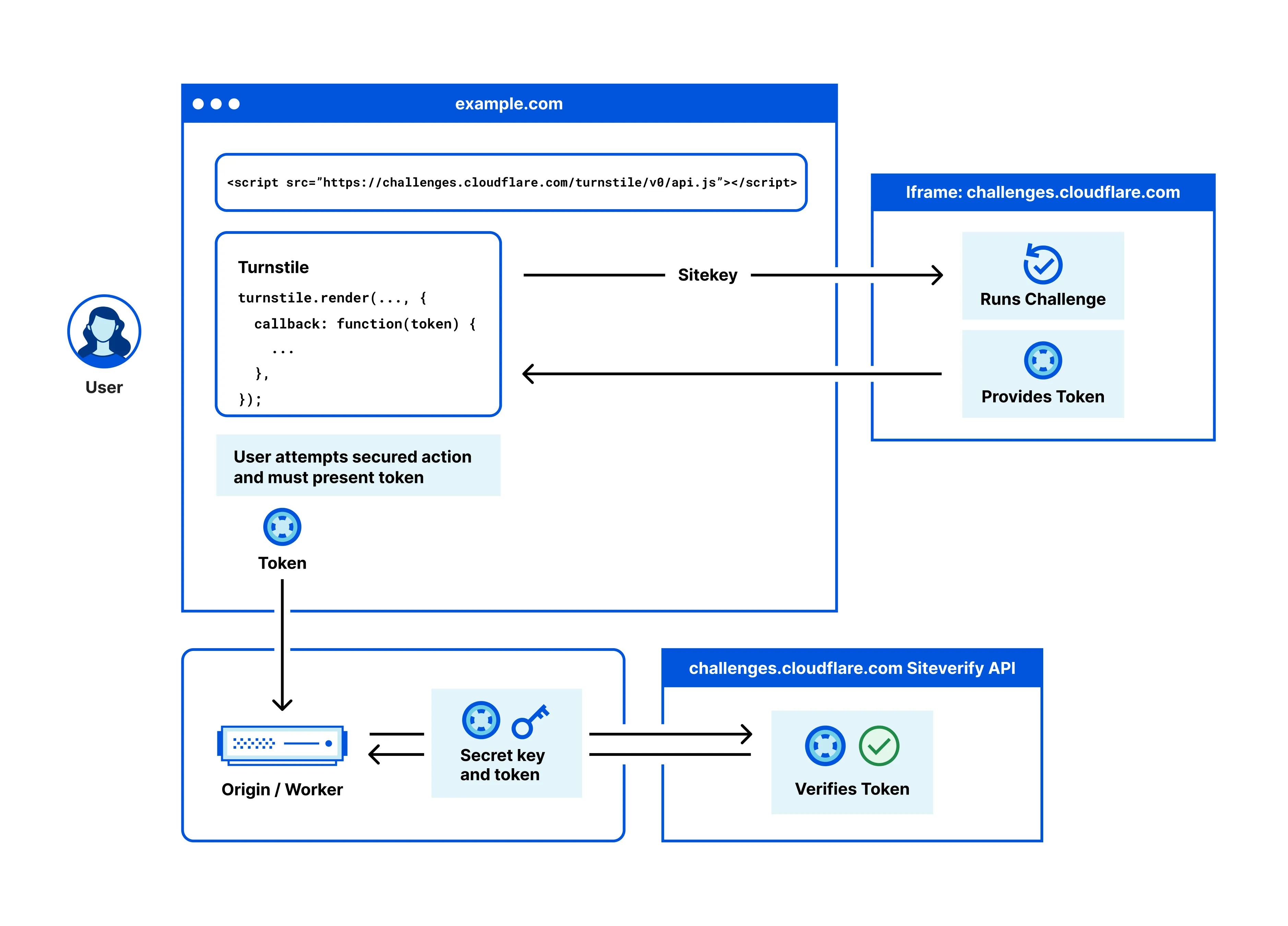
Turnstile adapts the challenge outcome to the individual visitor or browser. First, we run a series of small non-interactive JavaScript challenges to gather signals about the visitor or browser environment.
These challenges include proof-of-work (computational puzzles), proof-of-space, probing for web APIs, and various other challenges for detecting browser-quirks and human behavior. As a result, we can fine-tune the difficulty of the challenge to the specific request and avoid showing a visual or interactive puzzle to a user.
Note
For detailed information on Turnstile's data privacy practices, refer to the [Turnstile Privacy Addendum ↗](https://www.cloudflare.com/turnstile-privacy-policy/).
### Widget types
Turnstile [widget types](https://developers.cloudflare.com/turnstile/concepts/widget/) include:
* **Managed** (recommended): Automatically decides whether to show a checkbox based on visitor risk level.
* **Non-interactive**: Visitors never need to interact with the widget.
* **Invisible**: The widget is completely hidden from the visitor.
---
## Accessibility
Turnstile is WCAG 2.2 AAA compliant.
---
## Features
### Turnstile Analytics
Assess the number of challenges issued, evaluate the [challenge solve rate](https://developers.cloudflare.com/cloudflare-challenges/reference/challenge-solve-rate/), and view the metrics of issued challenges.
[ Use Turnstile Analytics ](https://developers.cloudflare.com/turnstile/turnstile-analytics/)
### Pre-clearance
Integrate Cloudflare challenges on single-page applications (SPAs) by allowing Turnstile to issue a Pre-Clearance cookie.
[ Use Pre-clearance ](https://developers.cloudflare.com/cloudflare-challenges/concepts/clearance/#pre-clearance-support-in-turnstile)
---
## Related products
**[Bots](https://developers.cloudflare.com/bots/)**
Cloudflare bot solutions identify and mitigate automated traffic to protect your domain from bad bots.
**[DDoS Protection](https://developers.cloudflare.com/ddos-protection/)**
Detect and mitigate Distributed Denial of Service (DDoS) attacks using Cloudflare's Autonomous Edge.
**[WAF](https://developers.cloudflare.com/waf/)**
Get automatic protection from vulnerabilities and the flexibility to create custom rules.
---
## More resources
[Plans](https://developers.cloudflare.com/turnstile/plans/)
Learn more about Turnstile's plan availability.
```json
{"@context":"https://schema.org","@type":"BreadcrumbList","itemListElement":[{"@type":"ListItem","position":1,"item":{"@id":"/directory/","name":"Directory"}},{"@type":"ListItem","position":2,"item":{"@id":"/turnstile/","name":"Turnstile"}}]}
```
---
---
title: Plans
description: Cloudflare Turnstile is available on the following plans:
image: https://developers.cloudflare.com/core-services-preview.png
---
[Skip to content](#%5Ftop)
Was this helpful?
YesNo
[ Edit page ](https://github.com/cloudflare/cloudflare-docs/edit/production/src/content/docs/turnstile/plans.mdx) [ Report issue ](https://github.com/cloudflare/cloudflare-docs/issues/new/choose)
Copy page
# Plans
Cloudflare Turnstile is available on the following plans:
Free plan
The Free plan is best for:
* Personal websites and blogs
* Small to medium businesses
* Development and testing environments
* Most production applications
Enterprise plan
The Enterprise plan is best for:
* Large enterprises with high-volume traffic
* Organizations requiring advanced bot detection and device fingerprinting
* Organizations requiring custom branding, companies with strict compliance requirements
* Multi-domain or complex hosting environments
| Free | Enterprise | |
| ------------------------------------------------------- | ----------------------- | ----------------------------------- |
| Pricing | Free | Contact Sales |
| Number of widgets | Up to 20 widgets | Unlimited |
| All widget types | Yes | Yes |
| Unlimited challenges (traffic or verification requests) | Yes | Yes |
| Hostname management | 10 hostnames per widget | Maximum of 200 hostnames per widget |
| Any hostname widget (no preconfigured hostnames) | No | Yes |
| Analytics lookback | 7 days maximum | 30 days maximum |
| Pre-clearance support | Yes | Yes |
| Ephemeral IDs | No | Yes |
| Offlabel (remove Cloudflare branding) | No | Yes |
| WCAG 2.2 AAA compliance | Yes | Yes |
| Community support | Yes | Yes |
Notes
* If you upgrade from Free to Enterprise, your existing widgets and configurations will be preserved during the upgrade process.
* Free users are limited to 20 widgets per account. Customers with Enterprise Bot Management and Enterprise Turnstile can have this limit increased. Contact your account team to discuss your requirements.
* Turnstile can be used independently without requiring other Cloudflare services.
```json
{"@context":"https://schema.org","@type":"BreadcrumbList","itemListElement":[{"@type":"ListItem","position":1,"item":{"@id":"/directory/","name":"Directory"}},{"@type":"ListItem","position":2,"item":{"@id":"/turnstile/","name":"Turnstile"}},{"@type":"ListItem","position":3,"item":{"@id":"/turnstile/plans/","name":"Plans"}}]}
```
---
---
title: Get started
description: Turnstile protects your website forms from bots. It works in two steps: a JavaScript widget runs challenges in the visitor's browser and produces a token, then your server sends that token to Cloudflare to confirm it is valid. This guide covers how to set up both steps.
image: https://developers.cloudflare.com/core-services-preview.png
---
[Skip to content](#%5Ftop)
Was this helpful?
YesNo
[ Edit page ](https://github.com/cloudflare/cloudflare-docs/edit/production/src/content/docs/turnstile/get-started/index.mdx) [ Report issue ](https://github.com/cloudflare/cloudflare-docs/issues/new/choose)
Copy page
# Get started
Turnstile protects your website forms from bots. It works in two steps: a JavaScript widget runs challenges in the visitor's browser and produces a token, then your server sends that token to Cloudflare to confirm it is valid. This guide covers how to set up both steps.
## Prerequisites
Before you begin, you must have:
* [A Cloudflare account](https://developers.cloudflare.com/fundamentals/account/create-account/)
* A website or web application to protect
* Basic knowledge of HTML and your preferred server-side language
---
## Process
A Turnstile widget is an instance of Turnstile embedded on your webpage. Each widget has a sitekey (a public identifier you place in your HTML) and a secret key (a private credential your server uses to validate tokens).
Each widget gets its own unique sitekey and secret key pair, and options for configurations.
| Component | Description |
| -------------- | ------------------------------------------------------------ |
| Sitekey | Public key used to invoke the Turnstile widget on your site. |
| Secret key | Private key used for server-side token validation. |
| Configurations | Mode, hostnames, appearance settings, and other options. |
Important
Regardless of how you create and manage your widgets, you will still need to [embed the widget](https://developers.cloudflare.com/turnstile/get-started/client-side-rendering/) on your webpage and [validate the token](https://developers.cloudflare.com/turnstile/get-started/server-side-validation/) on your server.
Implementing Turnstile involves two essential components that work together:
1. Client-side: [Embed the widget](https://developers.cloudflare.com/turnstile/get-started/client-side-rendering/)
Add the Turnstile widget to your webpage to challenge visitors and generate tokens. A token is a string (up to 2,048 characters) generated when the visitor completes a challenge.
2. Server-side: [Validate the token](https://developers.cloudflare.com/turnstile/get-started/server-side-validation/)
Send tokens to Cloudflare's [Siteverify API](https://developers.cloudflare.com/turnstile/get-started/server-side-validation/) — the endpoint for validating Turnstile tokens — to confirm they are authentic and have not been tampered with.
Turnstile is designed to be an independent service. You can use Turnstile on any website, regardless of whether it is proxied through the Cloudflare network. This allows for flexible deployment across multi-cloud environments, on-premises infrastructure, or sites using other CDNs. The client-side widget and server-side validation steps are completely self-contained.
Refer to [Implementation](#implementation) below for guidance on how to implement Turnstile on your website.
---
## Implementation
Follow the steps below to implement Turnstile.
### 1\. Create your widget
First, you must create a Turnstile widget to get your sitekey and secret key.
Select your preferred implementation method:
[ Cloudflare dashboard ](https://developers.cloudflare.com/turnstile/get-started/widget-management/dashboard/) [ API ](https://developers.cloudflare.com/turnstile/get-started/widget-management/api/) [ Terraform ](https://developers.cloudflare.com/turnstile/get-started/widget-management/terraform/)
### 2\. Embed the widget
Add the Turnstile widget to your webpage forms and applications.
Refer to [Embed the widget](https://developers.cloudflare.com/turnstile/get-started/client-side-rendering/) to learn more about implicit and explicit rendering methods.
Testing
You can test your Turnstile widget on your webpage without triggering an actual Cloudflare Challenge by using a testing sitekey.
Refer to [Testing](https://developers.cloudflare.com/turnstile/troubleshooting/testing/) for more information.
### 3\. Validate tokens
Implement server-side validation to verify the tokens generated by your widgets.
Refer to [Validate the token](https://developers.cloudflare.com/turnstile/get-started/server-side-validation/) to secure your implementation with proper token verification.
Testing
You can test the dummy token generated with testing sitekey via Siteverify API with the testing secret key. Your production secret keys will reject dummy tokens.
Refer to [Testing](https://developers.cloudflare.com/turnstile/troubleshooting/testing/) for more information.
## Additional implementation options
### Mobile configuration
Special considerations are necessary for mobile applications and WebView implementations.
Refer to [Mobile implementation](https://developers.cloudflare.com/turnstile/get-started/mobile-implementation/) for more information on mobile application integration.
### Migration from other CAPTCHAs
If you are currently using reCAPTCHA, hCaptcha, or another CAPTCHA service, Turnstile can be a drop-in replacement. You can copy and paste our script wherever you have deployed the existing script today.
Refer to [Migration](https://developers.cloudflare.com/turnstile/migration/) for step-by-step migration guidance from other CAPTCHA services.
---
## Security requirements
* Server-side validation is mandatory. It is critical to enforce Turnstile tokens with the Siteverify API. The Turnstile token could be invalid, expired, or already redeemed. Not verifying the token will leave major vulnerabilities in your implementation. You must call Siteverify to complete your Turnstile configuration. Otherwise, it is incomplete and will result in zeroes for token validation when viewing your metrics in [Turnstile Analytics](https://developers.cloudflare.com/turnstile/turnstile-analytics/).
* Tokens expire after 300 seconds (5 minutes). Each token can only be validated once. Expired or used tokens must be replaced with fresh challenges.
---
## Best practices
### Security
* Protect your secret keys. Never expose secret keys in client-side code.
* Rotate your keys regularly. Use API or dashboard to rotate secret keys periodically.
* Restrict your hostnames. Only allow widgets on domains that you control.
* Monitor the usage. Use analytics to detect unusual patterns.
### Operational
* Use descriptive names. Name widgets based on their purpose, such as "Login Form" or "Contact Page".
* Separate your environments. Use different widgets for development, staging, and production.
* Keep track of which widgets are used at which locations.
* Store your widget configurations in version control when using Terraform.
```json
{"@context":"https://schema.org","@type":"BreadcrumbList","itemListElement":[{"@type":"ListItem","position":1,"item":{"@id":"/directory/","name":"Directory"}},{"@type":"ListItem","position":2,"item":{"@id":"/turnstile/","name":"Turnstile"}},{"@type":"ListItem","position":3,"item":{"@id":"/turnstile/get-started/","name":"Get started"}}]}
```
---
---
title: Embed the widget
description: Learn how to add the Turnstile widget to your webpage using implicit or explicit rendering methods.
image: https://developers.cloudflare.com/core-services-preview.png
---
[Skip to content](#%5Ftop)
Was this helpful?
YesNo
[ Edit page ](https://github.com/cloudflare/cloudflare-docs/edit/production/src/content/docs/turnstile/get-started/client-side-rendering/index.mdx) [ Report issue ](https://github.com/cloudflare/cloudflare-docs/issues/new/choose)
Copy page
# Embed the widget
Learn how to add the Turnstile widget to your webpage using implicit or explicit rendering methods.
Turnstile offers two ways to add widgets to your page. **Implicit rendering** automatically scans your HTML for widget containers when the page loads. **Explicit rendering** gives you programmatic control to create widgets at any time using JavaScript. Use implicit rendering for static pages where forms exist at page load. Use explicit rendering for dynamic content and single-page applications (SPAs) where forms are created after the initial page load.
| Feature | Implicit rendering | Explicit rendering |
| ----------------------- | ---------------------------------- | ---------------------------------- |
| **Ease of setup** | Simple, minimal code | Requires additional JavaScript |
| **Control over timing** | Renders automatically on page load | Full control over rendering timing |
| **Use cases** | Static content | Dynamic or interactive content |
| **Customization** | Limited to HTML attributes | Extensive via JavaScript API |
## Prerequisites
Before you begin, you must have:
* A Cloudflare account
* [A Turnstile widget](https://developers.cloudflare.com/turnstile/get-started/#1-create-your-widget) with a sitekey
* Access to edit your website's HTML
* Basic knowledge of HTML and JavaScript
## Process
1. Page load: The Turnstile script loads and scans for elements or waits for programmatic calls.
2. Widget rendering: Widgets are created and begin running challenges.
3. Token generation: When a challenge is completed, a token is generated.
4. Form integration: The token is made available via callbacks or hidden form fields.
5. Server validation: Your server receives the token and validates it using the Siteverify API.
## Implicit rendering
Implicit rendering automatically scans your HTML for elements with the `cf-turnstile` class and renders widgets without additional JavaScript code. This set up is ideal for static pages where you want the widget to load immediately when the page loads.
### Use cases
Cloudflare recommends using implicit rendering on the following scenarios:
* You have simple implementations and want a quick integration.
* You have static websites with straightforward forms.
* You want widgets to appear immediately on pageload.
* You do not need programmatic control of the widget.
### Implementation
#### 1\. Add the Turnstile script
**Include the Turnstile Script**: Add the Turnstile JavaScript API to your HTML file within the `` section or just before the closing `` tag.
```
```
Warning
The `api.js` file must be fetched from the exact URL shown above. Proxying or caching this file will cause Turnstile to fail when future updates are released.
#### 2\. (Optional) Optimize performance with resource hints
Add resource hints to improve loading performance by establishing early connections to Cloudflare servers. Place this `` tag in your HTML `` section before the Turnstile script.
```
```
#### 3\. Add widget elements
Add widget containers where you want the challenges to appear on your website.
```
```
#### 4\. Configure with data attributes
[Customize your widgets](https://developers.cloudflare.com/turnstile/get-started/client-side-rendering/widget-configurations/) using data attributes. Insert a `div` element where you want the widget to appear.
```
```
Once a challenge has been solved, a token is passed to the success callback. This token must be validated against our [Siteverify endpoint](https://developers.cloudflare.com/turnstile/get-started/server-side-validation/).
### Complete implicit rendering examples by use case
Basic login form
Turnstile is often used to protect forms on websites such as login forms or contact forms. You can embed the widget within your `
```
An invisible input with the name `cf-turnstile-response` is added and will be sent to the server with the other fields.
Complete HTML example
```
Implicit Rendering with Cloudflare Turnstile
Contact Us
```
Advanced form with callbacks
Example
```
```
Multiple widgets with different configurations
Example
```
```
Automatic form integration
When you embed a Turnstile widget inside a `
```
---
## Explicit rendering
Explicit rendering gives you programmatic control over when and where the widget appears and how the widgets are created using JavaScript functions. This method is suitable for dynamic content, single-page applications (SPAs), or conditional rendering based on user interactions.
### Use cases
Cloudflare recommends using explicit rendering on the following scenarios:
* You have dynamic websites and single-page applications (SPAs).
* You need to control the timing of widget creation.
* You want to conditionally render the widget based on visitor interactions.
* You want multiple widgets with different configurations.
* You have complex applications requiring widget lifecycle management.
### Implementation
#### 1\. Add the script to your website with explicit rendering
```
```
#### 2\. Create container elements
Create containers without the `cf-turnstile` class.
```
```
#### 3\. Render the widgets programmatically
Call `turnstile.render()` when you are ready to create the widget.
JavaScript
```
const widgetId = turnstile.render("#turnstile-container", {
sitekey: "",
callback: function (token) {
console.log("Success:", token);
},
});
```
### Optional calls
After rendering the Turnstile widget explicitly, you may need to interact with it based on your application's requirements. Refer to the sections below to manage the widget's state.
#### Reset a widget
To reset the widget if the given widget timed out or expired, you can use the function:
JavaScript
```
turnstile.reset(widgetId);
```
#### Get the response token
Retrieve the current response token at any time:
JavaScript
```
const responseToken = turnstile.getResponse(widgetId);
```
#### Remove a widget
When a widget is no longer needed, it can be removed from the page using:
JavaScript
```
turnstile.remove(widgetId);
```
This will not call any callback and will remove all related DOM elements.
### Complete explicit rendering examples by use case
Basic explicit implementation
Example
```
Explicit Rendering
```
Using onload callback
Example
```
```
Advanced SPA implementation
Example
```
```
### Widget lifecycle management
Explicit rendering provides full control over the widget lifecycle.
JavaScript
```
// Render a widget
const widgetId = turnstile.render("#container", {
sitekey: "",
callback: handleSuccess,
});
// Get the current token
const token = turnstile.getResponse(widgetId);
// Check if widget is expired
const isExpired = turnstile.isExpired(widgetId);
// Reset the widget (clears current state)
turnstile.reset(widgetId);
// Remove the widget completely
turnstile.remove(widgetId);
```
### Execution mode
Control when challenges run with execution modes.
JavaScript
```
// Render widget but don't run challenge yet
const widgetId = turnstile.render("#container", {
sitekey: "",
execution: "execute", // Don't auto-execute
});
// Later, run the challenge when needed
turnstile.execute("#container");
```
---
## Performance and user experience optimization
Cloudflare recommends that you execute the Turnstile script as early upon the visitor's page entry as possible, so that the verification is complete and the interaction is available once the visitor attempts an action on the page.
---
## Configuration options
Both implicit and explicit rendering methods support the same configuration options. Refer to the table below for the most commonly used configurations.
| Option | Description | Values |
| -------------- | -------------------------- | --------------------------------- |
| sitekey | Your widget's sitekey | Required string |
| theme | Visual theme | auto, light, dark |
| size | Widget size | normal, flexible, compact |
| callback | Success callback | Function |
| error-callback | Error callback | Function |
| execution | When to run the challenge | render, execute |
| appearance | When the widget is visible | always, execute, interaction-only |
For a complete list of configuration options, refer to [Widget configurations](https://developers.cloudflare.com/turnstile/get-started/client-side-rendering/widget-configurations/).
---
## Testing
You can test your Turnstile widget on your webpage without triggering an actual Cloudflare Challenge by using a testing sitekey.
Refer to [Testing](https://developers.cloudflare.com/turnstile/troubleshooting/testing/) for more information.
---
## Limitations
Turnstile is designed to function only on pages using `http://` or `https://` URI schemes. Other protocols, such as `file://`, are not supported for embedding the widget.
---
## Security requirements
* Server-side validation is mandatory. It is critical to enforce Turnstile tokens with the Siteverify API. The Turnstile token could be invalid, expired, or already redeemed. Not verifying the token will leave major vulnerabilities in your implementation. You must call Siteverify to complete your Turnstile configuration. Otherwise, it is incomplete and will result in zeroes for token validation when viewing your metrics in [Turnstile Analytics](https://developers.cloudflare.com/turnstile/turnstile-analytics/).
* Tokens expire after 300 seconds (5 minutes). Each token can only be validated once. Expired or used tokens must be replaced with fresh challenges.
```json
{"@context":"https://schema.org","@type":"BreadcrumbList","itemListElement":[{"@type":"ListItem","position":1,"item":{"@id":"/directory/","name":"Directory"}},{"@type":"ListItem","position":2,"item":{"@id":"/turnstile/","name":"Turnstile"}},{"@type":"ListItem","position":3,"item":{"@id":"/turnstile/get-started/","name":"Get started"}},{"@type":"ListItem","position":4,"item":{"@id":"/turnstile/get-started/client-side-rendering/","name":"Embed the widget"}}]}
```
---
---
title: Widget configurations
description: Configure your Turnstile widget's appearance, behavior, and functionality using data attributes or JavaScript render parameters.
image: https://developers.cloudflare.com/core-services-preview.png
---
[Skip to content](#%5Ftop)
Was this helpful?
YesNo
[ Edit page ](https://github.com/cloudflare/cloudflare-docs/edit/production/src/content/docs/turnstile/get-started/client-side-rendering/widget-configurations.mdx) [ Report issue ](https://github.com/cloudflare/cloudflare-docs/issues/new/choose)
Copy page
# Widget configurations
Configure your Turnstile widget's appearance, behavior, and functionality using data attributes or JavaScript render parameters.
## Rendering methods
Turnstile widgets can be implemented using implicit or explicit rendering.
* [ Implicit rendering ](#tab-panel-6722)
* [ Explicit rendering ](#tab-panel-6723)
Implicit rendering automatically scans your HTML for elements with the `cf-turnstile` class and renders the widget when the page loads. It is best used for simple implementations, static websites, or when you want widgets to appear immediately on page load.
**How it works**
1. Add the Turnstile script to your page.
2. Include `` elements.
3. Widgets will render automatically when the page loads.
4. Configure the widget using `data-*` attributes on the HTML element.
Example
```
```
Explicit rendering gives you programmatic control over when and how widgets are created using JavaScript functions. It is best used for dynamic websites and single-page applications (SPAs), when you need to control timing of widget creation, conditional rendering based on visitor interactions, or for multiple widgets with different configurations.
**How it works**
1. Add the Turnstile script with `?render=explicit` parameter.
2. Create container elements (without the `cf-turnstile` class).
3. Call `turnstile.render()` function when you want to create widgets.
4. Configure the widget using JavaScript object parameters.
Example
```
```
---
## Widget sizes
The Turnstile widget can have two different fixed sizes or a flexible width size when using the Managed or Non-Interactive modes.
| Size | Width | Height | Use case |
| -------- | ----------------- | ------ | ------------------------- |
| Normal | 300px | 65px | Standard implementation |
| Flexible | 100% (min: 300px) | 65px | Responsive design |
| Compact | 150px | 140px | Space-constrained layouts |
* `normal`: The default size works well for most desktop and mobile layouts. Use this if you have adequate horizontal space on your website or form.
* `flexible`: Automatically adapts to the container width while maintaining minimum usability. Use this for responsive designs that need to work across all screen sizes.
* `compact`: Ideal for mobile interfaces, sidebars, or any space where horizontal space is limited. The compact widget is taller than normal to accommodate the smaller width.
Note
Widget size only applies to Managed and Non-Interactive modes. Invisible widgets have no visual footprint regardless of size configuration.
* [ Implicit rendering ](#tab-panel-6710)
* [ Explicit rendering ](#tab-panel-6711)
Normal size (default)
```
```
Flexible size
```
```
Compact size
```
```
Normal size (default)
```
turnstile.render('#widget-container', {
sitekey: ''
});
```
Flexible size
```
turnstile.render('#widget-container', {
sitekey: '',
size: 'flexible'
});
```
Compact size
```
turnstile.render('#widget-container', {
sitekey: '',
size: 'compact'
});
```
---
## Theme options
Customize the widget's visual appearance to match your website's design.
* `auto` (default): Automatically matches the visitor's system theme preference. Auto is recommended for most implementations as it respects the visitor's preferences and provides the best accessibility experience.
* `light`: Light theme with bright colors and clear contrast. Light theme works best on bright backgrounds and provides high contrast for readability.
* `dark`: Dark theme optimized for dark interfaces. Dark theme is ideal for dark interfaces, gaming sites, or applications with dark color schemes.
* [ Implicit rendering ](#tab-panel-6712)
* [ Explicit rendering ](#tab-panel-6713)
Auto theme (default)
```
```
Light theme
```
```
Dark theme
```
```
Auto theme (default)
```
turnstile.render('#widget-container', {
sitekey: ''
});
```
Light theme
```
turnstile.render('#widget-container', {
sitekey: '',
theme: 'light'
});
```
Dark theme
```
turnstile.render('#widget-container', {
sitekey: '',
theme: 'dark'
});
```
---
## Appearance modes
Control when the widget becomes visible to visitors using the appearance mode.
* `always` (default): The widget is always visible from page load. This is the best option for most implementations where you want your visitors to see the widget immediately as it provides clear visual feedback that security verification is in place.
* `execute`: The widget only becomes visible after the challenge begins. This is useful for when you need to control the timing of widget appearance, such as showing it only when a visitor starts filling out a form or selecting a submit button.
* `interaction-only`: The widget becomes visible only when visitor interaction is required and provides the cleanest visitor experience. Most visitors will never see the widget, but suspected bots will encounter the interactive challenge.
Note
Appearance modes only affect visible widget types (Managed and Non-Interactive). Invisible widgets are never shown regardless of the appearance setting.
* [ Implicit rendering ](#tab-panel-6714)
* [ Explicit rendering ](#tab-panel-6715)
Always visible (default)
```
```
Visible only after challenge begins
```
```
Visible only when interaction is needed
```
```
Always visible (default)
```
turnstile.render('#widget-container', {
sitekey: ''
});
```
Visible only after challenge begins
```
turnstile.render('#widget-container', {
sitekey: '',
appearance: 'execute'
});
```
Visible only when interaction is needed
```
turnstile.render('#widget-container', {
sitekey: '',
appearance: 'interaction-only'
});
```
---
## Execution modes
Control when the challenge runs and a token is generated.
* `render` (default): The challenge runs automatically after calling the `render()` function and provides immediate protection as soon as the widget loads. The challenge runs in the background while the page loads, ensuring the token is ready when the visitor submits data.
* `execute`: The challenge runs after calling the `turnstile.execute()` function separately and gives you precise control over when verification occurs. This option is useful for multi-step forms, conditional verification, or when you want to defer the challenge until the visitor actually attempts to submit data. This can improve page load performance and visitor experience by only running verification when needed.
**Common scenarios**
* Multi-step forms: Run verification only on the final step.
* Conditional protection: Only verify visitors who meet certain criteria.
* Performance optimization: Defer verification to reduce initial page load time.
* User-triggered verification: Let visitors manually start the verification process.
* [ Implicit rendering ](#tab-panel-6716)
* [ Explicit rendering ](#tab-panel-6717)
Auto execution (default)
```
```
Manual execution
```
```
Auto execution (default)
```
turnstile.render('#widget-container', {
sitekey: ''
});
```
Manual execution
```
turnstile.render('#widget-container', {
sitekey: '',
execution: 'execute'
});
```
Execute the challenge later
```
turnstile.execute('#widget-container');
```
---
## Language configuration
Set the language for the widget interface.
* `auto` (default): Uses the visitor's browser language preference.
* Specific language codes: ISO 639-1 two-letter codes, such as `es`, `fr`, `de`.
* Language and region: Combined codes for regional variants, such as `en-US`, `es-MX`, `pt-BR`.
Notes
* When set to `auto`, Turnstile automatically detects the visitor's preferred language from their browser settings.
* If a requested language is not supported, Turnstile falls back to English.
* Language affects all visitor-facing text including loading messages, error states, and accessibility labels.
* Setting specific languages can improve visitor experience for international audiences.
* [ Implicit rendering ](#tab-panel-6718)
* [ Explicit rendering ](#tab-panel-6719)
Auto language (default)
```
```
Specific language
```
```
Language and country
```
```
Auto language (default)
```
turnstile.render('#widget-container', {
sitekey: ''
});
```
Specific language
```
turnstile.render('#widget-container', {
sitekey: '',
language: 'es'
});
```
---
## Callback configuration
Handle widget events with callbacks.
* `callback`: Triggered when the challenge is successfully completed.
* `error-callback`: Triggered when an error occurs during the challenge.
* `expired-callback`: Triggered when a token expires (before timeout).
* `timeout-callback`: Triggered when an interactive challenge times out.
The success callback receives a token that must be validated on your server using the Siteverify API. Tokens are single-use and expire after 300 seconds (five minutes).
* [ Implicit rendering ](#tab-panel-6720)
* [ Explicit rendering ](#tab-panel-6721)
```
```
JavaScript
```
turnstile.render('#widget-container', {
sitekey: '',
callback: function(token) {
console.log('Challenge Success:', token);
},
'error-callback': function(errorCode) {
console.log('Challenge Error:', errorCode);
},
'expired-callback': function() {
console.log('Token expired');
},
'timeout-callback': function() {
console.log('Challenge timed out');
}
});
```
### Best practices
* Always implement the success callback to handle the token and proceed with form submission or next steps.
* Use error callbacks for graceful error handling and visitor feedback.
* Monitor expired tokens to refresh challenges before they become invalid.
* Handle timeouts to guide visitors through challenge resolution.
---
## Advanced configuration options
### Retry behavior
Control how Turnstile handles failed challenges.
* `auto` (default): Automatically retries failed challenges. Auto retry provides better visitor experience by automatically recovering from temporary network issues or processing errors.
* `never`: Disables automatic retry. This requires manual intervention and gives you full control over error handling in applications that need custom retry logic.
* `retry-interval`: Controls the time between retry attempts (default: 8000ms) and lets you balance between quick recovery and server load.
Auto retry (default)
```
```
Disable retry
```
```
Custom retry interval (8000ms default)
```
```
### Refresh behavior
Control how Turnstile handles token expiration and interactive timeouts.
* `refresh-expired`: Controls behavior when tokens expire (`auto`, `manual`, `never`).
* `refresh-timeout`: Controls behavior when interactive challenges timeout (`auto`, `manual`, `never`).
#### Benefits
* `auto` refresh provides seamless visitor experience but uses more resources.
* `manual` refresh gives visitors control but requires them to take action.
* `never` refresh requires your application to handle all refresh logic.
Different strategies can be used for token expiration versus interactive timeouts based on your visitor experience requirements.
Auto refresh expired tokens (default)
```
```
Manual refresh
```
```
Auto refresh timeouts (default for Managed mode)
```
```
### Custom data
Add custom identifiers and data to your challenges.
* `action`: A custom identifier for analytics and differentiation (maximum 32 characters).
* `cData`: Custom payload data returned during validation (maximum 255 characters).
#### Use cases
* Action tracking: Differentiate between login, signup, contact forms, and more. in your analytics.
* Visitor context: Pass visitor IDs, session information, or other contextual data.
* A/B testing: Track different widget configurations or page variants.
* Fraud detection: Include additional context for risk assessment.
Warning
Both action and cData fields only accept alphanumeric characters, underscores (\_), and hyphens (-).
Add custom action identifier
```
```
Add custom data payload
```
```
### Form integration
Configure how Turnstile integrates with HTML forms.
When enabled, Turnstile automatically creates a hidden `` element with the verification token. This gets submitted along with your other form data, making server-side validation straightforward.
* `response-field`: Determines whether to create a hidden form field with the token (`default: true`)
* `response-field-name`: Custom name for the hidden form field (`default: cf-turnstile-response`)
#### Benefits
* Automatic form integration means that the token is included when the form is submitted, requiring no additional JavaScript.
* Custom field names helps avoid conflicts with existing form fields.
* Disabled response fields give you full control over token handling for complex form scenarios.
Custom response field name
```
```
Disable response field
```
```
---
## Complete configuration reference
| JavaScript Render Parameters | Data Attribute | Description |
| ---------------------------- | -------------------------------- | ------------------------------------------------------------------------------------------------------------------------------------------------------------------------------------------------------------------------------------------------------------------------------------------------------------------------------------------------------ |
| sitekey | data-sitekey | Every widget has a sitekey. This sitekey is associated with the corresponding widget configuration and is created upon the widget creation. |
| action | data-action | A customer value that can be used to differentiate widgets under the same sitekey in analytics and which is returned upon validation. This can only contain up to 32 alphanumeric characters including \_ and \-. |
| cData | data-cdata | A customer payload that can be used to attach customer data to the challenge throughout its issuance and which is returned upon validation. This can only contain up to 255 alphanumeric characters including \_ and \-. |
| callback | data-callback | A JavaScript callback invoked upon success of the challenge. The callback is passed a token that can be validated. |
| error-callback | data-error-callback | A JavaScript callback invoked when there is an error (e.g. network error or the challenge failed). Refer to [Client-side errors](https://developers.cloudflare.com/turnstile/troubleshooting/client-side-errors/). |
| execution | data-execution | Execution controls when to obtain the token of the widget and can be on render (default) or on execute. Refer to [Execution Modes](https://developers.cloudflare.com/turnstile/get-started/client-side-rendering/#execution-modes) for more information. |
| expired-callback | data-expired-callback | A JavaScript callback invoked when the token expires and does not reset the widget. |
| before-interactive-callback | data-before-interactive-callback | A JavaScript callback invoked before the challenge enters interactive mode. |
| after-interactive-callback | data-after-interactive-callback | A JavaScript callback invoked when challenge has left interactive mode. |
| unsupported-callback | data-unsupported-callback | A JavaScript callback invoked when a given client/browser is not supported by Turnstile. |
| theme | data-theme | The widget theme. Can take the following values: light, dark, auto. The default is auto, which respects the visitor preference. This can be forced to light or dark by setting the theme accordingly. |
| language | data-language | Language to display, must be either: auto (default) to use the language that the visitor has chosen, or an ISO 639-1 two-letter language code (e.g. en) or language and country code (e.g. en-US). Refer to the [list of supported languages](https://developers.cloudflare.com/turnstile/reference/supported-languages/) for more information. |
| tabindex | data-tabindex | The tabindex of Turnstile's iframe for accessibility purposes. The default value is 0. |
| timeout-callback | data-timeout-callback | A JavaScript callback invoked when the challenge presents an interactive challenge but was not solved within a given time. A callback will reset the widget to allow a visitor to solve the challenge again. |
| response-field | data-response-field | A boolean that controls if an input element with the response token is created, defaults to true. |
| response-field-name | data-response-field-name | Name of the input element, defaults to cf-turnstile-response. |
| size | data-size | The widget size. Can take the following values: normal, flexible, compact. |
| retry | data-retry | Controls whether the widget should automatically retry to obtain a token if it did not succeed. The default is auto, which will retry automatically. This can be set to never to disable retry on failure. |
| retry-interval | data-retry-interval | When retry is set to auto, retry-interval controls the time between retry attempts in milliseconds. Value must be a positive integer less than 900000, defaults to 8000. |
| refresh-expired | data-refresh-expired | Automatically refreshes the token when it expires. Can take auto, manual, or never, defaults to auto. |
| refresh-timeout | data-refresh-timeout | Controls whether the widget should automatically refresh upon entering an interactive challenge and observing a timeout. Can take auto (automatically refreshes upon encountering an interactive timeout), manual (prompts the visitor to manually refresh) or never (will show a timeout), defaults to auto. Only applies to widgets of Managed mode. |
| appearance | data-appearance | Appearance controls when the widget is visible. It can be always (default), execute, or interaction-only. Refer to [Appearance modes](https://developers.cloudflare.com/turnstile/get-started/client-side-rendering/#appearance-modes) for more information. |
| feedback-enabled | data-feedback-enabled | Allows Cloudflare to gather visitor feedback upon widget failure. It can be true (default) or false. |
| offlabel-show-privacy | data-offlabel-show-privacy | Displays privacy link for unbranded Turnstile widgets. Can be true (default) or false. |
| offlabel-show-help | data-offlabel-show-help | Displays help link for unbranded Turnstile widgets. Can be true (default) or false. |
### Examples
Responsive design widget
```
```
```json
{"@context":"https://schema.org","@type":"BreadcrumbList","itemListElement":[{"@type":"ListItem","position":1,"item":{"@id":"/directory/","name":"Directory"}},{"@type":"ListItem","position":2,"item":{"@id":"/turnstile/","name":"Turnstile"}},{"@type":"ListItem","position":3,"item":{"@id":"/turnstile/get-started/","name":"Get started"}},{"@type":"ListItem","position":4,"item":{"@id":"/turnstile/get-started/client-side-rendering/","name":"Embed the widget"}},{"@type":"ListItem","position":5,"item":{"@id":"/turnstile/get-started/client-side-rendering/widget-configurations/","name":"Widget configurations"}}]}
```
---
---
title: Mobile implementation
description: Turnstile requires a browser environment because it runs JavaScript challenges in the visitor's browser. On mobile devices, Turnstile works in mobile browsers without additional configuration.
image: https://developers.cloudflare.com/core-services-preview.png
---
[Skip to content](#%5Ftop)
Was this helpful?
YesNo
[ Edit page ](https://github.com/cloudflare/cloudflare-docs/edit/production/src/content/docs/turnstile/get-started/mobile-implementation.mdx) [ Report issue ](https://github.com/cloudflare/cloudflare-docs/issues/new/choose)
Copy page
# Mobile implementation
Turnstile requires a browser environment because it runs JavaScript challenges in the visitor's browser. On mobile devices, Turnstile works in mobile browsers without additional configuration.
For native mobile applications, Turnstile does not run natively. Instead, you use a WebView — a browser component embedded inside your native app — to load a webpage that contains the Turnstile widget.
---
## WebView integration
A WebView embeds a browser engine within your native application, enabling you to show web pages, forms, and JavaScript-powered content like Turnstile widgets.
### Requirements
For Turnstile to function properly in WebView, the following requirements must be met.
#### JavaScript support
* JavaScript execution must be enabled.
* DOM storage API must be available.
* Standard web APIs must be accessible.
#### Network access
* Access to `challenges.cloudflare.com`
* Support for both HTTP and HTTPS connections.
* Allow connections to `about:blank` and `about:srcdoc`
#### Environment consistency
* Consistent User Agent throughout the session
* Stable device and browser characteristics
* No modification to core browser behavior
### Platform-specific implementation
#### Android WebView
```
WebView webView = findViewById(R.id.webview);
WebSettings webSettings = webView.getSettings();
// Required: Enable JavaScript
webSettings.setJavaScriptEnabled(true);
// Required: Enable DOM storage
webSettings.setDomStorageEnabled(true);
// Recommended: Enable other web features
webSettings.setLoadWithOverviewMode(true);
webSettings.setUseWideViewPort(true);
webSettings.setAllowFileAccess(true);
webSettings.setAllowContentAccess(true);
// Load your web content with Turnstile
webView.loadUrl("https://yoursite.com/protected-form");
```
#### iOS WKWebView (Swift)
Swift
```
import WebKit
class ViewController: UIViewController {
@IBOutlet weak var webView: WKWebView!
override func viewDidLoad() {
super.viewDidLoad()
// Configure WebView
let configuration = WKWebViewConfiguration()
configuration.preferences.javaScriptEnabled = true
// Load your web content with Turnstile
if let url = URL(string: "https://yoursite.com/protected-form") {
webView.load(URLRequest(url: url))
}
}
}
```
#### React Native WebView
JavaScript
```
import { WebView } from "react-native-webview";
export default function App() {
return (
);
}
```
#### Flutter WebView
Dart
```
import 'package:flutter_inappwebview/flutter_inappwebview.dart';
class WebViewScreen extends StatelessWidget {
@override
Widget build(BuildContext context) {
return InAppWebView(
initialUrlRequest: URLRequest(
url: Uri.parse('https://yoursite.com/protected-form')
),
initialOptions: InAppWebViewGroupOptions(
crossPlatform: InAppWebViewOptions(
javaScriptEnabled: true,
useShouldOverrideUrlLoading: false,
),
android: AndroidInAppWebViewOptions(
domStorageEnabled: true,
),
ios: IOSInAppWebViewOptions(
allowsInlineMediaPlayback: true,
),
),
);
}
}
```
---
## Common implementation issues
### User Agent consistency
Changing the User Agent during a session causes Turnstile challenges to fail because the system relies on consistent browser characteristics to validate the visitor's authenticity. When the User Agent changes mid-session, Turnstile treats this as a potential security risk and rejects the challenge.
```
// Android - Set consistent User Agent
webSettings.setUserAgentString(webSettings.getUserAgentString());
```
Swift
```
// iOS - Maintain default User Agent
webView.customUserAgent = webView.value(forKey: "userAgent") as? String
```
### Content Security Policy (CSP)
Strict [Content Security Policy](https://developers.cloudflare.com/turnstile/reference/content-security-policy/) settings can prevent Turnstile from loading the necessary scripts and making required network connections. This happens when CSP headers or meta tags block access to the domains and resources that Turnstile needs to function properly.
```
```
### Domain configuration
WebView security restrictions can prevent access to the domains that Turnstile requires for proper operation. Some WebViews are configured to only allow specific domains or block certain types of connections, which can interfere with Turnstile's ability to load challenges and communicate with Cloudflare's servers.
To resolve this, configure your WebView's allowed origins to include all domains that Turnstile needs:
* `challenges.cloudflare.com`
* `about:blank`
* `about:srcdoc`
* Your own domain(s)
The exact configuration method varies by platform, but the principle is to explicitly allow network access for these domains.
### Cookie and storage issues
Cookies and local storage not persisting between sessions can cause Turnstile to fail because it relies on these mechanisms to maintain state and track visitor behavior. This commonly occurs when WebView storage settings are too restrictive or when the app clears storage between sessions. Ensure that your WebView is configured to properly handle cookies and local storage.
```
// Android - Enable cookies
CookieManager.getInstance().setAcceptCookie(true);
CookieManager.getInstance().setAcceptThirdPartyCookies(webView, true);
```
Swift
```
// iOS - Configure cookie storage
webView.configuration.websiteDataStore = WKWebsiteDataStore.default()
```
```json
{"@context":"https://schema.org","@type":"BreadcrumbList","itemListElement":[{"@type":"ListItem","position":1,"item":{"@id":"/directory/","name":"Directory"}},{"@type":"ListItem","position":2,"item":{"@id":"/turnstile/","name":"Turnstile"}},{"@type":"ListItem","position":3,"item":{"@id":"/turnstile/get-started/","name":"Get started"}},{"@type":"ListItem","position":4,"item":{"@id":"/turnstile/get-started/mobile-implementation/","name":"Mobile implementation"}}]}
```
---
---
title: Validate the token
description: Learn how to securely validate Turnstile tokens on your server using the Siteverify API.
image: https://developers.cloudflare.com/core-services-preview.png
---
[Skip to content](#%5Ftop)
Was this helpful?
YesNo
[ Edit page ](https://github.com/cloudflare/cloudflare-docs/edit/production/src/content/docs/turnstile/get-started/server-side-validation.mdx) [ Report issue ](https://github.com/cloudflare/cloudflare-docs/issues/new/choose)
Copy page
# Validate the token
Learn how to securely validate Turnstile tokens on your server using the Siteverify API.
Mandatory server-side validation
You must call the Siteverify API to complete your Turnstile implementation. The client-side widget alone does not protect your forms.
Server-side validation is required because:
* **Tokens can be forged.** An attacker can submit any string to your form endpoint without completing a challenge.
* **Tokens expire.** Each token is valid for 300 seconds (5 minutes) after generation.
* **Tokens are single-use.** Each token can only be validated once. A replayed token will be rejected with the `timeout-or-duplicate` error code.
## Process
1. Client generates token: Visitor completes Turnstile challenge on your webpage.
2. Token sent to server: Form submission includes the Turnstile token.
3. Server validates token: Your server calls Cloudflare's Siteverify API.
4. Cloudflare responds: Returns `success` or `failure` and additional data.
5. Server takes action: Allow or reject the original request based on validation.
## Siteverify API overview
Endpoint
```
POST https://challenges.cloudflare.com/turnstile/v0/siteverify
```
### Request format
The API accepts both `application/x-www-form-urlencoded` and `application/json` requests, but always returns JSON responses.
#### Required parameters
| Parameter | Required | Description |
| ---------------- | -------- | ------------------------------------------------------- |
| secret | Yes | Your widget's secret key from the Cloudflare dashboard |
| response | Yes | The token from the client-side widget |
| remoteip | No | The visitor's IP address |
| idempotency\_key | No | A UUID you generate to safely retry validation requests |
#### Token characteristics
* Maximum length: 2048 characters
* Validity period: 300 seconds (5 minutes) from generation
* Single use: Each token can only be validated once
* Automatic expiry: Tokens automatically expire and cannot be reused
The validation token issued by Turnstile is valid for five minutes. If a user submits the form after this period, the token is considered expired. In this scenario, the server-side verification API will return a failure, and the `error-codes` field in the response will include `timeout-or-duplicate`.
To ensure a successful validation, the visitor must initiate the request and submit the token to your backend within the five-minute window. Otherwise, the Turnstile widget needs to be refreshed to generate a new token. This can be done using the `turnstile.reset` function.
---
## Basic validation examples
* [ JavaScript ](#tab-panel-6724)
* [ PHP ](#tab-panel-6725)
* [ Python ](#tab-panel-6726)
* [ Java ](#tab-panel-6727)
* [ C# ](#tab-panel-6728)
#### JSON
JavaScript
```
const SECRET_KEY = "your-secret-key";
async function validateTurnstile(token, remoteip) {
try {
const response = await fetch(
"https://challenges.cloudflare.com/turnstile/v0/siteverify",
{
method: "POST",
headers: {
"Content-Type": "application/json",
},
body: JSON.stringify({
secret: SECRET_KEY,
response: token,
remoteip: remoteip,
}),
},
);
const result = await response.json();
return result;
} catch (error) {
console.error("Turnstile validation error:", error);
return { success: false, "error-codes": ["internal-error"] };
}
}
```
#### Form Data
JavaScript
```
const SECRET_KEY = "your-secret-key";
async function validateTurnstile(token, remoteip) {
const formData = new FormData();
formData.append("secret", SECRET_KEY);
formData.append("response", token);
formData.append("remoteip", remoteip);
try {
const response = await fetch(
"https://challenges.cloudflare.com/turnstile/v0/siteverify",
{
method: "POST",
body: formData,
},
);
const result = await response.json();
return result;
} catch (error) {
console.error("Turnstile validation error:", error);
return { success: false, "error-codes": ["internal-error"] };
}
}
// Usage in form handler
async function handleFormSubmission(request) {
const body = await request.formData();
const token = body.get("cf-turnstile-response");
const ip =
request.headers.get("CF-Connecting-IP") ||
request.headers.get("X-Forwarded-For") ||
"unknown";
const validation = await validateTurnstile(token, ip);
if (validation.success) {
// Token is valid - process the form
console.log("Valid submission from:", validation.hostname);
return processForm(body);
} else {
// Token is invalid - reject the submission
console.log("Invalid token:", validation["error-codes"]);
return new Response("Invalid verification", { status: 400 });
}
}
```
```
$secret,
'response' => $token
];
if ($remoteip) {
$data['remoteip'] = $remoteip;
}
$options = [
'http' => [
'header' => "Content-type: application/x-www-form-urlencoded\r\n",
'method' => 'POST',
'content' => http_build_query($data)
]
];
$context = stream_context_create($options);
$response = file_get_contents($url, false, $context);
if ($response === FALSE) {
return ['success' => false, 'error-codes' => ['internal-error']];
}
return json_decode($response, true);
}
// Usage
$secret_key = 'your-secret-key';
$token = $_POST['cf-turnstile-response'] ?? '';
$remoteip = $\_SERVER['HTTP_CF_CONNECTING_IP'] ??
$\_SERVER['HTTP_X_FORWARDED_FOR'] ??
$\_SERVER['REMOTE_ADDR'];
$validation = validateTurnstile($token, $secret_key, $remoteip);
if ($validation['success']) {
// Valid token - process form
echo "Form submission successful!";
// Process your form data here
} else {
// Invalid token - show error
echo "Verification failed. Please try again.";
error_log('Turnstile validation failed: ' . implode(', ', $validation['error-codes']));
}
?>
```
Python
```
import requests
def validate_turnstile(token, secret, remoteip=None):
url = 'https://challenges.cloudflare.com/turnstile/v0/siteverify'
data = {
'secret': secret,
'response': token
}
if remoteip:
data['remoteip'] = remoteip
try:
response = requests.post(url, data=data, timeout=10)
response.raise_for_status()
return response.json()
except requests.RequestException as e:
print(f"Turnstile validation error: {e}")
return {'success': False, 'error-codes': ['internal-error']}
# Usage with Flask
from flask import Flask, request, jsonify
app = Flask(__name__)
SECRET_KEY = 'your-secret-key'
@app.route('/submit-form', methods=['POST'])
def submit_form():
token = request.form.get('cf-turnstile-response')
remoteip = request.headers.get('CF-Connecting-IP') or \
request.headers.get('X-Forwarded-For') or \
request.remote_addr
validation = validate_turnstile(token, SECRET_KEY, remoteip)
if validation['success']:
# Valid token - process form
return jsonify({'status': 'success', 'message': 'Form submitted successfully'})
else:
# Invalid token - reject submission
return jsonify({
'status': 'error',
'message': 'Verification failed',
'errors': validation['error-codes']
}), 400
```
```
import org.springframework.web.client.RestTemplate;
import org.springframework.util.LinkedMultiValueMap;
import org.springframework.util.MultiValueMap;
import org.springframework.http.HttpEntity;
import org.springframework.http.HttpHeaders;
import org.springframework.http.MediaType;
import org.springframework.http.ResponseEntity;
@Service
public class TurnstileService {
private static final String SITEVERIFY_URL = "https://challenges.cloudflare.com/turnstile/v0/siteverify";
private final String secretKey = "your-secret-key";
private final RestTemplate restTemplate = new RestTemplate();
public TurnstileResponse validateToken(String token, String remoteip) {
HttpHeaders headers = new HttpHeaders();
headers.setContentType(MediaType.APPLICATION_FORM_URLENCODED);
MultiValueMap params = new LinkedMultiValueMap<>();
params.add("secret", secretKey);
params.add("response", token);
if (remoteip != null) {
params.add("remoteip", remoteip);
}
HttpEntity> request = new HttpEntity<>(params, headers);
try {
ResponseEntity response = restTemplate.postForEntity(
SITEVERIFY_URL, request, TurnstileResponse.class);
return response.getBody();
} catch (Exception e) {
TurnstileResponse errorResponse = new TurnstileResponse();
errorResponse.setSuccess(false);
errorResponse.setErrorCodes(List.of("internal-error"));
return errorResponse;
}
}
}
// Controller usage
@PostMapping("/submit-form")
public ResponseEntity submitForm(
@RequestParam("cf-turnstile-response") String token,
HttpServletRequest request) {
String remoteip = request.getHeader("CF-Connecting-IP");
if (remoteip == null) {
remoteip = request.getHeader("X-Forwarded-For");
}
if (remoteip == null) {
remoteip = request.getRemoteAddr();
}
TurnstileResponse validation = turnstileService.validateToken(token, remoteip);
if (validation.isSuccess()) {
// Valid token - process form
return ResponseEntity.ok("Form submitted successfully");
} else {
// Invalid token - reject submission
return ResponseEntity.badRequest()
.body("Verification failed: " + validation.getErrorCodes());
}
}
```
```
using System.Text.Json;
public class TurnstileService
{
private readonly HttpClient _httpClient;
private readonly string _secretKey = "your-secret-key";
private const string SiteverifyUrl = "https://challenges.cloudflare.com/turnstile/v0/siteverify";
public TurnstileService(HttpClient httpClient)
{
_httpClient = httpClient;
}
public async Task ValidateTokenAsync(string token, string remoteip = null)
{
var parameters = new Dictionary
{
{ "secret", _secretKey },
{ "response", token }
};
if (!string.IsNullOrEmpty(remoteip))
{
parameters.Add("remoteip", remoteip);
}
var postContent = new FormUrlEncodedContent(parameters);
try
{
var response = await _httpClient.PostAsync(SiteverifyUrl, postContent);
var stringContent = await response.Content.ReadAsStringAsync();
return JsonSerializer.Deserialize(stringContent);
}
catch (Exception ex)
{
return new TurnstileResponse
{
Success = false,
ErrorCodes = new[] { "internal-error" }
};
}
}
}
// Controller usage
[HttpPost("submit-form")]
public async Task SubmitForm([FromForm] string cfTurnstileResponse)
{
var remoteip = HttpContext.Request.Headers["CF-Connecting-IP"].FirstOrDefault() ??
HttpContext.Request.Headers["X-Forwarded-For"].FirstOrDefault() ??
HttpContext.Connection.RemoteIpAddress?.ToString();
var validation = await _turnstileService.ValidateTokenAsync(cfTurnstileResponse, remoteip);
if (validation.Success)
{
// Valid token - process form
return Ok("Form submitted successfully");
}
else
{
// Invalid token - reject submission
return BadRequest($"Verification failed: {string.Join(", ", validation.ErrorCodes)}");
}
}
```
---
## Advanced validation techniques
Idempotency keys for retry operation
```
const crypto = require("crypto");
async function validateWithRetry(token, remoteip, maxRetries = 3) {
const idempotencyKey = crypto.randomUUID();
for (let attempt = 1; attempt <= maxRetries; attempt++) {
try {
const formData = new FormData();
formData.append("secret", SECRET_KEY);
formData.append("response", token);
formData.append("remoteip", remoteip);
formData.append("idempotency_key", idempotencyKey);
const response = await fetch(
"https://challenges.cloudflare.com/turnstile/v0/siteverify",
{
method: "POST",
body: formData,
},
);
const result = await response.json();
if (response.ok) {
return result;
}
// If this is the last attempt, return the error
if (attempt === maxRetries) {
return result;
}
// Wait before retrying (exponential backoff)
await new Promise((resolve) =>
setTimeout(resolve, Math.pow(2, attempt) * 1000),
);
} catch (error) {
if (attempt === maxRetries) {
return { success: false, "error-codes": ["internal-error"] };
}
}
}
}
```
Enhanced validation with custom checks
```
async function validateTurnstileEnhanced(
token,
remoteip,
expectedAction = null,
expectedHostname = null,
) {
const validation = await validateTurnstile(token, remoteip);
if (!validation.success) {
return {
valid: false,
reason: "turnstile_failed",
errors: validation["error-codes"],
};
}
// Check if action matches expected value (if specified)
if (expectedAction && validation.action !== expectedAction) {
return {
valid: false,
reason: "action_mismatch",
expected: expectedAction,
received: validation.action,
};
}
// Check if hostname matches expected value (if specified)
if (expectedHostname && validation.hostname !== expectedHostname) {
return {
valid: false,
reason: "hostname_mismatch",
expected: expectedHostname,
received: validation.hostname,
};
}
// Check token age (warn if older than 4 minutes)
const challengeTime = new Date(validation.challenge_ts);
const now = new Date();
const ageMinutes = (now - challengeTime) / (1000 * 60);
if (ageMinutes > 4) {
console.warn(`Token is ${ageMinutes.toFixed(1)} minutes old`);
}
return {
valid: true,
data: validation,
tokenAge: ageMinutes,
};
}
// Usage
const result = await validateTurnstileEnhanced(
token,
remoteip,
"login", // expected action
"example.com", // expected hostname
);
if (result.valid) {
// Process the request
console.log("Validation successful:", result.data);
} else {
// Handle validation failure
console.log("Validation failed:", result.reason);
}
```
---
## API response format
* [ Successful response ](#tab-panel-6729)
* [ Failed response ](#tab-panel-6730)
Example
```
{
"success": true,
"challenge_ts": "2022-02-28T15:14:30.096Z",
"hostname": "example.com",
"error-codes": [],
"action": "login",
"cdata": "sessionid-123456789",
"metadata": {
"ephemeral_id": "x:9f78e0ed210960d7693b167e"
}
}
```
Example
```
{
"success": false,
"error-codes": ["invalid-input-response"]
}
```
### Response fields
| Field | Description |
| ---------------------- | ------------------------------------------------ |
| success | Boolean indicating if validation was successful |
| challenge\_ts | ISO 8601 timestamp when the challenge was solved |
| hostname | Hostname where the challenge was served |
| error-codes | Array of error codes (if validation failed) |
| action | Custom action identifier from client-side |
| cdata | Custom data payload from client-side |
| metadata.ephemeral\_id | Device fingerprint ID (Enterprise only) |
### Error codes reference
| Error code | Description | Action required |
| ---------------------- | --------------------------------------- | ------------------------------------------------- |
| missing-input-secret | Secret parameter not provided | Ensure secret key is included |
| invalid-input-secret | Secret key is invalid or expired | Check your secret key in the Cloudflare dashboard |
| missing-input-response | Response parameter was not provided | Ensure token is included |
| invalid-input-response | Token is invalid, malformed, or expired | User should retry the challenge |
| bad-request | Request is malformed | Check request format and parameters |
| timeout-or-duplicate | Token has already been validated | Each token can only be used once |
| internal-error | Internal error occurred | Retry the request |
---
## Implementation
Example implementation
```
class TurnstileValidator {
constructor(secretKey, timeout = 10000) {
this.secretKey = secretKey;
this.timeout = timeout;
}
async validate(token, remoteip, options = {}) {
// Input validation
if (!token || typeof token !== "string") {
return { success: false, error: "Invalid token format" };
}
if (token.length > 2048) {
return { success: false, error: "Token too long" };
}
// Prepare request
const controller = new AbortController();
const timeoutId = setTimeout(() => controller.abort(), this.timeout);
try {
const formData = new FormData();
formData.append("secret", this.secretKey);
formData.append("response", token);
if (remoteip) {
formData.append("remoteip", remoteip);
}
if (options.idempotencyKey) {
formData.append("idempotency_key", options.idempotencyKey);
}
const response = await fetch(
"https://challenges.cloudflare.com/turnstile/v0/siteverify",
{
method: "POST",
body: formData,
signal: controller.signal,
},
);
const result = await response.json();
// Additional validation
if (result.success) {
if (
options.expectedAction &&
result.action !== options.expectedAction
) {
return {
success: false,
error: "Action mismatch",
expected: options.expectedAction,
received: result.action,
};
}
if (
options.expectedHostname &&
result.hostname !== options.expectedHostname
) {
return {
success: false,
error: "Hostname mismatch",
expected: options.expectedHostname,
received: result.hostname,
};
}
}
return result;
} catch (error) {
if (error.name === "AbortError") {
return { success: false, error: "Validation timeout" };
}
console.error("Turnstile validation error:", error);
return { success: false, error: "Internal error" };
} finally {
clearTimeout(timeoutId);
}
}
}
// Usage
const validator = new TurnstileValidator(process.env.TURNSTILE_SECRET_KEY);
const result = await validator.validate(token, remoteip, {
expectedAction: "login",
expectedHostname: "example.com",
});
if (result.success) {
// Process the request
} else {
// Handle failure
console.log("Validation failed:", result.error);
}
```
---
## Testing
You can test the dummy token generated with testing sitekey via Siteverify API with the testing secret key. Your production secret keys will reject dummy tokens.
Refer to [Testing](https://developers.cloudflare.com/turnstile/troubleshooting/testing/) for more information.
---
## Best practices
### Security
* Store your secret keys securely. Use environment variables or secure key management.
* Validate the token on every request. Never trust client-side validation alone.
* Check additional fields. Validate the action and hostname when specified.
* Monitor for abuse and log failed validations and unusual patterns.
* Use HTTPS. Always validate over secure connections.
* Only call the Siteverify API in your backend environment. If you expose the secret key in the front-end client code to call Siteverify, attackers can bypass the security check. Ensure that your client-side code sends the validation token to your backend, and that your backend is the sole caller of the Siteverify API.
### Performance
* Set reasonable timeouts. Do not wait indefinitely for Siteverify responses.
* Implement retry logic and handle temporary network issues.
* Cache validation results for the same token, if it is needed for your flow.
* Monitor your API latency. Track the Siteverify response time.
### Error handling
* Have fallback behavior for API failures.
* Use user-friendly messaging. Do not expose internal error details to users.
* Properly log errors for debugging without exposing secrets.
* Rate limit to protect against validation flooding.
```json
{"@context":"https://schema.org","@type":"BreadcrumbList","itemListElement":[{"@type":"ListItem","position":1,"item":{"@id":"/directory/","name":"Directory"}},{"@type":"ListItem","position":2,"item":{"@id":"/turnstile/","name":"Turnstile"}},{"@type":"ListItem","position":3,"item":{"@id":"/turnstile/get-started/","name":"Get started"}},{"@type":"ListItem","position":4,"item":{"@id":"/turnstile/get-started/server-side-validation/","name":"Validate the token"}}]}
```
---
---
title: Create and manage widgets using Cloudflare API
description: Use the Cloudflare API for programmatic widget management and automation.
image: https://developers.cloudflare.com/core-services-preview.png
---
[Skip to content](#%5Ftop)
Was this helpful?
YesNo
[ Edit page ](https://github.com/cloudflare/cloudflare-docs/edit/production/src/content/docs/turnstile/get-started/widget-management/api.mdx) [ Report issue ](https://github.com/cloudflare/cloudflare-docs/issues/new/choose)
Copy page
# Create and manage widgets using Cloudflare API
Use the [Cloudflare API](https://developers.cloudflare.com/api/resources/turnstile/) for programmatic widget management and automation.
## Prerequisites
Before you begin, you must have:
* A Cloudflare API token with `Account:Turnstile:Edit` permissions
* An account ID found in your Cloudflare dashboard
### Create a widget via the API
Required API token permissions
At least one of the following [token permissions](https://developers.cloudflare.com/fundamentals/api/reference/permissions/)is required:
* `Turnstile Sites Write`
* `Account Settings Write`
Create a Turnstile Widget
```
curl "https://api.cloudflare.com/client/v4/accounts/$ACCOUNT_ID/challenges/widgets" \
--request POST \
--header "Authorization: Bearer $CLOUDFLARE_API_TOKEN" \
--json '{
"domains": [
"example.com"
],
"mode": "managed",
"name": "My Example Turnstile Widget"
}'
```
### Manage widgets via the API
Required API token permissions
At least one of the following [token permissions](https://developers.cloudflare.com/fundamentals/api/reference/permissions/)is required:
* `Turnstile Sites Write`
* `Turnstile Sites Read`
* `Account Settings Write`
* `Account Settings Read`
List Turnstile Widgets
```
curl "https://api.cloudflare.com/client/v4/accounts/$ACCOUNT_ID/challenges/widgets" \
--request GET \
--header "Authorization: Bearer $CLOUDFLARE_API_TOKEN"
```
Required API token permissions
At least one of the following [token permissions](https://developers.cloudflare.com/fundamentals/api/reference/permissions/)is required:
* `Turnstile Sites Write`
* `Turnstile Sites Read`
* `Account Settings Write`
* `Account Settings Read`
Turnstile Widget Details
```
curl "https://api.cloudflare.com/client/v4/accounts/$ACCOUNT_ID/challenges/widgets/$SITEKEY" \
--request GET \
--header "Authorization: Bearer $CLOUDFLARE_API_TOKEN"
```
Required API token permissions
At least one of the following [token permissions](https://developers.cloudflare.com/fundamentals/api/reference/permissions/)is required:
* `Turnstile Sites Write`
* `Account Settings Write`
Update a Turnstile Widget
```
curl "https://api.cloudflare.com/client/v4/accounts/$ACCOUNT_ID/challenges/widgets/$SITEKEY" \
--request PUT \
--header "Authorization: Bearer $CLOUDFLARE_API_TOKEN" \
--json '{
"domains": [
"203.0.113.1",
"cloudflare.com",
"blog.example.com"
],
"mode": "invisible",
"name": "blog.cloudflare.com login form",
"clearance_level": "interactive"
}'
```
Required API token permissions
At least one of the following [token permissions](https://developers.cloudflare.com/fundamentals/api/reference/permissions/)is required:
* `Turnstile Sites Write`
* `Account Settings Write`
Rotate Secret for a Turnstile Widget
```
curl "https://api.cloudflare.com/client/v4/accounts/$ACCOUNT_ID/challenges/widgets/$SITEKEY/rotate_secret" \
--request POST \
--header "Authorization: Bearer $CLOUDFLARE_API_TOKEN" \
--json '{
"invalidate_immediately": false
}'
```
Required API token permissions
At least one of the following [token permissions](https://developers.cloudflare.com/fundamentals/api/reference/permissions/)is required:
* `Turnstile Sites Write`
* `Account Settings Write`
Delete a Turnstile Widget
```
curl "https://api.cloudflare.com/client/v4/accounts/$ACCOUNT_ID/challenges/widgets/$SITEKEY" \
--request DELETE \
--header "Authorization: Bearer $CLOUDFLARE_API_TOKEN"
```
```json
{"@context":"https://schema.org","@type":"BreadcrumbList","itemListElement":[{"@type":"ListItem","position":1,"item":{"@id":"/directory/","name":"Directory"}},{"@type":"ListItem","position":2,"item":{"@id":"/turnstile/","name":"Turnstile"}},{"@type":"ListItem","position":3,"item":{"@id":"/turnstile/get-started/","name":"Get started"}},{"@type":"ListItem","position":4,"item":{"@id":"/turnstile/get-started/widget-management/","name":"Widget management"}},{"@type":"ListItem","position":5,"item":{"@id":"/turnstile/get-started/widget-management/api/","name":"Create and manage widgets using Cloudflare API"}}]}
```
---
---
title: Create and manage widgets using the Cloudflare dashboard
description: The Cloudflare dashboard provides a user-friendly interface for creating and managing widgets.
image: https://developers.cloudflare.com/core-services-preview.png
---
[Skip to content](#%5Ftop)
Was this helpful?
YesNo
[ Edit page ](https://github.com/cloudflare/cloudflare-docs/edit/production/src/content/docs/turnstile/get-started/widget-management/dashboard.mdx) [ Report issue ](https://github.com/cloudflare/cloudflare-docs/issues/new/choose)
Copy page
# Create and manage widgets using the Cloudflare dashboard
The Cloudflare dashboard provides a user-friendly interface for creating and managing widgets.
## Create a widget
1. In the Cloudflare dashboard, go to the **Turnstile** page.
[ Go to **Turnstile** ](https://dash.cloudflare.com/?to=/:account/turnstile)
2. Select **Add widget**.
3. Fill out the required information:
* **Widget name**: A descriptive name for your widget.
* **Hostname management**: Domains where the widget will be used.
* **Widget mode**: Choose from Managed, Non-Interactive, or Invisible.
4. (Optional) Configure **Pre-clearance support** for single-page applications.
5. Select **Create** to save your widget.
6. Copy your sitekey and secret key, and store the secret key securely.
## Manage existing widgets
You can view your widget details on the Cloudflare dashboard by selecting any existing widget to access analytics, settings, and performance metrics.
To update the widget configuration, go to any existing widget and select **Settings**. Select **Save** to apply your changes.
```json
{"@context":"https://schema.org","@type":"BreadcrumbList","itemListElement":[{"@type":"ListItem","position":1,"item":{"@id":"/directory/","name":"Directory"}},{"@type":"ListItem","position":2,"item":{"@id":"/turnstile/","name":"Turnstile"}},{"@type":"ListItem","position":3,"item":{"@id":"/turnstile/get-started/","name":"Get started"}},{"@type":"ListItem","position":4,"item":{"@id":"/turnstile/get-started/widget-management/","name":"Widget management"}},{"@type":"ListItem","position":5,"item":{"@id":"/turnstile/get-started/widget-management/dashboard/","name":"Create and manage widgets using the Cloudflare dashboard"}}]}
```
---
---
title: Create and manage widgets using Terraform
description: Manage Turnstile widgets as code using Terraform for version control and automated deployments.
image: https://developers.cloudflare.com/core-services-preview.png
---
[Skip to content](#%5Ftop)
Was this helpful?
YesNo
[ Edit page ](https://github.com/cloudflare/cloudflare-docs/edit/production/src/content/docs/turnstile/get-started/widget-management/terraform.mdx) [ Report issue ](https://github.com/cloudflare/cloudflare-docs/issues/new/choose)
Copy page
# Create and manage widgets using Terraform
Manage Turnstile widgets as code using Terraform for version control and automated deployments.
## Prerequisites
Before you begin, you must have:
* [Terraform ↗](https://terraform.io/) installed
* A Cloudflare API token with `Account:Turnstile:Edit permissions`
* (Optional) A `cf-terraforming` tool for importing existing widgets
## Setup
### 1\. Configure provider
Create a `main.tf` file.
Note
Terraform code snippets below refer to the v4 SDK only.
```
terraform {
required_providers {
cloudflare = {
source = "cloudflare/cloudflare"
version = "~> 4.0"
}
}
}
provider "cloudflare" {
api_token = var.cloudflare_api_token
}
variable "cloudflare_api_token" {
description = "Cloudflare API Token"
type = string
sensitive = true
}
variable "account_id" {
description = "Cloudflare Account ID"
type = string
}
```
### 2\. Define widgets
```
resource "cloudflare_turnstile_widget" "login_form" {
account_id = var.account_id
name = "Login Form Widget"
domains = ["example.com", "www.example.com"]
mode = "managed"
region = "world"
}
resource "cloudflare_turnstile_widget" "api_protection" {
account_id = var.account_id
name = "API Protection"
domains = ["api.example.com"]
mode = "invisible"
region = "world"
}
# Output the sitekeys for use in your application
output "login_sitekey" {
value = cloudflare_turnstile_widget.login_form.sitekey
}
output "api_sitekey" {
value = cloudflare_turnstile_widget.api_protection.sitekey
}
```
### 3\. Environment variables
Create a `.env` file or set environment variables.
Terminal window
```
export TF_VAR_cloudflare_api_token="your-api-token"
export TF_VAR_account_id="your-account-id"
```
---
## Terraform commands
### Initialize and plan
Initialize Terraform
```
terraform init
```
Plan changes
```
terraform plan
```
Apply configuration
```
terraform apply
```
### Manage changes
Update widget configuration
```
terraform plan
```
Apply changes
```
terraform apply
```
Destroy widgets
```
terraform destroy
```
---
## Advanced Terraform configuration
### Multiple environments
```
locals {
environments = {
dev = {
domains = ["dev.example.com"]
mode = "managed"
}
staging = {
domains = ["staging.example.com"]
mode = "non_interactive"
}
prod = {
domains = ["example.com", "www.example.com"]
mode = "invisible"
}
}
}
resource "cloudflare_turnstile_widget" "app_widget" {
for_each = local.environments
account_id = var.account_id
name = "App Widget - ${each.key}"
domains = each.value.domains
mode = each.value.mode
region = "world"
}
```
### Widget with Enterprise features
```
resource "cloudflare_turnstile_widget" "enterprise_widget" {
account_id = var.account_id
name = "Enterprise Form"
domains = ["enterprise.example.com"]
mode = "managed"
region = "world"
offlabel = true # Remove Cloudflare branding
bot_fight_mode = true # Enable bot fight mode
}
```
---
## Import existing widgets
Use [cf-terraforming](https://developers.cloudflare.com/terraform/advanced-topics/import-cloudflare-resources/#cf-terraforming) to import existing widgets.
Install cf-terraforming
```
go install github.com/cloudflare/cf-terraforming/cmd/cf-terraforming@latest
```
Generate Terraform configuration from existing widgets
```
cf-terraforming generate \
--resource-type cloudflare_turnstile_widget \
--account $ACCOUNT_ID
```
Import existing widget
```
terraform import cloudflare_turnstile_widget.existing_widget \
$ACCOUNT_ID/$WIDGET_SITEKEY
```
```json
{"@context":"https://schema.org","@type":"BreadcrumbList","itemListElement":[{"@type":"ListItem","position":1,"item":{"@id":"/directory/","name":"Directory"}},{"@type":"ListItem","position":2,"item":{"@id":"/turnstile/","name":"Turnstile"}},{"@type":"ListItem","position":3,"item":{"@id":"/turnstile/get-started/","name":"Get started"}},{"@type":"ListItem","position":4,"item":{"@id":"/turnstile/get-started/widget-management/","name":"Widget management"}},{"@type":"ListItem","position":5,"item":{"@id":"/turnstile/get-started/widget-management/terraform/","name":"Create and manage widgets using Terraform"}}]}
```
---
---
title: Turnstile Analytics
description: Use Turnstile Analytics to view the number of challenges issued, the challenge solve rate, and the metrics of issued challenges.
image: https://developers.cloudflare.com/core-services-preview.png
---
[Skip to content](#%5Ftop)
Was this helpful?
YesNo
[ Edit page ](https://github.com/cloudflare/cloudflare-docs/edit/production/src/content/docs/turnstile/turnstile-analytics/index.mdx) [ Report issue ](https://github.com/cloudflare/cloudflare-docs/issues/new/choose)
Copy page
# Turnstile Analytics
Turnstile Analytics provides you with a view of the top widget statistics across different metadata dimensions to understand where your traffic is coming from, which environments have the highest challenge activity, and whether certain sources are disproportionately failing or bypassing challenges, allowing you to fine-tune your security settings, apply more granular mitigations, and proactively respond to evolving threats.
## Available statistics
* **Top Hostnames**: If the Turnstile widget is placed across multiple hostnames, this will display the highest traffic hostnames where challenges are being issued.
* **Top Browsers**: A breakdown of browsers that are most commonly encountering Turnstile challenges, helping customers spot trends in visitor traffic.
* **Top Countries**: View the top originating countries for visitors completing challenges, which can help identify regional traffic anomalies.
* **Top User Agents**: Identify which user agents are generating the most Turnstile challenge requests.
* [**Top ASNs** ↗](https://cloudflare.com/learning/network-layer/what-is-an-autonomous-system): Displays the highest volume of challenges issued from specific Autonomous System Numbers (ASNs), helping customers detect potential bot activity.
* **Top Operating Systems**: Shows which operating systems are most common among visitors passing or failing challenges.
* [**Top Source IPs** ↗](https://cloudflare.com/learning/ddos/glossary/ip-spoofing): Identify the highest-volume IP addresses issuing Turnstile challenges, which can be useful in identifying attack sources or repeated challenge failures.
## View widget metrics
To see an overview of your widget analytics:
[ Go to **Turnstile** ](https://dash.cloudflare.com/?to=/:account/turnstile) 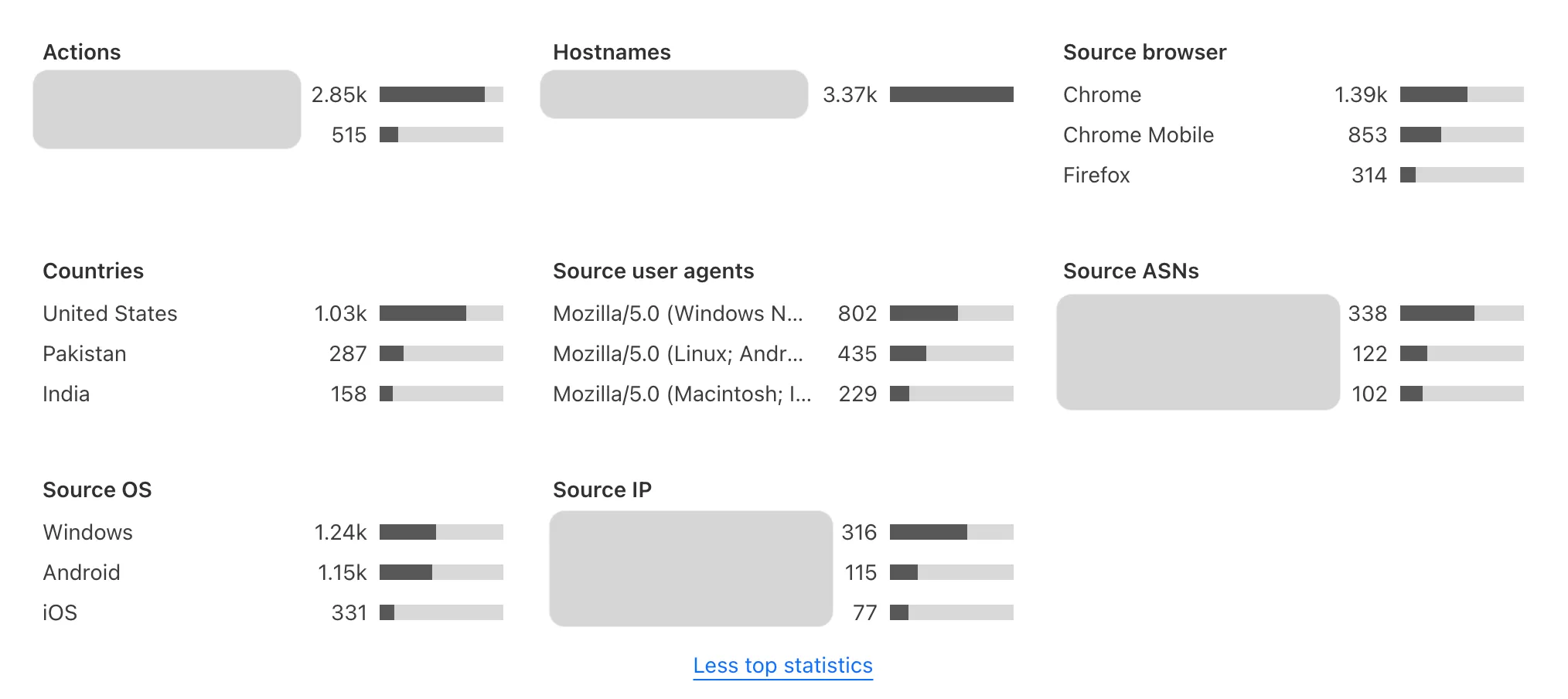
The metrics show changes in the solve rate, widget traffic, and top actions for your widget.
Refer to the pages below for more information about Turnstile Analytics:
* [ Challenge outcome ](https://developers.cloudflare.com/turnstile/turnstile-analytics/challenge-outcomes/)
* [ Token validation ](https://developers.cloudflare.com/turnstile/turnstile-analytics/token-validation/)
```json
{"@context":"https://schema.org","@type":"BreadcrumbList","itemListElement":[{"@type":"ListItem","position":1,"item":{"@id":"/directory/","name":"Directory"}},{"@type":"ListItem","position":2,"item":{"@id":"/turnstile/","name":"Turnstile"}},{"@type":"ListItem","position":3,"item":{"@id":"/turnstile/turnstile-analytics/","name":"Turnstile Analytics"}}]}
```
---
---
title: Challenge outcome
description: When a visitor encounters Turnstile, it assesses whether they are human or bot-like based on various signals. These outcomes help you evaluate how effectively Turnstile is protecting your application.
image: https://developers.cloudflare.com/core-services-preview.png
---
[Skip to content](#%5Ftop)
Was this helpful?
YesNo
[ Edit page ](https://github.com/cloudflare/cloudflare-docs/edit/production/src/content/docs/turnstile/turnstile-analytics/challenge-outcomes.mdx) [ Report issue ](https://github.com/cloudflare/cloudflare-docs/issues/new/choose)
Copy page
# Challenge outcome
When a visitor encounters Turnstile, it assesses whether they are human or bot-like based on various signals. These outcomes help you evaluate how effectively Turnstile is protecting your application.
## Metrics
A "solved" Turnstile challenge does not automatically confirm the visitor is human. You must [call the Siteverify API](#call-siteverify) to validate the token and proceed only if the response returns `success:true`.
For example, the challenge outcome values in your analytics may look like this:
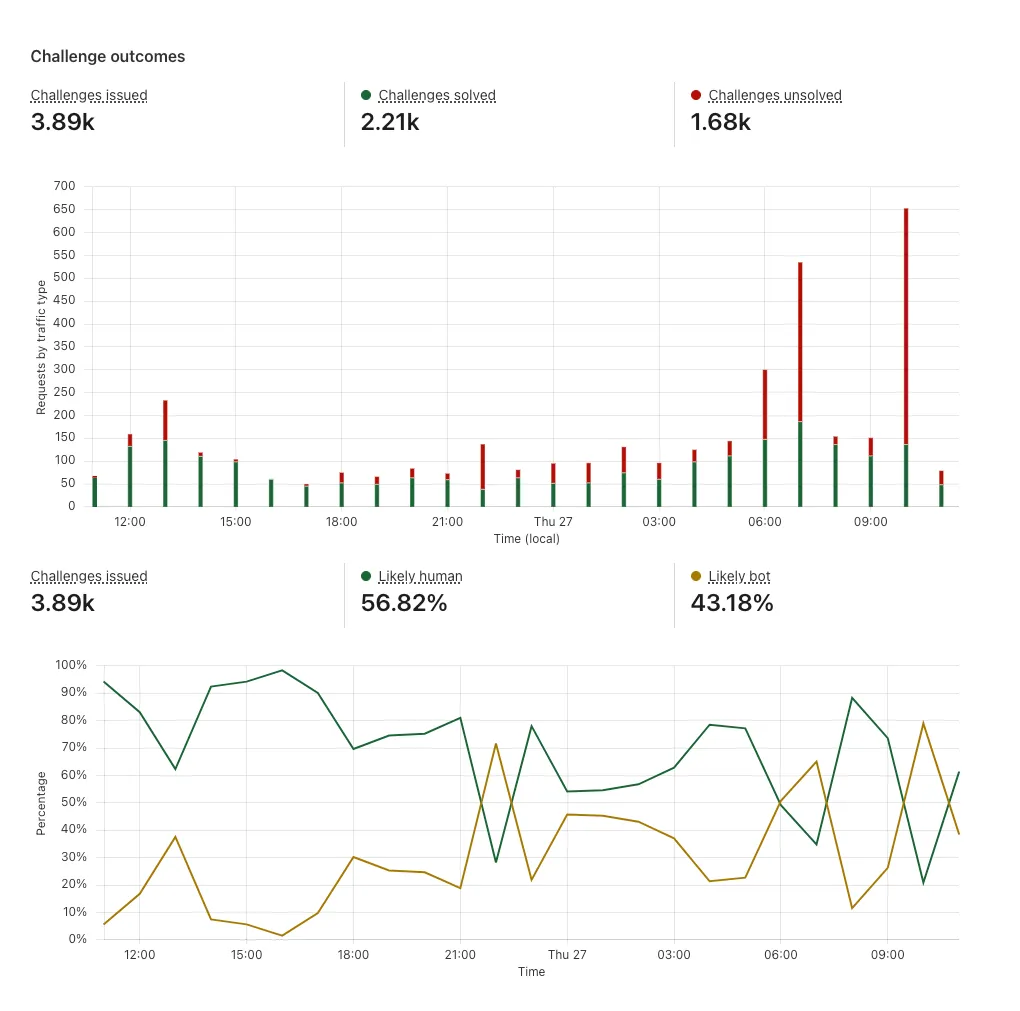
Challenge outcome example
* **Challenges issued**: The total number of challenges presented to visitors within a specific timeframe.
* **Challenges solved**: The number of challenges successfully completed by visitors in that period.
* **Challenges unsolved**: Challenges that were abandoned or failed in that period.
* **Likely human**: The total number of challenges solved or the total number of challenges issued.
* **Likely bot**: The total number of challenges unsolved or the total number challenges issued.
By analyzing these metrics, you can identify trends such as high failure rates in specific regions, device types, or traffic sources, which may indicate bot activity or misconfigurations.
### Call Siteverify
It is important to [call the Siteverify API](https://developers.cloudflare.com/turnstile/get-started/server-side-validation/). Without calling Siteverify API to validate the tokens, your website or application is not protected. Skipping token validation means you cannot confirm the visitor's legitimacy.
* Tokens can only be redeemed once. Even valid tokens will return `success:false` if they are reused, preventing token theft and replay attacks.
* Tokens expire after five minutes. Validation must occur within this window to be effective.
* Tokens can be invalid. Bots might complete challenges, but Cloudflare can detect bot-like signals and mark the token as invalid.
## Solve rates
Turnstile's solve rate indicates how many visitors pass a challenge. Solve rates can be broken down into the total number of challenges solved and whether they are interactive, non-interactive, or pre-clearance solves.
If you are using [managed mode](https://developers.cloudflare.com/turnstile/concepts/widget/#managed-mode-recommended), you can monitor how many of your visitors were prompted to interact with the checkbox on the widget (interactive solves) and how many were verified without any disruptions to their experience (non-interactive solves).
For example, the solve rate values in your analytics may look like this:
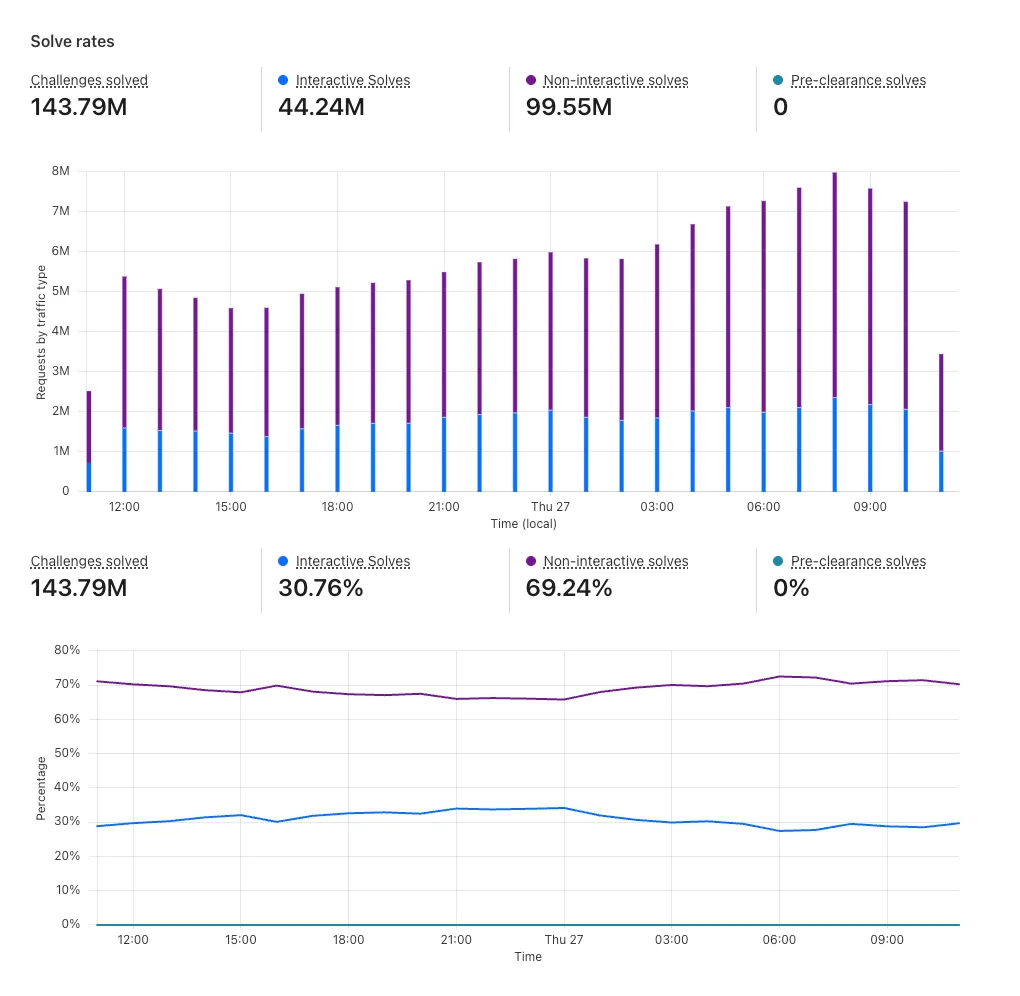
Solve rate example
### Metrics
* **Non-interactive solves**: Challenges solved without requiring the visitor to click a checkbox.
* **Interactive solves**: Challenges solved that required visitor interaction to be solved.
* [**Pre-clearance solves**](https://developers.cloudflare.com/cloudflare-challenges/concepts/clearance/#pre-clearance-support-in-turnstile): Challenges solved that issued the `cf_clearance` cookie along with the Turnstile token.
A low solve rate might indicate increased bot activity attempting to bypass Turnstile or anomalous traffic patterns that require further investigation.
```json
{"@context":"https://schema.org","@type":"BreadcrumbList","itemListElement":[{"@type":"ListItem","position":1,"item":{"@id":"/directory/","name":"Directory"}},{"@type":"ListItem","position":2,"item":{"@id":"/turnstile/","name":"Turnstile"}},{"@type":"ListItem","position":3,"item":{"@id":"/turnstile/turnstile-analytics/","name":"Turnstile Analytics"}},{"@type":"ListItem","position":4,"item":{"@id":"/turnstile/turnstile-analytics/challenge-outcomes/","name":"Challenge outcome"}}]}
```
---
---
title: Token validation
description: After a visitor successfully completes a Turnstile challenge, a token is generated and validated via the Siteverify API. Token validation data shows how many tokens your server validated successfully versus how many failed. A high rate of invalid tokens may indicate bot activity, expired tokens, or implementation issues.
image: https://developers.cloudflare.com/core-services-preview.png
---
[Skip to content](#%5Ftop)
Was this helpful?
YesNo
[ Edit page ](https://github.com/cloudflare/cloudflare-docs/edit/production/src/content/docs/turnstile/turnstile-analytics/token-validation.mdx) [ Report issue ](https://github.com/cloudflare/cloudflare-docs/issues/new/choose)
Copy page
# Token validation
After a visitor successfully completes a Turnstile challenge, a token is generated and validated via the Siteverify API. Token validation data shows how many tokens your server validated successfully versus how many failed. A high rate of invalid tokens may indicate bot activity, expired tokens, or implementation issues.
For example, the token validation values in your analytics may look like this:
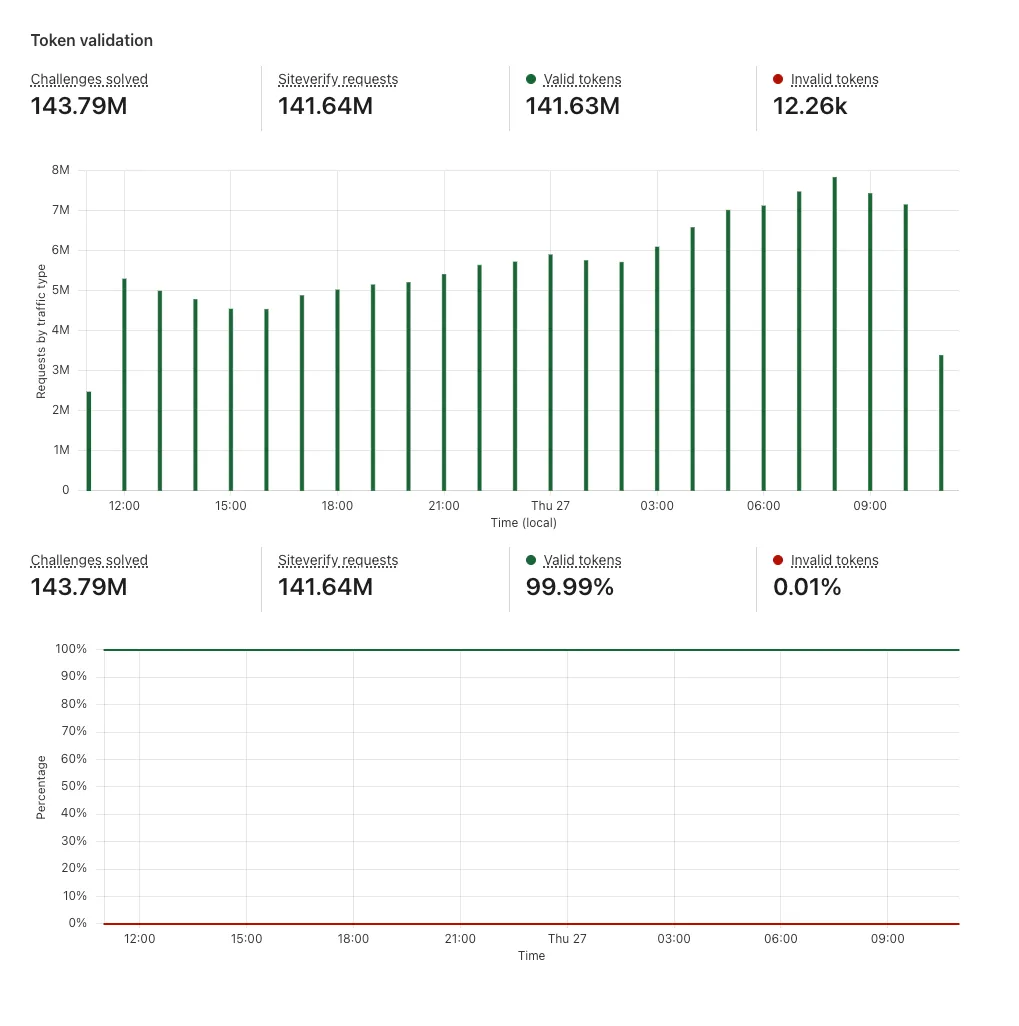
Token validation example
## Metrics
* **Siteverify requests**: The total number of requests made to the Siteverify API in the given timeframe.
* **Valid tokens**: The number of Siteverify requests with `success:true` responses.
* **Invalid tokens**: The number of Siteverify requests with `success:false` responses.
### Call Siteverify
It is important to [call the Siteverify API](https://developers.cloudflare.com/turnstile/get-started/server-side-validation/). Without calling Siteverify API to validate the tokens, your website or application is not protected. Skipping token validation means you cannot confirm the visitor's legitimacy.
* Tokens can only be redeemed once. Even valid tokens will return `success:false` if they are reused, preventing token theft and replay attacks.
* Tokens expire after five minutes. Validation must occur within this window to be effective.
* Tokens can be invalid. Bots might complete challenges, but Cloudflare can detect bot-like signals and mark the token as invalid.
```json
{"@context":"https://schema.org","@type":"BreadcrumbList","itemListElement":[{"@type":"ListItem","position":1,"item":{"@id":"/directory/","name":"Directory"}},{"@type":"ListItem","position":2,"item":{"@id":"/turnstile/","name":"Turnstile"}},{"@type":"ListItem","position":3,"item":{"@id":"/turnstile/turnstile-analytics/","name":"Turnstile Analytics"}},{"@type":"ListItem","position":4,"item":{"@id":"/turnstile/turnstile-analytics/token-validation/","name":"Token validation"}}]}
```
---
---
title: Migration
description: If you are using alternative CAPTCHA services, you can switch to Cloudflare Turnstile using the guides below to assist with the upgrade process.
image: https://developers.cloudflare.com/core-services-preview.png
---
[Skip to content](#%5Ftop)
Was this helpful?
YesNo
[ Edit page ](https://github.com/cloudflare/cloudflare-docs/edit/production/src/content/docs/turnstile/migration/index.mdx) [ Report issue ](https://github.com/cloudflare/cloudflare-docs/issues/new/choose)
Copy page
# Migration
If you are using alternative CAPTCHA services, you can switch to Cloudflare Turnstile using the guides below to assist with the upgrade process.
[Get started with Turnstile](https://developers.cloudflare.com/turnstile/get-started/) if there is no guide available yet.
## Guides
* [reCAPTCHA](https://developers.cloudflare.com/turnstile/migration/recaptcha/)
* [hCAPTCHA](https://developers.cloudflare.com/turnstile/migration/hcaptcha/)
```json
{"@context":"https://schema.org","@type":"BreadcrumbList","itemListElement":[{"@type":"ListItem","position":1,"item":{"@id":"/directory/","name":"Directory"}},{"@type":"ListItem","position":2,"item":{"@id":"/turnstile/","name":"Turnstile"}},{"@type":"ListItem","position":3,"item":{"@id":"/turnstile/migration/","name":"Migration"}}]}
```
---
---
title: Migrate from hCaptcha
description: If you are using hCaptcha today, you can switch seamlessly to Cloudflare Turnstile by following the step-by-step guide below to assist with the upgrade process.
image: https://developers.cloudflare.com/core-services-preview.png
---
[Skip to content](#%5Ftop)
Was this helpful?
YesNo
[ Edit page ](https://github.com/cloudflare/cloudflare-docs/edit/production/src/content/docs/turnstile/migration/hcaptcha.mdx) [ Report issue ](https://github.com/cloudflare/cloudflare-docs/issues/new/choose)
Copy page
# Migrate from hCaptcha
If you are using hCaptcha today, you can switch seamlessly to Cloudflare Turnstile by following the step-by-step guide below to assist with the upgrade process.
To complete the migration, you must obtain the [sitekey and secret key](https://developers.cloudflare.com/turnstile/get-started/widget-management/).
## Client-side integration
1. Update the client-side integration by inserting the Turnstile script snippet in your HTML's `` element:
Turnstile script snippet
```
```
2. Locate the `hcaptcha.render()` calls and replace the sitekey with your Turnstile sitekey and the API.
Render
```
// before
hcaptcha.render(element, {
sitekey: "00000000-0000-0000-0000-000000000000"
})
// after
turnstile.render(element, {
sitekey: "1x00000000000000000000AA"
})
```
Note
Turnstile supports:
* the `render()` call
* hCaptcha invisible mode with the `execute()` call
## Server-side integration
1. Update the server-side integration by replacing the Siteverify URL.
Replace: `https://hcaptcha.com/siteverify` with the following:
```
https://challenges.cloudflare.com/turnstile/v0/siteverify
```
2. Replace the `h-captcha-response` input name with the following:
```
cf-turnstile-response
```
```json
{"@context":"https://schema.org","@type":"BreadcrumbList","itemListElement":[{"@type":"ListItem","position":1,"item":{"@id":"/directory/","name":"Directory"}},{"@type":"ListItem","position":2,"item":{"@id":"/turnstile/","name":"Turnstile"}},{"@type":"ListItem","position":3,"item":{"@id":"/turnstile/migration/","name":"Migration"}},{"@type":"ListItem","position":4,"item":{"@id":"/turnstile/migration/hcaptcha/","name":"Migrate from hCaptcha"}}]}
```
---
---
title: Migrate from reCAPTCHA
description: If you are using reCAPTCHA today, you can switch seamlessly to Cloudflare Turnstile by following the step-by-step guide below to assist with the upgrade process.
image: https://developers.cloudflare.com/core-services-preview.png
---
[Skip to content](#%5Ftop)
Was this helpful?
YesNo
[ Edit page ](https://github.com/cloudflare/cloudflare-docs/edit/production/src/content/docs/turnstile/migration/recaptcha.mdx) [ Report issue ](https://github.com/cloudflare/cloudflare-docs/issues/new/choose)
Copy page
# Migrate from reCAPTCHA
If you are using reCAPTCHA today, you can switch seamlessly to Cloudflare Turnstile by following the step-by-step guide below to assist with the upgrade process.
To complete the migration, you must obtain the [sitekey and secret key](https://developers.cloudflare.com/turnstile/get-started/widget-management/).
Note
Turnstile migration is currently compatible up to reCAPTCHA v2.
## Client-side integration
1. Update the client-side integration by inserting the Turnstile script snippet in your HTML's `` element.
Turnstile script snippet
```
```
Note
Adding `?compat=recaptcha` runs Turnstile in compatibility mode, which enables the following features:
* implicit rendering for reCAPTCHA
* `g-recaptcha-response` input name for forms
* register the Turnstile API as `grecaptcha`
2. Locate the `grecaptcha.render()` calls and replace the sitekey with your Turnstile sitekey.
Note
Turnstile supports:
* the `render()` call
* reCAPTCHA v2 invisible mode with the `execute()` call
## Server-side integration
Update the server-side integration by replacing the Siteverify URL.
Replace `https://www.google.com/recaptcha/api/siteverify` with the following:
```
https://challenges.cloudflare.com/turnstile/v0/siteverify
```
Differences to reCAPTCHA's Siteverify
reCAPTCHA supports `GET` requests using query parameters, such as `GET /siteverify?response=&secret=`.
Turnstile's Siteverify endpoint does _not_ support this and only accepts `POST` requests with a FormData or JSON body.
Refer to [server-side validation](https://developers.cloudflare.com/turnstile/get-started/server-side-validation/) for more information.
```json
{"@context":"https://schema.org","@type":"BreadcrumbList","itemListElement":[{"@type":"ListItem","position":1,"item":{"@id":"/directory/","name":"Directory"}},{"@type":"ListItem","position":2,"item":{"@id":"/turnstile/","name":"Turnstile"}},{"@type":"ListItem","position":3,"item":{"@id":"/turnstile/migration/","name":"Migration"}},{"@type":"ListItem","position":4,"item":{"@id":"/turnstile/migration/recaptcha/","name":"Migrate from reCAPTCHA"}}]}
```
---
---
title: Tutorials
description: View tutorials to help you get started with Turnstile.
image: https://developers.cloudflare.com/core-services-preview.png
---
[Skip to content](#%5Ftop)
Was this helpful?
YesNo
[ Edit page ](https://github.com/cloudflare/cloudflare-docs/edit/production/src/content/docs/turnstile/tutorials/index.mdx) [ Report issue ](https://github.com/cloudflare/cloudflare-docs/issues/new/choose)
Copy page
# Tutorials
View tutorials to help you get started with Turnstile.
| Name | Last Updated | Difficulty |
| ------------------------------------------------------------------------------------------------------------------------------------------------- | ---------------- | ------------ |
| [Fraud detection with Ephemeral IDs](https://developers.cloudflare.com/turnstile/tutorials/fraud-detection-with-ephemeral-ids/) | 3 months ago | Advanced |
| [Protect your forms](https://developers.cloudflare.com/turnstile/tutorials/login-pages/) | 10 months ago | Beginner |
| [Conditionally enforce Turnstile](https://developers.cloudflare.com/turnstile/tutorials/conditionally-enforcing-turnstile/) | about 1 year ago | Intermediate |
| [Exclude Turnstile from E2E tests](https://developers.cloudflare.com/turnstile/tutorials/excluding-turnstile-from-e2e-tests/) | about 1 year ago | Intermediate |
| [Integrate Turnstile, WAF, & Bot Management](https://developers.cloudflare.com/turnstile/tutorials/integrating-turnstile-waf-and-bot-management/) | over 1 year ago | Beginner |
## Demo
Learn how you can use Turnstile within your existing application.
Explore the following demo applications for Turnstile.
* [Turnstile Demo: ↗](https://github.com/cloudflare/turnstile-demo-workers) A simple demo with a Turnstile-protected form, using Cloudflare Workers. With the code in this repository, we demonstrate implicit rendering and explicit rendering.
```json
{"@context":"https://schema.org","@type":"BreadcrumbList","itemListElement":[{"@type":"ListItem","position":1,"item":{"@id":"/directory/","name":"Directory"}},{"@type":"ListItem","position":2,"item":{"@id":"/turnstile/","name":"Turnstile"}},{"@type":"ListItem","position":3,"item":{"@id":"/turnstile/tutorials/","name":"Tutorials"}}]}
```
---
---
title: Conditionally enforce Turnstile
description: This tutorial explains how to conditionally enforce Turnstile based on the incoming request, such as a pre-shared secret in a header or a specific IP address.
image: https://developers.cloudflare.com/core-services-preview.png
---
[Skip to content](#%5Ftop)
### Tags
[ Node.js ](https://developers.cloudflare.com/search/?tags=Node.js)[ TypeScript ](https://developers.cloudflare.com/search/?tags=TypeScript)
Was this helpful?
YesNo
[ Edit page ](https://github.com/cloudflare/cloudflare-docs/edit/production/src/content/docs/turnstile/tutorials/conditionally-enforcing-turnstile.mdx) [ Report issue ](https://github.com/cloudflare/cloudflare-docs/issues/new/choose)
Copy page
# Conditionally enforce Turnstile
**Last reviewed:** about 1 year ago
This tutorial explains how to conditionally enforce Turnstile based on the incoming request, such as a pre-shared secret in a header or a specific IP address.
## Overview
You may have setups such as automation that cannot load or run the Turnstile challenge. Using [HTMLRewriter](https://developers.cloudflare.com/workers/runtime-apis/html-rewriter/), this tutorial will demonstrate how to conditionally handle the [client-side widget](https://developers.cloudflare.com/turnstile/get-started/client-side-rendering/) and [Siteverify API](https://developers.cloudflare.com/turnstile/get-started/server-side-validation/) when specific criteria are met.
Note
While this tutorial removes Turnstile client-side elements when specific criteria are met, you could instead conditionally insert them.
Warning
It is critical to make sure you are validating tokens with the Siteverify API when your criteria for enforcing Turnstile are not met.
It is not sufficient to only remove the client-side widget from the page, as an attacker can forge the request to your API.
## Implementation
This tutorial will modify the existing [Turnstile demo ↗](https://github.com/cloudflare/turnstile-demo-workers/blob/main/src/) to conditionally remove the existing `script` and widget container elements.
src/index.mjs
```
export default {
async fetch(request) {
// ...
if (request.headers.get("x-bypass-turnstile") === "VerySecretValue") {
class RemoveHandler {
element(element) {
element.remove();
}
}
return new HTMLRewriter()
// Remove the script tag
.on(
'script[src="https://challenges.cloudflare.com/turnstile/v0/api.js"]',
new RemoveHandler(),
)
// Remove the container used in implicit rendering
.on(
'.cf-turnstile',
new RemoveHandler(),
)
// Remove the container used in explicit rendering
.on(
'#myWidget',
new RemoveHandler(),
)
.transform(body);
}
return new Response(body, {
headers: {
"Content-Type": "text/html",
},
});
},
};
```
## Server-side integration
We will exit early in our validation if the same logic we used to remove the client-side elements is present.
Warning
The same logic must be used in both the client-side and the server-side implementations.
src/index.mjs
```
async function handlePost(request) {
if (request.headers.get("x-bypass-turnstile") === "VerySecretValue") {
return new Response('Turnstile not enforced on this request')
}
// Proceed with validation as normal!
const body = await request.formData();
// Turnstile injects a token in "cf-turnstile-response".
const token = body.get('cf-turnstile-response');
const ip = request.headers.get('CF-Connecting-IP');
// ...
}
```
With these changes, Turnstile will not be enforced on requests with the header `x-bypass-turnstile: VerySecretValue` present.
## Demonstration
After running `npm run dev` in the project folder, you can test the changes by running the following command:
Terminal window
```
curl -X POST http://localhost:8787/handler -H "x-bypass-turnstile: VerySecretValue"
```
```
Turnstile not enforced on this request
```
```json
{"@context":"https://schema.org","@type":"BreadcrumbList","itemListElement":[{"@type":"ListItem","position":1,"item":{"@id":"/directory/","name":"Directory"}},{"@type":"ListItem","position":2,"item":{"@id":"/turnstile/","name":"Turnstile"}},{"@type":"ListItem","position":3,"item":{"@id":"/turnstile/tutorials/","name":"Tutorials"}},{"@type":"ListItem","position":4,"item":{"@id":"/turnstile/tutorials/conditionally-enforcing-turnstile/","name":"Conditionally enforce Turnstile"}}]}
```
---
---
title: Exclude Turnstile from E2E tests
description: This tutorial explains how to handle Turnstile in your end-to-end (E2E) tests by using Turnstile's dedicated testing keys.
image: https://developers.cloudflare.com/core-services-preview.png
---
[Skip to content](#%5Ftop)
### Tags
[ Node.js ](https://developers.cloudflare.com/search/?tags=Node.js)[ TypeScript ](https://developers.cloudflare.com/search/?tags=TypeScript)
Was this helpful?
YesNo
[ Edit page ](https://github.com/cloudflare/cloudflare-docs/edit/production/src/content/docs/turnstile/tutorials/excluding-turnstile-from-e2e-tests.mdx) [ Report issue ](https://github.com/cloudflare/cloudflare-docs/issues/new/choose)
Copy page
# Exclude Turnstile from E2E tests
**Last reviewed:** about 1 year ago
This tutorial explains how to handle Turnstile in your end-to-end (E2E) tests by using Turnstile's dedicated testing keys.
## Overview
When running E2E tests, you often want to bypass or simplify the Turnstile verification process. Cloudflare provides official test credentials that always pass verification, making them perfect for testing environments:
* Test sitekey: `1x00000000000000000000AA`
* Test secret key: `1x0000000000000000000000000000000AA`
For more details, refer to the [testing documentation](https://developers.cloudflare.com/turnstile/troubleshooting/testing/).
Warning
Never use test credentials in production. Always ensure:
* Test credentials are only used in test environments.
* Production credentials are properly protected.
* Your deployment process prevents test credentials from reaching production.
## Implementation
The key to implementing test-environment detection is identifying test requests server-side. Here is a simple approach:
TypeScript
```
// Detect test environments using IP addresses or headers
function isTestEnvironment(request) {
const testIPs = ['127.0.0.1', '::1'];
const isTestIP = testIPs.includes(request.ip);
const hasTestHeader = request.headers['x-test-environment'] === 'secret-token';
return isTestIP || hasTestHeader;
}
// Use the appropriate credentials based on the environment
function getTurnstileCredentials(request) {
if (isTestEnvironment(request)) {
return {
sitekey: '1x00000000000000000000AA',
secretKey: '1x0000000000000000000000000000000AA'
};
}
return {
sitekey: process.env.TURNSTILE_SITE_KEY,
secretKey: process.env.TURNSTILE_SECRET_KEY
};
}
```
## Server-side integration
When rendering your page, inject the appropriate sitekey based on the environment:
TypeScript
```
app.get('/your-form', (req, res) => {
const { sitekey } = getTurnstileCredentials(req);
res.render('form', { sitekey });
});
```
## Client-side integration
Your template can then use the injected sitekey:
```
```
## Best practices
1. **Environment detection**
* Use multiple factors to identify test environments (IP, headers, etc.).
* Keep your test environment identifiers secure if you need to test from the public web.
2. **Credential management**
* Store production credentials securely (for example, in environment variables).
* Never commit credentials to version control.
* Use different credentials for each environment.
3. **Deployment safety**
* Add checks to prevent test credentials in production.
* Include credential validation in your CI/CD pipeline.
* Monitor for accidental test credential usage.
## Testing considerations
* Test credentials will always pass verification.
* They are perfect for automated testing environments.
* They help avoid rate limiting during testing.
* They make tests more predictable and faster.
## Example test setup
For Cypress or similar E2E testing frameworks:
TypeScript
```
// Set test header for all test requests
beforeEach(() => {
cy.intercept('*', (req) => {
req.headers['x-test-environment'] = 'secret-token';
});
});
// Your test can now interact with the form normally
it('submits form successfully', () => {
cy.visit('/your-form');
cy.get('form').submit();
// Turnstile will automatically pass verification
});
```
## Conclusion
By using Turnstile's test credentials and proper environment detection, you can create reliable E2E tests while maintaining security in production. Remember to always keep test credentials separate from production and implement proper safeguards in your deployment process.
```json
{"@context":"https://schema.org","@type":"BreadcrumbList","itemListElement":[{"@type":"ListItem","position":1,"item":{"@id":"/directory/","name":"Directory"}},{"@type":"ListItem","position":2,"item":{"@id":"/turnstile/","name":"Turnstile"}},{"@type":"ListItem","position":3,"item":{"@id":"/turnstile/tutorials/","name":"Tutorials"}},{"@type":"ListItem","position":4,"item":{"@id":"/turnstile/tutorials/excluding-turnstile-from-e2e-tests/","name":"Exclude Turnstile from E2E tests"}}]}
```
---
---
title: Fraud detection with Ephemeral IDs
description: Learn how to implement fraud detection using Turnstile's Ephemeral IDs to identify and block bad actors who rotate IP addresses.
image: https://developers.cloudflare.com/core-services-preview.png
---
[Skip to content](#%5Ftop)
### Tags
[ JavaScript ](https://developers.cloudflare.com/search/?tags=JavaScript)[ Node.js ](https://developers.cloudflare.com/search/?tags=Node.js)[ SQL ](https://developers.cloudflare.com/search/?tags=SQL)
Was this helpful?
YesNo
[ Edit page ](https://github.com/cloudflare/cloudflare-docs/edit/production/src/content/docs/turnstile/tutorials/fraud-detection-with-ephemeral-ids.mdx) [ Report issue ](https://github.com/cloudflare/cloudflare-docs/issues/new/choose)
Copy page
# Fraud detection with Ephemeral IDs
**Last reviewed:** 3 months ago
[Ephemeral IDs](https://developers.cloudflare.com/turnstile/additional-configuration/ephemeral-id/) let you detect fraud patterns that evade traditional IP-based detection. This tutorial will show you how to log Ephemeral IDs, detect suspicious patterns, and block bad actors.
Attackers often create hundreds of fake accounts to abuse promotions, rotate through proxy pools to avoid IP-based rate limiting, and use real browsers to evade basic bot detection.
Traditional IP-based detection fails because each request appears to come from a different address. Ephemeral IDs solve this by identifying the underlying client device, even when IP addresses change.
## Before you begin
* Ephemeral IDs require [Enterprise Bot Management](https://developers.cloudflare.com/bots/plans/bm-subscription/) with the [Enterprise Turnstile add-on](https://developers.cloudflare.com/turnstile/plans/), or [standalone Enterprise Turnstile](https://developers.cloudflare.com/turnstile/plans/). Contact your account team to enable this feature.
* You must have basic familiarity with Turnstile integration. Refer to [Get started with Turnstile](https://developers.cloudflare.com/turnstile/get-started/) for more information.
Ephemeral IDs are not guaranteed to be unique
Not every unique device will produce a unique Ephemeral ID. Privacy-focused devices and browsers (such as iPhones and Safari) limit the signals available for fingerprinting, which means multiple legitimate users may share the same Ephemeral ID.
Use Ephemeral IDs to detect high-volume abuse patterns, not to uniquely identify individual devices. Always set detection thresholds high enough to avoid false positives.
---
### Set up logging
Create a table to store events with Ephemeral IDs.
```
CREATE TABLE turnstile_events (
id BIGSERIAL PRIMARY KEY,
ephemeral_id VARCHAR(64) NOT NULL,
event_type VARCHAR(50) NOT NULL, -- 'signup', 'login', 'checkout'
ip_address VARCHAR(45),
user_id VARCHAR(128), -- NULL for signups, populated after
created_at TIMESTAMPTZ DEFAULT NOW()
);
CREATE TABLE blocked_ephemeral_ids (
ephemeral_id VARCHAR(64) PRIMARY KEY,
reason VARCHAR(255),
created_at TIMESTAMPTZ DEFAULT NOW()
);
```
### Extract and log the Ephemeral IDs
When you call Siteverify, the Ephemeral ID is returned in the `metadata` field. Log it with every protected action.
TypeScript
```
async function verifyAndLogTurnstile(
token: string,
ip: string,
secretKey: string,
eventType: string,
db: Database,
): Promise<{ success: boolean; ephemeralId?: string; isBlocked: boolean }> {
// Call Siteverify API
const response = await fetch(
"https://challenges.cloudflare.com/turnstile/v0/siteverify",
{
method: "POST",
headers: { "Content-Type": "application/x-www-form-urlencoded" },
body: new URLSearchParams({
secret: secretKey,
response: token,
remoteip: ip,
}),
},
);
const result = await response.json();
if (!result.success) {
return { success: false, isBlocked: false };
}
const ephemeralId = result.metadata?.ephemeral_id;
if (ephemeralId) {
// Log the event
await db.query(
`INSERT INTO turnstile_events (ephemeral_id, event_type, ip_address)
VALUES ($1, $2, $3)`,
[ephemeralId, eventType, ip],
);
// Check if already blocked
const blocked = await db.query(
`SELECT 1 FROM blocked_ephemeral_ids WHERE ephemeral_id = $1`,
[ephemeralId],
);
if (blocked.rows.length > 0) {
return { success: true, ephemeralId, isBlocked: true };
}
}
return { success: true, ephemeralId, isBlocked: false };
}
```
### Use the Ephemeral ID in your sign up flow
TypeScript
```
export async function handleSignup(request: Request, env: Env) {
const formData = await request.formData();
const email = formData.get("email") as string;
const turnstileToken = formData.get("cf-turnstile-response") as string;
const ip = request.headers.get("CF-Connecting-IP") || "";
// Verify Turnstile and log the Ephemeral ID
const verification = await verifyAndLogTurnstile(
turnstileToken,
ip,
env.TURNSTILE_SECRET_KEY,
"signup",
env.DB,
);
if (!verification.success) {
return new Response("Verification failed", { status: 400 });
}
// Block if this device is flagged
if (verification.isBlocked) {
// Return a generic message - don't reveal detection
return new Response("Please verify your email to continue", {
status: 202,
});
}
// Proceed with normal signup
const userId = await createUser(email, formData.get("password"));
// Update the log with the new user ID
if (verification.ephemeralId) {
await env.DB.query(
`UPDATE turnstile_events
SET user_id = $1
WHERE ephemeral_id = $2 AND event_type = 'signup' AND user_id IS NULL
ORDER BY created_at DESC LIMIT 1`,
[userId, verification.ephemeralId],
);
}
return new Response("Account created", { status: 201 });
}
```
### Detect fraud patterns
Run the following query periodically (for example, every five minutes) to find suspicious Ephemeral IDs:
```
-- Find devices creating multiple accounts in the last hour
SELECT
ephemeral_id,
COUNT(*) as signup_count,
COUNT(DISTINCT ip_address) as unique_ips
FROM turnstile_events
WHERE
event_type = 'signup'
AND created_at > NOW() - INTERVAL '1 hour'
GROUP BY ephemeral_id
HAVING COUNT(*) > 3; -- More than 3 signups = suspicious
```
When you find suspicious IDs, block them:
```
INSERT INTO blocked_ephemeral_ids (ephemeral_id, reason)
SELECT
ephemeral_id,
'Multiple signups: ' || COUNT(*) || ' in 1 hour'
FROM turnstile_events
WHERE
event_type = 'signup'
AND created_at > NOW() - INTERVAL '1 hour'
GROUP BY ephemeral_id
HAVING COUNT(*) > 3
ON CONFLICT (ephemeral_id) DO NOTHING;
```
### Investigate and take action
When you ban accounts for abuse, find other accounts from the same device:
```
-- Find all accounts created from the same device as a banned user
SELECT DISTINCT te2.user_id, te2.created_at
FROM turnstile_events te1
JOIN turnstile_events te2 ON te1.ephemeral_id = te2.ephemeral_id
WHERE te1.user_id = 'BANNED_USER_ID'
AND te2.user_id IS NOT NULL
AND te2.user_id != 'BANNED_USER_ID';
```
Bulk-flag accounts for review:
```
-- Flag all accounts from a suspicious device
UPDATE users
SET status = 'under_review'
WHERE id IN (
SELECT DISTINCT user_id
FROM turnstile_events
WHERE ephemeral_id = 'x:SUSPICIOUS_ID_HERE'
AND user_id IS NOT NULL
);
```
---
## Recommendations
Privacy
Ephemeral IDs are privacy-preserving. They are scoped to your account, short-lived, and cannot identify individuals across sites.
* **Log immediately**: Capture the Ephemeral ID right when you call Siteverify.
* **Silent rejection**: When blocking fraud, return generic errors. Never reveal that you detected the device.
* **Tune thresholds**: Start conservative (for example, three sign ups per hour) with the query and adjust based on your traffic.
* **Combine signals**: Use Ephemeral IDs alongside IP reputation and behavior analytics.
---
## Related resources
* [Ephemeral IDs](https://developers.cloudflare.com/turnstile/additional-configuration/ephemeral-id/)
* [Server-side validation](https://developers.cloudflare.com/turnstile/get-started/server-side-validation/)
* [Integrate Turnstile, WAF, and Bot Management](https://developers.cloudflare.com/turnstile/tutorials/integrating-turnstile-waf-and-bot-management/)
```json
{"@context":"https://schema.org","@type":"BreadcrumbList","itemListElement":[{"@type":"ListItem","position":1,"item":{"@id":"/directory/","name":"Directory"}},{"@type":"ListItem","position":2,"item":{"@id":"/turnstile/","name":"Turnstile"}},{"@type":"ListItem","position":3,"item":{"@id":"/turnstile/tutorials/","name":"Tutorials"}},{"@type":"ListItem","position":4,"item":{"@id":"/turnstile/tutorials/fraud-detection-with-ephemeral-ids/","name":"Fraud detection with Ephemeral IDs"}}]}
```
---
---
title: Integrate Turnstile, WAF, & Bot Management
description: This tutorial will guide you on how to integrate Cloudflare Turnstile, Web Application Firewall (WAF), and Bot Management. This combination creates a robust defense against various threats, including automated attacks and malicious login attempts.
image: https://developers.cloudflare.com/core-services-preview.png
---
[Skip to content](#%5Ftop)
### Tags
[ JavaScript ](https://developers.cloudflare.com/search/?tags=JavaScript)
Was this helpful?
YesNo
[ Edit page ](https://github.com/cloudflare/cloudflare-docs/edit/production/src/content/docs/turnstile/tutorials/integrating-turnstile-waf-and-bot-management.mdx) [ Report issue ](https://github.com/cloudflare/cloudflare-docs/issues/new/choose)
Copy page
# Integrate Turnstile, WAF, & Bot Management
**Last reviewed:** over 1 year ago
This tutorial will guide you on how to integrate Cloudflare Turnstile, [Web Application Firewall (WAF)](https://developers.cloudflare.com/waf/), and [Bot Management](https://developers.cloudflare.com/bots/get-started/bot-management/) into an existing authentication system. This combination creates a robust defense against various threats, including automated attacks and malicious login attempts.
## Overview
To use WAF and Bot Management, your site must have its DNS pointing through Cloudflare. However, Turnstile can be used independently on any site including those not on Cloudflare's network. This tutorial will cover how to implement all three products, but you can focus on Turnstile if your site is not on Cloudflare's network.
WAF, Bot Management, and Turnstile work well together by operating on different layers of the application:
* WAF filters malicious traffic based on network signals.
* Bot Management analyzes requests to identify and mitigate automated threats.
* Turnstile examines client-side and browser signals to distinguish between human users and bots.
By combining server-side (WAF and Bot Management) and client-side (Turnstile) security measures, you can combine multiple layers of defense to create a protection system that is difficult for attackers to circumvent.
## Before you begin
* You must have a Cloudflare account with access to WAF and Bot Management (if using).
* An existing JavaScript/TypeScript-based route handling authentication.
This tutorial uses a simple login form written in plain HTML to demonstrate how to integrate Turnstile into your application. In the backend, a stubbed out authentication route, written in TypeScript, will handle the login request. You may replace this with the language of your choice. As long as your language or framework is able to make an external HTTP request to [Turnstile's API](https://developers.cloudflare.com/api/resources/turnstile/subresources/widgets/methods/create/), you can integrate Turnstile into your application.
## Configure WAF and Bot Management
If your site is on Cloudflare's network and subscribed to an Enterprise plan, you must configure WAF and Bot Management.
### Issue challenges for potential bot traffic
1. In the Cloudflare dashboard, go to the **WAF** page.
[ Go to **WAF** ](https://dash.cloudflare.com/?to=/:account/application-security/waf)
2. Create a new custom WAF rule by selecting **Edit expression**:
* Field: "Bot Score"
* Operator: "less than or equal to"
* Value: "30"
* Action: "Managed Challenge"
This configuration challenges requests with a low bot score, leveraging network signals to identify potential threats before they reach your application. You may customize the score threshold based on your specific use case.
## Set up Cloudflare Turnstile
Turnstile can be used on any site, regardless of whether it is on Cloudflare's network:
1. In the Cloudflare dashboard, go to the **Turnstile** page.
[ Go to **Turnstile** ](https://dash.cloudflare.com/?to=/:account/turnstile)
2. Select **Add widget** and fill out the necessary information.
3. Add your domain to the Turnstile configuration.
4. Select **Create**.
Turnstile adds an extra layer of security by analyzing browser and client-side signals, complementing the server-side checks performed by WAF and Bot Management.
### Enable the option to use the existing clearance cookie
If your site is on Cloudflare, you can enable the option to use the existing [clearance cookie](https://developers.cloudflare.com/cloudflare-challenges/concepts/clearance/#pre-clearance-support-in-turnstile) in Turnstile's settings. This integration allows Turnstile to use the clearance cookie as part of its determination of whether a user should receive a challenge. This integration is optional, but recommended if you already are using WAF and Bot Management.
## Integrate Turnstile into your application
There are two components to implementing Turnstile into your application: the Turnstile widget and the server-side validation logic.
### Add the Turnstile widget to your login form
Add the Turnstile widget to your existing login form:
```
```
Replace `` with your actual Turnstile site key.
## Handle the login request
In your existing authentication route, add Turnstile validation:
TypeScript
```
async function validateTurnstileToken(
ip: string,
token: string,
secret: string,
): Promise {
const response = await fetch(
"https://challenges.cloudflare.com/turnstile/v0/siteverify",
{
method: "POST",
headers: { "Content-Type": "application/json" },
body: JSON.stringify({ ip, secret, response: token }),
},
);
const outcome = await response.json();
return outcome.success;
}
// Assume that this is a TypeScript route handler.
// You may replace this with a different implementation,
// based on your language or framework
export async function onRequestPost(context) {
const { request, env } = context;
const { username, password, token } = await request.json();
// Validate Turnstile token
const secretKey = env.TURNSTILE_SECRET_KEY;
const ip = request.headers.get("CF-Connecting-IP");
const turnstileValid = await validateTurnstileToken(ip, token, secretKey);
if (!turnstileValid) {
// Return back to the login page with an error message
return Response.redirect("/login", 302, {
headers: {
Location: "/login?error=invalid-turnstile-token",
},
});
}
// Perform your existing authentication logic here
const isValidLogin = await checkCredentials(username, password);
if (isValidLogin) {
return new Response(JSON.stringify({ message: "Login successful" }), {
status: 200,
headers: { "Content-Type": "application/json" },
});
} else {
return new Response(JSON.stringify({ error: "Invalid credentials" }), {
status: 401,
headers: { "Content-Type": "application/json" },
});
}
}
async function checkCredentials(
username: string,
password: string,
): Promise {
// Your existing credential checking logic
}
```
This setup ensures that the Turnstile token is validated on the server-side before proceeding with the login process, adding an extra layer of security based on client-side signals.
## Testing
After deployment, you will want to test your integration. Because your bot score will be low, you will probably not receive a challenge. However, you can add additional rules as needed to force a redirect to the challenge page. Some options to do this are:
1. Add a WAF rule that always forwards your IP address to the challenge page.
2. Add a WAF rule that checks for the presence of a query parameter, such as `?challenge=true`.
## Best practices
1. Always validate the Turnstile token on the server-side before checking credentials.
2. Use environment variables to store sensitive information like your Turnstile secret key.
3. Implement proper error handling and logging to monitor for potential security issues.
By combining Turnstile with WAF and Bot Management, you can create a system that secures your application at the network layer, while also providing an extra layer of protection using client-side signals. This approach makes it significantly more difficult for malicious actors to automate attacks against your login system.
## Resources
If you are interested in customizing Turnstile, refer to the resources below for more information:
* [Client-side rendering](https://developers.cloudflare.com/turnstile/get-started/client-side-rendering/). Learn how to customize how and when Turnstile renders in your user interface, to better fit your application's needs and user experience.
* [Server-side validation](https://developers.cloudflare.com/turnstile/get-started/server-side-validation/). Learn how Turnstile's API works, including request parameters, as well as how to handle different types of responses, including error codes.
* [Turnstile Analytics](https://developers.cloudflare.com/turnstile/turnstile-analytics/). Learn how to view Turnstile's analytics in the Cloudflare dashboard. This includes metrics on the number of challenges issued, as well as the [challenge solve rate (CSR)](https://developers.cloudflare.com/cloudflare-challenges/reference/challenge-solve-rate/).
```json
{"@context":"https://schema.org","@type":"BreadcrumbList","itemListElement":[{"@type":"ListItem","position":1,"item":{"@id":"/directory/","name":"Directory"}},{"@type":"ListItem","position":2,"item":{"@id":"/turnstile/","name":"Turnstile"}},{"@type":"ListItem","position":3,"item":{"@id":"/turnstile/tutorials/","name":"Tutorials"}},{"@type":"ListItem","position":4,"item":{"@id":"/turnstile/tutorials/integrating-turnstile-waf-and-bot-management/","name":"Integrate Turnstile, WAF, & Bot Management"}}]}
```
---
---
title: Protect your forms
description: This tutorial will guide you through integrating Cloudflare Turnstile to protect your web forms, such as login, signup, or contact forms.
image: https://developers.cloudflare.com/core-services-preview.png
---
[Skip to content](#%5Ftop)
### Tags
[ JavaScript ](https://developers.cloudflare.com/search/?tags=JavaScript)[ Node.js ](https://developers.cloudflare.com/search/?tags=Node.js)
Was this helpful?
YesNo
[ Edit page ](https://github.com/cloudflare/cloudflare-docs/edit/production/src/content/docs/turnstile/tutorials/login-pages.mdx) [ Report issue ](https://github.com/cloudflare/cloudflare-docs/issues/new/choose)
Copy page
# Protect your forms
**Last reviewed:** 10 months ago
This tutorial will guide you through integrating Cloudflare Turnstile to protect your web forms, such as login, signup, or contact forms. Learn how to implement the Turnstile widget on the client side and verify the Turnstile token via the Siteverify API on the server side.
## Before you begin
* You must have a Cloudflare account.
* You must have a web application with a form you want to protect.
* You must have basic knowledge of HTML and your server-side language of choice, such as Node.js or Python.
## Get Your Turnstile sitekey and secret key
1. In the Cloudflare dashboard, go to the **Turnstile** page.
[ Go to **Turnstile** ](https://dash.cloudflare.com/?to=/:account/turnstile)
2. [Create a new Turnstile widget](https://developers.cloudflare.com/turnstile/get-started/).
3. Copy the sitekey and the secret key to use in the next step.
## Add the Turnstile widget to your HTML form
1. Add the Turnstile widget to your form.
2. Replace `` with the sitekey from Cloudflare.
3. Add a `data-callback` attribute to the Turnstile widget div. This JavaScript function will be called when the challenge is successful.
4. Ensure your submit button is initially disabled.
Example
```
Contact Form
```
## Verify the Turnstile token on the server side
You will need to verify the Turnstile token sent from the client side. Below is an example in Node.js.
Node.js example
```
const express = require("express");
const axios = require("axios");
const bodyParser = require("body-parser");
const app = express();
app.use(bodyParser.urlencoded({ extended: true }));
app.post("/submit", async (req, res) => {
const turnstileToken = req.body["cf-turnstile-response"];
const secretKey = "your-secret-key";
try {
const response = await axios.post(
"https://challenges.cloudflare.com/turnstile/v0/siteverify",
null,
{
params: {
secret: secretKey,
response: turnstileToken,
},
},
);
if (response.data.success) {
// Token is valid, proceed with form submission
const name = req.body.name;
const email = req.body.email;
const message = req.body.message;
// Your form processing logic here
res.send("Form submission successful");
} else {
res.status(400).send("Turnstile verification failed");
}
} catch (error) {
res.status(500).send("Error verifying Turnstile token");
}
});
app.listen(3000, () => {
console.log("Server is running on port 3000");
});
```
## Important considerations
It is crucial to handle the verification of the Turnstile token correctly. This section covers some key points to keep in mind.
### Verify the token after form input
* Ensure that you verify the Turnstile token after the user has filled out the form and selected **submit**.
* If you verify the token before the user inputs their data, a malicious actor could potentially bypass the protection by manipulating the form submission after obtaining a valid token.
### Proper flow implementation
* When the user submits the form, send both the form data and the Turnstile token to your server.
* On the server side, verify the Turnstile token first.
* Based on the verification response, decide whether to proceed with processing the form data.
```json
{"@context":"https://schema.org","@type":"BreadcrumbList","itemListElement":[{"@type":"ListItem","position":1,"item":{"@id":"/directory/","name":"Directory"}},{"@type":"ListItem","position":2,"item":{"@id":"/turnstile/","name":"Turnstile"}},{"@type":"ListItem","position":3,"item":{"@id":"/turnstile/tutorials/","name":"Tutorials"}},{"@type":"ListItem","position":4,"item":{"@id":"/turnstile/tutorials/login-pages/","name":"Protect your forms"}}]}
```
---
---
title: Community resources
description: Community resources for our customers to help them integrate Turnstile.
image: https://developers.cloudflare.com/core-services-preview.png
---
[Skip to content](#%5Ftop)
Was this helpful?
YesNo
[ Edit page ](https://github.com/cloudflare/cloudflare-docs/edit/production/src/content/docs/turnstile/community-resources.mdx) [ Report issue ](https://github.com/cloudflare/cloudflare-docs/issues/new/choose)
Copy page
# Community resources
Community resources for our customers to help them integrate Turnstile.
Warning
These resources are made by the **community** and not maintained directly by Cloudflare.
As such, Cloudflare is not liable for any damages arising from using them.
Note
Did we miss your library? [Contribute to our list](https://developers.cloudflare.com/style-guide/contributions/)
## Client-side rendering libraries
Libraries that only support the client-side rendering of Turnstile:
* React
* [react-turnstile ↗](https://www.npmjs.com/package/react-turnstile)
* [@marsidev/react-turnstile ↗](https://www.npmjs.com/package/@marsidev/react-turnstile)
Note
Cloudflare recommends [@marsidev/react-turnstile ↗](https://www.npmjs.com/package/@marsidev/react-turnstile) when rendering Turnstile. We have deployed an implementation of the library and can confirm that it is safe to use and works as expected.
* Vue
* [vue-cloudflare-turnstile ↗](https://www.npmjs.com/package/vue-cloudflare-turnstile)
* [cfturnstile-vue3 ↗](https://www.npmjs.com/package/cfturnstile-vue3)
* [vue-turnstile ↗](https://www.npmjs.com/package/vue-turnstile)
* [Angular ↗](https://www.npmjs.com/package/ngx-turnstile)
* Svelte
* [svelte-turnstile ↗](https://www.npmjs.com/package/svelte-turnstile)
* [@battlefieldduck/turnstile-svelte ↗](https://www.npmjs.com/package/@battlefieldduck/turnstile-svelte)
## Server-side validation libraries
Libraries that only support the server-side validation of Turnstile:
* [fastify-cloudflare-turnstile ↗](https://www.npmjs.com/package/fastify-cloudflare-turnstile)
## Full-stack libraries
Libraries that both support the both client-side rendering and server-side validation of Turnstile:
* [Nuxt ↗](https://www.npmjs.com/package/@nuxtjs/turnstile)
* [Laravel ↗](https://github.com/romanzipp/Laravel-Turnstile)
* [Phoenix ↗](https://github.com/jsonmaur/phoenix-turnstile)
## Integrations
Turnstile integrations for popular content management systems:
* [Craft CMS ↗](https://plugins.craftcms.com/turnstile)
* [Google Forms ↗](https://github.com/ModMalwareInvestigation/turnstile-for-forms)
* [SilverStripe ↗](https://github.com/webbuilders-group/silverstripe-turnstile)
* [Statamic ↗](https://statamic.com/addons/aryeh-raber/captcha)
* [WordPress ↗](https://wordpress.org/plugins/simple-cloudflare-turnstile)
## Other
Other resources related to integrating Turnstile:
### TypeScript definitions
* [turnstile-types ↗](https://www.npmjs.com/package/turnstile-types)
* [@types/cloudflare-turnstile ↗](https://www.npmjs.com/package/@types/cloudflare-turnstile)
### Widget management
* [Cloudflare.NET ↗](https://github.com/Alos-no/Cloudflare.NET) (C#/.NET)
### Additional support
* [Cloudflare Community ↗](https://community.cloudflare.com/c/website-application-performance/turnstile/83)
* [Cloudflare Developers Discord server ↗](https://discord.com/channels/595317990191398933/1025131875397812224)
```json
{"@context":"https://schema.org","@type":"BreadcrumbList","itemListElement":[{"@type":"ListItem","position":1,"item":{"@id":"/directory/","name":"Directory"}},{"@type":"ListItem","position":2,"item":{"@id":"/turnstile/","name":"Turnstile"}},{"@type":"ListItem","position":3,"item":{"@id":"/turnstile/community-resources/","name":"Community resources"}}]}
```
---
---
title: Changelog
description: Subscribe to RSS
image: https://developers.cloudflare.com/core-services-preview.png
---
[Skip to content](#%5Ftop)
Was this helpful?
YesNo
[ Edit page ](https://github.com/cloudflare/cloudflare-docs/edit/production/src/content/docs/turnstile/changelog.mdx) [ Report issue ](https://github.com/cloudflare/cloudflare-docs/issues/new/choose)
Copy page
# Changelog
[ Subscribe to RSS ](https://developers.cloudflare.com/turnstile/changelog/index.xml)
## 2024-08-12
* Added [\[flexible\]](https://developers.cloudflare.com/turnstile/get-started/client-side-rendering/#widget-size) width widget size.
* Added new dimensions for Turnstile's compact size.
* Added a Feedback Report toggle on the widget's configuration.
## 2024-04-10
* Added [\[refresh-timeout\]](https://developers.cloudflare.com/turnstile/get-started/client-side-rendering/#refresh-a-timed-out-widget) and document new automatic interactive timeout-refresh.
## 2024-03-25
* Added more [supported languages](https://developers.cloudflare.com/turnstile/reference/supported-languages).
## 2023-12-18
* Added [Pre-Clearance mode](https://developers.cloudflare.com/turnstile/concepts/pre-clearance-support/).
## 2023-08-24
* Added [Client-side errors](https://developers.cloudflare.com/turnstile/troubleshooting/client-side-errors/).
## 2023-07-31
* Added [\[turnstile.isExpired\]](https://developers.cloudflare.com/turnstile/get-started/client-side-rendering/#access-a-widgets-state).
* Added `uk` language.
## 2023-05-25
* Added idempotency support for `POST /siteverify` requests via the `idempotency_key` parameter.
## 2023-04-17
* Added references to Turnstile Public API.
* Added references for [\[after-interactive-callback\]](https://developers.cloudflare.com/turnstile/get-started/client-side-rendering/#explicitly-render-the-turnstile-widget), [\[before-interactive-callback\]](https://developers.cloudflare.com/turnstile/get-started/client-side-rendering/#explicitly-render-the-turnstile-widget), and [\[unsupported-callback\]](https://developers.cloudflare.com/turnstile/get-started/client-side-rendering/#explicitly-render-the-turnstile-widget).
## 2023-03-06
* Added [\[execution\]](https://developers.cloudflare.com/turnstile/get-started/client-side-rendering/#explicitly-render-the-turnstile-widget) and [\[appearance\]](https://developers.cloudflare.com/turnstile/get-started/client-side-rendering/#explicitly-render-the-turnstile-widget).
## 2023-02-15
* Added the [\[turnstile.ready\]](https://developers.cloudflare.com/turnstile/get-started/client-side-rendering/#explicitly-render-the-turnstile-widget) callback.
## 2023-02-01
* Added the [\[data-\]language](https://developers.cloudflare.com/turnstile/get-started/client-side-rendering/#configurations) parameter.
## 2022-12-12
* [POST /siteverify](https://developers.cloudflare.com/turnstile/get-started/server-side-validation/) supports JSON requests now.
## 2022-11-11
* Added [retry and retry-interval](https://developers.cloudflare.com/turnstile/get-started/client-side-rendering/#configurations) for controlling retry behavior.
## 2022-10-28
* Renamed the `[data-]expired-callback` callback to [\[data-\]timeout-callback](https://developers.cloudflare.com/turnstile/get-started/client-side-rendering/#configurations) (called when the challenge times out).
* Added the [\[data-\]expired-callback](https://developers.cloudflare.com/turnstile/get-started/client-side-rendering/#configurations) callback (called when the token expires).
## 2022-10-24
* Added [response-field and response-field-name](https://developers.cloudflare.com/turnstile/get-started/client-side-rendering/#configurations) for controlling the input element created by Turnstile.
* Added option for changing the [size of the Turnstile widget](https://developers.cloudflare.com/turnstile/get-started/client-side-rendering/#widget-size).
## 2022-10-13
* Added validation for action: `/^[a-z0-9_-]{0,32}$/i`
* Added validation for cData: `/^[a-z0-9_-]{0,255}$/i`
## 2022-10-11
* Added [turnstile.remove](https://developers.cloudflare.com/turnstile/get-started/client-side-rendering/#remove-a-widget)
```json
{"@context":"https://schema.org","@type":"BreadcrumbList","itemListElement":[{"@type":"ListItem","position":1,"item":{"@id":"/directory/","name":"Directory"}},{"@type":"ListItem","position":2,"item":{"@id":"/turnstile/","name":"Turnstile"}},{"@type":"ListItem","position":3,"item":{"@id":"/turnstile/changelog/","name":"Changelog"}}]}
```
---
---
title: Ephemeral IDs
description: Ephemeral IDs are short-lived device identifiers that Turnstile generates for each visitor interaction. Unlike IP-based detection, Ephemeral IDs link visitor behavior to a specific client device without relying on cookies or client-side storage. This makes them effective against attackers who change IP addresses between requests.
image: https://developers.cloudflare.com/core-services-preview.png
---
[Skip to content](#%5Ftop)
Was this helpful?
YesNo
[ Edit page ](https://github.com/cloudflare/cloudflare-docs/edit/production/src/content/docs/turnstile/additional-configuration/ephemeral-id.mdx) [ Report issue ](https://github.com/cloudflare/cloudflare-docs/issues/new/choose)
Copy page
# Ephemeral IDs
Ephemeral IDs are short-lived device identifiers that Turnstile generates for each visitor interaction. Unlike IP-based detection, Ephemeral IDs link visitor behavior to a specific client device without relying on cookies or client-side storage. This makes them effective against attackers who change IP addresses between requests.
## How Ephemeral IDs work
Ephemeral IDs are dynamically generated for each Turnstile solve attempt. No cookies or local storage is required.
Ephemeral IDs are scoped to your Cloudflare account and cannot be shared across accounts. IDs expire within a few days and cannot be used to identify individual users.
This approach is particularly effective against credential stuffing and fake account creation attacks, where attackers rotate IP addresses to evade detection.
Refer to the [blog post ↗](https://blog.cloudflare.com/turnstile-ephemeral-ids-for-fraud-detection/) for more information.
---
## Implementation
### Enable Ephemeral IDs
1. Contact your Cloudflare account team to enable Ephemeral ID entitlement for your account. This feature requires Enterprise-level access and cannot be self-activated.
2. After entitlement is enabled, activate Ephemeral IDs for specific widgets using the Cloudflare API.
cURL command
```
curl -X PUT "https://api.cloudflare.com/client/v4/accounts/$ACCOUNT_ID/challenges/widgets/$WIDGET_ID" \
-H "Authorization: Bearer $API_TOKEN" \
-H "Content-Type: application/json" \
-d '{
"ephemeral_id": true
}'
```
3. Confirm Ephemeral IDs are active by checking your widget configuration.
cURL command
```
curl -X GET "https://api.cloudflare.com/client/v4/accounts/$ACCOUNT_ID/challenges/widgets/$WIDGET_ID" \
-H "Authorization: Bearer $API_TOKEN"
```
### Access Ephemeral IDs
Once enabled, Ephemeral IDs are included in Siteverify API responses.
Siteverify API response
```
{
"success": true,
"challenge_ts": "2022-02-28T15:14:30.096Z",
"hostname": "example.com",
"error-codes": [],
"action": "login",
"cdata": "sessionid-123456789",
"metadata": {
"ephemeral_id": "x:9f78e0ed210960d7693b167e"
}
}
```
---
## Availability
Ephemeral IDs are available to Enterprise Bot Management customers with the Enterprise Turnstile add-on or standalone Enterprise Turnstile customers. Contact your account team for access to Ephemeral IDs.
```json
{"@context":"https://schema.org","@type":"BreadcrumbList","itemListElement":[{"@type":"ListItem","position":1,"item":{"@id":"/directory/","name":"Directory"}},{"@type":"ListItem","position":2,"item":{"@id":"/turnstile/","name":"Turnstile"}},{"@type":"ListItem","position":3,"item":{"@id":"/turnstile/additional-configuration/","name":"Additional configurations"}},{"@type":"ListItem","position":4,"item":{"@id":"/turnstile/additional-configuration/ephemeral-id/","name":"Ephemeral IDs"}}]}
```
---
---
title: Hostname management
description: Hostname management controls where your Turnstile widgets can be used by specifying which domains are authorized to load and execute your widgets. This security measure prevents unauthorized use of your widgets on domains that you do not control.
image: https://developers.cloudflare.com/core-services-preview.png
---
[Skip to content](#%5Ftop)
Was this helpful?
YesNo
[ Edit page ](https://github.com/cloudflare/cloudflare-docs/edit/production/src/content/docs/turnstile/additional-configuration/hostname-management/index.mdx) [ Report issue ](https://github.com/cloudflare/cloudflare-docs/issues/new/choose)
Copy page
# Hostname management
Hostname management controls where your Turnstile widgets can be used by specifying which domains are authorized to load and execute your widgets. This security measure prevents unauthorized use of your widgets on domains that you do not control.
You can associate hostnames with your widget to control where it can be used via Hostname Management. Managing your hostnames ensures that Turnstile works seamlessly with your setup, whether you add standalone hostnames or leverage zones registered to your Cloudflare account.
---
## Hostname requirements
### Standard configuration
By default, every widget requires at least one hostname to be configured. You cannot create a widget without specifying at least one authorized hostname.
### Hostname format requirements
When adding hostnames, follow these requirements:
* The hostname must be fully qualified domain names (FQDNs): `example.com` or `subdomain.example.com`
* No wildcards are supported. You must specify each hostname individually.
Invalid formats
The following formats are not valid and will not be accepted:
* Schemes such as `http://example.com` or `https://example.com`
* Ports such as `example.com:443` or `subdomain.example.com:8080`
* Paths such as `example.com/path` or `subdomain.example.com/login`
### Subdomain behavior
Specifying a subdomain provides additional security by restricting widget usage.
For example, adding `www.example.com` as a hostname will allow widgets to work on:
* `www.example.com`
* `abc.www.example.com:8080` (subdomains of the specified hostname).
However, it will not work on:
* `example.com` (parent domain)
* `dash.example.com` (sibling subdomain)
* `cloudflare.com` (unrelated domain)
## Add hostnames
* [ Dashboard ](#tab-panel-6708)
* [ API ](#tab-panel-6709)
Existing widget
1. In the Cloudflare dashboard, go to the **Turnstile** page.
[ Go to **Turnstile** ](https://dash.cloudflare.com/?to=/:account/turnstile)
2. Select an existing widget.
3. Go to **Settings**.
4. Under **Hostname Management**, select **Add Hostnames**.
5. Add a custom hostname or choose from an existing hostname.
6. Select **Add**.
New widget
1. In the Cloudflare dashboard, go to the **Turnstile** page.
[ Go to **Turnstile** ](https://dash.cloudflare.com/?to=/:account/turnstile)
2. Select **Add widget**.
3. In the hostname field, enter your domain(s).
4. If you have zones registered with Cloudflare, you can select from existing zones
cURL command
```
curl -X PUT "https://api.cloudflare.com/client/v4/accounts/$ACCOUNT_ID/challenges/widgets/$WIDGET_ID" \
-H "Authorization: Bearer $API_TOKEN" \
-H "Content-Type: application/json" \
-d '{
"domains": ["example.com", "app.example.com", "api.example.com"]
}'
```
---
## Limitations
Free users are entitled to a maximum of 10 hostnames per widget.
Enterprise customers can have up to 200 hostnames per widget.
```json
{"@context":"https://schema.org","@type":"BreadcrumbList","itemListElement":[{"@type":"ListItem","position":1,"item":{"@id":"/directory/","name":"Directory"}},{"@type":"ListItem","position":2,"item":{"@id":"/turnstile/","name":"Turnstile"}},{"@type":"ListItem","position":3,"item":{"@id":"/turnstile/additional-configuration/","name":"Additional configurations"}},{"@type":"ListItem","position":4,"item":{"@id":"/turnstile/additional-configuration/hostname-management/","name":"Hostname management"}}]}
```
---
---
title: Any Hostname (Enterprise only)
description: The Any Hostname feature removes the requirement to specify hostnames during widget creation, allowing widgets to function on any domain.
image: https://developers.cloudflare.com/core-services-preview.png
---
[Skip to content](#%5Ftop)
Was this helpful?
YesNo
[ Edit page ](https://github.com/cloudflare/cloudflare-docs/edit/production/src/content/docs/turnstile/additional-configuration/hostname-management/any-hostname.mdx) [ Report issue ](https://github.com/cloudflare/cloudflare-docs/issues/new/choose)
Copy page
# Any Hostname (Enterprise only)
The Any Hostname feature removes the requirement to specify hostnames during widget creation, allowing widgets to function on any domain.
By default, hostname validation is a security feature that prevents unauthorized use of your widgets. The Any Hostname entitlement removes this restriction, making the hostname field optional during widget creation.
When enabled, widgets can be created without the required hostname specification and used on any domain without pre-configuration. Hostname validation protection is also removed.
## Implementation
To reduce security risks when using Any Hostname, monitor widget usage through [Turnstile Analytics](https://developers.cloudflare.com/turnstile/turnstile-analytics/) to identify unexpected patterns, implement server-side validation with hostname checking in your application code, and use `action` and `cData` parameters to track widget usage sources and identify where widgets are being deployed.
When using the Any Hostname feature, it is essential to implement additional validation in your server-side code to maintain security controls. Always validate the `hostname` field in Siteverify responses.
Example response
```
async function validateTurnstileWithHostname(token, expectedHostnames = []) {
const response = await fetch('https://challenges.cloudflare.com/turnstile/v0/siteverify', {
method: 'POST',
headers: { 'Content-Type': 'application/json' },
body: JSON.stringify({
secret: process.env.TURNSTILE_SECRET,
response: token
})
});
const result = await response.json();
if (!result.success) {
return { valid: false, error: 'Token validation failed' };
}
// Additional hostname validation when using Any Hostname
if (expectedHostnames.length > 0 && !expectedHostnames.includes(result.hostname)) {
return {
valid: false,
error: 'Hostname not in allowed list',
hostname: result.hostname
};
}
return { valid: true, data: result };
}
```
You should regularly review Turnstile Analytics for unexpected usage patterns and monitor the hostname field in Siteverify responses. You can set up alerts for widget usage on unexpected domains.
Use `action` and `cData` parameters to track widget usage sources.
```
```
---
## Use cases
The Any Hostname feature is particularly valuable for customers with:
* Large domain portfolios with many domains to manage individually.
* Dynamic subdomain creation and frequently create subdomains or customer-specific domains.
* Multi-tenant applications such as SaaS platforms serving multiple customer domains.
* Development environments that test across various staging and development domains.
```json
{"@context":"https://schema.org","@type":"BreadcrumbList","itemListElement":[{"@type":"ListItem","position":1,"item":{"@id":"/directory/","name":"Directory"}},{"@type":"ListItem","position":2,"item":{"@id":"/turnstile/","name":"Turnstile"}},{"@type":"ListItem","position":3,"item":{"@id":"/turnstile/additional-configuration/","name":"Additional configurations"}},{"@type":"ListItem","position":4,"item":{"@id":"/turnstile/additional-configuration/hostname-management/","name":"Hostname management"}},{"@type":"ListItem","position":5,"item":{"@id":"/turnstile/additional-configuration/hostname-management/any-hostname/","name":"Any Hostname (Enterprise only)"}}]}
```
---
---
title: Pre-clearance configuration
description: Pre-clearance allows Turnstile to issue clearance cookies that can be used across your Cloudflare-protected domains. This feature requires specific hostname configuration for proper functionality.
image: https://developers.cloudflare.com/core-services-preview.png
---
[Skip to content](#%5Ftop)
Was this helpful?
YesNo
[ Edit page ](https://github.com/cloudflare/cloudflare-docs/edit/production/src/content/docs/turnstile/additional-configuration/hostname-management/pre-clearance.mdx) [ Report issue ](https://github.com/cloudflare/cloudflare-docs/issues/new/choose)
Copy page
# Pre-clearance configuration
[Pre-clearance](https://developers.cloudflare.com/cloudflare-challenges/concepts/clearance/#pre-clearance-support-in-turnstile) allows Turnstile to issue clearance cookies that can be used across your Cloudflare-protected domains. This feature requires specific hostname configuration for proper functionality.
## Prerequisites
For pre-clearance to work correctly, you must:
1. Use a registered Cloudflare zone.
The hostname must be a zone registered in your Cloudflare account. When configuring your widget via the dashboard, you can select from existing zones.
2. Select the registered Cloudflare zone with intended WAF rule to set pre-clearance.
The zone you select must contain the WAF rule you wish to set pre-clearance through Turnstile.
For example, if you have `example.com` and `app.example.com` as registered zones and you want to have Turnstile issue pre-clearance for `app.example.com`, you must select `app.example.com`.
## Validation
The clearance cookie `cf_clearance` will only be accepted on domains that match the widget's configured hostnames, are registered as zones in your Cloudflare account, and have challenges enabled through Cloudflare's security settings.
If pre-clearance is configured incorrectly, clearance cookies may become invalid and lead to additional challenge requests.
```json
{"@context":"https://schema.org","@type":"BreadcrumbList","itemListElement":[{"@type":"ListItem","position":1,"item":{"@id":"/directory/","name":"Directory"}},{"@type":"ListItem","position":2,"item":{"@id":"/turnstile/","name":"Turnstile"}},{"@type":"ListItem","position":3,"item":{"@id":"/turnstile/additional-configuration/","name":"Additional configurations"}},{"@type":"ListItem","position":4,"item":{"@id":"/turnstile/additional-configuration/hostname-management/","name":"Hostname management"}},{"@type":"ListItem","position":5,"item":{"@id":"/turnstile/additional-configuration/hostname-management/pre-clearance/","name":"Pre-clearance configuration"}}]}
```
---
---
title: Remove Cloudflare branding with Offlabel
description: Offlabel is an Enterprise-only feature that removes Cloudflare branding and logo from Turnstile widgets. When enabled, widgets display without any visual references to Cloudflare.
image: https://developers.cloudflare.com/core-services-preview.png
---
[Skip to content](#%5Ftop)
Was this helpful?
YesNo
[ Edit page ](https://github.com/cloudflare/cloudflare-docs/edit/production/src/content/docs/turnstile/additional-configuration/offlabel.mdx) [ Report issue ](https://github.com/cloudflare/cloudflare-docs/issues/new/choose)
Copy page
# Remove Cloudflare branding with Offlabel
Offlabel is an Enterprise-only feature that removes Cloudflare branding and logo from Turnstile widgets. When enabled, widgets display without any visual references to Cloudflare.
When Offlabel is enabled:
* The Cloudflare logo and color schemes are removed from all widget states.
* The widget maintains the same functionality, behavior, and WCAG 2.2 AAA accessibility compliance.
* All security features remain unchanged.
The widget will display with a clean, unbranded appearance that integrates seamlessly with your website's design.
---
## Implementation
### Enable Offlabel
After your account team enables the Offlabel entitlement, you can activate it for specific widgets using the Cloudflare API.
cURL command
```
curl -X PUT "https://api.cloudflare.com/client/v4/accounts/$ACCOUNT_ID/challenges/widgets/$WIDGET_ID" \
-H "Authorization: Bearer $API_TOKEN" \
-H "Content-Type: application/json" \
-d '{
"offlabel": true
}'
```
### Create new widgets with Offlabel
You can enable Offlabel when creating new widgets.
cURL command
```
curl -X POST "https://api.cloudflare.com/client/v4/accounts/$ACCOUNT_ID/challenges/widgets" \
-H "Authorization: Bearer $API_TOKEN" \
-H "Content-Type: application/json" \
-d '{
"name": "Branded Widget",
"domains": ["example.com"],
"mode": "managed",
"offlabel": true
}'
```
### Verification
Confirm Offlabel is enabled by checking your widget configuration.
cURL command
```
curl -X GET "https://api.cloudflare.com/client/v4/accounts/$ACCOUNT_ID/challenges/widgets/$WIDGET_ID" \
-H "Authorization: Bearer $API_TOKEN"
```
The response will include `"offlabel": true` when the feature is active.
### Link to Cloudflare's Turnstile Privacy Policy
As a condition of enabling offlabel, you must reference Cloudflare's [Turnstile Privacy Addendum ↗](https://www.cloudflare.com/turnstile-privacy-policy/) in one of two ways:
1. Link to it in your own privacy policy.
2. Configure the widget to display a link to Cloudflare's privacy policy using the [JavaScript Render Parameters](https://developers.cloudflare.com/turnstile/get-started/client-side-rendering/widget-configurations/#complete-configuration-reference).
---
## Availability
Offlabel is available exclusively to Enterprise customers with the Enterprise Turnstile add-on or Standalone Enterprise Turnstile customers.
Contact your account team for access to the Offlabel feature.
```json
{"@context":"https://schema.org","@type":"BreadcrumbList","itemListElement":[{"@type":"ListItem","position":1,"item":{"@id":"/directory/","name":"Directory"}},{"@type":"ListItem","position":2,"item":{"@id":"/turnstile/","name":"Turnstile"}},{"@type":"ListItem","position":3,"item":{"@id":"/turnstile/additional-configuration/","name":"Additional configurations"}},{"@type":"ListItem","position":4,"item":{"@id":"/turnstile/additional-configuration/offlabel/","name":"Remove Cloudflare branding with Offlabel"}}]}
```
---
---
title: Pre-clearance support
image: https://developers.cloudflare.com/core-services-preview.png
---
[Skip to content](#%5Ftop)
Was this helpful?
YesNo
[ Edit page ](https://github.com/cloudflare/cloudflare-docs/edit/production/src/content/docs/turnstile/additional-configuration/pre-clearance-support.mdx) [ Report issue ](https://github.com/cloudflare/cloudflare-docs/issues/new/choose)
Copy page
# Pre-clearance support
```json
{"@context":"https://schema.org","@type":"BreadcrumbList","itemListElement":[{"@type":"ListItem","position":1,"item":{"@id":"/directory/","name":"Directory"}},{"@type":"ListItem","position":2,"item":{"@id":"/turnstile/","name":"Turnstile"}},{"@type":"ListItem","position":3,"item":{"@id":"/turnstile/additional-configuration/","name":"Additional configurations"}},{"@type":"ListItem","position":4,"item":{"@id":"/turnstile/additional-configuration/pre-clearance-support/","name":"Pre-clearance support"}}]}
```
---
---
title: Cloudflare Challenges
image: https://developers.cloudflare.com/core-services-preview.png
---
[Skip to content](#%5Ftop)
Was this helpful?
YesNo
[ Edit page ](https://github.com/cloudflare/cloudflare-docs/edit/production/src/content/docs/turnstile/concepts/challenges.mdx) [ Report issue ](https://github.com/cloudflare/cloudflare-docs/issues/new/choose)
Copy page
# Cloudflare Challenges
```json
{"@context":"https://schema.org","@type":"BreadcrumbList","itemListElement":[{"@type":"ListItem","position":1,"item":{"@id":"/directory/","name":"Directory"}},{"@type":"ListItem","position":2,"item":{"@id":"/turnstile/","name":"Turnstile"}},{"@type":"ListItem","position":3,"item":{"@id":"/turnstile/concepts/","name":"Concepts"}},{"@type":"ListItem","position":4,"item":{"@id":"/turnstile/concepts/challenges/","name":"Cloudflare Challenges"}}]}
```
---
---
title: Turnstile widgets
description: A Turnstile widget defines how Turnstile behaves on your webpage. Each widget has a mode, a label, a sitekey, and a secret key. You can create multiple widgets with different configurations.
image: https://developers.cloudflare.com/core-services-preview.png
---
[Skip to content](#%5Ftop)
Was this helpful?
YesNo
[ Edit page ](https://github.com/cloudflare/cloudflare-docs/edit/production/src/content/docs/turnstile/concepts/widget.mdx) [ Report issue ](https://github.com/cloudflare/cloudflare-docs/issues/new/choose)
Copy page
# Turnstile widgets
A Turnstile widget defines how Turnstile behaves on your webpage. Each widget has a mode, a label, a sitekey, and a secret key. You can create multiple widgets with different configurations.
Turnstile is hosted under `challenges.cloudflare.com`. Your application will connect to this origin. If your site uses a [Content Security Policy](https://developers.cloudflare.com/turnstile/reference/content-security-policy/), you must allow connections to this domain.
## Widget components
Each widget gets its own unique sitekey and secret key pair, and options for configurations.
| Component | Description |
| -------------- | ------------------------------------------------------------ |
| Sitekey | Public key used to invoke the Turnstile widget on your site. |
| Secret key | Private key used for server-side token validation. |
| Configurations | Mode, hostnames, appearance settings, and other options. |
## Widget modes
The available modes for Turnstile widgets are **Managed**, **Non-Interactive**, and **Invisible**.
| Widget mode | Description | Use case |
| ------------------------- | ------------------------------------------------------------------------------------------------------------------------------- | ----------------------------------------------------------------------------- |
| **Managed** (recommended) | Automatically chooses between non-interactive or checkbox challenge based on visitor risk level. No images or text to decipher. | Simple setup with adaptive security. Balances protection and user experience. |
| **Non-Interactive** | Displays visible widget with loading spinner. Runs challenges without requiring visitor interaction. | Minimize friction while showing verification is occurring. |
| **Invisible** | Runs challenges completely in the background with no visible widget or loading indicators. | Maximize visual experience with zero visible verification elements. |
### Managed mode (recommended)
Managed mode is fully managed by Cloudflare. It automatically chooses the appropriate action based on client-side signals and risk levels. Cloudflare uses the information from the visitor to decide if an interactive challenge should be used.
Turnstile will only require interaction if a further check is necessary to verify that the visitor is human. When an interaction is required, the visitor will be prompted to select a box. There will be no images or text to decipher.
Managed mode is ideal for users who want a simple configuration without needing to fine-tune the widget's behavior.
### Non-Interactive mode
Visitors will see a widget with a loading spinner while the challenges run in their browsers. Unlike managed mode, visitors will never be required or prompted to interact with the widget.
Non-Interactive mode is ideal for users who want to prioritize visitor experience and do not want to add any friction on their website with a Turnstile interaction.
### Invisible mode
Invisible mode is similar to Non-Interactive mode where visitors will never interact with the Turnstile widget. Visitors will also not see a widget or any indication that an invisible browser challenge is in progress.
Invisible mode is ideal for users who want to prioritize visitor and visual experience on their website.
Link to Cloudflare's Turnstile Privacy Policy
As a condition of enabling invisible mode, you must reference Cloudflare's [Turnstile Privacy Addendum ↗](https://www.cloudflare.com/turnstile-privacy-policy/) in your own privacy policy.
---
## Widget customization
### Sizes
Widgets can be implemented in normal, flexible, or compact sizes.
Refer to [Widget configurations](https://developers.cloudflare.com/turnstile/get-started/client-side-rendering/widget-configurations/) for detailed configuration options and code examples.
### Appearance and themes
Turnstile widgets support multiple appearance modes and themes to match your website's design.
Refer to [Widget configurations](https://developers.cloudflare.com/turnstile/get-started/client-side-rendering/widget-configurations/) for implementation details.
---
## Widget states
flowchart LR
accTitle: Normal widget operation states
accDescr: This diagram details a Turnstile widget's normal operation states.
A[Loading Widget is processing the challenge. ] --> B[Interaction* Visitor needs to check the box. *Managed mode only.]
B --> C[Success The Challenge was completed successfully.]
### Error states
| Type | Description |
| ------------------------------- | ----------------------------------------------------------------------------------------------------------------------------------------------------------------------------------------------------------------------------------------------------------------------------------------------------------------------------------------------------- |
| Unknown error | When an unknown error occurs during the challenge, visitors will encounter this widget state. Visitors can follow the troubleshooting guidelines from the widget or refresh the page to retry the challenge. |
| Interaction timed out | When the visitor is presented with a checkbox but does not interact with it for an extended period of time. The challenge must be reissued by reloading the page or the widget. |
| Challenge timed out | When the verification was completed but no further action has been taken, the challenge outcome will no longer be valid. For example, if a Turnstile widget is on a login page and the Turnstile successfully ran, but the visitor did not log in for an extended period of time, the challenge must be reissued by reloading the page or the widget. |
| Outdated or unsupported browser | Visitors with outdated browsers or unsupported browsers will encounter this widget state. Refer to [Supported browsers](https://developers.cloudflare.com/cloudflare-challenges/reference/supported-browsers/) for more information regarding supported browsers. |
```json
{"@context":"https://schema.org","@type":"BreadcrumbList","itemListElement":[{"@type":"ListItem","position":1,"item":{"@id":"/directory/","name":"Directory"}},{"@type":"ListItem","position":2,"item":{"@id":"/turnstile/","name":"Turnstile"}},{"@type":"ListItem","position":3,"item":{"@id":"/turnstile/concepts/","name":"Concepts"}},{"@type":"ListItem","position":4,"item":{"@id":"/turnstile/concepts/widget/","name":"Turnstile widgets"}}]}
```
---
---
title: Implement Turnstile with Google Firebase
description: Turnstile is available as an extension with Google's Firebase platform as an App Check provider. You can leverage Cloudflare Turnstile's bot detection and challenge capabilities to ensure that requests to your Firebase backend services are verified and only authentic human visitors can interact with your application.
image: https://developers.cloudflare.com/core-services-preview.png
---
[Skip to content](#%5Ftop)
Was this helpful?
YesNo
[ Edit page ](https://github.com/cloudflare/cloudflare-docs/edit/production/src/content/docs/turnstile/extensions/google-firebase.mdx) [ Report issue ](https://github.com/cloudflare/cloudflare-docs/issues/new/choose)
Copy page
# Implement Turnstile with Google Firebase
Turnstile is [available as an extension ↗](https://extensions.dev/extensions/cloudflare/cloudflare-turnstile-app-check-provider) with [Google's Firebase ↗](https://firebase.google.com/) platform as an [App Check ↗](https://firebase.google.com/docs/app-check) provider. You can leverage Cloudflare Turnstile's bot detection and challenge capabilities to ensure that requests to your Firebase backend services are verified and only authentic human visitors can interact with your application.
Google Firebase is a comprehensive app development platform that provides a variety of tools and services to help developers build, improve, and grow their mobile and web applications.
Firebase App Check helps protect Firebase resources like Cloud Firestore, Realtime Database, Cloud Storage, and Functions from abuse, such as automated fraud attacks and denial of service (DoS) attacks, by ensuring that incoming requests are from legitimate visitors and trusted sources.
## 1\. Set up a Google Firebase project
1. Create a Firebase project by going to the [Firebase Console ↗](https://console.firebase.google.com/).
2. Select **Add Project** and follow the prompts to create a new project.
3. Add an app to your project by selecting your project.
4. In the project overview, select **Add App** and choose the platform: **Web**.
5. [Register your app ↗](https://firebase.google.com/docs/web/setup?hl=en&authuser=0#register-app) and follow the guide to get your Firebase configuration.
Note
It is important to register your web app first to connect it with Turnstile later.
## 2\. Set up Cloudflare Turnstile
1. Create a Cloudflare Turnstile site by going to the [Cloudflare Turnstile dashboard ↗](https://dash.cloudflare.com/?to=/:account/turnstile).
2. Create a new widget and get the [sitekey and secret key](https://developers.cloudflare.com/turnstile/get-started/#get-a-sitekey-and-secret-key).
* The domain you configure with the Turnstile widget should be the domain of your web app.
* The [widget mode](https://developers.cloudflare.com/turnstile/concepts/widget/) must be **Invisible**.
## 3\. Integrate Firebase App Check with Turnstile
### 3a. Enable App Check in Firebase
1. Go to [Cloudflare Turnstile in the Firebase Extensions hub ↗](https://extensions.dev/extensions/cloudflare/cloudflare-turnstile-app-check-provider).
2. Install the Cloudflare Turnstile extension to your Firebase project.
3. Enable [Cloud Functions ↗](https://cloud.google.com/functions?hl=en), [Artifact Registry ↗](https://cloud.google.com/artifact-registry), and [Secret Manager ↗](https://cloud.google.com/security/products/secret-manager?hl=en).
4. Enter the secret key from Cloudflare Turnstile and your Firebase App ID.
5. Select **Install extension**.
### 3b. Grant access to the Cloudflare extension
1. Grant access to the Cloudflare extension under the IAM section of your project by selecting **Grant Access** under **View by Principals**.
2. Select `ext-cloudflare-turnstile` from the dropdown menu.
3. When filtering the token, select **Service Account Token Creator**.
### 3c. Configure Firebase in your app with Turnstile
1. Create an `index.ts` file.
2. Add your Firebase configuration.
JavaScript
```
import { initializeApp } from "firebase/app";
import { getAppCheck, initializeAppCheck } from "firebase/app-check";
import {
CloudflareProviderOptions,
} from '@cloudflare/turnstile-firebase-app-check';
const firebaseConfig = {
apiKey: "YOUR_API_KEY",
authDomain: "YOUR_PROJECT_ID.firebaseapp.com",
projectId: "YOUR_PROJECT_ID",
storageBucket: "YOUR_PROJECT_ID.appspot.com",
messagingSenderId: "YOUR_MESSAGING_SENDER_ID",
appId: "YOUR_APP_ID",
};
const app = initializeApp(firebaseConfig);
// Initialize App Check
const siteKey = 'YOUR-SITEKEY';
const HTTP_ENDPOINT = '${function:ext-cloudflare-turnstile-app-check-provider-tokenExchange.url}';
const cpo = new CloudflareProviderOptions(HTTP_ENDPOINT, siteKey);
const provider = new CustomProvider(cpo);
initializeAppCheck(app, { provider });
// retrieve App Check token from Cloudflare Turnstile
cpo.getToken().then(({ token }) => {
document.getElementById('app-check-token').innerHTML = token;
});
```
### 3d. Verify the App Check token in your web application
To verify the App Check token in your web application, refer to Firebase's [Token Verification guide ↗](https://firebase.google.com/docs/app-check/custom-resource-backend?hl=en#verification).
JavaScript
```
import express from "express";
import { initializeApp } from "firebase-admin/app";
import { getAppCheck } from "firebase-admin/app-check";
const expressApp = express();
const firebaseApp = initializeApp();
const appCheckVerification = async (req, res, next) => {
const appCheckToken = req.header("X-Firebase-AppCheck");
if (!appCheckToken) {
res.status(401);
return next("Unauthorized");
}
try {
const appCheckClaims = await getAppCheck().verifyToken(appCheckToken);
// If verifyToken() succeeds, continue with the next middleware function in the stack.
return next();
} catch (err) {
res.status(401);
return next("Unauthorized");
}
}
expressApp.get("/yourApiEndpoint", [appCheckVerification], (req, res) => {
// Handle request.
});
```
```json
{"@context":"https://schema.org","@type":"BreadcrumbList","itemListElement":[{"@type":"ListItem","position":1,"item":{"@id":"/directory/","name":"Directory"}},{"@type":"ListItem","position":2,"item":{"@id":"/turnstile/","name":"Turnstile"}},{"@type":"ListItem","position":3,"item":{"@id":"/turnstile/extensions/","name":"Extensions"}},{"@type":"ListItem","position":4,"item":{"@id":"/turnstile/extensions/google-firebase/","name":"Implement Turnstile with Google Firebase"}}]}
```
---
---
title: Pages Plugin
image: https://developers.cloudflare.com/core-services-preview.png
---
[Skip to content](#%5Ftop)
Was this helpful?
YesNo
[ Edit page ](https://github.com/cloudflare/cloudflare-docs/edit/production/src/content/docs/turnstile/extensions/pages-plugin.mdx) [ Report issue ](https://github.com/cloudflare/cloudflare-docs/issues/new/choose)
Copy page
# Pages Plugin
```json
{"@context":"https://schema.org","@type":"BreadcrumbList","itemListElement":[{"@type":"ListItem","position":1,"item":{"@id":"/directory/","name":"Directory"}},{"@type":"ListItem","position":2,"item":{"@id":"/turnstile/","name":"Turnstile"}},{"@type":"ListItem","position":3,"item":{"@id":"/turnstile/extensions/","name":"Extensions"}},{"@type":"ListItem","position":4,"item":{"@id":"/turnstile/extensions/pages-plugin/","name":"Pages Plugin"}}]}
```
---
---
title: Waiting Room Analytics
image: https://developers.cloudflare.com/core-services-preview.png
---
[Skip to content](#%5Ftop)
Was this helpful?
YesNo
[ Edit page ](https://github.com/cloudflare/cloudflare-docs/edit/production/src/content/docs/turnstile/extensions/waiting-room.mdx) [ Report issue ](https://github.com/cloudflare/cloudflare-docs/issues/new/choose)
Copy page
# Waiting Room Analytics
```json
{"@context":"https://schema.org","@type":"BreadcrumbList","itemListElement":[{"@type":"ListItem","position":1,"item":{"@id":"/directory/","name":"Directory"}},{"@type":"ListItem","position":2,"item":{"@id":"/turnstile/","name":"Turnstile"}},{"@type":"ListItem","position":3,"item":{"@id":"/turnstile/extensions/","name":"Extensions"}},{"@type":"ListItem","position":4,"item":{"@id":"/turnstile/extensions/waiting-room/","name":"Waiting Room Analytics"}}]}
```
---
---
title: Content Security Policy
description: If your website uses a Content Security Policy (CSP) header, you must configure it to allow Turnstile's scripts and iframes. Without the correct CSP directives, Turnstile may fail to load.
image: https://developers.cloudflare.com/core-services-preview.png
---
[Skip to content](#%5Ftop)
Was this helpful?
YesNo
[ Edit page ](https://github.com/cloudflare/cloudflare-docs/edit/production/src/content/docs/turnstile/reference/content-security-policy.mdx) [ Report issue ](https://github.com/cloudflare/cloudflare-docs/issues/new/choose)
Copy page
# Content Security Policy
If your website uses a [Content Security Policy (CSP) ↗](https://developer.mozilla.org/en-US/docs/Web/HTTP/CSP) header, you must configure it to allow Turnstile's scripts and iframes. Without the correct CSP directives, Turnstile may fail to load.
Cloudflare recommends using the nonce-based approach documented with [CSP3 ↗](https://w3c.github.io/webappsec-csp/#framework-directive-source-list). Include your nonce in the `api.js` script tag and Turnstile will propagate it to dynamically loaded resources. Turnstile works with [strict-dynamic ↗](https://developer.mozilla.org/en-US/docs/Web/HTTP/Headers/Content-Security-Policy#strict-dynamic).
Alternatively, add the following values to your CSP header:
* **script-src**: `https://challenges.cloudflare.com`
* **frame-src**: `https://challenges.cloudflare.com`
We recommend validating your CSP with [Google's CSP Evaluator ↗](https://csp-evaluator.withgoogle.com/).
Note
You cannot set your own CSP and/or Referer-Policy via meta tags or [Transform rules](https://developers.cloudflare.com/rules/transform/) in challenge pages.
## Pre-clearance support
If you are using [Turnstile in pre-clearance mode](https://developers.cloudflare.com/cloudflare-challenges/concepts/clearance/#pre-clearance-support-in-turnstile), Turnstile sets the `cf_clearance` cookie by doing a fetch request to a special endpoint in [/cdn-cgi/](https://developers.cloudflare.com/fundamentals/reference/cdn-cgi-endpoint/) of your domain.
For this request to succeed, your `connect-src` directive must include `'self'`.
```json
{"@context":"https://schema.org","@type":"BreadcrumbList","itemListElement":[{"@type":"ListItem","position":1,"item":{"@id":"/directory/","name":"Directory"}},{"@type":"ListItem","position":2,"item":{"@id":"/turnstile/","name":"Turnstile"}},{"@type":"ListItem","position":3,"item":{"@id":"/turnstile/reference/","name":"Reference"}},{"@type":"ListItem","position":4,"item":{"@id":"/turnstile/reference/content-security-policy/","name":"Content Security Policy"}}]}
```
---
---
title: Supported browsers
image: https://developers.cloudflare.com/core-services-preview.png
---
[Skip to content](#%5Ftop)
Was this helpful?
YesNo
[ Edit page ](https://github.com/cloudflare/cloudflare-docs/edit/production/src/content/docs/turnstile/reference/supported-browsers.mdx) [ Report issue ](https://github.com/cloudflare/cloudflare-docs/issues/new/choose)
Copy page
# Supported browsers
```json
{"@context":"https://schema.org","@type":"BreadcrumbList","itemListElement":[{"@type":"ListItem","position":1,"item":{"@id":"/directory/","name":"Directory"}},{"@type":"ListItem","position":2,"item":{"@id":"/turnstile/","name":"Turnstile"}},{"@type":"ListItem","position":3,"item":{"@id":"/turnstile/reference/","name":"Reference"}},{"@type":"ListItem","position":4,"item":{"@id":"/turnstile/reference/supported-browsers/","name":"Supported browsers"}}]}
```
---
---
title: Supported languages
description: Turnstile supports auto (default), which uses the visitor's browser language if it is supported. You can also explicitly set the widget's language using the client-side configuration attribute to one listed on the table below:
image: https://developers.cloudflare.com/core-services-preview.png
---
[Skip to content](#%5Ftop)
Was this helpful?
YesNo
[ Edit page ](https://github.com/cloudflare/cloudflare-docs/edit/production/src/content/docs/turnstile/reference/supported-languages.mdx) [ Report issue ](https://github.com/cloudflare/cloudflare-docs/issues/new/choose)
Copy page
# Supported languages
Turnstile supports `auto` (default), which uses the visitor's browser language if it is supported. You can also explicitly set the widget's language using the [client-side configuration attribute](https://developers.cloudflare.com/turnstile/get-started/client-side-rendering/#configurations) to one listed on the table below:
Note
To request Turnstile support for a language not listed below, you can fill out [this form ↗](https://forms.gle/L8njBeRFCsZAjJ2f7).
You can also submit feedback on a translation error via [this form ↗](https://forms.gle/Cdz4YTRoagGpVwd7A).
| Language | Language code(4 letters) | Language code(2 letters) |
| -------------------------------- | ------------------------ | ------------------------ |
| Arabic (Egypt) | ar-eg | ar |
| Bulgarian (Bulgaria) | bg-bg | bg |
| Chinese (Simplified, China) | zh-cn | zh |
| Chinese (Traditional, Taiwan) | zh-tw | \-- |
| Croatian (Croatia) | hr-hr | hr |
| Czech (Czech Republic) | cs-cz | cs |
| Danish (Denmark) | da-dk | da |
| Dutch (Netherlands) | nl-nl | nl |
| English (United States) | en-us | en |
| Farsi (Iran) | fa-ir | fa |
| Finnish (Finland) | fi-fi | fi |
| French (France) | fr-fr | fr |
| German (Germany) | de-de | de |
| Greek (Greece) | el-gr | el |
| Hebrew (Israel) | he-il | he |
| Hindi (India) | hi-in | hi |
| Hungarian (Hungary) | hu-hu | hu |
| Indonesian (Indonesia) | id-id | id |
| Italian (Italy) | it-it | it |
| Japanese (Japan) | ja-jp | ja |
| Klingon (Qo'noS) | tlh | \-- |
| Korean (Korea) | ko-kr | ko |
| Lithuanian (Lithuania) | lt-lt | lt |
| Malay (Malaysia) | ms-my | ms |
| Norwegian Bokmål (Norway) | nb-no | nb |
| Polish (Poland) | pl-pl | pl |
| Portuguese (Brazil) | pt-br | pt |
| Romanian (Romania) | ro-ro | ro |
| Russian (Russia) | ru-ru | ru |
| Serbian (Bosnia and Herzegovina) | sr-ba | sr |
| Slovak (Slovakia) | sk-sk | sk |
| Slovenian (Slovenia) | sl-si | sl |
| Spanish (Spain) | es-es | es |
| Swedish (Sweden) | sv-se | sv |
| Tagalog (Philippines) | tl-ph | tl |
| Thai (Thailand) | th-th | th |
| Turkish (Turkey) | tr-tr | tr |
| Ukrainian (Ukraine) | uk-ua | uk |
| Vietnamese (Vietnam) | vi-vn | vi |
```json
{"@context":"https://schema.org","@type":"BreadcrumbList","itemListElement":[{"@type":"ListItem","position":1,"item":{"@id":"/directory/","name":"Directory"}},{"@type":"ListItem","position":2,"item":{"@id":"/turnstile/","name":"Turnstile"}},{"@type":"ListItem","position":3,"item":{"@id":"/turnstile/reference/","name":"Reference"}},{"@type":"ListItem","position":4,"item":{"@id":"/turnstile/reference/supported-languages/","name":"Supported languages"}}]}
```
---
---
title: Turnstile Privacy Addendum
image: https://developers.cloudflare.com/core-services-preview.png
---
[Skip to content](#%5Ftop)
Was this helpful?
YesNo
[ Edit page ](https://github.com/cloudflare/cloudflare-docs/edit/production/src/content/docs/turnstile/reference/turnstile-privacy-addendum.mdx) [ Report issue ](https://github.com/cloudflare/cloudflare-docs/issues/new/choose)
Copy page
# Turnstile Privacy Addendum
```json
{"@context":"https://schema.org","@type":"BreadcrumbList","itemListElement":[{"@type":"ListItem","position":1,"item":{"@id":"/directory/","name":"Directory"}},{"@type":"ListItem","position":2,"item":{"@id":"/turnstile/","name":"Turnstile"}},{"@type":"ListItem","position":3,"item":{"@id":"/turnstile/reference/","name":"Reference"}},{"@type":"ListItem","position":4,"item":{"@id":"/turnstile/reference/turnstile-privacy-addendum/","name":"Turnstile Privacy Addendum"}}]}
```
---
---
title: Challenge solve issues
description: You may encounter a challenge loop where the challenge keeps reappearing without being solved. This is in very specific cases where we detect strong bot signals. If you are a legitimate human, you can follow the troubleshooting guide below to resolve the issue or submit a feedback report. Challenge loops can happen for several reasons:
image: https://developers.cloudflare.com/core-services-preview.png
---
[Skip to content](#%5Ftop)
Was this helpful?
YesNo
[ Edit page ](https://github.com/cloudflare/cloudflare-docs/edit/production/src/content/docs/cloudflare-challenges/troubleshooting/challenge-solve-issues.mdx) [ Report issue ](https://github.com/cloudflare/cloudflare-docs/issues/new/choose)
Copy page
# Challenge solve issues
## Challenge loops
You may encounter a challenge loop where the challenge keeps reappearing without being solved. This is in very specific cases where we detect strong bot signals. If you are a legitimate human, you can follow the troubleshooting guide below to resolve the issue or submit a feedback report. Challenge loops can happen for several reasons:
* **Network issues**: Poor or unstable network connections can prevent the challenge from being completed.
* **Browser configuration**: Some browser settings or extensions may block the scripts needed to execute the challenge.
* **Unsupported browsers**: Using a browser that is not supported by Turnstile.
* **JavaScript disabled**: Turnstile relies on JavaScript to function properly.
* **Detection errors**: If Turnstile suspects bot-like behavior, you may encounter repeated challenges for verification.
Most challenges are quick to complete and typically take only a few seconds. If it takes longer, ensure your network is stable and follow the [troubleshooting steps](#troubleshooting).
Note
If the issue persists, try switching to a different network or device to rule out any issues with your browser environment.
Ensure your browser is updated to the latest version to maintain compatibility.
## Troubleshooting
Follow the steps below to ensure that your environment is properly configured.
1. Verify your browser compatibility.
* Turnstile supports all major browsers, except Internet Explorer.
* Ensure your browser is up to date. For more information, refer to our [Supported browsers](https://developers.cloudflare.com/cloudflare-challenges/reference/supported-browsers/).
2. Disable your browser extensions.
* Some browser extensions, such as ad blockers, may block the scripts Turnstile needs to operate.
* Temporarily disable all extensions and reload the page.
3. Enable JavaScript.
* Turnstile requires JavaScript to run. Ensure it is enabled in your browser settings. Refer to your browser's documentation for instructions on enabling JavaScript.
4. Try Incognito or Private mode.
* Use your browser's incognito or private mode to rule out issues caused by extensions or cached data.
5. Test another browser or device.
* Switch to a different browser or device to see if the issue is specific to your current setup.
6. Avoid VPNs or proxies.
* Some virtual private networks (VPN) or proxies may interfere with Turnstile. Disable them temporarily to test.
7. Switch to a different network.
* Your current network may have restrictions causing Turnstile challenges to fail. Try switching to another network, such as a mobile hotspot.
If none of the above resolves your issue, contact the website administrator with the [error code](https://developers.cloudflare.com/turnstile/troubleshooting/client-side-errors/error-codes/) and Ray ID or submit a [feedback report](https://developers.cloudflare.com/turnstile/troubleshooting/feedback-reports/) through the Turnstile widget by selecting **Submit Feedback**.
```json
{"@context":"https://schema.org","@type":"BreadcrumbList","itemListElement":[{"@type":"ListItem","position":1,"item":{"@id":"/directory/","name":"Directory"}},{"@type":"ListItem","position":2,"item":{"@id":"/cloudflare-challenges/","name":"Challenges"}},{"@type":"ListItem","position":3,"item":{"@id":"/cloudflare-challenges/troubleshooting/","name":"Troubleshooting"}},{"@type":"ListItem","position":4,"item":{"@id":"/cloudflare-challenges/troubleshooting/challenge-solve-issues/","name":"Challenge solve issues"}}]}
```
---
---
title: Client-side errors
description: There are instances where Turnstile may encounter problems, invoking the error-callback.
image: https://developers.cloudflare.com/core-services-preview.png
---
[Skip to content](#%5Ftop)
Was this helpful?
YesNo
[ Edit page ](https://github.com/cloudflare/cloudflare-docs/edit/production/src/content/docs/turnstile/troubleshooting/client-side-errors/index.mdx) [ Report issue ](https://github.com/cloudflare/cloudflare-docs/issues/new/choose)
Copy page
# Client-side errors
There are instances where Turnstile may encounter problems, invoking the `error-callback`.
These problems can range from network connectivity issues and browser compatibility problems to configuration errors and challenge failures.
When errors occur, implementing proper error handling ensures your visitors receive helpful feedback and your application can recover from temporary issues.
Refer to the [Error codes](https://developers.cloudflare.com/turnstile/troubleshooting/client-side-errors/error-codes/) for troubleshooting guidance to address specific error conditions.
## Error handling
The `error-callback` option for explicitly rendering widgets and the `data-error-callback` attribute for implicit rendering provides a JavaScript callback to handle potential errors that occur.
This callback mechanism gives you complete control over how errors are presented to visitors and allows you to implement custom recovery strategies tailored to your application's needs.
* [ Explicit rendering with error callback ](#tab-panel-6731)
* [ Implicit rendering with error callback ](#tab-panel-6732)
JavaScript
```
turnstile.render('#my-widget', {
sitekey: 'your-sitekey',
'error-callback': function(errorCode) {
console.error('Turnstile error occurred:', errorCode);
handleTurnstileError(errorCode);
return true; // Indicates we handled the error
}
});
```
HTML
```
```
Specifying an error callback is optional, but recommended for production applications. If no error callback is set, Turnstile will throw a JavaScript exception upon error, which can disrupt your page's functionality and create a poor user experience. By providing an error callback, you can catch these exceptions and handle them.
If an error callback returns with a non-falsy result, Turnstile will assume that the error callback handled the error accordingly and will not perform any additional error logging. If the error callback returns with a falsy result (including `undefined`), Turnstile will log a warning to the JavaScript console containing the error code, which can be useful for debugging during development.
An error callback will retrieve an error code as its first parameter. This error code follows a structured format where the first three digits indicate the error family (such as configuration issues, network problems, or challenge failures), and the remaining digits specify the exact error within that family.
JavaScript
```
function handleTurnstileError(errorCode) {
const errorFamily = Math.floor(errorCode / 1000);
switch(errorFamily) {
case 100:
showMessage('Please refresh the page and try again.');
break;
case 110:
showMessage('Configuration error. Please contact support.');
break;
case 300:
case 600:
showMessage('Security check failed. Please try refreshing or using a different browser.');
break;
default:
showMessage('An unexpected error occurred. Please try again.');
}
}
```
## Retry
By default, Turnstile will automatically retry upon encountering a problem, which helps handle transient network issues or temporary service disruptions without requiring user intervention.
This automatic retry mechanism is useful for [mobile visitors](https://developers.cloudflare.com/turnstile/get-started/mobile-implementation/) who may experience intermittent connectivity or visitors on networks with occasional stability issues.
When subsequent failures due to retries are observed, the error callback can be invoked multiple times for the same underlying issue. Your error handling code should account for this possibility to avoid showing duplicate error messages or performing the same recovery action repeatedly.
JavaScript
```
let retryCount = 0;
turnstile.render('#my-widget', {
sitekey: 'your-sitekey',
'error-callback': function(errorCode) {
retryCount++;
if (retryCount <= 2) {
console.log(`Turnstile retry attempt ${retryCount}`);
return false; // Let Turnstile handle the retry
} else {
showPersistentErrorMessage(errorCode);
return true; // We'll handle it from here
}
}
});
```
You can adjust the retry behavior by setting the retry value to `never` instead of the default `auto`. This will result in Turnstile not automatically retrying, giving you control over when and how recovery attempts are made. If there is any issue or error verifying the visitor, the widget will not retry and will remain in the respective failure state until you take manual action.
JavaScript
```
turnstile.render('#my-widget', {
sitekey: 'your-sitekey',
retry: 'never',
'error-callback': function(errorCode) {
// You control all retry logic
setTimeout(() => {
turnstile.reset('#my-widget');
}, 3000);
}
});
```
You may call `turnstile.reset()` in the corresponding `error-callback` to manually trigger a retry. This approach is useful for when you want to implement custom retry logic, such as exponential backoff, user confirmation before retrying, or different retry strategies based on the specific error encountered.
The interval between retries for Turnstile can be configured by the `retry-interval` option, allowing you to optimize retry timing for your visitors’ typical network conditions. A longer interval may be more appropriate for visitors on slower or less reliable connections, while shorter intervals work well in environments with typically stable connectivity.
JavaScript
```
turnstile.render('#my-widget', {
sitekey: 'your-sitekey',
retry: 'auto',
'retry-interval': 8000, // Wait 8 seconds between retries
'error-callback': handleError
});
```
## Interactivity
If the visitor fails to engage with an interactive challenge within a reasonable timeframe, the timeout callback function is triggered. This timeout mechanism prevents challenges from remaining in a pending state indefinitely and ensures that visitors receive feedback when action is required.
For instance, in a scenario where the Turnstile widget is implemented within a form that may require several minutes to complete, the interactive challenge within the widget becomes outdated if it remains unaddressed for an extended period. Visitors might focus on filling out form fields and overlook the Turnstile challenge, leading to a situation where they attempt to submit the form with an expired or invalid token.
In such instances, the `timeout-callback` of the widget is activated, enabling the widget to reset itself as needed and provide appropriate guidance. This callback allows you to implement user-friendly timeout handling, such as highlighting the Turnstile widget, displaying a notification, or automatically refreshing the challenge.
JavaScript
```
turnstile.render('#my-widget', {
sitekey: 'your-sitekey',
callback: function(token) {
console.log('Challenge completed successfully');
},
'timeout-callback': function() {
console.log('Challenge timed out - user action required');
document.getElementById('challenge-notice').textContent =
'Please complete the security check above to continue.';
// Optionally highlight the widget
document.getElementById('my-widget').style.border = '2px solid orange';
},
'expired-callback': function() {
console.log('Token expired - challenge needs refresh');
document.getElementById('challenge-notice').textContent =
'Security check expired. Please try again.';
}
});
```
```json
{"@context":"https://schema.org","@type":"BreadcrumbList","itemListElement":[{"@type":"ListItem","position":1,"item":{"@id":"/directory/","name":"Directory"}},{"@type":"ListItem","position":2,"item":{"@id":"/turnstile/","name":"Turnstile"}},{"@type":"ListItem","position":3,"item":{"@id":"/turnstile/troubleshooting/","name":"Troubleshooting"}},{"@type":"ListItem","position":4,"item":{"@id":"/turnstile/troubleshooting/client-side-errors/","name":"Client-side errors"}}]}
```
---
---
title: Error codes
description: You can troubleshoot these error codes using the following recommendations:
image: https://developers.cloudflare.com/core-services-preview.png
---
[Skip to content](#%5Ftop)
Was this helpful?
YesNo
[ Edit page ](https://github.com/cloudflare/cloudflare-docs/edit/production/src/content/docs/turnstile/troubleshooting/client-side-errors/error-codes.mdx) [ Report issue ](https://github.com/cloudflare/cloudflare-docs/issues/new/choose)
Copy page
# Error codes
Note
When an error code is marked with `*`, the remaining digits can vary and are for internal use.
| Error Code | Description | Retry | Troubleshooting |
| ---------- | ------------------------- | ----- | ------------------------------------------------------------------------------------------ |
| 110100 | Invalid sitekey | No | Verify the sitekey in [Cloudflare dashboard ↗](https://dash.cloudflare.com/). |
| 110110 | Sitekey not found | No | Check sitekey spelling and dashboard configuration. |
| 110200 | Domain not authorized | No | Add current domain in Hostname Management. |
| 110600 | Challenge timed out | Yes | The visitor's clock may be wrong, or the challenge took too long. |
| 110620 | Interaction timed out | Yes | The visitor did not interact with the widget in time. Reset with turnstile.reset(). |
| 200100 | Clock or cache problem | No | The visitor's clock is wrong or the challenge was cached by an intermediary. |
| 200500 | Iframe load error | Yes | The Turnstile iframe could not load. Check if challenges.cloudflare.com is blocked. |
| 300\* | Generic challenge failure | Yes | Bot behavior detected. Refer to [troubleshooting](#troubleshooting). |
| 400020 | Invalid sitekey | No | Verify the sitekey in [Cloudflare dashboard ↗](https://dash.cloudflare.com/). |
| 400070 | Sitekey disabled | No | The sitekey is disabled. Check the [Cloudflare dashboard ↗](https://dash.cloudflare.com/). |
| 600\* | Generic challenge failure | Yes | Bot behavior detected. Refer to [troubleshooting](#troubleshooting). |
---
## Troubleshooting
You can troubleshoot these error codes using the following recommendations:
1. Verify your browser compatibility.
* Turnstile supports all major browsers, except Internet Explorer.
* Ensure your browser is up to date. For more information, refer to our [Supported browsers](https://developers.cloudflare.com/cloudflare-challenges/reference/supported-browsers/).
2. Disable your browser extensions.
* Some browser extensions, such as ad blockers, may block the scripts Turnstile needs to operate.
* Temporarily disable all extensions and reload the page.
3. Enable JavaScript.
* Turnstile requires JavaScript to run. Ensure it is enabled in your browser settings. Refer to your browser's documentation for instructions on enabling JavaScript.
4. Try Incognito or Private mode.
* Use your browser's incognito or private mode to rule out issues caused by extensions or cached data.
5. Test another browser or device.
* Switch to a different browser or device to see if the issue is specific to your current setup.
6. Avoid VPNs or proxies.
* Some virtual private networks (VPN) or proxies may interfere with Turnstile. Disable them temporarily to test.
7. Switch to a different network.
* Your current network may have restrictions causing Turnstile challenges to fail. Try switching to another network, such as a mobile hotspot.
Error code `401`
Turnstile may occasionally generate a `401` Unauthorized error in your browser console during a security check. This is not typically a problem with your implementation. This error often occurs when the widget attempts to request a [Private Access Token](https://developers.cloudflare.com/cloudflare-challenges/reference/private-access-tokens/) that your device or browser does not support yet.
You can generally safely ignore the `401` error, as it is an expected part of Turnstile's underlying Challenge Platform workflow. If the widget is successfully resolving and you are receiving a token, no action is required.
```json
{"@context":"https://schema.org","@type":"BreadcrumbList","itemListElement":[{"@type":"ListItem","position":1,"item":{"@id":"/directory/","name":"Directory"}},{"@type":"ListItem","position":2,"item":{"@id":"/turnstile/","name":"Turnstile"}},{"@type":"ListItem","position":3,"item":{"@id":"/turnstile/troubleshooting/","name":"Troubleshooting"}},{"@type":"ListItem","position":4,"item":{"@id":"/turnstile/troubleshooting/client-side-errors/","name":"Client-side errors"}},{"@type":"ListItem","position":5,"item":{"@id":"/turnstile/troubleshooting/client-side-errors/error-codes/","name":"Error codes"}}]}
```
---
---
title: Feedback reports
description: When Cloudflare detects that a challenge has failed or the user cannot be verified on a page with Turnstile, the user will encounter an error on the widget and may be asked to send feedback on the issue that they have encountered by choosing one of the options listed.
image: https://developers.cloudflare.com/core-services-preview.png
---
[Skip to content](#%5Ftop)
Was this helpful?
YesNo
[ Edit page ](https://github.com/cloudflare/cloudflare-docs/edit/production/src/content/docs/turnstile/troubleshooting/feedback-reports.mdx) [ Report issue ](https://github.com/cloudflare/cloudflare-docs/issues/new/choose)
Copy page
# Feedback reports
When Cloudflare detects that a challenge has failed or the user cannot be verified on a page with Turnstile, the user will encounter an [error](https://developers.cloudflare.com/turnstile/concepts/widget/#error-states) on the widget and may be asked to send feedback on the issue that they have encountered by choosing one of the options listed.
When debugging or submitting a feedback report for an unresolved issue, you must provide the Ray ID (a request identifier displayed on the challenge page) or QR code associated with the challenge. These identifiers are essential for Cloudflare Support to trace the specific event.
To obtain these identifiers:
1. Ray ID: Find the Ray ID displayed at the end of the Challenge Page. The RayID is collected by the feedback report.
2. QR Code: Click the success, failure, or spinner logo on the Turnstile widget four times. This action will reveal the unique QR code for that challenge instance.
Note
Currently, feedback submitted via the feedback form is sent directly to Cloudflare and used for improvements on the Turnstile user experience.
Available options include:
* The widget always fails
* The widget sometimes fails
* The widget is too slow
* The widget keeps looping
* Other
Users can provide additional data in the text field and then select **Submit**.
```json
{"@context":"https://schema.org","@type":"BreadcrumbList","itemListElement":[{"@type":"ListItem","position":1,"item":{"@id":"/directory/","name":"Directory"}},{"@type":"ListItem","position":2,"item":{"@id":"/turnstile/","name":"Turnstile"}},{"@type":"ListItem","position":3,"item":{"@id":"/turnstile/troubleshooting/","name":"Troubleshooting"}},{"@type":"ListItem","position":4,"item":{"@id":"/turnstile/troubleshooting/feedback-reports/","name":"Feedback reports"}}]}
```
---
---
title: Rotate secret key
description: You can rotate the secret key using the following steps:
image: https://developers.cloudflare.com/core-services-preview.png
---
[Skip to content](#%5Ftop)
Was this helpful?
YesNo
[ Edit page ](https://github.com/cloudflare/cloudflare-docs/edit/production/src/content/docs/turnstile/troubleshooting/rotate-secret-key.mdx) [ Report issue ](https://github.com/cloudflare/cloudflare-docs/issues/new/choose)
Copy page
# Rotate secret key
You can rotate the secret key using the following steps:
1. In the Cloudflare dashboard, go to the **Turnstile** page.
[ Go to **Turnstile** ](https://dash.cloudflare.com/?to=/:account/turnstile)
2. [Create a new Turnstile widget](https://developers.cloudflare.com/turnstile/get-started/).
3. In the widget overview, select **Settings** \> **Rotate Secret Key**.
4. Configure your website to use the new secret key.
The rotation occurs over the course of two hours. During this time, both the old secret key and the new secret key are valid. This allows you to swap the secret key while avoiding any issues with your website.
```json
{"@context":"https://schema.org","@type":"BreadcrumbList","itemListElement":[{"@type":"ListItem","position":1,"item":{"@id":"/directory/","name":"Directory"}},{"@type":"ListItem","position":2,"item":{"@id":"/turnstile/","name":"Turnstile"}},{"@type":"ListItem","position":3,"item":{"@id":"/turnstile/troubleshooting/","name":"Troubleshooting"}},{"@type":"ListItem","position":4,"item":{"@id":"/turnstile/troubleshooting/rotate-secret-key/","name":"Rotate secret key"}}]}
```
---
---
title: Test your Turnstile implementation
description: Use dummy sitekeys and secret keys to test your Turnstile implementation without triggering real challenges that would interfere with automated testing suites.
image: https://developers.cloudflare.com/core-services-preview.png
---
[Skip to content](#%5Ftop)
Was this helpful?
YesNo
[ Edit page ](https://github.com/cloudflare/cloudflare-docs/edit/production/src/content/docs/turnstile/troubleshooting/testing.mdx) [ Report issue ](https://github.com/cloudflare/cloudflare-docs/issues/new/choose)
Copy page
# Test your Turnstile implementation
Use dummy sitekeys and secret keys to test your Turnstile implementation without triggering real challenges that would interfere with automated testing suites.
Automated testing suites (like Selenium, Cypress, or Playwright) are detected as bots by Turnstile, which can cause:
* Tests to fail when Turnstile blocks automated browsers
* Unpredictable test results due to challenge variations
* Interference with form submission testing
* Difficulty testing complete user flows
Dummy keys solve this by providing predictable, controlled responses that work with automated testing tools.
## Test sitekeys
| Sitekey | Behavior | Widget Type | Use case |
| ------------------------ | ---------------------------- | ----------- | ------------------------------------ |
| 1x00000000000000000000AA | Always passes | Visible | Test successful form submissions |
| 2x00000000000000000000AB | Always fails | Visible | Test error handling and retry logic |
| 1x00000000000000000000BB | Always passes | Invisible | Test invisible widget success flows |
| 2x00000000000000000000BB | Always fails | Invisible | Test invisible widget error handling |
| 3x00000000000000000000FF | Forces interactive challenge | Visible | Test user interaction scenarios |
## Test secret keys
Use these secret keys for server-side validation testing:
| Secret key | Behavior | Use case |
| ----------------------------------- | ----------------------------------- | -------------------------------- |
| 1x0000000000000000000000000000000AA | Always passes validation | Test successful token validation |
| 2x0000000000000000000000000000000AA | Always fails validation | Test validation error handling |
| 3x0000000000000000000000000000000AA | Returns "token already spent" error | Test duplicate token handling |
---
## Implementation
### Local development
Test keys work on any domain, including:
* `localhost`
* `127.0.0.1`
* `0.0.0.0`
* Any development domain
Cloudflare recommends that sitekeys used in production do not allow local domains (`localhost` or `127.0.0.1`), but users can choose to add local domains to the list of allowed domains under [Hostname Management](https://developers.cloudflare.com/turnstile/additional-configuration/hostname-management/). Dummy sitekeys can be used from any domain, including on `localhost`.
### Client-side testing
Replace your production sitekey with a test sitekey.
```
```
### Server-side testing
Replace your production secret key with a test secret key.
JavaScript
```
// Environment-based configuration
const SECRET_KEY = process.env.NODE_ENV === 'production'
? process.env.TURNSTILE_SECRET_KEY
: '1x0000000000000000000000000000000AA';
// Use in validation
const validation = await validateTurnstile(token, SECRET_KEY);
```
### Environment configuration
Set up different keys for different environments.
Terminal window
```
# .env.development
TURNSTILE_SITEKEY=1x00000000000000000000AA
TURNSTILE_SECRET_KEY=1x0000000000000000000000000000000AA
# .env.test
TURNSTILE_SITEKEY=2x00000000000000000000AB
TURNSTILE_SECRET_KEY=2x0000000000000000000000000000000AA
# .env.production
TURNSTILE_SITEKEY=your-real-sitekey
TURNSTILE_SECRET_KEY=your-real-secret-key
```
---
## Dummy token behavior
### Token generation
Test sitekeys generate a dummy token: `XXXX.DUMMY.TOKEN.XXXX`
### Token validation
* Test secret keys: Only accept the dummy token, reject real tokens.
* Production secret keys: Only accept real tokens, reject dummy tokens.
Note
Production secret keys will reject the dummy token. You must also use a dummy secret key for testing purposes.
### Validation response
Success response
```
{
"success": true,
"challenge_ts": "2022-02-28T15:14:30.096Z",
"hostname": "localhost",
"error-codes": [],
"action": "test",
"cdata": "test-data"
}
```
Failure response
```
{
"success": false,
"error-codes": ["invalid-input-response"]
}
```
Token already redeemed
```
{
"success": false,
"error-codes": ["timeout-or-duplicate"]
}
```
---
## Testing scenarios
| Test sitekey | Test secret key | Test case |
| ------------------------ | ----------------------------------- | -------------------------------------------------------------------- |
| 1x00000000000000000000AA | 1x0000000000000000000000000000000AA | This combination will always result in successful validation. |
| 2x00000000000000000000AB | 2x0000000000000000000000000000000AA | This combination will always fail. |
| 1x00000000000000000000AA | 3x0000000000000000000000000000000AA | This combination will always fail with "timeout-or-duplicate" error. |
```json
{"@context":"https://schema.org","@type":"BreadcrumbList","itemListElement":[{"@type":"ListItem","position":1,"item":{"@id":"/directory/","name":"Directory"}},{"@type":"ListItem","position":2,"item":{"@id":"/turnstile/","name":"Turnstile"}},{"@type":"ListItem","position":3,"item":{"@id":"/turnstile/troubleshooting/","name":"Troubleshooting"}},{"@type":"ListItem","position":4,"item":{"@id":"/turnstile/troubleshooting/testing/","name":"Test your Turnstile implementation"}}]}
```