

A new GA release for the Linux Cloudflare One Client is now available on the stable releases downloads page.
This release introduces the new Cloudflare One Client UI for Linux! You can expect a cleaner and more intuitive design as well as easier access to common actions and information. Here are some of the many things we have found our users appreciate:
- Right click context menu to access the most common client actions quickly
- Built-in captive portal login experience
Changes and improvements
- Added a new CLI command: warp-cli mdm refresh. This command executes an immediate refresh of the Mobile Device Management (MDM) configuration file.
- Official support for RHEL 9 has been added for Cloudflare Mesh nodes. To install the RHEL 9 package, the Extra Packages for Enterprise Linux (EPEL) repository must be active, as it contains dependencies required for the tray icon and captive portal webview.
Known issues
- Registration may hang at "Checking your organization configuration" due to IPC errors. A system reboot should resolve the error, allowing registration to proceed.
- Split tunnel list configuration is not available in the new UI. Management of split tunnel entries is currently only possible via
warp-cli tunnel ipandwarp-cli tunnel host. UI support will be added in a future release.
Cloudflare IPsec now supports the standard NAT traversal (NAT-T) flow, where IKE begins on UDP port
500and switches to UDP port4500after NAT is detected.Previously, devices behind NAT had to be configured to initiate IKE on UDP port
4500directly. Devices that started on UDP port500could not complete the IKE handshake when NAT was in the path. This required custom configuration on devices such as VeloCloud SD-WAN edges, Cisco IOS-XE routers, and Juniper SRX firewalls, and was not possible on every platform.What changed:
- Devices behind NAT can now initiate IKE on either UDP port
500or UDP port4500. - Devices that start IKE on UDP port
500and switch to UDP port4500after NAT detection now complete the handshake successfully. - No configuration change is required on Cloudflare. The change is available for all IPsec tunnels on Cloudflare WAN and Magic Transit.
This change does not affect existing tunnels:
- Tunnels using UDP port
500with no NAT detected continue to operate as before. - Tunnels configured to start IKE on UDP port
4500continue to operate as before. - NAT detection logic is unchanged.
For configuration details, refer to GRE and IPsec tunnels.
- Devices behind NAT can now initiate IKE on either UDP port
Key Findings
- Existing rule enhancements have been deployed to improve detection resilience against broad classes of web attacks and strengthen behavioral coverage.
Continuous Rule Improvements
We are continuously refining our managed rules to provide more resilient protection and deeper insights into attack patterns. To ensure an optimal security posture, we recommend consistently monitoring the Security Events dashboard and adjusting rule actions as these enhancements are deployed.
Ruleset Rule ID Legacy Rule ID Description Previous Action New Action Comments Cloudflare Managed Ruleset N/A Remote Code Execution - Java Deserialization - Body - Beta Block Disabled This is a new detection. This rule is merged into the original rule "Remote Code Execution - Java Deserialization" (ID:
Announcement Date Release Date Release Behavior Legacy Rule ID Rule ID Description Comments 2026-05-11 2026-05-18 Disabled N/A Sitecore - Cache Poisoning - CVE:CVE-2025-53693 This is a new detection. This rule will be merged into the original rule "Remote Code Execution - Java Deserialization" (ID:
We are refreshing the Workers AI model catalog to make room for newer releases. Please update your apps to remove references to the models listed below before the deprecation date.
@cf/zai-org/glm-4.7-flash— fast multilingual model with multi-turn tool calling and coding capabilities.@cf/google/gemma-4-26b-a4b-it— efficient open model with vision and tool calling.@cf/moonshotai/kimi-k2.6— capable tool-calling and vision model for agentic workloads and coding.
For pricing, refer to the Workers AI pricing page.
We originally stated Kimi K2.5 would be deprecated on May 10, 2026, however we have extended the deprecation date to May 30, 2026. Requests will be automatically aliased to Kimi K2.6 on May 30, 2026, which has a higher price. Please review the
@cf/moonshotai/kimi-k2.6pricing and model capabilities prior to May 30, 2026 to ensure that the model suits your needs.@cf/moonshotai/kimi-k2.5-->@cf/moonshotai/kimi-k2.6@hf/meta-llama/meta-llama-3-8b-instruct@cf/meta/llama-3-8b-instruct@cf/meta/llama-3-8b-instruct-awq@cf/meta/llama-3.1-8b-instruct@cf/meta/llama-3.1-8b-instruct-awq@cf/meta/llama-3.1-70b-instruct@cf/meta/llama-2-7b-chat-int8@cf/meta/llama-2-7b-chat-fp16@cf/mistral/mistral-7b-instruct-v0.1@hf/mistral/mistral-7b-instruct-v0.2@hf/google/gemma-7b-it@cf/google/gemma-3-12b-it@hf/nousresearch/hermes-2-pro-mistral-7b@cf/microsoft/phi-2@cf/defog/sqlcoder-7b-2@cf/unum/uform-gen2-qwen-500m@cf/facebook/bart-large-cnn
The
-fastand-loravariants of models will remain active, including:@cf/meta/llama-3.3-70b-instruct-fp8-fast@cf/meta/llama-3.1-8b-instruct-fast@cf/google/gemma-7b-it-lora@cf/google/gemma-2b-it-lora@cf/mistral/mistral-7b-instruct-v0.2-lora@cf/meta-llama/llama-2-7b-chat-hf-lora
LoRA models may be deprecated in the future. We will be adding more LoRA capabilities to the catalog, and will communicate when new LoRA models come online to give users time to train new LoRAs before we deprecate old ones.
For the full list of available models, refer to the Workers AI model catalog.
Multiple security vulnerabilities were disclosed by the React team and Vercel affecting React Server Components and Next.js. These include denial of service, middleware and proxy bypass, server-side request forgery, cross-site scripting, and cache poisoning issues across a range of severity levels.
We strongly recommend updating your application and its dependencies immediately. Patched versions are available for React (
react-server-dom-webpack,react-server-dom-parcel, andreact-server-dom-turbopack19.0.6,19.1.7, and19.2.6) and Next.js (15.5.16and16.2.5).Cloudflare WAF rules deployed in response to prior React Server Component CVEs (
CVE-2025-55184↗ andCVE-2026-23864↗) already provide coverage for the newly disclosed denial-of-service vulnerabilities. These rules are enabled by default with a Block action for all customers using the Cloudflare Managed Ruleset, including Free plan customers using the Free Managed Ruleset.Ruleset Rule description Rule ID Default action Cloudflare Managed Ruleset React - DoS - CVE-2025-55184↗2694f1610c0b471393b21aef102ec699Block Cloudflare Managed Ruleset React - DoS - CVE-2026-23864↗aaede80b4d414dc89c443cea61680354Block The existing rules detect the underlying attack patterns generically. As a result, they apply to the new
CVE-2026-23870↗ denial-of-service vulnerability in Server Components and the corresponding Next.js advisoryGHSA-8h8q-6873-q5fj↗.Cloudflare is investigating whether WAF rules can be safely and effectively deployed for three of the high-severity advisories:
CVE-2026-23870↗ /GHSA-8h8q-6873-q5fj↗,GHSA-267c-6grr-h53f↗, andGHSA-mg66-mrh9-m8jx↗. If it is possible to create a managed WAF rule that mitigates these CVEs and does not potentially break application behavior, Cloudflare will add additional managed WAF rules. These rules will be announced through the WAF changelog. Because these vulnerabilities were shared with Cloudflare with minimal advance notice, we are still investigating what WAF mitigations are possible.Several of the disclosed vulnerabilities are not possible to block in WAF. We strongly recommend updating your applications so they are not purely reliant on WAF mitigations.
Customers on Pro, Business, or Enterprise plans should ensure that Managed Rules are enabled.
Vinext: Vinext ↗ is a Vite plugin that reimplements the Next.js API surface. Vinext's latest release is not vulnerable to any of the disclosed CVEs. Vinext's architecture differs from stock Next.js in ways that sidestep the affected code paths. For example, it does not implement the PPR resume protocol, does not expose Pages Router data-route endpoints, and strips internal headers such as
x-nextjs-dataat request boundaries. As an extra layer of defense, we added a React19.2.6or later requirement when runningvinext init(PR #1118 ↗, PR #1112 ↗) to prevent accidentally running a vulnerable version of React with Vinext.OpenNext on Cloudflare: OpenNext is an adapter that lets you deploy Next.js apps to the Cloudflare Workers platform. OpenNext itself is not directly vulnerable to the React denial-of-service CVE, but users must update the Next.js version in their application. The OpenNext team has updated the adapter to further harden against these vectors and released a new version of the Cloudflare adapter. Test fixtures and examples have been updated to use patched versions (PR #1255 ↗).
Advisory Severity Issue WAF status CVE-2026-23870↗ /GHSA-8h8q-6873-q5fj↗High Denial of service in Server Components WAF rules in place: 2694f1610c0b471393b21aef102ec699,aaede80b4d414dc89c443cea61680354
Cloudflare is investigating additional managed WAF coverageGHSA-267c-6grr-h53f↗High Middleware bypass via segment-prefetch routes Cloudflare is investigating if this can be safely and effectively mitigated by a managed WAF rule GHSA-mg66-mrh9-m8jx↗High Denial of service via connection exhaustion in Cache Components Cloudflare is investigating if this can be safely and effectively mitigated by a managed WAF rule GHSA-492v-c6pp-mqqv↗High Middleware bypass via dynamic route parameter injection Not possible to safely enable a managed WAF rule without potentially breaking application behavior GHSA-c4j6-fc7j-m34r↗High SSRF via WebSocket upgrades Not possible to safely enable a managed WAF rule without potentially breaking application behavior GHSA-36qx-fr4f-26g5↗High Middleware bypass in Pages Router i18n Custom WAF rule possible; global managed rule could potentially break application behavior GHSA-ffhc-5mcf-pf4q↗Moderate XSS via CSP nonces Custom WAF rule possible; global managed rule could potentially break application behavior GHSA-gx5p-jg67-6x7h↗Moderate XSS in beforeInteractivescriptsNot possible to safely enable a managed WAF rule without potentially breaking application behavior GHSA-h64f-5h5j-jqjh↗Moderate Denial of service in Image Optimization API Custom WAF rule possible; global managed rule could potentially break application behavior GHSA-wfc6-r584-vfw7↗Moderate Cache poisoning in RSC responses Custom WAF rule possible; global managed rule could potentially break application behavior GHSA-vfv6-92ff-j949↗Low Cache poisoning via RSC cache-busting collisions Not possible to safely enable a managed WAF rule without potentially breaking application behavior GHSA-3g8h-86w9-wvmq↗Low Middleware redirect cache poisoning Custom WAF rule possible; global managed rule could potentially break application behavior
When the Cloudflare One Appliance is acting as the DHCP server for a LAN, you can now configure custom DHCP options on the leases it issues. This unlocks workflows such as PXE / iPXE boot, VoIP phone provisioning, and vendor-specific client configuration.
Each option is defined by
option_number,value, and one of four value types:text,integer,hex, orip. Configurations are validated on the appliance before being applied — invalid configurations are rejected and the underlying error is returned to the API caller, so a bad option will not disrupt the live DHCP service.For details, refer to DHCP server options.
Breakout and traffic prioritization rules on the Cloudflare One Appliance can now match by source in addition to destination application. You can pin breakout or priority behavior to:
- A source LAN interface — VLANs attached to that LAN are included automatically.
- A source IP address, range, or CIDR block.
This is the natural way to break out a guest VLAN to the local Internet, or to prioritize traffic from a specific subnet, without enumerating destination applications.
For details, refer to Breakout traffic.
You can now create, rotate, and delete Cloudflare One Virtual Appliance instances and their license keys directly via the API and Terraform.
- Create a virtual appliance and receive a license key:
POST /accounts/{account_id}/magic/connectorswithdevice.provision_license: true. - Rotate the license key for an existing virtual appliance:
PATCH /accounts/{account_id}/magic/connectors/{connector_id}withprovision_license: true. The previous key is immediately and irrevocably revoked. - Delete a virtual appliance to release the associated licensed device.
The license key is returned in the response only once, at create or rotate time. Copy and store it securely.
For details, refer to Configure a Cloudflare One Virtual Appliance.
- Create a virtual appliance and receive a license key:
You can now export your Requests for Information (RFI) history to a CSV document and customize your dashboard view by choosing how many RFI records to load per page.
These quality-of-life updates focus on data portability and dashboard performance, allowing power users to manage high volumes of requests more efficiently:
- The new CSV export allows you to move RFI data into external tools for custom reporting, internal auditing, or cross-referencing with other security projects without manual data entry
- With adjustable page density, you can now choose to load more records at once (10, 25 or 50) to scan through history faster
Cloudforce One subscribers can find these new options in Cloudflare Dashboard > Application Security > Threat Intelligence > Requests for Information ↗.
You can now interact with your Stream video library using new bindings for Workers! This allows customers to upload content to Stream, provision direct uploads, manage videos, and generate signed URLs from a Worker without making authenticated API calls. We're excited to bring Stream and Workers closer together to empower more programmatic pipelines, tighter integrations, and support generative AI and inference workloads.
Use the Stream binding when you want to:
- Upload videos from URLs or create basic direct upload links for end users
- Generate signed playback tokens without managing signing keys
- Manage video metadata, captions, downloads, and watermarks
- Build video pipelines entirely within Workers
To get started, add the Stream binding to your Wrangler configuration:
JSONC {"$schema": "./node_modules/wrangler/config-schema.json","stream": {"binding": "STREAM"}}TOML [stream]binding = "STREAM"Generate a video with AI and upload directly to Stream or send a URL of a file you already have:
JavaScript const aiResponse = await env.AI.run("google/veo-3.1",{prompt: "A dog walking next to a river",duration: "10s",aspect_ratio: "16:9",resolution: "1080p",generate_audio: true,},{gateway: { id: "experiments" },},);// Veo will return a URL of the generated asset.const videoUrl = aiResponse.result.video;// Alternative option: a video of the Austin Office mobile// const videoUrl = 'https://pub-d9fcbc1abcd244c1821f38b99017347f.r2.dev/aus-mobile.mp4';// Upload to Stream by providing a URLconst streamVideo = await env.STREAM.upload(videoUrl);// The streamVideo response will include the video ID, playback and manifest// URLs, and other information, just like the REST API.TypeScript const aiResponse = await env.AI.run('google/veo-3.1',{prompt: 'A dog walking next to a river',duration: '10s',aspect_ratio: '16:9',resolution: '1080p',generate_audio: true,},{gateway: { id: 'experiments' },},);// Veo will return a URL of the generated asset.const videoUrl = aiResponse.result.video;// Alternative option: a video of the Austin Office mobile// const videoUrl = 'https://pub-d9fcbc1abcd244c1821f38b99017347f.r2.dev/aus-mobile.mp4';// Upload to Stream by providing a URLconst streamVideo = await env.STREAM.upload(videoUrl);// The streamVideo response will include the video ID, playback and manifest// URLs, and other information, just like the REST API.Generate a signed URL without using a signing key or an API call:
JavaScript const video_id = "ce800be43a9772f4bb02f35b860fb516";const token = await env.STREAM.video(video_id).generateToken();// Use the "token" in an iframe embed code, manifest URL, or thumbnail:const embedUrl = `https://customer-igynxd2rwhmuoxw8.cloudflarestream.com/${token}/iframe`;TypeScript const video_id = 'ce800be43a9772f4bb02f35b860fb516';const token = await env.STREAM.video(video_id).generateToken();// Use the "token" in an iframe embed code, manifest URL, or thumbnail:const embedUrl = `https://customer-igynxd2rwhmuoxw8.cloudflarestream.com/${token}/iframe`;Get and set video properties easily:
JavaScript const video_id = "46c8b7f480d410840758c1cb14a72e47";const result = await env.STREAM.video(video_id).details();await env.STREAM.video(video_id).update({meta: { name: "sample video" },});TypeScript const video_id = '46c8b7f480d410840758c1cb14a72e47';const result = await env.STREAM.video(video_id).details();await env.STREAM.video(video_id).update({meta: { name: 'sample video' }});For setup instructions and the full API reference, refer to Bind to Workers API.
Add a binding for Cloudflare Stream (env.STREAM). On the watch page, use the Stream binding to get info based on the ID, and leverage video.meta.name as the page title.
This emergency release introduces a new rule to detect Next.js App Router middleware and proxy bypass attempts via segment-prefetch routes (CVE-2026-44575).
Key Findings
CVE-2026-44575: Next.js Middleware / Proxy Bypass in App Router Applications via Segment-Prefetch Routes
Successful exploitation allows unauthenticated attackers to bypass middleware or proxy-based authorization checks in affected Next.js App Router applications. This leads to unauthorized access to protected content, potential exposure of sensitive application data, and compromise of application security boundaries.
We strongly recommend upgrading to Next.js 15.5.16 or 16.2.5 (or later) immediately to address the underlying vulnerability. If you cannot upgrade immediately, enforce authorization in the underlying route or page logic instead of relying solely on middleware.
Ruleset Rule ID Legacy Rule ID Description Previous Action New Action Comments Cloudflare Managed Ruleset N/A Next.js - Middleware Bypass via Invalid RSC Header - CVE:CVE-2026-44575 N/A Disabled This is a new detection.
You can now get a single unified trace across Worker-to-Worker subrequests, with trace context propagating automatically. Previously, automatic tracing produced disconnected traces when a Worker called another Worker through a service binding or Durable Object.
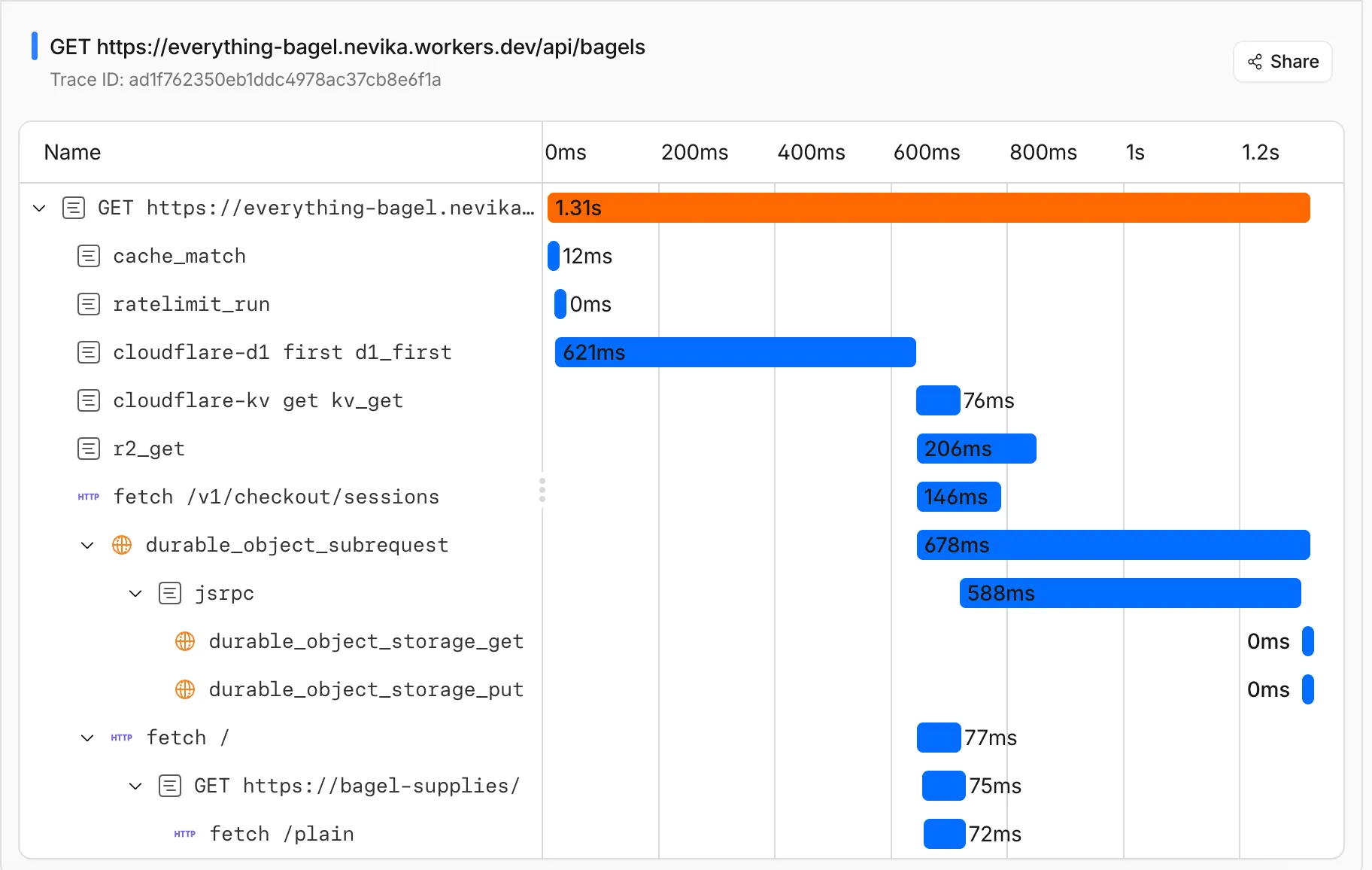
This means you can:
- Follow a request through your entire Worker architecture in one trace view
- See service binding and Durable Object calls as nested child spans instead of separate traces
- Debug cross-Worker request flows in the Cloudflare dashboard or in an external observability platform via OpenTelemetry
Tracing must be enabled in your Wrangler configuration for traces to be recorded. Checkout Workers tracing to get started.
Up next, we are working on external trace context propagation using W3C Trace Context standards ↗, which will allow traces from your Workers to link with traces from services outside of Cloudflare.
PhishNet users can now access Cloudy summaries directly within the email investigation experience. When reviewing a message in PhishNet, users will see an AI-generated summary that provides additional context and key details about the email.
These summaries help users quickly understand the nature of a message without needing to manually parse through headers, body content, and detection signals. Cloudy surfaces the most relevant information so users can make faster, more informed decisions about suspicious emails.
These summaries are not trained on customer data. They are generated using the outputs of our existing detection models and analysis systems.
This feature is available for PhishNet with Office 365. Support for Gmail will be available by the end of the quarter.
Cloudflare Mesh nodes now support IPv6 CIDR routes. You can advertise both IPv4 and IPv6 subnets through your Mesh nodes, making IPv6-only or dual-stack private networks reachable from any enrolled device.
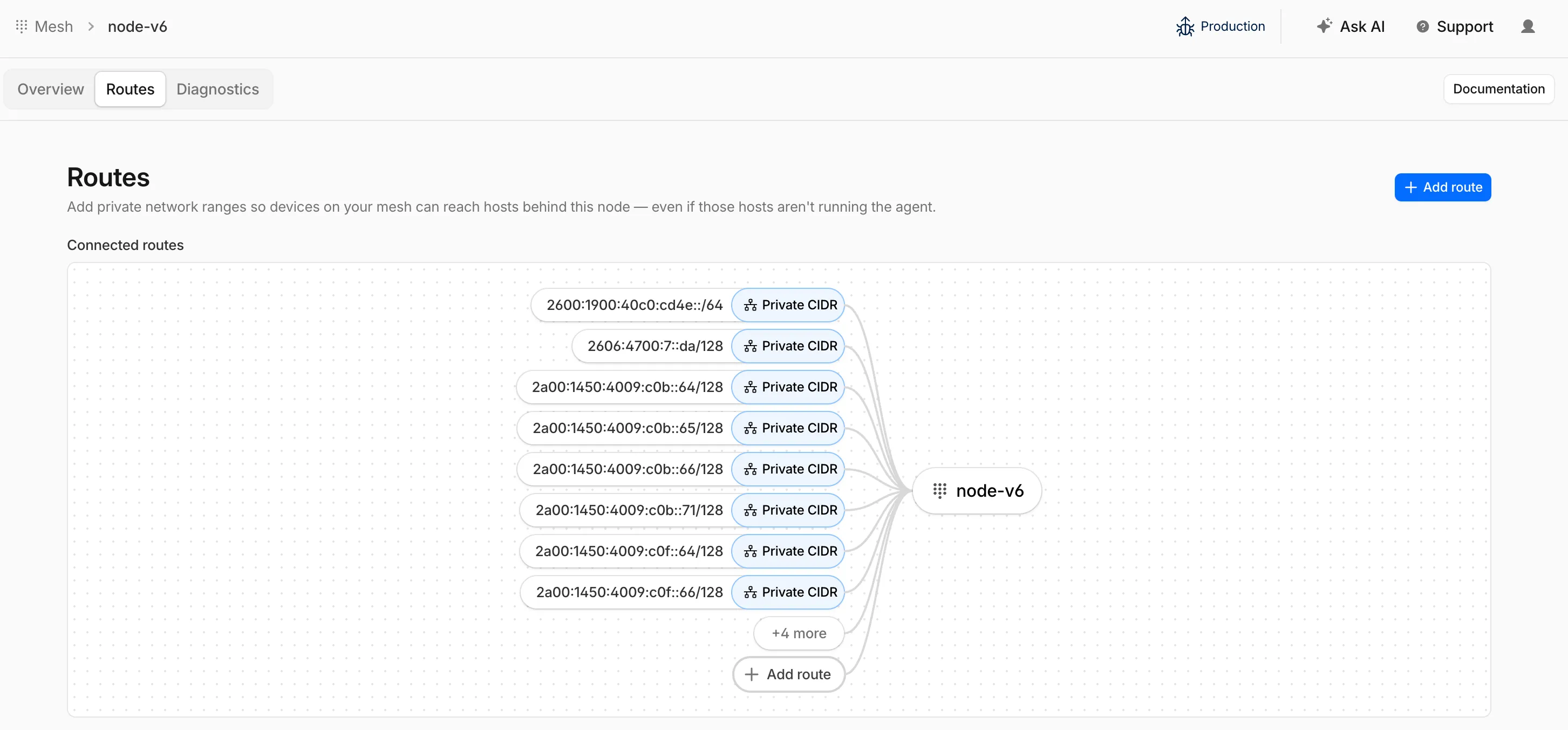
To add an IPv6 route, follow the same steps as adding an IPv4 route — enter the IPv6 CIDR (for example,
fd00::/64) when configuring the route in the dashboard ↗ or via the API.
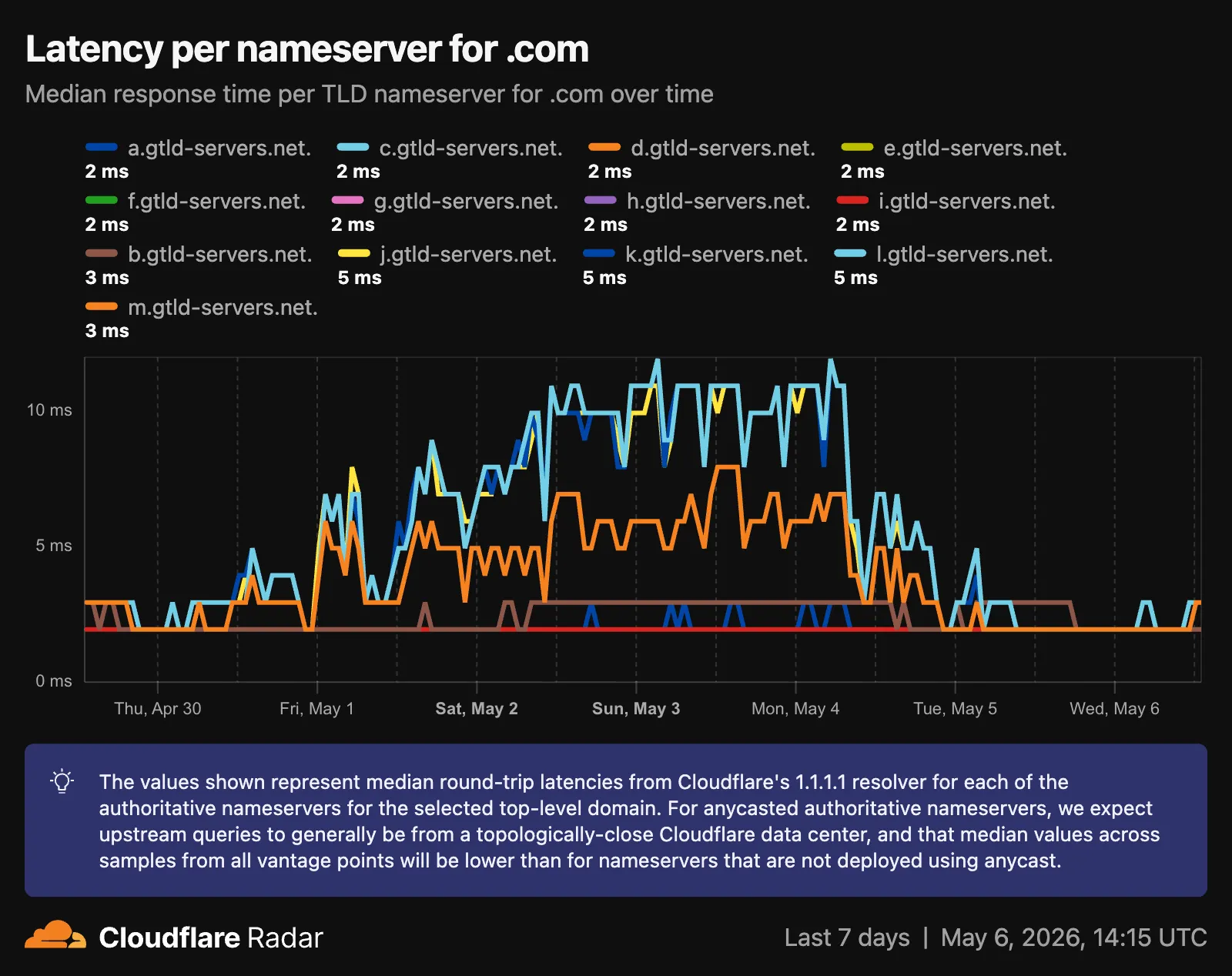
Radar now provides TLD authoritative nameserver performance insights, measuring response time (latency) as observed from Cloudflare's 1.1.1.1 resolver infrastructure when forwarding queries upstream to TLD nameservers.
New widgets on TLD detail pages ↗:
- Aggregate nameserver latency ↗: Response time percentiles (p25/p50/p75) for all authoritative nameservers of the selected TLD.
- Latency per nameserver ↗: Median response time (p50) broken down by each authoritative nameserver over time.
- Median latency geographic distribution ↗: p50 response time by Cloudflare data center country, displayed on a choropleth map.
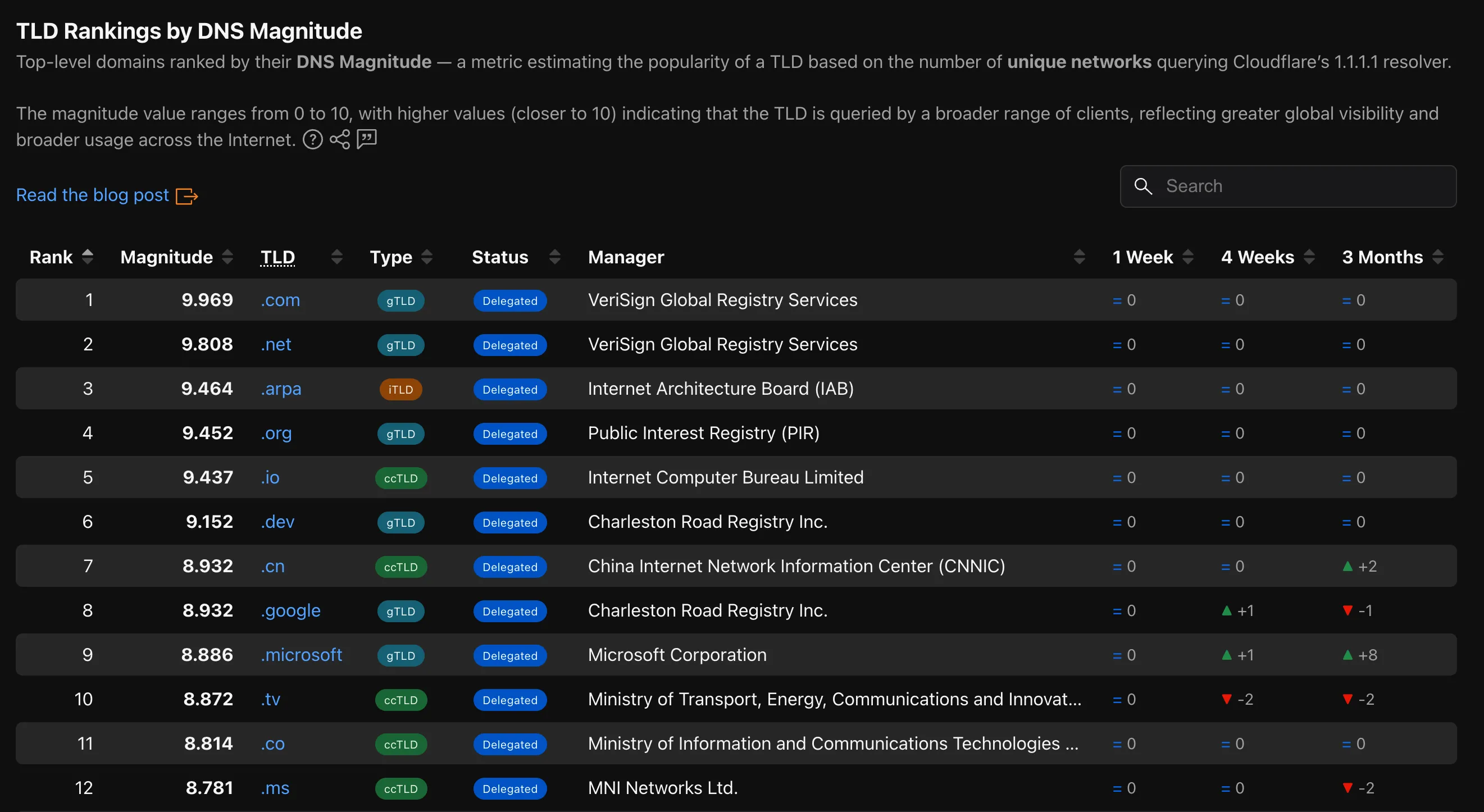
- TLD ranking over time ↗: Daily DNS magnitude rank and magnitude value with a Rank/Magnitude toggle.
- Rank change deltas ↗: 1 week, 4 weeks, and 3 months rank changes added to the TLD magnitude table and the TLD detail info panel.
The new
TLD PerformanceAPI provides the following endpoints:/tlds/performance/summary/{dimension}— TLD nameserver performance summarized by dimension./tlds/performance/timeseries_groups/{dimension}— TLD nameserver performance over time grouped by dimension.
Available dimensions:
LATENCY(aggregate p25/p50/p75),NAMESERVER_LATENCY(per-nameserver p50),LOCATION_LATENCY(per-data-center-country p50).TLD Performance is also available as a dataset in the Data Explorer ↗.
Check out the updated TLD detail page ↗.
The Cloudforce One Threat Events API now supports TAXII ↗ as an output format, enabling standardized, automated sharing of cyber threat intelligence with your existing security stack.
- You can now ingest Cloudforce One threat data directly into your SIEM, TIP or SOAR tools that prefer TAXII-formatted streams without needing custom translation scripts.
- By supporting the TAXII format parameter in our API, security teams can automate the synchronization of indicator data, reducing the manual overhead of updating blocklists and detection rules.
- This alignment with industry standards ensures that your threat data remains consistent across different security ecosystems and partner integrations.
When calling the Threat Events API, you can now specify
taxiiin theformatquery parameter:GET /accounts/{account_id}/cloudforce_one/threat_events?format=taxiiYou can find the updated documentation in the Cloudflare API Reference ↗.
Cloudflare's cache now runs on a new proxy built on Pingora ↗, the Rust-based framework that already serves a significant portion of Cloudflare's network traffic. The new proxy is faster, more memory-safe, and designed to evolve our cache architecture. It delivers immediate performance improvements and enables new caching capabilities.
- Lower latency: The new proxy reduces per-request overhead through improved connection reuse.
- Reduced cache MISSes: Enhanced cache retention improves origin offload.
- Better RFC compliance: Caching behavior more closely follows HTTP caching standards.
- Foundation for future features: The new architecture enables upcoming improvements to cache functionality and efficiency.
- Asynchronous
stale-while-revalidate: Every request returns stale content immediately while revalidation happens in the background, instead of the first request after expiry blocking on the origin. Refer to the asynchronousstale-while-revalidatechangelog for details. - Unbuffered bypass by default: Responses that bypass cache are streamed directly to the client without buffering, reducing time-to-first-byte for uncacheable content.
The new architecture introduces the following behavioral changes to improve RFC compliance and correctness:
Vary: *results in cache bypass: According to RFC 9110 Section 12.5.5 ↗, aVaryheader value of*indicates the response varies on factors beyond request headers and must not be served from cache. Cloudflare now bypasses cache for these responses instead of storing them.Set-Cookiestripped on MISS and EXPIRED: For cacheable assets,Set-Cookieis now stripped on MISS and EXPIRED responses, not only on HITs.- Floating-point TTL values: Floating-point time-to-live values (for example,
max-age=1.5) are rounded down to the nearest integer instead of being rejected as invalid.
A deeper look at the new cache proxy is coming soon to the Cloudflare blog ↗. For background on the underlying framework, read:
You can now navigate, switch context, and take common actions in the Cloudflare dashboard without leaving your keyboard. Press
?anywhere to see the full list. Keyboard shortcuts can be disabled by visiting your profile settings ↗.Shortcut Action g hGo to Home g aGo to account overview g zGo to zone overview g pGo to your profile g wGo to Workers & Pages g oGo to Zero Trust g bGo to billing g 1–g 5Go to a recent or pinned item (by position in sidebar) t →Move to the next tab t ←Move to the previous tab p →Move to the next page of a table p ←Move to the previous page of a table Shortcut Action /Open quick search ?Show keyboard shortcuts s aSwitch account s zSwitch zone s .Star or unstar the current zone p .Pin or unpin the current page t sToggle the sidebar open or closed t mExpand or collapse all sidebar menus t aToggle Ask AI sidebar d .Toggle dark mode c uCopy the current URL c dCopy a deep link URL
Cloudflare Pipelines ingests streaming data via Workers or HTTP endpoints, transforms it with SQL, and writes it to R2 as Apache Iceberg tables. R2 Data Catalog manages those Iceberg tables, compaction, and compatibility with query engines like R2 SQL, Spark, and DuckDB.
You can now create and manage both products using Terraform, supported in the Cloudflare Terraform provider v5.19.0 ↗.
This adds four new resources that let you define your entire data pipeline as infrastructure-as-code: a data catalog, a stream for ingestion, a sink that writes to R2 Data Catalog or R2, and a pipeline that connects them with SQL.
The new Terraform resources are:
cloudflare_r2_data_catalog↗ — enable the data catalog on an R2 bucketcloudflare_pipeline_stream↗ — create a stream that receives events via HTTP or Worker bindingscloudflare_pipeline_sink↗ — create a sink that writes to R2 Data Catalog or R2cloudflare_pipeline↗ — create a pipeline with SQL connecting a stream to a sink
Here is a minimal example that creates a stream, an R2 Data Catalog sink, and a pipeline:
resource "cloudflare_pipeline_stream" "my_stream" {account_id = var.cloudflare_account_idname = "my_stream"format = { type = "json" }schema = {fields = [{name = "value"type = "json"required = true}]}http = { enabled = true, authentication = false, cors = {} }worker_binding = { enabled = false }}resource "cloudflare_pipeline_sink" "my_sink" {account_id = var.cloudflare_account_idname = "my_sink"type = "r2_data_catalog"format = { type = "parquet" }schema = { fields = [] }config = {account_id = var.cloudflare_account_idbucket = "my-pipeline-bucket"table_name = "my_table"token = var.catalog_token}}resource "cloudflare_pipeline" "my_pipeline" {account_id = var.cloudflare_account_idname = "my_pipeline"sql = "INSERT INTO ${cloudflare_pipeline_sink.my_sink.name} SELECT * FROM ${cloudflare_pipeline_stream.my_stream.name}"}For a full end-to-end example that includes R2 bucket creation, data catalog setup, and scoped API token provisioning, refer to the Pipelines Terraform documentation.
Radar is expanding its Routing section ↗ with two new widgets that give a deeper view into how networks announce address space and how RPKI ROA coverage evolves over time.
Country routing pages now include a Top ASes by announced IP space chart, breaking down the IPv4 and IPv6 address space announced from a country across the autonomous systems that originate it. The chart stacks the IPv4 and IPv6 views vertically, with the top contributing ASes called out by color and the remaining networks aggregated as Other.
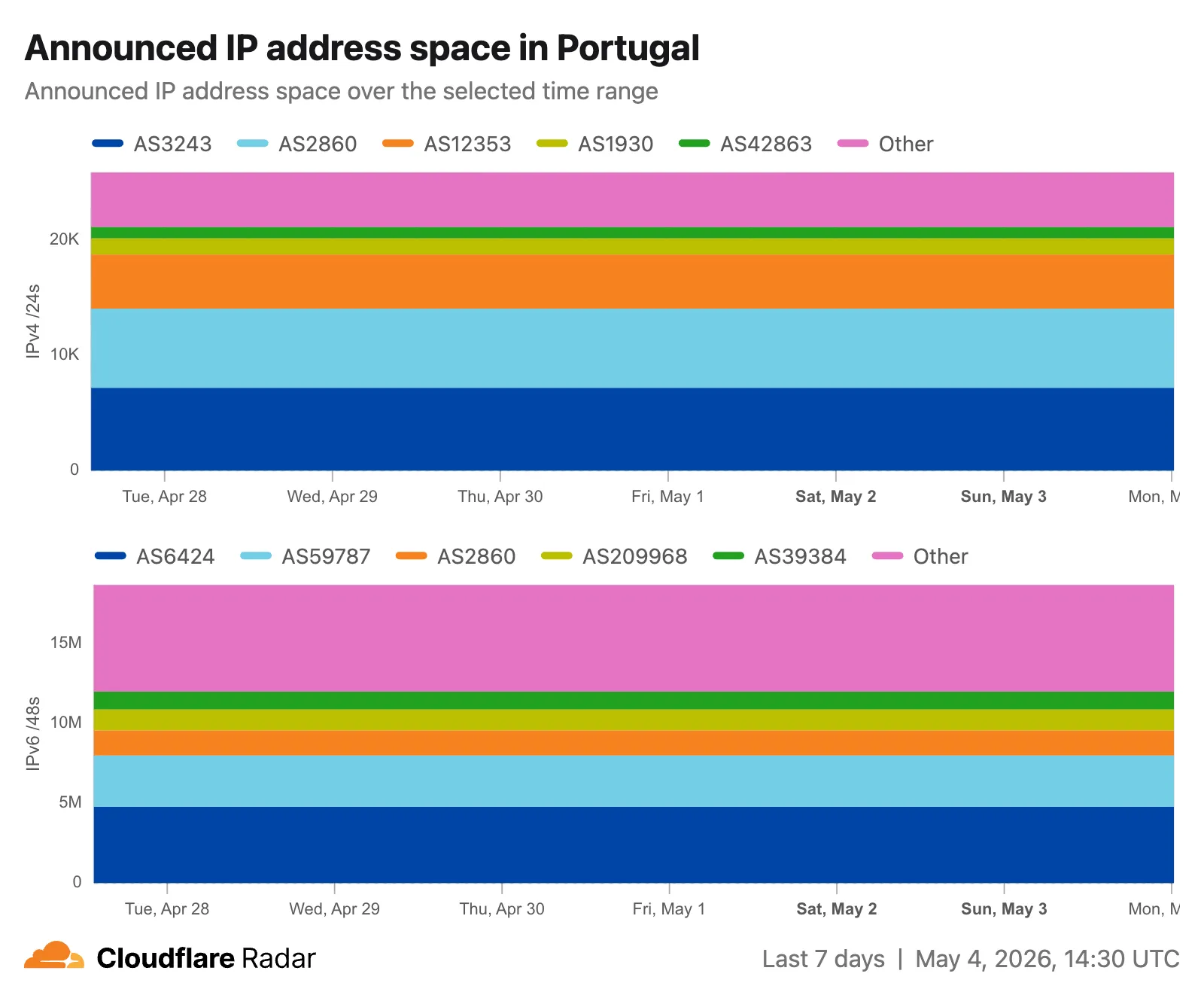
The RPKI sub-page ↗ adds an RPKI ROA deployment timeseries widget that tracks the share of announced BGP space covered by a valid Route Origin Authorization (ROA) over time, with separate IPv4 and IPv6 lines. A toggle switches the view between the share of covered prefixes and the share of covered IP address space. The widget is available on global, country, and AS views, so operators can monitor RPKI adoption progress and compare deployment trends across different scopes.
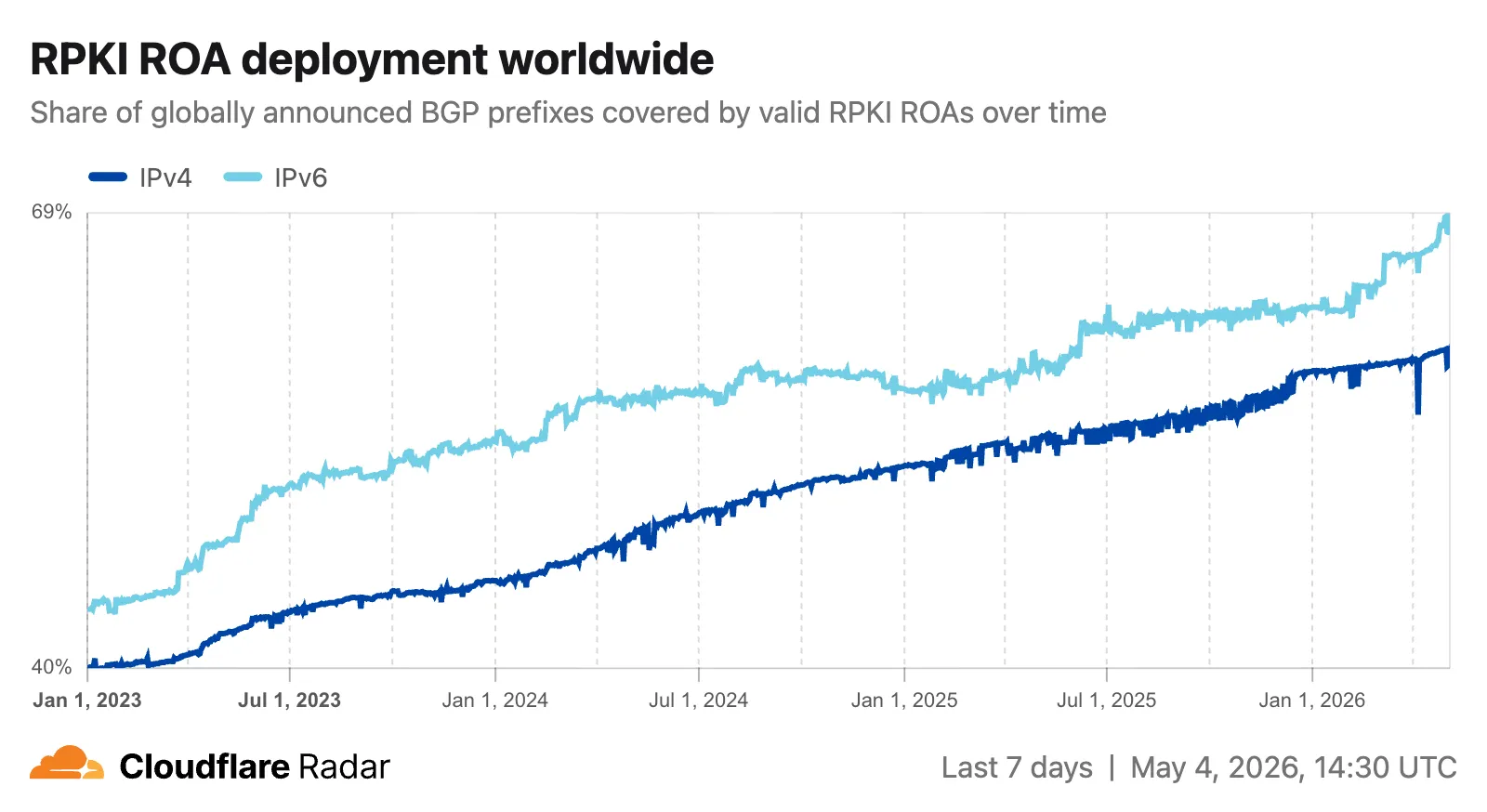
The data behind these widgets is also available through two new endpoints on the
BGPAPI:/bgp/ips/top/ases- Returns the top autonomous systems by announced IP space (IPv4/24s or IPv6/48s), globally or filtered by country, snapped to the nearest 8-hour RIB boundary./bgp/rpki/roas/timeseries- Returns RPKI ROA validation coverage over time, by share of prefixes or share of IP address space, split by IP version, with optional ASN or location filters.
Visit the Radar routing section ↗ to explore both widgets.
This week's release focuses on new detections to expand coverage across command injection, SQL injection, PHP object injection, remote code execution, and XSS attack vectors.
Key Findings
- Existing rule enhancements have been deployed to improve detection resilience against broad classes of web attacks and strengthen behavioral coverage.
Continuous Rule Improvements
We are continuously refining our managed rules to provide more resilient protection and deeper insights into attack patterns. To ensure an optimal security posture, we recommend consistently monitoring the Security Events dashboard and adjusting rule actions as these enhancements are deployed.
Ruleset Rule ID Legacy Rule ID Description Previous Action New Action Comments Cloudflare Managed Ruleset N/A XSS, HTML Injection - Object Tag - Body (beta) Log Block This is a new detection. This rule is merged into the original rule "XSS, HTML Injection - Object Tag" (ID:
Cloudflare Managed Ruleset N/A XSS, HTML Injection - Object Tag - Headers Log Block This is a new detection. The rule previously known as "XSS, HTML Injection - Object Tag - Headers (beta)" is now renamed to "XSS, HTML Injection - Object Tag - Headers".
Cloudflare Managed Ruleset N/A XSS, HTML Injection - Object Tag - URI Log Block This is a new detection. The rule previously known as "XSS, HTML Injection - Object Tag - URI (beta)" is now renamed to "XSS, HTML Injection - Object Tag - URI".
Cloudflare Managed Ruleset N/A Command Injection - Generic 9 - Body Vector - Beta N/A Disabled This is a new detection. This rule is merged into the original rule "Command Injection - Generic 9 - Body Vector" (ID:
Cloudflare Managed Ruleset N/A Command Injection - Generic 9 - Header Vector - Beta N/A Disabled This is a new detection. This rule is merged into the original rule "Command Injection - Generic 9 - Header Vector" (ID:
Cloudflare Managed Ruleset N/A Command Injection - Generic 9 - URI Vector - Beta N/A Disabled This is a new detection. This rule is merged into the original rule "Command Injection - Generic 9 - URI Vector" (ID:
Cloudflare Managed Ruleset N/A Command Injection - Sleep - Body N/A Disabled This is a new detection. The rule previously known as "Command Injection
- Sleep" is now renamed to "Command Injection - Sleep - Body".
Cloudflare Managed Ruleset N/A Command Injection - Sleep - Headers N/A Disabled This is a new detection. Cloudflare Managed Ruleset N/A Command Injection - Sleep - URI N/A Disabled This is a new detection. Cloudflare Managed Ruleset N/A Fortinet FortiSandbox - Command Injection - CVE:CVE-2026-39808 Log Block This is a new detection. Cloudflare Managed Ruleset N/A Remote Code Execution - Common Bash Bypass - Headers N/A Disabled This is a new detection. Cloudflare Managed Ruleset N/A Remote Code Execution - Common Bash Bypass - URI N/A Disabled This is a new detection. Cloudflare Managed Ruleset N/A Remote Code Execution - Common Bash Bypass - Body - Beta N/A Disabled This is a new detection. This rule is merged into the original rule "Remote Code Execution - Common Bash Bypass Body" (ID:
Cloudflare Managed Ruleset N/A PHP Object Injection - 2 - Body - Beta N/A Disabled This is a new detection. This rule is merged into the original rule "PHP Object Injection - 2" (ID:
Cloudflare Managed Ruleset N/A PHP Object Injection - 2 - Headers N/A Disabled This is a new detection. Cloudflare Managed Ruleset N/A PHP Object Injection - 2 - URI N/A Disabled This is a new detection. Cloudflare Managed Ruleset N/A SQLi - DROP - 2 - Beta N/A Disabled This is a new detection. This rule is merged into the original rule "SQLi - DROP - 2" (ID:
Cloudflare Managed Ruleset N/A SQLi - DROP - 2 - Headers N/A Disabled This is a new detection. Cloudflare Managed Ruleset N/A SQLi - DROP - 2 - URI N/A Disabled This is a new detection. Cloudflare Managed Ruleset N/A SmarterMail - Remote Code Execution - CVE:CVE-2026-24423 Log Block This is a new detection. Cloudflare Managed Ruleset N/A SQLi - SELECT Expression - Body Block Disabled Action changed Cloudflare Managed Ruleset N/A SQLi - String Concatenation - URI Block Disabled Action changed
You can now use
@cloudflare/dynamic-workflows↗ to run a Workflow inside a Dynamic Worker, ensuring durable execution for code that is loaded at runtime.The Worker Loader loads Dynamic Workers on demand, which previously made durability challenging. Even within a Dynamic Worker, a Workflow might sleep for hours or days between steps, and by the time it resumes, the original Dynamic Worker code would no longer be in memory.
The library solves this by tagging each Workflow instance with metadata that identifies which Dynamic Worker to load — for example, a tenant ID — then reloading the matching Dynamic Worker through the Worker Loader whenever a Workflow awakens.
Because Dynamic Workers are created on-demand, you do not have to register each Workflow up front or manage them individually. Load the Workflow code in the Dynamic Worker when it is needed, and the Workflows engine handles persistence and retries behind the scenes. Your Workflow code itself is unaffected by the routing and behaves as normal.
This unlocks patterns where the Workflow code itself is dynamic. For example, this is useful with:
- SaaS platforms where each tenant defines their own automation, such as onboarding sequences, approval chains, or billing retry logic.
- AI agent frameworks where agents generate and execute multi-step plans at runtime, surviving restarts and waiting for human approval between tool calls.
- Multi-tenant job systems where each customer submits their own processing logic and every step persists progress and retries on failure.
TypeScript import {createDynamicWorkflowEntrypoint,DynamicWorkflowBinding,wrapWorkflowBinding,type WorkflowRunner,} from "@cloudflare/dynamic-workflows";export { DynamicWorkflowBinding };interface Env {WORKFLOWS: Workflow;LOADER: WorkerLoader;}function loadTenant(env: Env, tenantId: string) {return env.LOADER.get(tenantId, async () => ({compatibilityDate: "2026-01-01",mainModule: "index.js",modules: { "index.js": await fetchTenantCode(tenantId) },// The Dynamic Worker uses this exactly like a real Workflow binding;// every create() is tagged with { tenantId } automatically.env: { WORKFLOWS: wrapWorkflowBinding({ tenantId }) },}));}// The entrypoint name must match `class_name` in the workflows binding of your Wrangler config file.export const DynamicWorkflow = createDynamicWorkflowEntrypoint<Env>(async ({ env, metadata }) => {const stub = loadTenant(env, metadata.tenantId as string);return stub.getEntrypoint("TenantWorkflow") as unknown as WorkflowRunner;},);export default {fetch(request: Request, env: Env) {const tenantId = request.headers.get("x-tenant-id")!;return loadTenant(env, tenantId).getEntrypoint().fetch(request);},};For a full walkthrough, refer to the Dynamic Workflows guide.
Cloudflare IPsec now supports post-quantum key agreement with compatible third-party devices. Cisco ↗ and Fortinet ↗ are the first third-party vendors validated to interoperate with Cloudflare IPsec using ML-KEM (Module-Lattice-Based Key-Encapsulation Mechanism).
Post-quantum IPsec uses RFC 9370 ↗ and draft-ietf-ipsecme-ikev2-mlkem ↗ to negotiate hybrid key agreement during the IKEv2
IKE_INTERMEDIATEphase. This combines classical Diffie-Hellman (Group 20) with ML-KEM-768 or ML-KEM-1024 to protect against harvest-now, decrypt-later ↗ attacks.Key details:
- Compatible with Cisco 8000 Series Secure Routers with IOS XR Release 26.1.1 and Fortinet FortiOS 7.6.6 and later.
- Uses ML-KEM-768 or ML-KEM-1024 as an additional Key Exchange to DH Group 20.
- Follows RFC 9370 and draft-ietf-ipsecme-ikev2-mlkem standards.
- No additional licensing required.
Post-quantum IPsec with third-party devices is now generally available with confirmed interoperability for the platforms listed above. Cloudflare intends to support interoperability with more vendors as they build out support for draft-ietf-ipsecme-ikev2-mlkem. Contact your account team to discuss support for additional vendors.
For supported key exchange methods and the list of validated platforms, refer to GRE and IPsec tunnels.
Cloudflare DLP now includes Data Classification, which lets administrators organize and label sensitive content using labels, templates, and reusable data classes.
With Data Classification, administrators can define labels such as sensitivity schemas and levels, and data tag groups and tags. Administrators can also build from Cloudflare-managed templates and create reusable data classes that combine detection entries, other data classes, sensitivity levels, and data tags.
You can then use those classifications in custom DLP profiles to identify the severity of sensitive content, understand where it exists, and apply that logic consistently across DLP profiles.
For more information, refer to Data Classification.