

Cloudflare DLP now includes new predefined detection entries.
The expanded catalog includes detections for specific credential types, webhooks, addresses, tax identifiers, national IDs, financial data, and crypto wallets.
Examples include
GitHub PAT,OpenAI API Key,Slack Webhook,Discord Webhook,US Physical Address, andBitcoin Wallet.For the full list, refer to Predefined detection entries.
Full Changelog: v6.10.0...v7.0.0 ↗
This is a major version release that includes breaking changes to three packages:
ai_search,email_security, andworkers. These changes reflect upstream API specification updates that improve type correctness and consistency.Please ensure you read through the list of changes below before moving to this version - this will help you understand any down or upstream issues it may cause to your environments.
See the v7.0.0 Migration Guide ↗ for before/after code examples and actions needed for each change.
The
SearchForAgentsnested type has been removed from all instance metadata structs. This field is no longer part of the API specification.Removed Types:
InstanceNewResponseMetadataSearchForAgentsInstanceUpdateResponseMetadataSearchForAgentsInstanceListResponseMetadataSearchForAgentsInstanceDeleteResponseMetadataSearchForAgentsInstanceReadResponseMetadataSearchForAgentsInstanceNewParamsMetadataSearchForAgentsInstanceUpdateParamsMetadataSearchForAgentsNamespaceInstanceNewResponseMetadataSearchForAgentsNamespaceInstanceUpdateResponseMetadataSearchForAgentsNamespaceInstanceListResponseMetadataSearchForAgentsNamespaceInstanceDeleteResponseMetadataSearchForAgentsNamespaceInstanceReadResponseMetadataSearchForAgentsNamespaceInstanceNewParamsMetadataSearchForAgentsNamespaceInstanceUpdateParamsMetadataSearchForAgents
Multiple Email Security settings sub-resources have changed their path parameter types from
int64tostring:AllowPolicies(policyID int64->policyID string)BlockSenders(patternID int64->patternID string)Domains(domainID int64->domainID string)ImpersonationRegistry(displayNameID int64->impersonationRegistryID string)TrustedDomains(trustedDomainID int64->trustedDomainID string)
The
Investigate.Get,Investigate.Move.New, andInvestigate.Reclassify.Newmethods now useinvestigateIDinstead ofpostfixIDas the path parameter name.The
SettingDomainService.BulkDeletemethod and its associated types have been removed:SettingDomainBulkDeleteResponseSettingDomainBulkDeleteParams
SettingTrustedDomainService.Newnow returns*SettingTrustedDomainNewResponseinstead of*SettingTrustedDomainNewResponseUnion.InvestigateMoveService.Newnow returns*pagination.SinglePage[InvestigateMoveNewResponse]instead of*[]InvestigateMoveNewResponse.The observability telemetry filter parameter types have been restructured to support nested filter groups. New discriminated union types replace the previous flat filter arrays:
ObservabilityTelemetryKeysParams.Filtersnow acceptsFiltersObjectFilterUnion(was[]interface\{\})ObservabilityTelemetryQueryParams.Parameters.Filtersnow acceptsFiltersObjectFilterUnionObservabilityTelemetryValuesParams.Filtersnow acceptsFiltersObjectFilterUnion
New types include
FiltersObjectFiltersObject(for group filters withFilterCombination) andFiltersWorkersObservabilityFilterLeaf(for leaf filters with typedOperation,Type, andValuefields).NEW SERVICE: Query organization audit logs with cursor-based pagination.
List()- Retrieve audit logs
client.BrowserRendering.Devtools.Browser.Targets.Close()- Close a specific browser target (tab, page) by ID
client.Queues.GetMetrics()- Retrieve queue metrics for a specific queue
- Added
WaitForCompletionparameter toNamespaceInstanceItemNewOrUpdateParamsandNamespaceInstanceItemSyncParamsfor synchronous indexing confirmation
- Magic Transit:
ConnectorService.Listparameter name corrected fromquerytoparams(non-functional, affects generated documentation only)
None in this release.
You can now empty an entire R2 bucket or delete folders directly from the dashboard. Emptying a bucket is required before you can delete it. Previously, this required scripting or configuring lifecycle rules. Now, the dashboard can handle it in a single action.
Go to your bucket's Settings tab and select Empty under the Empty Bucket section. This deletes all objects in the bucket while preserving the bucket and its configuration. For large buckets, the operation runs in the background and the dashboard displays progress.
Emptying a bucket is also a prerequisite for deleting it. The dashboard now guides you through both steps in one place.
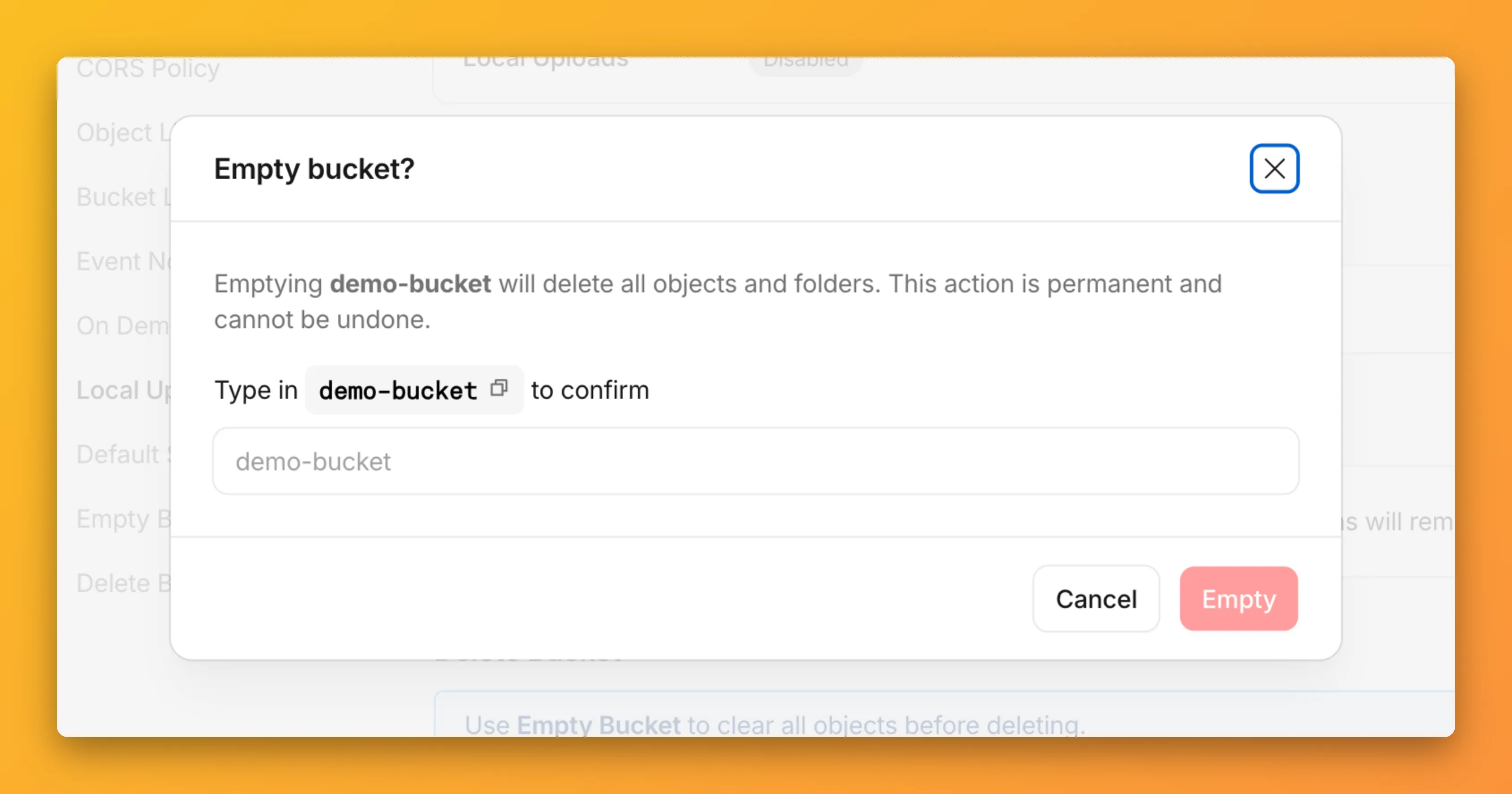
R2 uses a flat object structure. The dashboard groups objects that share a common prefix into folders when the View prefixes as directories checkbox is selected. Deleting a folder removes every object under that prefix.
From the Objects tab, you can select one or more folders and delete them alongside individual objects.
For step-by-step instructions, refer to Delete buckets and Delete objects.
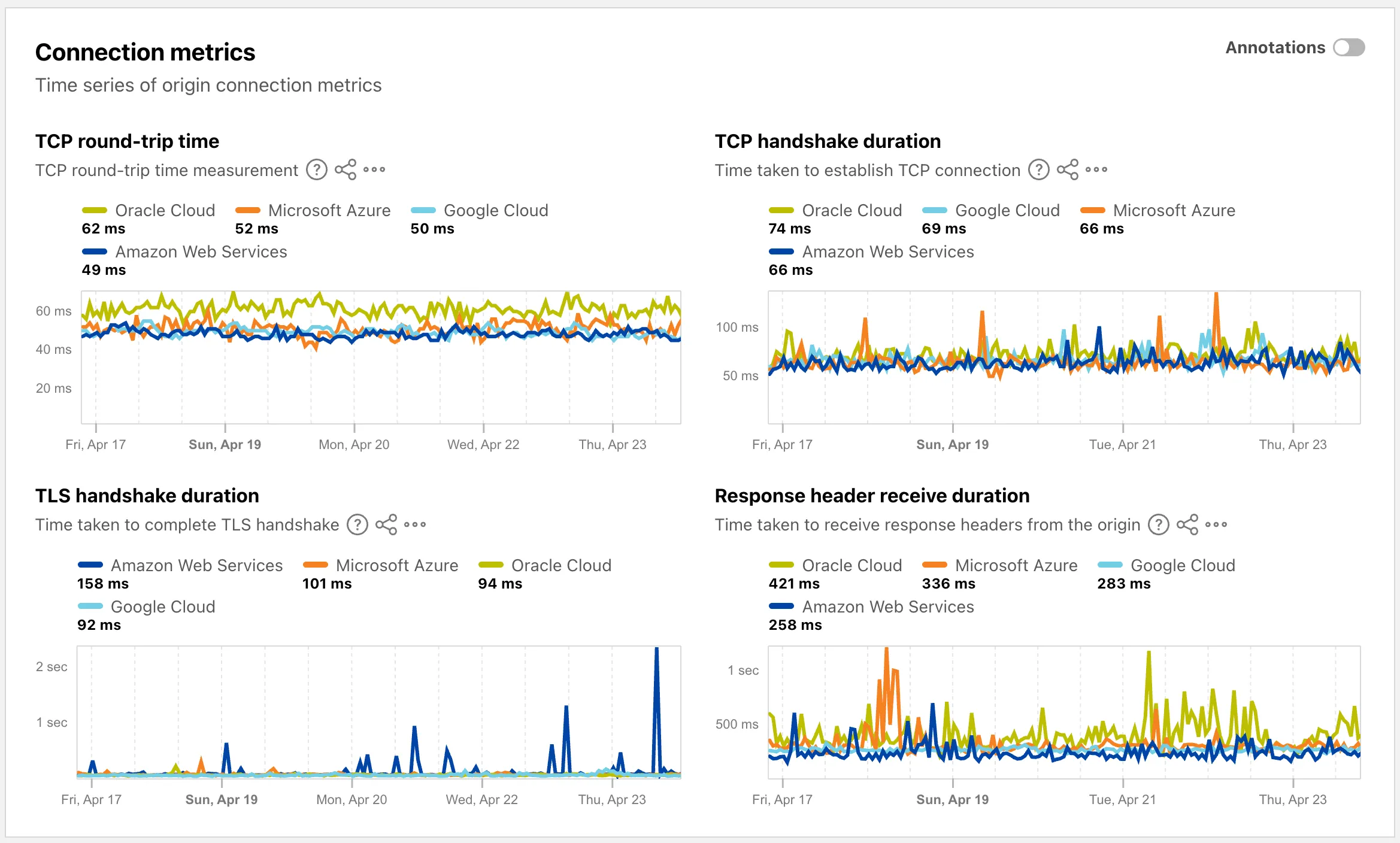
The Cloud Observatory ↗ on Radar now provides improved connection metric insights, offering new ways to explore TCP round-trip time, TCP handshake duration, TLS handshake duration, and response header receive duration across cloud provider origin servers.
The Cloud Observatory overview ↗ now shows connection metrics broken down by cloud provider, making it easy to compare connection performance across Amazon Web Services, Google Cloud, Microsoft Azure, and Oracle Cloud.
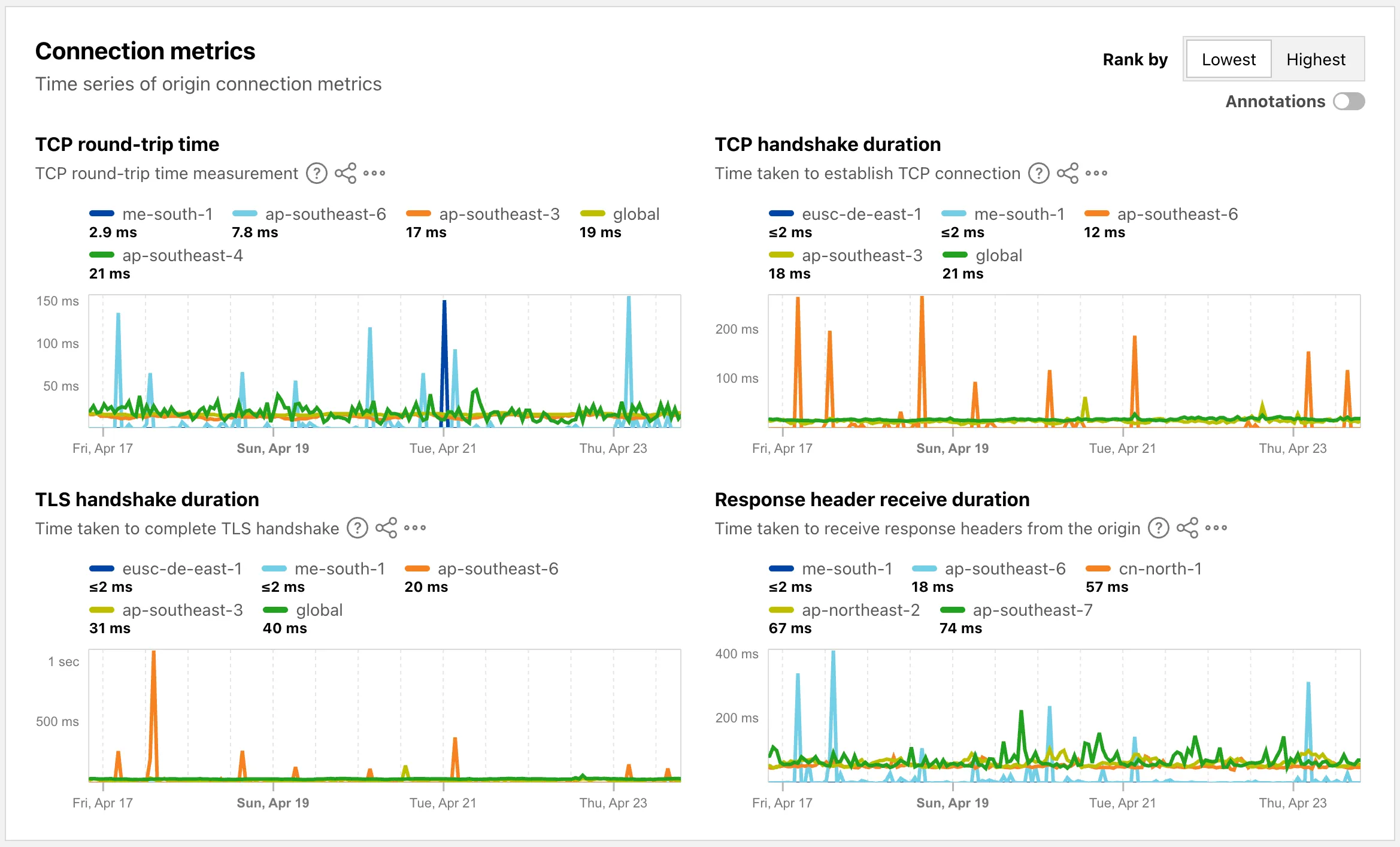
Each provider page ↗ now shows connection metrics for the top five regions, with a selector to rank by lowest or highest values.
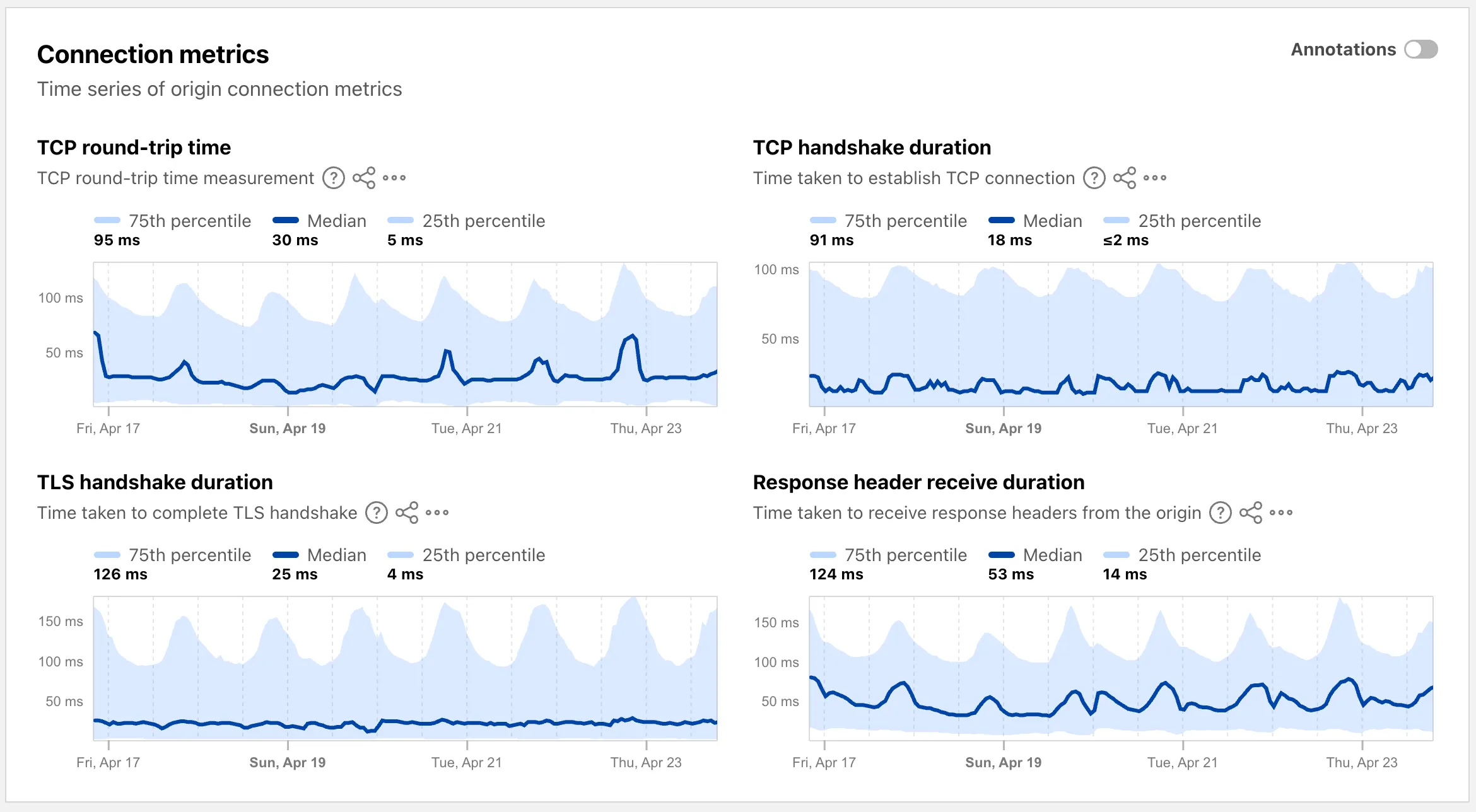
Each region page ↗ now displays connection metrics as percentile distributions (25th percentile, median, and 75th percentile), providing insight into the range and variability of connection times.
These views are also available through the
OriginsAPI, using thetimeseries_groupsendpoint with theORIGIN,REGION, orPERCENTILEdimension.
Radar now supports dark mode. A theme selector in the upper right corner of the page lets users explicitly choose between three display options:
- Light — standard light theme
- Dark — full dark theme
- System — follows the operating system preference
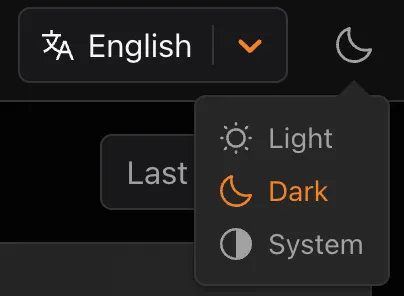
The selected theme applies consistently across all Radar pages and widgets.
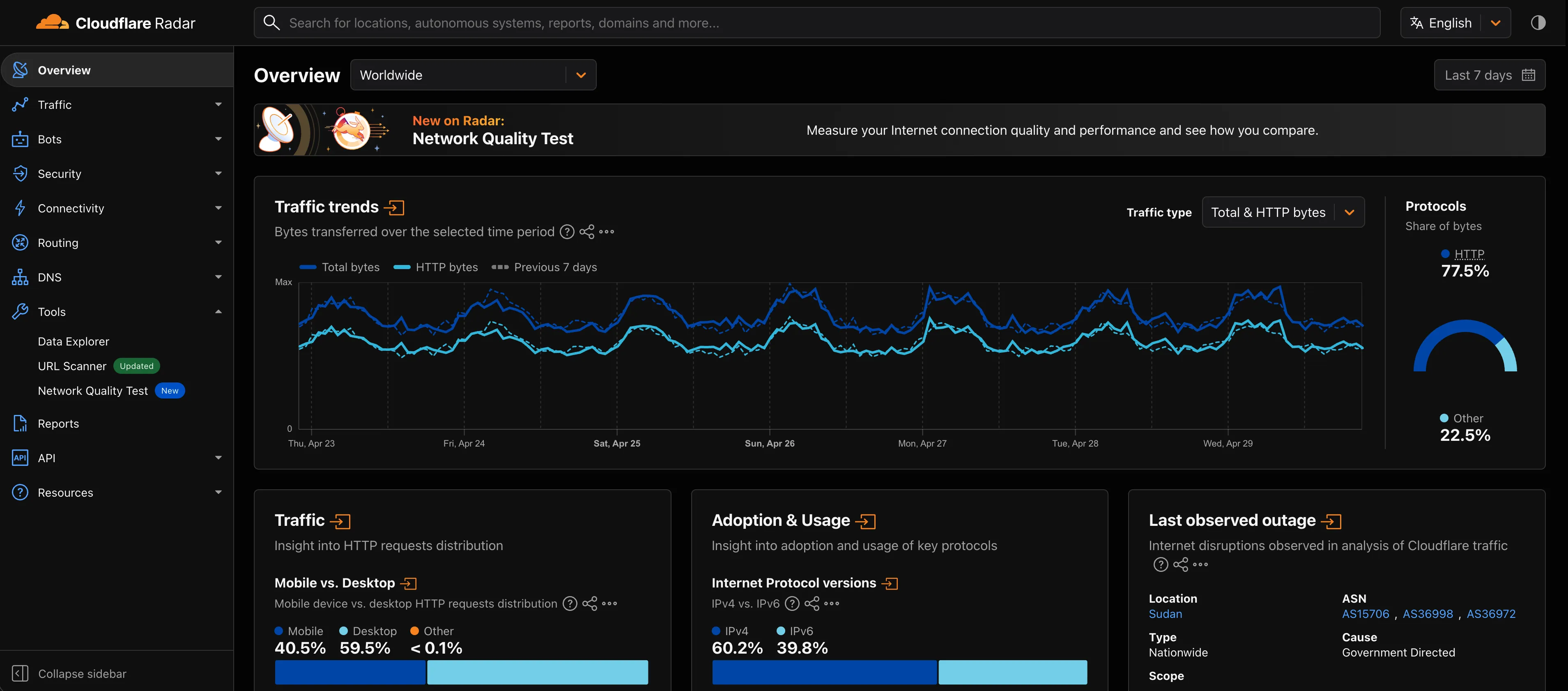
The theme choice also applies to shared and embedded graphs.
Try it out at Cloudflare Radar ↗.
Full Changelog: v4.3.1...v5.0.0 ↗
This is a major release of the Cloudflare Python SDK. It drops support for Python 3.8, adds 11 new API services, introduces optional aiohttp backend support for improved async concurrency, and includes hundreds of type and method updates across the entire API surface.
Please review the breaking changes below before upgrading. A migration guide is available at v5.0.0 Migration Guide ↗.
- Python 3.8 is no longer supported. The minimum required version is now Python 3.9.
typing-extensionsminimum version bumped from>=4.10to>=4.14.
The following resources have breaking changes. See the v5.0.0 Migration Guide ↗ for detailed migration instructions.
abusereportsacm.totaltlsapigateway.configurationscloudforceone.threateventsd1.databaseintel.indicatorfeedslogpush.edgeorigintlsclientauth.hostnamesqueues.consumersradar.bgprulesets.rulesschemavalidation.schemassnippetszerotrust.dlpzerotrust.networks
The async client now supports an optional
aiohttpHTTP backend for improved concurrency performance. Install withpip install cloudflare[aiohttp]and useDefaultAioHttpClient()as thehttp_clientparameter.Python 3.13 and 3.14 are now tested and supported.
The following top-level resources are new in this release:
Resource Client Path Description AI Search aisearchAI-powered search capabilities Connectivity connectivityConnectivity testing and diagnostics Email Sending email_sendingEmail send and send_raw endpoints Fraud fraudFraud detection and prevention Google Tag Gateway google_tag_gatewayGoogle Tag Gateway management Organizations organizationsOrganization audit logs and management R2 Data Catalog r2_data_catalogR2 Data Catalog operations Realtime Kit realtime_kitRealtime communication (Calls/TURN) Resource Tagging resource_taggingResource tagging and labeling Token Validation token_validationToken validation configuration and rules Vulnerability Scanner vulnerability_scannerVulnerability scanning, credential sets, and target environments - api_gateway: Labels endpoints
- billing: Billable usage PayGo endpoint
- brand_protection: v2 endpoints
- browser_rendering: DevTools methods
- cache: Origin cloud regions resource
- custom_origin_trust_store: Custom origin trust store
- dns:
dns_records/usageendpoints - email_security: Phishguard reports endpoint
- iam: User groups and user group members resources
- radar: Botnet Threat Feed and Post-Quantum endpoints
- workers: Observability Destinations resources
- zero_trust: Access Users, DEX rules, Device IP Profile, Device Subnet, WARP Connector connections and failover, WARP Subnet, Gateway PAC files
- zones: Zone environments endpoints
- Fixed
polymorphic_serializationparameter inmodel_dumpoverrides - Added
BaseModelbase to responseSchemaFieldStruct/SchemaFieldListstubs in Pipelines - Added missing
model_rebuild/update_forward_refsforSharedEntryCustomEntryclasses in DLP - Made
RunQueryParametersNeedleValueaBaseModelwitharbitrary_types_allowedin Workers - Removed duplicate
notification_urlfield in webhook response types for Stream - Resolved pre-existing codegen type errors
- Fixed
type: ignore[call-arg]placement for mypy compatibility in Radar
Resources with
@deprecatedannotations on some methods include:accounts,addressing,ai-gateway,aisearch,api-gateway,billing,cloudforce-one,dns,email-routing,email-security,filters,firewall,images,intel,kv,logpush,origin-tls-client-auth,pages,pipelines,radar,rate-limits,registrar,rulesets,ssl,user,workers,workers-for-platforms,zero-trust,zones
Full Changelog: v6.0.0-beta.2...v6.0.0 ↗
This is a major version release of the Cloudflare TypeScript SDK. It includes 11 entirely new top-level API resources, new sub-resources and methods across 50+ existing resources, SDK infrastructure improvements, and breaking changes to the generated API surface from the v5.x line.
Please ensure you read through the list of changes below before moving to this version - this will help you understand any down or upstream issues it may cause to your environments.
- Retry-After handling changed: The SDK now respects any server-specified
Retry-Aftervalue for rate-limited requests. Previously, values over 60 seconds were ignored and a default backoff was used instead. - Empty response handling: Responses with
content-length: 0now returnundefinedinstead of attempting to parse the body. - Environment variable reading: Empty string env vars (for example,
CLOUDFLARE_API_TOKEN="") are now treated as unset. - Path query parameter merging: URL search params embedded in endpoint paths are now extracted and merged into the query object.
17 HTTP endpoints were removed from the SDK, affecting
abuse-reports,cloudforce-one,dlp/profiles/predefined,email-security/investigate,email-security/settings, andintel/ip-list.client.ai.toMarkdown.transform(file, \{ ...params \})->client.ai.toMarkdown.transform(\{ ...params \})--filemoved from positional arg into params bodyclient.radar.ai.toMarkdown.create(body, \{ ...params \})->client.radar.ai.toMarkdown.create(\{ ...params \})--bodymoved from positional arg into paramsclient.abuseReports.create(reportType, \{ ...params \})->client.abuseReports.create(reportParam, \{ ...params \})-- positional arg renamedclient.iam.userGroups.members.create(userGroupId, [ ...body ])->client.iam.userGroups.members.create(userGroupId, [ ...members ])-- body array param renamed
client.originTLSClientAuth.hostnames.certificates->client.originTLSClientAuth.zoneCertificatesclient.radar.netflows->client.radar.netFlows(casing change)
- 133 methods now return
nullinstead of a typed response object. This primarily affects delete operations acrossaccounts,cache,d1,filters,firewall,hyperdrive,iam,kv,logpush,logs,r2,stream,workers,zero-trust,zones, and others. - 17 methods changed pagination type (for example,
KeysCursorPaginationAfter->KeysCursorLimitPagination). - 29 methods changed to a different named type (for example,
CloudflaredCreateResponse->CloudflareTunnel).
24 shared types removed from root namespace (
ASN,AuditLog,Member,Permission,Role,Subscription,Token, etc.). 19 response types consolidated or renamed.19 resources were restructured from single files to directories. Public API client paths are unchanged, but deep imports may break.
11 entirely new resources added to the client:
Resource Client Path Methods Description AI Search client.aiSearch46 Instances, namespaces, tokens, and items Connectivity client.connectivity5 Directory service APIs Email Sending client.emailSending7 Send and send_raw endpoints Fraud client.fraud2 Fraud detection API Google Tag Gateway client.googleTagGateway2 Google Tag Gateway management Organizations client.organizations8 Organization profiles and audit logs R2 Data Catalog client.r2DataCatalog11 R2 Data Catalog routes Realtime Kit client.realtimeKit54 Realtime Kit APIs Resource Tagging client.resourceTagging9 Resource tagging routes Token Validation client.tokenValidation13 Token validation rules Vulnerability Scanner client.vulnerabilityScanner21 Vulnerability scanning - browser-rendering:
crawl,devtools- Crawl endpoints and DevTools methods - cache:
origin-cloud-regions- Origin cloud regions resource - dns:
usage- DNS records usage endpoints - d1:
time-travel- Time travel get_bookmark and restore - email-security:
phishguard- Phishguard reports endpoint - pipelines:
sinks,streams- Pipelines restructure - radar:
agent-readiness,geolocations,post-quantum- New analytics endpoints - workers:
observability- Observability destinations - zones:
environments- Zone environments endpoints - api-gateway:
labels- Labels endpoints - brand-protection:
v2- V2 endpoints - alerting:
silences- Alert silencing API - billing:
usage- Billable usage PayGo endpoint - iam:
sso- SSO Connectors resource - queues:
getMetricsmethod - Queues metrics endpoint - registrar:
registration-status,update-status- Registrar API convergence - zero-trust: DLP settings, DEX rules, Access Users, WARP Connector, WARP Subnets, Gateway PAC files, Gateway tenants
- Resolved type errors from codegen overwriting manual fixes
- Fixed
post()usage for to-markdown endpoints to resolve async type error - Added least-privilege permissions to all workflow jobs
- Reverted erroneous removal of rulesets resource methods and types
- Resolved prettier formatting errors in codegen output
The following resources now include
@deprecatedannotations on some methods:accounts,addressing,ai-gateway,aisearch,api-gateway,billing,cloudforce-one,custom-nameservers,dns,email-routing,email-security,filters,firewall,images,intel,keyless-certificates,kv,logpush,origin-tls-client-auth,page-shield,pages,pipelines,radar,rate-limits,registrar,rulesets,ssl,user,workers,workers-for-platforms,zero-trust,zones- Retry-After handling changed: The SDK now respects any server-specified
Shared dictionaries (RFC 9842 ↗) let an origin compress a response against a previous version of the same resource that the browser already has cached, so only the difference between versions travels over the wire. Shared dictionaries passthrough is now in open beta on all plans.
In passthrough mode, Cloudflare:
- Forwards the
Use-As-DictionaryandAvailable-Dictionaryheaders between client and origin without modification. - Treats
dcb(Dictionary-Compressed Brotli) anddcz(Dictionary-Compressed Zstandard) as validContent-Encodingvalues end to end, without recompressing them. - Extends the cache key to vary on
Available-DictionaryandAccept-Encodingso each delta-compressed variant is cached correctly.
Your origin manages the dictionary lifecycle: deciding which assets are dictionaries, attaching
Use-As-Dictionaryheaders, and producing deltas in response toAvailable-Dictionaryrequests. Cloudflare handles the transport and the cache.In internal testing on a 272 KB JavaScript bundle, the asset shrinks from 92.1 KB with Gzip to 2.6 KB with delta Zstandard against the previous version — a 97% reduction over standard compression — with download times improving by 81–89% versus Gzip.
Shared dictionaries work with browsers that advertise
dcbordczinAccept-Encoding. Today, this includes Chrome 130 or later and Edge 130 or later.Turn on passthrough for your zone with a single API call:
Terminal window curl "https://api.cloudflare.com/client/v4/zones/$ZONE_ID/settings/shared_dictionary_mode" \--request PATCH \--header "Authorization: Bearer $CLOUDFLARE_API_TOKEN" \--json '{"value": "passthrough"}'You can also turn it on under Speed > Settings > Content Optimization in the Cloudflare dashboard ↗. For full origin setup instructions and a working test recipe, refer to Shared dictionaries, or try the live demo at canicompress.com ↗.
- Forwards the
This emergency release introduces a new rule to block a cPanel & WHM Authentication Bypass related to CVE-2026-41940.
Key Findings
- CVE-2026-41940: A critical authentication bypass vulnerability in cPanel & WHM allows unauthenticated remote attackers to bypass authentication mechanisms and gain unauthorized administrative access to the web hosting control panel. This vulnerability affects the session validation logic, enabling attackers to craft malicious requests that circumvent normal authentication checks.
Impact
Successful exploitation allows unauthenticated attackers to gain administrative control over affected cPanel & WHM installations. This leads to complete server compromise, potential theft or manipulation of hosted data, and significant service disruption across managed environments.
We strongly recommend applying official vendor patches for cPanel & WHM immediately to address the underlying vulnerability.
Ruleset Rule ID Legacy Rule ID Description Previous Action New Action Comments Cloudflare Managed Ruleset N/A cPanel - Auth Bypass - CVE:CVE-2026-41940 N/A Block This is a new detection.
Cloudflare Web Analytics now supports Navigation Type reporting and filtering.
This update allows developers and performance analysts to see how users are navigating between pages — whether through a link click or form submission, a page reload, or using the browser's back/forward buttons — and whether a browser cache hit occurred for these behaviors.
Understanding navigation types is critical for optimizing user experience. For example, if a high volume of your traffic consists of "Back-forward" navigations versus "Back-forward Cache", those visitors are not benefiting from the Back/Forward Cache (bfcache) and therefore are experiencing higher load times due to potentially unnecessary network requests.
The same applies for regular "Navigate" entries — where "Navigate Cache", "Navigate Prefetch Cache" and "Prerender" would provide instant document retrieval — and "Reload", where "Reload cache" would be more optimal.
A high volume of "Reload" entries can also indicate a potential stability problem with your website.
By identifying these patterns, you can tune your browser caching strategies to ensure HTML documents are served instantaneously from local caches rather than requiring a roundtrip to the network.
For more information, refer to Navigation Types.
- Monitor Cache Effectiveness: See how often your site is served from the HTTP cache or bfcache.
- Identify Performance Bottlenecks: Filter by the different types to understand performance opportunity of improving browser cache hit ratio.
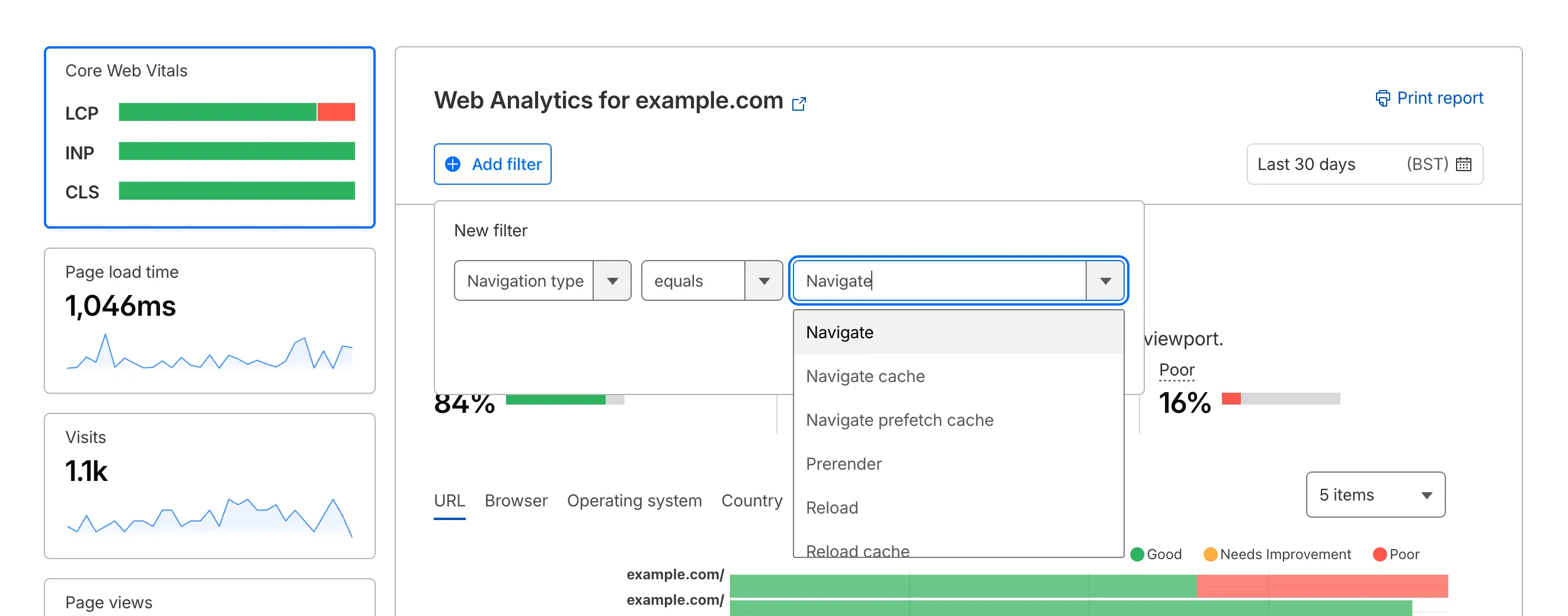
You can now find the Navigation Type dimension in the Web Analytics dashboard. You can filter to include/exclude one or more specific types using "equals", "does not equal", "in", or "not in" matchers.
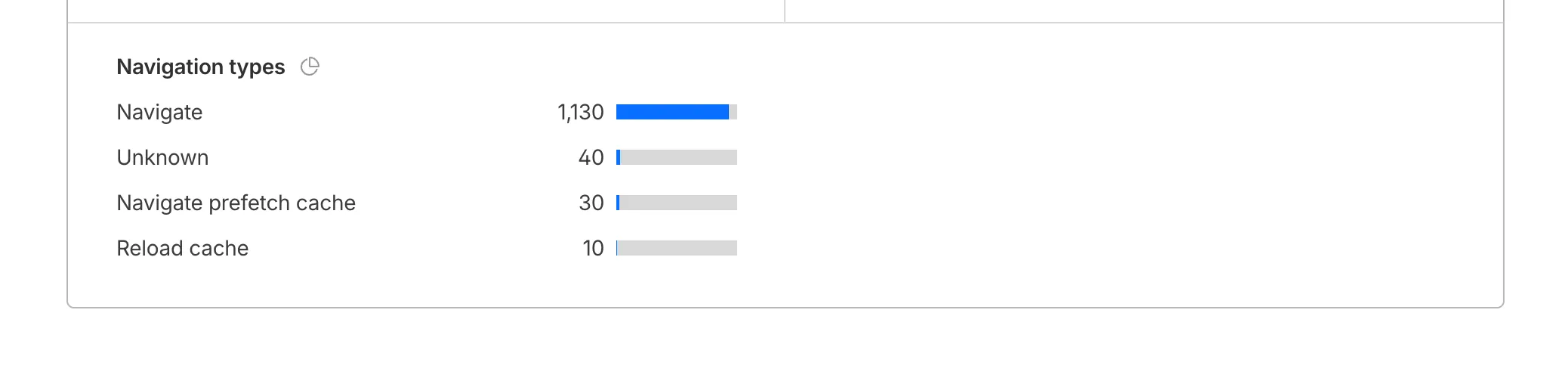
To check the list of popular navigation types, select Page views on the Web Analytics sidebar and scroll down to the bottom:
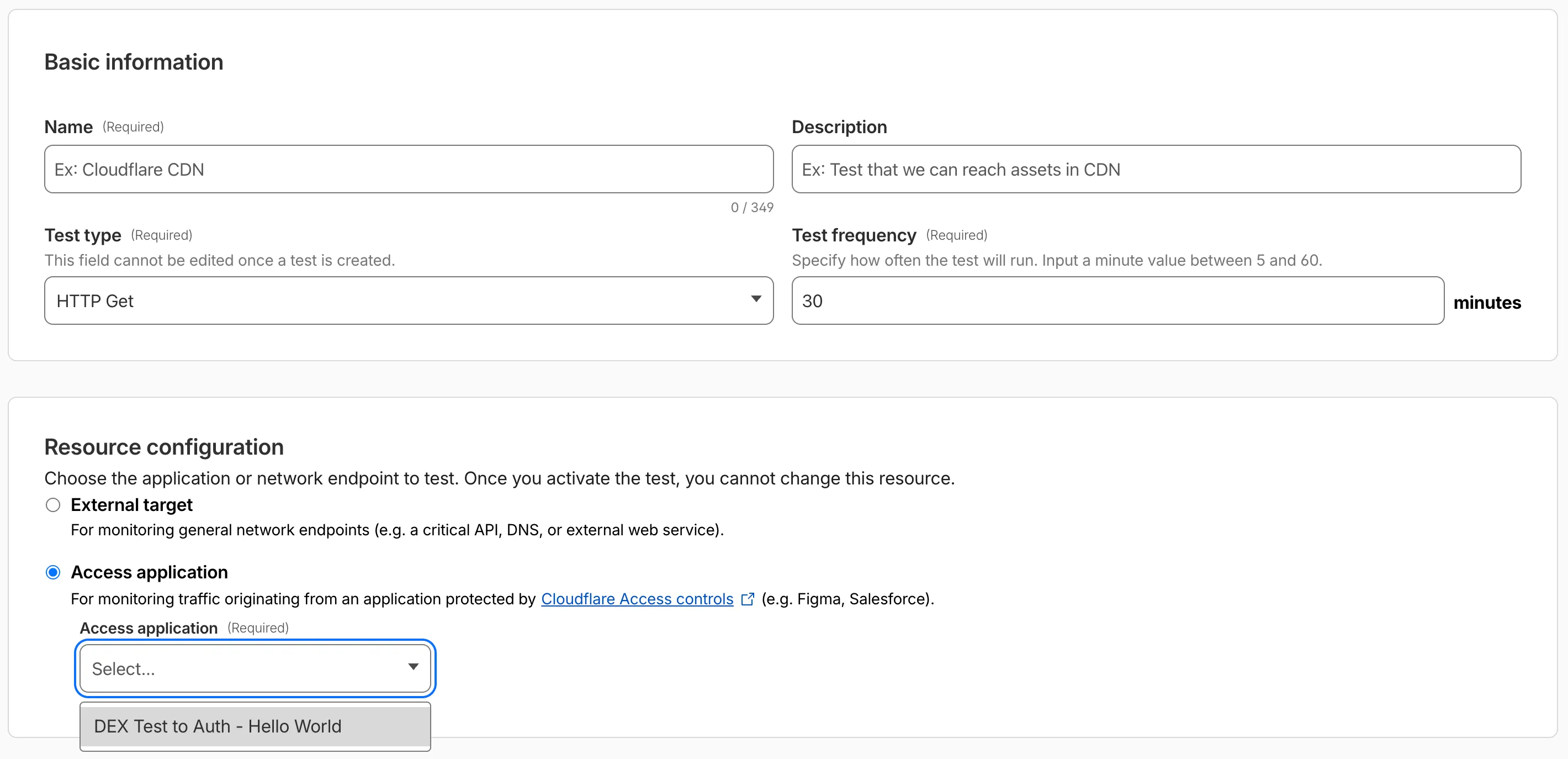
Digital experience tests now support testing applications protected by Cloudflare Access or third-party authentication. All authentication secrets are managed via Cloudflare Secret Store.
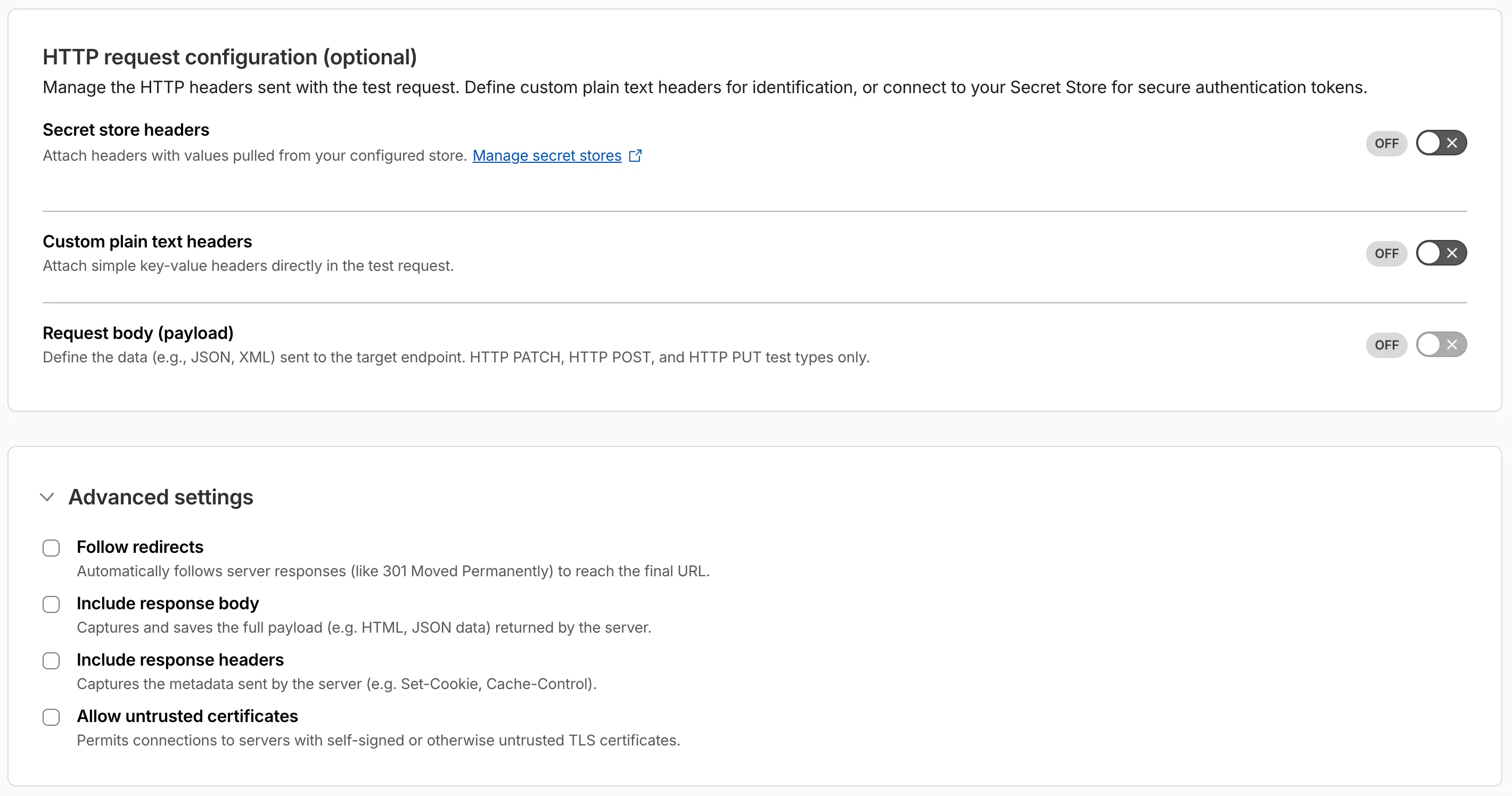
Digital experience tests also have enhanced configuration options including:
- New HTTP methods (DELETE, PATCH, POST, PUT)
- Secret Store headers, custom plain text headers, and custom request bodies
- Advanced settings: follow redirects, response bodies, response headers, and allow untrusted certificates
You can now pay for Cloudflare services directly from your bank account using Instant Bank Payments via Link.
Link ↗ now supports bank account payments in addition to cards. If you have a bank account saved in Link, it appears as a payment option at checkout. If not, you can connect one during the checkout flow.
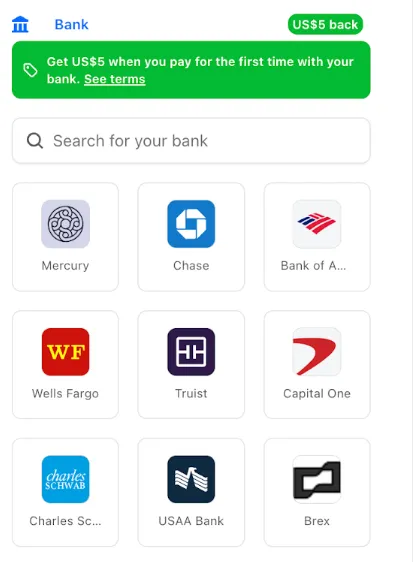
- During checkout, select your bank account from your saved Link payment methods.
- Confirm the payment.
After your first Link authentication, your bank account is available for future purchases without re-entering details.
Instant Bank Payments via Link is available to US-based self-serve accounts across all Cloudflare products. Your existing cards remain available at checkout.
Bank-based Link payments appear in your billing history with the payment method shown as
linkand last four digits as0000. For details, refer to the Instant Bank Payments via Link documentation.
The Gateway Authorization Proxy and hosted PAC files are now generally available for all plan types.
Authorization proxy endpoints add an identity-aware option alongside the existing source IP proxy endpoints, using Cloudflare Access authentication to verify who a user is before applying Gateway filtering — without installing the Cloudflare One Client. Cloudflare-hosted PAC files let you create and distribute PAC files directly from Cloudflare One on Cloudflare's global network.
These features are ideal for environments where deploying a device client is not an option, such as virtual desktops (VDI) or compliance-restricted endpoints.
To get started, refer to the proxy endpoints documentation.
You can now connect Hyperdrive to a private database through a Workers VPC service. This is the recommended way to connect Hyperdrive to a private database that is not exposed to the public Internet.
When creating a Hyperdrive configuration in the Cloudflare dashboard, choose Connect to private database and then Workers VPC. From there, you can select an existing VPC service or create a new one inline by picking a Cloudflare Tunnel and entering your origin host and TCP port.
You can also create a Hyperdrive configuration backed by a Workers VPC service from the command line:
Terminal window npx wrangler hyperdrive create my-vpc-database \--service-id <YOUR_VPC_SERVICE_ID> \--database <DATABASE_NAME> \--user <DATABASE_USER> \--password <DATABASE_PASSWORD> \--scheme postgresqlWorkers VPC services are reusable across Hyperdrive configurations and can also be bound directly to Workers, so you can share the same private connection across multiple products.
To get started, refer to Connect Hyperdrive to a private database using Workers VPC.
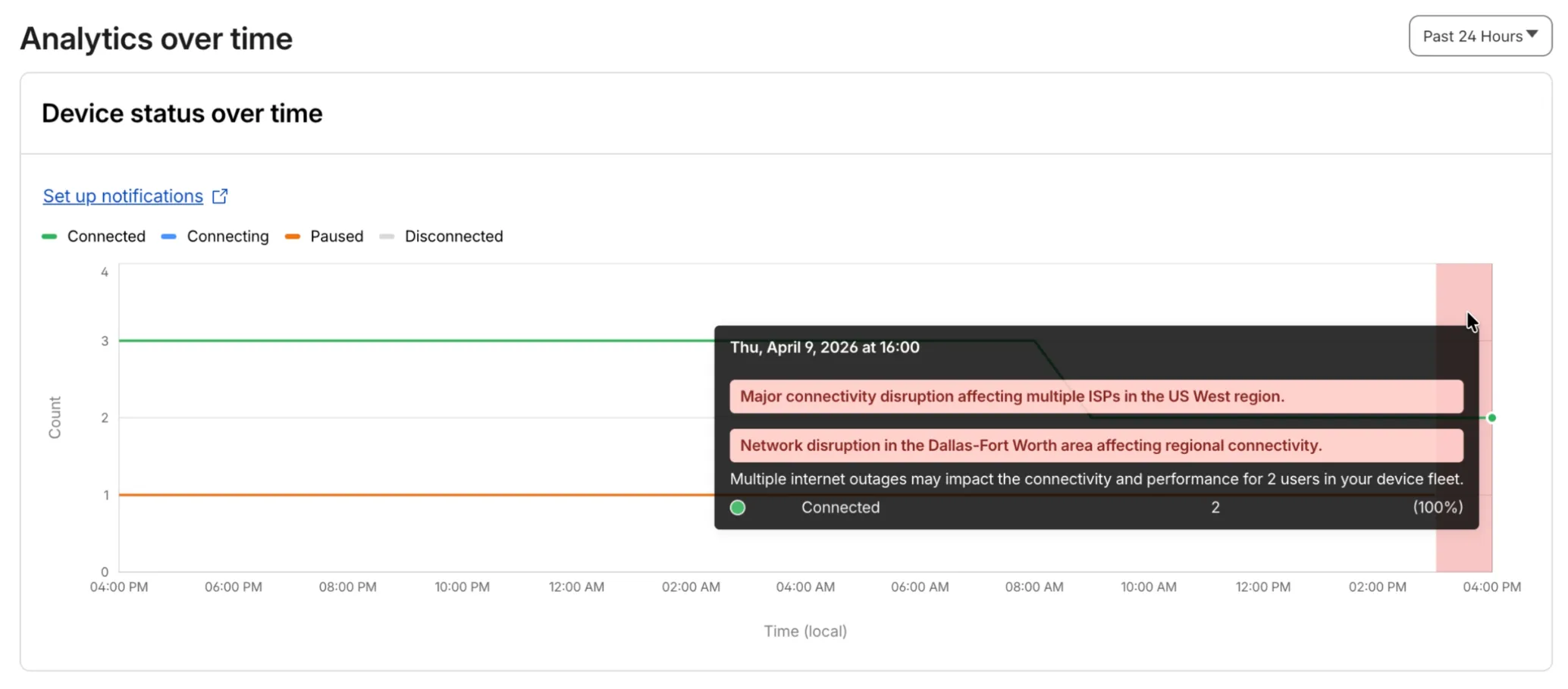
Digital Experience will display a dashboard notification when an Internet outage or traffic anomaly may impact a Cloudflare One Client device based on its geographic location or network connection.
This Internet outage and traffic anomaly data is pulled from Cloudflare Radar ↗. All Internet outage and traffic anomaly observations can be viewed in the Radar Outage Center ↗.

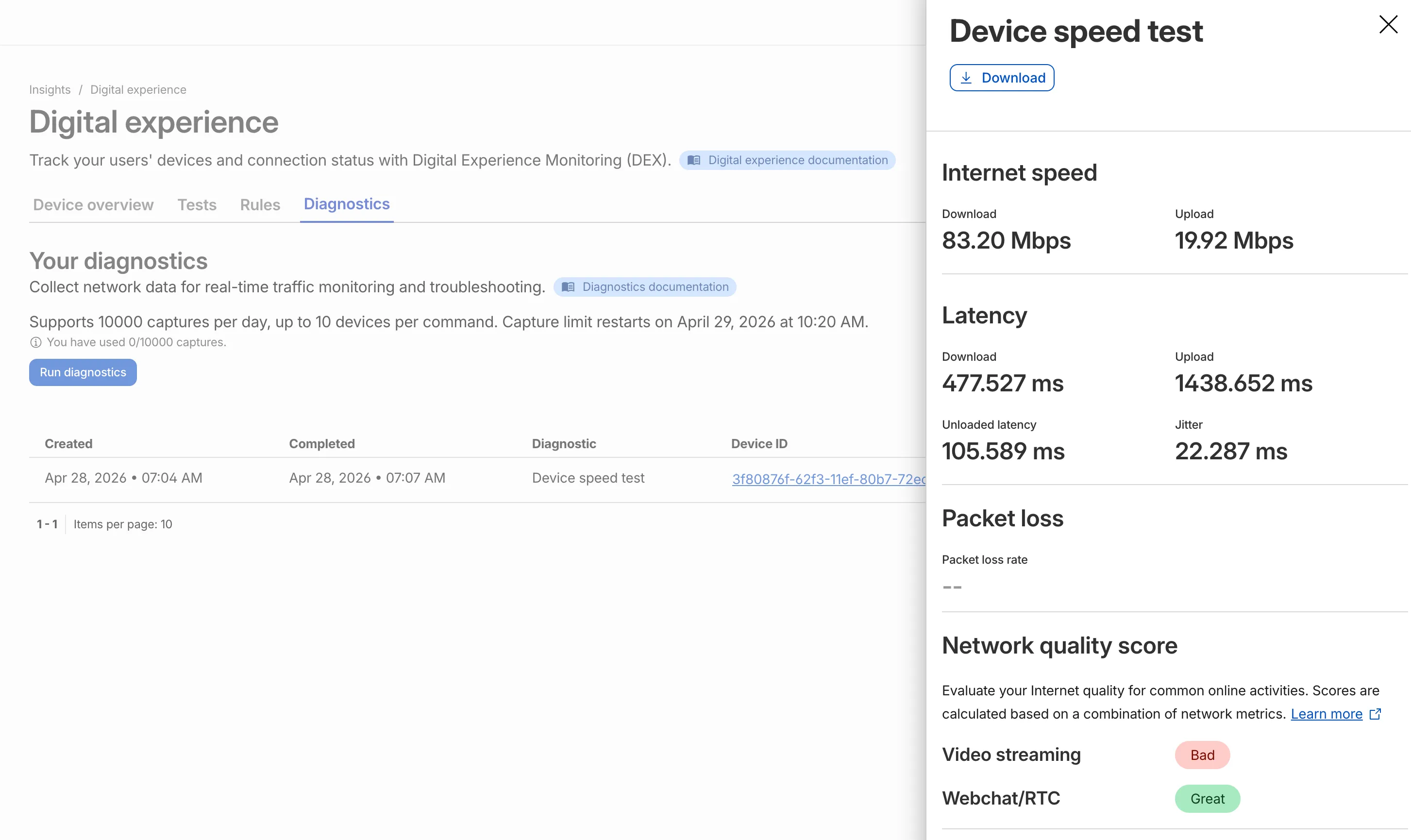
IT teams can now remotely run speed tests from the Cloudflare One Client to Cloudflare's network edge.
Each speed test includes the following metrics:
- Internet speed: download and upload throughput
- Latency: download, upload, unloaded latency, and jitter
- Network quality score: video streaming, webchat/real-time communication (RTC)
In the Cloudflare dashboard ↗, go to Zero Trust > Insights > Digital experience > Diagnostics and select Run diagnostics to use the feature today.
You can now create, view, and manage DLP detection entries outside of profiles.
Detection entries are no longer hidden inside individual profiles. Administrators can manage detection entries directly from the Detection entries section and use them in custom DLP profiles.
For more information, refer to Configure detection entries.
Cloudflare DLP now includes a new predefined profile designed to detect PII records that contain multiple types of personal data: Personally Identifiable Information (PII) Record.
Most predefined and custom DLP profiles match when any enabled detection entry matches. The Personally Identifiable Information (PII) Record profile is different. It only matches when at least three unique detection entries are found in close proximity, which reduces false positives from standalone values that may not represent a real PII record.
Detection entries included in the profile:
- AU Passport Number
- American Express Card Number
- Diners Club Card Number
- US Driver's License Number
- Email Address
- Full Name
- US Mailing Address
- Mastercard Card Number
- US Individual Tax Identification Number (ITIN)
- US Passport Number
- US Phone Number
- Union Pay Card Number
- United States SSN Numeric Detection
- Visa Card Number
For more information, refer to predefined DLP profiles.
You can now disable Cloudflare's reverse proxy across all zones in your account simultaneously using the new
enforce_dns_onlysetting. When enabled, Cloudflare responds to DNS queries for all proxied records with your origin IP addresses instead of Cloudflare's anycast IPs. This account-level kill switch is designed for incident response scenarios where you need to quickly route traffic directly to your origin servers.- Account-level — Affects all zones in the account simultaneously with a single API call.
- Non-destructive — Does not modify your DNS records. Disabling the setting restores normal proxy behavior.
- API-only — Available through the API only, not in the Cloudflare dashboard.
Included: Standard proxied A, AAAA, and CNAME records, Load Balancing records, and records matching Worker routes.
Excluded: Spectrum applications, Cloudflare Tunnel CNAMEs, R2 custom domains, Web3 gateways, and Workers custom domains continue to operate normally.
- Verify your origin servers can handle direct traffic without Cloudflare's caching and filtering.
- Review which origin IPs will become publicly visible through DNS queries.
- Test the API in a staging account before relying on it for incident response.
Available via API to all Cloudflare customers.
For information on how to use it, refer to Enforce DNS-only developer documentation .
Queues, Cloudflare's managed message queue, now exposes realtime backlog metrics via the dashboard, REST API, and JavaScript API. Three new fields are available:
backlog_count— the number of unacknowledged messages in the queuebacklog_bytes— the total size of those messages in bytesoldest_message_timestamp_ms— the timestamp of the oldest unacknowledged message
The following endpoints also now include a
metadata.metricsobject on the result field after successful message consumption:/accounts/{account_id}/queues/{queue_id}/messages/pull/accounts/{account_id}/queues/{queue_id}/messages/accounts/{account_id}/queues/{queue_id}/messages/batch
Call
env.QUEUE.metrics()to get realtime backlog metrics:TypeScript const {backlogCount, // numberbacklogBytes, // numberoldestMessageTimestamp, // Date | undefined} = await env.QUEUE.metrics();env.QUEUE.send()andenv.QUEUE.sendBatch()also now return a metrics object on the response.You can also query these fields via the GraphQL Analytics API or view realtime backlog on the dashboard ↗.
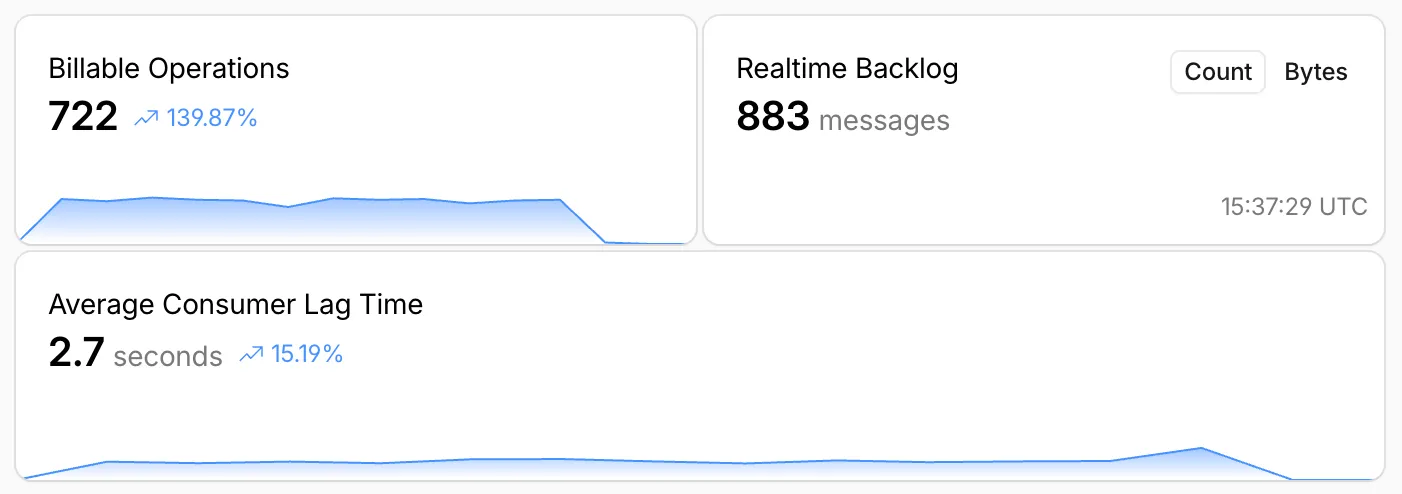
For more information, refer to Queues metrics.
-
The Support button in the dashboard global navigation header now takes you directly to the Cloudflare Support Portal ↗, eliminating the previous dropdown menu.
This change ensures that when you need help, you spend less time navigating the UI and more time getting the answers you need.
- Previous behavior: Selecting ? Support opened a dropdown menu with various links (Help Center, Cloudflare Community, etc.).
- New behavior: Selecting Support immediately redirects your current tab to the Support Portal.
To learn more about the resources available to you, refer to the Cloudflare Support documentation ↗.
Cache Response Rules now work with Version Management. You can version response-phase cache settings and promote them through environments, just like Cache Rules and other supported configurations.
Previously, Cache Response Rules were excluded from zone versioning. Any response-phase rule you created applied globally across all environments with no way to test changes in staging first. Cache Rules already supported versioning, but the response phase, where you modify
Cache-Controldirectives, manage cache tags, and strip headers, did not.Cache Response Rules are now fully integrated with Version Management. You can create or modify response-phase rules within a version, and those changes stay scoped to that version until promoted.
- Safe rollout of cache behavior changes: Test response-phase rules in a staging environment before promoting to production. Catch unintended caching side effects early.
- Parity with Cache Rules: Cache Response Rules now follow the same versioning workflow as Cache Rules, so you can manage all cache configuration through a single promotion pipeline.
- Independent environment control: Run different response-phase cache settings per environment. For example, strip
Set-Cookieheaders in staging to validate cacheability without affecting production traffic.
Configure Cache Response Rules in the Cloudflare dashboard ↗ under Caching > Cache Rules, or via the Rulesets API. For more details, refer to the Cache Response Rules documentation and the Version Management documentation.
Cloudflare-generated 5xx error responses now return structured JSON and Markdown when agents request them, matching the format already available for 1xxx errors. Responses follow RFC 9457 (Problem Details for HTTP APIs) ↗ and include a
Retry-AfterHTTP header on retryable codes.5xx coverage. Ten Cloudflare-generated error codes (500, 502, 504, 520-526) now serve structured responses. These are errors Cloudflare itself generates when it cannot reach or understand the origin server. Origin-generated 5xx responses that Cloudflare passes through are not affected.
Fault attribution. The
error_categoryfield tells agents where the fault lies:origin(502, 504, 520-524) — the origin server is responsible. Transient; retry with the backoff inretry_after.cloudflare(500) — Cloudflare's fault, not the website or the request. Short retry.ssl(525, 526) — the origin's TLS configuration is broken. Do not retry.
Retry-After header. Retryable codes (500, 502, 504, 520-524) include a
Retry-AfterHTTP header matching theretry_afterbody field. Non-retryable codes (525, 526) do not include the header.Request header sent Response format Accept: application/jsonJSON ( application/jsoncontent type)Accept: application/problem+jsonJSON ( application/problem+jsoncontent type)Accept: application/json, text/markdown;q=0.9JSON Accept: text/markdownMarkdown Accept: text/markdown, application/jsonMarkdown (equal q, first-listed wins)Accept: */*HTML (default) Available now for all zones on all plans.
Get JSON response for error 522:
Terminal window curl -s --compressed -H "Accept: application/json" -A "TestAgent/1.0" -H "Accept-Encoding: gzip, deflate" "<YOUR_DOMAIN>/cdn-cgi/error/522" | jq .Check presence of the
Retry-AfterHTTP header associated with the JSON response for error 521:Terminal window curl -s --compressed -D - -o /dev/null -H "Accept: application/json" -A "TestAgent/1.0" -H "Accept-Encoding: gzip, deflate" "<YOUR_DOMAIN>/cdn-cgi/error/521" | grep -i retry-afterReferences:
Resource Tagging is now in public beta and rolling out to all Cloudflare accounts over the coming days. You can attach custom key-value metadata to your Cloudflare resources and query across your entire account to find what you need.
- Broad resource type support — Tag zones, custom hostnames, Cloudflare Tunnels, Workers, D1 databases, R2 buckets, KV namespaces, Durable Object namespaces, Queues, Stream videos, Images, Access applications, Gateway rules, AI Gateways, and more. Refer to the full list of supported resource types.
- Powerful filtering — Query tagged resources using AND/OR logic, negation, and key-only matching. Combine up to 20 filters per query to build precise resource views.
- Account and zone-level endpoints — Full CRUD operations across both scopes.
- Token-based authentication — Tagging supports Account Owned Tokens that persist independently of individual users, so your automation keeps running through credential rotations and team changes.
- Flexible role support — Super Administrators, Workers Admins, and Tag Admins can all manage tags.
The API is the primary interface for Resource Tagging and the recommended path for all workflows — scripting tag assignments, building CI/CD pipelines, or integrating with your infrastructure-as-code toolchain.
You can also view and manage tagged resources directly in the Cloudflare dashboard. Navigate to Manage Account > Resource Tagging to see all tagged resources across your account, filter by resource name or tag, and add or edit tags inline.
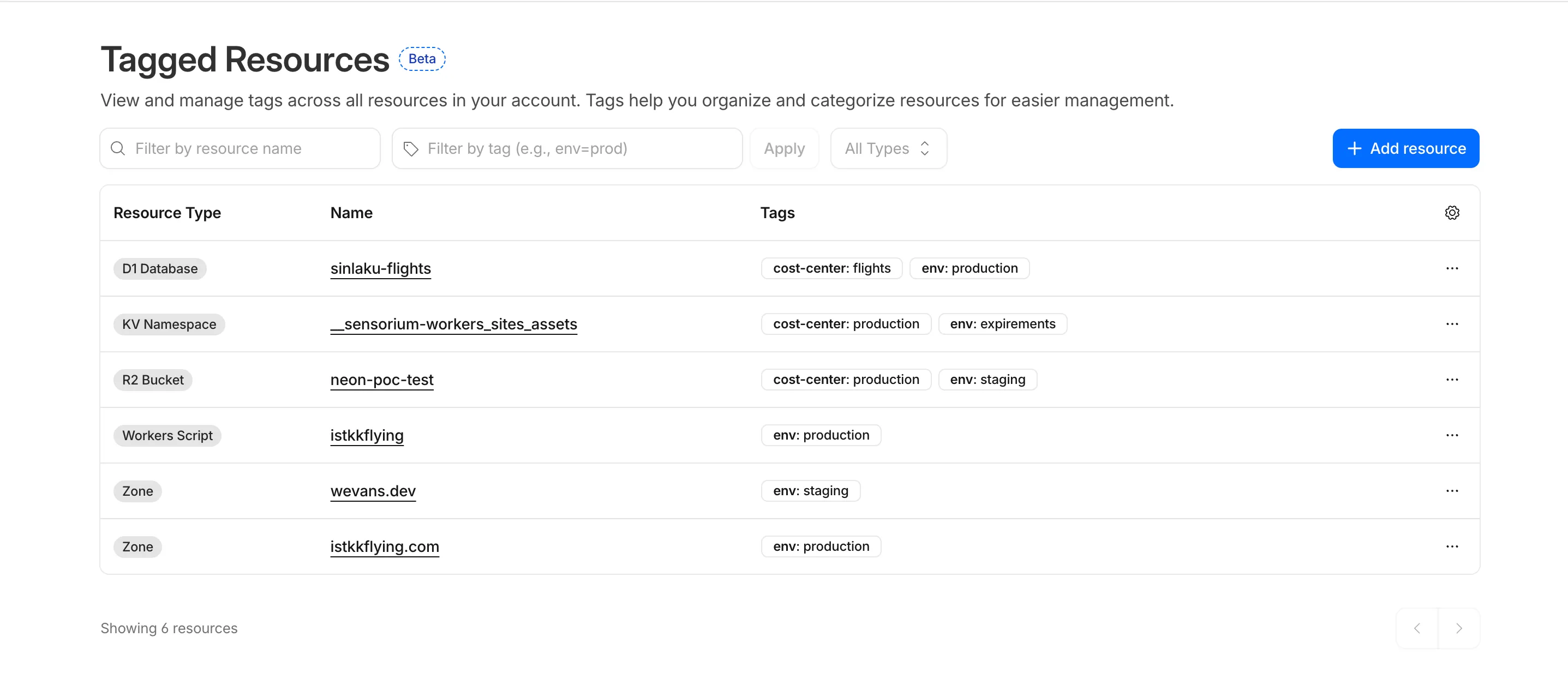
In future releases, expect support for additional resource types across the Cloudflare platform, tag-based access control policies for scoping user permissions to tagged resources, billing and usage attribution by tag for breaking down costs by team, project, or environment, and Terraform provider support for managing tags declaratively.
PUTreplaces all tags on a resource (no partial update). Use the GET, merge, PUT workflow to modify individual tags safely.DELETEremoves all tags from a resource. To remove a single tag, PUT the remaining tags back.- Querying tags for a resource that has never been tagged returns
500instead of404. This is a known beta limitation.
To get started, refer to the Resource Tagging documentation.
We have introduced a unified investigation workspace within Brand Protection to help analysts manage complex brand portfolios. Instead of jumping between individual queries, you can now consolidate your workflow into a single, cohesive view.
- You can now elect multiple saved queries from your dashboard to generate a consolidated "Combined Matches" view. This allows you to triage results from different brand queries in one unified table
- You can open query extended views in distinct tabs within the Brand Protection dashboard. This enables you to maintain multiple investigation contexts simultaneously and switch between them without losing your place.
- You can reset your workspace using the new "Clear Selection" action, making it easier to pivot between different investigation sets.
- Eliminate fragmented workflows by viewing all matches across different query buckets in a single table, reducing the need to click through dozens of individual query pages
- Correlate related campaigns by seeing similar domains or infrastructure patterns that appear across multiple saved queries
Learn more in our Brand Protection documentation.