
Enterprise AI agent workspace
An enterprise AI agent workspace gives employees a persistent environment for completing work with AI. It pairs that workspace with a curated library of organizational context and skills, so people do their best work using an organization's own knowledge and proven playbooks. Each workspace holds its own conversation state, files, enterprise tools, and isolated execution.
Employees use a workspace to produce documents, presentations, spreadsheets, research, workflows, source code, and apps. These outputs outlive the conversation. An employee can review, share, export, or keep improving them with AI.
The architecture uses Cloudflare Workers and the Agents SDK for orchestration, Durable Objects for state, AI Gateway for model governance, and MCP server portals for enterprise tools. Dynamic Workers, Sandbox SDK containers, and Browser Run handle work that needs more than model inference.
Unlike an enterprise vibe coding platform, the result is not always a deployed application. Source code and apps are two output types among documents, data, analysis, and repeatable workflows.
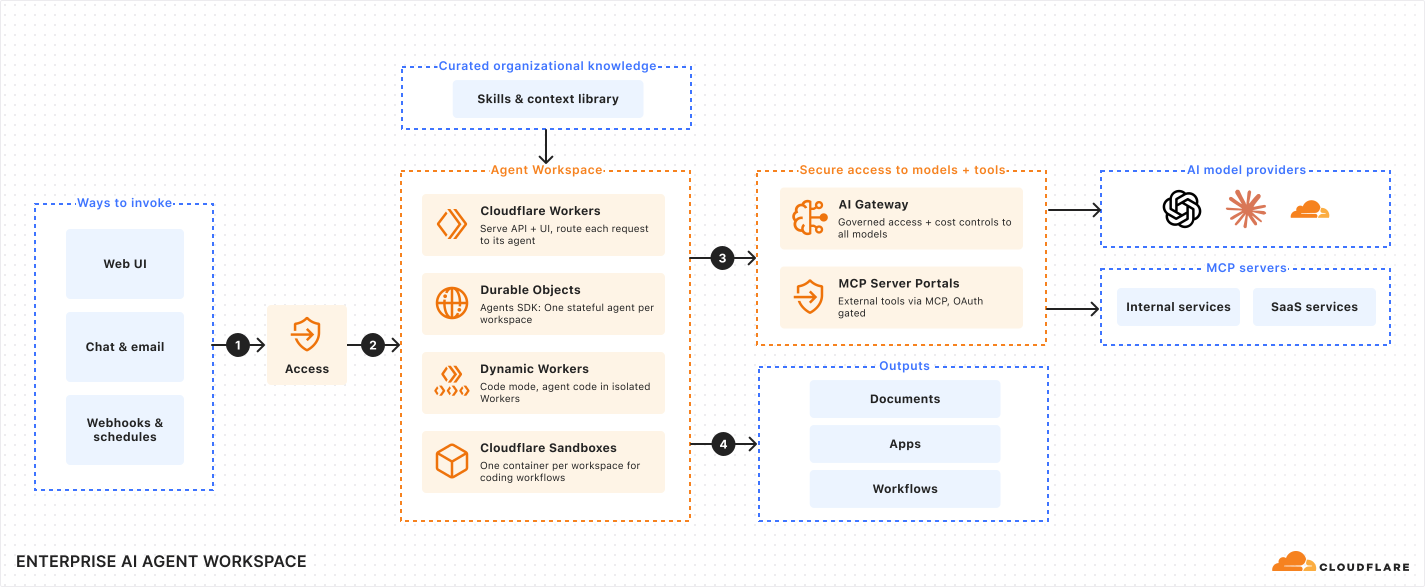
- Invoke work: An employee starts or resumes work from the web application, enterprise chat, or email. Webhooks and schedules can also start work without an open browser session. Cloudflare Access authenticates browser sessions, and each asynchronous channel validates its signature, token, or sender before a request is accepted.
- Reach the agent workspace: Workers route the request to the workspace agent. The agent restores conversation history, tasks, files, permissions, and queued events from durable state, draws on curated organization knowledge, then runs bounded code in Dynamic Workers or a Sandbox container when a task needs more than model inference.
- Use governed models and tools: The agent calls approved models through AI Gateway and approved enterprise tools through an MCP server portal. Both layers keep provider routing, credentials, policy, and logging outside the workspace.
- Save an output: The workspace saves the result as a durable work product that the employee can review, continue with AI, share, or export.
The web application is the primary surface, but it is not the agent runtime. Every channel sends events to the same stateful workspace, so an employee can start work in chat, review it in the web application, and continue later against one agent history.
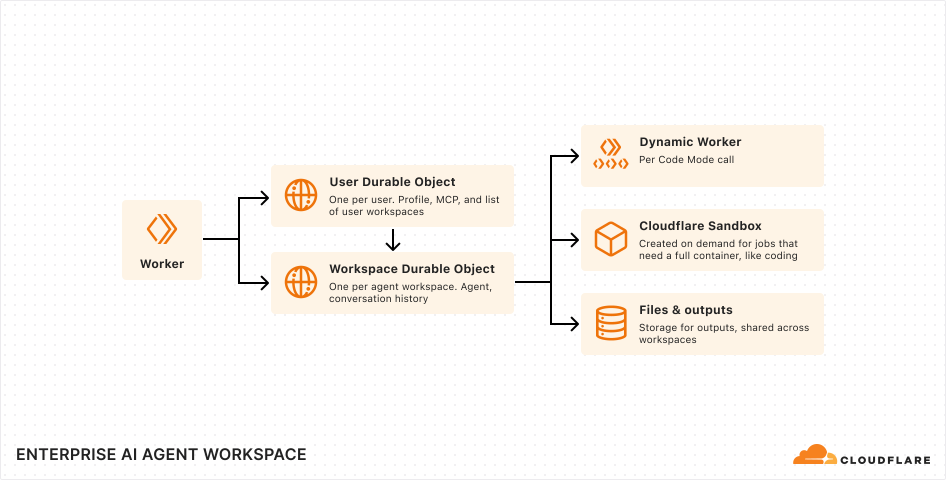
Workers stay stateless. They serve the interface and route each request to the right Durable Object using the identity and workspace in the request.
Each workspace maps to one Durable Object running the Agents SDK. This object is the durable authority for the workspace. It owns the conversation, tasks, schedules, consent decisions, and event queue, and it coordinates model calls, tools, files, and execution. Work continues after the browser disconnects or a Worker isolate restarts, and workspaces scale independently instead of sharing one agent process.
A separate per-user Durable Object stores profile settings, the workspace registry, integrations, and grants. One user owns many independently stateful workspaces.
The workspace coordinates resources but does not store everything. The workspace picks an execution environment per task: Dynamic Workers for bounded Code Mode, Sandbox SDK containers for a full shell and build environment, and Browser Run for isolated browser sessions. Large files and reusable outputs live in a versioned file service, and sharing grants are kept separate from the output bytes so access can be granted or revoked without moving the file. Sandbox backups and shared organizational context use R2. Usage and lifecycle events use Workers Analytics Engine or an external system.
| Scope | Cloudflare primitive | Responsibility | Lifetime |
|---|---|---|---|
| Application | Workers | UI, APIs, authentication, routing, and channel ingress | Stateless request handling |
| User | Durable Object | Profile, workspace registry, integrations, grants, and activity | Durable |
| Workspace | Agents SDK and Durable Object | Agent state, event queue, and turn orchestration | Durable |
| Code Mode execution | Dynamic Worker | Bounded code and tool composition | Ephemeral |
| Active development environment | Sandbox SDK container | Shell, builds, previews, and coding sessions | Created on demand |
| Browser session | Browser Run | Web navigation, interaction, screenshots, and PDF rendering | Session scoped |
| User files | Versioned file service | Files, saved outputs, and revisions | Durable |
| Skills and context library | Read-only object store (R2) | Curated skills, reference context, and commands | Published centrally |
| Backup | R2 | Sandbox backups | Durable |
All model requests go through AI Gateway. The agent uses models from different providers without moving provider-specific logic into each workspace. AI Gateway applies routing, tracks usage and cost, and stores request logs.
Enterprise tools connect through an MCP server portal. The portal exposes one endpoint, applies Access policies, curates the available tools, routes per-user credentials, and logs tool activity. Administrators build portals per team so an agent receives the tools for its work instead of every tool in the organization.
A workspace draws on a curated, read-only library that is published centrally and shared across every workspace. The library holds skills, which are reusable task playbooks the agent loads on demand, and context, which is the reference material an organization wants agents to use.
Skills layer by source, from platform-provided to organization-shared to workspace-local, so a team can extend or override the defaults. The agent lists skills, loads one when a task matches, and unloads it afterward. This keeps guidance out of the model context until it is needed.
Publish the library through a versioned, read-only store so changes to skills and context stay auditable and reviewable. The library is read-only to the agent and governed centrally.
Treat model output, tool output, and generated code as untrusted. Apply controls at the platform boundary, not in generated code.
- Identity: Use Access for browser sessions and MCP portal connections. Verify asynchronous channels before routing their events to a workspace.
- Authorization: Check user ownership before resolving a workspace, opening a terminal, reading an output, or serving a preview.
- Tool access: Use MCP server portal policies, tool allowlists, OAuth, grants, and consent for sensitive operations.
- Code isolation: Run bounded code in Dynamic Workers and full development workloads in Sandbox SDK containers.
- Credential isolation: Keep model and tool credentials in platform services. Never expose them to generated code or model context.
- Curated inputs: Publish skills and context to a read-only, versioned store. A workspace cannot mutate the shared library.
- Auditability: Record model usage, tool calls, consent decisions, output sharing, and execution lifecycle events.